Page 273 of 651
AIR CONDITIONING
252If the engine coolant temperature becomes extremely high, the
air conditioning may shut off automatically to resolve
emergency situation for engine cooling. This is not a
malfunction. When the engine coolant
temperature is lowered,
the air conditioning comes on automatically.
(b) Windshield defogging and defrosting
To remove interior fog on the windshield —
Push the windshield air flow button.
To remove frost or exterior fog on the windshield —
1. Push the “TEMP” button to set the maximum temperature.
2. Push the windshield air flow button.
3. Push the fan speed control button on the right side to obtain
a maximum air flow.
4. Leave the “A/C” button off.
When the windshield air flow button is pushed, air flows mainly
from the windshield vents and turns on the defogging function
with the purpose of clearing the front view.
Pushing this button once again returns the air flow mode to the
last one used.
Page 274 of 651

AIR CONDITIONING
253
This button allows the air intake to select the OUTSIDE AIR
mode automatically. This is to clean up the front view more
quickly. If you want to return the setting to the
RECIRCULATED
AIR mode, push the air intake control button
once again.
Push the “A/C” button for dehumidified heating or cooling. This
setting clears the front view more quickly.
CAUTION
Do not use the windshield air flow button during cooled
air operation in extremely humid weather. The
difference between the temperature of the outside air
and that of the windshield could cause the outer surface
of the windshield to fog up blocking your vision.
(c) Operating tips
� To cool off your Lexus after it has been parked in the hot sun,
drive with the windows open for a few minutes. After the
excess heat has blown away, close the windows. This vents
the hot air, allowing the air conditioning to cool the interior
more quickly.
� Make sure the air intake grilles in front of the windshield are
not blocked (by leaves or snow, for example).
� If air flow control is not satisfactory, check the side vents and
rear vents. (See “(d) Side vents and rear vents”.)
� On humid days, do not blow cold air on the windshield. The
windshield could fog up because of the difference in air
temperature on the inside and outside of the windshield.
� Keep the area under the front seats clear to allow air to
circulate throughout the vehicle.
� On cold days, set the fan speed to high for a minute to help
clear the intake ducts of snow or moisture. This can reduce
the amount of fogging on the windows.
� When driving on dusty roads, close all windows. If dust
thrown up by the vehicle is still drawn into the vehicle after
closing the windows, it is recommended that the air intake
control button be set to the OUTSIDE AIR mode to take in
the fresh air and the fan speed selector to any setting except
OFF.
Page 275 of 651

AIR CONDITIONING
254�
If following another vehicle on a dusty road, or driving in
windy and dusty conditions, it is recommended that the air
intake be temporarily set to the RECIRCULATED AIR
mode, which will close off the outside passage and prevent
outside air and dust from entering the vehicle interior.
Heating
For best results, set controls to:
For automatic operation —
Push in the “AUTO” button.
Temperature — To the desired temperature
Air intake — OUTSIDE AIR
Air conditioning — OFF
For manual operation —Fan speed — To the desired fan speed
Temperature — Towards high temperature
Air intake — OUTSIDE AIR
Air flow — FLOOR
Air conditioning — OFF
� For quick heating, select RECIRCULATED AIR for a few
minutes. To keep the windows from fogging, select
OUTSIDE AIR after the vehicle interior has been warmed.
� Push the “A/C” button on for dehumidified heating.
� Choose floor/windshield air flow to heat the vehicle interior
while defrosting or defogging the windshield. Air conditioning
For best results, set controls to:
For automatic operation —
Push in the “AUTO” button.
Temperature — To the desired temperature
Air intake — OUTSIDE AIR
Air conditioning — ON
For manual operation —Fan speed — To the desired fan speed
Temperature — Towards low temperature
Air intake — OUTSIDE AIR
Air flow — PANEL
Air conditioning — ON
� For quick cooling, select RECIRCULATED AIR for a few
minutes.
Page 288 of 651
AUDIO
267
Adjusting the sound balance and selecting the listening seat
position is also important for good an audio sound.
Keep in mind that if you are listening to a stereo recording or
broadcast, changing the sound balance or listening seat
position will increase the volume of one group of sounds while
decreasing the volume of another.
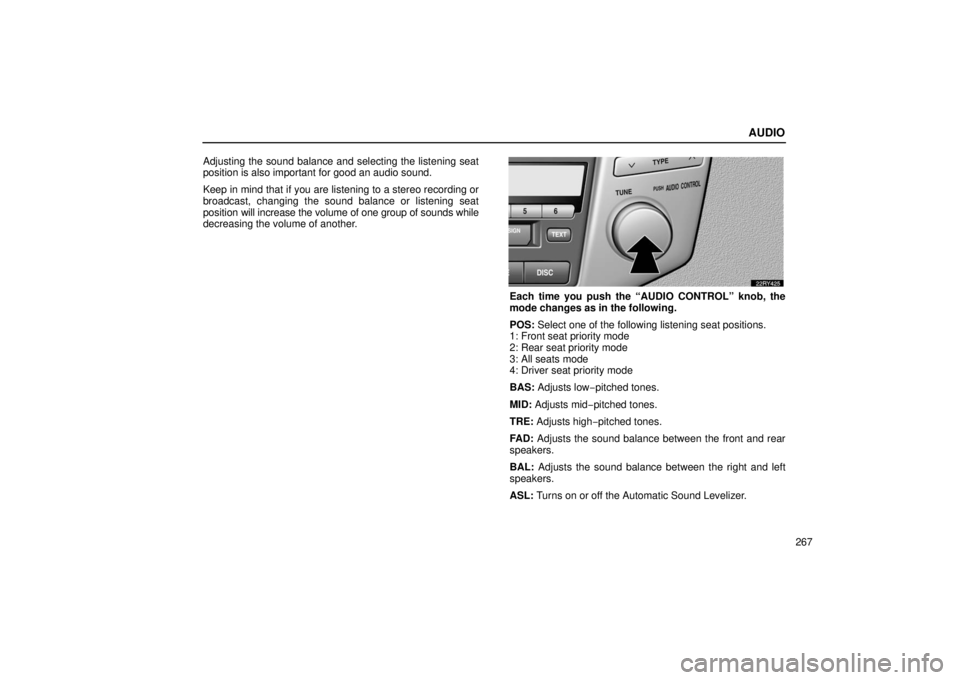
Each time you push the “AUDIO CONTROL” knob, the
mode changes as in the following.
POS:
Select one of the following listening seat positions.
1: Front seat priority mode
2: Rear seat priority mode
3: All seats mode
4: Driver seat priority mode
BAS: Adjusts low− pitched tones.
MID: Adjusts mid− pitched tones.
TRE: Adjusts high− pitched tones.
FAD: Adjusts the sound balance between the front and rear
speakers.
BAL: Adjusts the sound balance between the right and left
speakers.
ASL: Turns on or off the Automatic Sound Levelizer.
Page 289 of 651

AUDIO
268Automatic Sound Levelizer (ASL):
When the audio sound
becomes dif ficult to be heard due to road noise, wind noise, etc.
during driving, the system adjusts to the optimum volume and
tone quality according to the noise level. While the Automatic
Sound Levelizer is on, “ASL” appears on the display.
Push the “AUDIO CONTROL” knob until the desired mode.
Turn the knob to suit your preference.
(c) Your radio antennas
Detachable antenna: To remove a detachable antenna,
carefully turn it counterclockwise.
NOTICE
To prevent damage to the antenna, make sure it is
removed before driving your vehicle through an
automatic car wash.
Wire antenna: The wire antenna is mounted inside the back
door window.
NOTICE
� When cleaning the inside of the back door window, be
careful not to scratch or damage the wire antennas or
connectors.
� Putting a window tint (especially, conductive or
metallic type) on the back door window may af fect the
reception of radio or mobile telephone. For the
installation of the window tint, consult with your
Lexus dealer.
(d) Your cassette player
When you insert a cassette, the exposed tape should face to
the right.
NOTICE
Never try to disassemble or oil any part of the cassette
player. Do not insert anything other than cassette tapes
into the slot.
Page 294 of 651
AUDIO
273
TRAF (Traffic) function: A station that regularly
broadcasts traffic information is automatically located.
When you push the “TRAF” button, “TRAF SEEK” appear on
the display and the radio will start seeking any traffic program
station.
If no traf
fic program station is found, “NO TRAF INFO” appears
on the display for a few seconds and the display returns to the
previous mode. Radio text message:
If the radio receives a radio text from RDS station, “MSG”
appears on the display. Push the “TEXT” button, and a text
message is displayed.
If the entire the message is not displayed, “
�” will appear on
the display. To display the rest of the message, push and hold
the “TEXT” button until you hear a beep.
After the entire message has b een displayed, the message will
disappear.
In case a text message is not accepted on the display, you can
push the “TEXT” button and hold it to display the rest of the
message.
Page 296 of 651

AUDIO
275
If a cassette is already in the slot, push the “TAPE” button.
Dolby\b Noise Reduction* feature: If you are listening to a
tape that was recorded with Dolby \b Noise Reduction*, push
the “
” button. The display will indicate that the Dolby noise
reduction system is on.
The Dolby NR mode reduces tape noise by about 10 dB. For
best sound reproduction, play your tapes with the Dolby NR on
or off according to the mode used for recording the tape.
To play a tape recorded without Dolby NR, push the button
again to turn off the Dolby NR.
* Dolby noise reduction manufactured under license from Dolby
Laboratories Licensing Corporation. “DOLBY” and the double −D
symbol
are trademarks of Dolby Laboratories Licensing
Corporation.
(b) Manual program selection
“Program” button: Push the “��” button to select the
other side of a cassette tape. The display indicates which side
is currently selected (“ ” indicates top side, “
” indicates
bottom side).
“Rewind” button: Push the “�� ” button to rewind a tape.
“REW” appears on the display.
To stop rewinding, push the same button or “TAPE” button.
“Fast forward” button: Push the “��” button to fast forward
a cassette tape. “FF” appears on the display.
To stop fast forwarding, push the same button or “TAPE”
button.
Page 307 of 651

AUDIO
286
In the “TAPE” or “CD” mode, the applicable functions are
shown in the lowest part of the display. Push the switch
just below to turn on each function.
(b) Adjusting audio sounds
How good an audio program sounds to you is largely
determined by the mix of the treble, mid−range, and bass
levels. In fact, different kinds of music and vocal programs
usually sound better with different mixes of treble, mid −range
and bass.
Adjusting the sound balance and selecting the listening seat
position is also important for good an audio sound.
Keep in mind that if you are listening to a stereo recording or
broadcast, changing the sound balance or listening seat
position will increase the volume of one group of sounds while
decreasing the volume of another.Each time you push the “AUDIO CONTROL” knob, the
mode changes as in the following.
POS: Select one of the following listening seat positions.
1: Front seats priority mode
2: Rear seat priority mode
3: All seats mode
4: Driver seat priority mode
BAS: Adjusts low− pitched tones.
MID: Adjusts mid− pitched tones.
TRE: Adjusts high− pitched tones.
FAD: Adjusts the sound balance between the front and rear
speakers.
BAL: Adjusts the sound balance between the right and left
speakers.
ASL: Turns on or off the Automatic Sound Levelizer.