Page 44 of 419
28
1-3. Adjustable components
■If the battery is disconnected
The computer’s memory will b
e erased and the memorized positions will have to be
set again.
CAUTION
■Caution of wrong operation
Take care during seat adjustment that the seat does not strike the rear passenger or
squeeze
your body against the steering wheel.
If this happens, you can stop the moveme nt b
y pressing another driving position
memory button.
NOTICE
■When using the smart or wireless keys to change your vehicle’s settings
Pushing the “LOCK” button for longer than 2-3 seconds will activate an alarm.
( P.12 )
Page 82 of 419
66
1-7. Safety information
CAUTION
■SRS airbag precautions
Observe the following precautions regarding the airbags. Failure to do so may
ca
use death or serious injury:
●The driver and all passengers in the vehicle must wear their seat belts properly.
The SRS airbags are supplemental devices to be used with seat belts.
●The SRS driver airbag deploys by a cons iderable force and can cause death or
serious injury especially, if the driver is very close to the airbag. The National
Highway Traffic Safety Administration (“NHTSA”) advises:
Since the risk zone for driver airbag is th e fi
rst 2 - 3 in. (50 - 75 mm) of inflation,
placing yourself 10 in. (250 mm) from your driver airbag provides you with a
clear margin of safety. This distance is measured from the center of the steering
wheel to your breastbone. If you sit less than 10 in. (250 mm) away now, you can
change your driving position in several ways:
• Move your seat to the rear as far as you can while still reaching the pedals
co
mfortably.
• Slightly recline the back of the seat. Alt
hough vehicle designs vary, many driv-
ers can achieve the 10 in. (250 mm) distance, even with the driver seat all the
w
ay forward, simply by reclining the back of the seat somewhat. If reclining
the back of your seat makes it hard to see the road, raise yourself by using a
firm, non-slippery cushion or raise the seat if your vehicle has that feature.
• If your steering wheel is adjustable, ti lt it do
wnward. This points the airbag
toward your chest instead of your head and neck.
Page 211 of 419
195
3-2. Using the audio system
3
Interior features
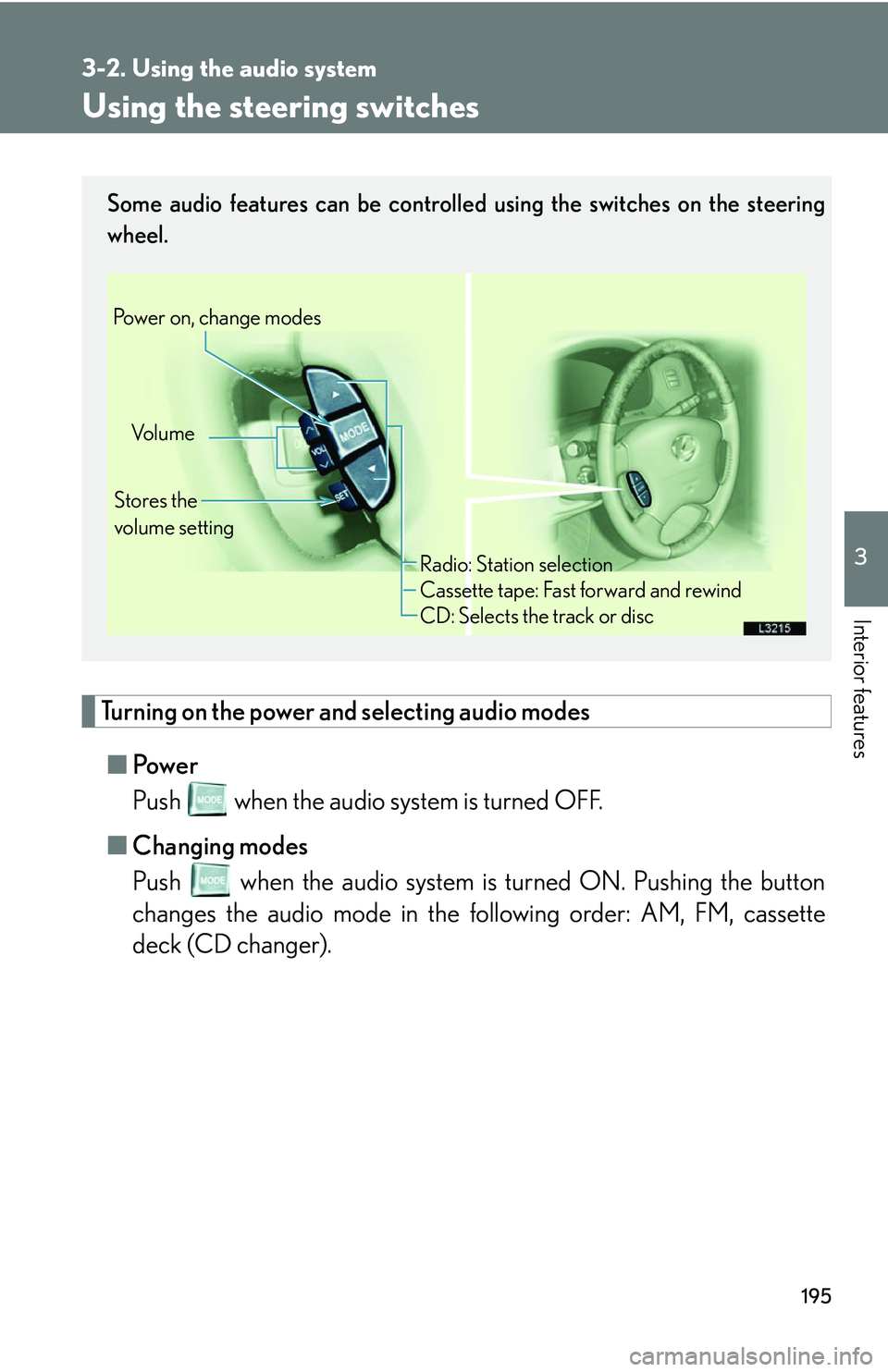
Using the steering switches
Turning on the power and selecting audio modes
■Pow e r
Push when the audio system is turned OFF.
■ Cha
nging modes
Push when the audio system is turned ON. Pushing the button
changes the audio mode in the following order: AM, FM, cassette
deck (CD changer).
Some audio features can be controlled using the switches on the steering
wheel.
Vo l u m e
Stores the
volume setting
Power on, change modes
Radio: Station selection
Cassette tape: Fast forward and rewind
CD: Selects the track or disc
Page 303 of 419

287
4-3. Do-it-yourself maintenance
4
Maintenance and care
Wheels
If your wheel is bent, cracked or heavily corroded, the wheel should be
replaced.
Otherwise, the tire may separate from t
he wheel or cause loss of handling
control.
■ Wheel selection
When replacing wheels, care should be tak
en to ensure that they are
equivalent to those removed in lo ad capacity, diameter, rim width,
and offset.
Replacement wheels are available at your Lexus dealer.
Lexus does not recommend using:
• A wheel of a different size or type;
• Used wheels; or
• Bent wheels that have been straightened.
■ Aluminum wheel precautions
●Use only Lexus wheel nuts and a wrench designed for your alumi-
num wheels if you have rotated, repaired or changed your tires.
●Check that the wheel nuts are st ill tight after driving 1000 miles
(1600 km).
●Be careful not to damage the aluminum wheels when using tire
chains.
●Use only Lexus balance weights or equivalent and a plastic or rub-
ber hammer when balancing your wheels.
Page 403 of 419
387
6-2. Owner’s customize
6
Vehicle specifications
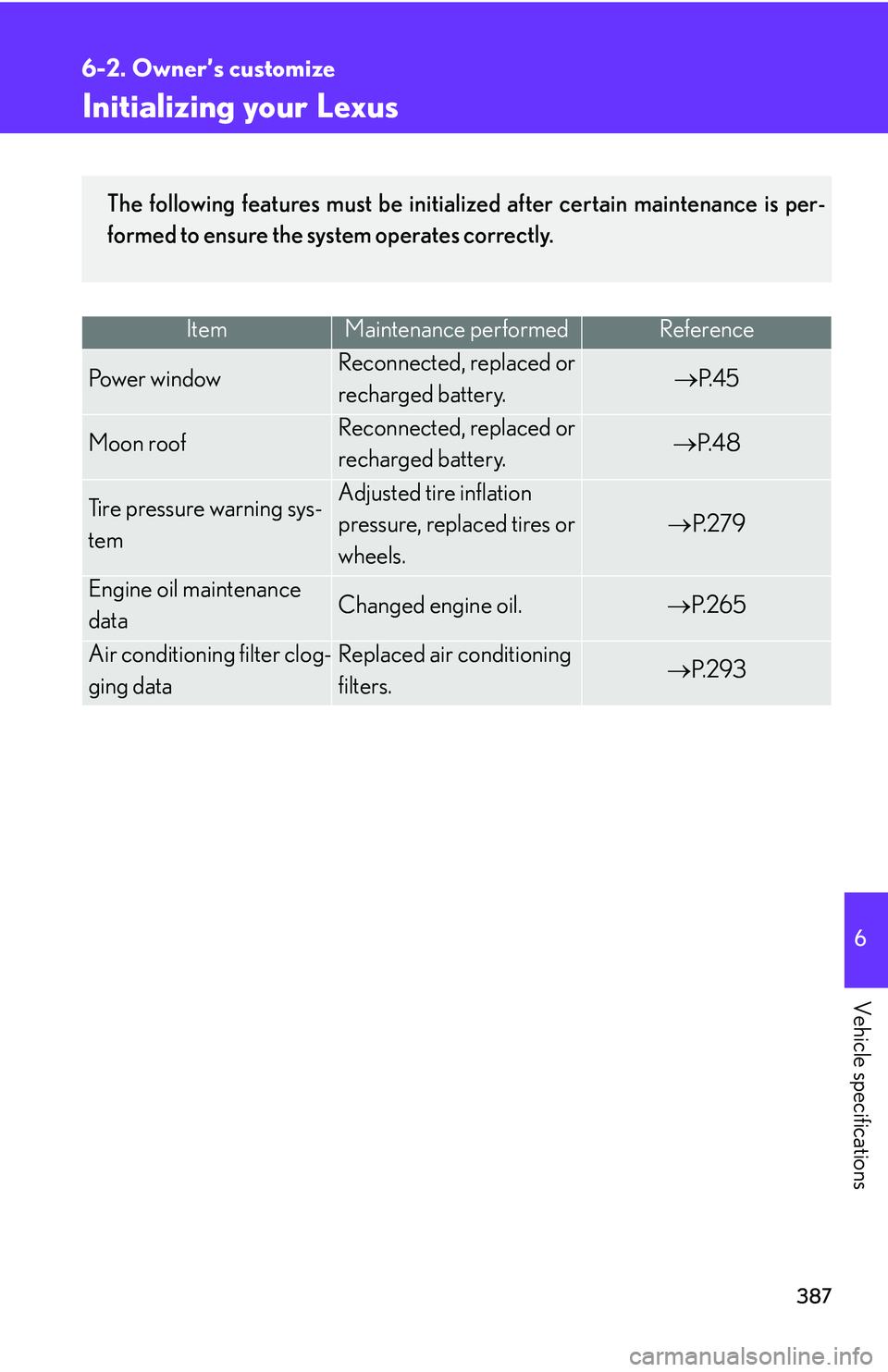
Initializing your Lexus
ItemMaintenance performedReference
Po w e r w i n d o wReconnected, replaced or
recharged battery.P. 4 5
Moon roofReconnected, replaced or
recharged battery.P. 4 8
Tire pressure warning sys-
tem
Adjusted tire inflation
pressure, replaced tires or
wheels.
P. 2 7 9
Engine oil maintenance
dataChanged engine oil.P. 2 6 5
Air conditioning filter clog-
ging data
Replaced air conditioning
filters.P. 2 9 3
The following features must be initialized after certain maintenance is per-
formed to ensure the system operates correctly.