Page 2 of 419

TABLE OF CONTENTSIndex
1-1. Key information .............................. 2Keys ......................................................... 2
1-2. Opening, closing and locking
the doors and trunk ..................... 5
Smart access system......................... 5
Wireless remote control ............... 12
Doors..................................................... 15
Trunk...................................................... 19
1-3. Adjustable components ............ 22 Front seats .......................................... 22
Rear seats ........................................... 23
Driving position memory
system ............................................... 25
Rear seat position memory
system ............................................... 29
Head restraints.................................. 31
Seat belts ............................................ 34
Steering wheel.................................. 40
Auto anti-glare mirror................... 42
Side mirrors ....................................... 43
1-4. Opening and closing the
windows and moon roof .......... 45
Power windows................................ 45
Moon roof .......................................... 48 1-5. Opening the fuel tank cap ......... 51
Opening the fuel tank cap............ 51
1-6. Theft deterrent system............... 54 Engine immobilizer system ......... 54
Alarm.................................................... 55
Theft prevention labels
(U.S.A.Only) .................................. 57
1-7. Safety information ...................... 58 Correct driving posture .............. 58
SRS airbags ....................................... 60
Child restraint system
................... 73
Installing child restraints ............... 76
2-1. Driving procedures..................... 86 Driving the vehicle .......................... 86
Starting the engine ......................... 94
Automatic transmission................ 98
Turn signal lever.............................. 101
Parking brake ................................. 102
2-2. Instrument cluster ..................... 103 Gauges and meters ..................... 103
Indicators and warning lights ... 105
Multi-information display........... 107
1Before driving
2When driving
Page 17 of 419
1Before driving
1
1-1. Key information ........................... 2Keys ....................................................... 2
1-2. Opening, closing and locking
the doors and trunk .................. 5
Smart access system ..................... 5
Wireless remote control ............. 12
Doors .................................................. 15
Trunk.................................................... 19
1-3. Adjustable components ......... 22 Front seats....................................... 22
Rear seats........................................ 23
Driving position memory
system ............................................ 25
Rear seat position memory
system ............................................ 29
Head restraints ............................... 31
Seat belts ......................................... 34
Steering wheel .............................. 40
Auto anti-glare mirror ................ 42
Side mirrors.................................... 43 1-4. Opening and closing the
windows and moon roof
....... 45
Power windows.............................. 45
Moon roof....................................... 48
1-5. Opening the fuel tank cap .......51 Opening the fuel tank cap ......... 51
1-6. Theft deterrent system ........... 54 Engine immobilizer system ...... 54
Alarm................................................ 55
Theft prevention labels
(U.S.A.Only) ................................ 57
1-7. Safety information ................... 58 Correct driving posture............ 58
SRS airbags.................................... 60
Child restraint system ................. 73
Installing child r
estraints ............ 76
Page 28 of 419
12
1-2. Opening, closing and locking the doors and trunk
Wireless remote control
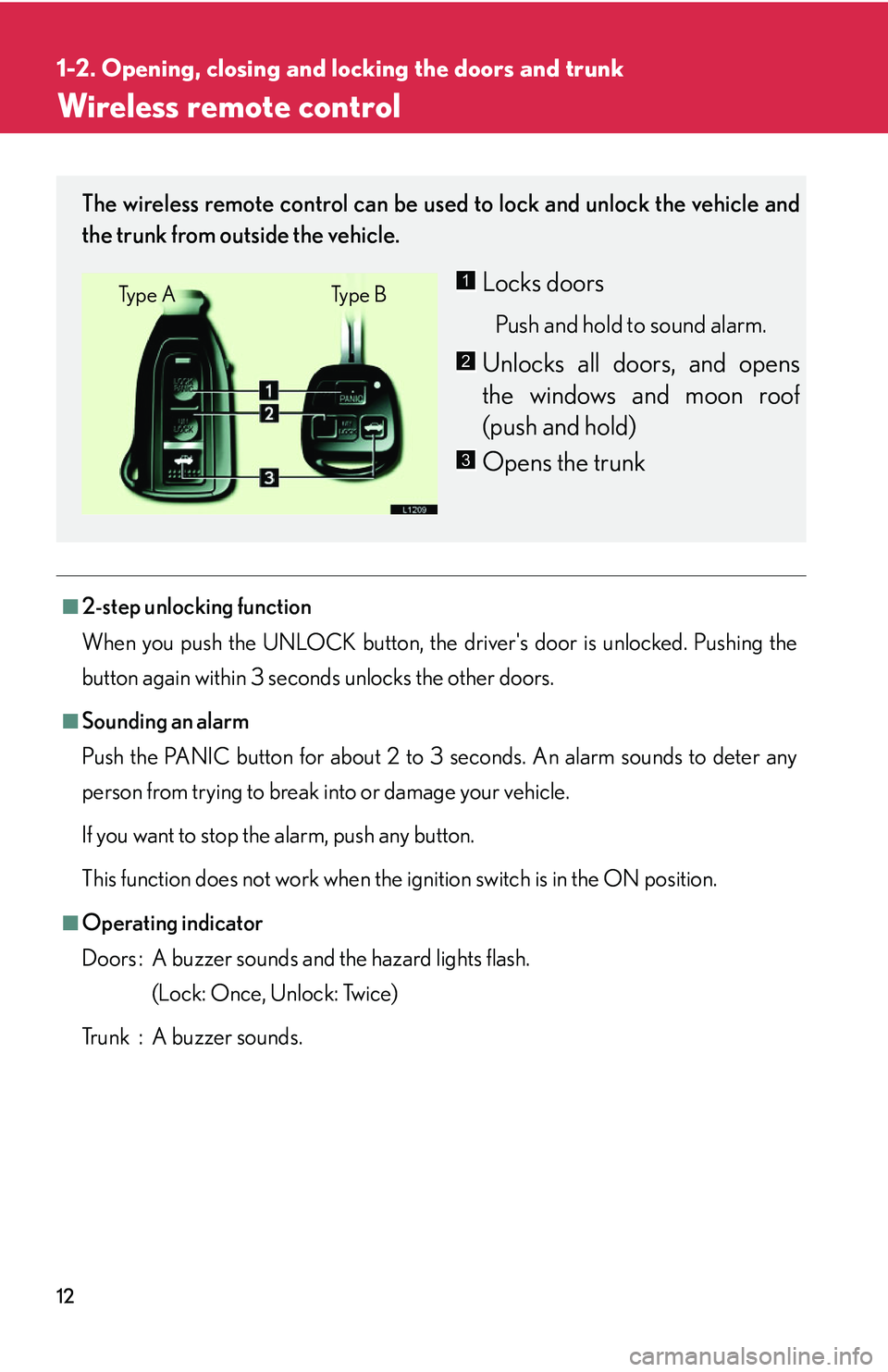
■2-step unlocking function
When you push the UNLOCK button, the driver's door is unlocked. Pushing the
butto
n again within 3 seco nds unlocks the other doors.
■Sounding an alarm
Push the PANIC button for about 2 to 3 seconds. An alarm sounds to deter any
per
son from trying to break into or damage your vehicle.
If you want to stop the alarm, push any button.
This function does not work when the ignition switch is in the ON position.
■Operating indicator
Doors : A buzzer sounds and the hazard lights flash. (Lock: Once, Unlock: Twice)
Trunk : A buzzer sounds.
The wireless remote control can be used to lock and unlock the vehicle and
the trunk from outside the vehicle.
Locks doors
Push and hold to sound alarm.
Unlocks all doors, and opens
the windows and moon roof
(pu
sh and hold)
Opens the trunk
Ty p e A Ty p e B1
2
3
Page 44 of 419
28
1-3. Adjustable components
■If the battery is disconnected
The computer’s memory will b
e erased and the memorized positions will have to be
set again.
CAUTION
■Caution of wrong operation
Take care during seat adjustment that the seat does not strike the rear passenger or
squeeze
your body against the steering wheel.
If this happens, you can stop the moveme nt b
y pressing another driving position
memory button.
NOTICE
■When using the smart or wireless keys to change your vehicle’s settings
Pushing the “LOCK” button for longer than 2-3 seconds will activate an alarm.
( P.12 )
Page 71 of 419
55
1
1-6. Theft deterrent system
Before driving
Alarm
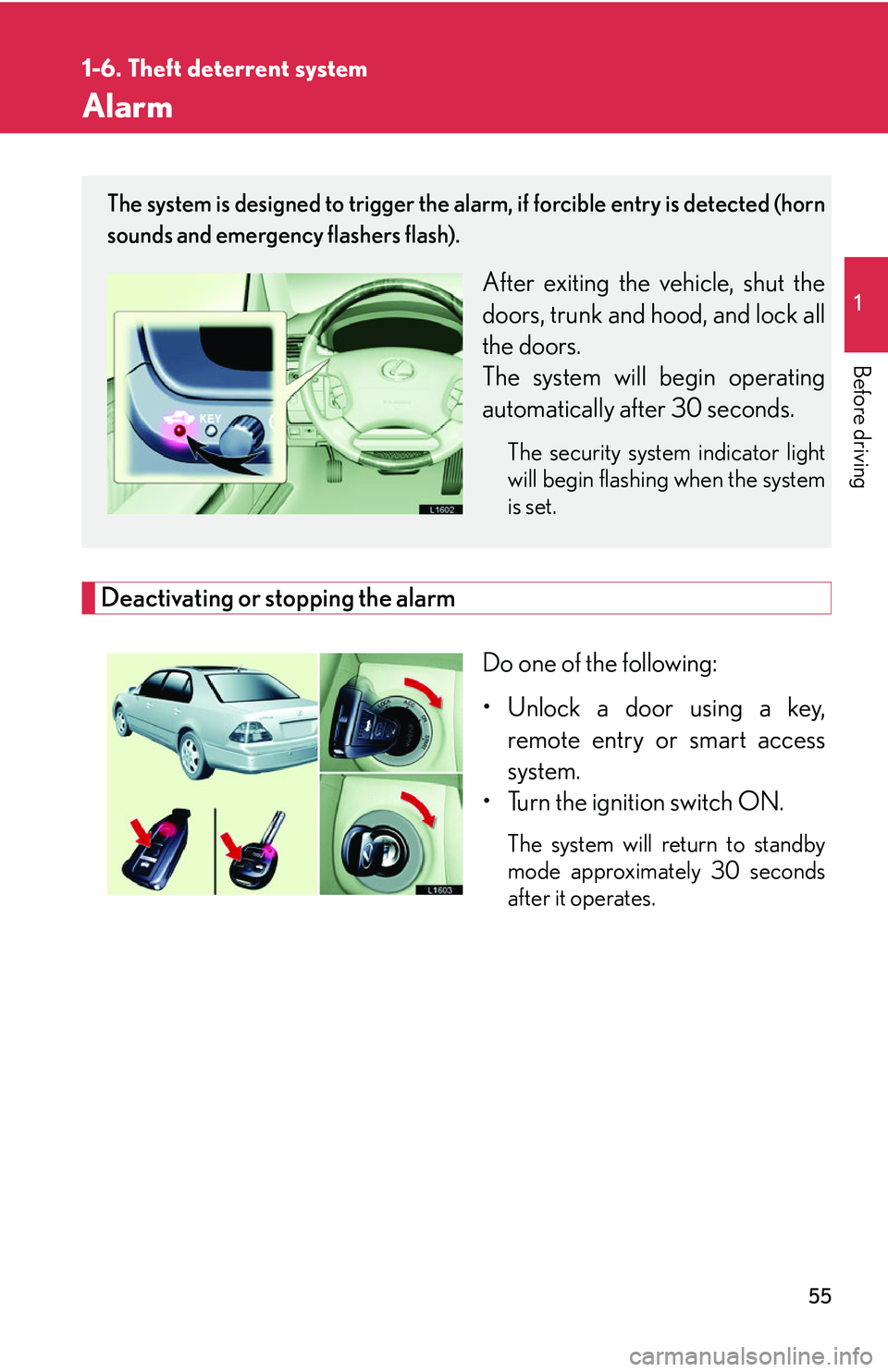
Deactivating or stopping the alarm
Do one of the following:
• Unlock a door using a key, r
emote entry or smart access
system.
• Turn the ignition switch ON.
The system will return to standby
mode approximately 30 seconds
after it operates.
The system is designed to trigger the alarm, if forcible entry is detected (horn
sounds and emergency flashers flash).
After exiting the vehicle, shut the
doors, trunk and hood, and lock all
the doors.
The system will begin operating
automatically af
ter 30 seconds.
The security system indicator light
will begin flashing when the system
is set.
Page 72 of 419

56
1-6. Theft deterrent system
■Items to check before locking the vehicle
To prevent unintended triggering of the alarm
, check that there is no one in the vehi-
cle and that all windows are clos ed bef
ore locking the vehicle.
■Alarm operation
The alarm will sound if any of the following conditions occur.
• When a locked door or trunk is opened in any way other than using a key or
wir
eless remote control, such as someone exiting the vehicle after the alarm is
activated.
• When the hood is lifted open while the vehicle is locked.
• When the battery is reconnected.
■Sounding an alarm
Manually triggering the alarm will help de ter an
yone from breaking into or damag-
ing your vehicle. (
P. 12 )
■Certifications for the engine immobilizer system (for vehicles sold in U.S.A.)
This device complies with Part 15 of the FCC Rules.
Operation is subject to the following two co
nditions: (1) This device may not cause
harmful interference, and (2) this device must accept any interference received,
including interference that may cause undesired operation.
■Certifications for the engine immobilizer system (for vehicles sold in Canada)
This device complies with RSS-210 of Indu str
y Canada. Operation is subject to the
following two conditions:
(1) This device may not cause interference, and (2) this device must accept any
inter
ference, including interference that may cause undesired operation of the
device.
FCC ID: MOZ RI-20BTY
MADE IN JAPAN
FCC ID: MOZ RI-15HTY
MADE IN JAPAN
Page 360 of 419

344
5-2. Steps to take in an emergency
Smart access system failure warnings
To prevent incorrect operation, your Lexus is equipped with alarms inside
and outside, as well as warning messa ges in the multi-information display,
to alert you to problems involving the smart access system.
Inside alarmOutside alarmMulti-information displayCausesCorrection
procedures
BuzzerNoneNone
A door is
opened with -
out turning OFF
the ignition
switch.
Close the door
or turn off the
ignition switch
None
Beep
(two sec-
onds)
None
An attempt is
made to lock
the door(s)
while the mas-
ter key is still in
the vehicle or
the ignition
switch is ON.Shift to P range.
None
Beep
(ten sec-
onds)
None
An attempt is
made to lock a
door that is ajar,
or lock the mas-
ter key in the
trunk.
Bring the mas -
ter key to the
vehicle.
BeepNone
A door is
opened with-
out turning off
the ignition
switch and with
the transmission
selector lever in
a position other
than P.Turn the igni-
tion switch to
"L
OCK" posi -
tion or bring the
master k
ey to
the vehicle.
Page 361 of 419
5
When trouble arises
345
5-2. Steps to take in an emergency
One
buzzerNone(shown for about 5 sec-
onds)
The master key
is not in the
vehicle when
the ignition
switch is
pushed while in
the LOCK posi-
tion.
Bring the mas-
ter key to the
vehicle.
One
buzzer3 beeps
A door is
opened and
closed while the
master key is
not in the vehi-
cle with the
ignition switch
in the ACC or
ON position.
Bring the mas-
ter key to the
vehicle.
BeepBeep
&
appear alternately
The driver has
exited the vehi -
cle and closed
the door with-
out turning off
the ignition
switch when the
selector lever is
in a position
other than P.
Shift to P range
or bring the
master key to
the vehicle.
Inside alarmOutside alarmMulti-information displayCausesCorrection
procedures