Page 71 of 419
55
1
1-6. Theft deterrent system
Before driving
Alarm
Deactivating or stopping the alarm
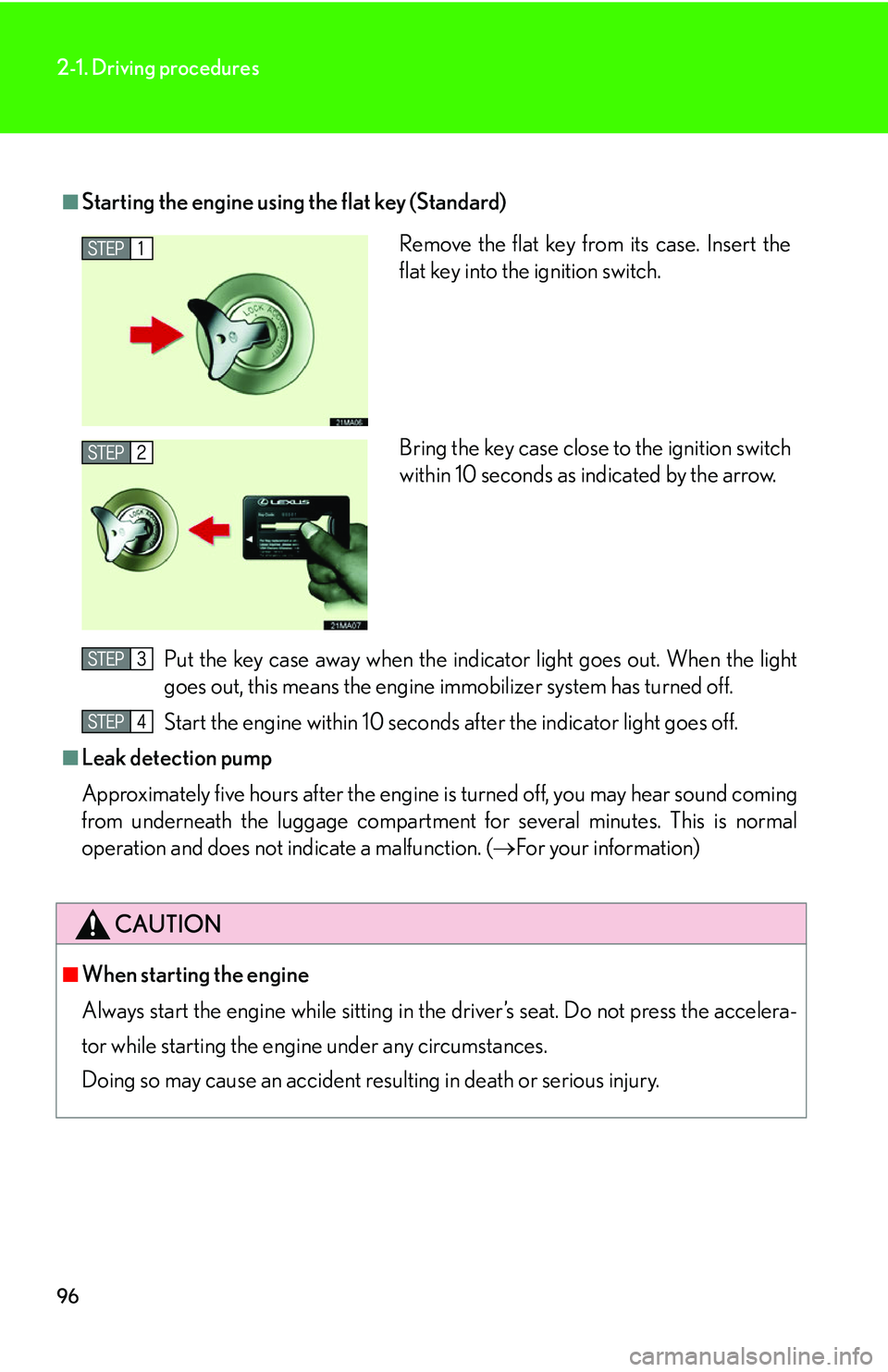
Do one of the following:
• Unlock a door using a key, r
emote entry or smart access
system.
• Turn the ignition switch ON.
The system will return to standby
mode approximately 30 seconds
after it operates.
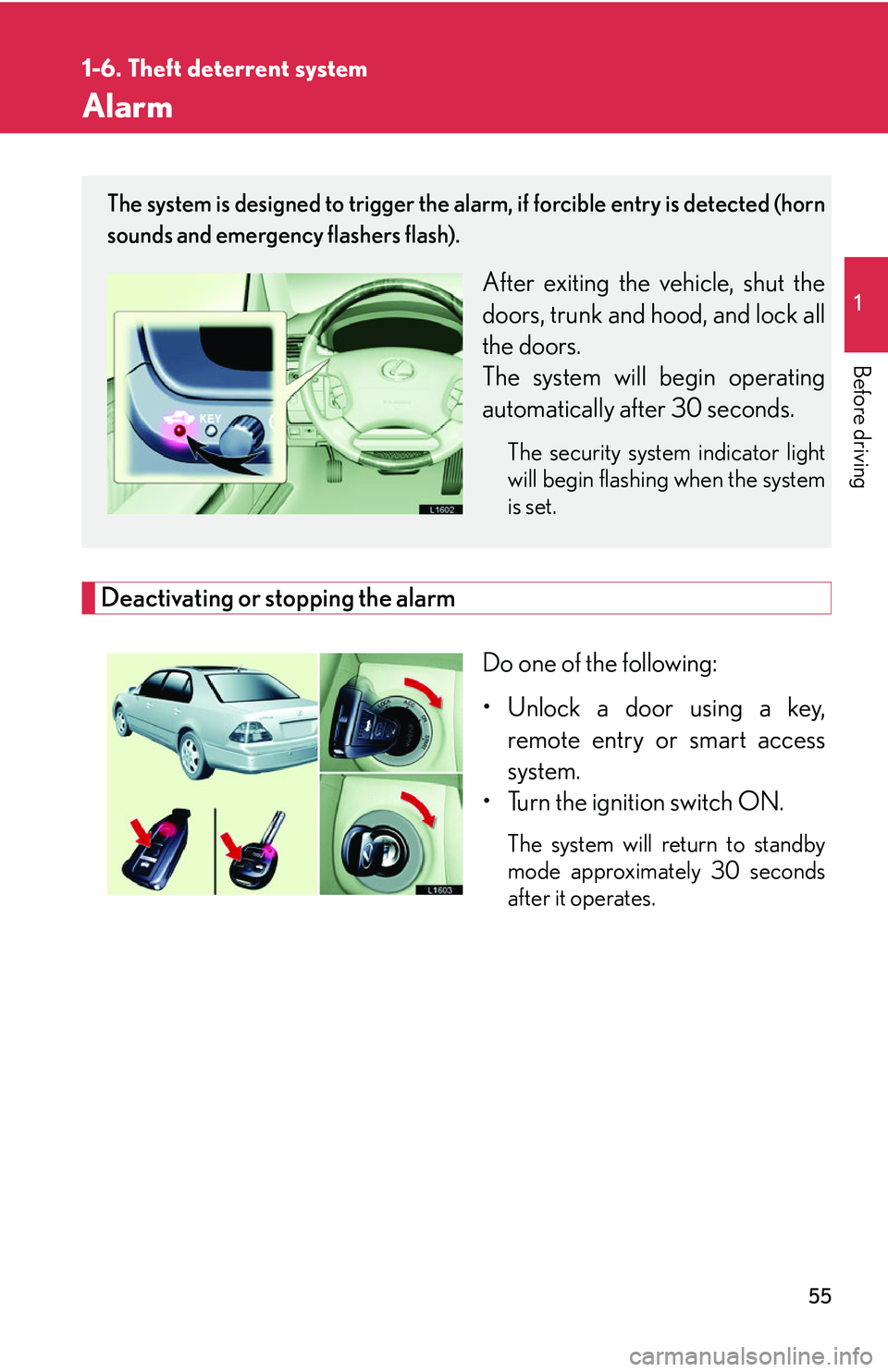
The system is designed to trigger the alarm, if forcible entry is detected (horn
sounds and emergency flashers flash).
After exiting the vehicle, shut the
doors, trunk and hood, and lock all
the doors.
The system will begin operating
automatically af
ter 30 seconds.
The security system indicator light
will begin flashing when the system
is set.
Page 72 of 419

56
1-6. Theft deterrent system
■Items to check before locking the vehicle
To prevent unintended triggering of the alarm
, check that there is no one in the vehi-
cle and that all windows are clos ed bef
ore locking the vehicle.
■Alarm operation
The alarm will sound if any of the following conditions occur.
• When a locked door or trunk is opened in any way other than using a key or
wir
eless remote control, such as someone exiting the vehicle after the alarm is
activated.
• When the hood is lifted open while the vehicle is locked.
• When the battery is reconnected.
■Sounding an alarm
Manually triggering the alarm will help de ter an
yone from breaking into or damag-
ing your vehicle. (
P. 12 )
■Certifications for the engine immobilizer system (for vehicles sold in U.S.A.)
This device complies with Part 15 of the FCC Rules.
Operation is subject to the following two co
nditions: (1) This device may not cause
harmful interference, and (2) this device must accept any interference received,
including interference that may cause undesired operation.
■Certifications for the engine immobilizer system (for vehicles sold in Canada)
This device complies with RSS-210 of Indu str
y Canada. Operation is subject to the
following two conditions:
(1) This device may not cause interference, and (2) this device must accept any
inter
ference, including interference that may cause undesired operation of the
device.
FCC ID: MOZ RI-20BTY
MADE IN JAPAN
FCC ID: MOZ RI-15HTY
MADE IN JAPAN
Page 87 of 419
71
1-7. Safety information
1
Before driving
CAUTION
■SRS airbag precautions
●If the vinyl cover is put on the area where the SRS knee airbag will deploy, be sure
to remove it.
●Do not use seat accessories which cover the parts where the SRS side airbags
inflate as this may interfere with inflation of these airbags.
●Do not strike or apply significant levels of force to the area of the SRS airbag
components shown on P. 61. Doing so could cause a SRS airbag to malfunction.
●Do not touch any of the component parts immediately after the SRS airbag has
deployed (inflated) as they become hot.
●If breathing becomes difficult, open a d oor or window to allow fresh air in, or
leave the vehicle if it is safe to do so. Wash off any residue as soon as possible to
prevent skin irritation.
●If the areas where the SRS airbags are stored, such as the steering wheel pad and
front pillar garnish, are damaged or cracked, have them replaced by your Lexus
dealer.
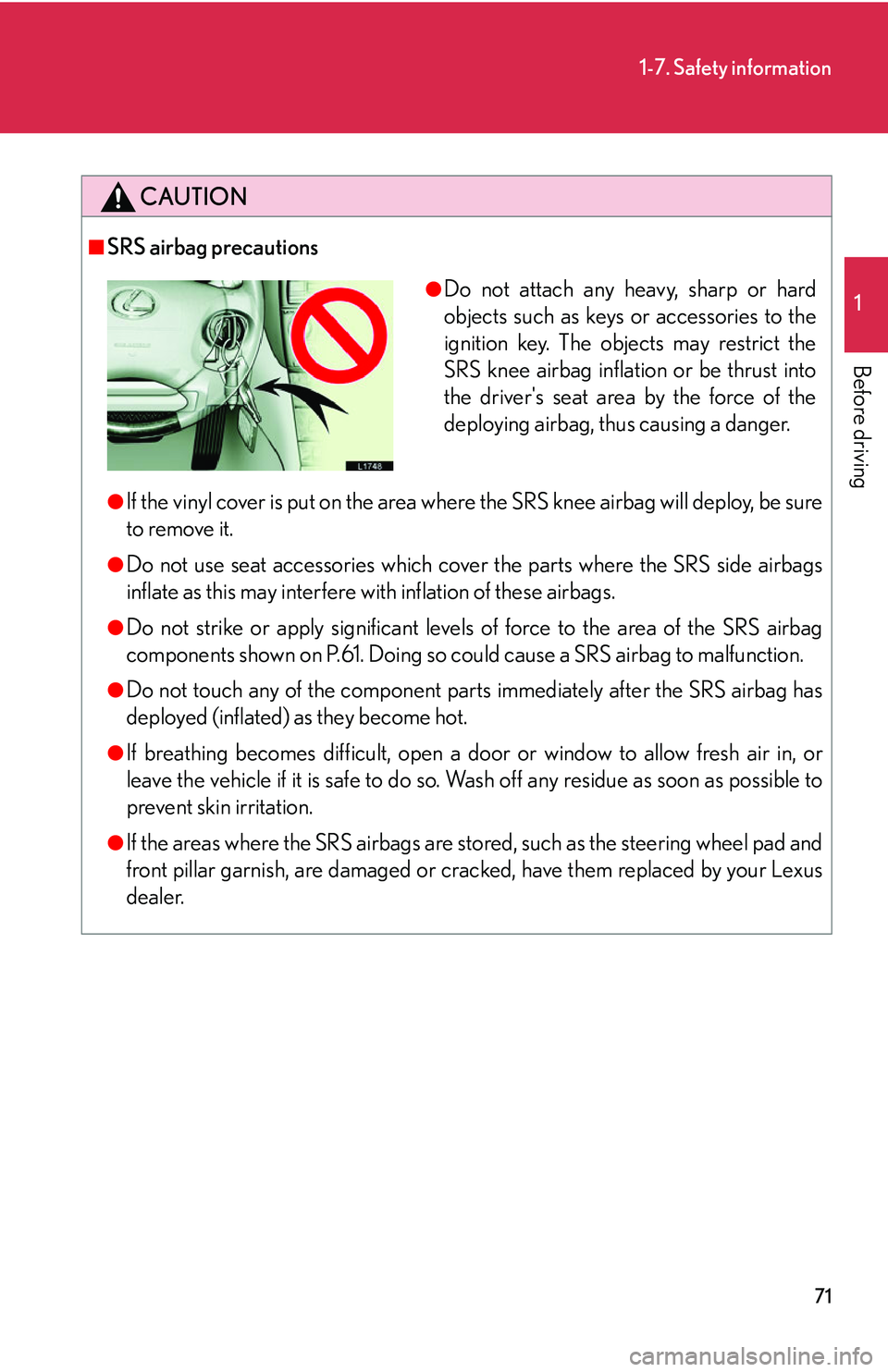
●Do not attach any heavy, sharp or hard
objects such as keys or accessories to the
ignition key. The obje cts may restrict the
SRS knee airbag inflation or be thrust into
the driver's seat area by the force of the
deploying airbag, thus causing a danger.
Page 110 of 419
94
2-1. Driving procedures
Starting the engine
■Ignition switch
LOCK:
Inserting and removing the key
ACC:
The audio system and other
acces
sories can be used when
the engine is stopped.
ON:
When driving the vehicle the
engine an
d all accessories are
on.
START:
For starting the engine.
■ Star
ting the engine
Check that the parking brake is set.
Check that the selector lever is set in P.
If you need to restart the engine while the vehicle is moving, put the
selector lever in N.
Sit in the driver’s seat and firmly depress the brake pedal.
Push and turn (if the smart access s
ystem is engaged) or turn the
ignition switch to STAR T and star
t the engine.
1
2
3
4
Page 111 of 419
95
2-1. Driving procedures
2
When driving
■If the engine does not start
Check whether the other keys will start the engine.
If they work, your key may be broken. Have the key checked at your Lexus dealer.
■Starting the engine using the flat key (Smart access)
■ Steering lock release
When starting the engine, the igni -
tion switch may seem stuck in the
“L
OCK” position. To free it, per -
form the following:
Smart access
Push and hold the ignition
s
witch (do not try to turn the
ignition switch), then rock the
steering wheel until it releases.
Standard
Turn the key while turning the
steering wheel slightly in either
dir
ection.
Remove the flat key from its case.
Insert the flat key into the igni-
tions switch.
Start the engine within 10 sec-
onds after the indicator light goes
off.
Page 112 of 419
96
2-1. Driving procedures
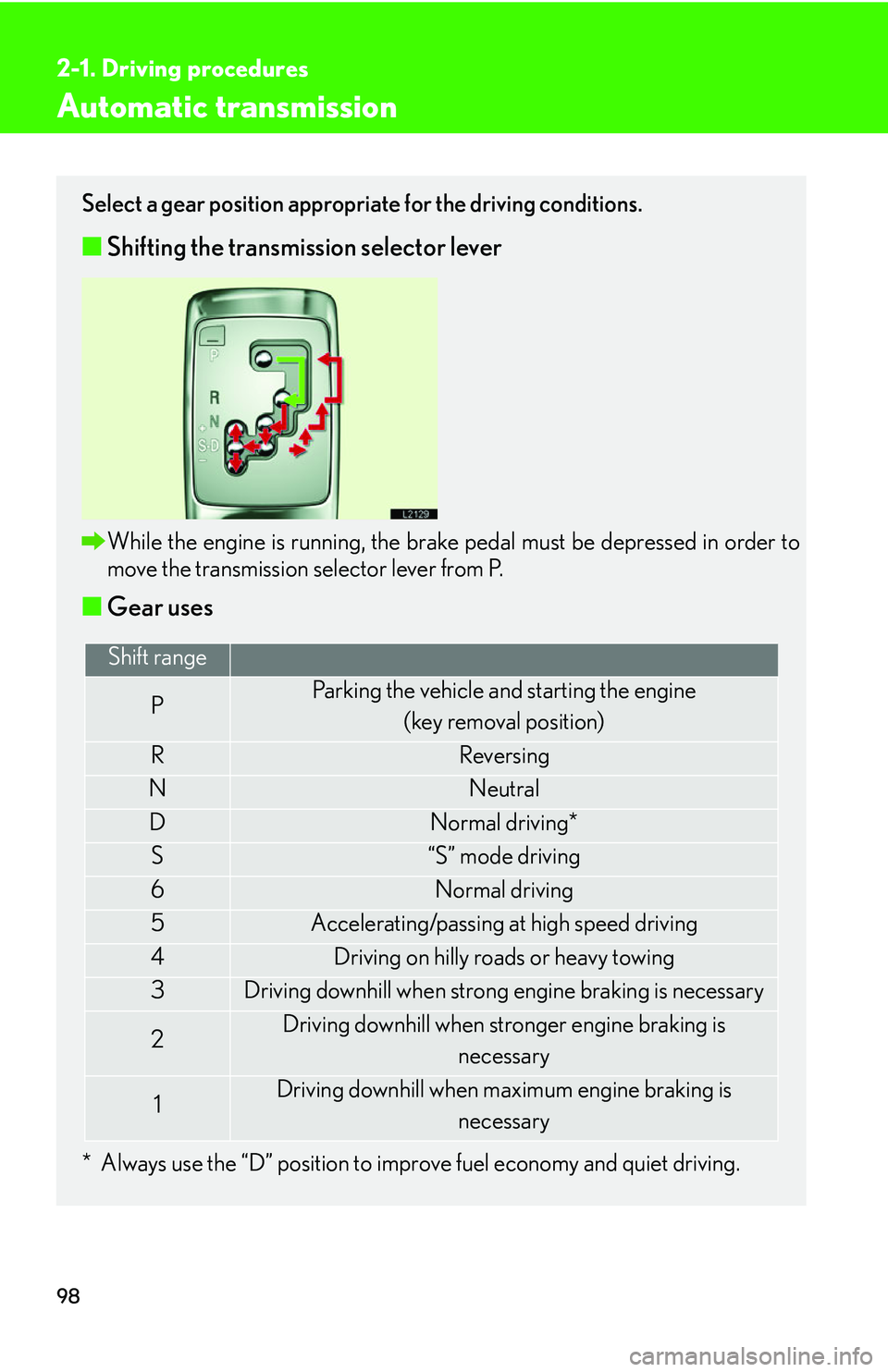
■Starting the engine using the flat key (Standard)Put the key case away when the indicator light goes out. When the light
goes out, this means the engine immobilizer system has turned off.
Start the engine within 10 seconds after the indicator light goes off.
■Leak detection pump
Approximately five hours after the engine is turned off, you may hear sound coming
fr
om underneath the luggage compartment for several minutes. This is normal
operation and does not indicate a malfunction. (
For your information)
CAUTION
■When starting the engine
Always start the engine while sitting in the driver’s seat. Do not press the accelera -
tor while starting the engine under any circumstances.
Doing so may cause an accident resu lting i
n death or serious injury.
Remove the flat key from its case. Insert the
flat key into the ignition switch.
Bring the key case close to the ignition switch
within 10 seconds as indicated by the arrow.
Page 114 of 419
98
2-1. Driving procedures
Automatic transmission
Select a gear position appropriate for the driving conditions.
■Shifting the transmission selector lever
While the engine is running, the brake pedal must be depressed in order to
move the transmission selector lever from P.
■Gear uses
* Always use the “D” position to improve fuel economy and quiet driving.
Shift range
PParking the vehicle and starting the engine
(key removal position)
RReversing
NNeutral
DNormal driving*
S“S” mode driving
6Normal driving
5Accelerating/passing at high speed driving
4Driving on hilly roads or heavy towing
3Driving downhill when strong engine braking is necessary
2Driving downhill when stronger engine braking is necessary
1Driving downhill when maximum engine braking is
necessary
Page 127 of 419

111
2-3. Operating the headlight and windshield wipers
2
When driving
Daytime running light system
The headlights turn on automatically (at a reduced intensity) whenever the
engine is started and the parking brake is released to make your vehicle
more visible to other drivers. Dayt ime running lights are not designed for
use at night.
■Headlight control sensor
■Automatic light off system
The headlights turn off automatically if the engine is stopped and the driver’s door is
opened wh
ile the headlights are turned on.
To turn the headlights on again, turn the key to ON, or turn the light switch off once
and then
back to or position.
■Automatic headlight leveling system
The level of the headlights is
automatically adjusted according to the number of
passengers and the loading condition of the vehicle to ensure that the headlights do
not interfere other road users.
■Customization
The time it takes for the headlights to automatically turn on or off can be changed.
( P.384 )
The sensor may not function properly if an
object is placed on the sensor, or anything
that blocks the sensor is affixed to the wind-
shield.
Doing so interferes with the sensor detect-
ing the level of ambient light and may cause
the automatic headlight system malfunc-
tion.