Page 55 of 419
39
1-3. Adjustable components
1
Before driving
CAUTION
■Seat belt damage and wear
●Do not damage the seat belts by allowing the belt, plate or buckle to be jammed
in the door.
●Do not use a damaged seat belt until it is replaced. Damaged seat belts cannot
protect an occupant from injury.
●Ensure that the belt and tab are locked and the belt is not twisted. If the seat belt
does not function correctly, immediately contact your Lexus dealer.
●Replace the seat assembly, including the belts, if your vehicle has been involved in
a serious accident, even if there is no obvious damage.
●Do not attempt to install, remove, modify , disassemble or dispose of a seat belt.
Have any necessary repairs carried out by your Lexus dealer. Inappropriate han-
dling of the pretensioner may cause it to activate or operate improperly and may
caus
e death or serious injury.
■Using seat belt extender
●Do not wear the seat belt extender, if you can fasten the seat belt without the
extender.
●Do not use the seat belt extender when installing a child restraint system, because
the belt will not securely hold the child restraint system, increasing the risk of
death or injury in the event of a collision.
●The personalized extender may not be safe on another vehicle, when used by
another person, or at a different seating position other than the one originally
intended.
NOTICE
■When using a seat belt extender
When releasing the seat belt, press on the buckle release button on the extender,
not
on the seat belt.
This helps prevent damage to the vehi cle
interior and the extender itself.
Page 62 of 419
46
1-4. Opening and closing the windows and moon roof
■Power window operating conditions
The ignition switch must b
e turned to ON.
■Integrated door lock window operation
The power windows can be opened and closed using the key or wireless remote
co
ntrol. ( P.12 , P. 15)
This feature can be deactivated. ( P.
3 8 4 )
■Retained accessory power operation
The power windows can be operated for approximately 45 seconds after the
engine ha
s been stopped. They cannot, however, be operated if the driver’s door is
opened.
■Jam protection function
If an object becomes caught between th e
window and the window frame, window
travel is stopped and the window is opened slightly.
■Initializing the power windows
After the battery is reconnected, replaced or recharged, you will need to initialize
the po
wer windows; otherwise the jam prot ection function will not operate cor-
rectly.
To initialize the power windows:
Lower each window halfway using the power window switches on the
door for that window.
Close each window and continue hold ing the
switch for a second, after
the window has fully closed.
Make sure the windows open and close correctly. If not, see your Lexus dealer.
Page 65 of 419
49
1-4. Opening and closing the windows and moon roof
1
Before driving
■Moon roof operating conditions
The ignition switch must b
e turned to ON.
■Integrated door lock moon roof operation
The moon roof can be opened and closed, using the key or wireless remote control.
( P.
12 , P. 15)
■Retained accessory power operation
The moon roof can be operated for approximately 45 seconds after the engine has
b
een turned off. It cannot, however, be operated if the driver’s door is opened.
■Jam protection function
If an object is detected between the m oon
roof and the frame during automatic
close or automatic tilt down, travel is stopped and the moon roof opens slightly.
■Initializing the moon roof
After the battery is reconnected, replaced or recharged, you will need to initialize
the moon r
oof, otherwise the jam protecti on function will not operate correctly.
To initialize the moon roof, push and hold the “TILT” switch until the moon roof tilts
al
l the way up and then automatically returns slightly.
Make sure the moon roof opens and closes correctly. If not, see your Lexus dealer.
■Opening and closing the sunshade
The sunshade can be opened and closed manually; however, it will be opened if the
m
oon roof is opened.
■Sunshade
The sunshade can be manually opened and closed.
Page 71 of 419
55
1
1-6. Theft deterrent system
Before driving
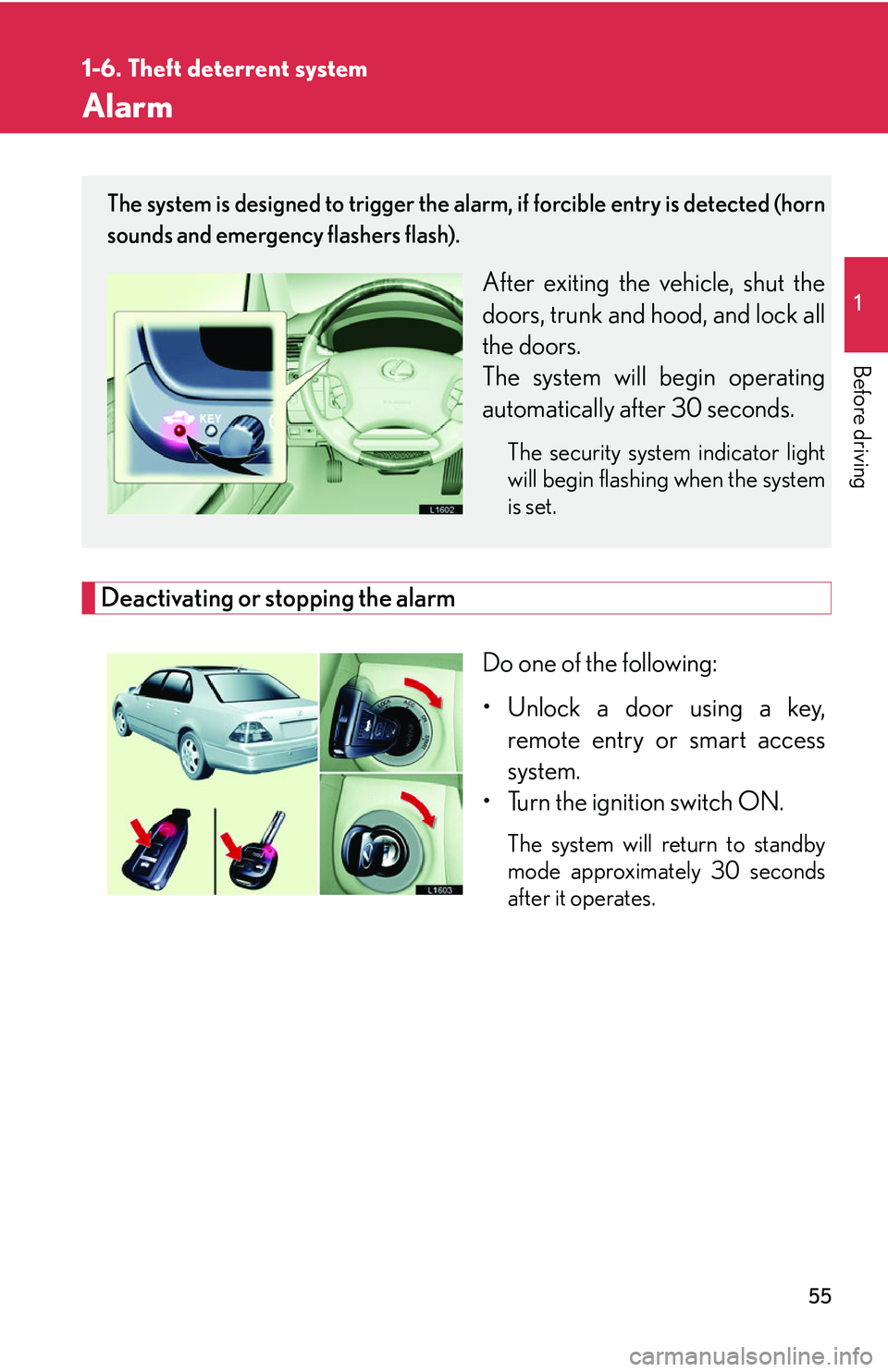
Alarm
Deactivating or stopping the alarm
Do one of the following:
• Unlock a door using a key, r
emote entry or smart access
system.
• Turn the ignition switch ON.
The system will return to standby
mode approximately 30 seconds
after it operates.
The system is designed to trigger the alarm, if forcible entry is detected (horn
sounds and emergency flashers flash).
After exiting the vehicle, shut the
doors, trunk and hood, and lock all
the doors.
The system will begin operating
automatically af
ter 30 seconds.
The security system indicator light
will begin flashing when the system
is set.
Page 72 of 419

56
1-6. Theft deterrent system
■Items to check before locking the vehicle
To prevent unintended triggering of the alarm
, check that there is no one in the vehi-
cle and that all windows are clos ed bef
ore locking the vehicle.
■Alarm operation
The alarm will sound if any of the following conditions occur.
• When a locked door or trunk is opened in any way other than using a key or
wir
eless remote control, such as someone exiting the vehicle after the alarm is
activated.
• When the hood is lifted open while the vehicle is locked.
• When the battery is reconnected.
■Sounding an alarm
Manually triggering the alarm will help de ter an
yone from breaking into or damag-
ing your vehicle. (
P. 12 )
■Certifications for the engine immobilizer system (for vehicles sold in U.S.A.)
This device complies with Part 15 of the FCC Rules.
Operation is subject to the following two co
nditions: (1) This device may not cause
harmful interference, and (2) this device must accept any interference received,
including interference that may cause undesired operation.
■Certifications for the engine immobilizer system (for vehicles sold in Canada)
This device complies with RSS-210 of Indu str
y Canada. Operation is subject to the
following two conditions:
(1) This device may not cause interference, and (2) this device must accept any
inter
ference, including interference that may cause undesired operation of the
device.
FCC ID: MOZ RI-20BTY
MADE IN JAPAN
FCC ID: MOZ RI-15HTY
MADE IN JAPAN
Page 127 of 419

111
2-3. Operating the headlight and windshield wipers
2
When driving
Daytime running light system
The headlights turn on automatically (at a reduced intensity) whenever the
engine is started and the parking brake is released to make your vehicle
more visible to other drivers. Dayt ime running lights are not designed for
use at night.
■Headlight control sensor
■Automatic light off system
The headlights turn off automatically if the engine is stopped and the driver’s door is
opened wh
ile the headlights are turned on.
To turn the headlights on again, turn the key to ON, or turn the light switch off once
and then
back to or position.
■Automatic headlight leveling system
The level of the headlights is
automatically adjusted according to the number of
passengers and the loading condition of the vehicle to ensure that the headlights do
not interfere other road users.
■Customization
The time it takes for the headlights to automatically turn on or off can be changed.
( P.384 )
The sensor may not function properly if an
object is placed on the sensor, or anything
that blocks the sensor is affixed to the wind-
shield.
Doing so interferes with the sensor detect-
ing the level of ambient light and may cause
the automatic headlight system malfunc-
tion.
Page 177 of 419

3Interior features
161
3-1. Using the air conditioning
system and defogger ........... 162
Automatic air conditioning
control .......................................... 162
Rear window defogger............. 170
Rear air conditioning
controls ........................................ 172
3-2. Using the audio system .......... 174 Audio system ................................. 174
Operating the radio................... 176
Operating the cassette
player ............................................ 182
Using the CD changer ............ 185
Optimal use of the audio
system ............................................ 191
Using the rear controller ......... 193
Using the steering switches.... 195
3-3. Turning on interior lights ...... 198 Interior lights list ......................... 198
3-4. Storage ...................................... 201 Storage features......................... 201 3-5. Other interior features ....... 208
Sun visors ..................................... 208
Vanity mirror and light ............ 209
Clock ............................................... 210
Ashtray............................................. 211
Cigarette lighter ......................... 213
Power outlets................................ 214
Outside temperature display .......................................... 216
Seat heaters .................................. 218
Climate control seat
switches ..................................... 220
Refreshing rear seat
switches ...................................... 222
Coat hooks................................... 223
Floor mats ..................................... 224
Sunshades ................................... 225
Trunk features.............................. 227
Garage door opener ............... 232
Compass (vehicles without
navigation system) ................ 238
Page 214 of 419
198
3-3. Turning on interior lights
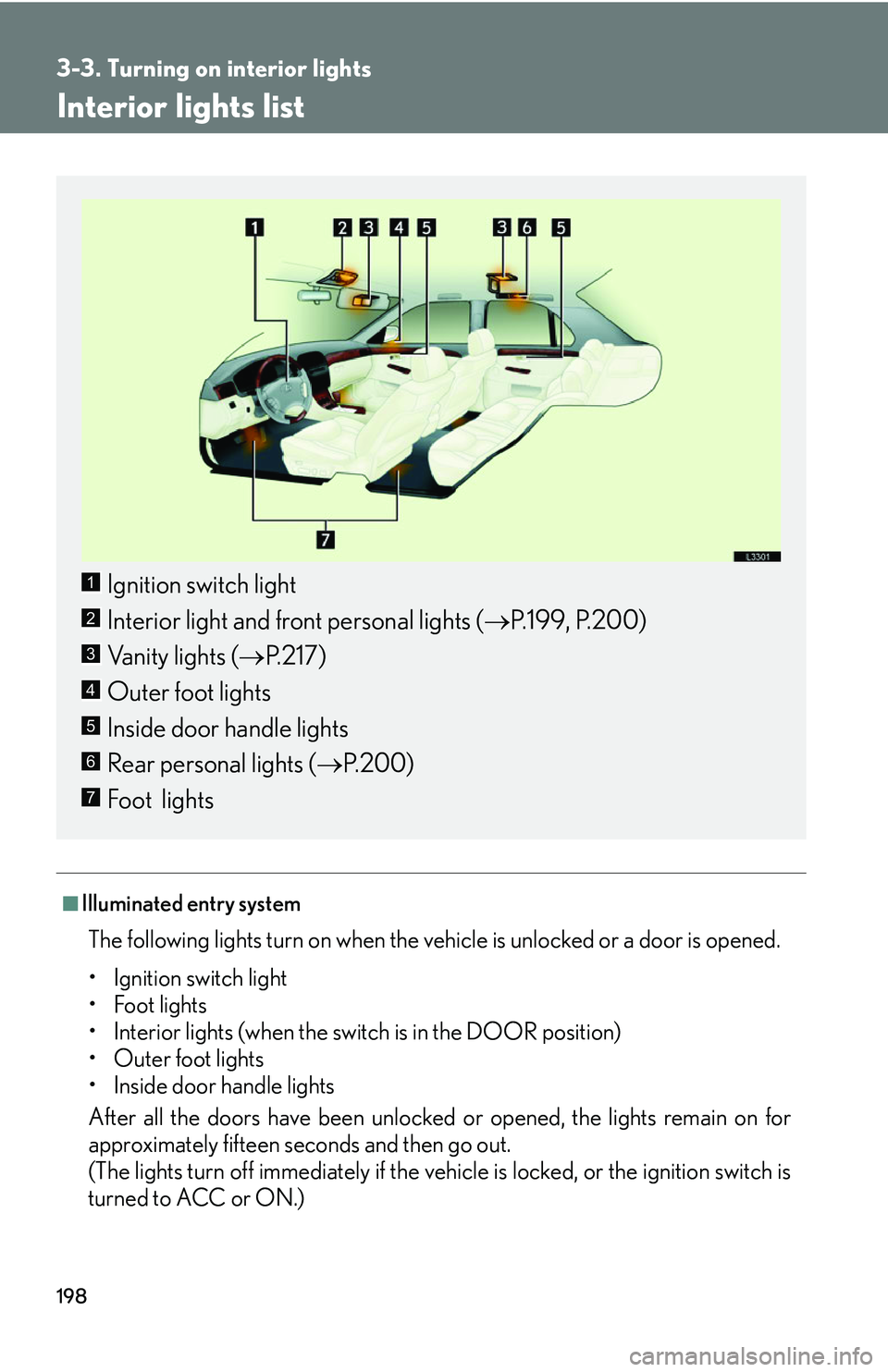
Interior lights list
■Illuminated entry system
The following lights turn on when the vehicle is unlocked or a door is opened.
• Ignition switch light
• Foot lights
• Interior lights (when the switch is in the DOOR position)
• Outer foot lights
• Inside door handle lights
After all the doors have been unlocked or
opened, the lights remain on for
approximately fifteen seconds and then go out.
(The lights turn off immediately if the vehicle is locked, or the ignition switch is
turned to A
CC or ON.)
Ignition switch light
Interior light and front personal lights ( P.199 , P.200)
Vanity lights ( P
.217)
Outer foot lights
Inside door handle lights
Rear personal lights ( P.200 )
Foot lights
1
2
3
4
5
6
7