Page 147 of 419
131
2-4. Using other driving systems
2
When driving
Cruising in the vehicle-to-vehicle distance control mode
The system employs a millimeter radar or laser radar sensor affixed in the
front end to detect the pr esence of a vehicle ahead as well as measuring
the distance from your vehicle. The detection range of the sensor is
approximately 400 ft. (120 m) ahead. Vehicle-to-vehicle distance will be
less than the selected distance during long downhill driving.
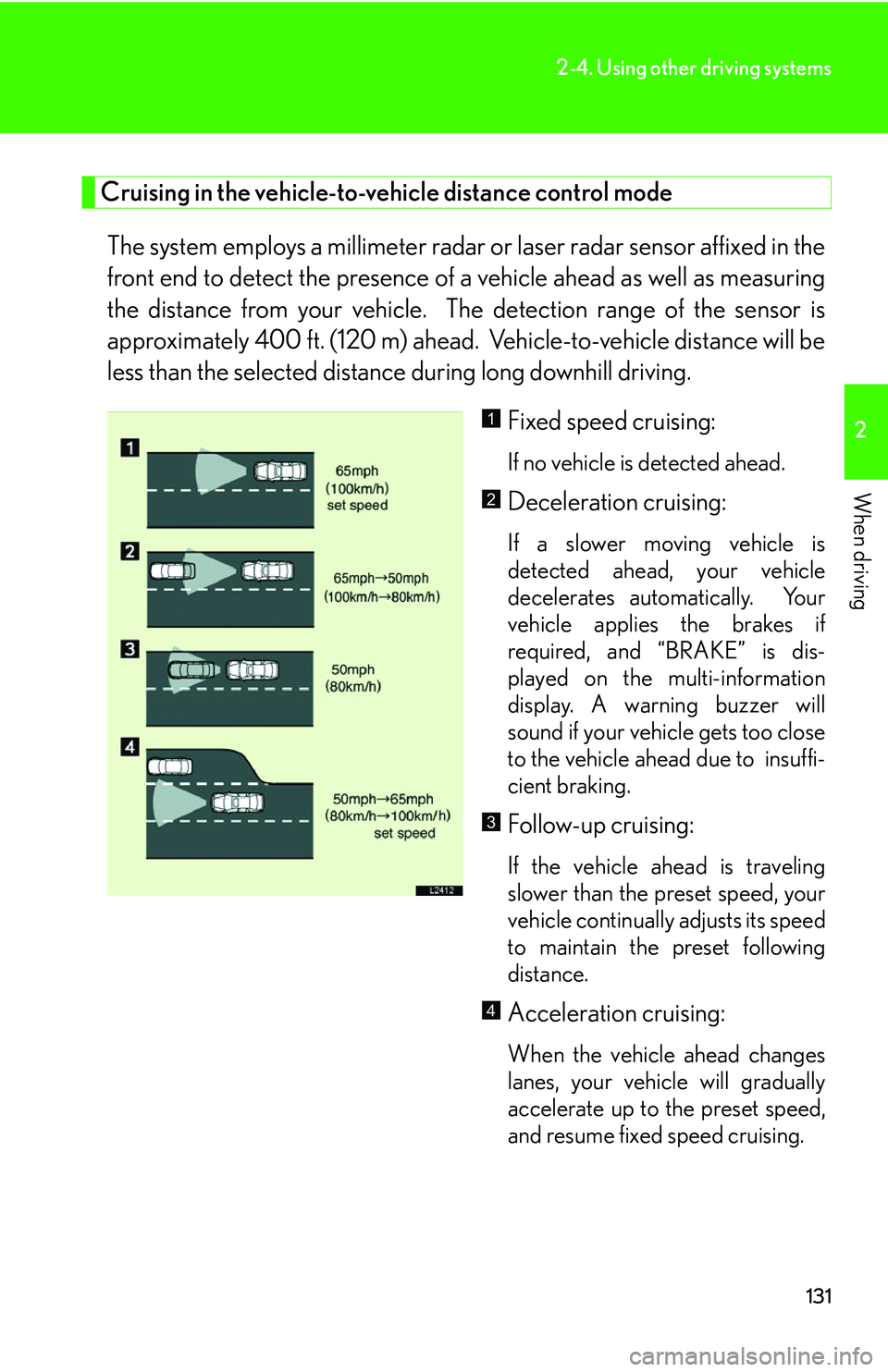
Fixed speed cruising:
If no vehicle is detected ahead.
Deceleration cruising:
If a slower moving vehicle is
detected ahead, your vehicle
decelerates automatically. Your
vehicle applies the brakes if
required, and “BRAKE” is dis -
played on the multi-information
displa
y. A warning buzzer will
sound if your vehicle gets too close
to the vehicle ahead due to insuffi -
cient braking.
Follow-up cruising:
If the vehicle ahead is traveling
slower than the preset speed, your
vehicle continually adjusts its speed
to maintain the preset following
distance.
Acceleration cruising:
When the vehicle ahead changes
lanes, your vehicle will gradually
accelerate up to the preset speed,
and resume fixed speed cruising.
1
2
3
4
Page 148 of 419
132
2-4. Using other driving systems
■Setting vehicle speed
Settings can be made when the vehicle
is traveling above 28 mph (45 km/h).
■Unsuitable conditions
You cannot set the speed in the following conditions:
• When the selector lever is in a position other than D, 4, 5, or 6.
• When driving in adverse weather conditions.
■Automatic cruise control cancellation
In the following cases, the preset speed is can ce
lled. If the system is restored, cruise
control enters the ready mode.
• The slip indicator light blinks and a warning tone sounds.
• The anti-lock braking system activates.
• Foreign matter adheres to the sensor.
• The driving pattern selector sw it
ch is set to “SNOW” mode.
• The wipers are operated at high speed (radar), or either high or low speeds (l
aser). This includes high and low speed operation with the wiper lever in the
AUTO position.
• The vehicle’s speed falls below 25 mph (40 km/h). In this case, you must apply th
e brakes manually to slow the vehicle.
If the preset speed automatically cancels out for other than the above reasons, the
sy
stem may have malfunctioned. Do not operate the dynamic radar/laser cruise
control. You may continue driving, howe ver have your vehicle checked by your
Lexus dealer at the earliest opportunity.
Page 192 of 419
176
3-2. Using the audio system
Operating the radio
Setting radio station memory presets
Select the station to store into the memory.
Press and hold a button from to until a beep is heard to
set the station to that button.
Preset stations
Tr a f f i c
information Adjusting the
frequency
AM·SAT/FM
mode buttons Displays RDS
programs
Po w e r Vo l u m e
Scans for
available
stations Displays radio text messages
Page 194 of 419
178
3-2. Using the audio system
Scanning radio stations
■Scanning the preset radio stations
Press and hold the button until a beep is heard.
Preset stations will be played for a few seconds each.
Push once more to select the desired station.
■ Scanning all r
adio stations within range
Push .
Received stations will be played for a few seconds each.
Push once more to select the desired station.
Page 197 of 419
181
3-2. Using the audio system
3
Interior features
■Certifications for the radio tuner
This equipment has been tested and found to comply with the limits for a class B
di
gital device, pursuant to Part 15 of the FCC Rules. These limits are designed to
provide reasonable protection against harmful interference in a residential installa -
tion. This equipment generate s
, uses and can radiate radio frequency energy and, if
not installed and used in accordance with the instructions, may cause harmful inter -
ference to radio communications. However, there is no guarantee that interference
wi
ll not occur in a particular installation.
If this equipment does cause harmful interference to radio or television reception,
whi
ch can be determined by turning the equipment off and on, the user is encour -
aged to try to correct the interference by one or more of the following measures:
• Reorient or relocate the receiving antenna.
• Increase the separation between the equipment and receiver.
• Connect the equipment into an outlet on a cir
cuit different from that to which
the receiver is connected.
• Consult the dealer or an experienced radio/TV technician for help.
Information to user
Alternation or modifications carried ou t
without appropriate authorization may
invalidate the user’s right to operate the equipment.
■When the battery is disconnected
Stations saved in the memory presets are deleted.
■Reception sensitivity
Maintaining perfect radio reception at all times is
difficult due to the continually
changing position of the antenna, differ ences in signal strength and surrounding
objects, such as trains, transmitters, etc.
Page 226 of 419
210
3-5. Other interior features
Clock
■Operational condition
The ignition switch must be turned to ON or ACC for the clock to illuminate.
■Vehicles with navigation system
For clock setting, see the separate “
Navigation System Owner’s Manual.”
H button : Adjusts the hour.
M button : Adjusts the
minutes.
:00 button : Resets the
minutes to zero.*
*For example:
9:30 to 9:59 displayed 10
:00
10:01 to 10:29 displayed 10
:00
1
2
3
Page 281 of 419
265
4-3. Do-it-yourself maintenance
4
Maintenance and care
■ How to read oil container labels
The ILSAC (International Lubricant Standardization and approval Commit -
tee) Certification mark is are added to some oil
containers to help you select
the oil you should use.
ILSAC Certification Mark
■Resetting the engine oil maintenance information data (U.S.A. only)
After replacing the engine oil, be sure to
reset the maintenance data. Otherwise,
the engine oil maintenance information may not function correctly. ( P.334 )
Push the "TRIP" button to change t
he trip meter display to blank.
Turn the ignition switch off.
Turn the ignition switch to "ON" while pushing
the trip meter "RESET"
button.
Keep pushing the trip meter "RESET " button for lon
ger than 5 seconds.
"Mileage Reset" appears on
the display, the master warning light comes
on, and a warning tone sounds.
Page 295 of 419

279
4-3. Do-it-yourself maintenance
4
Maintenance and care
Initializing the tire pressure warning system
Tire pressure warning system must be initialized after tires or wheels have
been replaced or rotated, or after adjusting tire pressure.
Message
Reset switch
Park the vehicle with the parking br
ake applied and turn the igni-
tion switch to “LOCK”.
Adjust the pressure of all the tir
es to the specified level.
( P.283 )
Turn the ignition switch on.*
Push and hold the reset switch until “P
ressure Initial” appears in
the multi-information display.**
Drive your vehicle for more than one hour or at speeds of 1
9 mph
(30 km/h) or over.
If you make a mistake in the middle of initialization, per
form the operation
again from the beginning.
*: If “Low Tire” appears in the multi- information display
, push the “RESET”
switch for a few seconds and make sure the warning message disap-
pears.
**:If “Pressure Initial” does not appear when the r
eset switch is held down,
the system may be malfunctioning. Ha ve your vehicle checked by your
Lexus dealer as soon as possible
1
2