Page 3272 of 4462
![INFINITI FX35 2006 Service Manual GW-32
POWER WINDOW SYSTEM
Revision: 2006 December 2006 FX35/FX45
Check BCM Power Supply and Ground CircuitNIS001R7
1. CHECK FUSE
�Check 15A fuse [No. 1, located in fuse block (J/B)]
�Check 15A fuse [N](/manual-img/42/57019/w960_57019-3271.png "INFINITI FX35 2006 Service Manual GW-32
POWER WINDOW SYSTEM
Revision: 2006 December 2006 FX35/FX45
Check BCM Power Supply and Ground CircuitNIS001R7
1. CHECK FUSE
�Check 15A fuse [No. 1, located in fuse block (J/B)]
�Check 15A fuse [N")
GW-32
POWER WINDOW SYSTEM
Revision: 2006 December 2006 FX35/FX45
Check BCM Power Supply and Ground CircuitNIS001R7
1. CHECK FUSE
�Check 15A fuse [No. 1, located in fuse block (J/B)]
�Check 15A fuse [No. 22, located in fuse block (J/B)]
�Check 50A fusible link (letter M , located in the fuse and fusible link box).
NOTE:
Refer to GW-15, "
Component Parts and Harness Connector Location" .
OK or NG
OK >> GO TO 2.
NG >> If fuse is blown out, be sure to eliminate cause of malfunction before installing new fuse. Refer to
PG-3, "
POWER SUPPLY ROUTING CIRCUIT" .
2. CHECK POWER SUPPLY CIRCUIT
Check voltage between BCM connector and ground.
OK or NG
OK >> GO TO 3.
NG >> Check BCM power supply circuit for open or short.
3. CHECK GROUND CIRCUIT
1. Turn ignition switch OFF.
2. Disconnect BCM connector.
3. Check continuity between BCM connector M4 terminal 49, 52 and ground.
OK or NG
OK >> Power supply and ground circuit are OK.
NG >> Check BCM ground circuit for open or short.
Connector Terminal (Wire color)
Condition of
ignition switch Voltage [V]
(Approx.)
(+) (–)
M3 38 (W/L) Ground ON
Battery
voltage
M4 42 (L/R)
OFF
55 (G)
PIIB1383E
49 (B) – Ground : Continuity should exist.
52 (B) – Ground : Continuity should exist.
PIIA6161E
Page 3291 of 4462
POWER WINDOW SYSTEM GW-51
C
D E
F
G H
J
K L
M A
B
GW
Revision: 2006 December 2006 FX35/FX45
Check Front Door Key Cylinder Switch NIS001RN
1. CHECK DOOR KEY CYLINDER SWITCH INPUT SIGNAL
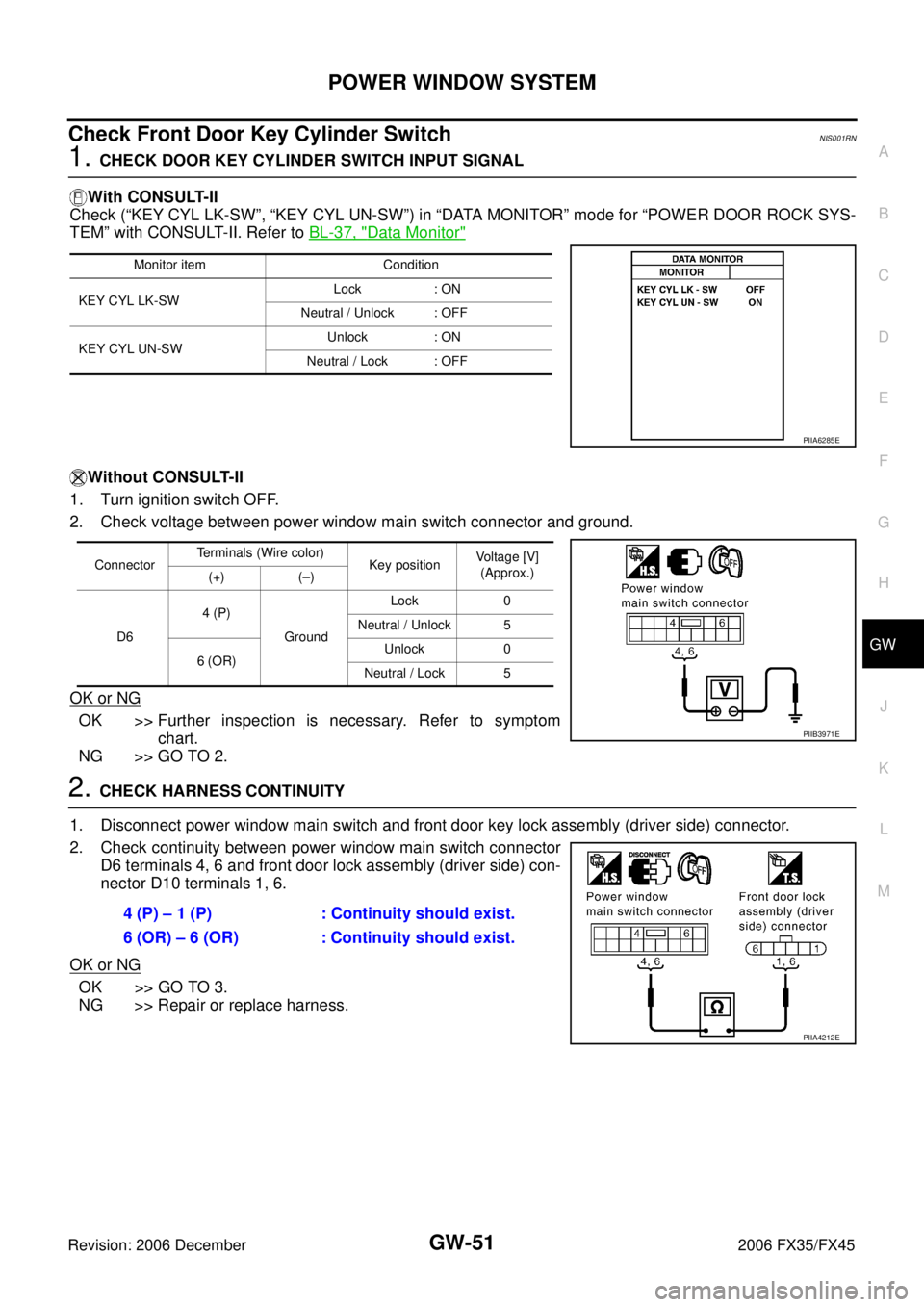
With CONSULT-II
Check (“KEY CYL LK-SW”, “KEY CYL UN-SW”) in “DATA MONITOR” mode for “POWER DOOR ROCK SYS-
TEM” with CONSULT-II. Refer to BL-37, "
Data Monitor"
Without CONSULT-II
1. Turn ignition switch OFF.
2. Check voltage between power window main switch connector and ground.
OK or NG
OK >> Further inspection is necessary. Refer to symptom chart.
NG >> GO TO 2.
2. CHECK HARNESS CONTINUITY
1. Disconnect power window main switch and front door key lock assembly (driver side) connector.
2. Check continuity between power window main switch connector D6 terminals 4, 6 and front door lock assembly (driver side) con-
nector D10 terminals 1, 6.
OK or NG
OK >> GO TO 3.
NG >> Repair or replace harness.
Monitor item Condition
KEY CYL LK-SW Lock : ON
Neutral / Unlock : OFF
KEY CYL UN-SW Unlock : ON
Neutral / Lock : OFF
PIIA6285E
Connector Terminals (Wire color)
Key position Voltage [V]
(Approx.)
(+) (–)
D6 4 (P)
Ground Lock 0
Neutral / Unlock 5
6 (OR) Unlock 0
Neutral / Lock 5
PIIB3971E
4 (P) – 1 (P) : Continuity should exist.
6 (OR) – 6 (OR) : Continuity should exist.
PIIA4212E
Page 3293 of 4462
POWER WINDOW SYSTEM GW-53
C
D E
F
G H
J
K L
M A
B
GW
Revision: 2006 December 2006 FX35/FX45
Check Power Window Serial Link (Passenger Side)NIS001RO
1. CHECK POWER WINDOW SWITCH OUTPUT SIGNAL
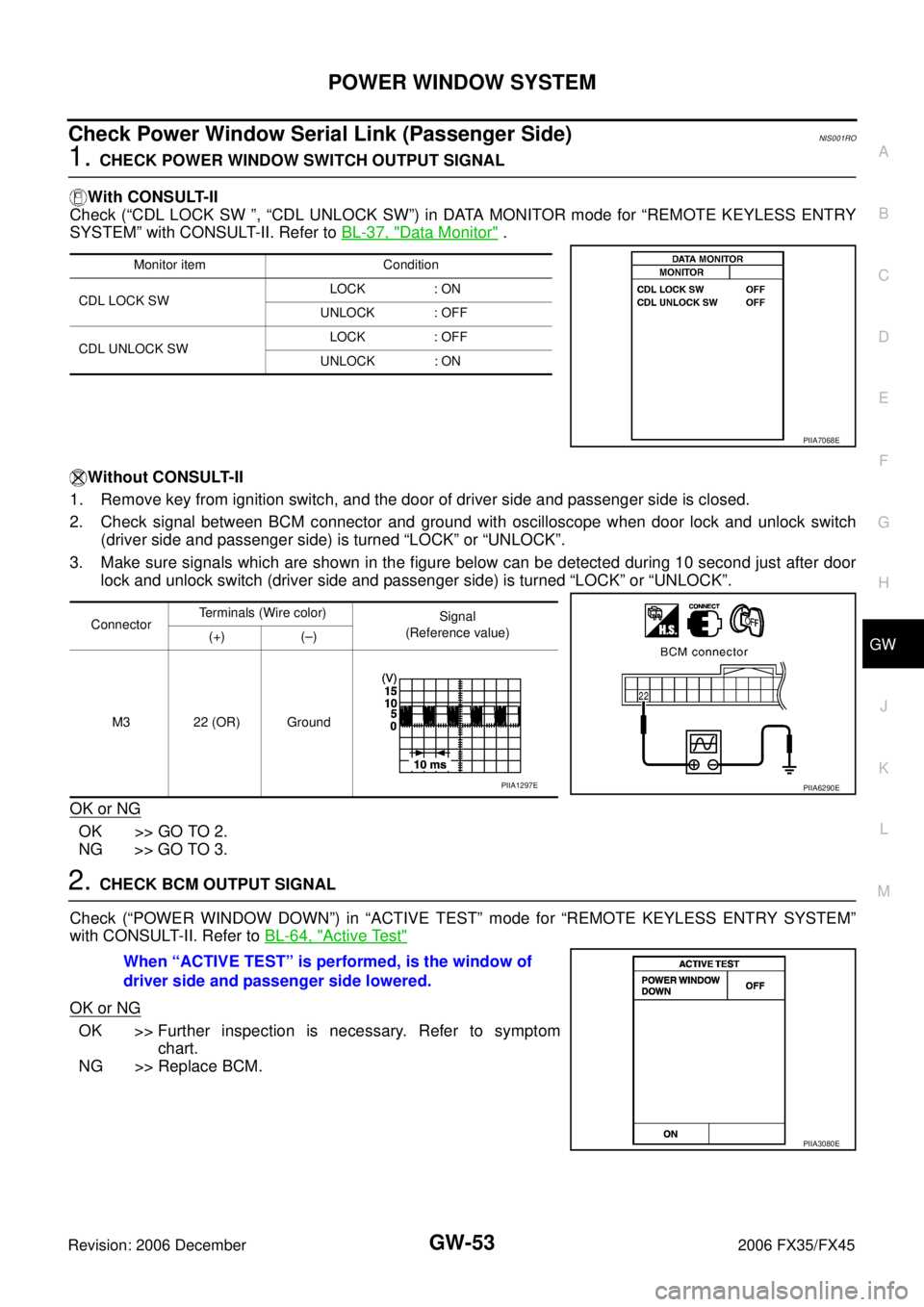
With CONSULT-II
Check (“CDL LOCK SW ”, “CDL UNLOCK SW”) in DATA MONITOR mode for “REMOTE KEYLESS ENTRY
SYSTEM” with CONSULT-II. Refer to BL-37, "
Data Monitor" .
Without CONSULT-II
1. Remove key from ignition switch, and the door of driver side and passenger side is closed.
2. Check signal between BCM connector and ground with oscilloscope when door lock and unlock switch (driver side and passenger side) is turned “LOCK” or “UNLOCK”.
3. Make sure signals which are shown in the figure below can be detected during 10 second just after door lock and unlock switch (driver side and passenger side) is turned “LOCK” or “UNLOCK”.
OK or NG
OK >> GO TO 2.
NG >> GO TO 3.
2. CHECK BCM OUTPUT SIGNAL
Check (“POWER WINDOW DOWN”) in “ACTIVE TEST” mode for “REMOTE KEYLESS ENTRY SYSTEM”
with CONSULT-II. Refer to BL-64, "
Active Test"
OK or NG
OK >> Further inspection is necessary. Refer to symptom
chart.
NG >> Replace BCM.
Monitor item Condition
CDL LOCK SW LOCK : ON
UNLOCK : OFF
CDL UNLOCK SW LOCK : OFF
UNLOCK : ON
PIIA7068E
Connector Terminals (Wire color)
Signal
(Reference value)
(+) (–)
M3 22 (OR) Ground
PIIA6290EPIIA1297E
When “ACTIVE TEST” is performed, is the window of
driver side and passenger side lowered.
PIIA3080E
Page 3307 of 4462
REAR WINDOW DEFOGGER GW-67
C
D E
F
G H
J
K L
M A
B
GW
Revision: 2006 December 2006 FX35/FX45
REAR WINDOW DEFOGGERPFP:25350
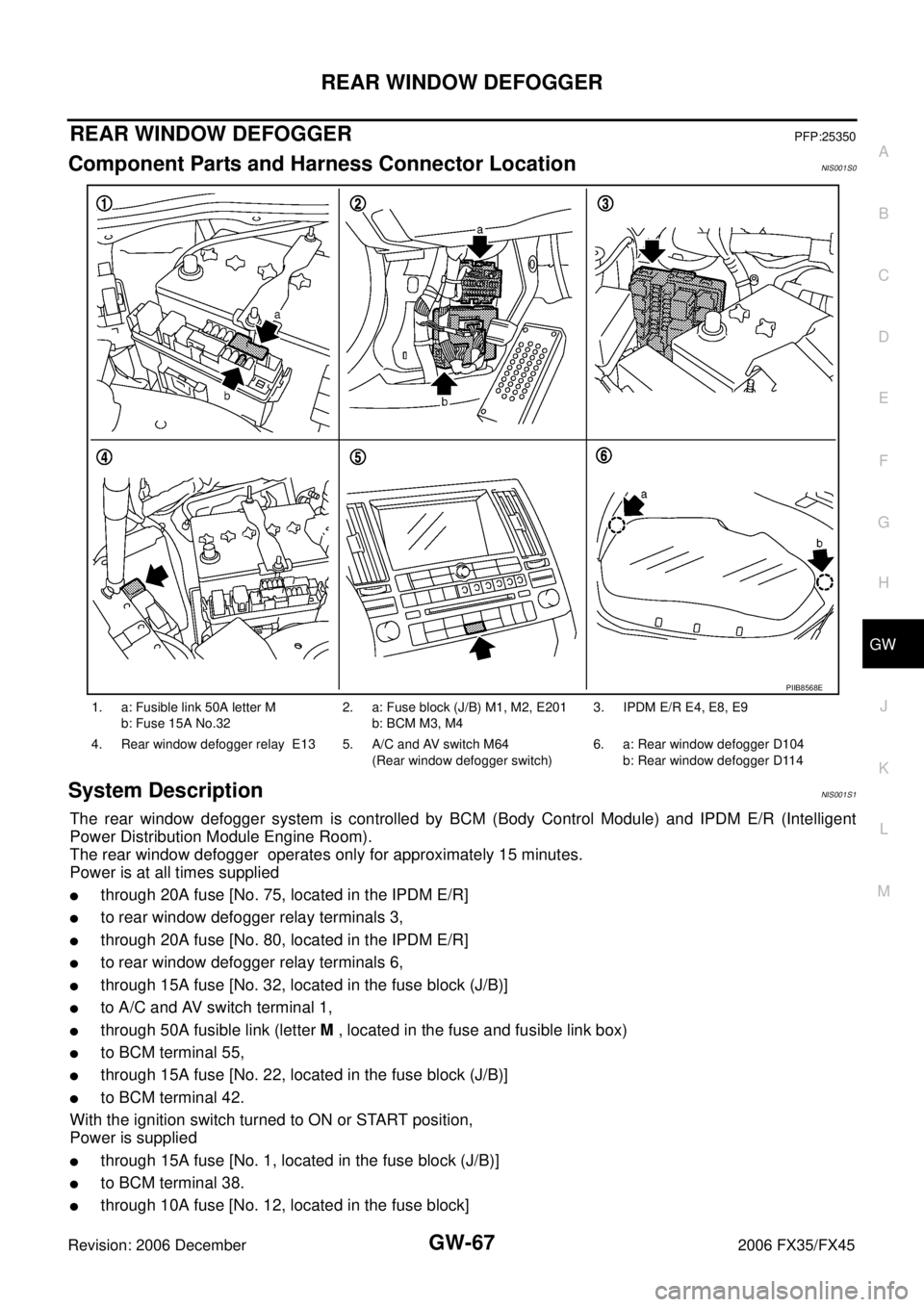
Component Parts and Harness Connector LocationNIS001S0
System DescriptionNIS001S1
The rear window defogger system is controlled by BCM (Body Control Module) and IPDM E/R (Intelligent
Power Distribution Module Engine Room).
The rear window defogger operates only for approximately 15 minutes.
Power is at all times supplied
�through 20A fuse [No. 75, located in the IPDM E/R]
�to rear window defogger relay terminals 3,
�through 20A fuse [No. 80, located in the IPDM E/R]
�to rear window defogger relay terminals 6,
�through 15A fuse [No. 32, located in the fuse block (J/B)]
�to A/C and AV switch terminal 1,
�through 50A fusible link (letter M , located in the fuse and fusible link box)
�to BCM terminal 55,
�through 15A fuse [No. 22, located in the fuse block (J/B)]
�to BCM terminal 42.
With the ignition switch turned to ON or START position,
Power is supplied
�through 15A fuse [No. 1, located in the fuse block (J/B)]
�to BCM terminal 38.
�through 10A fuse [No. 12, located in the fuse block]
1. a: Fusible link 50A letter M
b: Fuse 15A No.32 2. a: Fuse block (J/B) M1, M2, E201
b: BCM M3, M4 3. IPDM E/R E4, E8, E9
4. Rear window defogger relay E13 5. A/C and AV switch M64 (Rear window defogger switch) 6. a: Rear window defogger D104
b: Rear window defogger D114
PIIB8568E
Page 3317 of 4462
REAR WINDOW DEFOGGER GW-77
C
D E
F
G H
J
K L
M A
B
GW
Revision: 2006 December 2006 FX35/FX45
Check BCM Power Supply and Ground Circuit NIS001SB
First perform the “SELF-DIAG RESULTS” in “BCM” with CONSULT-II, when perform the each trouble
diagnosis. Refer to BCS-14, "
CAN Communication Inspection Using CONSULT-II (Self-Diagnosis)" .
1. CHECK FUSE
�Check 15A fuse [No.1, located in the fuse block (J/B)]
�Check 15A fuse [No.22, located in the fuse block (J/B)]
�Check 50A fusible link (letter M located in the fuse and fusible link box).
NOTE:
Refer to GW-67, "
Component Parts and Harness Connector Location" .
OK or NG
OK >> GO TO 2.
NG >> If fuse is blown out, be sure to eliminate cause of malfunction before installing new fuse. Refer to PG-3, "
POWER SUPPLY ROUTING CIRCUIT" .
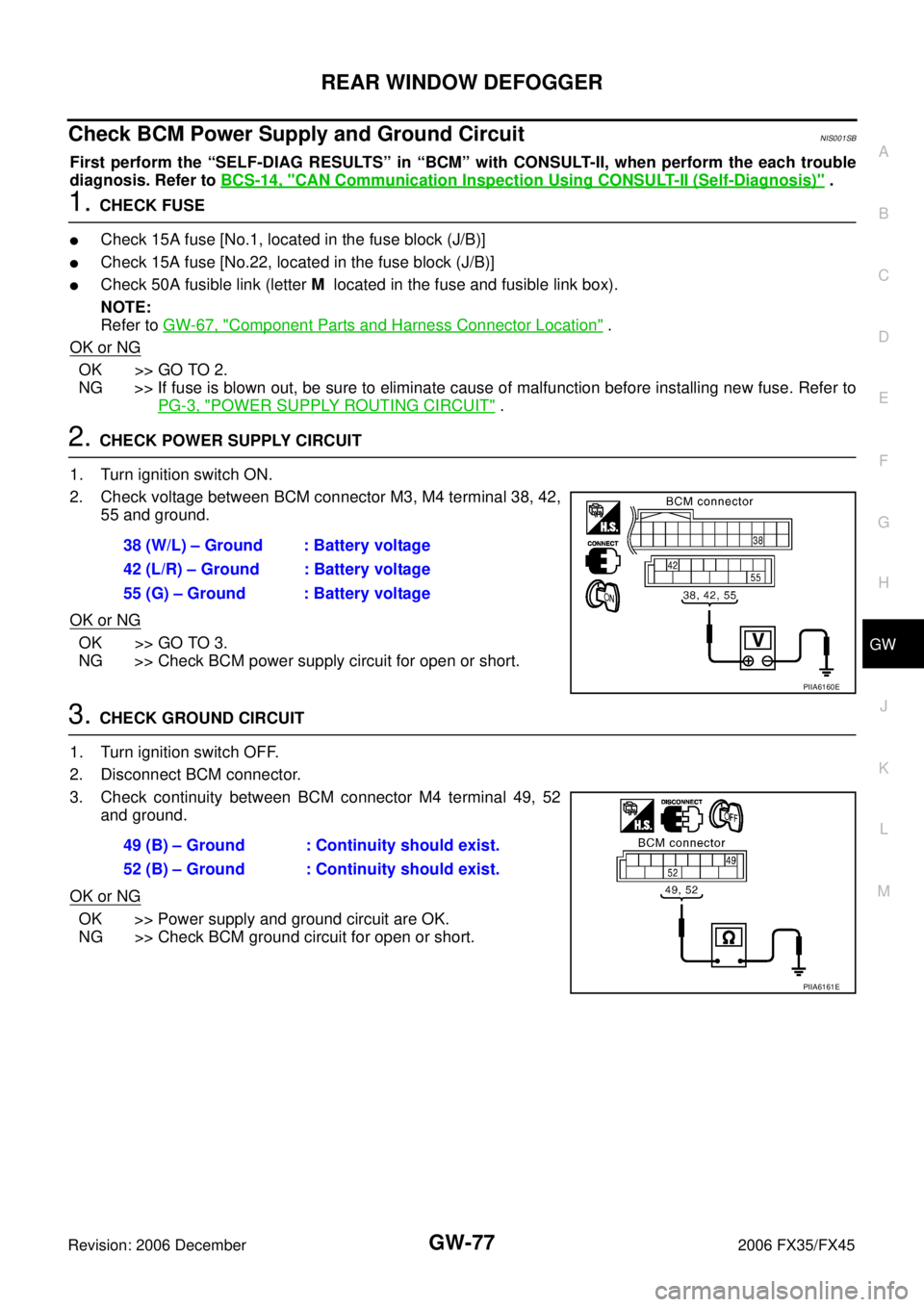
2. CHECK POWER SUPPLY CIRCUIT
1. Turn ignition switch ON.
2. Check voltage between BCM connector M3, M4 terminal 38, 42, 55 and ground.
OK or NG
OK >> GO TO 3.
NG >> Check BCM power supply circuit for open or short.
3. CHECK GROUND CIRCUIT
1. Turn ignition switch OFF.
2. Disconnect BCM connector.
3. Check continuity between BCM connector M4 terminal 49, 52 and ground.
OK or NG
OK >> Power supply and ground circuit are OK.
NG >> Check BCM ground circuit for open or short. 38 (W/L) – Ground : Battery voltage
42 (L/R) – Ground : Battery voltage
55 (G) – Ground : Battery voltage
PIIA6160E
49 (B) – Ground : Continuity should exist.
52 (B) – Ground : Continuity should exist.
PIIA6161E
Page 3319 of 4462
REAR WINDOW DEFOGGER GW-79
C
D E
F
G H
J
K L
M A
B
GW
Revision: 2006 December 2006 FX35/FX45
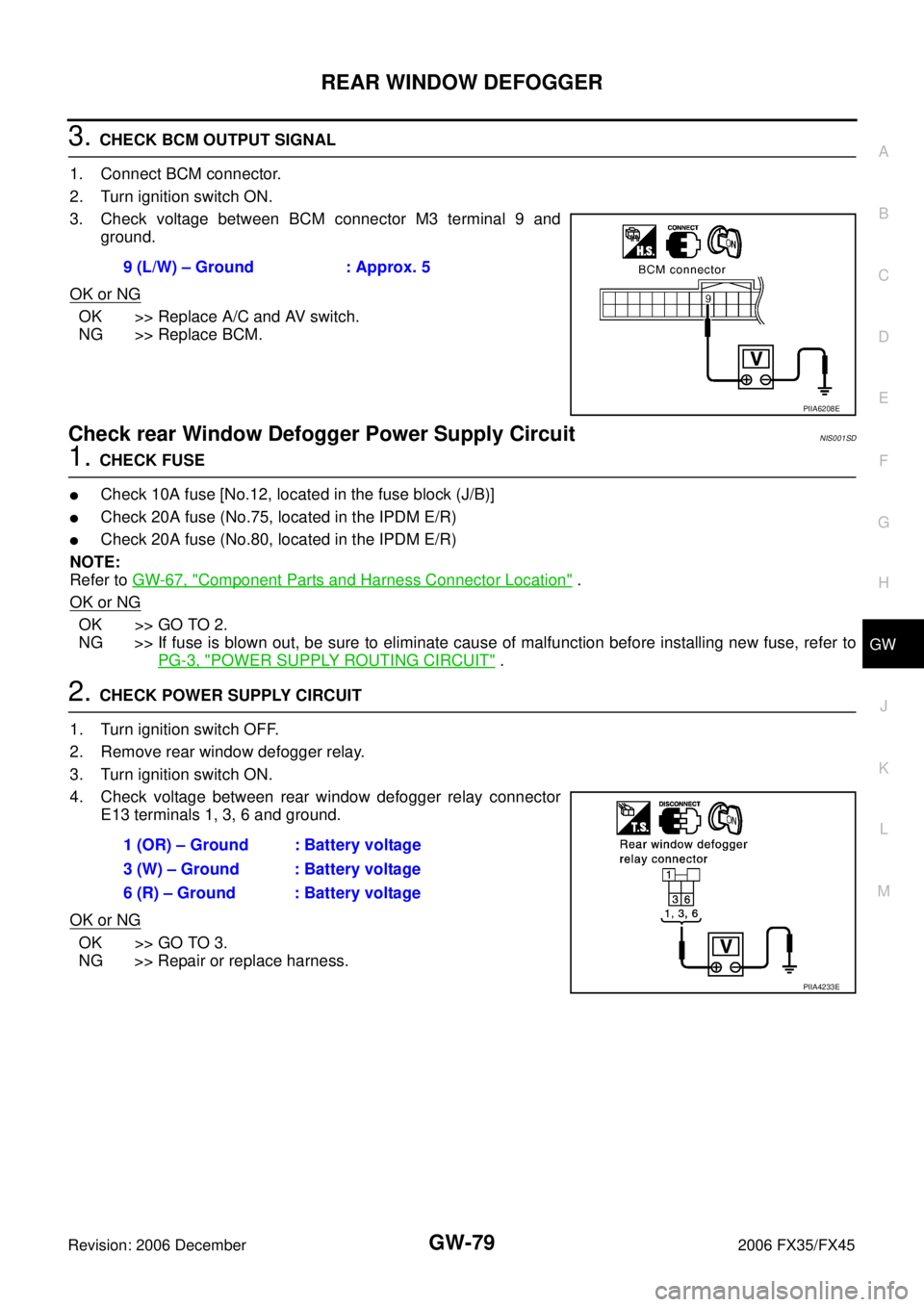
3. CHECK BCM OUTPUT SIGNAL
1. Connect BCM connector.
2. Turn ignition switch ON.
3. Check voltage between BCM connector M3 terminal 9 and ground.
OK or NG
OK >> Replace A/C and AV switch.
NG >> Replace BCM.
Check rear Window Defogger Power Supply Circuit NIS001SD
1. CHECK FUSE
�Check 10A fuse [No.12, located in the fuse block (J/B)]
�Check 20A fuse (No.75, located in the IPDM E/R)
�Check 20A fuse (No.80, located in the IPDM E/R)
NOTE:
Refer to GW-67, "
Component Parts and Harness Connector Location" .
OK or NG
OK >> GO TO 2.
NG >> If fuse is blown out, be sure to eliminate cause of malfunction before installing new fuse, refer to
PG-3, "
POWER SUPPLY ROUTING CIRCUIT" .
2. CHECK POWER SUPPLY CIRCUIT
1. Turn ignition switch OFF.
2. Remove rear window defogger relay.
3. Turn ignition switch ON.
4. Check voltage between rear window defogger relay connector E13 terminals 1, 3, 6 and ground.
OK or NG
OK >> GO TO 3.
NG >> Repair or replace harness. 9 (L/W) – Ground : Approx. 5
PIIA6208E
1 (OR) – Ground : Battery voltage
3 (W) – Ground : Battery voltage
6 (R) – Ground : Battery voltage
PIIA4233E
Page 3322 of 4462
GW-82
REAR WINDOW DEFOGGER
Revision: 2006 December 2006 FX35/FX45
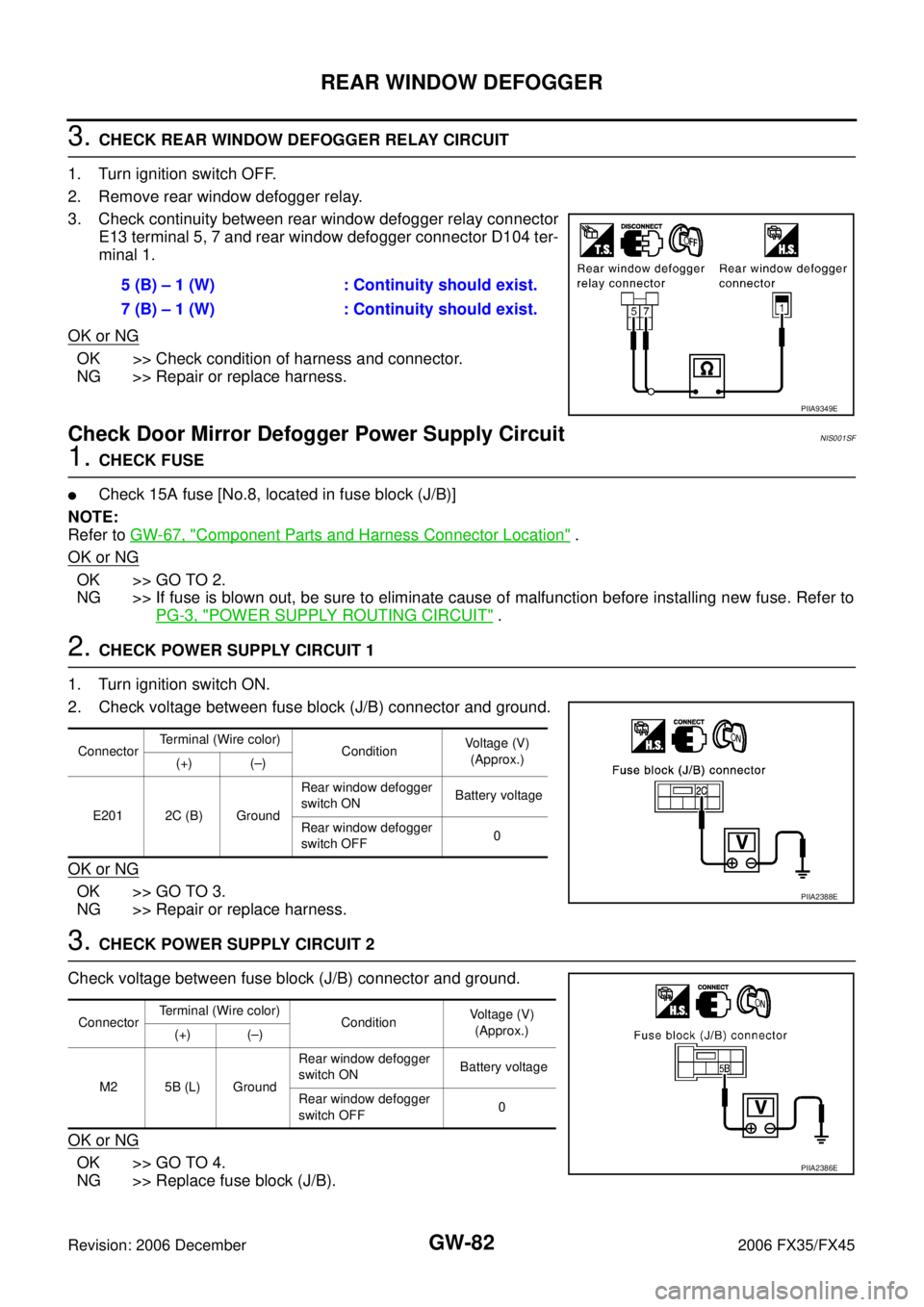
3. CHECK REAR WINDOW DEFOGGER RELAY CIRCUIT
1. Turn ignition switch OFF.
2. Remove rear window defogger relay.
3. Check continuity between rear window defogger relay connector E13 terminal 5, 7 and rear window defogger connector D104 ter-
minal 1.
OK or NG
OK >> Check condition of harness and connector.
NG >> Repair or replace harness.
Check Door Mirror Defogger Power Supply Circuit NIS001SF
1. CHECK FUSE
�Check 15A fuse [No.8, located in fuse block (J/B)]
NOTE:
Refer to GW-67, "
Component Parts and Harness Connector Location" .
OK or NG
OK >> GO TO 2.
NG >> If fuse is blown out, be sure to eliminate cause of malfunction before installing new fuse. Refer to
PG-3, "
POWER SUPPLY ROUTING CIRCUIT" .
2. CHECK POWER SUPPLY CIRCUIT 1
1. Turn ignition switch ON.
2. Check voltage between fuse block (J/B) connector and ground.
OK or NG
OK >> GO TO 3.
NG >> Repair or replace harness.
3. CHECK POWER SUPPLY CIRCUIT 2
Check voltage between fuse block (J/B) connector and ground.
OK or NG
OK >> GO TO 4.
NG >> Replace fuse block (J/B). 5 (B) – 1 (W) : Continuity should exist.
7 (B) – 1 (W) : Continuity should exist.
PIIA9349E
Connector Terminal (Wire color)
Condition Voltage (V)
(Approx.)
(+) (–)
E201 2C (B) Ground Rear window defogger
switch ON Battery voltage
Rear window defogger
switch OFF 0
PIIA2388E
Connector Terminal (Wire color)
Condition Voltage (V)
(Approx.)
(+) (–)
M2 5B (L) Ground Rear window defogger
switch ON Battery voltage
Rear window defogger
switch OFF 0
PIIA2386E
Page 3323 of 4462
REAR WINDOW DEFOGGER GW-83
C
D E
F
G H
J
K L
M A
B
GW
Revision: 2006 December 2006 FX35/FX45
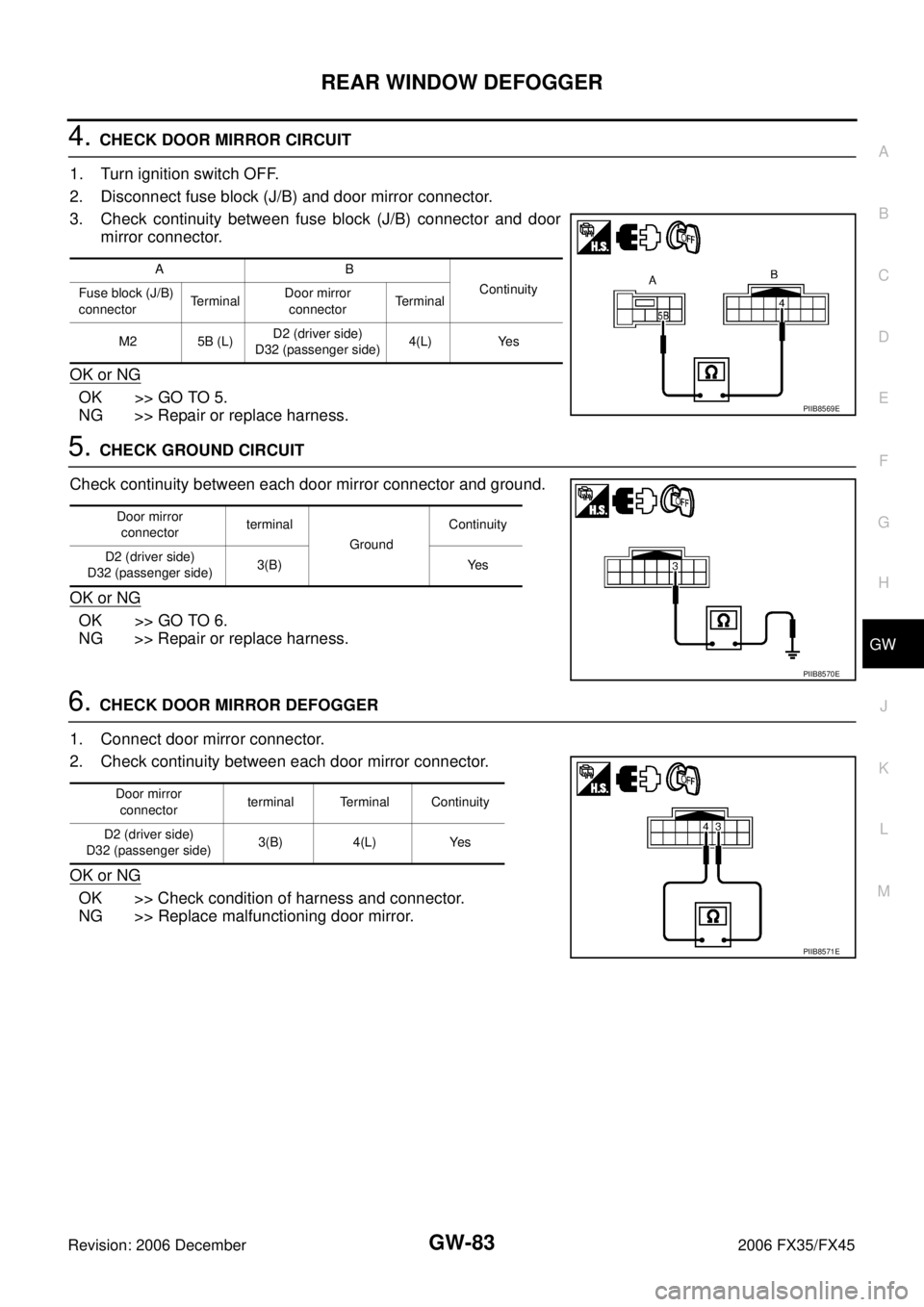
4. CHECK DOOR MIRROR CIRCUIT
1. Turn ignition switch OFF.
2. Disconnect fuse block (J/B) and door mirror connector.
3. Check continuity between fuse block (J/B) connector and door mirror connector.
OK or NG
OK >> GO TO 5.
NG >> Repair or replace harness.
5. CHECK GROUND CIRCUIT
Check continuity between each door mirror connector and ground.
OK or NG
OK >> GO TO 6.
NG >> Repair or replace harness.
6. CHECK DOOR MIRROR DEFOGGER
1. Connect door mirror connector.
2. Check continuity between each door mirror connector.
OK or NG
OK >> Check condition of harness and connector.
NG >> Replace malfunctioning door mirror.
AB
Continuity
Fuse block (J/B)
connector TerminalDoor mirror
connector Te r m i n a l
M2 5B (L) D2 (driver side)
D32 (passenger side) 4(L) Yes
PIIB8569E
Door mirror
connector terminal
Ground Continuity
D2 (driver side)
D32 (passenger side) 3(B) Yes
PIIB8570E
Door mirror
connector terminal Terminal Continuity
D2 (driver side)
D32 (passenger side) 3(B) 4(L) Yes
PIIB8571E