2006 Hyundai Accent lock
[x] Cancel search: lockPage 382 of 599

1FEATURES OF YOUR HYUNDAI
100
H210B04O-AAT
1. POWER ON-OFF/VOLUMEControl Knob
The radio unit may be operated when the ignition key is in the "ACC" or "ON"position. Rotate the knob clockwise to switch the radio unit on and to increase the volume.The LCD shows the radio frequency in the radio mode. Turn the knob counter- clockwise to reduce the volume and toswitch the radio unit off. BAL (Balance Control) Knob Pull and turn the control knob clockwise to emphasize right speaker sound (left speaker sound will be attenuated). When the control knob is turned counterclock-wise, left speaker sound will be empha- sized (right speaker sound will be at- tenuated).After adjusting the balance, push the knob again to use the other function. SCAN Knob When the scan knob is pressed, the frequency will increase and the receiv-able stations will be tuned in one after another, receiving each station for 5 seconds. To stop scanning, press thescan knob again.
2. FAD (Fader Control) Knob Turn the control knob counterclockwise to emphasize front speaker sound (rear speaker sound will be attenuated). Whenthe control knob is turned clockwise, rear speaker sound will be emphasized (front speaker sound will be attenu-ated).
3. BASS Control Knob Press to pop the knob out and turn to the left or right for the desired bass tone. TREBLE Control Knob. Pull the bass control knob further out. Turn to the left or right for the desiredtreble tone. 4. BAND Selector Pressing the button changes the AM, FM1 and FM2 bands. The modeselected is displayed on LCD.
5. TUNE (manual) Select Button Press the ( ) side or ( ) side to increase or to decrease the frequency. With the button held down for 1 sec. ormore, the stop signal (broadcasting radio wave) is ignored and channel selection continues. SEEK Operation (Automatic Channel Selection) Press the TUNE select button for 1 sec. or more. When the ( ) side is pressed,the unit will automatically tune to the next higher frequency and when the ( ) side is pressed, it will automaticallytune to the next lower frequency.
6. PRESET STATION SELECT
Button
Six (6) stations for AM, FM1 and FM2 respectively can be preset in the elec- tronic memory circuit on this unit.
FM AM
Page 387 of 599

1
FEATURES OF YOUR HYUNDAI
105
H260B04O-AAT
1. POWER ON-OFF Control Knob
The radio unit may be operated when the ignition key is in the "ACC" or "ON"position. Press the knob to switch the power on. The LCD shows the radio frequency in the radio mode or the CDtrack indicator in the CD mode. To switch the power off, press the knob again. VOLUME Control Rotate the knob clockwise to increase the volume and turn the knob counter-clockwise to reduce the volume. BALANCE Control Pull and turn the control knob clockwise to emphasize right speaker sound (left speaker sound will be attenuated). Whenthe control knob is turned counterclock- wise, left speaker sound will be empha- sized (right speaker sound will be at-tenuated). 2. FAD (Fader Control) Knob Turn the control knob counterclockwise to emphasize front speaker sound (rearspeaker sound will be attenuated). When the control knob is turned clockwise, rear speaker sound will be emphasized(front speaker sound will be attenu- ated).
3. BASS Control Knob Press to pop the knob out and turn to the left or right for the desired basstone. TREB (Treble Control) Knob Pull the bass control knob further out. Turn to the left or right for the desired treble tone.
4. SCAN Button When the scan button is pressed, the frequency will increase and the receiv-able stations will be tuned in one after another, receiving each station for 5 seconds. To stop scanning, press thescan button again.5. TUNE (Manual) Select Button Press the ( ) side or ( ) side to increase or to decrease the frequency.Press either button and hold down to continuously scroll. Release button once the desired station is reached. SEEK Operation (Automatic Channel Selection) Press the TUNE select button for 0.5 sec or more. Releasing it will automati-cally tune to the next available station with a beep sound. When the ( ) side is pressed longerthan 0.5 second, releasing will auto- matically tune to the next higher fre- quency and when the ( ) side ispressed longer than 0.5 second, releas- ing will automatically tune to the next lower frequency.
6. BAND Selector Pressing the button changes the AM, FM1 and FM2 bands. The mode selected is displayed on LCD.
FM/AM
Page 395 of 599

1
FEATURES OF YOUR HYUNDAI
113ANTENNA
NOTE: Look at a tape before you insert it. If the tape is loose, tighten it by turning one of the hubs with a pencil or your finger.If the label is peeling off, do not put it in the drive mechanism. Do not leave tapes sitting wherethey are exposed to hot, warm, or high humidity, such as on top of the dashboard or in the player.If a tape is exposed to excessively hot or cold, let it reach a moderate temperature before putting it in theplayer. B870A01A-AAT Fixed Rod Antenna (If Installed) Your car uses a fixed rod antenna to receive both AM and FM broadcast signals. This antenna is a removable type. Toremove the antenna, turn the antenna counterclockwise. To install the an- tenna, turn the antenna clockwise.
CAUTION:
o Be sure to remove the antenna before washing the car in an auto-matic car wash or the antenna may be damaged.
! B870C01A-GAT Manual Antenna (If Installed) Your car uses a manual stainless steel antenna to receive both AM and FM broadcast signals. Pull up the antenna using your fingers, as shown in thedrawing. NOTE: Before entering an automatic car wash or a place with a low heightclearance, be sure that the antenna is fully retracted.
B860A03L
B870A01A
o When reinstalling your antenna, it
is important that it is fully tight- ened to ensure proper reception.
HLC2122
Page 396 of 599
1FEATURES OF YOUR HYUNDAI
114
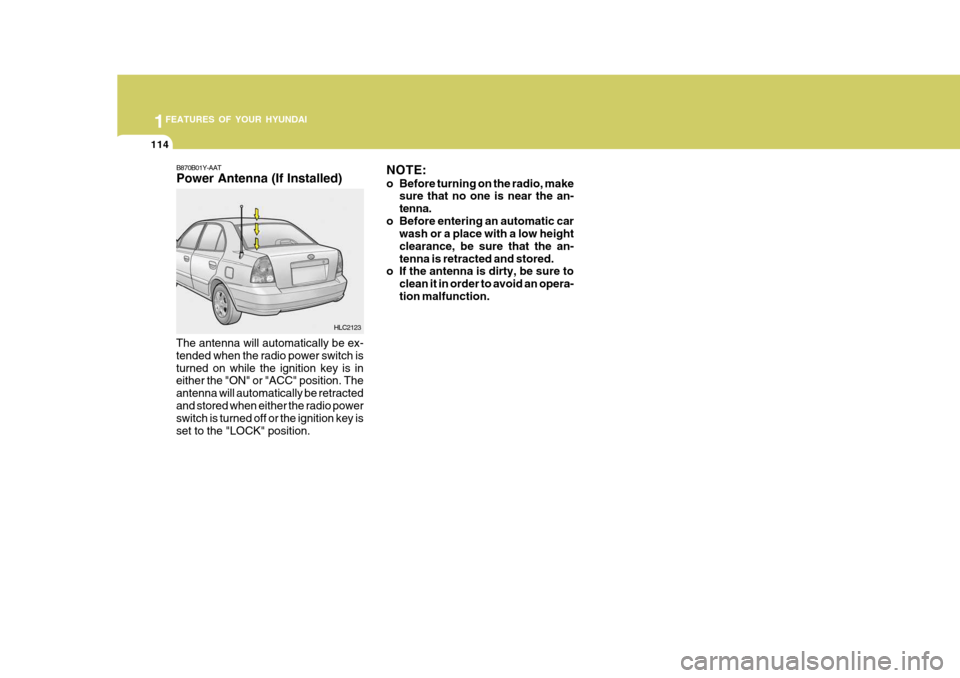
B870B01Y-AAT Power Antenna (If Installed)
The antenna will automatically be ex- tended when the radio power switch isturned on while the ignition key is in either the "ON" or "ACC" position. The antenna will automatically be retractedand stored when either the radio power switch is turned off or the ignition key is set to the "LOCK" position. NOTE:
o Before turning on the radio, make
sure that no one is near the an- tenna.
o Before entering an automatic car wash or a place with a low heightclearance, be sure that the an-tenna is retracted and stored.
o If the antenna is dirty, be sure to
clean it in order to avoid an opera-tion malfunction.
HLC2123
Page 406 of 599

CAUTION:
When installing a container of liquid air freshener inside the vehicle, do not place it near the instrument cluster nor on the instrument panel pad surface. If there is any leakage from the air freshener onto these areas (Instrument cluster, instrument panel pad or air ventilator), it may damage these parts. If the liquid from air freshener does leak onto these areas, wash themwith water immediately.!
1. Passenger's Airbag (Not all models)
2. Glove Box
3. Heating/Air Conditioning Control Panel
(Not all models)
4. Rear Fog Light Switch
5. Rear Window Defogger Switch (Not all models)
6. Hazard Warning Light Switch
7. Front Fog Light Switch (Not all models)
8. Digital Clock 9. Windscreen Wiper/Washer Switch
10. Horn and Driver's Airbag
11. Instrument Cluster
12. Multi-Function Light Switch 13. Headlight Leveling Switch
14. Rear Wiper/Washer Switch (Not all models)
15. Rear Drink Holder
16. Parking Brake Lever
17. Shift Lever (Not all models)
18. Front Drink Holder
19. Ashtray
20. Cigar Lighter
21. Bonnet Release Lever
Page 412 of 599

5
1
CONTROLS AND EQUIPMENT
!
IMMOBILISER SYSTEM
6SB035A1-FE The immobiliser system is an anti-theft device, designed to prevent and deter vehicle theft. B880B03A-GAT Keys All of the locks fitted to the vehicle are operated by the same key. However,since it is possible to lock the doors without the use of the key, care should be exercised to ensure that the keydoes not become locked inside the vehicle by mistake. NOTE: If you make your own duplicate key, you will not be able to cancel the system or start the engine. B880C02A-GAT Key Numbers
B880C01L
1) Do not race the engine without a load
(i.e revving the engine in neutral).
2) During the first 600 miles the maxi- mum engine speed should be re- stricted to 3,000 rpm and graduallyincreased thereafter. And while driv- ing, keep under three quarters of maximum vehicle speed.
3) Avoid prolonged constant speed op- eration. The internal components ofthe engine will become run-in morequickly if the operation speed is var- ied during the running-in period.
4) Never allow the engine to labour. Use the gearbox freely and avoid largethrottle openings when the engine speed is below 1,500 rpm.
5) Avoid rapid acceleration and maxi- mum throttle openings.
6) Avoid harsh braking during the first 100 miles of urban motoring or 1,000 miles of motorway driving to allow the friction facings of the brake padsand shoes to bed against the discs and drums properly.
7) No trailer towing should be under- taken during the running-in period. CAUTION:
o The password should be recorded and kept in a safe place in case the need to order further keys arises.
o If you forget the password, con-
sult your authorized Hyundaidealer. o When starting the engine, do not
use the key with other immobi- lizer keys around. Otherwise the engine may not start or may stopsoon after it starts. Keep each keys separately not to have any malfunction after youreceive your new vehicle.
The vehicle key number is recorded upon a metal tag attached to the keyswhen the vehicle is first delivered to you.
Page 413 of 599

1CONTROLS AND EQUIPMENT
6
The key number should be recorded and kept in a safe place in case theneed to order further keys arises. New keys are available from any Hyundai dealer by quoting the relevant keynumber. In the interest of security, the metal tag attached to the keys which bears thekey number should be removed from the key ring after you receive your new vehicle. In addition, key numbers can-not be provided by Hyundai for security reasons. If you need additional keys or if youshould lose your keys, your authorized Hyundai dealer can make new keys.
!
B040A02Y-EAT Door Locks B040B01A-AATLocking and Unlocking Front Doors With a Key
WARNING:
o Unlocked doors can be danger- ous. Before you drive away (espe- cially if there are children in thecar), be sure that all the doors are securely closed and locked so that the doors cannot be inadvert-ently opened from the inside. This helps ensure that doors will not be opened accidentally. Also, when combined with the proper use of seat belts, locking the doors helpskeep occupants from being ejected from the car in case of an accident.
o Before opening the door, always look for and avoid oncoming traf-fic.
o In case of accident the door is unlocked automatically (Not allmodels). o The door can be locked or unlocked
with a key.
o Lock the door by turning the key
toward the front of the vehicle and unlock it by turning the key toward the rear.
UNLOCK
LOCK
HLC2003-D
DOOR
Page 414 of 599

7
1
CONTROLS AND EQUIPMENT
SB040D1-F Locking from the Inside To lock the doors from inside, simply close the door and push the lock switch to the "LOCK" position. When this is done, the door cannot beusing either the inside or the outside door handle. SB040F1-E CHILD-PROOF REAR DOOR LOCK (Not all models) The rear doors are fitted with child proof locks to prevent accidental opening of the doors using the inside door handle,whilst allowing access by means of the outside handle (such as is required in the event of an acccident for example)provided that the door lock button is at the unlocked position. Use of the child
NOTE: When the door is locked, the red mark on the switch is not visible and the character "LOCK" on the switchis visible.
LOCK HLC2005-D
B040C03A-EAT Locking From the Outside The doors can be locked without a key. To lock the doors, first push the inside lock switch to the "LOCK" position sothat the red mark on the switch is not visible, then close the door. NOTE:
o If your vehicle is equipped with
central door locking system, the door will not lock if the key is left in the ignition switch when thefront doors close.
o When locking the door this way,
be careful not to lock the door withthe ignition key left in the vehicle. HLC2008-D
o To protect against theft, always
remove the ignition key, close allwindows, and lock all doors and boot lid(4Door)/hatchback door(3/ 5 Door) when leaving your vehicleunattended.
HLC2004-D
UNLOCK