Page 194 of 320

Youshoulddothefollowingchecks
and adjustments bef ore you drive
your vehicle.Make sure all windows, mirrors,
and outside lights are clean and
unobstructed. Remove f rost, snow,
or ice.
Check that the hood is f ully closed.
Check that the tailgate is f ully
closed when it is not used as an
extended pickup bed.
Visually check the tires. If a tire
looks low, use a gauge to check its
pressure.
Check that any items you may be
carrying are stored properly or
f astened down securely. Check the adjustment of the
inside and outside mirrors (see
page ).
Check the steering wheel
adjustment (see page ).
Make sure the doors and In-Bed
Trunk are securely closed and
locked.
Fasten your seat belt. Check that
your passengers have f astened
their seat belts (see page ).
When you start the engine, check
the gauges and indicators in the
instrument panel (see page ).
Check the seat adjustment (see
pages and ).
1.
2.
3.
4.
5.
6.
8. 7.
9.
10.
11. 14
57
107
76
95 97
Preparing to Drive
Driving
191
�����—�
���—�����y�
���������
���y���
�(�����������y���
�����y
Page 204 of 320

Make sure the moonroof (if
equipped) and the windows are
closed.
Turn of f the lights.
Place any packages, valuables, etc.
in the cargo area in your vehicle or
the In-Bed Trunk, or take them
with you.
Lock the doors.
Check the indicator on the driver’s
door to verify that the security
system is set.
Never park over dry leaves, tall
grass, or other f lammable
materials. The hot three way
catalytic converter could cause
these materials to catch on fire.
Set the parking brake bef ore you put
the transmission in Park. This keeps
the vehicle from moving and putting
pressure on the parking mechanism
in the transmission. Always use the parking brake when
you park your vehicle. Make sure
the parking brake is set f irmly or
your vehicle may roll if it is on an
incline.
On vehicles with security system
As required by the FCC:
This device complies with Part 15 of theFCC rules. Operation is subject to thef ollowing two conditions: (1) This devicemay not cause harmf ul interf erence, and(2) this device must accept anyinterf erence received, includinginterf erence that may cause undesiredoperation.
Changes or modif ications not expresslyapproved by the party responsible f orcompliance could void the user’sauthority to operate the equipment.
This device complies with IndustryCanada Standard RSS-210.Operation is subject to the f ollowing twoconditions: (1) this device may not causeinterf erence, and (2) this device mustaccept any interf erence that may causeundesired operation of the device.
CONT INUED
Parking T ips
Parking
Tire Pressure Monitoring System (TPMS), Parking
Driving
201
�����—�
���—�����y�
�������������y���
�(�����������y���������y
Page 257 of 320
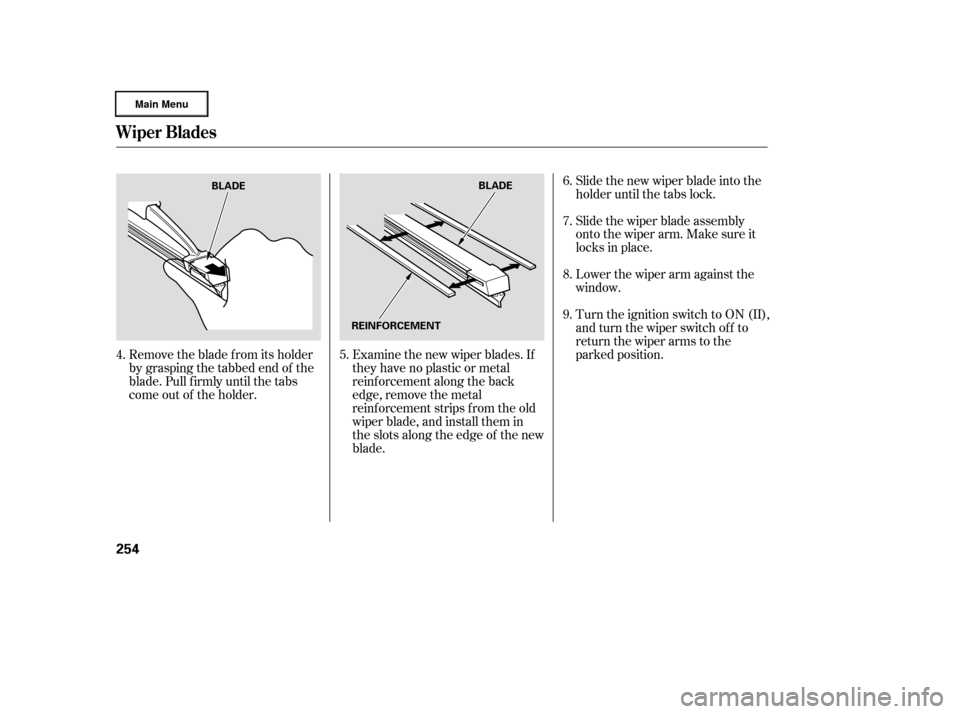
Remove the blade f rom its holder
by grasping the tabbed end of the
blade. Pull f irmly until the tabs
come out of the holder.Examine the new wiper blades. If
they have no plastic or metal
reinf orcement along the back
edge, remove the metal
reinf orcement strips f rom the old
wiper blade, and install them in
the slots along the edge of the new
blade.Slide the new wiper blade into the
holder until the tabs lock.
Slide the wiper blade assembly
onto the wiper arm. Make sure it
locks in place.
Lower the wiper arm against the
window.
Turn the ignition switch to ON (II),
andturnthewiperswitchoff to
return the wiper arms to the
parked position.
6.
7.
4. 5. 8.
9.
Wiper Blades
254
BLADE
BLADE
REINFORCEMENT
�����—�
���—�����y�
���������
���y���
�(�����������y���������y
Page 263 of 320
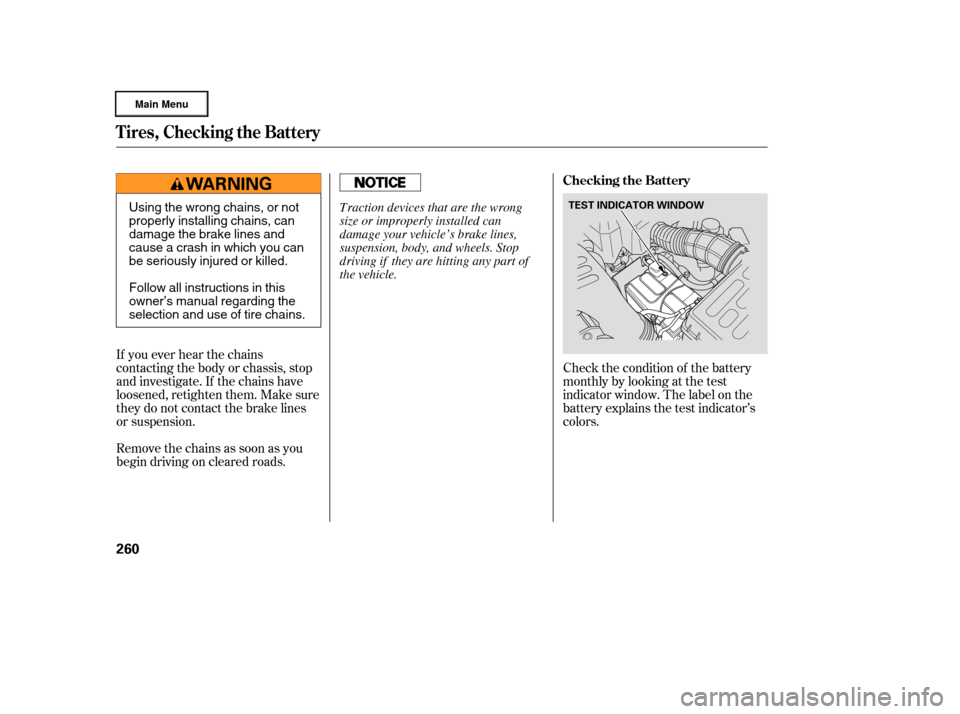
Check the condition of the battery
monthlybylookingatthetest
indicator window. The label on the
battery explains the test indicator’s
colors.
If you ever hear the chains
contacting the body or chassis, stop
and investigate. If the chains have
loosened, retighten them. Make sure
they do not contact the brake lines
or suspension.
Removethechainsassoonasyou
begin driving on cleared roads.
Tires, Checking the Battery
Checking the Battery
260
TEST INDICATOR WINDOWUsing the wrong chains, or not
properly installing chains, can
damage the brake lines and
cause a crash in which you can
be seriously injured or killed.
Follow all instructions in this
owner’s manual regarding the
selection and use of tire chains. Traction devices that are the wrong
size or improperly installed can
damage your vehicle’s brake lines,
suspension, body, and wheels. Stop
driving if they are hitting any part of
the vehicle.
�����—�����—�����y�
�������������y���
�(�����������y���������y
Page 265 of 320

If you need to park your vehicle f or
an extended period (more than 1
month), there are several things you
should do to prepare it f or storage.
Proper preparation helps prevent
deterioration and makes it easier to
get your vehicle back on the road. If
possible, store your vehicle indoors.Fill the f uel tank.
Change the engine oil and f ilter.
Wash and dry the exterior
completely.
Cleantheinterior.Makesurethe
carpeting, floor mats, etc., are
completely dry.
Leave the parking brake off. Put
the transmission in Park. Block the rear wheels.
If the vehicle is to be stored f or a
longer period, it should be
supported on jackstands so the
tires are of f the ground.
Leave one window open slightly (if
the vehicle is being stored
indoors).
Disconnect the battery.
Cover the vehicle with a
‘‘breathable’’ cover, one made
f rom a porous material such as
cotton. Non-porous materials, such
as plastic sheeting, trap moisture,
which can damage the paint.
If possible, periodically run the
engine until it reaches f ull
operating temperature (the
cooling f ans cycle on and of f
twice). Pref erably, do this once a
month.
Support the f ront wiper blade
arms with a f olded towel or rag so
they do not touch the windshield.
To minimize sticking, apply a
silicone spray lubricant to all door,
In-Bed Trunk lid, and tailgate seals.
Also,applyavehiclebodywaxto
the painted surfaces that mate
with the door, In-Bed Trunk lid
and tailgate seals.
Vehicle Storage
262
�����—�
���—�����y�
�������������y���
�(�����������y���������y
Page 281 of 320

Saf ely pull of f the road, and shut
of f the engine. Turn on the hazard
warning indicators.
Let the vehicle sit f or a minute.
Open the hood, and check the oil
level (see page ). An engine
very low on oil can lose pressure
during cornering and other driving
maneuvers.
If necessary, add oil to bring the
level back to the full mark on the
dipstick (see page ).If the charging system
indicator comes on brightly
when the engine is running, the
battery is not being charged.
Immediately turn of f all electrical
accessories. Try not to use other
electrically operated controls such as
the power windows. Keep the engine
running; starting the engine will
discharge the battery rapidly.
This indicator should never
come on when the engine is
running. If it starts f lashing or stays
on, the oil pressure has dropped very
low or lost pressure. Serious engine
damage is possible, and you should
take immediate action.
Start the engine, and watch the oil
pressure indicator. If it does not go
out within 10 seconds, turn of f the
engine. There is a mechanical
problem that needs to be repaired
bef ore you can continue driving
(see on page). Go to a service station or garage
where you can get technical
assistance.
1.
2.
3.
4.
178
236
286
L ow Oil Pressure Indicator Charging System Indicator
Emergency T owing
L ow Oil Pressure Indicator, Charging System Indicator
278
Running the engine with low oil
pressure can cause serious mechanical
damage almost immediately. Turn of f
the engine as soon as you can saf ely get
the vehicle stopped.
�����—�
���—�����y�
���������
���y���
�(�����������y���������y
Page 285 of 320
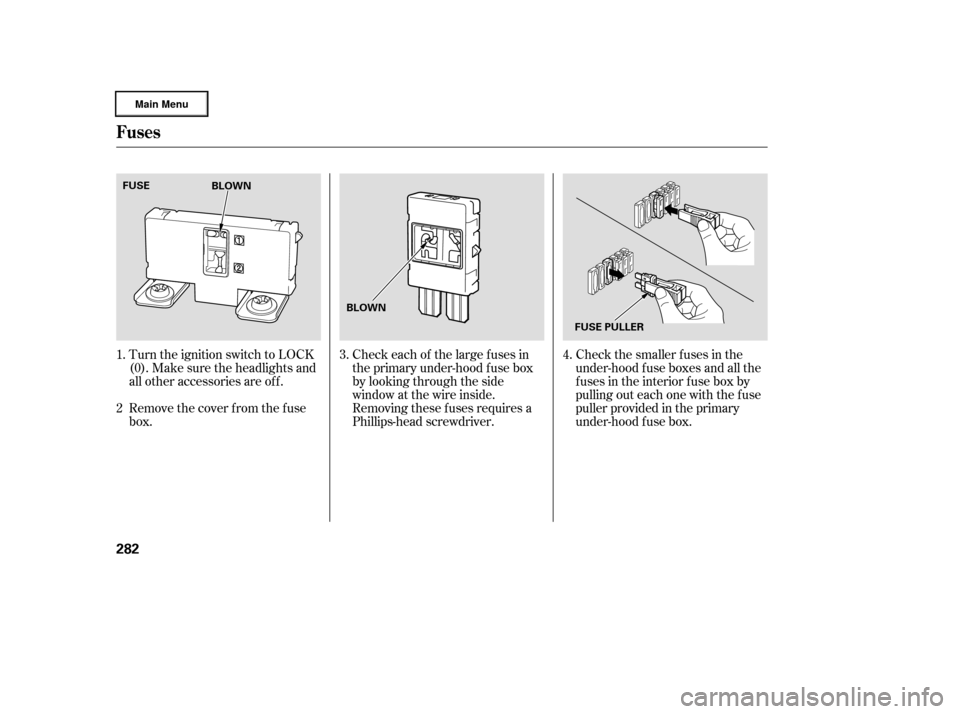
Check the smaller f uses in the
under-hood f use boxes and all the
fuses in the interior fuse box by
pulling out each one with the f use
puller provided in the primary
under-hood f use box.
Turn the ignition switch to LOCK
(0). Make sure the headlights and
all other accessories are off.
Remove the cover f rom the f use
box. Check each of the large f uses in
the primary under-hood f use box
by looking through the side
window at the wire inside.
Removing these f uses requires a
Phillips-head screwdriver.4.
3.
1.
2
Fuses
282
BLOWN
FUSE PULLER
BLOWN
FUSE
�����—�
���—�����y�
�������������y���
�(�����������y���������y
Page 286 of 320
If the replacement fuse of the
same rating blows in a short time,
there is probably a serious
electrical problem with your
vehicle. Leave the blown fuse in
that circuit, and have your vehicle
checked by a qualif ied mechanic.
If the driver’s power window f use is
removed, the AUTO f unction of the
driver’s window will be disabled. To
reset the AUTO f unction, see page .
If you cannot drive the vehicle
without f ixing the problem, and you
do not have a spare fuse, take a fuse
of the same rating or a lower rating
f rom one of the other circuits. Make
sureyoucandowithoutthatcircuit
temporarily (such as the accessory
power socket or radio).
If you replace the blown f use with a
spare f use that has a lower rating, it
might blow out again. This does not
indicate anything wrong. Replace the
f use with one of the correct rating as
soon as you can.
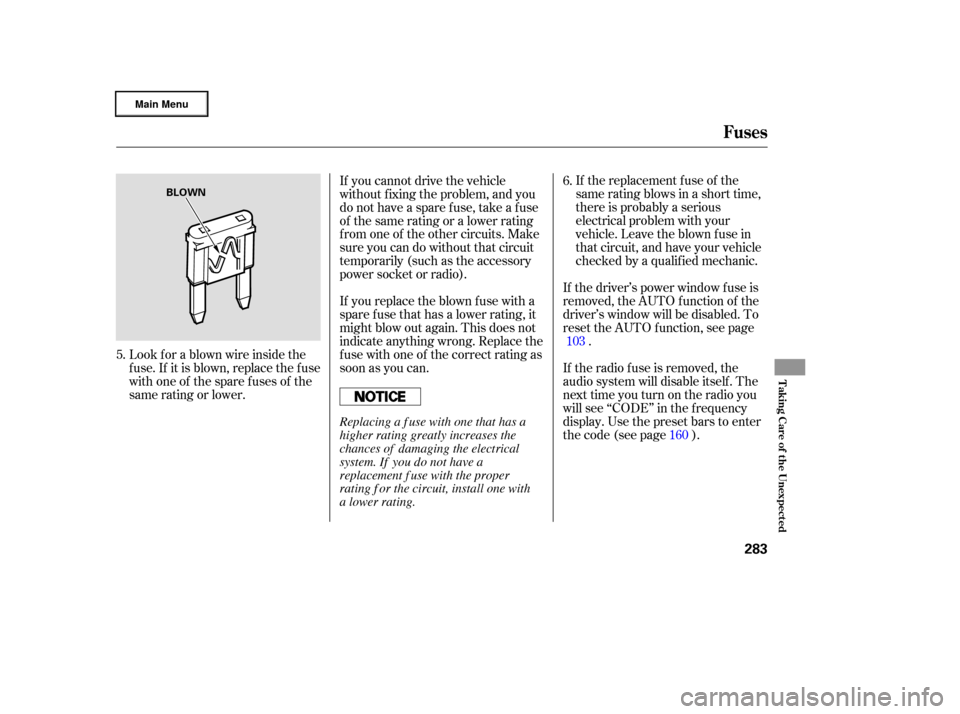
Look f or a blown wire inside the
fuse.If itisblown,replacethefuse
withoneof thesparefusesof the
same rating or lower. If the radio f use is removed, the
audio system will disable itself . The
nexttimeyouturnontheradioyou
will see ‘‘CODE’’ in the f requency
display. Use the preset bars to enter
thecode(seepage ).
5. 6.
103 160
Fuses
T aking Care of t he Unexpect ed
283
BLOWN
Replacing a f use with one that has a
higher rating greatly increases the
chances of damaging the electrical
system. If you do not have a
replacement f use with the proper
rating f or the circuit, install one with
a lower rating.
�����—�
���—�����y�
�������������y���
�(�����������y���������y