Page 2 of 420
T his owner’s manual should be considered
a permanent part of the vehicle and should
remain with the vehicle when it is sold.
T his Owner’s Manual covers all models of
the Odyssey. You may f ind descriptions of
equipment and f eatures that are not on your
particular model.
T he inf ormation and specif ications included
in this publication were in ef f ect at the time
of approval f or printing. Honda Motor Co.,
Ltd. reserves the right, however, to
discontinue or change specif ications or
design at any time without notice and
without incurring any obligation whatsoever.
Owner’s Identif ication
POUR CLIENTS CANADIEN
A VIS IMPORT A NT : Si vous avez
besoin d’un Manuel du Conduct eur
en f rançais, veuillez demander à
votreconcessionnairede
commander le numéro de pièce
33SHJC10
OWNER
ADDRESS
V. I. N.
DELIVERY DATE
DEALER NAMEDEALER NO.
ADDRESS
OWNER’S SIGNATURE
DEALER’S SIGNATURE
STREET
CITY STATE/PROVINCE ZIP CODE/
POSTAL CODE
(Date sold to original retail purchaser)
STREET
CITY STATE/PROVINCE ZIP CODE/
POSTAL CODE
Page 21 of 420
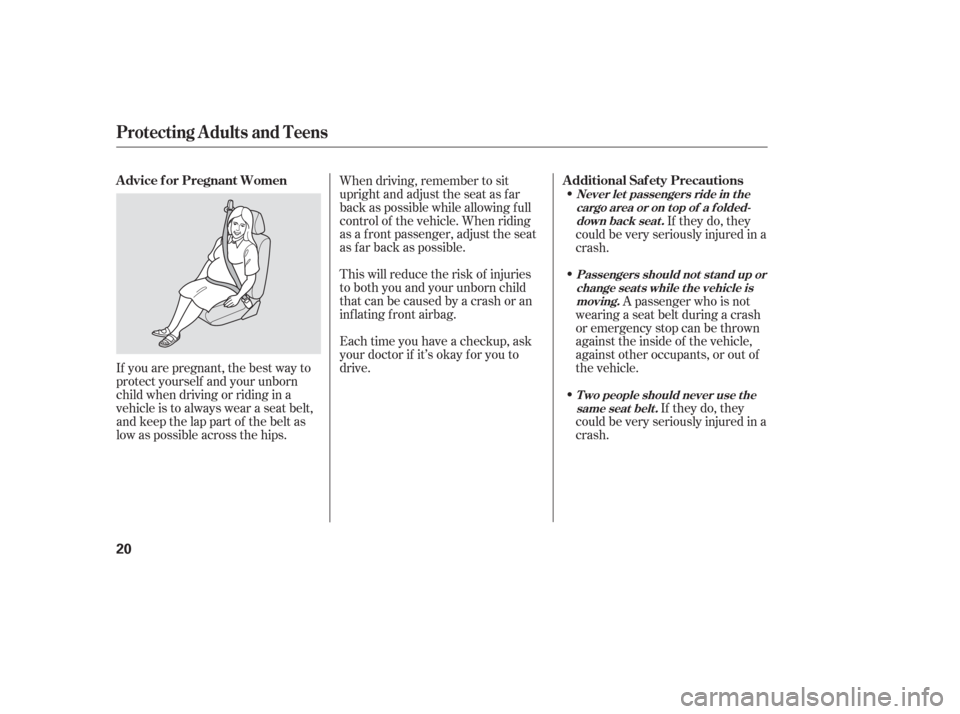
If you are pregnant, the best way to
protect yourself and your unborn
child when driving or riding in a
vehicle is to always wear a seat belt,
and keep the lap part of the belt as
low as possible across the hips.When driving, remember to sit
upright and adjust the seat as f ar
back as possible while allowing f ull
control of the vehicle. When riding
as a f ront passenger, adjust the seat
as far back as possible.
This will reduce the risk of injuries
to both you and your unborn child
that can be caused by a crash or an
inflating front airbag.
Each time you have a checkup, ask
your doctor if it’s okay f or you to
drive.
If they do, they
could be very seriously injured in a
crash.
A passenger who is not
wearing a seat belt during a crash
or emergency stop can be thrown
against the inside of the vehicle,
against other occupants, or out of
the vehicle.
If they do, they
could be very seriously injured in a
crash.
Protecting A dults and Teens
Advice f or Pregnant Women Additional Saf ety Precautions
Never let passengers ride in t he
cargo area or on t op of a f olded-down back seat .
Passengers should not stand up orchange seats while the vehicle ismoving.
T wo people should never use t hesame seat belt .
20
Page 76 of 420

If you press the INFO button when
‘‘AVERAGE SPEED’’ is displayed,
the display changes to ‘‘TIRE
PRESSURE’’ using both segments.
This display is a part of tire pressure
monitoring system (TPMS). See
page f or more inf ormation.
The multi-inf ormation display
consists of an upper segment and a
lower segment. Each segment can
display two lines of messages.
In normal display mode, the upper
segment displays trip computer and
tire pressures, and the lower
segment displays the compass,
odometer, trip meter, outside
temperature, engine oil lif e, and any
maintenance items needing attention. In normal display mode, the upper
display is blank when you turn the
ignition switch to ON (II). Each time
you press the INFO button, the trip
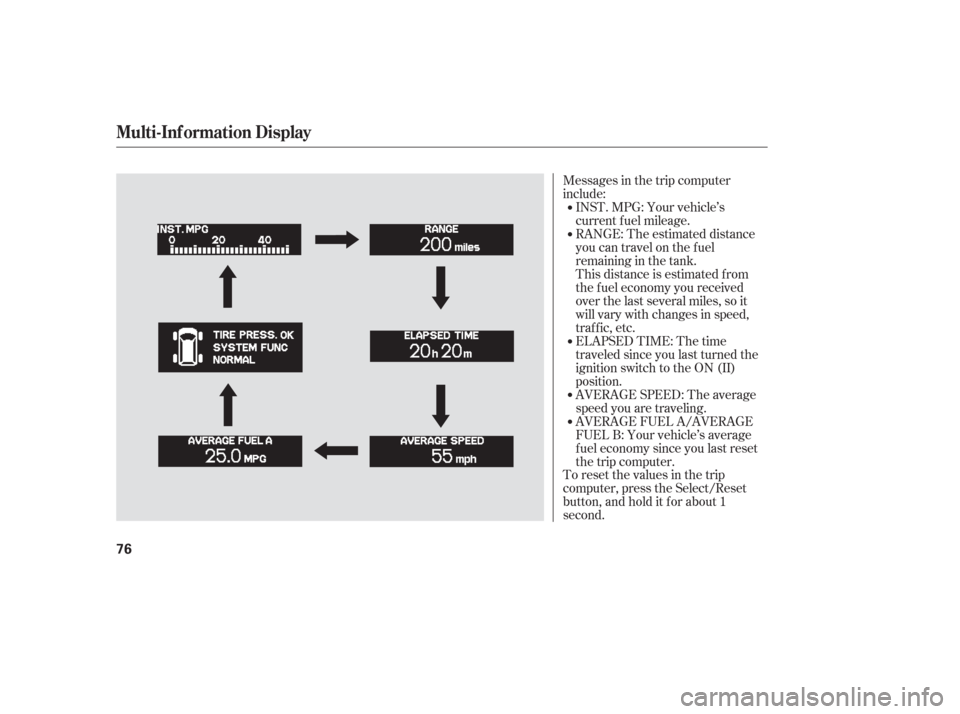
computer changes f rom ‘‘INST.
MPG’’ to ‘‘RANGE’’ to ‘‘ELAPSED
TIME’’ to ‘‘AVERAGE SPEED’’ and
then to ‘‘AVERAGE FUEL’’ as shown
on the next page.Pressing the INFO button again
brings the display back to the initial
display of the trip computer ‘‘INST.
MPG.’’
309
CONT INUED
Multi-Inf ormation Display
Inst rument s and Cont rols
75
LOWER SEGMENTUPPER SEGMENT
INFO BUTTON
SEL RESET BUTTON
Page 77 of 420
Messages in the trip computer
include:
To reset the values in the trip
computer, press the Select/Reset
button, and hold it f or about 1
second.AVERAGE FUEL A/AVERAGE
FUEL B: Your vehicle’s average
f uel economy since you last reset
the trip computer. AVERAGE SPEED: The average
speed you are traveling. INST.MPG:Yourvehicle’s
current f uel mileage.
RANGE: The estimated distance
you can travel on the fuel
remaining in the tank.
This distance is estimated f rom
the f uel economy you received
over the last several miles, so it
will vary with changes in speed,
traf f ic, etc.
ELAPSED TIME: The time
traveledsinceyoulastturnedthe
ignition switch to the ON (II)
position.
Multi-Inf ormation Display
76
Page 78 of 420
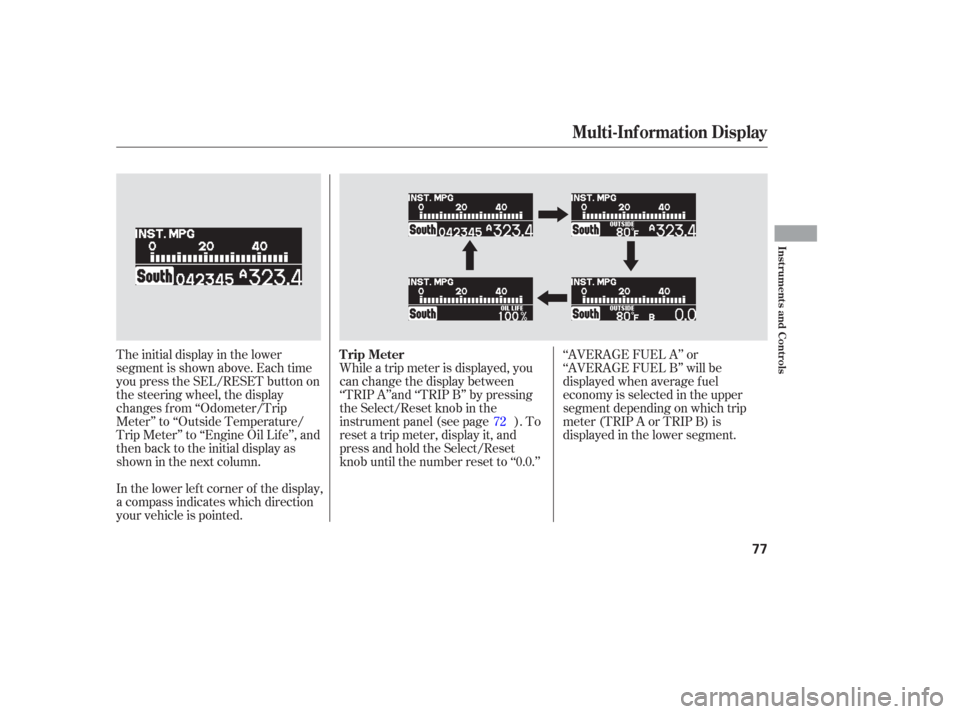
The initial display in the lower
segment is shown above. Each time
you press the SEL/RESET button on
the steering wheel, the display
changes f rom ‘‘Odometer/Trip
Meter’’ to ‘‘Outside Temperature/
Trip Meter’’ to ‘‘Engine Oil Lif e’’, and
then back to the initial display as
showninthenextcolumn.
In the lower lef t corner of the display,
a compass indicates which direction
your vehicle is pointed.While a trip meter is displayed, you
can change the display between
‘‘TRIP A’’and ‘‘TRIP B’’ by pressing
the Select/Reset knob in the
instrument panel (see page ). To
reset a trip meter, display it, and
press and hold the Select/Reset
knob until the number reset to ‘‘0.0.’’
‘‘AVERAGE FUEL A’’ or
‘‘AVERAGE FUEL B’’ will be
displayed when average f uel
economy is selected in the upper
segment depending on which trip
meter(TRIPAorTRIPB)is
displayed in the lower segment.
72
Multi-Inf ormation Display
Trip Meter
Inst rument s and Cont rols
77
Page 79 of 420
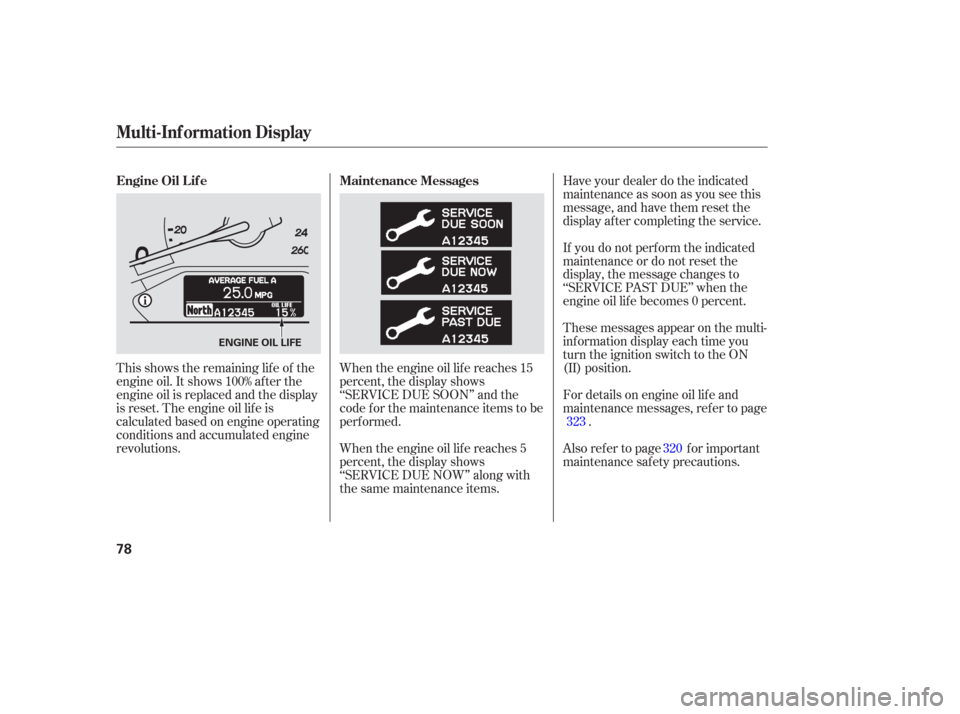
This shows the remaining lif e of the
engine oil. It shows 100% af ter the
engine oil is replaced and the display
is reset. The engine oil lif e is
calculated based on engine operating
conditions and accumulated engine
revolutions.When the engine oil lif e reaches 15
percent, the display shows
‘‘SERVICE DUE SOON’’ and the
code f or the maintenance items to be
perf ormed.
When the engine oil lif e reaches 5
percent, the display shows
‘‘SERVICE DUE NOW’’ along with
the same maintenance items.Have your dealer do the indicated
maintenance as soon as you see this
message, and have them reset the
display af ter completing the service.
If you do not perf orm the indicated
maintenance or do not reset the
display, the message changes to
‘‘SERVICE PAST DUE’’ when the
engine oil lif e becomes 0 percent.
These messages appear on the multi-
inf ormation display each time you
turn the ignition switch to the ON
(II) position.
Also ref er to page f or important
maintenance saf ety precautions. For details on engine oil lif e and
maintenance messages, ref er to page
.
320
323
Maintenance Messages
Engine Oil L if e
Multi-Inf ormation Display
78
ENGINE OIL LIFE
Page 92 of 420
You can also use the trip meter
SELECT/RESET knob in the
instrument panel to select and enter
your selections while the multi-
inf ormation display is in the
customizing mode. Turn the knob to
select a setting and press it to enter
your selection. UsetheINFObuttononthesteering
wheel to see the settings, and the
SEL/RESET button to enter your
selections.
If you want the settings as they were
when the vehicle lef t the f actory,
select ‘‘DEFAULT ALL,’’ as
described on page .
If you want to change any vehicle
control settings, select ‘‘CHANGE
SETTING,’’ and f ollow the
instructions on page .
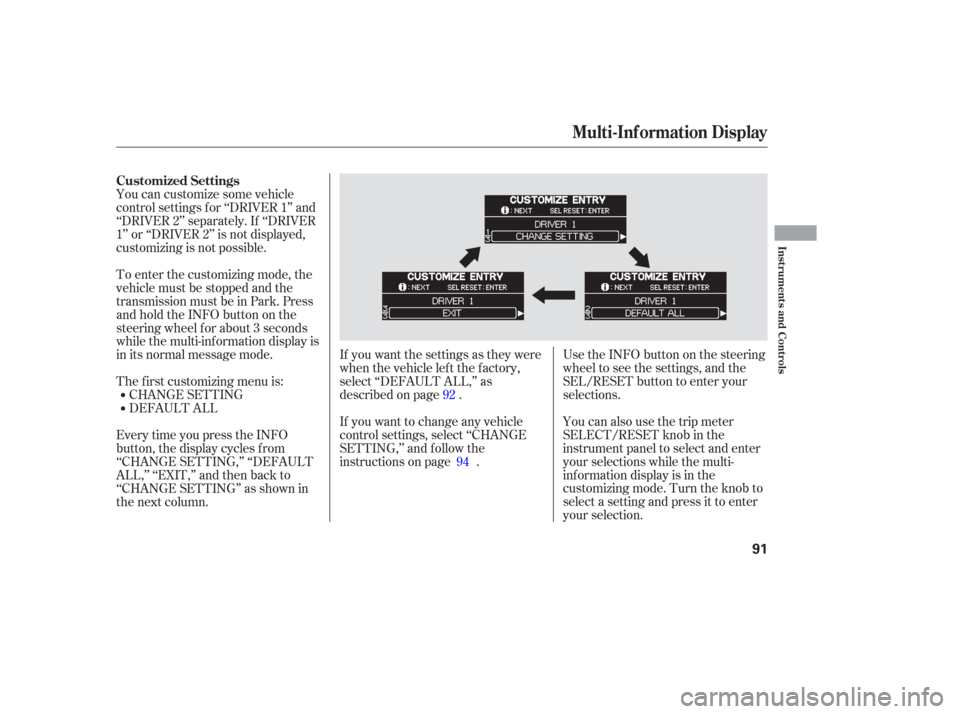
EverytimeyoupresstheINFO
button, the display cycles from
‘‘CHANGE SETTING,’’ ‘‘DEFAULT
ALL,’’ ‘‘EXIT,’’ and then back to
‘‘CHANGE SETTING’’ as shown in
the next column. You can customize some vehicle
control settings f or ‘‘DRIVER 1’’ and
‘‘DRIVER 2’’ separately. If ‘‘DRIVER
1’’ or ‘‘DRIVER 2’’ is not displayed,
customizing is not possible.
DEFAULT ALL CHANGE SETTING
The f irst customizing menu is: To enter the customizing mode, the
vehicle must be stopped and the
transmission must be in Park. Press
andholdtheINFObuttononthe
steering wheel f or about 3 seconds
while the multi-information display is
in its normal message mode.
92
94
Customized Settings
Multi-Inf ormation Display
Inst rument s and Cont rols
91
Page 95 of 420
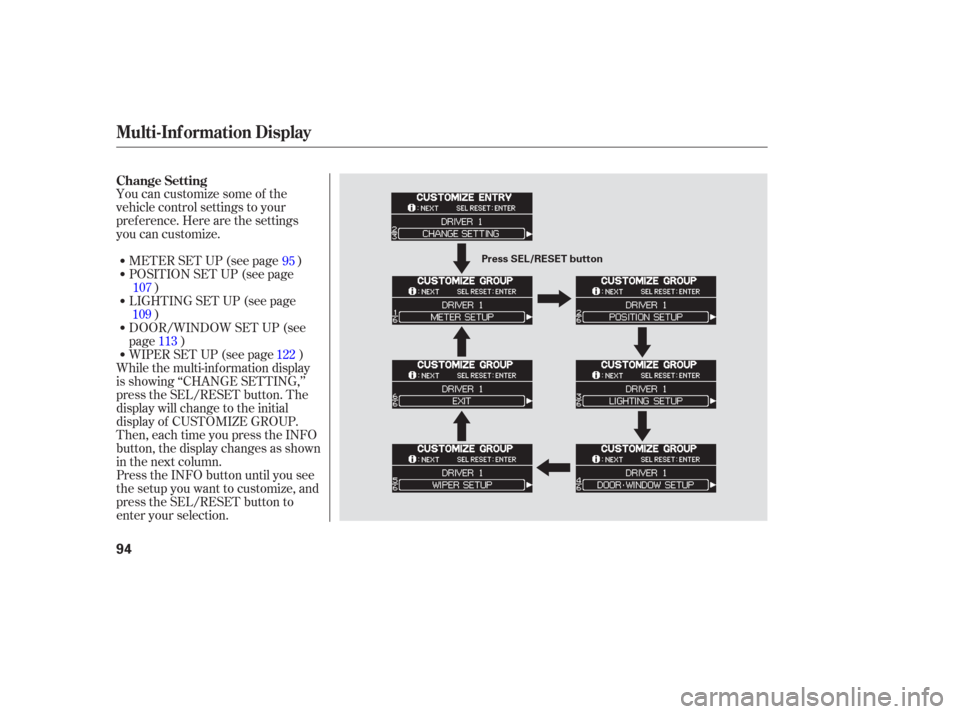
You can customize some of the
vehicle control settings to your
pref erence. Here are the settings
you can customize.METER SET UP (see page )
POSITION SET UP (see page )
WIPER SET UP (see page ) DOOR/WINDOW SET UP (see
page ) LIGHTING SET UP (see page )
While the multi-information display
is showing ‘‘CHANGE SETTING,’’
press the SEL/RESET button. The
display will change to the initial
display of CUSTOMIZE GROUP.
Then, each time you press the INFO
button, the display changes as shown
in the next column.
Press the INFO button until you see
the setup you want to customize, and
press the SEL/RESET button to
enter your selection. 95
107
109 113 122
Change Setting
Multi-Inf ormation Display
94
Press SEL/RESET button