Page 171 of 420
To tilt up the back of the moonroof ,
press and hold the center button
( ). To close the moonroof ,
press and hold the top of the switch
( ). To open the moonroof ,
press and hold the bottom of the
switch ( ).The moonroof has a key-of f delay.
You can still open and close the
moonroof f or up to 10 minutes af ter
you turn of f the ignition. The key-of f
delay cancels as soon as you open
either f ront door. You must then
turn the ignition to the ON (II)
position f or the moonroof to operate.
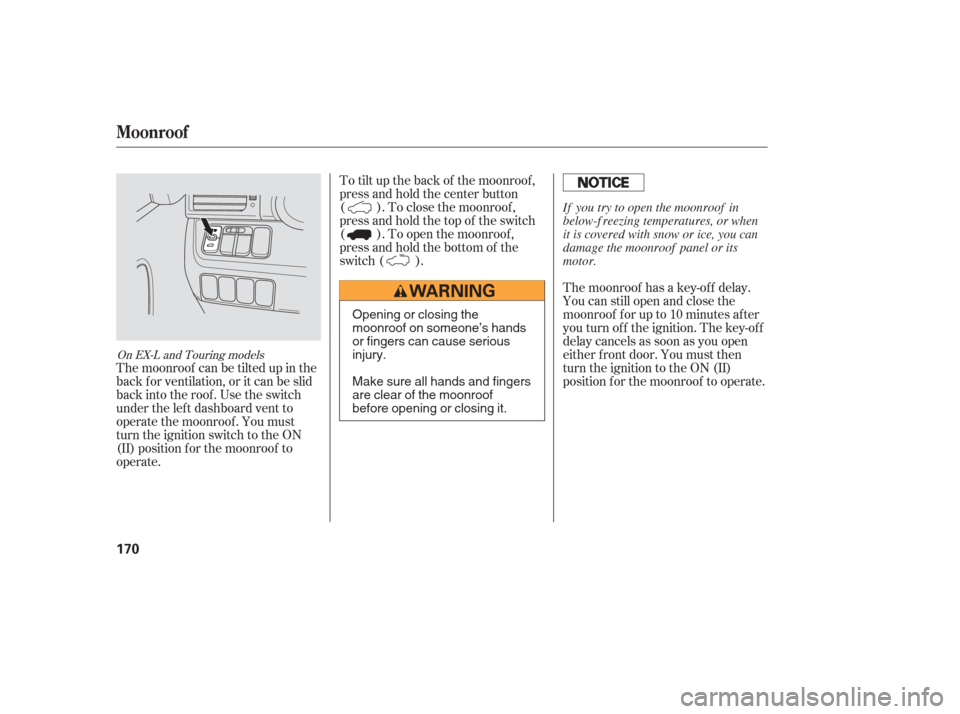
The moonroof can be tilted up in the
back f or ventilation, or it can be slid
back into the roof. Use the switch
under the lef t dashboard vent to
operate the moonroof . You must
turn the ignition switch to the ON
(II) position f or the moonroof to
operate.
On EX-L and Touring models
Moonroof
170
Opening or closing the
moonroof on someone’s hands
or fingers can cause serious
injury.
Make sure all hands and fingers
are clear of the moonroof
before opening or closing it. If you try to open the moonroof in
below-f reezing temperatures, or when
it is covered with snow or ice, you can
damage the moonroof panel or its
motor.
Page 172 of 420
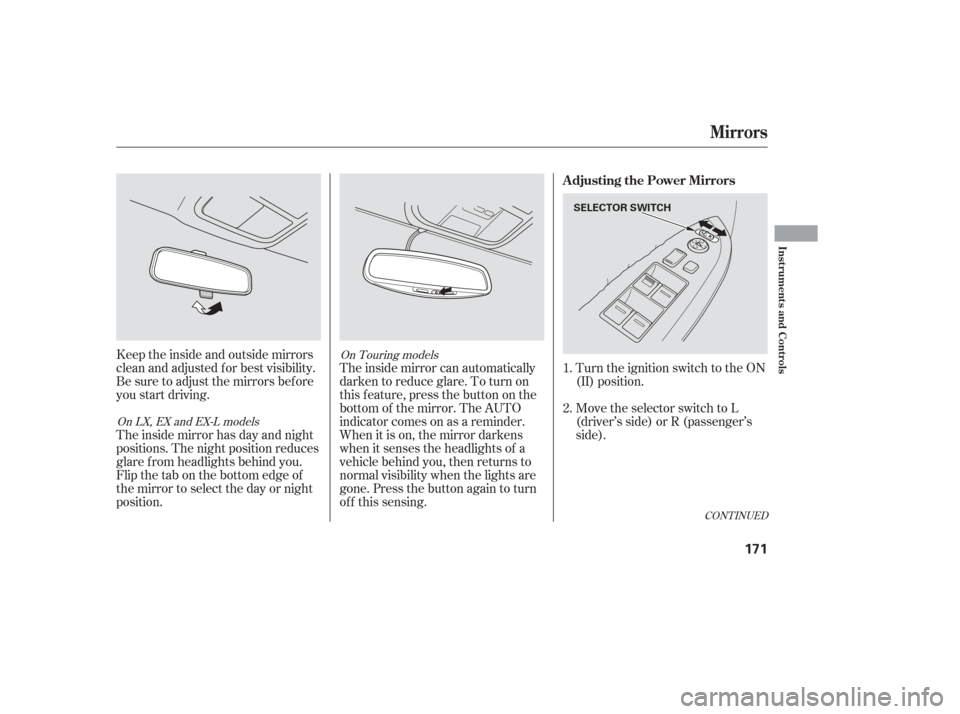
Keeptheinsideandoutsidemirrors
clean and adjusted f or best visibility.
Be sure to adjust the mirrors bef ore
you start driving.
The inside mirror has day and night
positions. The night position reduces
glare f rom headlights behind you.
Flip the tab on the bottom edge of
the mirror to select the day or night
position.The inside mirror can automatically
darken to reduce glare. To turn on
this feature, press the button on the
bottom of the mirror. The AUTO
indicator comes on as a reminder.
When it is on, the mirror darkens
when it senses the headlights of a
vehicle behind you, then returns to
normal visibility when the lights are
gone. Press the button again to turn
of f this sensing. Turn the ignition switch to the ON
(II) position.
Move the selector switch to L
(driver’s side) or R (passenger’s
side).
1.
2.
CONT INUED
On Touring models
On LX, EX and EX-L models
Mirrors
Adjusting the Power Mirrors
Inst rument s and Cont rols
171
SELECTOR SWITCH
Page 173 of 420
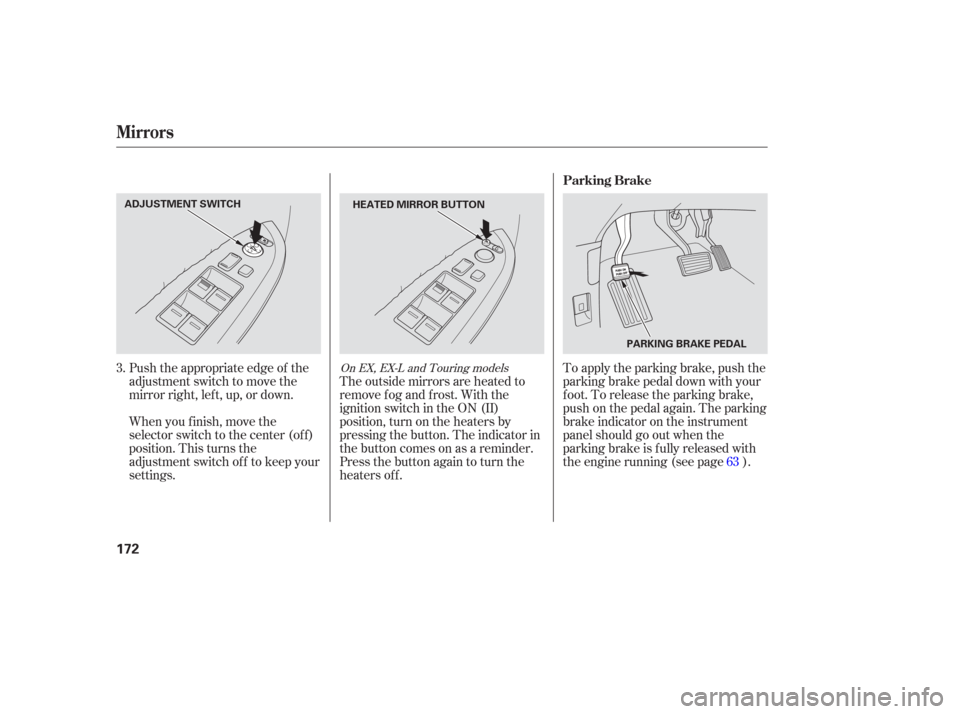
Push the appropriate edge of the
adjustment switch to move the
mirrorright,left,up,ordown.
When you f inish, move the
selector switch to the center (off)
position. This turns the
adjustment switch of f to keep your
settings.The outside mirrors are heated to
remove fog and frost. With the
ignition switch in the ON (II)
position, turn on the heaters by
pressing the button. The indicator in
the button comes on as a reminder.
Press the button again to turn the
heaters off. To apply the parking brake, push the
parking brake pedal down with your
f oot. To release the parking brake,
push on the pedal again. The parking
brake indicator on the instrument
panel should go out when the
parking brake is f ully released with
the engine running (see page ).
3.
63On EX, EX-L and Touring models
Mirrors
Parking Brake
172
ADJUSTMENT SWITCHHEATED MIRROR BUTTON
PARKING BRAKE PEDAL
Page 185 of 420
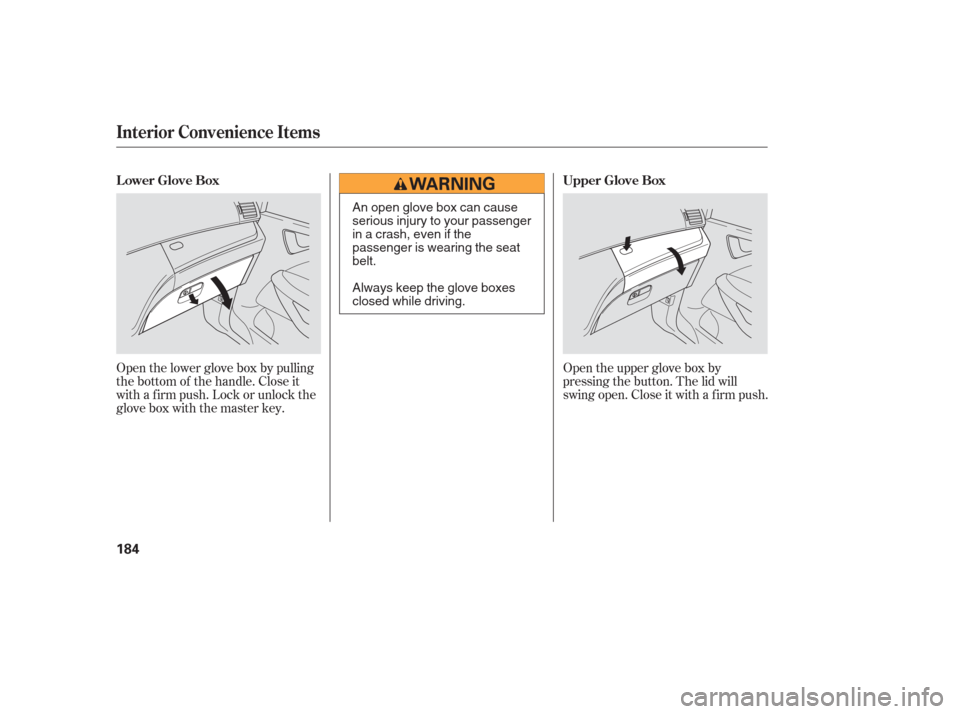
Open the upper glove box by
pressing the button. The lid will
swing open. Close it with a f irm push.
Open the lower glove box by pulling
the bottom of the handle. Close it
with a f irm push. Lock or unlock the
glove box with the master key.
Interior Convenience Items
LowerGloveBox
UpperGloveBox
184
An open glove box can cause
serious injury to your passenger
inacrash,evenifthe
passenger is wearing the seat
belt.
Always keep the glove boxes
closed while driving.
Page 193 of 420
Vents, Heating, and A/C
LX modelEX/EX-L /T ouring models
192
RECIRCULATION
BUTTON AIR CONDITIONING
BUTTON
REAR WINDOW
DEFOGGER BUTTON
FAN CONTROL
BUTTON MODE
CONTROL
DIAL
MODE
BUTTONAIR CONDITIONING
BUTTON
AUTO
BUTTON
RECIRCULATION
BUTTON TEMPERATURE
CONTROL DIAL
REAR
CONTROLLER
DIAL
WINDSHIELD
DEFROSTER BUTTON REAR WINDOW
DEFOGGER
BUTTONREAR
BUTTON
REAR LOCK
BUTTON
FAN CONTROL BUTTONS
OFF BUTTON
SYNCHRO BUTTON DRIVER’S SIDE
TEMPERATURE
CONTROL
SWITCH PASSENGER’S SIDE
TEMPERATURE CONTROL SWITCH
REAR TEMPERATURE/FAN SPEED (EX and EX-L models)
CONTROL SWITCH
Page 194 of 420
�Û
�Ý
�Û�Ý
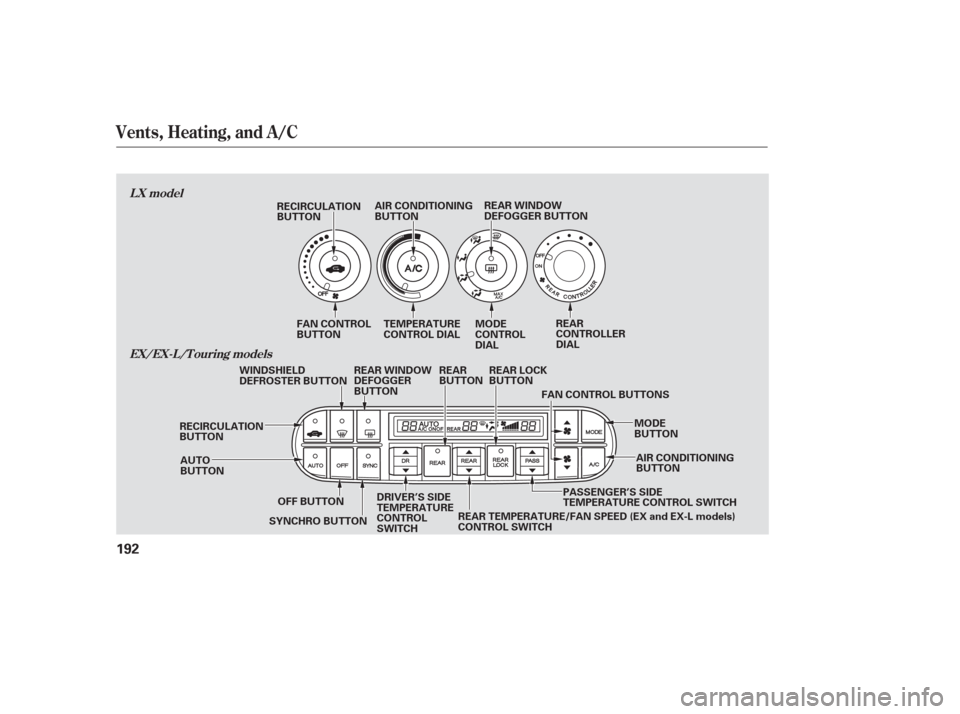
Turn the dial clockwise to increase
the fan speed and airflow. Turn the
dial counterclockwise to decrease it.
Press the button to increase
the fan speed and airflow. Press the button to decrease it.
Turning this dial clockwise increases
the temperature of the airflow.
The driver’s side temperature and
the passenger’s side temperature can
be set separately. On the Touring
model, the rear passenger
compartment temperature can also
be set separately. Press the top ( )
of the appropriate temperature
control button to increase the
temperature of airflow. Press the bottom ( ) of the button to
decrease it. Each set temperature is
shown in the display. When you turn
the A/C off, the system cannot
regulate the inside temperature if
you set the temperature control
below the outside temperature.
When you set the temperature to its
lower limit or its upper limit, it will be
displayed as ‘‘Lo’’ or ‘‘Hi’’.
When you press this button, the
indicator in the button comes on, and
the passenger’s side temperature
(and the temperature of the rear
passenger compartment on the
Touring model) is synchronized to
the driver’s side set temperature.
Changing the passenger’s side
temperature (or the temperature of
the rear passenger compartment on
the Touring model) makes the
indicator to go of f , and takes thesystem out of SYNC mode.
This button turns the air
conditioning on and of f . On the LX
model, the indicator in the button is
on when the A/C is on. On the EX,
EX-L and Touring models, you will
see A/C ON or A/C OFF in the
display.
The outside air intakes f or the
heating and cooling system are at
the base of the windshield. Keep this
area clear of leaves and other debris. When the indicator in the button is
on, air f rom the vehicle’s interior is
sent throughout the system again.
When the indicator is off, air is
brought in f rom the outside of the
vehicle (fresh air mode).
CONT INUED
LX model
LX model
EX, EX-L and Touring models
EX, EX-L and Touring models On EX, EX-L and Touring models
Vents, Heating, and A/C
Fan Control
T emperature Control Air Conditioning (A/C) Button
Recirculation Button
SYNC Button
Features
193
Page 195 of 420
Air flows from the center
and corner vents in the dashboard.
Airf low is divided between
the vents in the dashboard and the
f loor vents. This button turns the rear window
def ogger on and of f (see page ).
Use the mode control dial or button
to select the vents the air flows from.
Some air will flow from the
dashboard vents in all modes. Air f lows f rom the def roster
vents at the base of the windshield.
When you select , the system
automatically switches to f resh air
mode and turns on the A/C.
The passenger’s temperature cannot
be set separately f rom the driver’s.
The system automatically
turns on the A/C and switches to
recirculation mode. Air f lows f rom
the center and side vents in the
dashboard.
Airf low is divided between
the f loor vents and the def roster
vents at the base of the windshield. Air f lows f rom the f loor
vents. When you select , the
system automatically switch to Fresh
Air mode. When you want to change the
temperature of the rear passenger
compartment, press the REAR
button. The indicator in the button
comes on, and you can change the
temperature using the rear
temperature control button. When
you press the REAR LOCK button,the indicator in the button comes on,
the rear A/C passenger control
panel is disabled, and you cannot
change any settings f rom it.
See page f or how to operate the
rear passenger control panel.
You can change the fan speed of the
rear system f rom the f ront control
panel. Press the REAR button, the
indicator in the button comes on.
Push the rear fan control button up
or down to increase or decrease the
rear f an speed. When you press the
REAR LOCK button, the indicator in
the button comes on, and the rear
passenger control panel is disabled.
See page f or how to operate the
rear passenger control panel.
201
200
130
On LX model only
On Touring models only On EX and EX-L models
Vents, Heating, and A/C
Rear Window Def ogger Button
Mode Control
REAR/REAR LOCK Button
194
Page 196 of 420
CONT INUED
Air conditioning places an extra load
on the engine. Watch the engine
coolant temperature gauge (see page). If it moves near the red mark,
turn of f the A/C until the gauge
reads normally.
Press the A/C button. The
indicator in the button comes on
(LX model) or ‘‘A/C ON’’ is shown
in the display (EX, EX-L and
Touring models) when a f an speed
is selected.
Make sure the temperature is set
to the lower limit.
Select .
If the outside air is humid, select
recirculation mode. If the outside
air is dry, select f resh air mode. you can
cool it down more rapidly by partially
opening the windows, turning on the
A/C, and setting the fan to
maximum speed in f resh air mode.
The f low-through ventilation system
draws in outside air, circulates it
through the interior, then exhausts it
through vents near the rear side
panels.
The heater uses engine coolant to
warm the air. If the engine is cold, it
will be several minutes bef ore you
f eel warm air coming f rom the
system.
Select and fresh air mode.
Set the f an to the desired speed.
Adjust the warmth of the air with
the temperature control dial or
buttons. Set the temperature control dial or
button to the lower limit.
Make sure the A/C is of f .
Select and fresh air mode.
Set the f an to the desired speed.
Set the f an to the desired speed.
1.
2.
3.
4.
5.
1.
2.
3. 1.
2.
3.
4. 71
If the interior is very warm,
Vents, Heating, and A/C
Using the A/C
Ventilation
Using the Heater
Features
195