Page 196 of 420
CONT INUED
Air conditioning places an extra load
on the engine. Watch the engine
coolant temperature gauge (see page). If it moves near the red mark,
turn of f the A/C until the gauge
reads normally.
Press the A/C button. The
indicator in the button comes on
(LX model) or ‘‘A/C ON’’ is shown
in the display (EX, EX-L and
Touring models) when a f an speed
is selected.
Make sure the temperature is set
to the lower limit.
Select .
If the outside air is humid, select
recirculation mode. If the outside
air is dry, select f resh air mode. you can
cool it down more rapidly by partially
opening the windows, turning on the
A/C, and setting the fan to
maximum speed in f resh air mode.
The f low-through ventilation system
draws in outside air, circulates it
through the interior, then exhausts it
through vents near the rear side
panels.
The heater uses engine coolant to
warm the air. If the engine is cold, it
will be several minutes bef ore you
f eel warm air coming f rom the
system.
Select and fresh air mode.
Set the f an to the desired speed.
Adjust the warmth of the air with
the temperature control dial or
buttons. Set the temperature control dial or
button to the lower limit.
Make sure the A/C is of f .
Select and fresh air mode.
Set the f an to the desired speed.
Set the f an to the desired speed.
1.
2.
3.
4.
5.
1.
2.
3. 1.
2.
3.
4. 71
If the interior is very warm,
Vents, Heating, and A/C
Using the A/C
Ventilation
Using the Heater
Features
195
Page 204 of 420
Playing the AM/FM Radio
L X modelEX and EX-L models wit hout RES
Features
203
PWR/VOL
KNOBTUNE/SOUND
KNOB
SCAN
BUTTON SEEK BAR PWR/VOL
KNOB
FM BUTTON
AM BUTTON
PRESET BUTTONS AM/FM BUTTON
SCAN
BUTTON SEEK BAR
PRESET BUTTONS SOUND
KNOB
TUNE KNOB
AUTO SELECT
BUTTON AUTO SELECT
BUTTON
Page 205 of 420
Playing the AM/FM Radio
T ouring model wit h RES andNavigat ion Syst em
EX, EX-L and T ouring models wit h
RES wit hout Navigat ion Syst em
204
PWR/VOL
KNOB TUNE/SOUND
KNOB
SEEK BAR PWR/VOL
KNOB SEEK BAR
AM/FM BUTTON
PRESET BUTTONS
SCAN
BUTTON AM/FM BUTTON
SCAN BUTTON
TUNE/SOUND
KNOB
PRESET BUTTONS
AUTO SELECT
BUTTON AUTO SELECT
BUTTON
Page 206 of 420
�µ
�µ �´�µ �µ
�µ
The ignition switch must be in the
ACCESSORY (I) or ON (II) position.
Turn the system on by pushing the
PWR/VOL knob. Adjust the volume
by turning the same knob.
The band and f requency that the
radio was last tuned to is displayed.
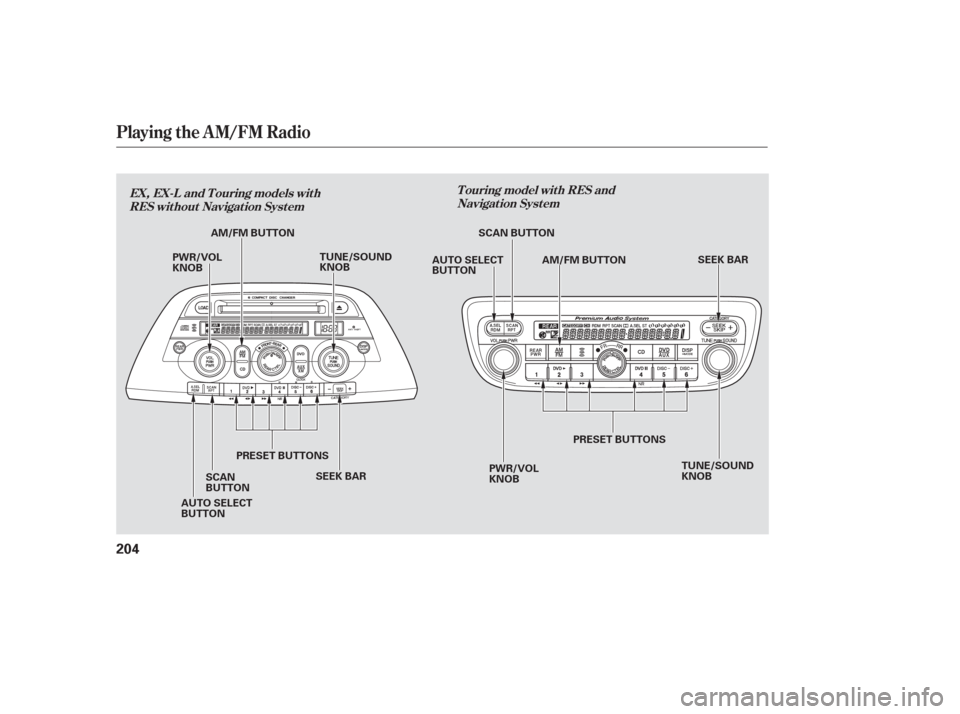
To change bands, press the AM or
FM button, or AM/FM button. On
the FM band, ST will be displayed if
the station is broadcasting in stereo.
Stereo reproduction in AM is not
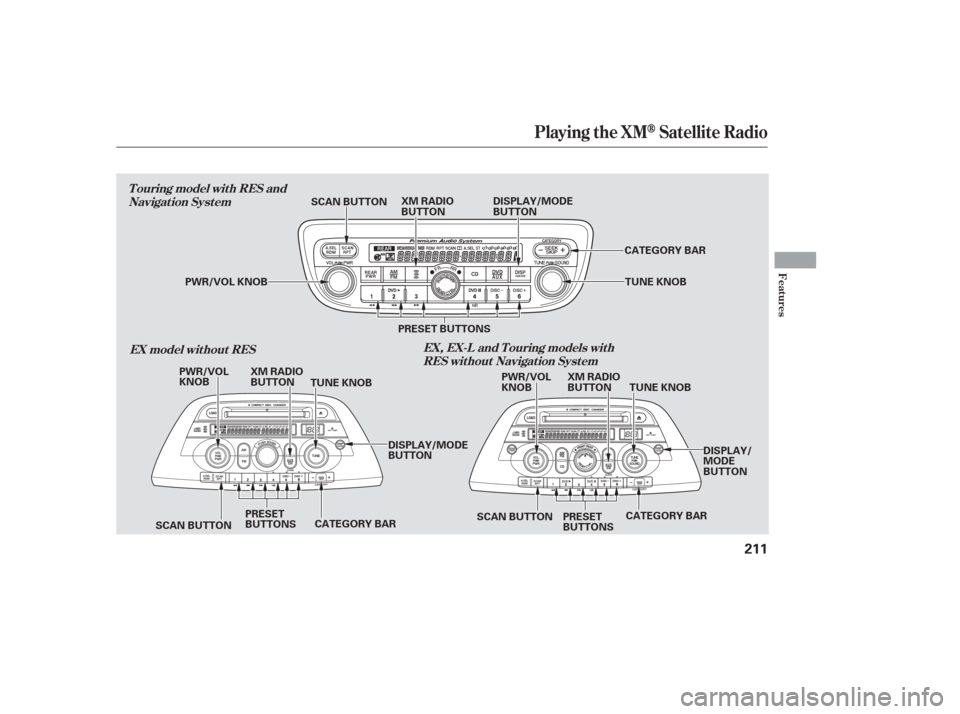
available. Use the TUNE knob to
tune the radio to a desired f requency.
Turn the knob right to tune to a
higher f requency, or lef t to tune to a
lower f requency.
The SEEK f unction
searches up and down from the
current f requency to f ind a station
with a strong signal. To activate it
press the or side of the bar,
then release it. Each preset button can
store one f requency on AM and two
f requencies on FM. Select the desired band, AM or
FM. FM1 and FM2 let you store
two f requencies with each preset
button.
UsetheTUNE,SEEK,orSCAN
function to tune the radio to a
desired station.
Repeat steps 1 through 3 to store a
total of six stations on AM and
twelve stations on FM.
You can use any of f ive methods to
f ind radio stations on the selected
band:
the
preset buttons, and .The SCAN f unction
samples all stations with strong
signals on the selected band. To
activate it, press the SCAN button,
then release it. You will see SCAN in
the display. The system will scan f or
a station with a strong signal. When
it f inds one, it will stop and play that
station for about 5 seconds. If you do nothing, the system will
then scan f or the next strong station
andplayitfor5seconds.Whenit
plays a station you want to listen to,
press the SCAN button again.
Pickapresetbutton,andholdit
until you hear a beep.
1.
2.
3.
4.
CONT INUED
TUNE
SEEK
Preset
To Select a Station TUNE,SEEK,SCAN, AUTO SELECT
To Play the AM/FM Radio
SCAN
Playing the AM/FM Radio
Features
205
Page 207 of 420
�µ�µ
�µ
The preset f requencies will be lost if
your vehicle’s battery goes dead, is
disconnected, or the radio f use is
removed.
Press the A. SEL button. ‘‘A.SEL’’
f lashes in the display, and the system
goes into scan mode f or several
seconds. It stores the f requencies of
six AM and twelve FM stations in
the preset buttons. To turn of f auto select, press the
A. SEL button. This restores the
presets you originally set.
You will see a ‘‘0’’ displayed af ter
pressing a preset button if auto
select cannot f ind a strong station f or
every preset button. If you do not like the stations auto
select has stored, you can store
other f requencies on the preset
buttons. Use the TUNE, SEEK, or
SCAN functions to find stations, then
store them in the preset buttons as
described.
If you are
traveling far from home and can no
longer receive your preset stations,
you can use the auto select feature to
find stations in the local area.
Press the SOUND (TUNE) knob
repeatedly to display the bass, treble,
balance, and f ader settings.
Eachmodeisshowninthedisplayas
it changes. Turn the SOUND
(TUNE) knob to adjust the setting to
your liking. When the level reaches
the center, you will see ‘‘CENTER’’
in the display. The system will
automatically return the display to
the selected audio mode about 5
seconds af ter you stop adjusting a
mode. Use the TRE/BAS
modes to adjust the tone to your
liking.
These two
modes adjust the strength of the
sound coming f rom each speaker.
BAL adjusts the side-to-side strength,
while FAD adjusts the f ront-to-back
strength.
Adjusting the Sound
AUTO SELECT
Treble/Bass
Balance/Fader
Playing the AM/FM Radio
206
Page 208 of 420

�µ
�µ
In addition to the knobs and buttons
on the radio control panel, you can
operate some of the radio controls
on the navigation system screen.
While you are listening to the radio,
you can change to another band by
pressing the AUDIO button next to
the navigation system screen, and
then touching the desired band icon (FM1, FM2, or AM).
You can also adjust the sound from
the navigation screen.
To adjust the sound, push the
AUDIO DISPLAY button, then enter
the sound grid by touching the
SOUNDicononthedisplay.
AUTO SELECT, SCAN, and SEEK
are adjustable f rom the navigation
screen. For an explanation of these
f unctions, see pages and .
Touch the
AUTO SELECT icon to activate the
auto select f unction. You will see
AUTO SEL f lashing in the upper
display.
Touch the SCAN icon to
activate the scan function. You will
see SCAN in the display. Touch the
icon again to deactivate it. 205 206
CONT INUED
On models with Navigation System
Operating the Radio on the
Navigation System Screen
AUTO SELECT
SCANA djust ing t he Sound
Playing the AM/FM Radio
Features
207
AUDIO DISPLAY BUTTON
Page 212 of 420
Playing the XMSatellite Radio
Features
T ouring model wit h RES andNavigat ion Syst em
EX model without RES EX, EX-L and T ouring models wit h
RES wit hout Navigat ion Syst em
211
PWR/VOL KNOB
PWR/VOL
KNOB PWR/VOL
KNOBXM RADIO
BUTTON
SCAN BUTTON
XM RADIO
BUTTON
CATEGORY BARTUNE KNOB
CATEGORY BAR
CATEGORY BAR PRESET BUTTONS
PRESET
BUTTONS TUNE KNOB
XM RADIO
BUTTON
TUNE KNOB
PRESET
BUTTONS
SCAN BUTTON SCAN BUTTONDISPLAY/MODE
BUTTON
DISPLAY/MODE
BUTTON DISPLAY/
MODE
BUTTON
Page 214 of 420

�µ�µ
�µ�´ �µ
�µ
On models with a rear entertainment
system and a navigation system, you
cannot listen to XM Radio and a disc
at the same time. For example, when
XM Radio is playing on the f ront
speakers, you cannot listen to a disc
on the rear speakers, or vice versa.
The scan f unction gives
you a sampling of all channels while
in the channel mode. In the category
mode, only the channels within that
category are scanned. To activate
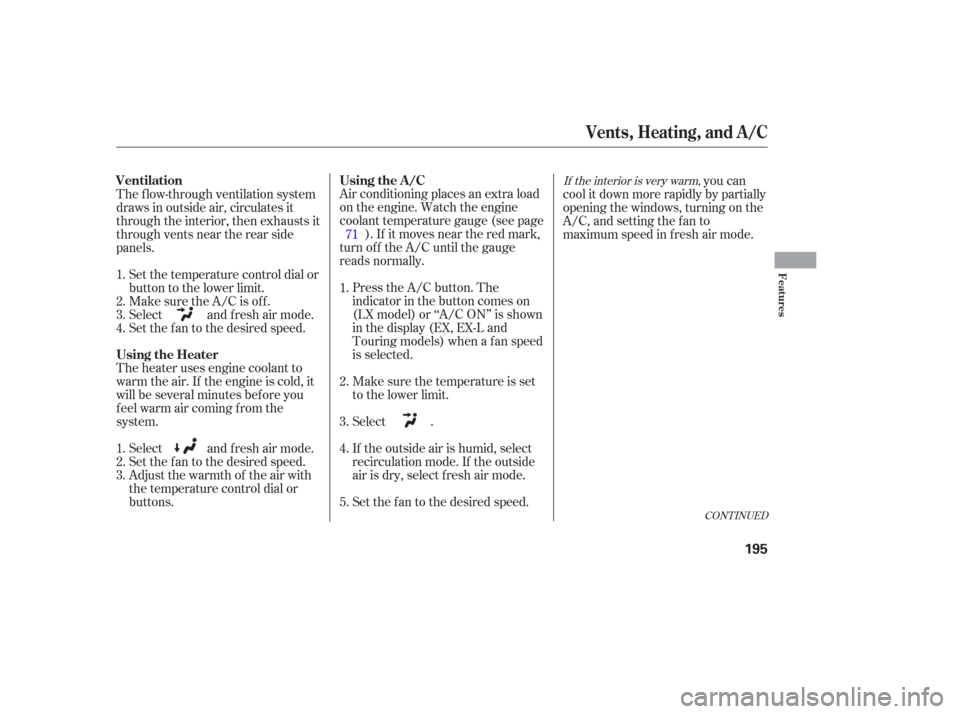
scan, press the SCAN/RPT button or
touch the SCAN icon on the audio
display. The system plays each
channel in numerical order f or a f ew seconds, then selects the next
channel. When you hear a channel
you want to continue listening to,
press the button or touch the icon
again.
Press either side of
the bar ( or ) to select another
category.
In the category mode, only channels
within that category can be selected.
In the channel mode, all channelscan be selected.
Use the TUNE knob, or the
CATEGORY or SCAN buttons to
tune to a desired channel. You can
also touch the SCAN icon on the
audio display. Press the XM RADIO button.
Either XM1 or XM2 will show in
the display.
To store a channel: Youcanstoreupto12
preset channels using the six preset
buttons or preset icons on the audio
display. Each button stores one
channel f rom the XM1 band and one
channel f rom the XM2 band.
The presets will be lost if your
vehicle’s battery goes dead, is
disconnected, or the radio f use is
removed. Once a channel is stored, press and
release the proper preset button
(icon) to tune to it.Press the XM RADIO button again
or touch the other XM icon (XM1
or XM2) on the audio display.
Store the next six channels using
steps 2 and 3. Repeat steps 2 and 3 to store the
f irst six channels. Pick the preset button (icon) you
want f or that channel. Press and
hold the button (icon) until you
hear a beep.
Turn the tune knob lef t or
right to select channels. In the
category mode, you can only select
channels within that category.
1.
2.3.
4.
5.
Playing the XMSatellite Radio
SCAN CATEGORY
Preset
TUNE
Features
213