Page 79 of 253
Parents should decide if their
children should be shown how to use
this feature.
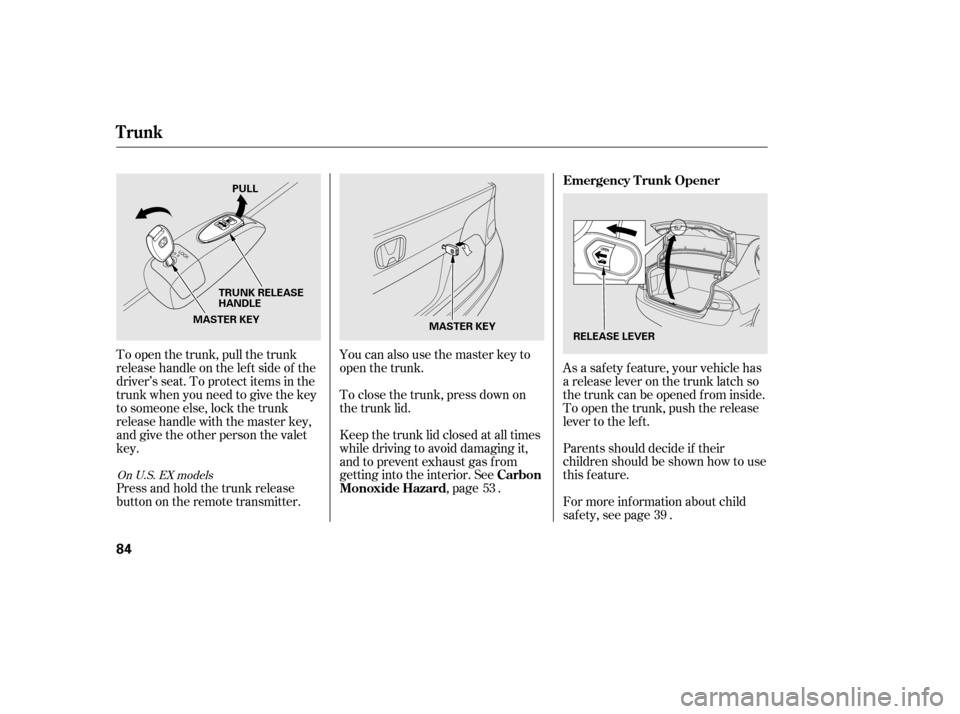
As a saf ety f eature, your vehicle has
a release lever on the trunk latch so
the trunk can be opened f rom inside.
To open the trunk, push the release
lever to the lef t.
To open the trunk, pull the trunk
release handle on the lef t side of the
driver’s seat. To protect items in the
trunk when you need to give the key
to someone else, lock the trunk
release handle with the master key,
and give the other person the valetkey.
For more inf ormation about child
saf ety, see page .
Press and hold the trunk release
button on the remote transmitter. You can also use the master key to
open the trunk.
To close the trunk, press down on
the trunk lid.
Keep the trunk lid closed at all times
while driving to avoid damaging it,
and to prevent exhaust gas from
getting into the interior. See
,page .
39
53
On U.S. EX models
Emergency T runk Opener
Carbon
Monoxide Hazard
Trunk
84
MASTER KEY
MASTER KEY PULL
TRUNK RELEASE
HANDLE RELEASE LEVER
�����—�����—���
�y�
����
��������y���
�(�#���������y���������y
Page 80 of 253
�µ�µ
�µ
�µ
CONT INUED
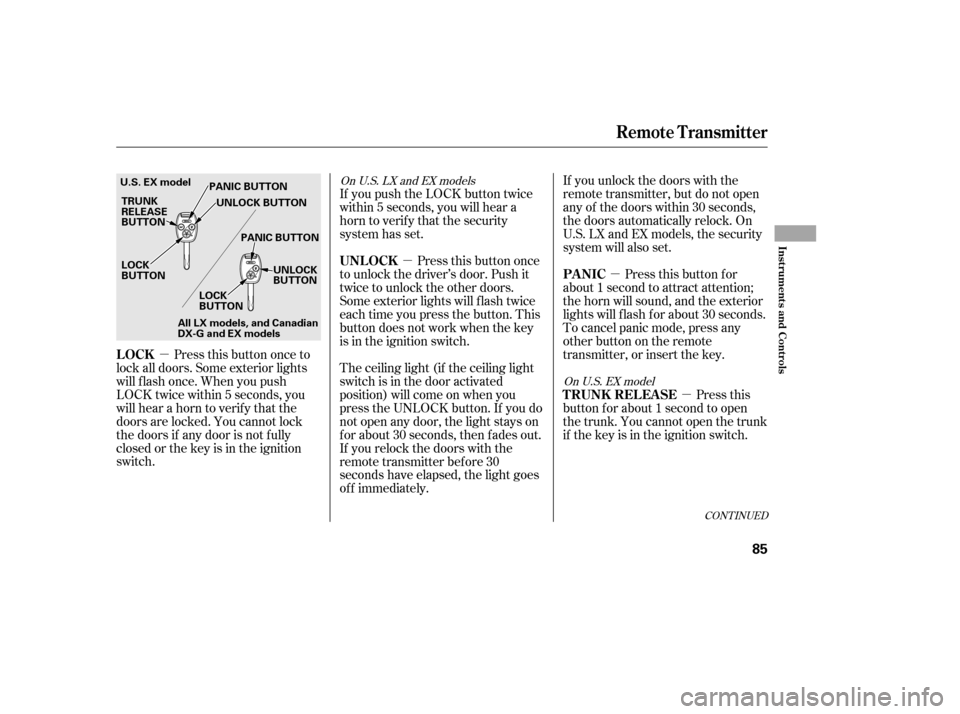
Press this button once to
lock all doors. Some exterior lights
will f lash once. When you push
LOCK twice within 5 seconds, you
will hear a horn to verif y that the
doors are locked. You cannot lock
the doors if any door is not f ully
closed or the key is in the ignition
switch. If you unlock the doors with the
remote transmitter, but do not open
any of the doors within 30 seconds,
the doors automatically relock. On
U.S. LX and EX models, the security
system will also set.
Pressthisbuttonfor
about 1 second to attract attention;
the horn will sound, and the exterior
lights will f lash f or about 30 seconds.
To cancel panic mode, press any
other button on the remote
transmitter, or insert the key.
Press this
button f or about 1 second to open
the trunk. You cannot open the trunk
if the key is in the ignition switch.
The ceiling light (if the ceiling light
switch is in the door activated
position) will come on when you
press the UNLOCK button. If you do
not open any door, the light stays on
f or about 30 seconds, then f ades out.
If you relock the doors with the
remote transmitter before 30
seconds have elapsed, the light goes
of f immediately. Press this button once
to unlock the driver’s door. Push it
twice to unlock the other doors.
Some exterior lights will f lash twice
each time you press the button. This
button does not work when the key
is in the ignition switch.
If you push the LOCK button twice
within 5 seconds, you will hear a
horn to verify that the security
system has set.
On U.S. EX model
On U.S. LX and EX models
Remote Transmitter
LOCK
PA NIC
T RUNK REL EA SE
UNL OCK
Inst rument s and Cont rols
85
LOCK
BUTTON
TRUNK
RELEASE
BUTTON
U.S. EX model
PANIC BUTTON
UNLOCK BUTTON
PANIC BUTTON UNLOCK
BUTTON
LOCK
BUTTON
All LX models, and Canadian
DX-G and EX models
�����—�����—�����y�
����
��������y���
�(�#���������y���������y
Page 81 of 253
Avoid dropping or throwing the
transmitter.
Protect the transmitter from
extreme temperature.
Do not immerse the transmitter in
any liquid.
If you lose a transmitter, the
replacement needs to be
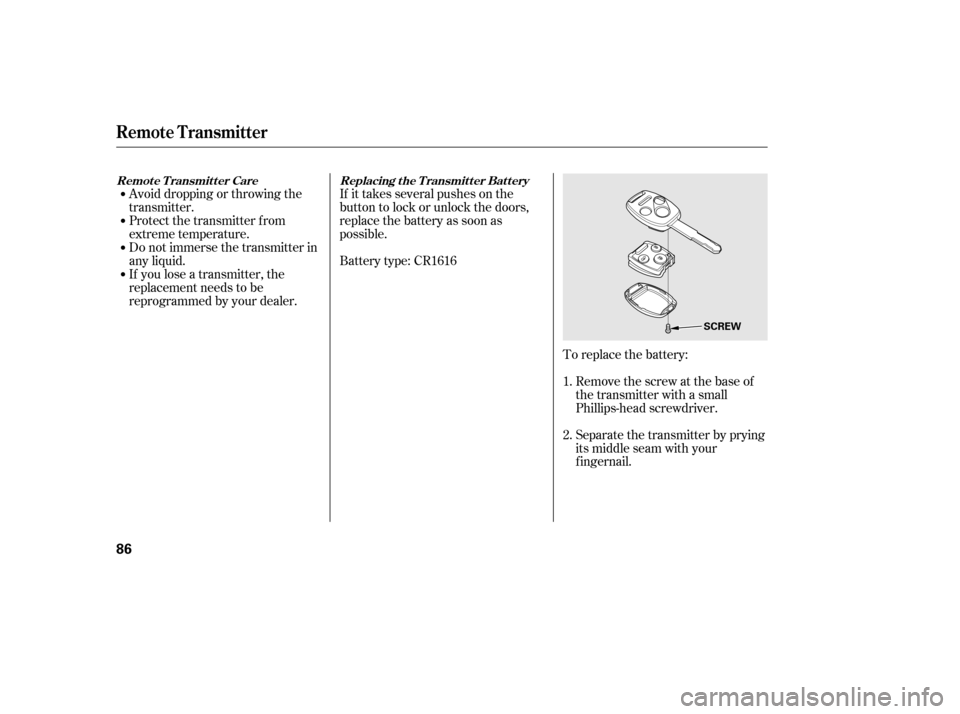
reprogrammed by your dealer.If it takes several pushes on the
button to lock or unlock the doors,
replace the battery as soon as
possible.
Battery type: CR1616
To replace the battery:Remove the screw at the base of
the transmitter with a small
Phillips-head screwdriver.
Separate the transmitter by prying
its middle seam with your
f ingernail.
1. 2.
Replacing the Transmitter Battery
Remote Transmitter Care
Remote Transmitter
86
SCREW
�����—�����—�����y�
����
����
���y���
�(�#���������y���������y
Page 83 of 253
�µ
See pages f or important saf ety
inf ormation and warnings about how toproperly position seats and seat-backs. 13 15
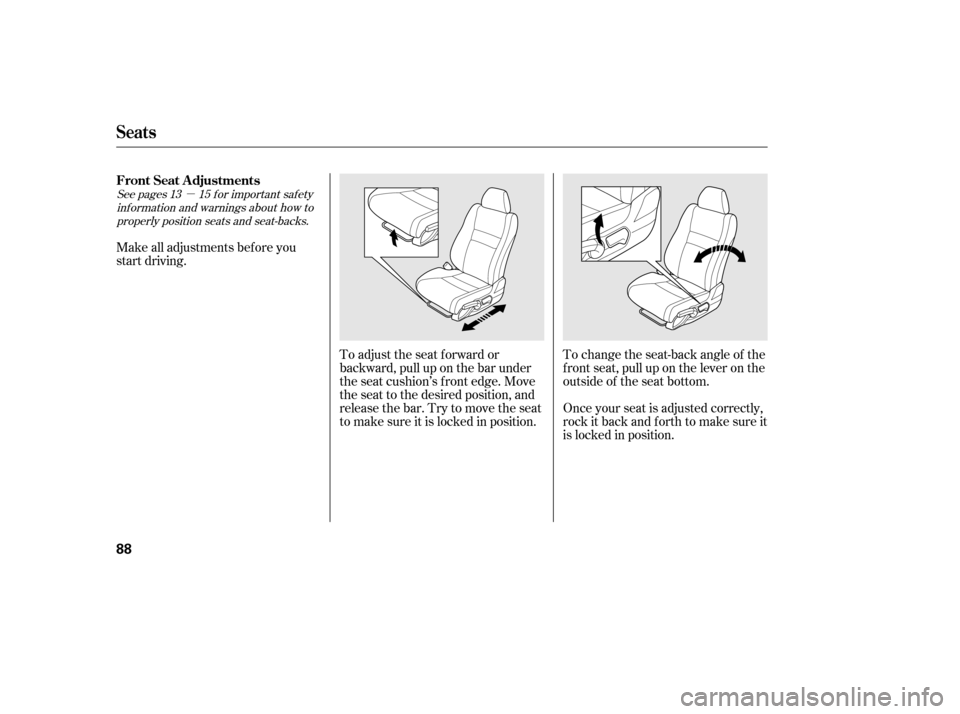
Make all adjustments bef ore you
start driving.
To change the seat-back angle of the
f ront seat, pull up on the lever on the
outside of the seat bottom.
To adjust the seat f orward or
backward, pull up on the bar under
the seat cushion’s f ront edge. Move
the seat to the desired position, and
releasethebar.Trytomovetheseat
to make sure it is locked in position.
Once your seat is adjusted correctly,
rock it back and f orth to make sure it
is locked in position.
Seats
FrontSeatAdjustments
88
�����—�����—�����y�
����
������
�y���
�(�#���������y�������
�y
Page 86 of 253
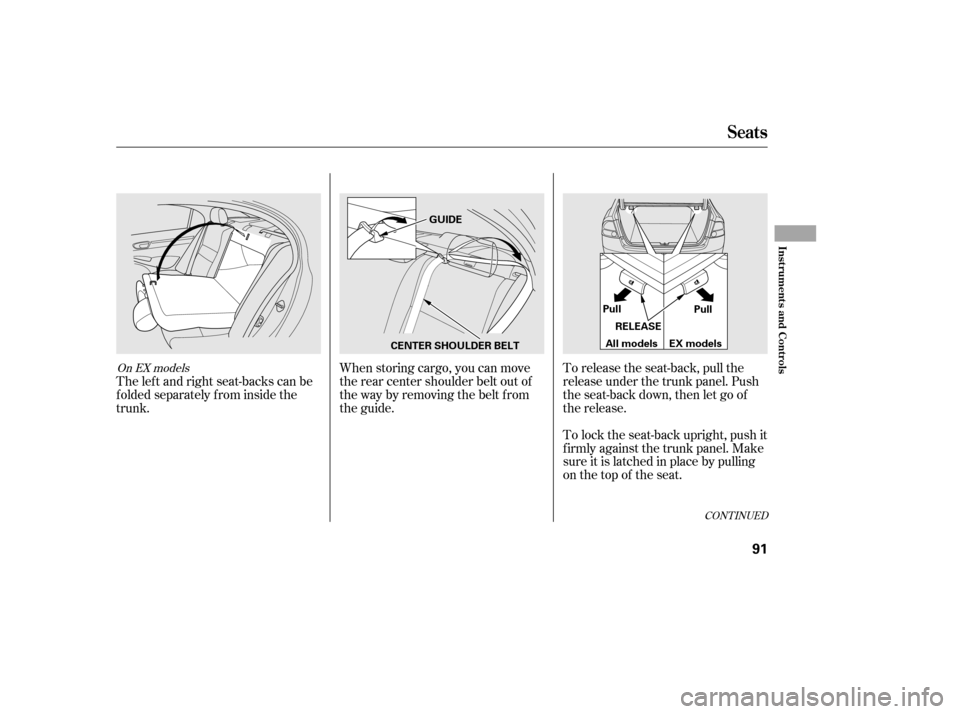
When storing cargo, you can move
therearcentershoulderbeltoutof
the way by removing the belt f rom
the guide.To lock the seat-back upright, push it
firmly against the trunk panel. Make
sure it is latched in place by pulling
on the top of the seat.
To release the seat-back, pull the
release under the trunk panel. Push
the seat-back down, then let go of
the release.
The lef t and right seat-backs can be
f olded separately f rom inside the
trunk.
CONT INUED
On EX models
Seats
Inst rument s and Cont rols
91
GUIDE
CENTER SHOULDER BELT RELEASE
Pull
Pull
EX models
All models
�����—�����—�����y�
�����������
�y���
�(�#���������y���������y
Page 93 of 253
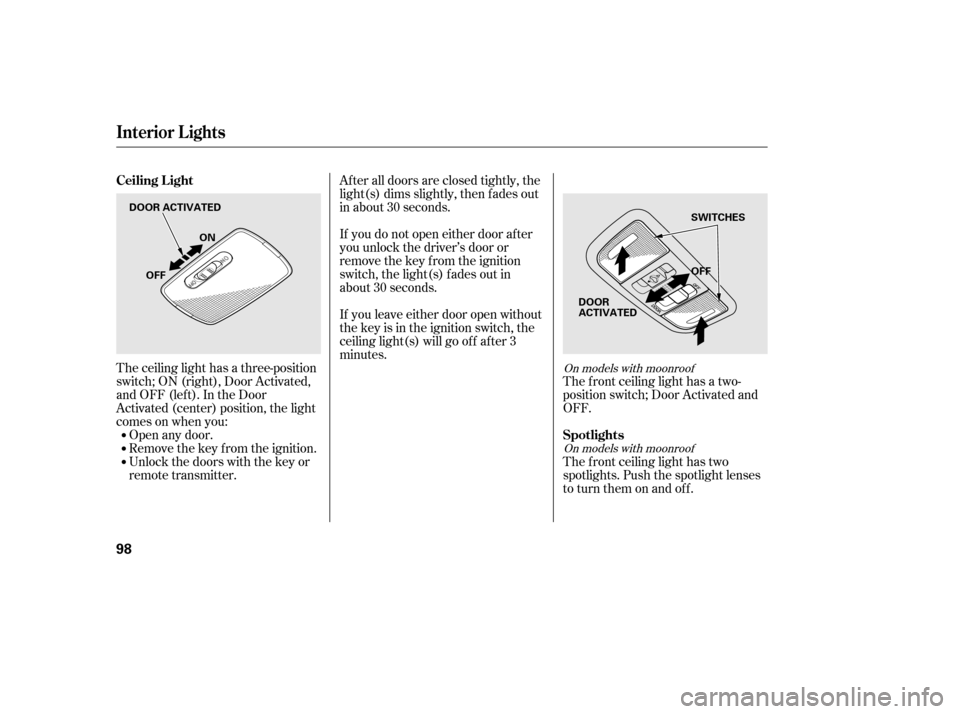
The ceiling light has a three-position
switch;ON(right),DoorActivated,
andOFF(left).IntheDoor
Activated (center) position, the light
comesonwhenyou:Open any door.
Remove the key from the ignition.
Unlock the doors with the key or
remote transmitter. The f ront ceiling light has a two-
position switch; Door Activated and
OFF.
The f ront ceiling light has two
spotlights. Push the spotlight lenses
to turn them on and off.
After all doors are closed tightly, the
light(s) dims slightly, then f ades out
in about 30 seconds.
If you do not open either door af ter
you unlock the driver’s door or
remove the key from the ignition
switch, the light(s) f ades out in
about 30 seconds.
If you leave either door open without
the key is in the ignition switch, the
ceiling light(s) will go of f af ter 3
minutes.On models with moonroof
On models with moonroof
Ceiling L ight
Spotlights
Interior Lights
98
DOOR ACTIVATED OFF
OFF ON
SWITCHES
DOOR
ACTIVATED
�����—�����—�����y�
�������������y���
�(�#���������y���
���
�y
Page 96 of 253
Turn the dial clockwise to increase
the fan speed and airflow. Turn the
dial counterclockwise to decrease it.
Turning this dial clockwise increases
the temperature of the airflow.
This button turns the air
conditioning on and of f . The
indicatorinthebuttonisonwhen
the A/C is on.
When the recirculation indicator is
on, air f rom the vehicle’s interior is
sent throughout the system again.
When the indicator is off, air is
brought in f rom the outside of the
vehicle (fresh air mode).
If equipped
Vents, Heating, and A/C
Air Conditioning (A/C) Button
Fan Control Dial
Recirculation Button
T emperature Control Dial
102
TEMPERATURE CONTROL DIAL
RECIRCULATION BUTTON
MODE BUTTONS
FAN CONTROL DIAL
MAX A/C BUTTON (If equipped)
(Canadian LX
and EX models)
AIR CONDITIONING BUTTON REAR WINDOW
DEFOGGER
BUTTON
�����—�����—�����y�
������
��
���y���
�(�#���������y���
�����y
Page 109 of 253
�µ
�µ
�µ
In MP3/WMA mode
To
select a different folder, turn the
FOLDER (TUNE) knob clockwise to
move to the beginning of the next
folder. Turn the knob
counterclockwise to move to the
beginning of the current f older. Turn
it counterclockwise again to skip to
the beginning of the previous f older.
Each time you
press and release the bar, the
player skips f orward to the
beginning of the next track (f iles in
MP3/WMA mode). Press and
release the bar to skip
backward to the beginning of the
current track. Press it again to skip
to the beginning of the previous
track.
To move rapidly within a track, press
and hold the or side of the
SEEK/SKIP bar. To continuously replay
a track (f ile in MP3/WMA mode),
press and release the RPT button.
You will see RPT in the display.
Press and hold the RPT button to
turn it off.
CONT INUED
Playing a Disc
FOLDER SELECTION
SEEK /SK IP
REPEA T (T RA CK /FIL E
REPEAT)
Features
115
�����—�����—�����y�
�������������y���
�(�#���������y���
�
���y