Page 71 of 319
�µ
�µ
�µ
Turning the
switch to the ‘‘ ’’ position turns
on the parking lights, taillights, side-
marker lights, and rear license plate
lights. Push
down on the
lever to signal a left turn and up to
signal a right turn. To signal a lane
change, push lightly on the lever,
and hold it. The lever will return to
center when you release it or
complete a turn.
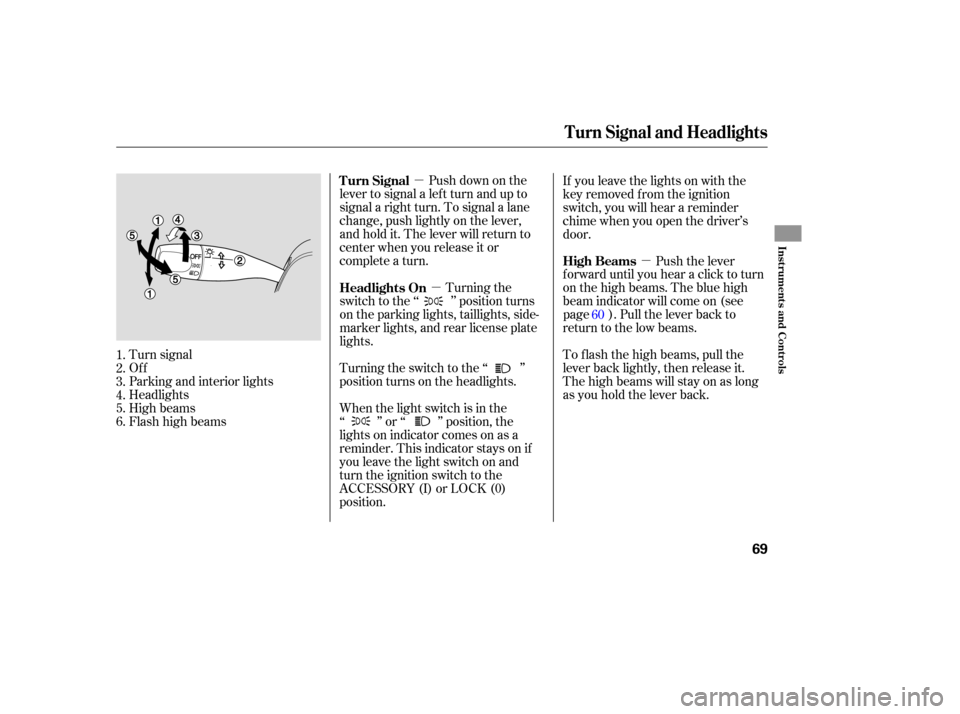
Tu rn signal
Off
Parking and interior lights
Headlights
High beams
Flashhighbeams Turning
the switch to the ‘‘ ’’
position turns on the headlights. If
you leave the lights on with the
key removed from the ignition
switch, you will hear a reminder
chime when you open the driver’s
door.
Push the lever
f orward until you hear a click to turn
on the high beams. The blue high
beam indicator will come on (see page ). Pull the lever back to
return to the low beams.
To f lash the high beams, pull the
lever back lightly, then release it.
The high beams will stay on as long
as you hold the lever back.
When the light switch is in the
‘‘ ’’ or ‘‘ ’’ position, the
lights on indicator comes on as a
reminder. This indicator stays on if
you leave the light switch on and
turn the ignition switch to the
ACCESSORY (I) or LOCK (0)
position.
1.
2.
3.
4.
5.
6.
60
Headlights On Turn Signal
High Beams
Turn Signal and Headlights
Inst rument s and Cont rols
69
�����—�����—�����y�
�������������y���
�(���%�������y���������y
Page 142 of 319
�µ�µ
�µ
�µ �µ The scan f unction samples
all channels f or 5 seconds. To
activate the function, push the SCAN
button. Push it again to get out of the
sequence.
Each side of the preset
bar can store one channel in XM1
and one in XM2.
Repeat steps 1 through 3 to store a
total of six stations on XM1 and
six on XM2.
The
seek/skip f unction selects the
various categories in XM, such as
Jazz/Blues, Rock, Classical, etc.
Push the to change the
category f orward. Push the to
change the category backward. To
search f or channels within a
category, press the TUNE bar .
Press the TUNE bar to change
channel selections. Press f or
higher numbered channels and
f or lower numbered channels.
When in the satellite radio mode,
you can use any of f our methods to
find
channels: tune, seek/skip
(category), scan, and the
preset bars.
Push the CD/AUX/XM button.
(You will see XM1 or XM2.)
Press and release this
button to change the display. The
display changes in this sequence:
channel name, channel number,
category, artist name, and music title. Usethetune,seek,orscan
function to tune the radio to a
desired station.
Pick a preset icon or number, and
hold it until you hear a beep.
1.
2.
3.
4.
T o Select a Channel SCA N
Preset
SEEK /SK IP (CA T EGORY)
TUNE DISP
A M/FM/CD Changer
140
�����—�����—�����y�
�������������y���
�(���%�������y���
�����y
Page 232 of 319
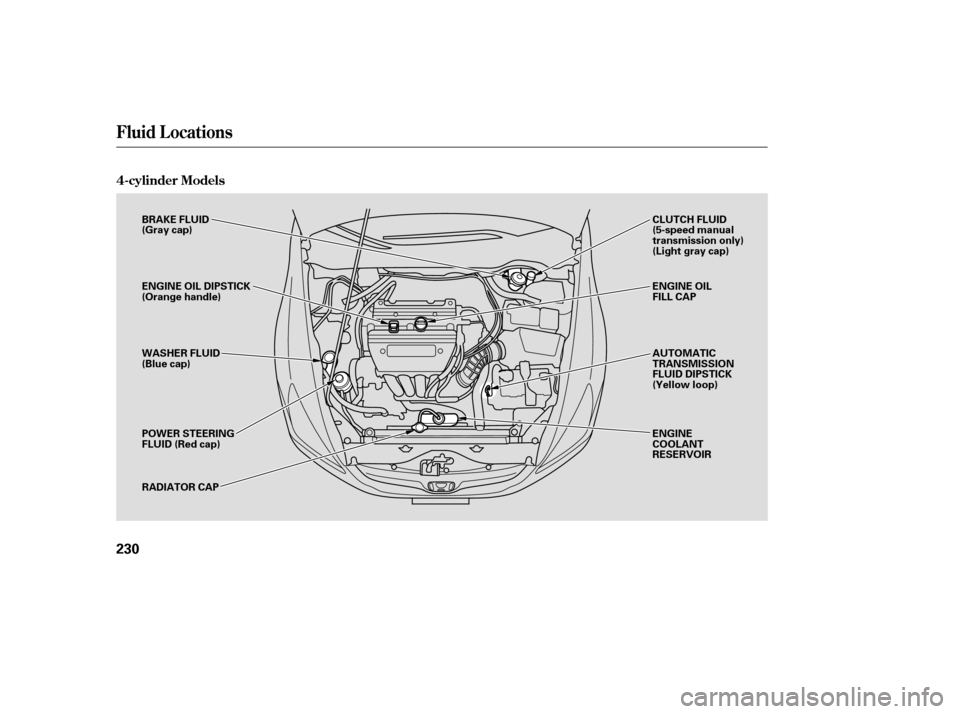
4-cylinder Models
Fluid Locations
230
BRAKE FLUID
(Gray cap)
ENGINE OIL DIPSTICK
(Orange handle)
WASHER FLUID
(Blue cap)
POWER STEERING
FLUID (Red cap)
RADIATOR CAPAUTOMATIC
TRANSMISSION
FLUID DIPSTICK
(Yellow loop) ENGINE OIL
FILL CAP
ENGINE
COOLANT
RESERVOIR CLUTCH FLUID
(5-speed manual
transmission only)
(Light gray cap)
�����—�����—�����y�
�������������y���
�(���%�������y���������y
Page 233 of 319
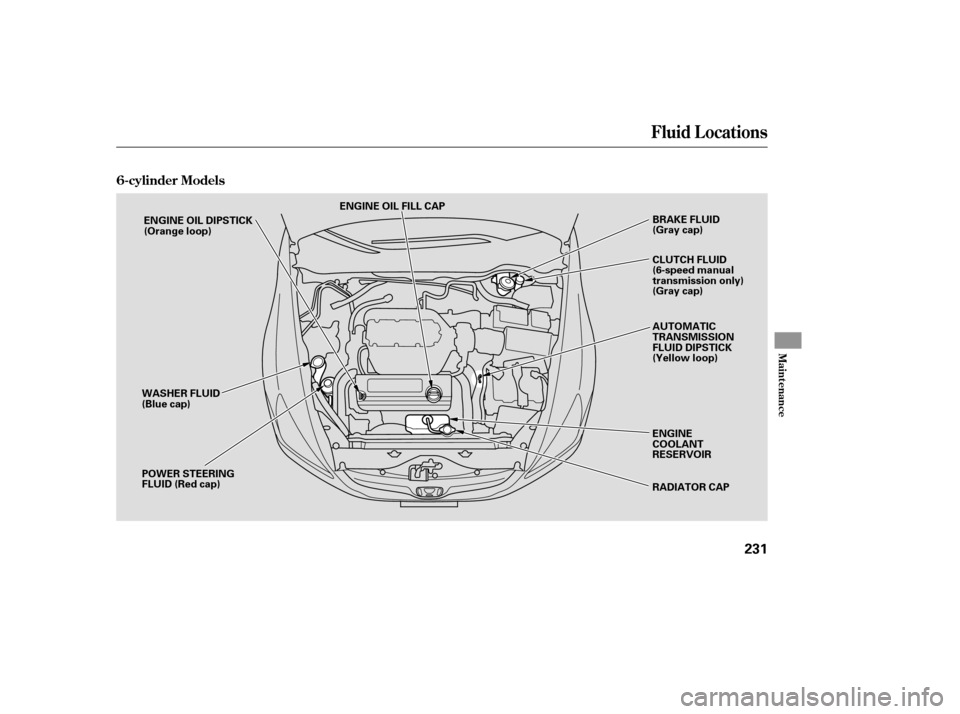
6-cylinder Models
Fluid Locations
Maint enance
231
ENGINE OIL FILL CAPRADIATOR CAP
ENGINE OIL DIPSTICK
(Orange loop)
WASHER FLUID
(Blue cap)
POWER STEERING
FLUID (Red cap) BRAKE FLUID
(Gray cap)
AUTOMATIC
TRANSMISSION
FLUID DIPSTICK
(Yellow loop)
ENGINE
COOLANT
RESERVOIR CLUTCH FLUID
(6-speed manual
transmission only)
(Gray cap)
�����—�����—�����y�
�������������y���
�(���%�������y���������y