Page 107 of 319

The standard audio system has
many f eatures. This section de-
scribes those f eatures and how to
use them.
Your vehicle has an anti-theft audio
system that requires a code number
to enable it. The heating and cooling system in
your vehicle provides a comf ortable
driving environment in all weather
conditions.......
Heating and Cooling System .106
......................
Heating and A/C .108
..........
Climate Control System .113
Climate Control System
.......
with navigation system .117
.........
Dual Temperature Control .121
.............
Climate Control Sensors .123
...............................
Audio System .124
.................
AM/FM/CD Player .126
............
AM/FM/CD Changer .136
AM/FM/CD Changer
.......
with navigation system .149
...........
AM/FM Radio Reception .164
...
XM
Satellite Radio Reception . 166
...................
Protecting Your CDs .169
.........
Caring f or the Tape Player . 170
...............
Remote Audio Controls . 171
................
Radio Thef t Protection . 172
.........................
Setting the Clock .173
...........................
Security System .174
..............................
Cruise Control .175
HomeLink Universal ...............................
Transceiver .178
The security system helps to
discourage vandalism and thef t of
your vehicle.
On all models except the 4-cylinder LX
Features
Features
105
�����—�����—�����y�
�������������y���
�(���%�������y���
�����y
Page 126 of 319
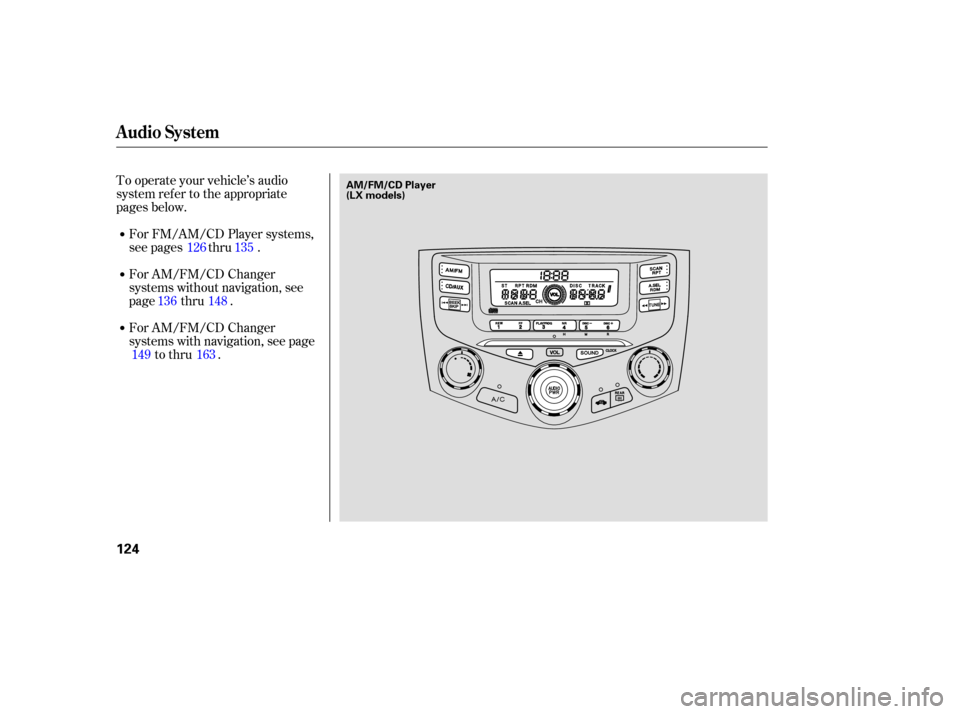
To operate your vehicl e’s audio
system refer to the appropriate
pages below.
For FM/AM /CD Player systems,
see pages thru .
For AM/FM/CD Changer
systems without navigation, see
page thru .
For AM/FM/CD Changer
systems with navigation, see page
to thru . 126 135
148
136
149 163
Audio System
124
AM/FM/CD Player
(LX models)
�����—�����—�����y�
�������������y���
�(���%�������y���
�����y
Page 127 of 319
Audio System
Features
125
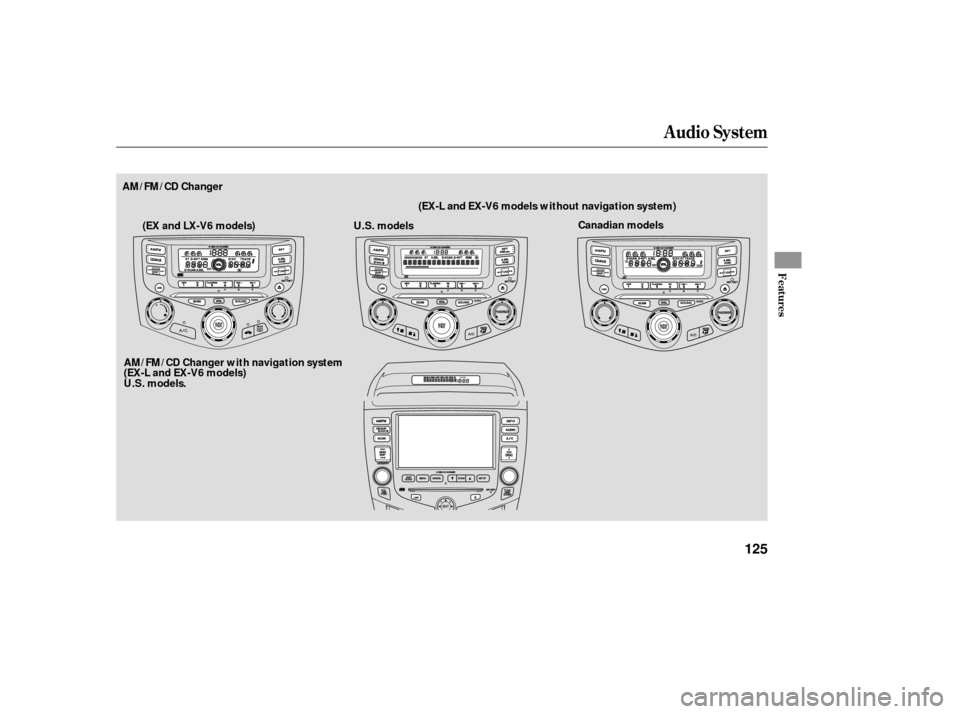
AM/FM/CD ChangerCanadian models
U.S. models
AM/FM/CD Changer with navigation system
(EX-L and EX-V6 models)
U.S. models . (EX-L and EX-V6 models without navigation system)
(EX and LX-V6 models)
�����—�����—�����y�
�������������y���
�(���%�������y���
�����y
Page 133 of 319

�µ�´
�µ�´
If you turn the system of f while a CD
is playing, either with the PWR/VOL
knob or by turning off the ignition,
the disc will stay in the drive. When
youturnthesystembackon,theCD
will begin playing where it lef t of f . An optional six or eight disc CD
changer is available f or your vehicle
f rom your dealer.
This disc changer uses the same
controls used f or the in-dash CD
player or the radio.
Load the desired CDs into the
magazine, and load the magazine
into the changer according to the
instructions that came with the unit.
If you select an empty slot in the
magazine, the changer will search
f or the next available CD to load and
play.
If there are no CDs in the changer,
the display will f lash, and you will
have to select another mode.
Press the eject button ( ) to
remove the CD. If you eject the CD,
but do not remove it f rom the slot,
the system will automatically reload
the CD af ter 15 seconds and put it in
pause mode. To begin playing, press
the CD/AUX button.
Press the AM/FM button to switch
to the AM/FM radio while a CD is
playing. To play the CD, press the
CD/AUX button.
If a tape is in the optional tape player,
press the CD/AUX button to switch
to the tape while a CD is playing.
Press the CD/AUX button again to
switch back to the CD player. To select the CD changer, press the
CD/AUX button. The disc and track
numbers will be displayed. To select
a dif f erent disc, use the preset 5
(DISC ) side or preset 6 (DISC )
side of the preset bar. To select the
previous disc, press the preset 5
(DISC ), or preset 6 (DISC ) to
select the next disc in sequence.
To Stop Playing a CD Operating the Optional CD
Changer
AM/FM/CD Player
Features
131
�����—�����—�����y�
���������
���y���
�(���%�������y���
�����y
Page 135 of 319
Error MessageSolution
Cause
Press the magazine eject button, pull the
magazine out, and check for an error message.
Insertthemagazineagain.Ifthemessagedoes
not disappear, or the magazine cannot be pulled
out, see your dealer.
Press the magazine eject button, pull the
magazine out, and check for an error message.
Insertthemagazineagain.Ifthemessagedoes
not disappear, or the magazine cannot be pulled
out, see your dealer.
Will disappear when the temperature returns to
normal.
FOCUS Error
Mechanical Error
High Temperature
If you see an error message in the
display while operating the optional
CD changer, f ind the cause in the
chart to the right. If you cannot clear
theerrormessage,takethevehicle
to your dealer.
AM/FM/CD Player
Optional CD Changer Error
Messages
Features
133
�����—�����—�����y�
�������������y���
�(���%�������y���
�����y
Page 138 of 319
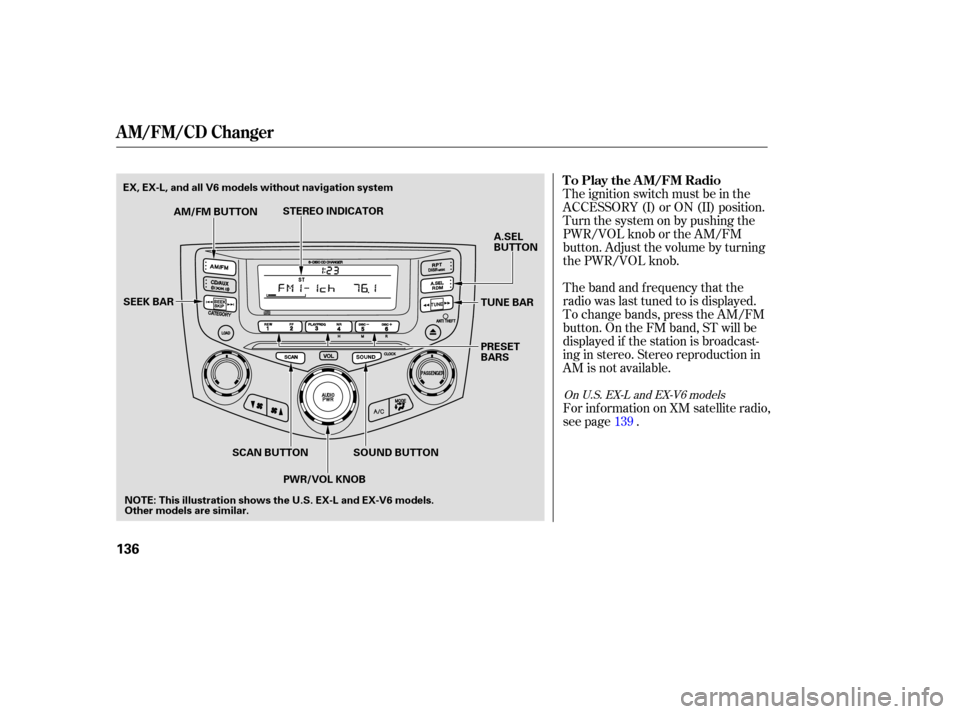
The ignition switch must be in the
ACCESSORY (I) or ON (II) position.
Turn the system on by pushing the
PWR/VOL knob or the AM/FM
button. Adjust the volume by turning
the PWR/VOL knob.
The band and frequency that the
radio was last tuned to is displayed.
To change bands, press the AM/FM
button. On the FM band, ST will be
displayed if the station is broadcast-
ing in stereo. Stereo reproduction in
AM is not available.
For inf ormation on XM satellite radio,
see page . 139
On U.S. EX-L and EX-V6 models
To Play the AM/FM Radio
A M/FM/CD Changer
136
TUNE BAR
SOUND BUTTON
AM/FM BUTTON
STEREO INDICATOR
SEEK BAR
SCAN BUTTONPWR/VOL KNOB PRESET
BARS
A.SEL
BUTTON
NOTE: This illustration shows the U.S. EX-L and EX-V6 models.
Other models are similar.
EX, EX-L, and all V6 models without navigation system
�����—�����—�����y�
�������������y���
�(���%�������y���
�����y
Page 139 of 319

�µ
�µ �µ�µ�µ
�µ
You can use any of f ive methods to
f ind radio stations on the selected
band: tune, seek, scan,
the
preset bars, and auto select.
Use the tune bar to tune
the radio to a desired f requency.
Press the side of the bar to tune
to a higher f requency, and press the side to tune to a lower
f requency.
The seek f unction
searches up and down from the
current f requency to f ind a station
with a strong signal. To activate it,
press the or side of the
bar, then release it. The scan f unction samples
all the stations with strong signals on
the selected band. To activate it,
press the SCAN button, then release
it. You will see SCAN in the display.
The system will scan f or a station
with a strong signal. When it f inds
one, it will stop and play that station
f or about 5 seconds. If you do
nothing, the system will then scan
f or the next strong station and play it
for 5 seconds. When it plays a station
that you want to listen to, press the
SCAN button again. Each side of the bars (1
6) can store one f requency on AM
and two f requencies on FM.
Select the desired band, AM or
FM. FM1 and FM2 let you store
two f requencies with each side of
the preset bar.
Usethetune,seek,orscan
function to tune the radio to a
desired station.
Pick a preset number (1 6), you
want for that station. Press the left
or right side of the bar, and hold it
until you hear a beep.
1.
2.
3.
To Select a Station
TUNE
SEEK SCA N Preset
A M/FM/CD Changer
Features
137
�����—�����—�����y�
�������������y���
�(���%�������y���
�����y
Page 140 of 319

�µ�µ
�µ
�µ
�µ
Repeat steps 1 through 3 to store a
total of six stations on AM and
twelve stations on FM.
The preset f requencies will be lost if
your vehicle’s battery goes dead, is
disconnected, or the radio f use is
removed. If you are
traveling far from home and can no
longer receive your preset stations,
you can use the auto select feature to
find stations in the local area. You will see a ‘‘0’’ displayed af ter
pressing a preset bar if auto select
cannot f ind a strong station f or every
preset bar.
,pressthe
A. SEL button. This restores the
presets you originally set.
Press the A. SEL button. ‘‘A.SEL’’
f lashes in the display, and the system
goes into scan mode f or several
seconds. It stores the f requencies of
six AM, and twelve FM stations in
the preset bars. If you do not like the stations auto
select has stored, you can store
other f requencies on the preset bars
as previously described.
Press the SOUND button repeatedly
to display the bass (BAS), treble
(TRE), f ader (FAD), and balance
(BAL) settings.
Eachmodeisshowninthedisplayas
it changes. Turn the PWR/VOL
knob to adjust the setting to your
liking. When the level reaches the
center, you will see a ‘‘ ’’ in the
display.
The system will return to the audio
display about 5 seconds af ter you
stop adjusting a mode.Adjusts the bass.
Adjusts the balance, or side-
to-side strength of the sound. Adjusts the treble.
Adjusts the fader, or the
f ront-to-back strength of the sound.
4.
To turn of f auto select
AUTO SELECT
Adjusting the Sound
BAS
BAL TRE
FAD
A M/FM/CD Changer
138
�����—�����—�����y�
�����������
�y���
�(���%�������y���
���
�y