2006 CHEVROLET SUBURBAN ECO mode
[x] Cancel search: ECO modePage 106 of 540
3. You are now ready to program the automatic door
locks. Select one of the four programming options
listed previously, and press the unlock side of
the power door lock switch to cycle through the
unlocking options. You will have 30 seconds
to begin programming. If you exceed the 30-second
limit, the locks will automatically lock and unlock
and the horn will chirp twice to indicate that
you have left the program mode. If this occurs,
repeat the procedure beginning with Step 1
to re-enter the programming mode.
You can exit the program mode any time by turning the
ignition to RUN. The locks will automatically lock and
unlock and the horn will chirp twice to indicate that you
are leaving the program mode. If the lock/unlock switches
are not pressed while in the programming mode, the
current auto lock/unlock setting will not be modied.
See your dealer for more information.
Rear Door Security Locks
If your vehicle has this feature, the rear side doors can
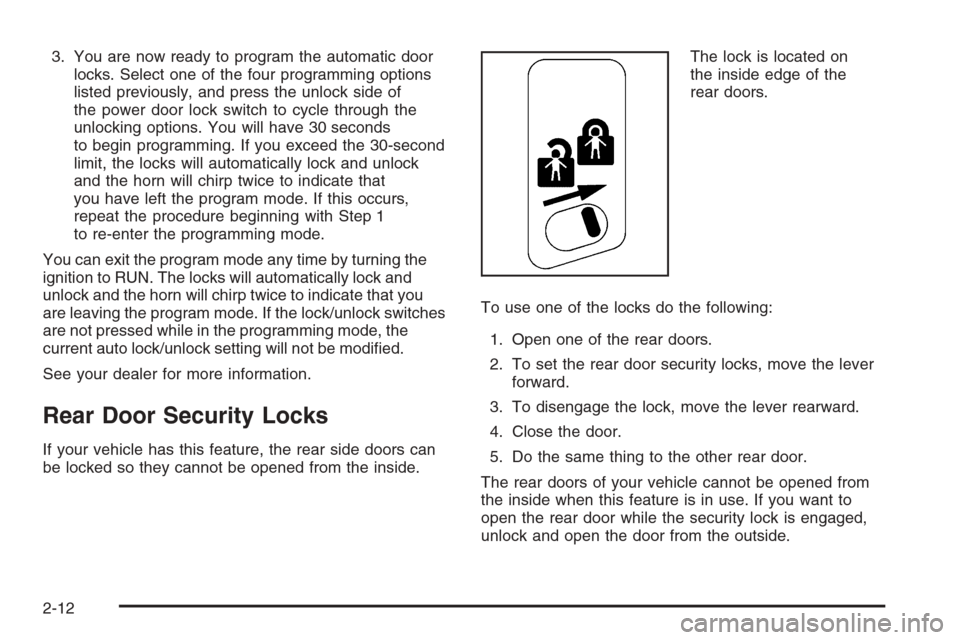
be locked so they cannot be opened from the inside.The lock is located on
the inside edge of the
rear doors.
To use one of the locks do the following:
1. Open one of the rear doors.
2. To set the rear door security locks, move the lever
forward.
3. To disengage the lock, move the lever rearward.
4. Close the door.
5. Do the same thing to the other rear door.
The rear doors of your vehicle cannot be opened from
the inside when this feature is in use. If you want to
open the rear door while the security lock is engaged,
unlock and open the door from the outside.
2-12
Page 121 of 540
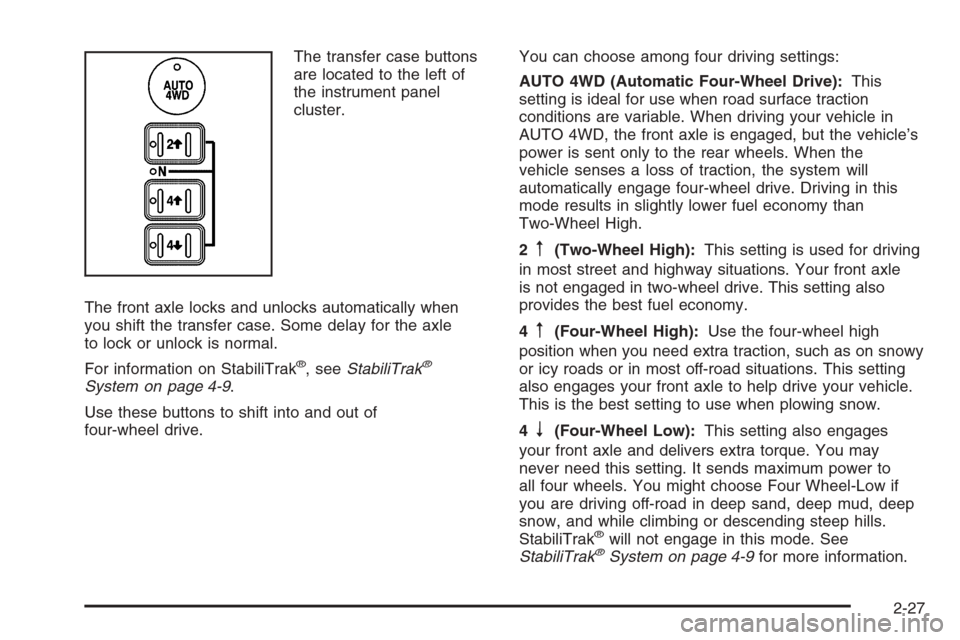
The transfer case buttons
are located to the left of
the instrument panel
cluster.
The front axle locks and unlocks automatically when
you shift the transfer case. Some delay for the axle
to lock or unlock is normal.
For information on StabiliTrak
®, seeStabiliTrak®
System on page 4-9.
Use these buttons to shift into and out of
four-wheel drive.You can choose among four driving settings:
AUTO 4WD (Automatic Four-Wheel Drive):This
setting is ideal for use when road surface traction
conditions are variable. When driving your vehicle in
AUTO 4WD, the front axle is engaged, but the vehicle’s
power is sent only to the rear wheels. When the
vehicle senses a loss of traction, the system will
automatically engage four-wheel drive. Driving in this
mode results in slightly lower fuel economy than
Two-Wheel High.
2
m(Two-Wheel High):This setting is used for driving
in most street and highway situations. Your front axle
is not engaged in two-wheel drive. This setting also
provides the best fuel economy.
4
m(Four-Wheel High):Use the four-wheel high
position when you need extra traction, such as on snowy
or icy roads or in most off-road situations. This setting
also engages your front axle to help drive your vehicle.
This is the best setting to use when plowing snow.
4
n(Four-Wheel Low):This setting also engages
your front axle and delivers extra torque. You may
never need this setting. It sends maximum power to
all four wheels. You might choose Four Wheel-Low if
you are driving off-road in deep sand, deep mud, deep
snow, and while climbing or descending steep hills.
StabiliTrak
®will not engage in this mode. See
StabiliTrak®System on page 4-9for more information.
2-27
Page 123 of 540
Shifting Into Four-Wheel High or AUTO
4WD (Automatic Four-Wheel Drive)
Press and release the Four-Wheel High or AUTO 4WD
button. This can be done at any speed, except when
shifting from Four-Wheel Low, and the indicator light will
ash while shifting. It will remain on when the shift is
completed.
Shifting Into Two-Wheel High
Press and release the Two-Wheel High button. This
can be done at any speed, except when shifting
from Four-Wheel Low.
Shifting Into Four-Wheel Low
To shift to the Four-Wheel Low position, the ignition
must be in RUN and the vehicle must be stopped
or moving less than 3 mph (5 km/h) with the
transmission in NEUTRAL (N). The preferred method
for shifting into four-wheel low is to have your vehicle
moving 1 to 2 mph (1.6 to 3.2 km/h). Press and release
the Four-Wheel Low button. You must wait for the
four-wheel low indicator light to stop ashing and remain
on before shifting your transmission in gear.Notice:Shifting the transmission into gear before
the Four-Wheel Low indicator light has stopped
ashing could damage the transfer case. To
help avoid damaging your vehicle, always wait for
the Four-Wheel Low indicator light to stop ashing
before shifting the transmission into gear.
It is typical for your vehicle to exhibit signicant
engagement noise and bump when shifting between
Four-Wheel Low and Four-Wheel High ranges or from
NEUTRAL with the engine running.
If the Four-Wheel Low button is pressed when your
vehicle is in gear and/or moving, the Four-Wheel Low
indicator light will ash for 30 seconds and not complete
the shift unless your vehicle is moving less than
3 mph (5 km/h) and the transmission is in NEUTRAL (N).
After 30 seconds the transfer case will shift to
Four-Wheel High mode.
2-29
Page 125 of 540
6. Simultaneously press and hold the Two-Wheel High
and Four-Wheel Low buttons for 10 seconds. The
NEUTRAL light will come on when the transfer case
shift to NEUTRAL is complete.
7. If the engine is running, verify that the transmission
is in NEUTRAL (N) by shifting the transmission to
REVERSE (R) for one second, then shift the
transmission to DRIVE (D) for one second.
8. Turn the ignition to ACCESSORY, which will turn
the engine off.
9. Place the transmission shift lever in PARK (P).
10. Turn the ignition to LOCK.
Shifting Out of NEUTRAL
To shift out of NEUTRAL do the following:
1. Set the parking brake and apply the regular
brake pedal.
2. Shift the transmission to NEUTRAL (N) and turn
the ignition to RUN with the engine off.3. Press the button for the desired transfer case shift
position (Two-Wheel High, Four-Wheel High, AUTO
4WD, or Four-Wheel Low).
After the transfer case has shifted out of NEUTRAL
the NEUTRAL light will go out.
4. Release the parking brake.
Notice:Shifting the transmission into gear before
the Four-Wheel Low indicator light has stopped
ashing could damage the transfer case. To
help avoid damaging your vehicle, always wait for
the Four-Wheel Low indicator light to stop ashing
before shifting the transmission into gear.
5. Start the engine and shift the transmission to the
desired position.
Excessively shifting the transfer case into or out of
the different modes may cause the transfer case to enter
the shift protection mode. This will protect the transfer
case from possible damage and will only allow the
transfer case to respond to one shift per 10 seconds.
The transfer case may stay in this mode for up to
three minutes.
2-31
Page 132 of 540

Mirror Operation
When turned on, this mirror automatically dims to the
proper level to minimize glare from any headlamps
behind you after dark.
O(On/Off): This is the on/off button for the automatic
dimming feature and compass. Press the far left button,
located below the mirror face, for up to three seconds
to turn the feature on and off. A light on the mirror will be
lit while the feature is turned on.
Compass Operation
Press the on/off button once to turn the compass
on or off.
There is a compass display in the window in the upper
right corner of the mirror face. The compass displays
a maximum of two characters. For example, “NE”
is displayed for north-east.
Compass Calibration
Press and hold the on/off button down for nine seconds
to activate the compass calibration mode. CAL will
be displayed in the compass window on the mirror.The compass can be calibrated by driving the vehicle
in circles at 5 mph (8 km/h) or less until the display
reads a direction.
Compass Variance
Compass variance is the difference between earth’s
magnetic north and true geographic north. The mirror
is set to zone eight upon leaving the factory. It will
be necessary to adjust the compass to compensate
for compass variance if you live outside zone eight.
Under certain circumstances, such as during a
long distance cross-country trip, it will be necessary
to adjust for compass variance. If not adjusted to
account for compass variance, your compass could
give false readings.
To adjust for compass variance, do the following:
1. Find your current location and variance zone
number on the map.
2-38
Page 134 of 540
To adjust between Fahrenheit and Celsius, do the
following:
1. Press and hold the on/off button for approximately
four seconds until either a ashing F or C appears.
2. Press the button again to change the display to the
desired unit of measurement. After approximately
four seconds of inactivity, the new unit will be locked
in and the compass/temperature display will return.
If an abnormal temperature reading is displayed for an
extended period of time, please see your GM dealer.
Under certain circumstances, a delay in updating
the temperature is normal.
Automatic Dimming Mirror Operation
The automatic dimming mirror function is turned
on automatically each time the ignition is started. To
operate the automatic dimming mirror, do the following:
1. Make sure the green indicator light, located to the left
of the on/off button, is lit. If it is not, press and hold
the on/off button for approximately six seconds until
the green light comes on, indicating that the mirror is
in automatic dimming mode.2. Turn off the automatic dimming mirror function
by pressing and holding the on/off button for
approximately six seconds, until the green indicator
light turns off.
Compass Variance
The mirror is set in zone eight upon leaving the
factory. It will be necessary to adjust the compass to
compensate for compass variance if the vehicle is
outside of zone eight. Under certain circumstances,
as during a long distance cross-country trip, it will
be necessary to adjust for compass variance. Compass
variance is the difference between earth’s magnetic
north and true geographic north. If not adjusted
to account for compass variance, the compass could
give false readings.
To adjust for compass variance, do the following:
1. Find your current location and variance zone
number on the following zone map.
2-40
Page 135 of 540
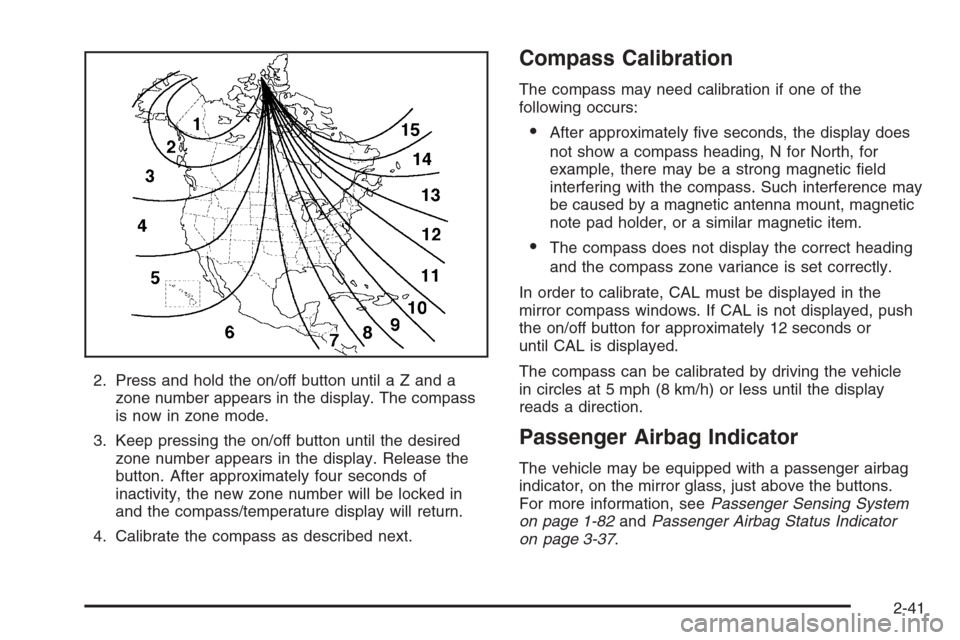
2. Press and hold the on/off button until a Z and a
zone number appears in the display. The compass
is now in zone mode.
3. Keep pressing the on/off button until the desired
zone number appears in the display. Release the
button. After approximately four seconds of
inactivity, the new zone number will be locked in
and the compass/temperature display will return.
4. Calibrate the compass as described next.
Compass Calibration
The compass may need calibration if one of the
following occurs:
After approximately ve seconds, the display does
not show a compass heading, N for North, for
example, there may be a strong magnetic eld
interfering with the compass. Such interference may
be caused by a magnetic antenna mount, magnetic
note pad holder, or a similar magnetic item.
The compass does not display the correct heading
and the compass zone variance is set correctly.
In order to calibrate, CAL must be displayed in the
mirror compass windows. If CAL is not displayed, push
the on/off button for approximately 12 seconds or
until CAL is displayed.
The compass can be calibrated by driving the vehicle
in circles at 5 mph (8 km/h) or less until the display
reads a direction.
Passenger Airbag Indicator
The vehicle may be equipped with a passenger airbag
indicator, on the mirror glass, just above the buttons.
For more information, seePassenger Sensing System
on page 1-82andPassenger Airbag Status Indicator
on page 3-37.
2-41
Page 136 of 540
Cleaning the Mirror
When cleaning the mirror, use a paper towel or similar
material dampened with glass cleaner. Do not spray
glass cleaner directly on the mirror as that may cause
the liquid cleaner to enter the mirror housing.
Automatic Dimming Rearview Mirror
with Compass
Your vehicle may have an automatic-dimming rearview
mirror with a compass.
Mirror Operation
When turned on, this mirror automatically dims to the
proper level to minimize glare from any headlamps
behind you after dark.
O(On/Off): This is the on/off button for the automatic
dimming feature and compass. Press the far left button,
located below the mirror face, for up to three seconds
to turn the feature on and off. A light on the mirror will be
lit while the feature is turned on.
Compass Operation
Press the on/off button once to turn the compass
on or off.
There is a compass display in the window in the upper
right corner of the mirror face. The compass displays
a maximum of two characters. For example, “NE”
is displayed for north-east.
Compass Calibration
Press and hold the on/off button down for nine seconds
to activate the compass calibration mode. CAL will
be displayed in the compass window on the mirror.
The compass can be calibrated by driving the vehicle
in circles at 5 mph (8 km/h) or less until the display
reads a direction.
Compass Variance
Compass variance is the difference between earth’s
magnetic north and true geographic north. The mirror is
set to zone eight upon leaving the factory. It will be
necessary to adjust the compass to compensate for
compass variance if you live outside zone eight. Under
certain circumstances, such as during a long distance
cross-country trip, it will be necessary to adjust for
compass variance. If not adjusted to account for compass
variance, your compass could give false readings.
2-42