2006 CHEVROLET HHR display
[x] Cancel search: displayPage 84 of 394
Mirrors...........................................................2-38
Manual Rearview Mirror.................................2-38
Automatic Dimming Rearview Mirror
with OnStar
®and Compass........................2-38
Automatic Dimming Rearview
Mirror with OnStar
®, Compass
and Temperature Display............................2-40
Outside Power Mirrors...................................2-42
Outside Convex Mirror...................................2-42
OnStar
®System.............................................2-43Storage Areas................................................2-45
Glove Box...................................................2-45
Cupholder(s)................................................2-45
Instrument Panel Storage Area.......................2-45
Floor Console Storage Area...........................2-45
Rear Storage Area........................................2-45
Rear Compartment Storage Panel/Cover..........2-46
Roof Rack System........................................2-48
Convenience Net..........................................2-49
Sunroof.........................................................2-49
Section 2 Features and Controls
2-2
Page 89 of 394
Battery Replacement
Under normal use, the battery in your remote keyless
entry transmitter should last about four years.
You can tell the battery is weak if the transmitter will not
work at the normal range in any location. If you have
to get close to your vehicle before the transmitter works,
it is probably time to change the battery.
The KEY FOB BATT LOW message in the vehicle’s
DIC will display if the remote keyless entry transmitter
battery is low.
Notice:When replacing the battery, use care not to
touch any of the circuitry. Static from your body
transferred to these surfaces may damage the
transmitter.
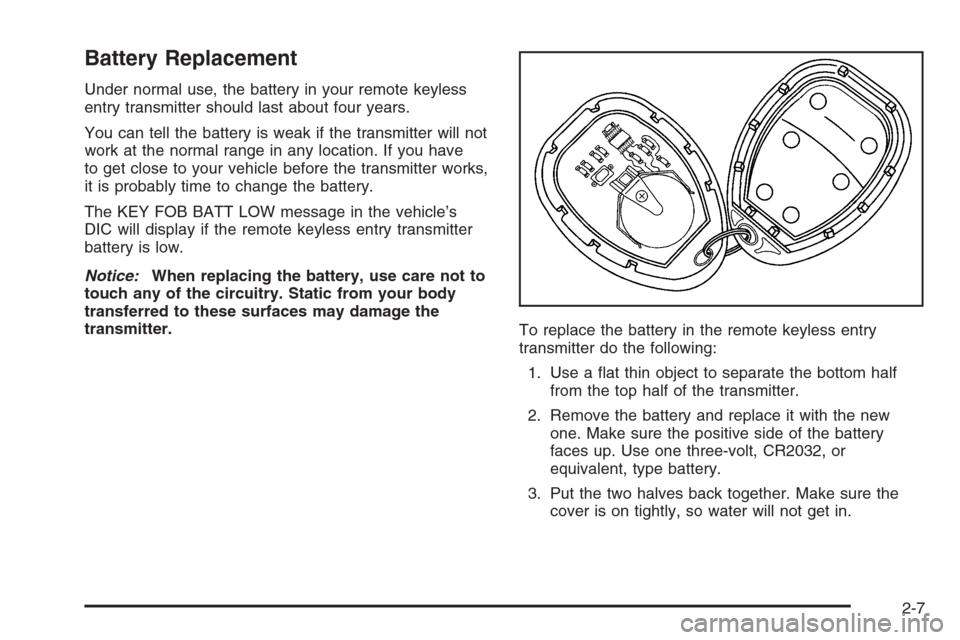
To replace the battery in the remote keyless entry
transmitter do the following:
1. Use a at thin object to separate the bottom half
from the top half of the transmitter.
2. Remove the battery and replace it with the new
one. Make sure the positive side of the battery
faces up. Use one three-volt, CR2032, or
equivalent, type battery.
3. Put the two halves back together. Make sure the
cover is on tightly, so water will not get in.
2-7
Page 105 of 394
ACC (ACCESSORY):This position operates some of
your electrical accessories. It unlocks the steering wheel
and ignition.
R(RUN):This is the position the switch returns to after
you start your engine and release the switch. The
switch stays in the RUN position when the engine is
running. But even when the ignition is not running, you
can use RUN to operate your electrical accessories
and to display some warning and indicator lights.
/(START):This position starts the engine. When the
engine starts, release the key. The ignition switch
will return to RUN for normal driving.
A warning tone will sound if you open the driver’s door
while in LOCK or ACC, when the key has not been
removed from the ignition.
Column Lock Release
The following procedure allows the ignition to be turned
to LOCK and for ignition key removal in case of a
dead battery or low voltage battery.
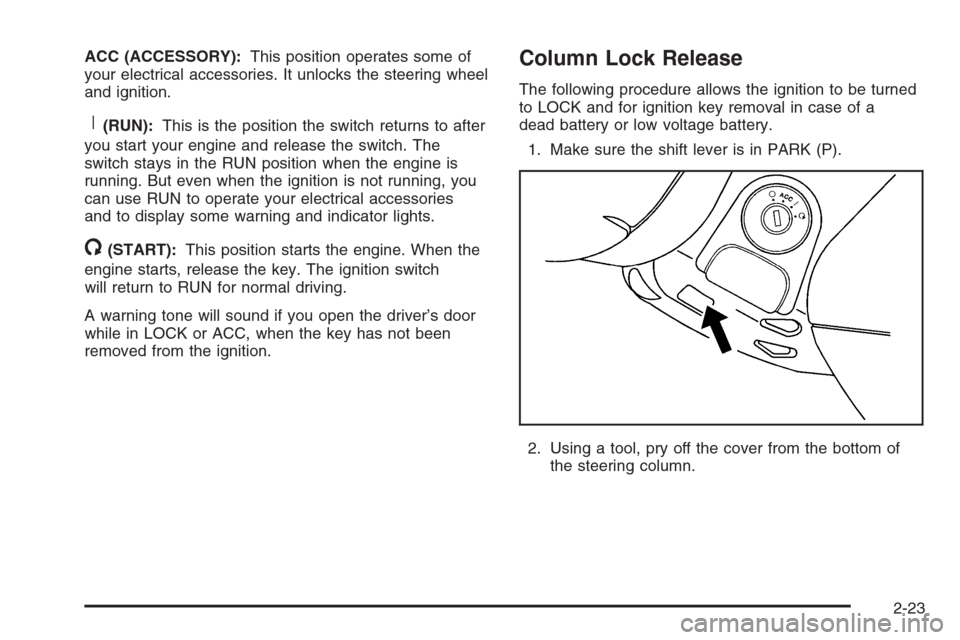
1. Make sure the shift lever is in PARK (P).
2. Using a tool, pry off the cover from the bottom of
the steering column.
2-23
Page 114 of 394
Parking Brake
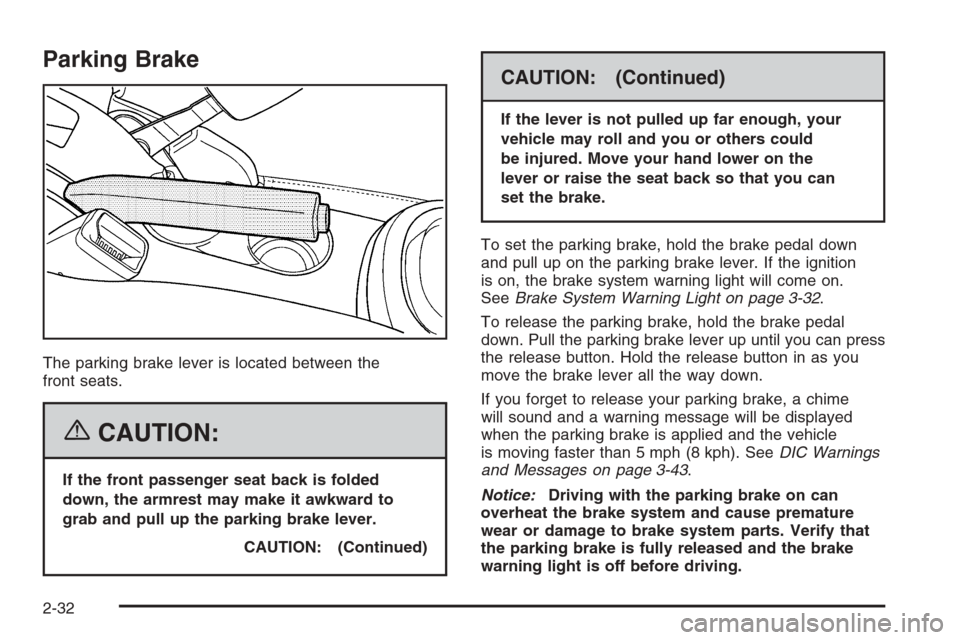
The parking brake lever is located between the
front seats.
{CAUTION:
If the front passenger seat back is folded
down, the armrest may make it awkward to
grab and pull up the parking brake lever.
CAUTION: (Continued)
CAUTION: (Continued)
If the lever is not pulled up far enough, your
vehicle may roll and you or others could
be injured. Move your hand lower on the
lever or raise the seat back so that you can
set the brake.
To set the parking brake, hold the brake pedal down
and pull up on the parking brake lever. If the ignition
is on, the brake system warning light will come on.
SeeBrake System Warning Light on page 3-32.
To release the parking brake, hold the brake pedal
down. Pull the parking brake lever up until you can press
the release button. Hold the release button in as you
move the brake lever all the way down.
If you forget to release your parking brake, a chime
will sound and a warning message will be displayed
when the parking brake is applied and the vehicle
is moving faster than 5 mph (8 kph). SeeDIC Warnings
and Messages on page 3-43.
Notice:Driving with the parking brake on can
overheat the brake system and cause premature
wear or damage to brake system parts. Verify that
the parking brake is fully released and the brake
warning light is off before driving.
2-32
Page 120 of 394
Mirrors
Manual Rearview Mirror
To reduce glare from lamps behind you, move the lever
toward you to the night position. Your vehicle may
also have reading lamps. Press the buttons, located
under the mirror, up to turn the lamps on or off.
Automatic Dimming Rearview Mirror
with OnStar
®and Compass
Your vehicle may have an automatic dimming rearview
mirror with OnStar®, compass and reading lamps.
This feature enables the mirror to sense nighttime glare
from vehicle headlamps from behind and automatically
dim to reduce the glare to a safe level.
The automatic dimming feature turns on each time the
vehicle is started. Press the MIRROR button once
and the green indicator light located to the left of the
button will go out indicating the feature is off. To turn
the feature back on, press and release the MIRROR
button and the green indicator light will come on.
The reading lamps, located under the mirror, can be
turned on or off by pushing the buttons up.There are three additional buttons for the OnStar
®
system. See your dealer for more information on the
system and how to subscribe to OnStar®. See OnStar®
in the Index for more information.
Compass Operation
Press the compass button once to turn the compass
on or off.
When the ignition and the compass feature are on,
the compass will show two character boxes for a
few seconds. After a few seconds, the mirror will
display the current compass direction.
Compass Calibration
If after a few seconds the display does not show a
compass direction, (N for North for example), there may
be a strong magnetic eld interfering with the compass.
Such interference may be caused by a magnetic
antenna mount, note pad holder, or similar object. If the
letter C appears in the compass window, the compass
may need to be reset or calibrated.
The mirror can be calibrated by driving the vehicle in
circles at 5 mph (8 km/h) or less until the display reads
a direction.
2-38
Page 121 of 394
Compass Variance
Compass variance is the difference between earth’s
magnetic north and true geographic north. If the mirror
is not adjusted for compass variance, the compass
could give false readings.
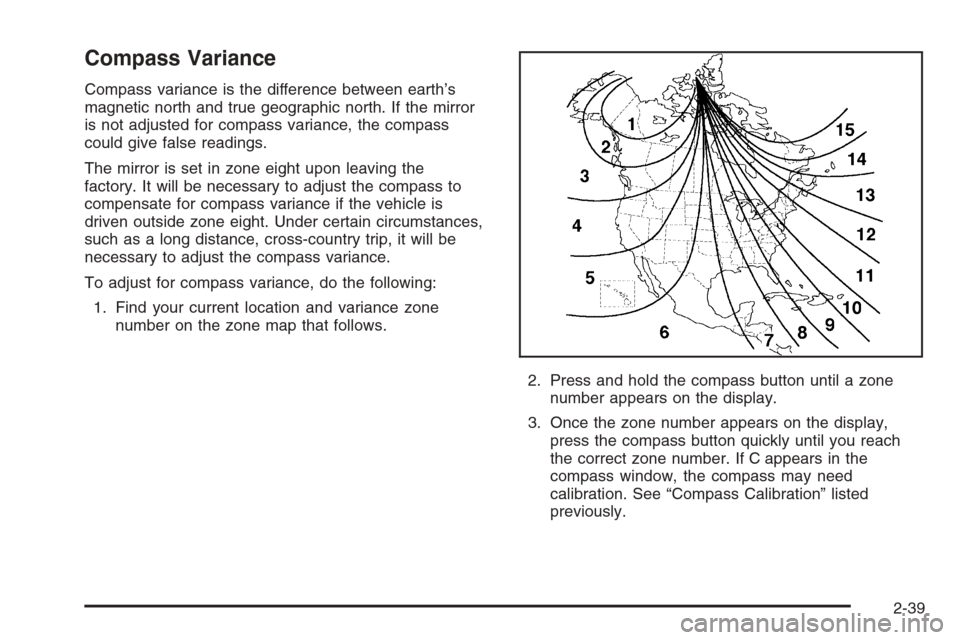
The mirror is set in zone eight upon leaving the
factory. It will be necessary to adjust the compass to
compensate for compass variance if the vehicle is
driven outside zone eight. Under certain circumstances,
such as a long distance, cross-country trip, it will be
necessary to adjust the compass variance.
To adjust for compass variance, do the following:
1. Find your current location and variance zone
number on the zone map that follows.
2. Press and hold the compass button until a zone
number appears on the display.
3. Once the zone number appears on the display,
press the compass button quickly until you reach
the correct zone number. If C appears in the
compass window, the compass may need
calibration. See “Compass Calibration” listed
previously.
2-39
Page 122 of 394
Automatic Dimming Rearview
Mirror with OnStar
®, Compass
and Temperature Display
Your vehicle may have an automatic dimming rearview
mirror with OnStar®, compass and temperature
display. If the vehicle has this feature, the automatic
dimming mirror automatically dims to the proper level to
minimize glare at night from lights behind your vehicle.
The mirror also has a dual display in the upper right
corner of the mirror that shows the compass reading and
the outside temperature.
There are three additional buttons for the OnStar
®
system. See your dealer for more information on the
system and how to subscribe to OnStar®. See OnStar®
in the Index for more information.
YOn/Off:Press this button to operate the automatic
dimming, compass and temperature features.
Automatic Dimming Mirror Operation
The automatic dimming mirror function is turned on each
time the ignition is started. A light near the on/off button
will come on to indicate the automatic dimming is on.
If the automatic dimming function is off, press and hold
the on/off button for four seconds to manually turn
the system back on.
Temperature and Compass Display
Press the on/off button, located in the center, to cycle
between °F, °C and off. If the display reads CAL,
the compass needs to be calibrated. For more
information, see “Compass Calibration” later in this
section.
If an abnormal temperature reading is displayed for an
extended period of time, please consult your dealer.
Under certain circumstances, a delay in updating
the temperature is normal.
Compass Variance
Compass variance is the difference between earth’s
magnetic north and true geographic north. If not
adjusted to account for compass variance, the mirror’s
compass could give false readings. The mirror is
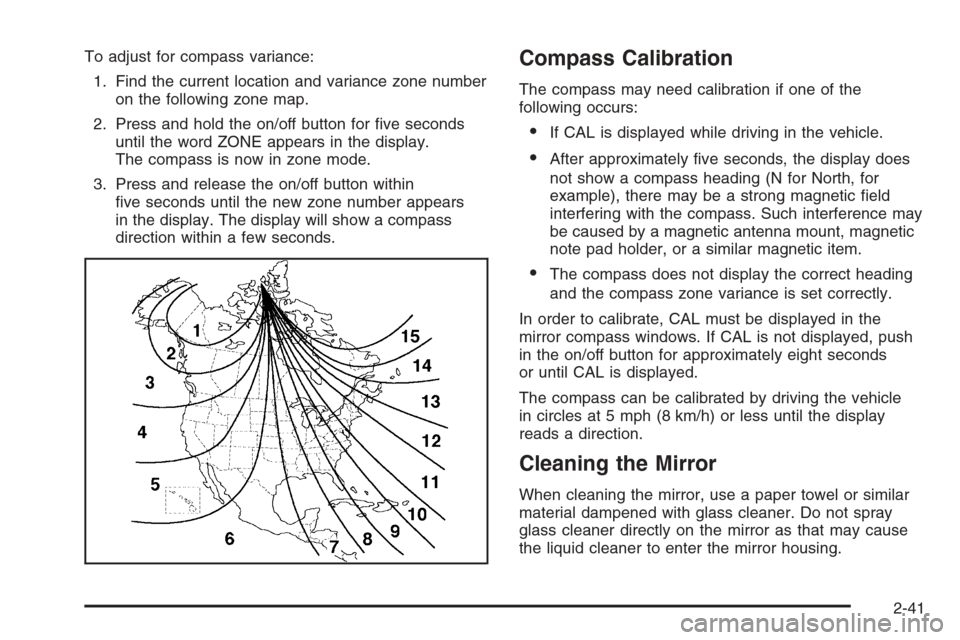
set in zone eight upon leaving the factory. It will be
necessary to adjust the compass to compensate
for compass variance if you live outside zone eight.
Under certain circumstances, as during a long distance
cross-country trip, it will be necessary to adjust for
compass variance.
2-40
Page 123 of 394
To adjust for compass variance:
1. Find the current location and variance zone number
on the following zone map.
2. Press and hold the on/off button for ve seconds
until the word ZONE appears in the display.
The compass is now in zone mode.
3. Press and release the on/off button within
ve seconds until the new zone number appears
in the display. The display will show a compass
direction within a few seconds.Compass Calibration
The compass may need calibration if one of the
following occurs:
If CAL is displayed while driving in the vehicle.
After approximately ve seconds, the display does
not show a compass heading (N for North, for
example), there may be a strong magnetic eld
interfering with the compass. Such interference may
be caused by a magnetic antenna mount, magnetic
note pad holder, or a similar magnetic item.
The compass does not display the correct heading
and the compass zone variance is set correctly.
In order to calibrate, CAL must be displayed in the
mirror compass windows. If CAL is not displayed, push
in the on/off button for approximately eight seconds
or until CAL is displayed.
The compass can be calibrated by driving the vehicle
in circles at 5 mph (8 km/h) or less until the display
reads a direction.
Cleaning the Mirror
When cleaning the mirror, use a paper towel or similar
material dampened with glass cleaner. Do not spray
glass cleaner directly on the mirror as that may cause
the liquid cleaner to enter the mirror housing.
2-41