2006 CHEVROLET HHR ignition
[x] Cancel search: ignitionPage 184 of 394

Here are some ways in which you can help avoid
distraction while driving.
While your vehicle is parked:
Familiarize yourself with all of its controls.
Familiarize yourself with its operation.
Set up your audio system by presetting your
favorite radio stations, setting the tone, and
adjusting the speakers. Then, when driving
conditions permit, you can tune to your favorite
radio stations using the presets and steering wheel
controls if the vehicle has them.
Notice:Before adding any sound equipment to
your vehicle, such as an audio system, CD player,
CB radio, mobile telephone, or two-way radio, make
sure that it can be added by checking with your
dealer. Also, check federal rules covering mobile
radio and telephone units. If sound equipment can
be added, it is very important to do it properly.Added sound equipment may interfere with the
operation of your vehicle’s engine, radio, or other
systems, and even damage them. Your vehicle’s
systems may interfere with the operation of sound
equipment that has been added.
Notice:The chime signals related to safety belts,
parking brake, and other functions of your vehicle
operate through the radio/entertainment system.
If that equipment is replaced or additional equipment
is added to your vehicle, the chimes may not
work. Make sure that replacement or additional
equipment is compatible with your vehicle before
installing it. SeeAccessories and Modifications
on page 5-3.
Your vehicle has a feature called Retained Accessory
Power (RAP). With RAP, the audio system can be
played even after the ignition is turned off. SeeRetained
Accessory Power (RAP) on page 2-24for more
information.
3-52
Page 187 of 394
Finding a Station
BAND:Press this button to switch between FM1, FM2
or AM. The display will show the selection.
f(Tune):Turn this knob to select radio stations.
©SEEK¨:Press the right or left SEEK arrow to go
to the next or to the previous station and stay there.
To scan stations, press and hold either SEEK arrow for
a few seconds until you hear a beep. The radio will
go to a station, play for a few seconds, then go on to the
next station. Press either SEEK arrow again to stop
scanning.
The radio will only seek and scan stations with a strong
signal that are in the selected band.
4(Information):Press this button to switch the display
between the radio station frequency and the time. While
the ignition is off, press this button to display the time.
Setting Preset Stations
Up to 18 stations (six FM1, six FM2, and six AM), can
be programmed on the six numbered pushbuttons,
by performing the following steps:
1. Turn the radio on.
2. Press BAND to select FM1, FM2, or AM.3. Tune in the desired station.
4. Press and hold one of the six numbered
pushbuttons for three seconds until you hear a
beep. Whenever that pushbutton is pressed
and released, the station that was set will return.
5. Repeat the Steps 2-4 for each pushbutton.
Setting the Tone (Bass/Treble)
BASS/TREB (Bass/Treble):To adjust the bass or
treble, press the tune knob or the BASS/TREBLE
pushbutton until the desired tone control label appears
on the display. Turn the tune knob clockwise or
counterclockwise to increase or decrease the setting.
You can also adjust the setting by pressing either
the SEEK, FWD, or REV buttons. The display will show
the current bass or treble level. If a station’s frequency
is weak, or if there is static, decrease the treble.
EQ (Equalization):Press this button to select preset
equalization settings.
To return to the manual mode, press the EQ button until
Manual appears on the display or start to manually
adjust the bass or treble by pressing the tune knob.
3-55
Page 188 of 394
Adjusting the Speakers (Balance/Fade)
`
BAL/FADE (Balance/Fade):To adjust the
balance or fade, press this button or the tune knob
until the desired speaker control label appears on
the display. Turn the tune knob clockwise or
counterclockwise to adjust the setting. You can also
adjust the setting by pressing either the SEEK, FWD, or
REV buttons.
Radio Messages
Calibration Error:The audio system has been
calibrated for your vehicle from the factory. If Calibration
Error appears on the display, it means that the radio
has not been congured properly for your vehicle and it
must be returned to your dealer for service.
Loc:This message is displayed while the THEFTLOCK
®
system has locked up the radio. Take the vehicle to your
dealer for service.
If any error occurs repeatedly or if an error cannot be
corrected, contact your dealer.
Playing a CD (Single CD Player)
Insert a CD partway into the slot, label side up. The
player will pull it in and the CD should begin playing.
If the ignition or radio is turned off with a CD in the
player, it will stay in the player. When the ignition or
radio is turned on, the CD will start playing where
it stopped, if it was the last selected audio source.
When a CD is inserted, the CD symbol will appear on
the radio display. As each new track starts to play,
the track number will appear on the display.
The CD player can play the smaller 3 inch (8 cm) single
CDs with an adapter ring. Full-size CDs and the
smaller CDs are loaded in the same manner.
If playing a CD-R, the sound quality may be reduced
due to CD-R quality, the method of recording, the quality
of the music that has been recorded, and the way the
CD-R has been handled. There may be an increase
in skipping, difficulty in nding tracks, and/or difficulty in
loading and ejecting. If these problems occur, check
the bottom surface of the CD. If the surface of the CD is
damaged, such as cracked, broken, or scratched, the
CD will not play properly. If the surface of the CD is
soiled, seeCare of Your CDs on page 3-79for more
information.
If there is no apparent damage, try a known good CD.
3-56
Page 190 of 394
RPT (Repeat):With repeat, one track or an entire CD
can be repeated (played over and over).
To use repeat, do the following:
To repeat the track you are listening to, press and
release the RPT button. An arrow symbol will
appear on the display. Press RPT again to turn off
repeat play.
To repeat the CD you are listening to, press and
hold the RPT button for a few seconds. An arrow
symbol will appear on the display. Press RPT again
to turn off repeat play. When repeat is off, the
symbol is no longer displayed.
4(Information):Press this button to switch the display
between the track number, elapsed time of the track,
and the time. When the ignition is off, press this button
to display the time.
BAND:Press this button to listen to the radio while a
CD is playing. The CD will remain safely inside the radio
for future listening.
CD/AUX (CD/Auxiliary):Press this button to play a CD
while listening to the radio. The CD icon and track
number will appear on the display while a CD is in the
player. Press this button again and the system will
automatically search for an auxiliary input device such
as a portable audio player.
CD Messages
CHECK DISC:If this message appears on the display
and/or the CD comes out, it could be for one of the
following reasons:
It is very hot. When the temperature returns to
normal, the CD should play.
You are driving on a very rough road. When the
road becomes smoother, the CD should play.
The CD is dirty, scratched, wet, or upside down.
The air is very humid. If so, wait about an hour and
try again.
There may have been a problem while burning
the CD-R.
The label may be caught in the CD player.
If the CD is not playing correctly, for any other reason,
try a known good CD.
If any error occurs repeatedly or if an error cannot be
corrected, contact your dealer. If the radio displays
an error message, write it down and provide it to your
dealer while reporting the problem.
3-58
Page 200 of 394
Playing a CD (Single CD Player)
Insert a CD partway into the slot, label side up. The
player will pull it in and the CD should begin playing.
Playing a CD(s) (Six-Disc CD Player)
LOAD^:Press this button to load CDs into the CD
player. This CD player will hold up to six CDs.
To insert one CD, do the following:
1. Press and release the load button.
2. Wait for the message to insert the disc.
3. Load a CD. Insert the CD partway into the slot,
label side up. The player will pull the CD in.
To insert multiple CDs, do the following:
1. Press and hold the load button for two seconds.
You will hear a beep and Load All Discs will be
displayed.
2. Follow the displayed instruction on when to insert
the discs. The CD player takes up to six CDs.
3. Press the Load button again to cancel loading
more CDs.If the ignition or radio is turned off, with a CD in the
player, it will stay in the player. When the ignition
or radio is turned on, the CD will start playing where it
stopped, if it was the last selected audio source.
When a CD is inserted, the CD symbol will appear on
the CD. As each new track starts to play, the track
number will appear on the display.
The CD player can play the smaller 3 inch (8 cm) single
CDs with an adapter ring. Full-size CDs and the
smaller CDs are loaded in the same manner.
If playing a CD-R, the sound quality may be reduced
due to CD-R quality, the method of recording, the quality
of the music that has been recorded, and the way the
CD-R has been handled. There may be an increase
in skipping, difficulty in nding tracks, and/or difficulty in
loading and ejecting. If these problems occur, check
the bottom surface of the CD. If the surface of the CD is
damaged, such as cracked, broken, or scratched, the
CD will not play properly. If the surface of the CD
is soiled, seeCare of Your CDs on page 3-79for more
information.
If there is no apparent damage, try a known good CD.
3-68
Page 205 of 394
File System and Naming
The song name that will be displayed will be the song
name that is contained in the ID3 tag. If the song name is
not present in the ID3 tag, then the radio will display the
le name without the extension (such as .mp3) as the
track name.
Track names longer than 32 characters or four pages
will be shortened. The display will not show parts
of words on the last page of text and the extension of
the lename will not be displayed.
Preprogrammed Playlists
You can access preprogrammed playlists that were
created using WinAmp™, MusicMatch™, or Real
Jukebox™ software, however, you will not have playlist
editing capability using the radio. These playlists will
be treated as special folders containing compressed
audio song les.
Playing an MP3
Insert a CD-R partway into the slot (Single CD Player),
or press the load button and wait for the message to
insert disc (Six-Disc CD Player), label side up. The
player will pull it in, and the CD-R should begin playing.If you turn off the ignition or radio with a CD-R in the
player it will stay in the player. When you turn on
the ignition or radio, the CD-R will start to play where it
stopped, if it was the last selected audio source.
As each new track starts to play, the track number and
song title will appear on the display.
The CD player can play the smaller 3 inch (8 cm) single
CD-Rs with an adapter ring. Full-size CD-Rs and the
smaller CD-Rs are loaded in the same manner.
If playing a CD-R, the sound quality may be reduced
due to CD-R quality, the method of recording, the quality
of the music that has been recorded, and the way the
CD-R has been handled. There may be an increase
in skipping, difficulty in nding tracks, and/or difficulty in
loading and ejecting. If these problems occur, check
the bottom surface of the CD. If the surface of the CD is
damaged, such as cracked, broken, or scratched, the
CD will not play properly. If the surface of the CD
is soiled, seeCare of Your CDs on page 3-79for more
information.
If there is no apparent damage, try a known good CD.
3-73
Page 237 of 394
{CAUTION:
If you do not shift down, your brakes could
get so hot that they would not work well.
You would then have poor braking or even
none going down a hill. You could crash.
Shift down to let your engine assist your
brakes on a steep downhill slope.
{CAUTION:
Coasting downhill in NEUTRAL (N) or with the
ignition off is dangerous. Your brakes will have
to do all the work of slowing down. They could
get so hot that they would not work well.
You would then have poor braking or even
none going down a hill. You could crash.
Always have your engine running and your
vehicle in gear when you go downhill.
Know how to go down hills. The most important
thing to know is this: let your engine do some of
the slowing down. Shift to a lower gear when you go
down a steep or long hill.
Know how to go uphill. You may want to shift down
to a lower gear. The lower gears help cool your
engine and transaxle, and you can climb the
hill better.
Stay in your own lane when driving on two-lane
roads in hills or mountains. Do not swing wide
or cut across the center of the road. Drive at speeds
that let you stay in your own lane.
As you go over the top of a hill, be alert. There
could be something in your lane, like a stalled car or
an accident.
You may see highway signs on mountains that
warn of special problems. Examples are long
grades, passing or no-passing zones, a falling rocks
area, or winding roads. Be alert to these and take
appropriate action.
4-25
Page 250 of 394
Dinghy Towing
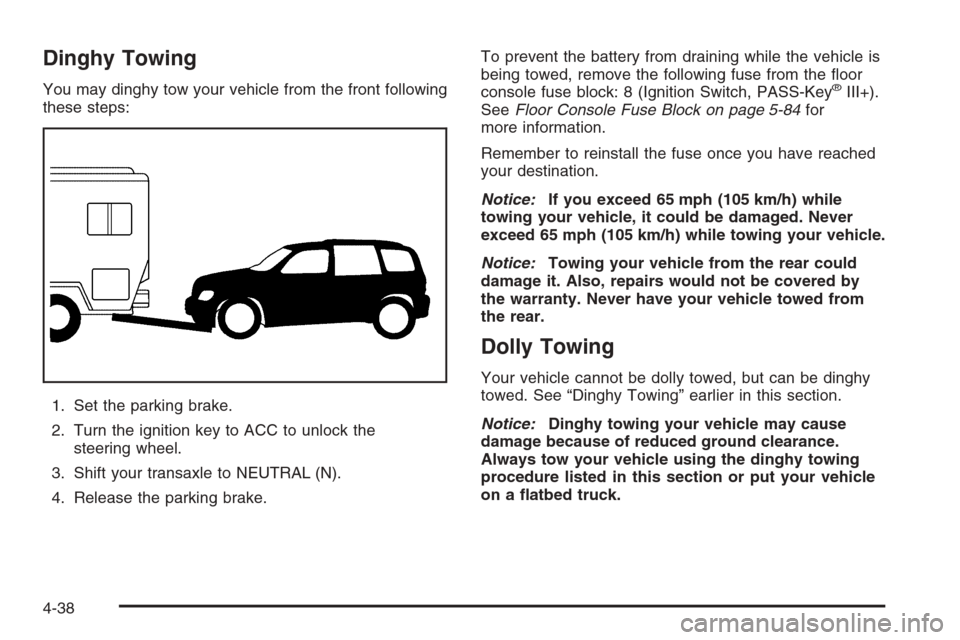
You may dinghy tow your vehicle from the front following
these steps:
1. Set the parking brake.
2. Turn the ignition key to ACC to unlock the
steering wheel.
3. Shift your transaxle to NEUTRAL (N).
4. Release the parking brake.To prevent the battery from draining while the vehicle is
being towed, remove the following fuse from the oor
console fuse block: 8 (Ignition Switch, PASS-Key®III+).
SeeFloor Console Fuse Block on page 5-84for
more information.
Remember to reinstall the fuse once you have reached
your destination.
Notice:If you exceed 65 mph (105 km/h) while
towing your vehicle, it could be damaged. Never
exceed 65 mph (105 km/h) while towing your vehicle.
Notice:Towing your vehicle from the rear could
damage it. Also, repairs would not be covered by
the warranty. Never have your vehicle towed from
the rear.
Dolly Towing
Your vehicle cannot be dolly towed, but can be dinghy
towed. See “Dinghy Towing” earlier in this section.
Notice:Dinghy towing your vehicle may cause
damage because of reduced ground clearance.
Always tow your vehicle using the dinghy towing
procedure listed in this section or put your vehicle
on a atbed truck.
4-38