2006 CHEVROLET HHR ignition
[x] Cancel search: ignitionPage 120 of 394
Mirrors
Manual Rearview Mirror
To reduce glare from lamps behind you, move the lever
toward you to the night position. Your vehicle may
also have reading lamps. Press the buttons, located
under the mirror, up to turn the lamps on or off.
Automatic Dimming Rearview Mirror
with OnStar
®and Compass
Your vehicle may have an automatic dimming rearview
mirror with OnStar®, compass and reading lamps.
This feature enables the mirror to sense nighttime glare
from vehicle headlamps from behind and automatically
dim to reduce the glare to a safe level.
The automatic dimming feature turns on each time the
vehicle is started. Press the MIRROR button once
and the green indicator light located to the left of the
button will go out indicating the feature is off. To turn
the feature back on, press and release the MIRROR
button and the green indicator light will come on.
The reading lamps, located under the mirror, can be
turned on or off by pushing the buttons up.There are three additional buttons for the OnStar
®
system. See your dealer for more information on the
system and how to subscribe to OnStar®. See OnStar®
in the Index for more information.
Compass Operation
Press the compass button once to turn the compass
on or off.
When the ignition and the compass feature are on,
the compass will show two character boxes for a
few seconds. After a few seconds, the mirror will
display the current compass direction.
Compass Calibration
If after a few seconds the display does not show a
compass direction, (N for North for example), there may
be a strong magnetic eld interfering with the compass.
Such interference may be caused by a magnetic
antenna mount, note pad holder, or similar object. If the
letter C appears in the compass window, the compass
may need to be reset or calibrated.
The mirror can be calibrated by driving the vehicle in
circles at 5 mph (8 km/h) or less until the display reads
a direction.
2-38
Page 122 of 394
Automatic Dimming Rearview
Mirror with OnStar
®, Compass
and Temperature Display
Your vehicle may have an automatic dimming rearview
mirror with OnStar®, compass and temperature
display. If the vehicle has this feature, the automatic
dimming mirror automatically dims to the proper level to
minimize glare at night from lights behind your vehicle.
The mirror also has a dual display in the upper right
corner of the mirror that shows the compass reading and
the outside temperature.
There are three additional buttons for the OnStar
®
system. See your dealer for more information on the
system and how to subscribe to OnStar®. See OnStar®
in the Index for more information.
YOn/Off:Press this button to operate the automatic
dimming, compass and temperature features.
Automatic Dimming Mirror Operation
The automatic dimming mirror function is turned on each
time the ignition is started. A light near the on/off button
will come on to indicate the automatic dimming is on.
If the automatic dimming function is off, press and hold
the on/off button for four seconds to manually turn
the system back on.
Temperature and Compass Display
Press the on/off button, located in the center, to cycle
between °F, °C and off. If the display reads CAL,
the compass needs to be calibrated. For more
information, see “Compass Calibration” later in this
section.
If an abnormal temperature reading is displayed for an
extended period of time, please consult your dealer.
Under certain circumstances, a delay in updating
the temperature is normal.
Compass Variance
Compass variance is the difference between earth’s
magnetic north and true geographic north. If not
adjusted to account for compass variance, the mirror’s
compass could give false readings. The mirror is
set in zone eight upon leaving the factory. It will be
necessary to adjust the compass to compensate
for compass variance if you live outside zone eight.
Under certain circumstances, as during a long distance
cross-country trip, it will be necessary to adjust for
compass variance.
2-40
Page 131 of 394
Convenience Net
Your vehicle may have a convenience net located on the
back wall of the cargo area. There are six metal rings in
the cargo area that the net can be attached to. Two are
on the oor behind the rear seat, two are on the oor near
the liftgate and the last two are near the liftgate glass.
The net can be positioned on the liftgate using two rings
securing the cargo in a envelope or using four rings,
keeping the cargo from falling over during sharp turns or
quick starts and stops. The net can also be positioned
using the four rings on the oor, with cargo underneath.
The net is not for larger, heavier loads.
Sunroof
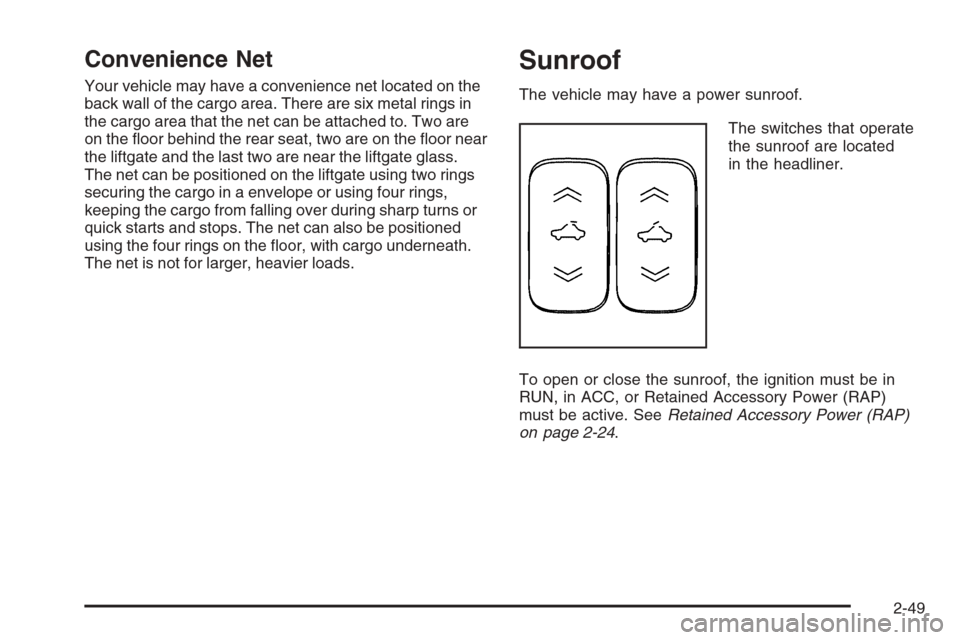
The vehicle may have a power sunroof.
The switches that operate
the sunroof are located
in the headliner.
To open or close the sunroof, the ignition must be in
RUN, in ACC, or Retained Accessory Power (RAP)
must be active. SeeRetained Accessory Power (RAP)
on page 2-24.
2-49
Page 138 of 394
Hazard Warning Flashers
Your hazard warning ashers let you warn others. They
also let police know you have a problem. Your front
and rear turn signal lamps will ash on and off.
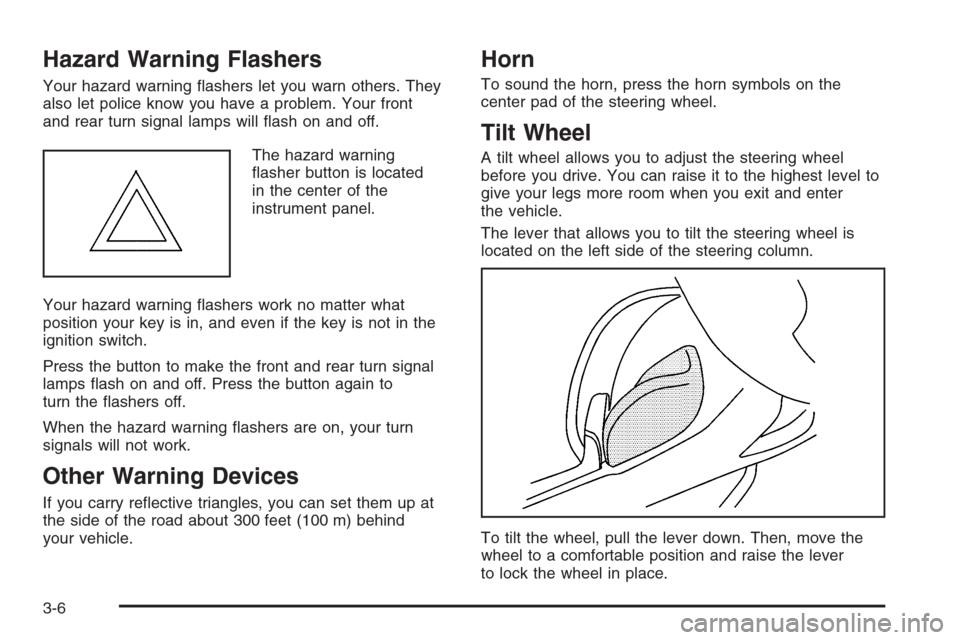
The hazard warning
asher button is located
in the center of the
instrument panel.
Your hazard warning ashers work no matter what
position your key is in, and even if the key is not in the
ignition switch.
Press the button to make the front and rear turn signal
lamps ash on and off. Press the button again to
turn the ashers off.
When the hazard warning ashers are on, your turn
signals will not work.
Other Warning Devices
If you carry reective triangles, you can set them up at
the side of the road about 300 feet (100 m) behind
your vehicle.
Horn
To sound the horn, press the horn symbols on the
center pad of the steering wheel.
Tilt Wheel
A tilt wheel allows you to adjust the steering wheel
before you drive. You can raise it to the highest level to
give your legs more room when you exit and enter
the vehicle.
The lever that allows you to tilt the steering wheel is
located on the left side of the steering column.
To tilt the wheel, pull the lever down. Then, move the
wheel to a comfortable position and raise the lever
to lock the wheel in place.
3-6
Page 145 of 394
Reducing Speed While Using Cruise
Control
If the cruise control system is already engaged,
Push and hold the SET−button until you reach the
lower speed you want, then release it.
To slow down in very small amounts, push the
SET−button briey. Each time you do this,
you’ll go about 1 mph (1.6 km/h) slower.
Passing Another Vehicle While Using
Cruise Control
Use the accelerator pedal to increase your speed.
When you take your foot off the pedal, your vehicle will
slow down to the cruise control speed you set earlier.
Using Cruise Control on Hills
How well your cruise control will work on hills depends
upon your speed, load and the steepness of the
hills. When going up steep hills, you may have to
step on the accelerator pedal to maintain your speed.
When going downhill, you may have to brake or shift to
a lower gear to keep your speed down. Of course,
applying the brake takes you out of cruise control.
Many drivers nd this to be too much trouble and don’t
use cruise control on steep hills.
Ending Cruise Control
To end cruise control, step lightly on the brake pedal or
the clutch if your vehicle has a manual transmission.
Stepping on the brake pedal or clutch will only end
the current cruise control session. Press the cruise
control on/off button to turn the system completely off.
Erasing Speed Memory
When you turn off the cruise control or the ignition,
your cruise control set speed memory is erased.
3-13
Page 146 of 394

Headlamps
The lever on the left side of the steering column
operates the exterior lamps.
The exterior lamp switch has the following four positions:
2(Headlamps):This position turns on the
headlamps, parking lamps, and taillamps.
;(Parking Lamps):This position turns on the
parking lamps and taillamps only.
AUTO (Automatic Headlamp System):This position
automatically turns on the Daytime Running Lamps
during daytime, and the headlamps, parking lamps, and
taillamps at night.
P(Off/On):This position is the momentary Off/On
switch for the Automatic Headlamp System. In Canada,
this only works when the vehicles with an automatic
transaxle are in PARK (P) and vehicles with a manual
transaxle have the parking brake set and the vehicle
is not moving.
When operating in AUTO, a momentary turn of the
switch to off/on will turn off the Automatic Headlamp
System. An AUTO LIGHTS OFF message will display on
the driver information center and a chime will sound.
Rotating the switch to off/on again will turn the Automatic
Headlamp System back on. An AUTO LIGHTS ON
message will display on the driver information center.
The Automatic Headlamp System is always turned on at
the beginning of an ignition cycle for vehicles with
manual transaxle.
Wiper Activated Headlamps
This feature activates the headlamps and parking lamps
after the windshield wipers are turned on. For this
feature to work, automatic lighting must be enabled.
SeeHeadlamps on page 3-14for additional information.
When the ignition is turned off, the wiper-activated
headlamps will immediately turn off. They will also turn
off 15 seconds after the windshield wiper control is
turned off.
3-14
Page 147 of 394

Headlamps on Reminder
If you open the driver’s door with the ignition off and the
lamps on, you will hear a warning chime.
Daytime Running Lamps (DRL)
Daytime Running Lamps (DRL) can make it easier for
others to see the front of your vehicle during the day.
DRL can be helpful in many different driving conditions,
but they can be especially helpful in the short periods
after dawn and before sunset. Fully functional daytime
running lamps are required on all vehicles rst sold
in Canada.
Your vehicle has a light sensor on top of the instrument
panel. Make sure it is not covered or the headlamps
will come on when you do not need them.
The DRL system will make both front turn signal lamps
turn on when the following conditions are met:
The ignition is on.
The exterior lamp control is turned to AUTO.
The light sensor detects daytime light.
The shift lever is not in PARK (P).
While the DRL system is on, the taillamps, sidemarker
lamps, and instrument panel lights will not be
illuminated.The DRL system will be off any time your vehicle is in
PARK (P). The DRL system on U.S. vehicles can
also be turned off by using the off/on switch for one
ignition cycle.
As with any vehicle, you should turn on the regular
headlamp system when you need it.
Automatic Headlamp System
When it is dark enough outside, your automatic system
will turn on your headlamps at the normal brightness
along with other lamps such as the taillamps,
sidemarker, parking lamps, instrument panel lights, and
interior switch backlighting.
Your vehicle has a light sensor on top of the instrument
panel. Make sure it is not covered, or the headlamps
may remain on when you do not need them.
The system may also be on when driving through a
parking garage, heavy overcast weather or a tunnel.
This is normal.
There is a delay in the transition between the daytime
and nighttime operation of the automatic lamp control
system so that driving under bridges or bright overhead
street lights does not affect the system. The automatic
lamp control system will only be affected when the light
sensor sees a change in lighting lasting longer than
this delay.
3-15
Page 148 of 394

If you start your vehicle in a dark garage, the automatic
lamp system will come on immediately. Once you leave
the garage, it will take about 20 seconds for the automatic
lamp system to change to DRL if it is light outside.
During that delay, your instrument panel cluster may not
be as bright as usual. Make sure your instrument panel
brightness control is in the full bright position.
SeeInstrument Panel Brightness on page 3-16.
To idle your vehicle with the system off, turn the ignition
on and rotate the exterior light switch to the off/on
position. For Canadian vehicles, the transaxle must stay
in PARK (P) for this function or the parking brake
must be set for vehicles with manual transaxles.
As with any vehicle, you should turn on the regular
headlamps when you need them.
Fog Lamps
If your vehicle is equipped
with a fog lamp button, it is
located to the right of
the steering wheel
and above the radio.
The ignition must be on to turn your fog lamps on.Push the button to turn the fog lamps on. An indicator
light on the cluster will come on when the fog lamps are
on. Push the button again to turn the fog lamps off.
The parking lamps will automatically turn on and
off when the fog lamps are turned on and off.
The fog lamps will turn off while the high-beam
headlamps are turned on.
Some localities have laws that require the headlamps to
be on along with the fog lamps.
Instrument Panel Brightness
The control for this feature
is located to the right of
the steering wheel
and above the radio.
Slide the switch to the left or right to brighten or dim
the lights.
3-16