2006 CHEVROLET CORVETTE engine
[x] Cancel search: enginePage 159 of 426

The HUD controls are
located to the left of the
steering wheel.
To adjust the HUD so you can see it properly, do the
following:
1. Start your engine and press the HUD dimmer
control all the way up by pressing the (+) button.
The brightness of the HUD image is determined by
the light conditions in the direction your vehicle is
facing and where you have the HUD dimmer control
set. If you are facing a dark object or a heavily
shaded area, your HUD may anticipate that you are
entering a dark area and may begin to dim.
It is possible for sunlight to enter the HUD making
it difficult to see the image. The display will return
to normal when the sunlight is no longer entering
the HUD.2. Adjust the seat to a comfortable driving position.
If you change your seat position later, you may
have to re-adjust your HUD.
3. Press the up or down arrows to center the HUD
image in your view.
The HUD image can only be adjusted up and down,
not side-to-side.
4. Press the dimmer control downward until the HUD
image is no brighter than necessary.
To turn HUD off, press and hold the (–) button until the
HUD display turns off.
If the sun comes out or it becomes cloudy, you may need
to adjust the HUD brightness again using the dimmer
control. Polarized sunglasses could make the HUD image
harder to see.
The HUD information can be displayed in one of
six languages including English, Spanish, French,
German, Italian or Japanese. The speedometer can
be displayed in either English or Metric units.
To change the language and unit selections, see
“OPTION” underDIC Controls and Displays on
page 3-48.
Clean the inside of the windshield as needed to remove
any dirt or lm that reduces the sharpness or clarity
of the HUD image.
3-23
Page 164 of 426
Air conditioning does not operate at temperatures below
about 35°F to 40°F (2°C to 4°C). In temperatures
above 40°F (4°C), the air conditioning cannot be turned
off in defrost and defog, as it helps to remove moisture
from the vehicle. It also helps to keep the windows clear.
You may notice a slight change in engine performance
when the air-conditioning compressor shuts off and
turns on again. This is normal. The system is designed
to make adjustments to help with fuel economy while
still maintaining the selected temperature.
On hot days, open the windows to let hot inside air
escape; then close them. This helps to reduce the time
it takes for your vehicle to cool down. It also helps
the system to operate more efficiently.
For quick cool down on hot days press the AUTO button
and adjust the temperature to a cool, comfortable setting.
To achieve maximum cool down, do the following:
1. Select the vent mode.
2. Select recirculation mode.
3. Select the A/C on.
4. Select the coolest temperature.
5. Select the highest fan speed.Using these settings together for long periods of time
may cause the air inside of your vehicle to become too
dry. To prevent this from happening, after the air in
your vehicle has cooled, turn the recirculation mode off.
The air conditioning system removes moisture from
the air, so you may sometimes notice a small amount of
water dripping underneath your vehicle while idling or
after turning off the engine. This is normal.
Sensors
The solar sensor on your vehicle monitors the solar
radiation and uses the information to maintain the
selected temperature when operating in AUTO mode by
initiating needed adjustments to the temperature, the
fan speed and the air delivery system. The system may
also supply cooler air to the side of the vehicle facing
the sun. The recirculation mode will also be activated, as
necessary. Do not cover the solar sensor located on
the top of the instrument panel near the windshield
or the system will not work properly.
There is also a sensor located behind the front bumper.
This sensor reads the outside air temperature and
helps to maintain the temperature inside the vehicle.
Any cover on the front of the vehicle could give a false
reading in the temperature.
3-28
Page 166 of 426
Rear Window Defogger
The rear window defogger uses a warming grid to
remove fog or frost from the rear window.
The rear window defogger will only work when the
engine is running.
=(Rear Window Defogger):Press this button to
turn the rear window defogger on. Be sure to clear
as much snow from the rear window as possible. An
indicator light in the button will come on to let you know
that the rear window defogger is activated.
The rear window defogger will turn off about 10 minutes
after the button is pressed when traveling less than
30 mph (48 km/h). If turned on again, the defogger
will only run for about ve minutes before turning off.
The defogger can also be turned off by pressing
the button again or by turning off the engine.
Your vehicle has heated outside rearview mirrors.
The mirrors will heat to help clear fog or frost from the
surface of the mirrors when the rear window defog
button is pressed.If your vehicle is equipped with the power convertible
top, the rear window defogger and heated mirrors
are automatically disabled when the power convertible
top is moving or down.
Notice:Do not use anything sharp on the inside
of the rear window. If you do, you could cut or
damage the warming grid, and the repairs would
not be covered by your warranty. Do not attach
a temporary vehicle license, tape, a decal or
anything similar to the defogger grid.
Outlet Adjustment
Use the tab located on the air outlets to change the
direction of the airow.
Operation Tips
Clear away any ice, snow or leaves from the air
inlets at the base of the windshield that may
block the ow of air into your vehicle.
Use of non-GM approved hood deectors may
adversely affect the performance of the system.
Keep the area around the base of the instrument
panel console and air path under the seats clear
of objects to help circulate the air inside of
your vehicle more effectively.
3-30
Page 167 of 426
Passenger Compartment Air Filter
The passenger compartment air lter removes certain
odor and particles from the air including pollen and dust
particles. Reductions in airow, which may occur more
often in dusty areas, indicate that the lter may need to
be replaced. SeeScheduled Maintenance on page 6-4
for information on how often to replace the lter.
Notice:Driving without a passenger compartment
air lter in place can cause water and small
particles, like paper and leaves, to be pulled into
your climate control system which may cause
damage to it. Make sure you always replace the old
lter with a new one.
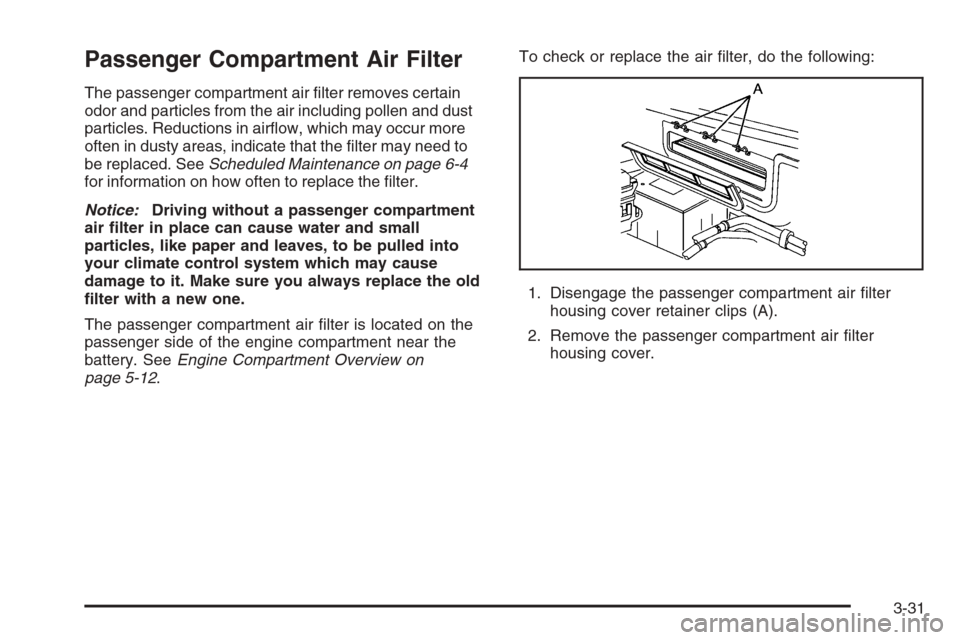
The passenger compartment air lter is located on the
passenger side of the engine compartment near the
battery. SeeEngine Compartment Overview on
page 5-12.To check or replace the air lter, do the following:
1. Disengage the passenger compartment air lter
housing cover retainer clips (A).
2. Remove the passenger compartment air lter
housing cover.
3-31
Page 168 of 426

3. Remove the passenger compartment air lter from
the housing.
4. Insert the new lter into the housing.
5. Reinstall the passenger compartment air lter
housing cover.
6. Engage the passenger compartment air lter
housing cover retainer clips.
Warning Lights, Gages, and
Indicators
This part describes the warning lights and gages that may
be on your vehicle. The pictures will help you locate them.Warning lights and gages can signal that something is
wrong before it becomes serious enough to cause
an expensive repair or replacement. Paying attention
to your warning lights and gages could also save you or
others from injury.
Warning lights come on when there may be or is a
problem with one of your vehicle’s functions. As you
will see in the details on the next few pages, some
warning lights come on briey when you start the
engine just to let you know they are working. If you are
familiar with this section, you should not be alarmed
when this happens.
Gages can indicate when there may be or is a problem
with one of your vehicle’s functions. Often gages
and warning lights work together to let you know when
there is a problem with your vehicle.
When one of the warning lights comes on and stays on
when you are driving, or when one of the gages shows
there may be a problem, check the section that tells you
what to do about it. Please follow this manual’s advice.
Waiting to do repairs can be costly — and even
dangerous. So please get to know your warning lights
and gages. They are a big help.
Your vehicle has a Driver Information Center that works
along with the warning lights and gages. SeeDriver
Information Center (DIC) on page 3-48.
3-32
Page 170 of 426

Speedometer and Odometer
Your speedometer lets you see your speed in either
miles per hour (mph) or kilometers per hour (km/h).
For more information see “Personal Options” under
DIC Vehicle Personalization on page 3-68.
To read the odometer with the ignition off, turn on the
parking lamps.
You may wonder what happens if your vehicle needs a
new odometer installed. The mileage total of the new
odometer will be set to the original miles (kilometers) of
the old odometer. See your dealer if the odometer must
be replaced in your vehicle.
Tachometer
The tachometer displays the engine speed in thousands
of revolutions per minute (rpm).
Notice:Fuel will shut off at about 6600 rpm for the
base model and 7100 rpm for the Z06 model. If you
continue to drive your vehicle at the fuel shut off rpm,
you could damage your engine. Be sure to operate
your vehicle below the fuel shut off rpm or reduce
your rpm quickly when the fuel shuts off.
Safety Belt Reminder Light
When the ignition is turned on, a chime will be provided
for several seconds to remind people to buckle their
safety belts. The driver safety belt light will also be
provided and stay on for several seconds, then it will
ash for several more. You should buckle your seat belt.
If the driver’s belt is
buckled, neither the
chime nor the light will
be provided.
Airbag Readiness Light
There is an airbag readiness light on the instrument
panel, which shows a deployed airbag symbol.
The system checks the airbag’s electrical system for
malfunctions. The light tells you if there is an electrical
problem. The system check includes the airbag
modules, the wiring and the diagnostic module.
For more information on the airbag system, seeAirbag
System on page 1-40.
3-34
Page 173 of 426

If, after several seconds, all status indicator lights
remain on, or if there are no lights at all, there may be
a problem with the lights or the passenger sensing
system. See your dealer for service.
{CAUTION:
If the airbag off indicator and the airbag
readiness light ever come on together, it means
that something may be wrong with the airbag
system. If this ever happens, have the vehicle
serviced promptly, because an adult-size
person sitting in the right front passenger seat
may not have the protection of the airbag. See
Airbag Readiness Light on page 3-34.
Voltmeter Gage
The voltmeter shows the
voltage output of your
battery. When the engine
is running, it shows
the voltage output of the
charging system.
The reading will change as the rate of charge changes
(with engine speed, for example), but if the voltmeter
reads at 9 volts or below, your instrument panel
cluster and other systems may shut down. The Driver
Information Center (DIC) will read BATTERY VOLTAGE
LOW when your vehicle is at 10 volts or below. Have
it checked right away. Driving with the voltmeter reading
at 10 volts or below could drain your battery and
disable your vehicle.
3-37
Page 174 of 426
One-to-Four Shift Light
(Manual Transmission)
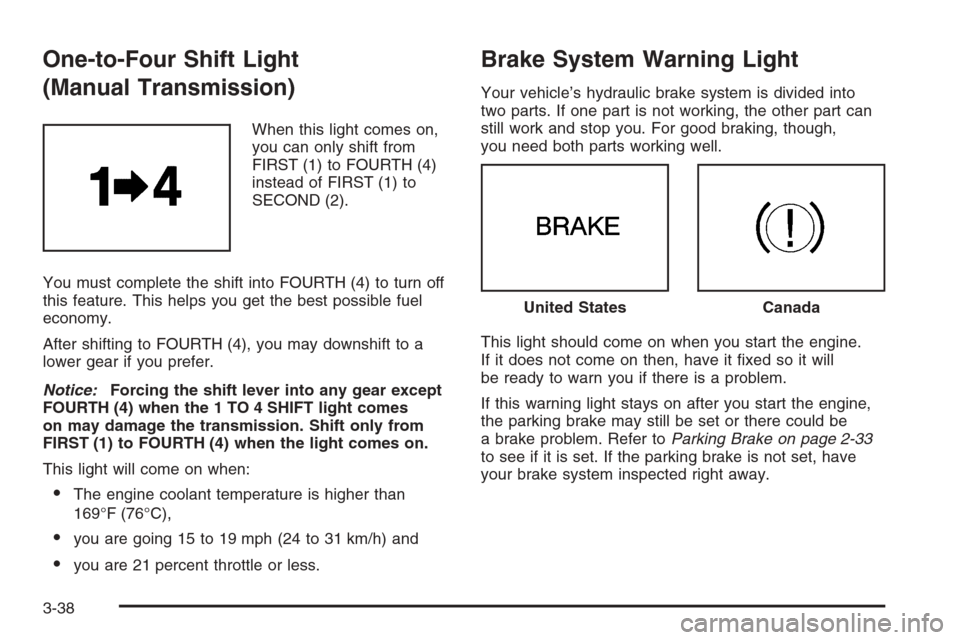
When this light comes on,
you can only shift from
FIRST (1) to FOURTH (4)
instead of FIRST (1) to
SECOND (2).
You must complete the shift into FOURTH (4) to turn off
this feature. This helps you get the best possible fuel
economy.
After shifting to FOURTH (4), you may downshift to a
lower gear if you prefer.
Notice:Forcing the shift lever into any gear except
FOURTH (4) when the 1 TO 4 SHIFT light comes
on may damage the transmission. Shift only from
FIRST (1) to FOURTH (4) when the light comes on.
This light will come on when:
The engine coolant temperature is higher than
169°F (76°C),
you are going 15 to 19 mph (24 to 31 km/h) and
you are 21 percent throttle or less.
Brake System Warning Light
Your vehicle’s hydraulic brake system is divided into
two parts. If one part is not working, the other part can
still work and stop you. For good braking, though,
you need both parts working well.
This light should come on when you start the engine.
If it does not come on then, have it xed so it will
be ready to warn you if there is a problem.
If this warning light stays on after you start the engine,
the parking brake may still be set or there could be
a brake problem. Refer toParking Brake on page 2-33
to see if it is set. If the parking brake is not set, have
your brake system inspected right away.
United StatesCanada
3-38