2006 CHEVROLET CORVETTE warning
[x] Cancel search: warningPage 177 of 426
When the system is working, you will see the ACTIVE
HANDLING message displayed in the DIC. You may also
feel or hear the system working. This is normal.
If the driver turns off the Active Handling System by
pressing the button on the console for ve seconds, the
Active Handling System light will come on, a chime
will sound, and the TRACTION SYSTEM AND ACTIVE
HANDLING – OFF message will be displayed in the
DIC. The Traction Control System will also be turned off.
SeeDIC Warnings and Messages on page 3-53for
more information.
If the Active Handling System and the Traction Control
System are off, pressing the console button momentarily
will turn both systems on. The DIC will display the
TRACTION SYSTEM AND ACTIVE HANDLING – ON
message, the instrument cluster light will be off, and
a chime will sound. SeeDIC Warnings and Messages
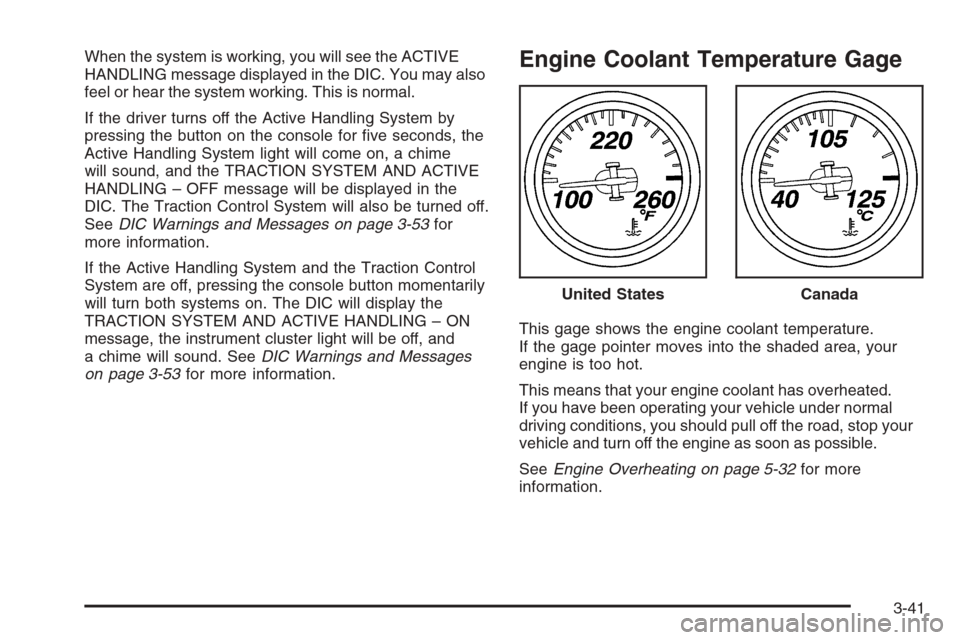
on page 3-53for more information.Engine Coolant Temperature Gage
This gage shows the engine coolant temperature.
If the gage pointer moves into the shaded area, your
engine is too hot.
This means that your engine coolant has overheated.
If you have been operating your vehicle under normal
driving conditions, you should pull off the road, stop your
vehicle and turn off the engine as soon as possible.
SeeEngine Overheating on page 5-32for more
information.United States
Canada
3-41
Page 184 of 426
Driver Information Center (DIC)
The Driver Information Center (DIC) gives you the
status of many of your vehicle’s systems. It is also
used to display driver personalization features
and warning/status messages. The DIC display is
located on the instrument panel cluster below the
speedometer and tachometer, directly above the
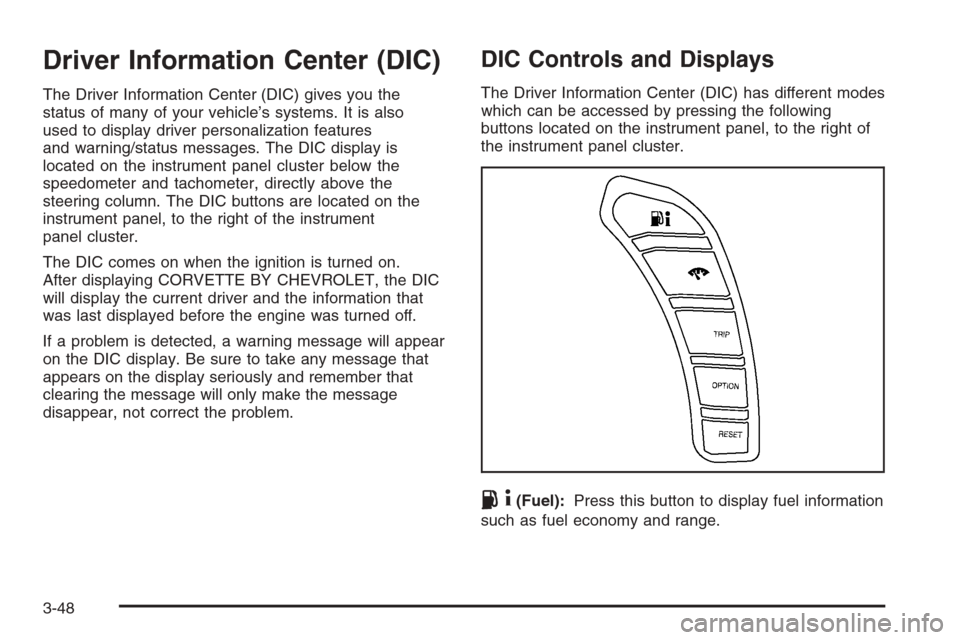
steering column. The DIC buttons are located on the
instrument panel, to the right of the instrument
panel cluster.
The DIC comes on when the ignition is turned on.
After displaying CORVETTE BY CHEVROLET, the DIC
will display the current driver and the information that
was last displayed before the engine was turned off.
If a problem is detected, a warning message will appear
on the DIC display. Be sure to take any message that
appears on the display seriously and remember that
clearing the message will only make the message
disappear, not correct the problem.
DIC Controls and Displays
The Driver Information Center (DIC) has different modes
which can be accessed by pressing the following
buttons located on the instrument panel, to the right of
the instrument panel cluster.
.4(Fuel):Press this button to display fuel information
such as fuel economy and range.
3-48
Page 185 of 426

2(Gages):Press this button to display gage
information like oil pressure and temperature, coolant
temperature, automatic transmission uid temperature, if
equipped, battery voltage, and front/rear tire pressures.
TRIP:Press this button to display your total and
trip distance driven, the elapsed time function, your
average speed, and the engine oil life.
OPTION:Press this button to choose personal options
that are available on your vehicle, depending on the
options your vehicle is equipped with, such as door
locks, easy entry seats, and language.
RESET:Press this button, used along with the other
buttons, to reset system functions, select personal
options, and turn off or acknowledge messages on
the DIC.
FUEL Button
The fuel button displays average fuel economy and
instantaneous fuel economy, calculated for your specic
driving conditions, and range information.
Average Fuel Economy:The average fuel economy is
viewed as a long-term approximation of your overall
driving conditions. You should reset the average fuel
economy display every time you refuel. If you press the
RESET button in this mode while you are driving, the
system will reset this display and begin guring fuel
economy from that point in time.Press the fuel button to display average fuel economy,
such as:
AVERAGE FUEL ECONOMY 20.1 MPG or
AVERAGE FUEL ECONOMY 11.7 L/100 km
Instantaneous Fuel Economy:Instantaneous fuel
economy reects only the fuel economy that the vehicle
has right now and will change frequently as driving
conditions change. Unlike average fuel economy, this
menu item cannot be reset.
Press the fuel button again to display instantaneous fuel
economy, such as:
INSTANT FUEL ECONOMY 20.1 MPG or
INSTANT FUEL ECONOMY 11.7 L/100 km
Fuel Range:The range calculates the remaining
distance you can drive without refueling. It is based on
fuel economy and the fuel remaining in the tank.
Press the fuel button again to display the range,
such as:
RANGE 30 MI or
RANGE 48 km
If the LOW FUEL warning is displayed or if RANGE
is less than 40 miles (64 km), the display will read
RANGE LOW.
3-49
Page 189 of 426
OPTION Button
The OPTION button allows you to access the
PERSONAL OPTIONS menu and customize the
personalization settings on your vehicle. SeeDIC
Vehicle Personalization on page 3-68for more
information.
RESET Button
The RESET button, used along with other buttons, will
reset system functions and turn off or acknowledge
messages on the DIC.
DIC Warnings and Messages
The following messages and warnings may appear in
the DIC display. The DIC display area is located in the
instrument panel cluster below the speedometer and
tachometer, directly above the steering column.
You may receive more than one message at a time.
Messages will appear one behind the other. To
acknowledge a message and remove it from the display,
press the RESET button. You may scroll through the
messages that may have been sent at the same time.
The message center is continuously updated with the
vehicle performance status.
ABS ACTIVE (Anti-Lock Brake System Active):When
your anti-lock system is adjusting brake pressure to help
avoid a braking skid, the ABS ACTIVE message will be
displayed.Slippery road conditions may exist if this message is
displayed, so adjust your driving accordingly. The
message will stay on for a few seconds after the system
stops adjusting brake pressure.
ACTIVE HANDLING:Your vehicle has a computer
controlled system to assist the driver in controlling the
vehicle in difficult driving conditions. You may feel
or hear the system working and see the ACTIVE
HANDLING message displayed in the DIC. This
message will stay on for a few seconds following the
active handling event. This is normal when the system is
operating. SeeActive Handling System on page 4-10
andBraking on page 4-6.
ACTIVE HANDLING CALIBRATING:This message
will display and the active handling system light on the
instrument panel cluster will be on while the system is
calibrating after exceeding 19 mph (30 km/h) for
10 seconds. SeeActive Handling System Light on
page 3-40. The Active Handling System is not functional
yet. The Active Handling System performance is affected
until the next message ACTIVE HANDLING READY is
displayed. The Active Handling System is off until the
ACTIVE HANDLING READY message is displayed.
SeeActive Handling System on page 4-10for more
information.
3-53
Page 191 of 426
BUCKLE SEATBELT:This message reminds you to
buckle the driver’s seat belt.
This message will display and a chime will sound when
the ignition is on, the driver’s seat belt is unbuckled,
and the vehicle is in motion. You should buckle
your seat belt.
If the driver remains unbuckled when the ignition is
on and the vehicle is in motion, the reminder will
be repeated. If the driver’s seat belt is already buckled,
this message and chime will not come on.
This message is an additional reminder to the Safety
Belt Reminder Light in the instrument panel cluster.
SeeSafety Belt Reminder Light on page 3-34for more
information.
CHANGE ENGINE OIL:This message will appear when
the life of the engine oil has expired. SeeScheduled
Maintenance on page 6-4. After an oil change, the engine
oil life system must be reset. See “Engine Oil Life” under
DIC Controls and Displays on page 3-48. Also, see
Engine Oil on page 5-16andEngine Oil Life System on
page 5-23for more information.
CHECK BRAKE FLUID:This message will appear, a
chime will sound, and the brake system warning light on
the instrument panel cluster will be on if the ignition is
on to inform the driver that the brake uid level is
low. SeeBrake System Warning Light on page 3-38.
Have the brake system serviced by your GM dealer as
soon as possible. SeeBrakes on page 5-42.CHECK COOLANT LEVEL:This message will appear
when there is a low level of engine coolant. Have
the cooling system serviced by your GM dealer as soon
as possible. SeeEngine Coolant on page 5-29.
CHECK GAS CAP:If the gas cap has not been fully
tightened, this message will appear. You should
check your gas cap to ensure that it is on properly.
Once tightened, it will take at least one overnight park
to reset or clear this message. If there is a CHECK GAS
CAP message and a malfunction indicator lamp on in
the instrument panel cluster, you may need to see your
GM dealer for service. SeeMalfunction Indicator
Lamp on page 3-42for more information.
CHECK OIL LEVEL:Press the RESET button to
acknowledge that you have read the message and to
remove it from the display. The message will reappear
every 10 minutes until this condition changes. Once
the vehicle senses a change in the engine oil level, the
light will remain off.
You will hear two chimes when this message is
displayed. If this message appears after starting your
engine, your engine oil level may be too low. You
may need to add oil. SeeEngine Overheating on
page 5-32.
3-55
Page 192 of 426
CLOSE TRUNK TO MOVE TOP:This message will
display and a chime will sound if the trunk is open while
you are trying to operate the convertible top. Make
sure the trunk is closed before operating the convertible
top. SeeConvertible Top (Manual) on page 2-60or
Convertible Top (Power) on page 2-67.
COMPETITIVE DRIVING MODE:When the Competitive
Driving mode is selected, this message will be
displayed in the DIC and a short chime will sound.
The instrument panel cluster light will not be on when
the Competitive Driving mode is selected. The Traction
Control System will not be operating while in the
Competitive Driving mode. You should adjust your
driving accordingly. SeeRacing or Other Competitive
Driving on page 4-18for more information.
COOLANT OVER TEMPERATURE:You will hear a
chime when this message is displayed. To acknowledge
the warning, press the RESET button. After you press
the RESET button, a message will be displayed and
you will hear a chime every minute until this condition
changes. If you do not press the RESET button,
the message will remain on the digital display until the
condition changes.If the engine coolant exceeds 255°F (124°C), this
message is displayed. If you have been operating your
vehicle under normal driving conditions, you should
pull off the road, stop your vehicle and turn off the
engine as soon as possible. You can monitor the coolant
temperature with the GAGES button on the DIC or
the engine coolant gage on the instrument panel cluster.
SeeEngine Overheating on page 5-32.
CRUISE DISENGAGED:This message will momentarily
appear when you disengage the cruise control system
by stepping on the brake on an automatic transmission
vehicle or the clutch on a manual transmission vehicle
or by turning off the cruise control switch. SeeCruise
Control on page 3-11for more information.
ENGINE DRAG CONTROL ACTIVE:This message
displays when engine drag control is active. When
driving in a lower gear in rainy, snowy or icy conditions,
and then letting up on the accelerator or downshifting,
the rear wheels may begin to slip and this message
appears. This message will stay on for a few seconds
following the engine drag control event.
ENGINE OVERHEATED – STOP ENGINE:This
message will appear along with a continuous chime when
the engine has overheated. Stop and turn the engine off
immediately to avoid severe engine damage. SeeEngine
Overheating on page 5-32.
3-56
Page 193 of 426
ENGINE PROTECTION REDUCE ENGINE RPM:
You will hear multiple chimes when this message is
displayed. This message will remain displayed and
active until the issue is resolved.
If the engine oil temperature exceeds 320°F (160°C),
this message is displayed. You should check the engine
coolant temperature and engine oil level. If your engine is
too hot, seeEngine Overheating on page 5-32. Your
vehicle may need service, so see your GM dealer. You
can monitor the oil temperature with the gages button
on the DIC.
HEADLAMPS SUGGESTED:If it is dark enough outside
and the headlamps and Twilight Sentinel
®controls are
off, this message will display. This message informs the
driver that turning on the exterior lamps is recommended.
It has become dark enough outside to require the
headlamps and/or other exterior lamps.
HIGH TIRE PRESSURE:To acknowledge the warning,
press the RESET button. After you press the RESET
button, a message will reappear every 10 minutes
until this condition changes. This message indicates
that the pressure in one of your tires is higher than
42 psi (290 kPa). Next to the HIGH TIRE PRESSURE
message, you can see either LEFT FRONT, RIGHT
FRONT, LEFT REAR, or RIGHT REAR to indicate to
you which tire is higher than 42 psi (290 kPa).You can receive more than one tire pressure message
at a time. To read other messages that may have
been sent at the same time, press the RESET button.
If a tire pressure message appears on the DIC, stop
as soon as you can. Have the tire pressures checked
and set to those shown on your Tire Loading Information
Label. SeeExtended Mobility Tires on page 5-62and
Ination - Tire Pressure on page 5-64.
HOT ENGINE AIR CONDITIONING OFF:This message
displays when the engine coolant becomes hotter than
the normal operating temperature. To avoid added strain
on a hot engine, the air conditioning compressor is
automatically turned off. When the coolant temperature
returns to normal, the A/C operation will automatically
resume. You can continue to drive your vehicle. If this
message continues to appear, have the system repaired
by your GM dealer as soon as possible to avoid
compressor damage.
ICE POSSIBLE:This message displays when the
outside air temperature is cold enough to create icy road
conditions.
LOW FUEL:This message displays when the fuel tank
is less than 10 percent full and the display is turned
off. A multiple chime will also sound when this message
is displayed. SeeFuel Gage on page 3-47.
3-57
Page 194 of 426
LOW OIL PRESSURE:If this message appears while
the engine is running, stop the engine and do not
operate it until the cause of low oil pressure is corrected.
Severe damage to the engine can result. A multiple
chime will sound when this message is displayed. See
Engine Oil on page 5-16.
LOW TIRE PRESSURE:You will hear multiple chimes
and the tire pressure light on the instrument panel
cluster will come on when this message is displayed.
SeeTire Pressure Light on page 3-42. To acknowledge
the warning, press the RESET button. After you
press the RESET button, a message will appear every
10 minutes until this condition changes. This message
indicates that the pressure in one of your tires is
less than 24 psi (164 kPa). Next to the LOW TIRE
PRESSURE message, you can see either LEFT
FRONT, RIGHT FRONT, LEFT REAR, or RIGHT REAR
to indicate to you which tire is low on pressure. You
can receive more than one tire pressure message at a
time. To read other messages that may have been
sent at the same time, press the RESET button. If a tire
pressure message appears on the DIC, stop as soon
as you can. Have the tire pressures checked and set to
those shown on your Tire Loading Information Label.
SeeExtended Mobility Tires on page 5-62andTire
Pressure Monitor System on page 5-67.
{CAUTION:
When the LOW TIRE PRESSURE or TIRE FLAT
message is displayed on the Driver Information
Center, your vehicle’s handling capabilities will
be reduced during severe maneuvers. The
active handling system will be affected. See
Active Handling System on page 4-10.Ifyou
drive too fast, you could lose control of your
vehicle. You or others could be injured. Do not
drive over 55 mph (90 km/h) when the LOW
TIRE PRESSURE or TIRE FLAT message is
displayed. Drive cautiously and check your tire
pressures as soon as you can.
MAXIMUM SPEED 80 MPH (129 km/h):To
acknowledge the warning, press the RESET button.
After you press the RESET button, a message will
reappear every 10 minutes until this condition changes.
This message indicates that a malfunction is present
in the Selective Ride Control system. The vehicle speed
will be limited to a value determined by the vehicle
when the shock absorber system has failed and
the shocks are in their full soft mode. Have your vehicle
serviced by your GM dealer as soon as possible.
3-58