Page 142 of 480

Memory Seat, Mirrors and
Steering Wheel
If your vehicle has the memory feature, you can
program and recall memory settings for the following
features for up to two drivers:
The driver’s seat position
The outside rearview mirrors position
The telescopic steering column position
The following settings and presets are set automatically:
The language, radio and XM™ presets, tone,
volume, playback mode (AM/FM or CD), last
displayed stations, and compact disc position
The last climate control setting
The Head-Up Display (HUD) position, if your
vehicle has this feature
Other personalization settings, for example, remote
start settings
SeeVehicle Personalization on page 2-53.For vehicles with the base audio system, memory
features are programmed and recalled through the radio
from the DRIVER SELECTION and the DRIVER EXIT
SETTINGS submenus. See “Entering the Driver
Selection Submenu” and “Entering the Driver Exit
Settings Submenu” later in this section for more
information on recalling and programming the memory
settings using the base audio system.
For vehicles with the Navigation system, memory
features are programmed and recalled through the
navigation display. See “Personalization” in the Index
of the Navigation System manual for more information
on programming and recalling the memory settings using
the Navigation system.
For vehicles with the Navigation system, you can also
recall the memory features by using voice recognition,
if your vehicle has this feature. See “Voice Recognition”
in the Index of the Navigation System manual for
more information.
2-70
Page 144 of 480

RECALL DRIVER SETTINGS
To recall driver settings, use the following procedure:
1. Enter the memory programming mode for your
driver settings by following the instructions listed
previously under “Entering the Driver Selection
Submenu.”
2. From the DRIVER SELECTION submenu, turn the
tune/select knob to scroll to RECALL DRIVER
SETTINGS and press in the knob.
If the vehicle is in PARK (P), one beep will sound
and your previously saved driving position will
then be recalled.
If the vehicle is not in PARK (P), three beeps will
sound and your previously saved driving position will
not be recalled.
A memory recall can be stopped by pressing any
memory seat or mirror position button.
If you would like the stored driving positions to be
recalled when unlocking your vehicle with the keyless
access transmitter or when starting your vehicle,
see “REMOTE RECALL MEMORY” or “START
BUTTON RECALL” underVehicle Personalization
on page 2-53.
STORE DRIVER SETTINGS
To store driver settings, use the following procedure:
1. Adjust your settings for the driver’s seat, the outside
rearview mirrors, and the steering column to a
comfortable driving position.
2. Enter the memory programming mode for your
driver settings by following the instructions listed
previously under “Entering the Driver Selection
Submenu.”
3. From the DRIVER SELECTION submenu, turn
the tune/select knob to scroll to STORE DRIVER
SETTINGS and press in the knob. Two beeps will
sound to conrm that your driver settings are saved.
4. Set the HUD position, if your vehicle has this
feature, the climate control temperature, fan
speed and mode settings, the radio presets, tone,
volume, playback mode (AM/FM, XM™, or CD), and
compact disc position.
Your memory settings are now programmed. Any
changes that are made to the HUD, audio system,
and climate controls while driving will be
automatically stored when the ignition is turned off.
5. Repeat the procedure for a second driver by
programming the other driver number.
2-72
Page 145 of 480

Entering the Driver Exit Settings
Submenu
To enter the memory programming mode for your exit
settings, use the following procedure:
1. Be sure the ignition is either on, in ACC position, or
in RAP and place the transmission in PARK (P) or
the vehicle speed is less than 6 mph (9 km/h).
2. Press any button on the appropriate keyless access
transmitter to identify yourself as Driver 1 or
Driver 2.
3. Turn on the radio by pressing the
power/volume knob.
4. Press the CNFG radio button to enter the main
menu of the radio.
5. Turn the tune/select knob and scroll to SETUP.
6. Press the tune/select knob to enter the
SETUP menu.
7. Turn the tune/select knob and scroll to DRIVER
EXIT SETTINGS.
8. Press the tune/select knob to enter the DRIVER
EXIT SETTINGS submenu. The following items
will appear:
RECALL EXIT SETTINGS
STORE EXIT SETTINGS
Driver Exit Settings Submenu Items
RECALL EXIT SETTINGS
To recall exit settings, use the following procedure:
1. Enter the memory programming mode for your
exit settings by following the instructions listed
previously under “Entering the Driver Exit Settings
Submenu.”
2. From the DRIVER EXIT SETTINGS submenu, turn
the tune/select knob to scroll to RECALL EXIT
SETTINGS and press in the knob.
If the vehicle is in PARK (P), one beep will sound
and your previously saved exit position will then be
recalled.
If the vehicle is not in PARK (P), three beeps will
sound and your previously saved exit position
will not be recalled.
A memory recall can be stopped by pressing any
memory seat or mirror position button.
If you would like the stored exit positions to be recalled
when your vehicle is in PARK (P), the vehicle is off,
and the driver’s door is opened, see “AUTO EXIT SEAT”
and “AUTO EXIT COLUMN” underVehicle
Personalization on page 2-53.
2-73
Page 146 of 480
STORE EXIT SETTINGS
To store exit settings, use the following procedure:
1. Adjust your settings for the driver’s seat, the outside
rearview mirrors, and the steering column to a
comfortable exit position.
2. Enter the memory programming mode for your
exit settings by following the instructions listed
previously under “Entering the Driver Exit Settings
Submenu.”3. From the DRIVER EXIT SETTINGS submenu,
turn the tune/select knob to scroll to STORE EXIT
SETTINGS and press in the knob. Two beeps will
sound to conrm that your new exit settings are
saved.
4. Repeat the procedure for a second driver by
programming the other driver number.
2-74
Page 153 of 480

Push the control forward and the steering wheel moves
toward the front of the vehicle. Push the control
rearward and the steering wheel moves toward the rear
of the vehicle. To set the memory position, see
Vehicle Personalization on page 2-53andMemory
Seat, Mirrors and Steering Wheel on page 2-70.
Heated Steering Wheel
Your vehicle may have a heated steering wheel.
The button for this
feature is located on
the steering wheel.
Press the bottom of the button to turn the heated
steering wheel on or off. A light on the button will display
while the feature is on.
The steering wheel will take about three minutes to
reach its maximum temperature.
Turn Signal/Multifunction Lever
The lever on the left side of the steering column
includes the following:
GTurn and Lane-Change Signals. SeeTurn and
Lane-Change Signals on page 3-8.
OHeadlamps. SeeHeadlamps on page 3-31.
3Headlamp High/Low-Beam Changer. See
Headlamp High/Low-Beam Changer on page 3-8.
Flash-To-Pass Feature. SeeFlash-to-Pass
on page 3-12.
-Fog Lamps. SeeFog Lamps on page 3-37.
ICruise Control. SeeCruise Control on
page 3-16.
Adaptive Cruise Control (If Equipped). SeeAdaptive
Cruise Control on page 3-19.
Forward Collision Alert (FCA) (If Equipped). See
Forward Collision Alert (FCA) System on page 3-9.
3-7
Page 264 of 480

LANG (Language):To change the language displayed
on the radio, select LANGUAGE by pressing the
tune/select knob. Turn the tune/select knob to scroll
through the following available languages:
ENGLISH
GERMAN
FRENCH
SPANISH
JAPANESE
To make your selection, press the tune/select knob. If
you accidentally select a language that you did not want,
ENGLISH is always at the top of the language list.
SETUP:When you select this menu item, the following
submenu is available:
PERSONAL SETTINGS MENU
DRIVER SELECTION
DRIVER EXIT SETTINGS
CONFIGURE DISPLAY KEYS
SETUP Submenu Items
The following choices are available for programming
using the Base audio system.
PERSONAL SETTINGS MENU
This item turns the entire list of personalization features
on or off. This item allows you to program certain features
to a preferred setting for up to two people. The number of
available features varies depending upon which options
are purchased. When this item is on, a check mark will
appear after it. For more information on the PERSONAL
SETTINGS MENU item, seeVehicle Personalization on
page 2-53.
DRIVER SELECTION
When you select this item, the following submenu
appears:
DRIVER 1
DRIVER 2
RECALL DRIVER SETTINGS
STORE DRIVER SETTINGS
For more information on the DRIVER SELECTION
submenu item, see “Recalling Driver Settings”
and “Storing Driver Settings” underMemory Seat,
Mirrors and Steering Wheel on page 2-70.
3-118
Page 265 of 480

DRIVER EXIT SETTINGS
When you select this item, the following submenu
appears:
RECALL EXIT SETTINGS
STORE EXIT SETTINGS
For more information on the DRIVER EXIT SETTINGS
submenu item, see “Recalling Exit Settings” and
“Storing Exit Settings” underMemory Seat, Mirrors and
Steering Wheel on page 2-70.
CONFIGURE DISPLAY KEYS
(Base Audio System)
This item allows you to customize the functions of the
four congurable keys located to the left and right of the
audio display. See “Congurable Radio Display Keys”
underRadio with CD on page 3-96for programming
information.
Theft-Deterrent Feature
THEFTLOCK®is designed to discourage theft of your
vehicle’s radio. The feature works automatically by
learning a portion of the Vehicle Identication Number
(VIN). If the radio is moved to a different vehicle, it
will not operate. If the radio is removed from your
vehicle, the original VIN in the radio can be used to
trace the radio back to your vehicle.
With THEFTLOCK
®activated, the radio will not operate
if stolen.
Audio Steering Wheel Controls
The audio steering wheel controls may be different
depending on your vehicle’s options. Some audio
controls can be adjusted at the steering wheel. They
include the following:
0(Mute):Press this button to silence the system.
Press this button again, or any other radio button, to turn
the sound on.
SRCE (Source):Press this button to switch between
FM1, FM2, AM, or XM1 or XM2 (if equipped), radio,
or CD.
3-119
Page 426 of 480
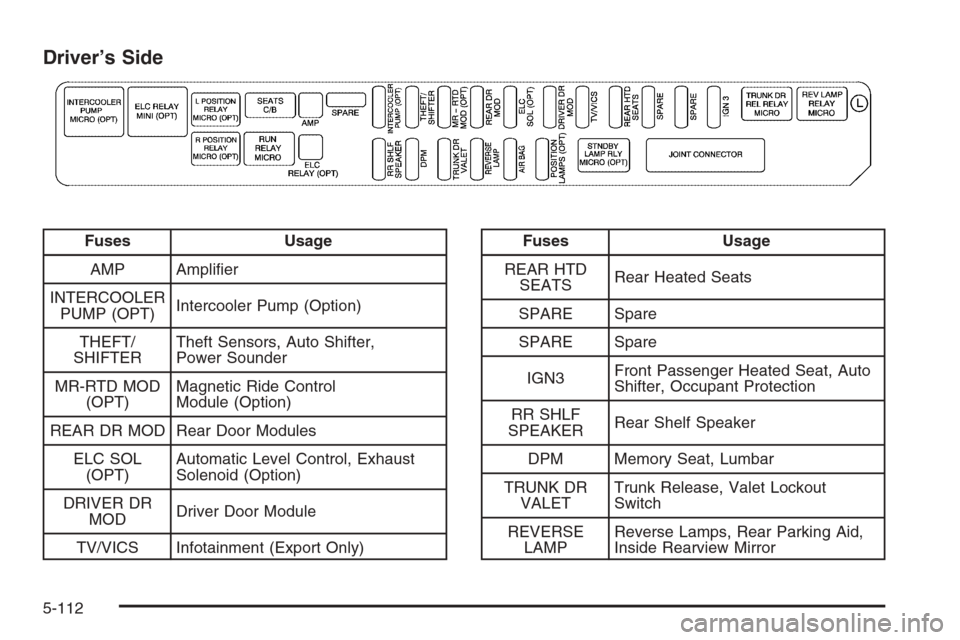
Driver’s Side
Fuses Usage
AMP Amplier
INTERCOOLER
PUMP (OPT)Intercooler Pump (Option)
THEFT/
SHIFTERTheft Sensors, Auto Shifter,
Power Sounder
MR-RTD MOD
(OPT)Magnetic Ride Control
Module (Option)
REAR DR MOD Rear Door Modules
ELC SOL
(OPT)Automatic Level Control, Exhaust
Solenoid (Option)
DRIVER DR
MODDriver Door Module
TV/VICS Infotainment (Export Only)Fuses Usage
REAR HTD
SEATSRear Heated Seats
SPARE Spare
SPARE Spare
IGN3Front Passenger Heated Seat, Auto
Shifter, Occupant Protection
RR SHLF
SPEAKERRear Shelf Speaker
DPM Memory Seat, Lumbar
TRUNK DR
VALETTrunk Release, Valet Lockout
Switch
REVERSE
LAMPReverse Lamps, Rear Parking Aid,
Inside Rearview Mirror
5-112