2006 BMW 525XI control arm
[x] Cancel search: control armPage 110 of 248
Controls
109Reference
At a glance
Driving tips
Communications
Navigation
Entertainment
Mobility
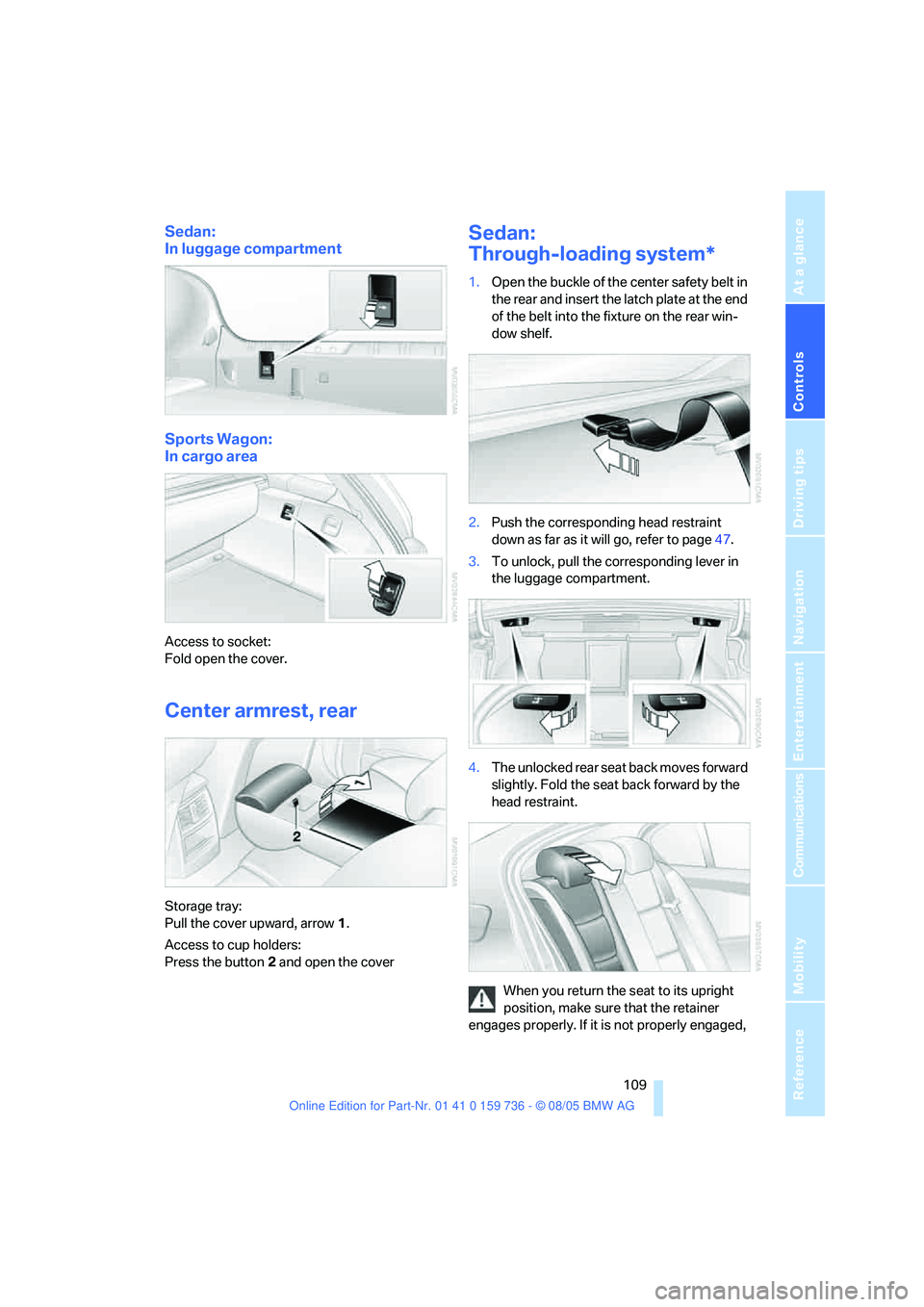
Sedan:
In luggage compartment
Sports Wagon:
In cargo area
Access to socket:
Fold open the cover.
Center armrest, rear
Storage tray:
Pull the cover upward, arrow1.
Access to cup holders:
Press the button2 and open the cover
Sedan:
Through-loading system*
1.Open the buckle of the center safety belt in
the rear and insert the latch plate at the end
of the belt into the fixture on the rear win-
dow shelf.
2.Push the corresponding head restraint
down as far as it will go, refer to page47.
3.To unlock, pull the corresponding lever in
the luggage compartment.
4.The unlocked rear seat back moves forward
slightly. Fold the seat back forward by the
head restraint.
When you return the seat to its upright
position, make sure that the retainer
engages properly. If it is not properly engaged,
Page 147 of 248
On/off and tone
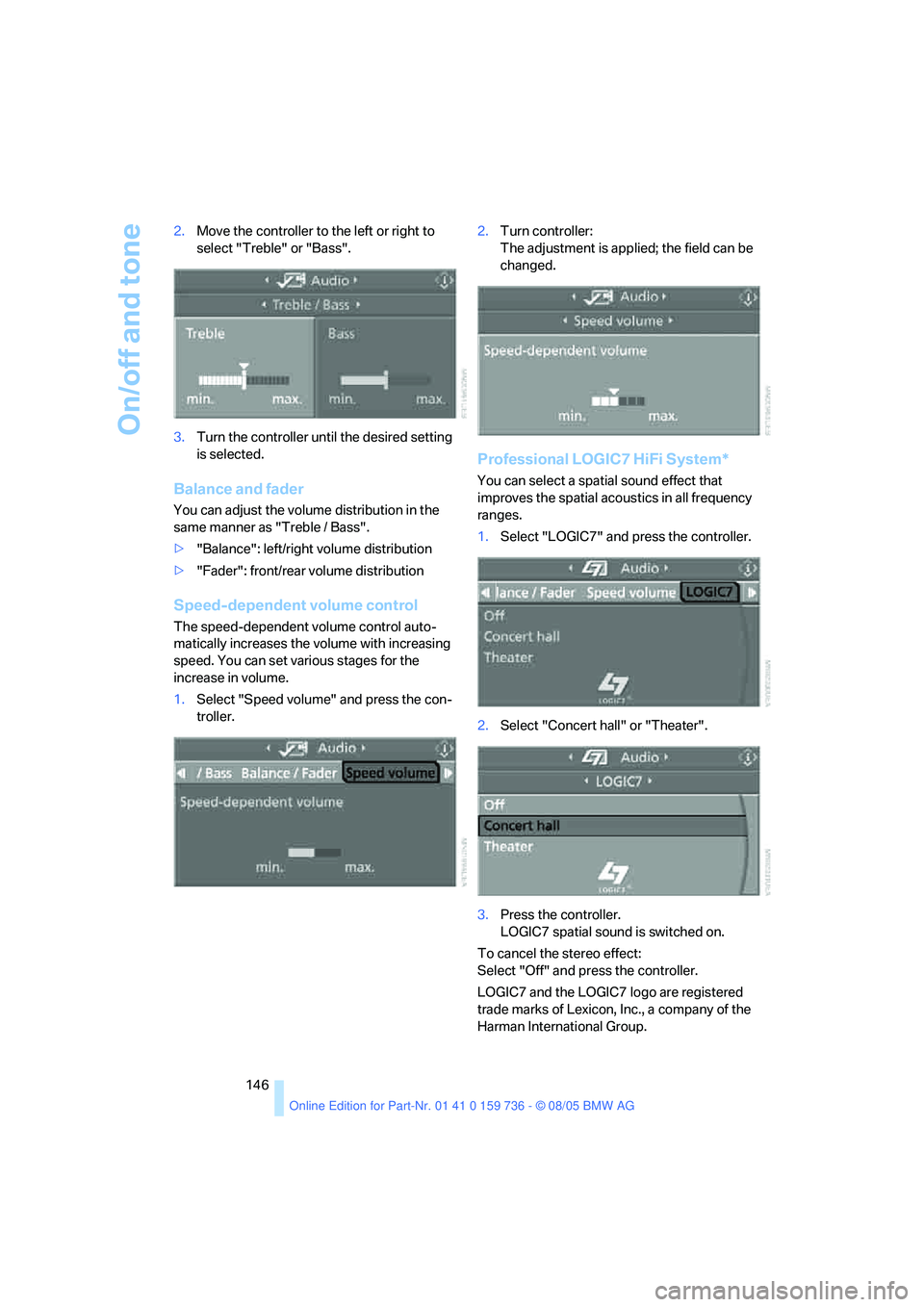
146 2.Move the controller to the left or right to
select "Treble" or "Bass".
3.Turn the controller until the desired setting
is selected.
Balance and fader
You can adjust the volume distribution in the
same manner as "Treble / Bass".
>"Balance": left/right volume distribution
>"Fader": front/rear volume distribution
Speed-dependent volume control
The speed-dependent volume control auto-
matically increases the volume with increasing
speed. You can set various stages for the
increase in volume.
1.Select "Speed volume" and press the con-
troller.2.Turn controller:
The adjustment is applied; the field can be
changed.
Professional LOGIC7 HiFi System*
You can select a spatial sound effect that
improves the spatial acoustics in all frequency
ranges.
1.Select "LOGIC7" and press the controller.
2.Select "Concert hall" or "Theater".
3.Press the controller.
LOGIC7 spatial sound is switched on.
To cancel the stereo effect:
Select "Off" and press the controller.
LOGIC7 and the LOGIC7 logo are registered
trade marks of Lexicon, Inc., a company of the
Harman International Group.
Page 189 of 248
Wheels and tires
188
Wheels and tires
Tire inflation pressure
Information for your safety
The condition of the tires and the maintenance
of the specified tire pressure are crucial not only
to the tire's service life, but also to driving com-
fort and most importantly, driving safety.
Checking pressure
Only check tire inflation pressure when the tires
are cold. This means after a maximum of
1.25 miles/2 km driving or when the vehicle has
been parked for at least 2 hours. When tires are
warm, the tire inflation pressure increases.
Check the tire inflation pressure regularly
and correct it as needed, even on the
compact tire
*: at least twice a month and before
starting long trips. Otherwise driving instability
or tire damage, and therefore accidents, can
result from incorrect tire inflation pressures.
Do not drive with depressurized, i.e. flat tires,
except run-flat tires. A flat tire will seriously
impair your vehicle's handling and braking
response. Attempts to drive on a flat tire can
lead to loss of control over the vehicle.<
After correcting the inflation pressure(s),
always reinitialize the Flat Tire Monitor,
refer to page88.<
Pressure specifications
The tables below provide all the correct inflation
pressures for the specified tire sizes at ambient
temperature.
The inflation pressures apply to the tire
sizes and tire brands respectively
approved and recommended by BMW; a list of
these is available from your BMW center.<
For correct identification of the right tire infla-
tion pressure for your tires, observe the follow-
ing:
>Tire sizes of your vehicle
>Load conditions>Maximum allowable driving speed
Tire inflation pressures for speeds
up to 100 mph/160 km/h
For normal driving up to 100 mph/160 km/h
adjust pressures to the respective tire inflation
pressures listed on the following pages in the
column Traveling speeds up to max. 100 mph/
160 km/h to achieve optimum driving comfort.
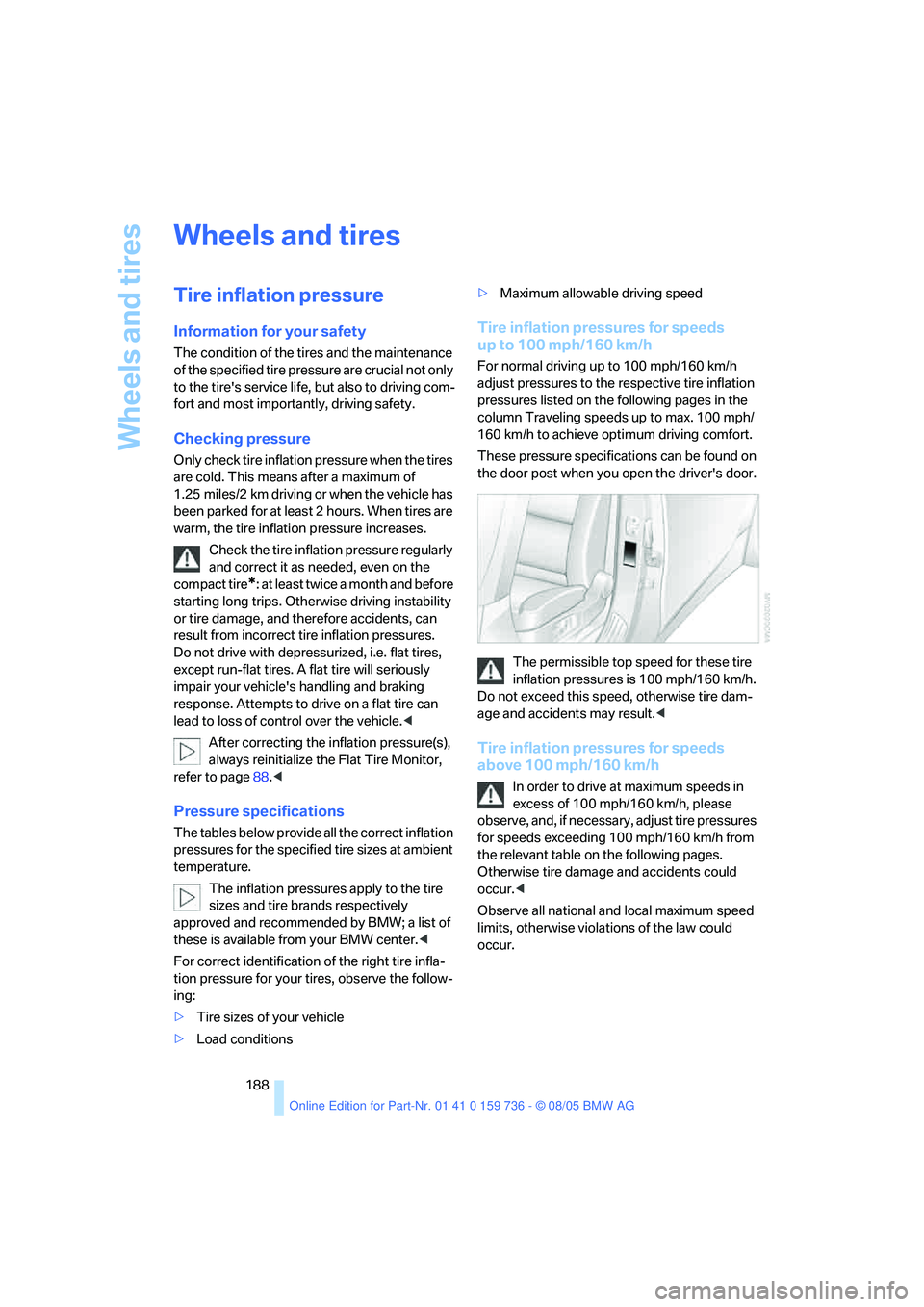
These pressure specifications can be found on
the door post when you open the driver's door.
The permissible top speed for these tire
inflation pressures is 100 mph/160 km/h.
Do not exceed this speed, otherwise tire dam-
age and accidents may result.<
Tire inflation pressures for speeds
above 100 mph/160 km/h
In order to drive at maximum speeds in
excess of 100 mph/160 km/h, please
observe, and, if necessary, adjust tire pressures
for speeds exceeding 100 mph/160 km/h from
the relevant table on the following pages.
Otherwise tire damage and accidents could
occur.<
Observe all national and local maximum speed
limits, otherwise violations of the law could
occur.
Page 204 of 248
Mobility
203Reference
At a glance
Controls
Driving tips
Communications
Navigation
Entertainment
Replacing components
Onboard toolkit
Sedan
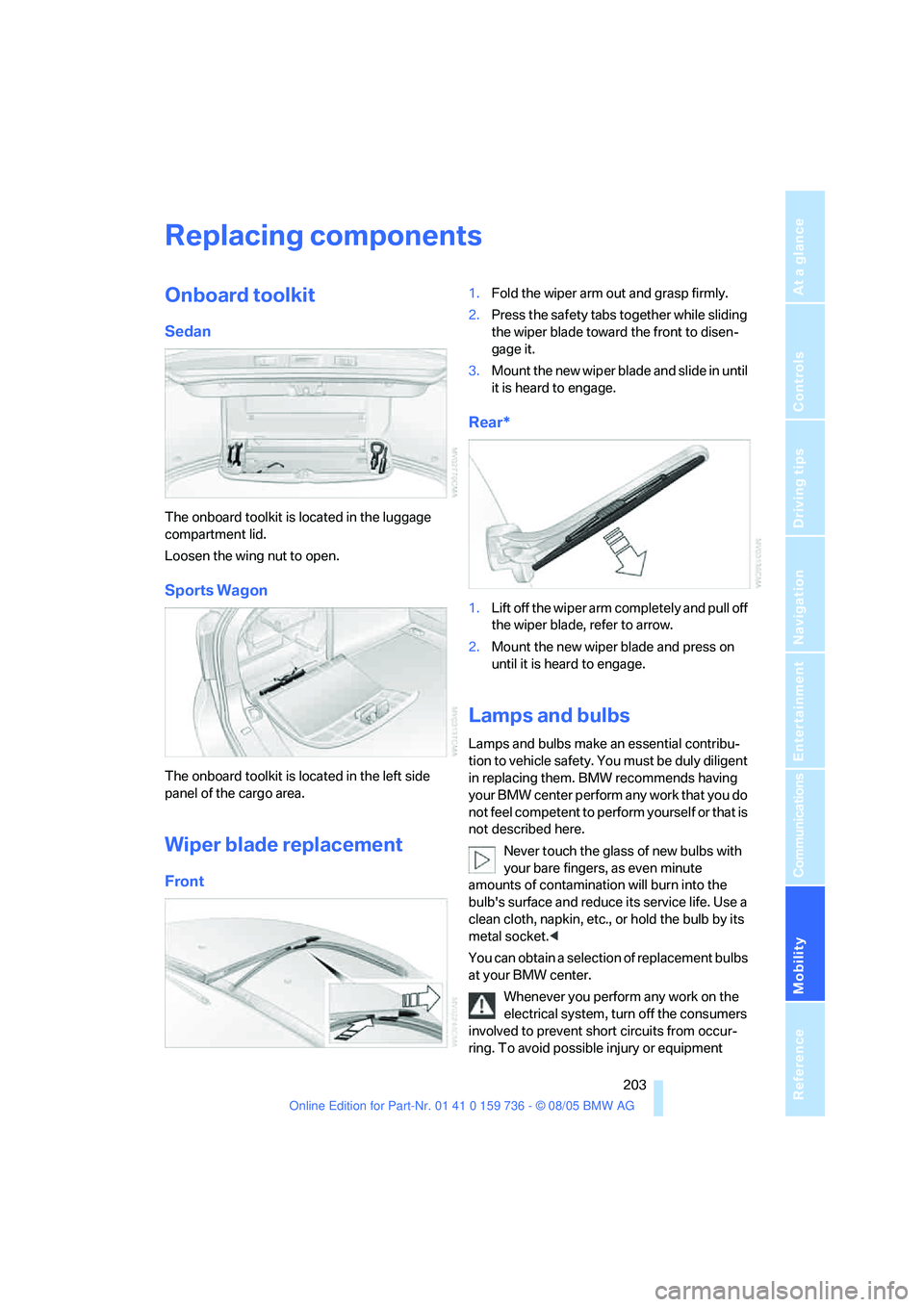
The onboard toolkit is located in the luggage
compartment lid.
Loosen the wing nut to open.
Sports Wagon
The onboard toolkit is located in the left side
panel of the cargo area.
Wiper blade replacement
Front
1.Fold the wiper arm out and grasp firmly.
2.Press the safety tabs together while sliding
the wiper blade toward the front to disen-
gage it.
3.Mount the new wiper blade and slide in until
it is heard to engage.
Rear*
1.Lift off the wiper arm completely and pull off
the wiper blade, refer to arrow.
2.Mount the new wiper blade and press on
until it is heard to engage.
Lamps and bulbs
Lamps and bulbs make an essential contribu-
tion to vehicle safety. You must be duly diligent
in replacing them. BMW recommends having
your BMW center perform any work that you do
not feel competent to perform yourself or that is
not described here.
Never touch the glass of new bulbs with
your bare fingers, as even minute
amounts of contamination will burn into the
bulb's surface and reduce its service life. Use a
clean cloth, napkin, etc., or hold the bulb by its
metal socket.<
You can obtain a selection of replacement bulbs
at your BMW center.
Whenever you perform any work on the
electrical system, turn off the consumers
involved to prevent short circuits from occur-
ring. To avoid possible injury or equipment
Page 228 of 248
227Reference
At a glance
Controls
Driving tips
Communications
Navigation
Entertainment
Mobility
Everything from A to Z
Index
"..." Identifies Control Display
texts used to select
individual functions, and
indicates where to find them
in the text.
A
ABS Antilock Brake
System84
ACC, refer to Active cruise
control65
Acceleration assistant for
SMG Sequential Manual
Gearbox61
Accessories6
Acoustic signal, refer to Check
Control77
Activated-charcoal filter102
"Activation time" for parked
car ventilation102
Active cruise control65
– indicator lamp68
– radar sensor69
– selecting distance67
– warning lamps69
Active head restraints,
front47
Active seat49
Active seat ventilation49
Active steering89
– warning lamp89
Adapter for spare key28
Adaptive brake lamps, refer to
Brake force display89
Adaptive Head Light95
"Add digits" for mobile
phone172
"Address book" for
navigation132Address for navigation
– deleting133
– entering125,128
– selecting133
– storing132
– storing current position133
"Add to address book"132
"Add to destination
list"128,129
Adjusting active backrest
width45
Adjusting confirmation signals
for locking and unlocking31
Adjusting the thigh support44
Adjusting the tone during
audio operation, refer to
Tone control145
Adjustment in audio mode
– front-to-rear146
– right/left balance146
"After door opened"46
"After unlocking"46
Airbags90
– sitting safely43
– warning lamp91
Air circulation, refer to Air
recirculation101
Air distribution
– automatic99
– manual100
Airing, refer to Ventilation101
Air recirculation
– AUC Automatic recircu-
lated-air control101
– recirculated-air mode101
"Air recirculation on / off"51
Air vent outlets of automatic
climate control98
Air vents98
– refer to Ventilation101
Air volume100
AKI, refer to Fuel quality187Alarm system36
– avoiding unintentional
alarms37
– interior motion sensor37
– switching off the alarm37
– switching off the tilt alarm
sensor and interior motion
sensor37
– tilt alarm sensor37
All around the center
console14
All around the steering
wheel10
"All channels"154
"All doors"30
All-season tires, refer to
Winter tires195
"All stations" calling up with
radio148,151
All-wheel drive, refer to
xDrive85
Alterations, technical, refer to
For your own safety5
Altering stretch of road140
"AM", reception
range144,148
Antenna for mobile phone166
Antifreeze
– coolant199
– washer fluid64
Antilock Brake System
ABS84
Anti-theft alarm system, refer
to Alarm system36
Anti-theft system, refer to
Central locking system29
Anti-trapping mechanism
– glass sunroof, electric41
– panorama glass sunroof42
– power windows39
Approved axle loads, refer to
Weights221
Approved engine oils
198
Page 229 of 248
Everything from A to Z
228 Approved gross vehicle
weight, refer to Weights221
Armrest, refer to Center
armrest, rear109
Arrival time
– refer to Computer74
– refer to Starting destination
guidance136
"Arrow display" during
navigation137
Ashtray
– front107
– rear108
Assist, refer to
BMW Assist179
Assistance systems, refer to
Driving stability control
systems84
Assistance window20
"Assist. window off"21
AUC Automatic recirculated-
air control101
Audio144
– controls144
– switching on/off144
– tone control145
– volume145
"Audio", refer to Tone
control145
Automatic
– air distribution99
– air volume99
– garage door opener104
– headlamp control94
– service notification180
– steering wheel adjustment,
refer to Easy entry/exit50
– storing stations149
– tailgate operation35
Automatically switching
between high beams and
low beams, refer to High-
beam assistant95
Automatic car washes118
– also refer to Caring for your
vehicle brochure
Automatic climate control98
– automatic air distribution99
– switching off101Automatic curb monitor50
Automatic lighting
– refer to Automatic headlamp
control94
– refer to Daytime driving
lamps94
– refer to High-beam
assistant95
– refer to Interior lamps97
– refer to Pathway lighting94
Automatic low-beam function,
refer to High-beam
assistant95
"Automatic programs"99
Automatic recirculated-air
control AUC101
Automatic station search149
Automatic transmission with
Steptronic61
– deactivating selector lever
interlock62
– interlock61
– kick-down61
– selector lever interlock61
– shiftlock61
– sport program62
– tow starting214
– tow-starting215
– with comfort access38
"Automatic ventilation"102
AUTO program for automatic
climate control99
"Autostore" on the
radio148,150
Average fuel consumption73
– setting the units81
Average speed, refer to
Computer73
"Avoid ferries" for
navigation135
"Avoid highways" for
navigation135
Avoiding freeways for
navigation135
Avoiding unintentional
alarms37
"Avoid tollroads" for
navigation135Axle loads, refer to
Weights221
"A - Z"172
B
Backrest contour, refer to
Lumbar support44
Backrests, refer to Seats44
Backrest width adjustment44
Backup lamps, refer to
Reverse gear59
– replacing bulbs205
"Balance", refer to Tone
control146
Balance, refer to Tone
control146
Band-aids, refer to First-aid
kit212
"Bass", refer to Tone
control146
Bass, refer to Tone
control145
Battery, refer to Vehicle
battery209
– jump starting212
Battery disposal
– remote control with comfort
access39
– vehicle battery209
Battery replacement, remote
control with comfort
access39
Being towed214
Belts, refer to Safety belts47
Beverage holder, refer to
Cup holders107
Blower, refer to Air
volume100
"BMW Assist"181
BMW Assist179
– enabling179
– services offered180
"BMW Contact"183
"BMW Contact
Numbers"183
BMW homepage4
BMW maintenance
system201
Page 230 of 248
Reference 229
At a glance
Controls
Driving tips
Communications
Navigation
Entertainment
Mobility
"BMW Service"181
"BMW Service settings"180
BMW website4
Bottle holder, refer to Cup
holders107
Brake Assistant, refer to DBC
Dynamic Brake Control84
Brake fluid199
– warning lamp199
Brake force display89
Brake lamps
– brake force display89
– replacing bulbs205
Brake pads200
– breaking-in116
Brake rotors118
Brakes
– ABS Antilock Brake
System84
– brake fluid199
– brake force display89
– brake pads200
– breaking-in116
– handbrake58
– warning lamps13
Brake system116,199
– brake fluid level199
– brake pads116,200
– breaking-in116
– disc brakes118
– warning lamp199
Braking
– CBC Cornering Brake
Control84
– DBC Dynamic Brake
Control84
– electronic brake-force
distribution84
– refer to Braking safely117
Braking safely117
Breakdown assistance181
Breakdown services, refer to
Roadside Assistance212
Breaking-in the clutch116
Breaking-in the
differential116
Break-in period116
"Brightness"81Brightness of Control
Display81
Button for starting engine56
Buttons on steering wheel11
C
California laws
– Event Data Recorders202
California Proposition 65
Warning5
"Call"172
Call
– accepting171
– displaying accepted173
– ending171
– in absence173
– starting171
Calling
– from phone book172
– from Top 8 list173
– redialing173
– refer to telephone owner's
manual
Can holder, refer to Cup
holders107
Capacities222
Capacity
– of cargo area221
– of luggage
compartment221
Car battery, refer to Vehicle
battery209
Car care, refer to Caring for
your vehicle brochure
Car-care products, refer to
Caring for your vehicle
brochure
"Car data"74
Care202
– refer to Caring for your
vehicle brochure
Cargo
– refer to Loading118
– securing120
– securing with ski bag110Cargo area
– capacity221
– emergency operation, refer
to Opening manually35
– increasing111
– opening/closing, refer to
Tailgate35
– opening from inside35
– opening from outside35
– opening with remote
control31
Cargo area cover, Sports
Wagon111
Caring for artificial leather,
refer to Caring for your
vehicle brochure
Caring for leather, refer to
Caring for your vehicle
brochure
Caring for light-alloy wheels,
refer to Caring for your
vehicle brochure
Caring for plastic, refer to
Caring for your vehicle
brochure
Caring for the carpet, refer to
Caring for your vehicle
brochure
Caring for the vehicle finish,
refer to Caring for your
vehicle brochure
Car key, refer to Keys/remote
control
28
Car phone166
– installation location, refer to
Center armrest106
– refer to Mobile phone166
– refer to separate Owner's
Manual
Car radio, refer to Radio148
Car wash118
– also refer to Caring for your
vehicle brochure
– with comfort access39
Catalytic converter, refer to
Hot exhaust system116
"Categories"154
CBC Cornering Brake
Control84
Page 231 of 248

Everything from A to Z
230 CBS Condition Based
Service201
"CD"144,157
CD changer157
– controls144
– fast forward/reverse161
– installation location161
– playing a track159
– random order160
– repeating a track160
– selecting a CD157
– selecting a track158
– switching on/off144
– tone control145
– volume145
CD player157
– controls144
– fast forward/reverse161
– playing a track159
– random order160
– repeating a track160
– selecting a track158
– switching on/off144
– tone control145
– volume145
Center armrest
– front106
– rear109
Center brake lamp206
Center console14
"Central locking"30
Central locking system29
– comfort access37
– from inside vehicle32
Changes, technical
– refer to For your own
safety5
– refer to Parts and
accessories6
Changing settings on Control
Display80
Changing the language on the
Control Display82
Changing units of measure on
Control Display81
Changing wheels194,207
CHECK button78
Check Control77"Check Control
messages"78
Check Gas Cap187
Checking the air pressure,
refer to Tire inflation
pressure188
Child-restraint fixing system
LATCH
54
Child restraints52
Child-restraint systems52
Child-safety lock55
Child seats52
Chime, refer to Check
Control77
Chock207
Chrome parts, care, refer to
Caring for your vehicle
brochure
Cigarette lighter108
Cleaning, refer to Caring for
your vehicle brochure
"Climate"48,99
Clock72
– 12h/24h mode81
– setting time and date80
Closing
– from inside32
– from outside30
Closing fuel filler cap187
Clothes hooks107
Cockpit10
Cold start, refer to Starting
engine57
"Comfort", active backrest
width adjustment45
Comfort access37
– observe in car wash39
– replacing battery39
Comfort area, refer to All
about the center console14
Comfort operation
– windows with comfort
access38
– with comfort access38
Comfort seat44
"Communication"170,181
"Communication
settings"180Compact Disc
– refer to CD changer157
– refer to CD player157
Compact wheel
– inflation pressure189
– wheel change208
Compartment for remote
control, refer to Ignition
lock56
Compartments, refer to
Storage compartments107
Compressed audio files157
Computer73
– displays on Control
Display74
– hour signal81
"Concert hall", refer to Tone
control146
Condition Based Service
CBS201
"Confirmation"
31
Connecting car vacuum
cleaner, refer to Connecting
electrical devices108
Consumption, refer to
Average consumption73
Consumption indicator,
Energy Control73
Consumption statistics, refer
to Average fuel
consumption73
"Continue guidance to
destination?"137
Control Center, refer to
iDrive16
Control Display, refer to
iDrive16
– setting brightness81
Controller, refer to iDrive16
Controls, refer to Cockpit10
Convenience operation
– glass sunroof30
– windows30
Convenience start, refer to
Starting engine57
Coolant199
– checking level199
– temperature72
Cooling, maximum100