2006 BMW 325XI SPORTS WAGON light
[x] Cancel search: lightPage 199 of 236
Replacing components
198 any instructions provided by the bulb manufac-
turer.<
For care and maintenance of the headlamps,
please follow the instructions in the separate
Caring for your vehicle brochure.
If the routine for changing a particular
bulb is not described here, please contact
your BMW Center or a workshop that works
according to BMW repair procedures with cor-
respondingly trained personnel.<
Light-emitting diodes LEDs
Light-emitting diodes installed behind translu-
cent lenses serve as the light source for many of
the controls and displays in your vehicle. These
light-emitting diodes, which operate using a
concept similar to that applied in conventional
lasers, are officially designated as Class 1 light-
emitting diodes.
Do not remove the covers or expose the
eyes directly to the unfiltered light source
for several hours at a time, otherwise this could
cause irritation to the retina.<
Xenon lamps*
The service life of these bulbs is very long and
the probability of a failure is very low, provided
that they are not switched on and off an unusual
number of times. If a xenon lamp fails neverthe-
less, switch on the fog lamps and continue the
journey with great care, provided that local leg-
islation does not prohibit this.
Have work on the xenon lighting system
performed only by your BMW Center or a
workshop that works according to BMW repair
procedures with correspondingly trained per-
sonnel. Due to the high electrical voltages
present, there is a risk of potentially fatal acci-
dents if work is performed inappropriate.<
Parking lamps, roadside parking lamps
In the event of a malfunction, please contact
your BMW Center or a workshop that works
according to BMW repair procedures with cor-
respondingly trained personnel.
Halogen lamps
H7 bulb, 55 watts
Always wear gloves and eye protection;
the atmosphere within the H7 bulb is
pressurized. Otherwise there is a risk of injury if
the bulb is damaged.<
There are separate headlamp covers for low-
beam headlamps and high-beam headlamps.
Be careful when installing the covers, oth-
erwise leaks could occur and cause dam-
age to the headlamp system.<
For checking and adjusting headlamp
aim, please contact your BMW Center.<
Access to the lamps
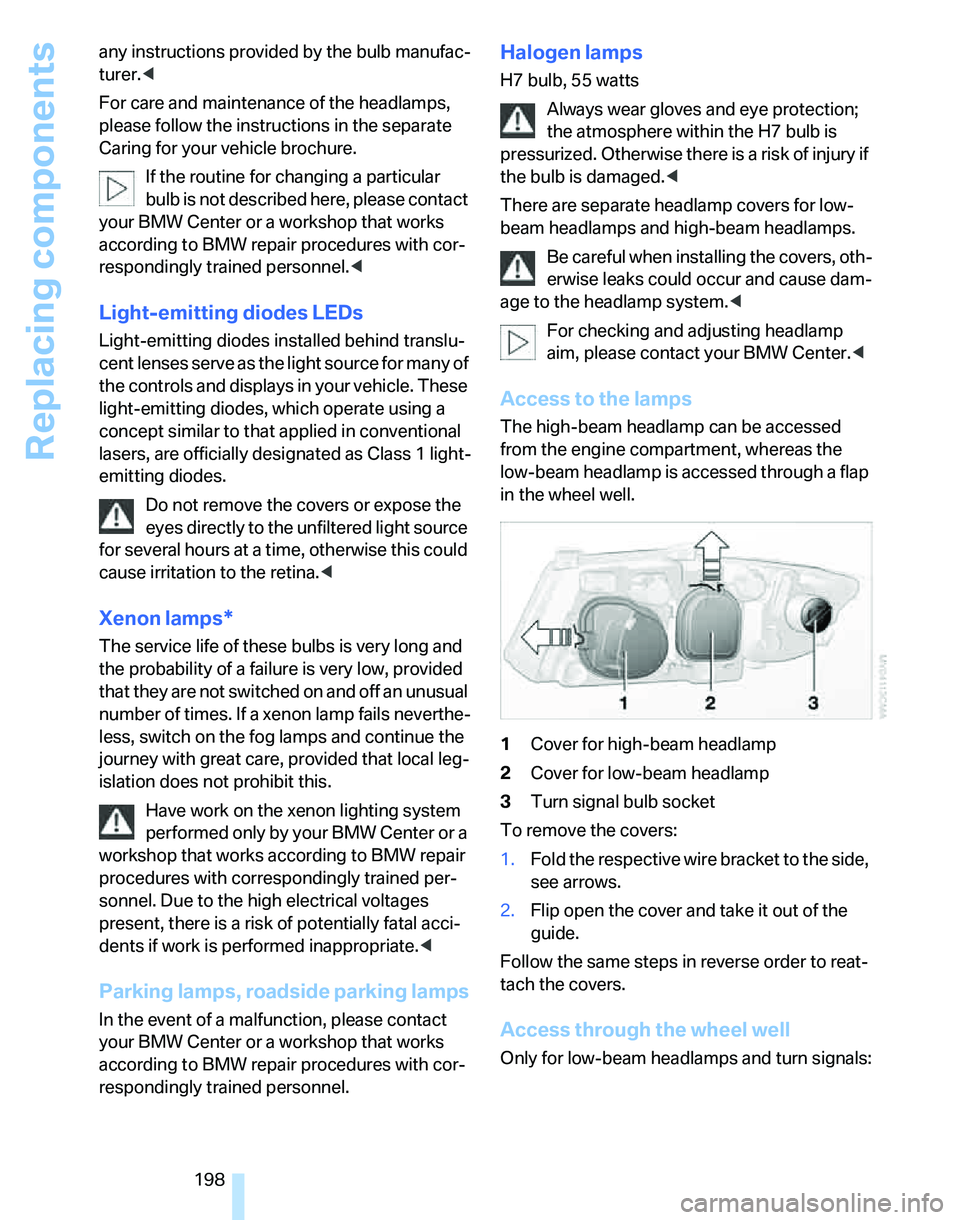
The high-beam headlamp can be accessed
from the engine compartment, whereas the
low-beam headlamp is accessed through a flap
in the wheel well.
1Cover for high-beam headlamp
2Cover for low-beam headlamp
3Turn signal bulb socket
To remove the covers:
1.Fold the respective wire bracket to the side,
see arrows.
2.Flip open the cover and take it out of the
guide.
Follow the same steps in reverse order to reat-
tach the covers.
Access through the wheel well
Only for low-beam headlamps and turn signals:
Page 204 of 236
Mobility
203Reference
At a glance
Controls
Driving tips
Communications
Navigation
Entertainment
Giving and receiving assistance
Emergency calling*
Conditions for an emergency call:
>Full preparation package mobile phone
>BMW Assist is enabled. Enabling BMW
Assist, refer to page174.
>Radio readiness is on.
>The car phone is logged on to a mobile tele-
phone network.
>The emergency call system is operable.
If your subscription contract with BMW Assist
expires, the car phone can be deactivated by a
BMW Center without having to schedule an
appointment at a workshop. Once the car
phone has been deactivated, emergency calls
are not possible. The car phone can be reacti-
vated by a BMW Center after signing a new
contract.
Initiating an emergency call
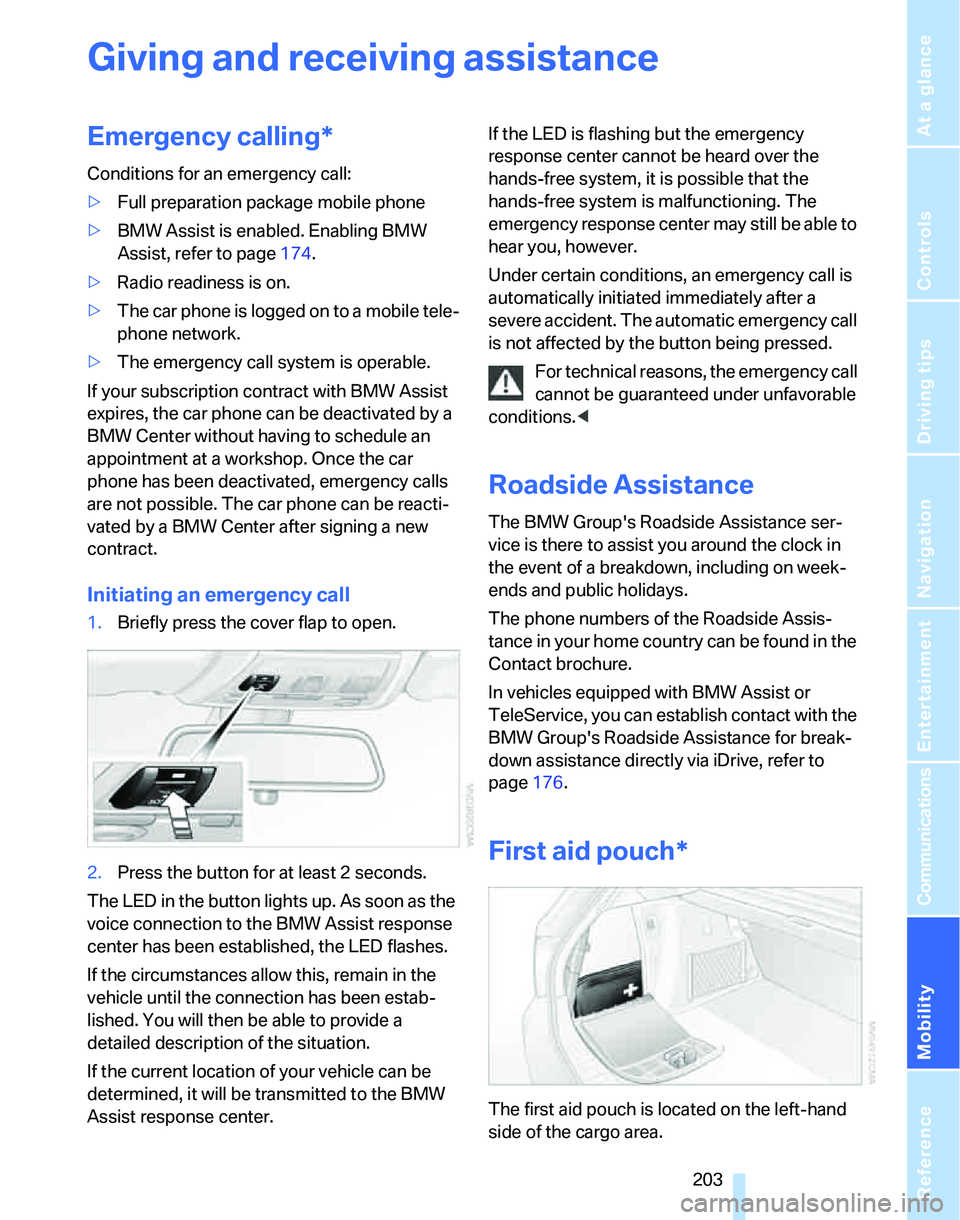
1.Briefly press the cover flap to open.
2.Press the button for at least 2 seconds.
The LED in the button lights up. As soon as the
voice connection to the BMW Assist response
center has been established, the LED flashes.
If the circumstances allow this, remain in the
vehicle until the connection has been estab-
lished. You will then be able to provide a
detailed description of the situation.
If the current location of your vehicle can be
determined, it will be transmitted to the BMW
Assist response center.If the LED is flashing but the emergency
response center cannot be heard over the
hands-free system, it is possible that the
hands-free system is malfunctioning. The
emergency response center may still be able to
hear you, however.
Under certain conditions, an emergency call is
automatically initiated immediately after a
severe accident. The automatic emergency call
is not affected by the button being pressed.
For technical reasons, the emergency call
cannot be guaranteed under unfavorable
conditions.<
Roadside Assistance
The BMW Group's Roadside Assistance ser-
vice is there to assist you around the clock in
the event of a breakdown, including on week-
ends and public holidays.
The phone numbers of the Roadside Assis-
tance in your home country can be found in the
Contact brochure.
In vehicles equipped with BMW Assist or
TeleService, you can establish contact with the
BMW Group's Roadside Assistance for break-
down assistance directly via iDrive, refer to
page176.
First aid pouch*
The first aid pouch is located on the left-hand
side of the cargo area.
Page 206 of 236
Mobility
205Reference
At a glance
Controls
Driving tips
Communications
Navigation
Entertainment
Your BMW has a special nut as body ground
or negative pole.
5.Attach the second terminal clamp of the
minus/– jumper cable to the negative termi-
nal of the battery or to the engine or body
ground of the vehicle to be started.
Starting the engine
1.Start the engine of the donor vehicle and
allow it to run for a few minutes at slightly
increased idle speed.
2.Start the engine on the other vehicle in the
usual way.
If the first start attempt is not successful,
wait a few minutes before another attempt
in order to allow the discharged battery to
recharge.
3.Let the engines run for a few minutes.
4.Disconnect the jumper cables by reversing
the above connecting sequence.
If necessary, have the battery checked and
recharged.
Never use spray fluids to start the
engine.<
Tow-starting, towing away
Observe the applicable laws and regula-
tions for tow-starting and towing vehi-
cles.<
Do not transport any occupants other
than the driver in a vehicle that is being
towed.<
Using a tow fitting
The screw-in tow fitting must always be carried
in the car. It can be screwed in at the front or
rear of the BMW.
It is stored in the onboard tool kit underneath
the cover on the right-hand side of the cargo
area, refer to page197.
Use only the tow fitting provided with the
vehicle and screw it all the way in. Use the
tow fitting for towing on paved roads only. Avoid
lateral loading of the tow fitting, e.g. do not lift
the vehicle by the tow fitting. Otherwise the tow
fitting and the vehicle could be damaged.<
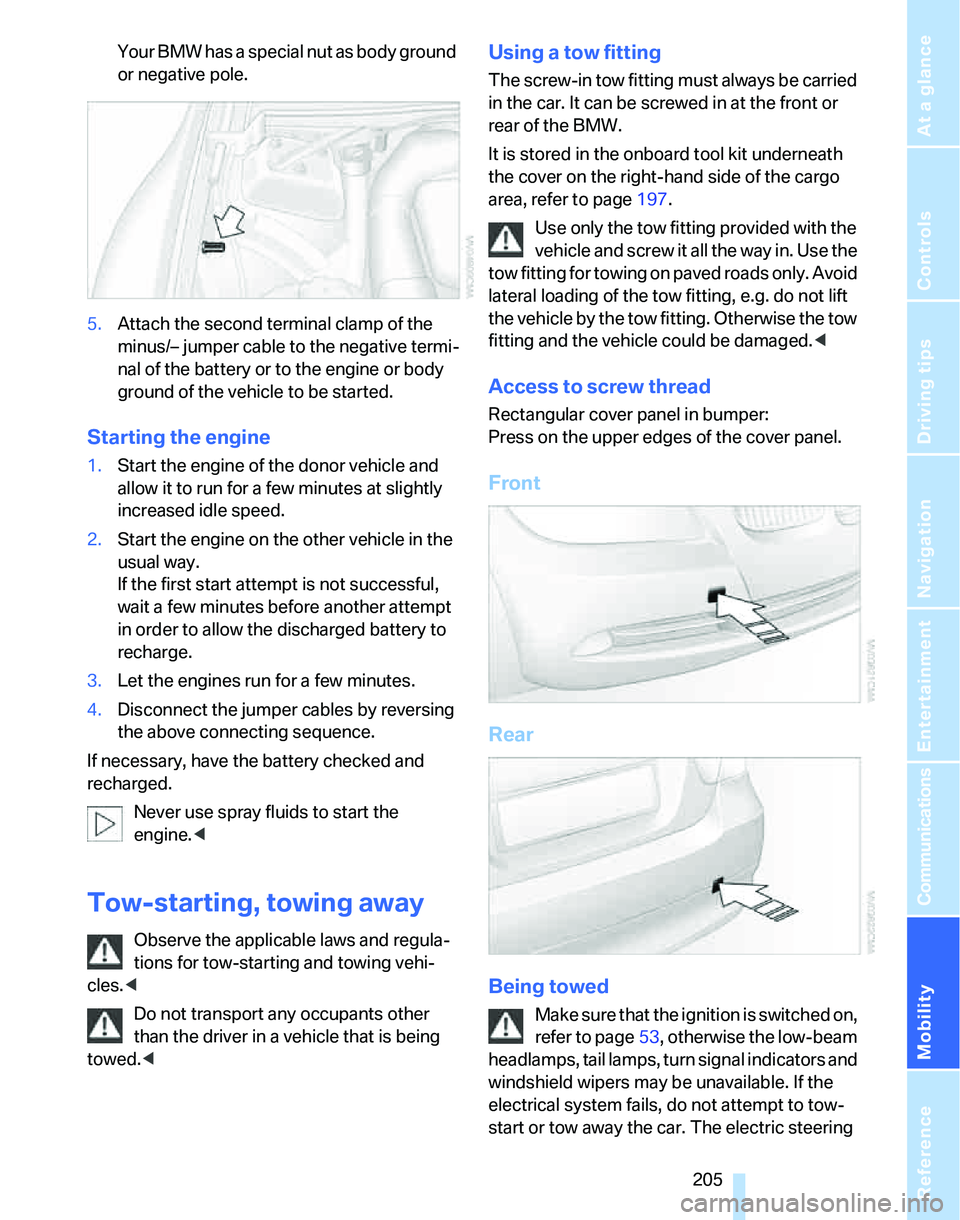
Access to screw thread
Rectangular cover panel in bumper:
Press on the upper edges of the cover panel.
Front
Rear
Being towed
Make sure that the ignition is switched on,
refer to page53, otherwise the low-beam
headlamps, tail lamps, turn signal indicators and
windshield wipers may be unavailable. If the
electrical system fails, do not attempt to tow-
start or tow away the car. The electric steering
Page 207 of 236
Giving and receiving assistance
206 wheel lock cannot be disengaged and the car is
not steerable. Jump starting, refer to page204.
Power steering assistance is not available when
the engine is not running. Thus, braking and
steering will require increased effort.<
Switch on the hazard warning flashers, depend-
ing on local regulations.
Manual transmission
Gearshift lever in idle position.
Automatic transmission
Selector lever in position N.
Changing selector lever positions, refer to
page56.
Do not exceed a towing speed of 45 mph
or 70 km/h and a towing distance of
90 miles/150 km, otherwise the automatic
transmission may be damaged.<
Towing with a tow bar
The towing vehicle must not be lighter
than the towed vehicle, otherwise it may
be impossible to maintain control.<
The tow fittings used should be on the same
side on both vehicles. Should it prove impossi-
ble to avoid mounting the tow bar at an angle,
please observe the following:
>Clearance and maneuvering capability will
be sharply limited during cornering.
>The tow bar will generate lateral forces if it is
attached offset.
Attach the tow bar to the tow fittings only,
as attaching it to other parts of the vehicle
could result in damage.<
Towing with a tow rope
When starting off in the towing vehicle, make
sure that the tow rope is taut.
To avoid jerking and the associated
stresses on vehicle components when
towing, always use nylon ropes or nylon straps.
Attach the tow rope to the tow fittings only, as
attaching it to other parts of the vehicle could
result in damage.<
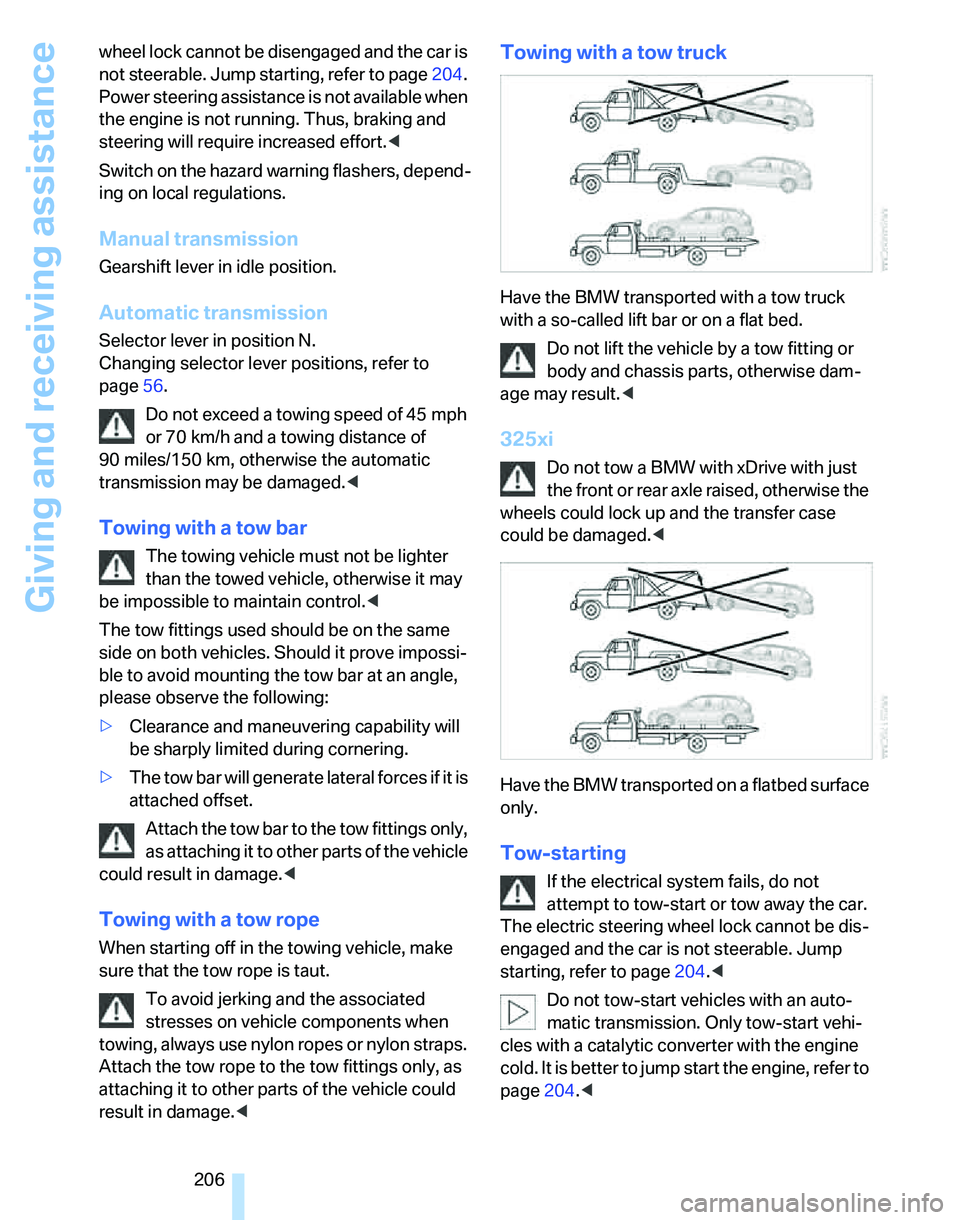
Towing with a tow truck
Have the BMW transported with a tow truck
with a so-called lift bar or on a flat bed.
Do not lift the vehicle by a tow fitting or
body and chassis parts, otherwise dam-
age may result.<
325xi
Do not tow a BMW with xDrive with just
the front or rear axle raised, otherwise the
wheels could lock up and the transfer case
could be damaged.<
Have the BMW transported on a flatbed surface
only.
Tow-starting
If the electrical system fails, do not
attempt to tow-start or tow away the car.
The electric steering wheel lock cannot be dis-
engaged and the car is not steerable. Jump
starting, refer to page204.<
Do not tow-start vehicles with an auto-
matic transmission. Only tow-start vehi-
cles with a catalytic converter with the engine
cold. It is better to jump start the engine, refer to
page204.<
Page 218 of 236
Reference 217
At a glance
Controls
Driving tips
Communications
Navigation
Entertainment
Mobility
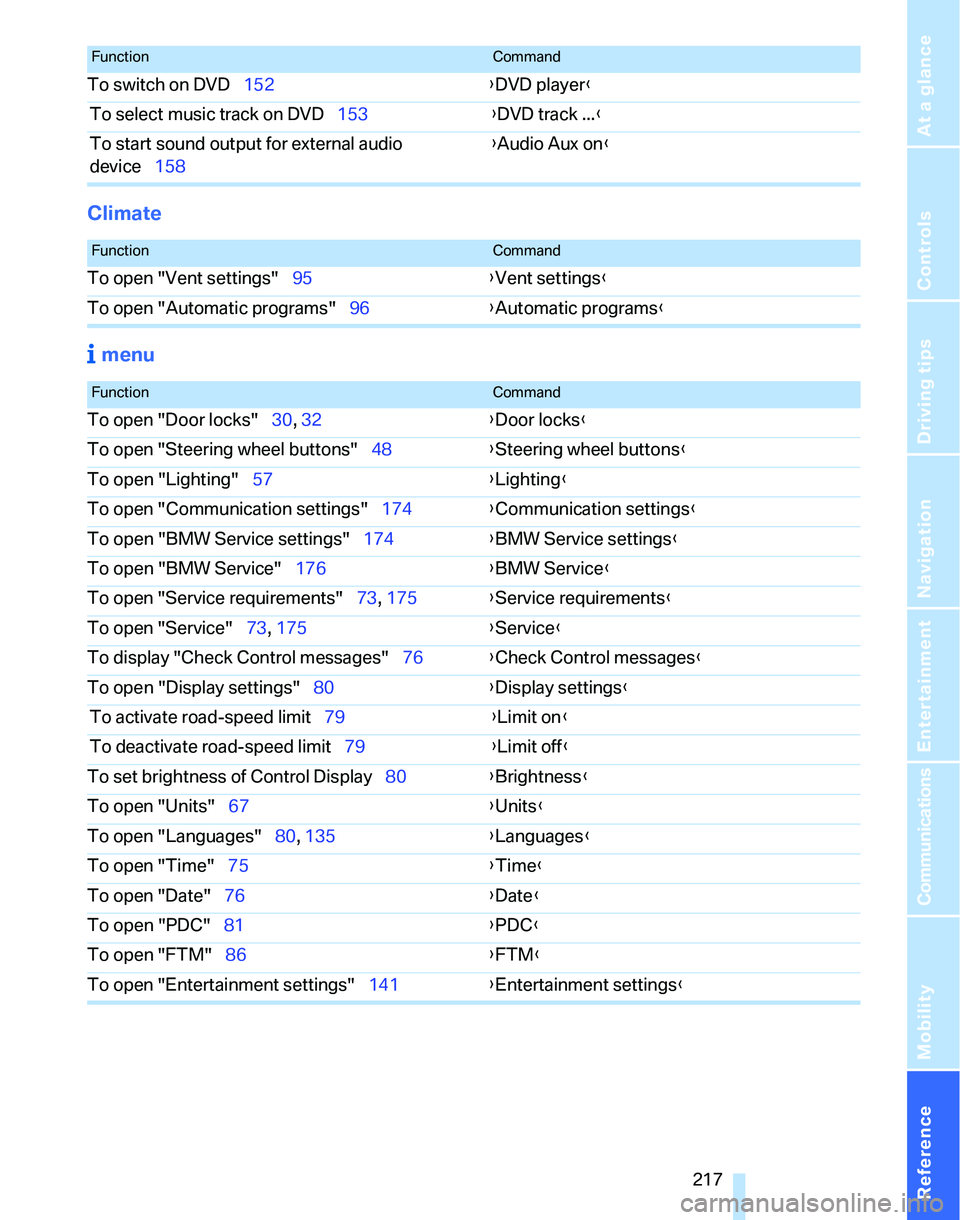
Climate
menu
To switch on DVD152{DVD player}
To select music track on DVD153{DVD track ...}
To start sound output for external audio
device158{Audio Aux on}
FunctionCommand
FunctionCommand
To open "Vent settings"95{Vent settings}
To open "Automatic programs"96{Automatic programs}
FunctionCommand
To open "Door locks"30, 32{Door locks}
To open "Steering wheel buttons"48{Steering wheel buttons}
To open "Lighting"57{Lighting}
To open "Communication settings"174{Communication settings}
To open "BMW Service settings"174{BMW Service settings}
To open "BMW Service"176{BMW Service}
To open "Service requirements"73, 175{Service requirements}
To open "Service"73, 175{Service}
To display "Check Control messages"76{Check Control messages}
To open "Display settings"80{Display settings}
To activate road-speed limit79{Limit on}
To deactivate road-speed limit79{Limit off}
To set brightness of Control Display80{Brightness}
To open "Units"67{Units}
To open "Languages"80, 135{Languages}
To open "Time"75{Time}
To open "Date"76{Date}
To open "PDC"81{PDC}
To open "FTM"86{
FTM}
To open "Entertainment settings"141{Entertainment settings}
Page 219 of 236
Everything from A - Z
218
Everything from A - Z
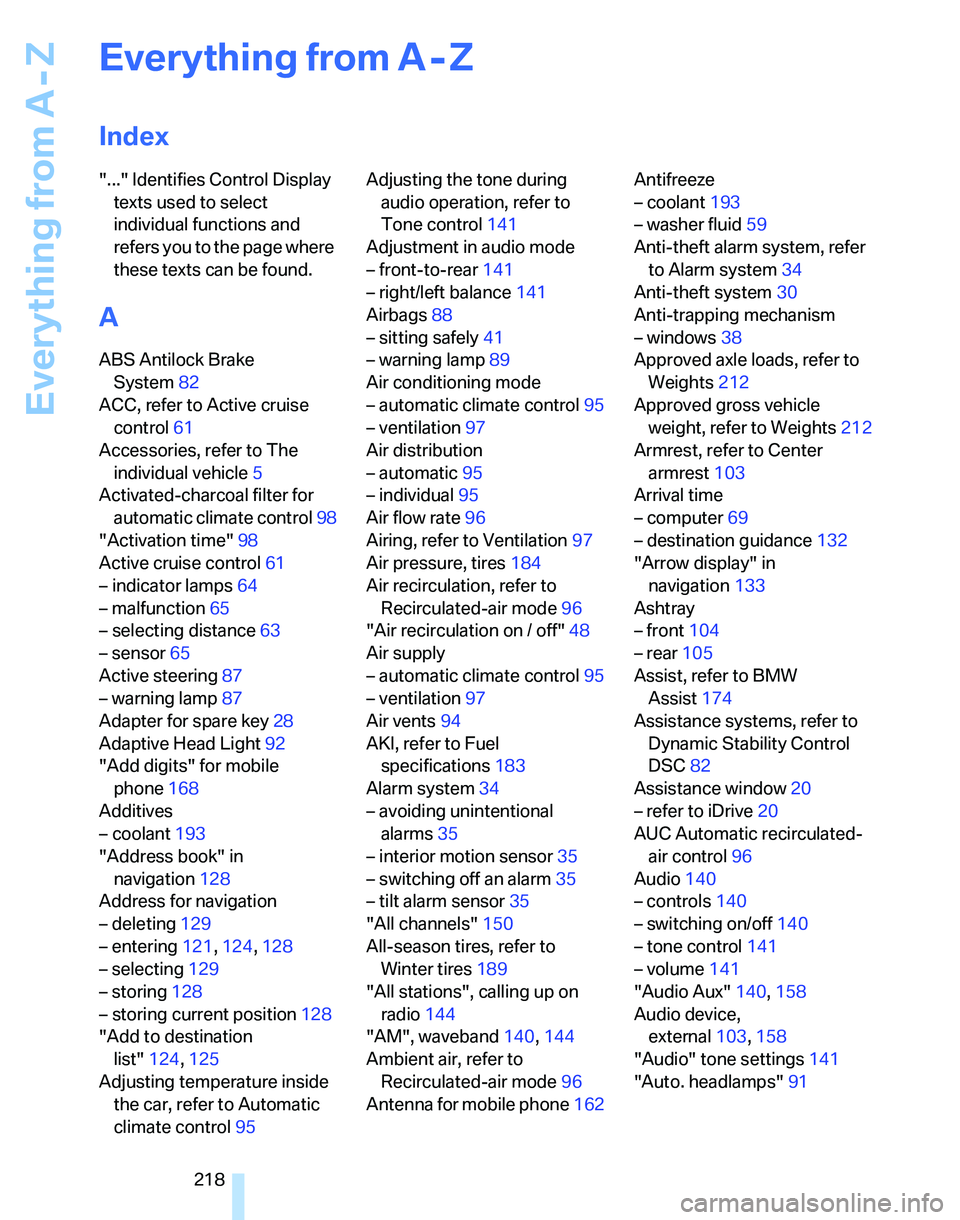
Index
"..." Identifies Control Display
texts used to select
individual functions and
refers you to the page where
these texts can be found.
A
ABS Antilock Brake
System82
ACC, refer to Active cruise
control61
Accessories, refer to The
individual vehicle5
Activated-charcoal filter for
automatic climate control98
"Activation time"98
Active cruise control61
– indicator lamps64
– malfunction65
– selecting distance63
– sensor65
Active steering87
– warning lamp87
Adapter for spare key28
Adaptive Head Light92
"Add digits" for mobile
phone168
Additives
– coolant193
"Address book" in
navigation128
Address for navigation
– deleting129
– entering121,124,128
– selecting129
– storing128
– storing current position128
"Add to destination
list"124,125
Adjusting temperature inside
the car, refer to Automatic
climate control95Adjusting the tone during
audio operation, refer to
Tone control141
Adjustment in audio mode
– front-to-rear141
– right/left balance141
Airbags88
– sitting safely41
– warning lamp89
Air conditioning mode
– automatic climate control95
– ventilation97
Air distribution
– automatic95
– individual95
Air flow rate96
Airing, refer to Ventilation97
Air pressure, tires184
Air recirculation, refer to
Recirculated-air mode96
"Air recirculation on / off"48
Air supply
– automatic climate control95
– ventilation
97
Air vents94
AKI, refer to Fuel
specifications183
Alarm system34
– avoiding unintentional
alarms35
– interior motion sensor35
– switching off an alarm35
– tilt alarm sensor35
"All channels"150
All-season tires, refer to
Winter tires189
"All stations", calling up on
radio144
"AM", waveband140,144
Ambient air, refer to
Recirculated-air mode96
Antenna for mobile phone162Antifreeze
– coolant193
– washer fluid59
Anti-theft alarm system, refer
to Alarm system34
Anti-theft system30
Anti-trapping mechanism
– windows38
Approved axle loads, refer to
Weights212
Approved gross vehicle
weight, refer to Weights212
Armrest, refer to Center
armrest103
Arrival time
– computer69
– destination guidance132
"Arrow display" in
navigation133
Ashtray
– front104
– rear105
Assist, refer to BMW
Assist174
Assistance systems, refer to
Dynamic Stability Control
DSC82
Assistance window20
– refer to iDrive20
AUC Automatic recirculated-
air control96
Audio140
– controls140
– switching on/off140
– tone control141
– volume141
"Audio Aux"140,158
Audio device,
external103,158
"Audio" tone settings141
"Auto. headlamps"91
Page 221 of 236

Everything from A - Z
220 Burned fuel
– refer to Average
consumption69
Button for starting engine53
Buttons on steering wheel11
C
California Proposition 65
warning6
"Call"168
Call
– accepting166
– displaying accepted168
– ending167
– in absence168
– starting167
Calling
– from phone book167
– from Top 8 list168
– redialing168
Can holders, refer to Cup
holders104
Capacities213
Capacity of cargo area212
Car battery, refer to Vehicle
battery201
Car care, refer to Caring for
your vehicle brochure
Car-care products, refer to
Caring for your vehicle
brochure
"Car Data"69
Care, refer to Caring for your
vehicle brochure
Cargo, securing115
Cargo area105
– capacity212
– convenient access36
– cover105
– folding up the floor
panel107
– lamp93
– lid, refer to Tailgate33
– net106
– opening from outside33
Cargo area net106Cargo loading
– stowing cargo115
– vehicle114
Caring for artificial leather,
refer to Caring for your
vehicle brochure
Caring for leather, refer to
Caring for your vehicle
brochure
Caring for light-alloy wheels,
refer to Caring for your
vehicle brochure
Caring for plastic, refer to
Caring for your vehicle
brochure
Caring for the carpet, refer to
Caring for your vehicle
brochure
Caring for the vehicle finish,
refer to Caring for your
vehicle brochure
Car jack
– jacking points201
Car key, refer to Integrated
key/remote control28
Car phone162
– installation location, refer to
Center armrest103
– refer to Mobile phone162
– refer to separate Owner's
Manual
Car radio, refer to Radio144
Car wash114
– also refer to Caring for your
vehicle brochure
Catalytic converter, refer to
Hot exhaust system112
"Categories"150
CBS Condition Based
Service195
"CD"140,152CD changer152
– controls140
– fast forward/reverse156
– installation location156
– playing a track154
– random order155
– repeating a track155
– selecting a CD152
– selecting a track153
– switching on/off140
– tone control141
– volume141
CD player152
– controls140
– fast forward/reverse156
– playing a track154
– random order155
– repeating a track155
– selecting a track153
– switching on/off140
– tone control141
– volume141
Center armrest103
Center brake lamp
– replacing bulbs201
Center console, refer to
Around the center
console14
"Central locking"30
Central locking
– from inside32
– from outside29
Central locking system29
– convenient access35
Changing bulbs197
Changing the language on the
Control Display80
Changing the measurement
units on the Control
Display71
Changing wheels201
Chassis number, refer to
Engine compartment191
Check Control77
"Check Control
messages"78
Check Gas Cap182
Page 222 of 236
Reference 221
At a glance
Controls
Driving tips
Communications
Navigation
Entertainment
Mobility
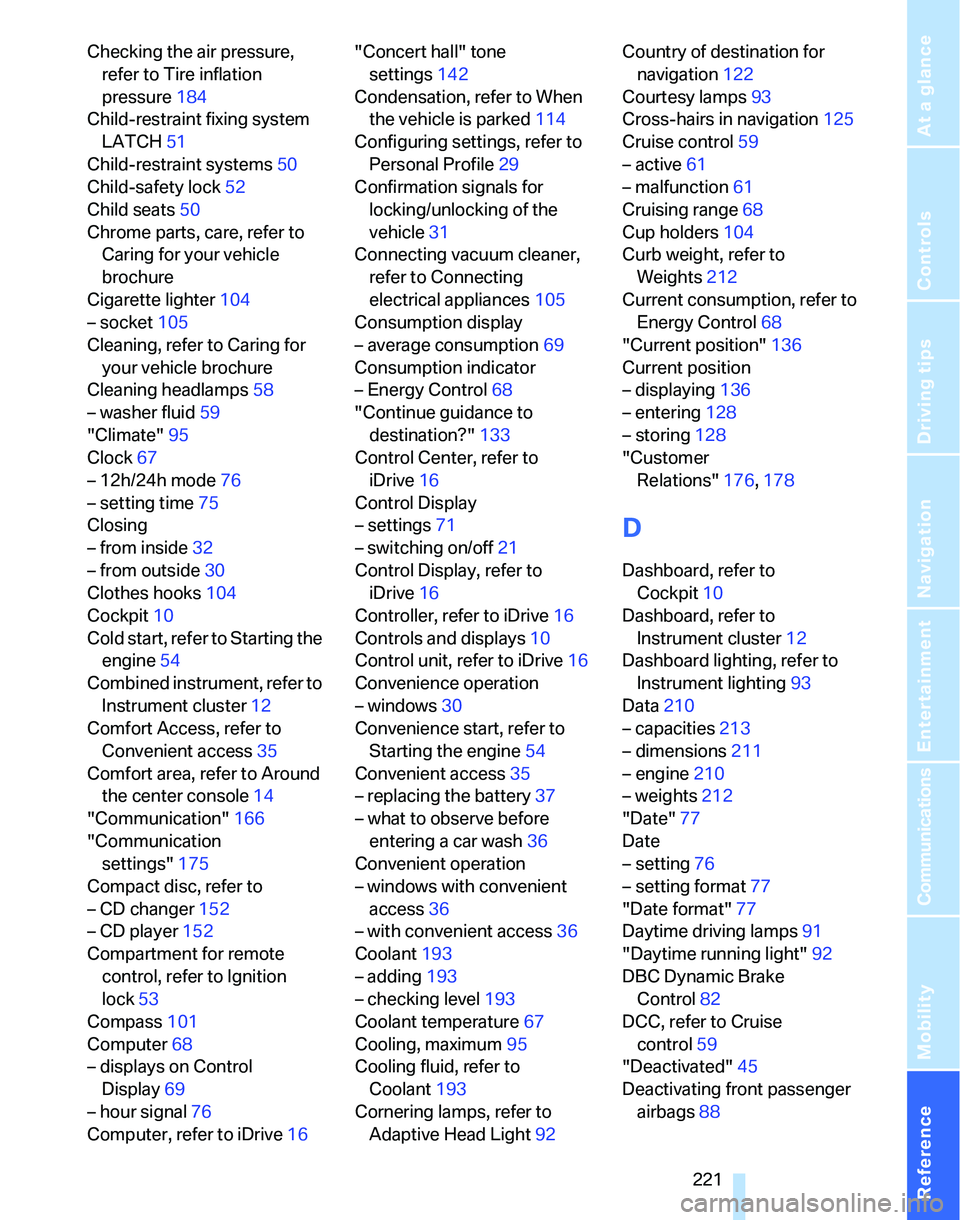
Checking the air pressure,
refer to Tire inflation
pressure184
Child-restraint fixing system
LATCH51
Child-restraint systems50
Child-safety lock52
Child seats50
Chrome parts, care, refer to
Caring for your vehicle
brochure
Cigarette lighter104
– socket105
Cleaning, refer to Caring for
your vehicle brochure
Cleaning headlamps58
– washer fluid59
"Climate"95
Clock67
– 12h/24h mode76
– setting time75
Closing
– from inside32
– from outside30
Clothes hooks104
Cockpit10
Cold start, refer to Starting the
engine54
Combined instrument, refer to
Instrument cluster12
Comfort Access, refer to
Convenient access35
Comfort area, refer to Around
the center console14
"Communication"166
"Communication
settings"175
Compact disc, refer to
– CD changer152
– CD player152
Compartment for remote
control, refer to Ignition
lock53
Compass101
Computer68
– displays on Control
Display69
– hour signal76
Computer, refer to iDrive16"Concert hall" tone
settings142
Condensation, refer to When
the vehicle is parked114
Configuring settings, refer to
Personal Profile29
Confirmation signals for
locking/unlocking of the
vehicle31
Connecting vacuum cleaner,
refer to Connecting
electrical appliances105
Consumption display
– average consumption69
Consumption indicator
– Energy Control68
"Continue guidance to
destination?"
133
Control Center, refer to
iDrive16
Control Display
– settings71
– switching on/off21
Control Display, refer to
iDrive16
Controller, refer to iDrive16
Controls and displays10
Control unit, refer to iDrive16
Convenience operation
– windows30
Convenience start, refer to
Starting the engine54
Convenient access35
– replacing the battery37
– what to observe before
entering a car wash36
Convenient operation
– windows with convenient
access36
– with convenient access36
Coolant193
– adding193
– checking level193
Coolant temperature67
Cooling, maximum95
Cooling fluid, refer to
Coolant193
Cornering lamps, refer to
Adaptive Head Light92Country of destination for
navigation122
Courtesy lamps93
Cross-hairs in navigation125
Cruise control59
– active61
– malfunction61
Cruising range68
Cup holders104
Curb weight, refer to
Weights212
Current consumption, refer to
Energy Control68
"Current position"136
Current position
– displaying136
– entering128
– storing128
"Customer
Relations"176,178
D
Dashboard, refer to
Cockpit10
Dashboard, refer to
Instrument cluster12
Dashboard lighting, refer to
Instrument lighting93
Data210
– capacities213
– dimensions211
– engine210
– weights212
"Date"77
Date
– setting76
– setting format77
"Date format"77
Daytime driving lamps91
"Daytime running light"92
DBC Dynamic Brake
Control82
DCC, refer to Cruise
control59
"Deactivated"45
Deactivating front passenger
airbags88