2006 BMW 325XI SPORTS WAGON odometer
[x] Cancel search: odometerPage 13 of 236

Cockpit
12
Instrument cluster
1Speedometer
2Indicator lamps for turn signals
3Indicator and warning lamps13
4Displays for active cruise control
*61
5Tachometer67
6Energy Control68
7Display for
>Clock67
>Outside temperature67
>Indicator and warning lamps778Display for
>Position of automatic transmission
*55
>Computer68
>Date of next scheduled service, and
remaining distance to be driven72
>Odometer and trip odometer67
>Checking engine oil level
*191
>Settings and information71
9Fuel gauge68
10Resetting trip odometer67
Page 68 of 236
Controls
67Reference
At a glance
Driving tips
Communications
Navigation
Entertainment
Mobility
Everything under control
Odometer, outside
temperature display, clock
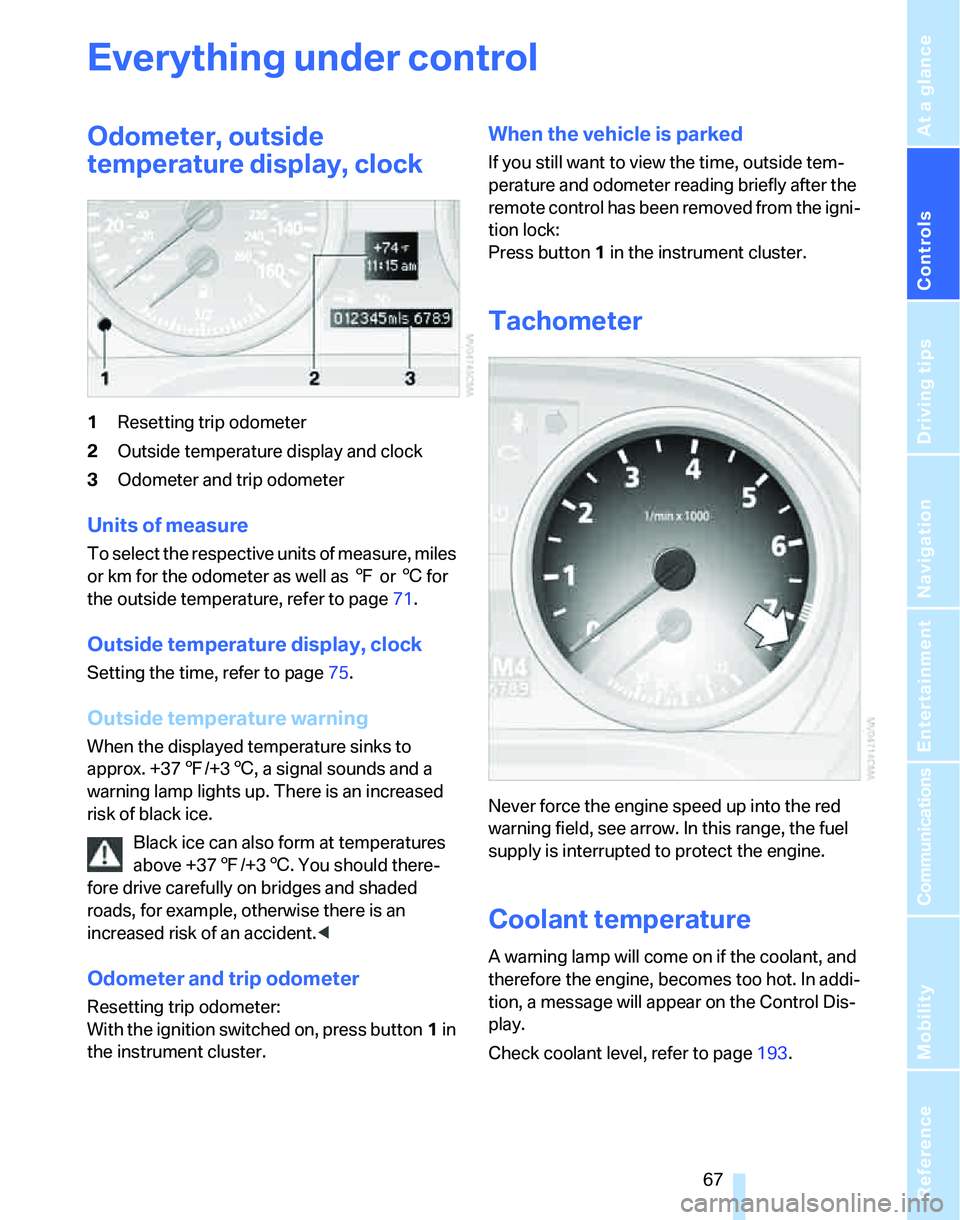
1Resetting trip odometer
2Outside temperature display and clock
3Odometer and trip odometer
Units of measure
T o s e l e c t t h e r e s p e c t i v e u n i t s o f m e a s u r e , m i l e s
or km for the odometer as well as 7 or 6 for
the outside temperature, refer to page71.
Outside temperature display, clock
Setting the time, refer to page75.
Outside temperature warning
When the displayed temperature sinks to
approx. +377/+36, a signal sounds and a
warning lamp lights up. There is an increased
risk of black ice.
Black ice can also form at temperatures
above +377/+36. You should there-
fore drive carefully on bridges and shaded
roads, for example, otherwise there is an
increased risk of an accident.<
Odometer and trip odometer
Resetting trip odometer:
With the ignition switched on, press button1 in
the instrument cluster.
When the vehicle is parked
If you still want to view the time, outside tem-
perature and odometer reading briefly after the
remote control has been removed from the igni-
tion lock:
Press button 1 in the instrument cluster.
Tachometer
Never force the engine speed up into the red
warning field, see arrow. In this range, the fuel
supply is interrupted to protect the engine.
Coolant temperature
A warning lamp will come on if the coolant, and
therefore the engine, becomes too hot. In addi-
tion, a message will appear on the Control Dis-
play.
Check coolant level, refer to page193.
Page 228 of 236
Reference 227
At a glance
Controls
Driving tips
Communications
Navigation
Entertainment
Mobility
N
"Navigation"121
Navigation address
– home address130
Navigation announcements,
refer to Switching voice
instructions on/off135
Navigation destination
– manual entry121,124
– selecting via map125
Navigation drive, location120
Navigation DVD120
Navigation system120
– address book128
– destination entry121
– destination guidance in
assistance window120
– destination list127
– displaying current
position136
– entering a destination
manually121,124
– last destinations127
– opening121
– route display133
– route list135
– searching for a special
destination126
– selecting destination using
information126
– selecting destination via
map125
– selecting route criteria130
– starting destination
guidance132
– switching off, refer to
Terminating/continuing
destination guidance132
– terminating/continuing
destination guidance132
– voice instructions135
– volume adjustment135
"Navigation voice
instructions" via buttons on
the steering wheel48
Neck support, refer to Head
restraints43Nets, refer to Storage
compartments104
"New address" in
navigation128
"New destination"121,125
"New route"136
New tires188
"Next entertainment
source"48
North-facing map134
Nose weight212
Nozzles94
Nozzles, refer to Windshield
washer nozzles58
Number of cylinders, refer to
Engine data210
O
OBD socket196
OBD socket, refer to Socket
for On-Board Diagnosis196
Octane ratings, refer to Fuel
specifications183
Odometer67
Oil
– capacity213
Oil, refer to Engine oil191
Oil consumption191
Oil level191
Old batteries, refer to
Disposal201
"On a new destination" in
navigation127
"Onboard info"69
Onboard tool kit197
"On destination"127
"On location"127
Opening and closing
– convenient access35
– from inside32
– from outside30
– using the door lock32
– via the remote control30
Opening and unlocking
– from the inside33Operation by voice for mobile
phone170
– adjusting volume171
– canceling170
– correcting phone
number171
– dialing phone number171
– placing a call171
– redialing172
– voice commands170
– voice phone book171
Orientation menu, refer to
Start menu17
Outlets
– refer to Ventilation97
Output, refer to Engine
data210
Outside-air mode
– automatic climate control96
Outside-temperature
display67
– changing units of
measure71
– in computer71
Overheated engine, refer to
Coolant temperature67
Overriding selector lever
lock57
P
Panorama glass roof38
– closing after electrical
malfunction39
– convenient operation30
– opening, closing38
– raising38
– remote control30
"Parked car operation"98
"Parked car ventilation"98
Parked car ventilation98
Parked car ventilation/heating
– activating switch-on
times99
– preselecting switch-on
times98
– switching on and off
directly98
Page 233 of 236
Everything from A - Z
232 Tow fitting
– screw thread205
Tow fittings205
Tow fittings for tow-starting
and towing away205
Towing205
– methods206
Towing away
– car with automatic
transmission205
"Town / City" in destination
entry122
Tow rope206
Tow-starting205
– sequential manual gearbox
SMG206
Tracks
– random play sequence155
Track width, refer to
Dimensions211
Traction-assist feature, refer
to DSC82
Traction control, refer to DSC
Dynamic Stability
Control82
Trailer towing
– towing loads and gross
weight212
Transmission
– automatic transmission with
Steptronic55
– manual transmission55
– overriding selector lever lock
for automatic transmission
with Steptronic57
Transporting children
safely50
Transport securing device,
refer to Securing cargo115
Tread depth, refer to Minimum
tire tread187
Treble, refer to Tone
control141
Treble, refer to Treble and
bass141
Treble, tone control141
"Trip computer"70
Trip computer69Trip-distance counter, refer to
Trip odometer67
"Triple turn signal
activation"57
Triple turn signal activation57
Trip odometer67
Trunk lamp, refer to Cargo
area lamp93
Trunk lid, refer to Tailgate33
Turning circle, refer to
Dimensions211
Turn signals57
– indicator lamp12
– replacing bulbs199
Tying down loads, refer to
Cargo loading115
U
Underbody protection, refer to
Caring for your vehicle
brochure
Uniform Tire Quality Grading/
UTQR186
"Units"71
Units
– average consumption71
– temperature71
Universal garage door opener,
refer to Integrated universal
remote control100
Universal remote control100
Unlatching, refer to
Unlocking35
"Unlock button"30
Unlocking
– from inside33
– from outside30
– tailgate36
– without remote control, refer
to Convenient access35
"Update services"177
V
Vehicle
– battery201
– breaking in112
– care, refer to Caring for your
vehicle brochure
– cargo loading114
– dimensions211
– Identification Number, refer
to Engine compartment191
– parking54
– washing, refer to Caring for
your vehicle brochure
– weight212
Vehicle jack201
Vehicle position, refer to
Displaying current
position136
"Vehicle settings"86
Ventilation97
– draft-free97
– in the rear97
Ventilation while at a
standstill98
Vents, refer to Ventilation97
"Vent settings"95
Voice commands
– overview22
– short commands214
Voice instructions for
navigation system135
– muting49,135
– repeating49,135
– switching on/off135
– volume135
Voice phone book171
Volume140
– audio sources140
– mobile phone166
– speed-dependent
adjustment141
– voice instructions135
W
Warning and indicator
lamps13