2005 VOLVO XC90 ECO mode
[x] Cancel search: ECO modePage 229 of 263
, 3-channel stereo (3-CH) - opti\
on
Dolby Surround Pro Logic II together with a center speaker in the dashbo\
ard offers you a sound
experience")
2005 VOLVO XC90
Dolby Surround Pro Logic II (DPL II), 3-channel stereo (3-CH) - opti\
on
Dolby Surround Pro Logic II together with a center speaker in the dashbo\
ard offers you a sound
experience very close to a live performance. The normal left-right stere\
o channels are divided to left-
center-right. In addition, surround sound is produced by the rear speake\
rs. This surround sound mirrors
the resonance of a concert hall. Dolby Surround Pro Logic II functions i\
n CD and FM modes. 3-channel
stereo is recommended for AM radio broadcasts.
Dolby Surround Pro Logic II is only available on the highest level audio\
system - Premium Sound.
Use the following instructions to select PRO LOGIC II, 3-CHANNEL, or to \
turn these functions off. See
also the menu structure on
page 190.
1. Select AUDIO SETTINGS in the menu and press ENTER.
2. Select SURROUND and press ENTER.
3. Select Dolby AM/FM, or Dolby CD and press ENTER.
4. Select PRO LOGIC II, 3-CHANNEL, or OFF and press ENTER.
l The symbol PL II is displayed when Pro Logic II is selected.
l 3-CH is shown when 3-channel stereo is selected.
l OFF indicates normal stereo mode.
Dolby noise reduction is manufactured under license from Dolby Laborator\
ies Licensing Corporation.
"Dolby Surround Pro Logic II", and the double-D symbol
are trademarks of Dolby Laboratories
Licensing Corporation. Dolby Surround Pro Logic II is manufactured under\
licence from Dolby
Laboratories Licensing Corporation.
pg. 183 Audio
file:///K|/ownersdocs/2005/2005_XC90/05xc90_11a.htm (9 of 18)12/30/200\
6 4:42:43 PM
Page 231 of 263
 or the \
AM/FM button (2).
2. Press briefly on
or to search for the next strong station. The radio wi")
2005 VOLVO XC90
Station search
1. Choose radio mode AM/FM1/FM2 using the SELECTOR control (1) or the \
AM/FM button (2).
2. Press briefly on
or to search for the next strong station. The radio will search for the ne\
xt
audible station and then stop.
3. Press one of the buttons again to start a new search.
Manually search for a known frequency
1. Press and hold the
or button (or the corresponding buttons on the steering wheel
keypad). MAN will be shown in the display. The radio will slowly scroll\
in the desired direction and
then increase speed after a few seconds.
2. Release the button when the desired frequency is displayed.
3. If you need to adjust the frequency, press briefly on
or .
4. The manual search function is available for five seconds after you la\
st pressed the button.
pg. 185 Audio
file:///K|/ownersdocs/2005/2005_XC90/05xc90_11a.htm (11 of 18)12/30/20\
06 4:42:43 PM
Page 234 of 263

This feature, which may not be available in your area, functions only wi\
th FM broadcasts.
The radio in your car is equipped with a")
2005 VOLVO XC90
pg. 187 Audio
Radio Broadcast Data System (RBDS)
This feature, which may not be available in your area, functions only wi\
th FM broadcasts.
The radio in your car is equipped with an advanced system allowing infor\
mation from broadcasters to be
transmitted visually, as text, together with the audio signal. This info\
rmation is then decoded by the
radio and made available for several new and unique features. The RBDS or Radio Broad\
cast Data
System operates in the FM band only, and the information transmitted is \
supplied exclusively by
participating broadcasters. Volvo has no control over the accuracy of the data or information.
Coverage by local broadcasters may be limited at this time, but as the t\
echnology and benefits grow, you
will find the radio in your car is equipped to take advantage of this sy\
stem.
NOTE: PI (Program Information) Seek: When an FM station has been stored as \
a preset, the radio also
stores RBDS program information if it is available. When the preset is s\
elected at a later time, the radio
tries to access updated program information. In weak signal areas, there\
may be a delay before the
station becomes audible. During this delay, there will be no sound and t\
he text "PI seek. Press EXIT to
cancel." will be displayed. You may press EXIT to immediately tune in th\
e station without RBDS
program information.
Scanning - SCAN
This function automatically searches for the next strongest AM and FM st\
ations. When the radio finds a
station, it will pause for approximately 8 seconds, after which it will \
continue scanning.
1. Choose radio mode using the SELECTOR control (1) or the AM/FM butto\
n (2).
file:///K|/ownersdocs/2005/2005_XC90/05xc90_11a.htm (14 of 18)12/30/20\
06 4:42:43 PM
Page 242 of 263
2005 VOLVO XC90
pg. 192 Audio
CD player (contd)
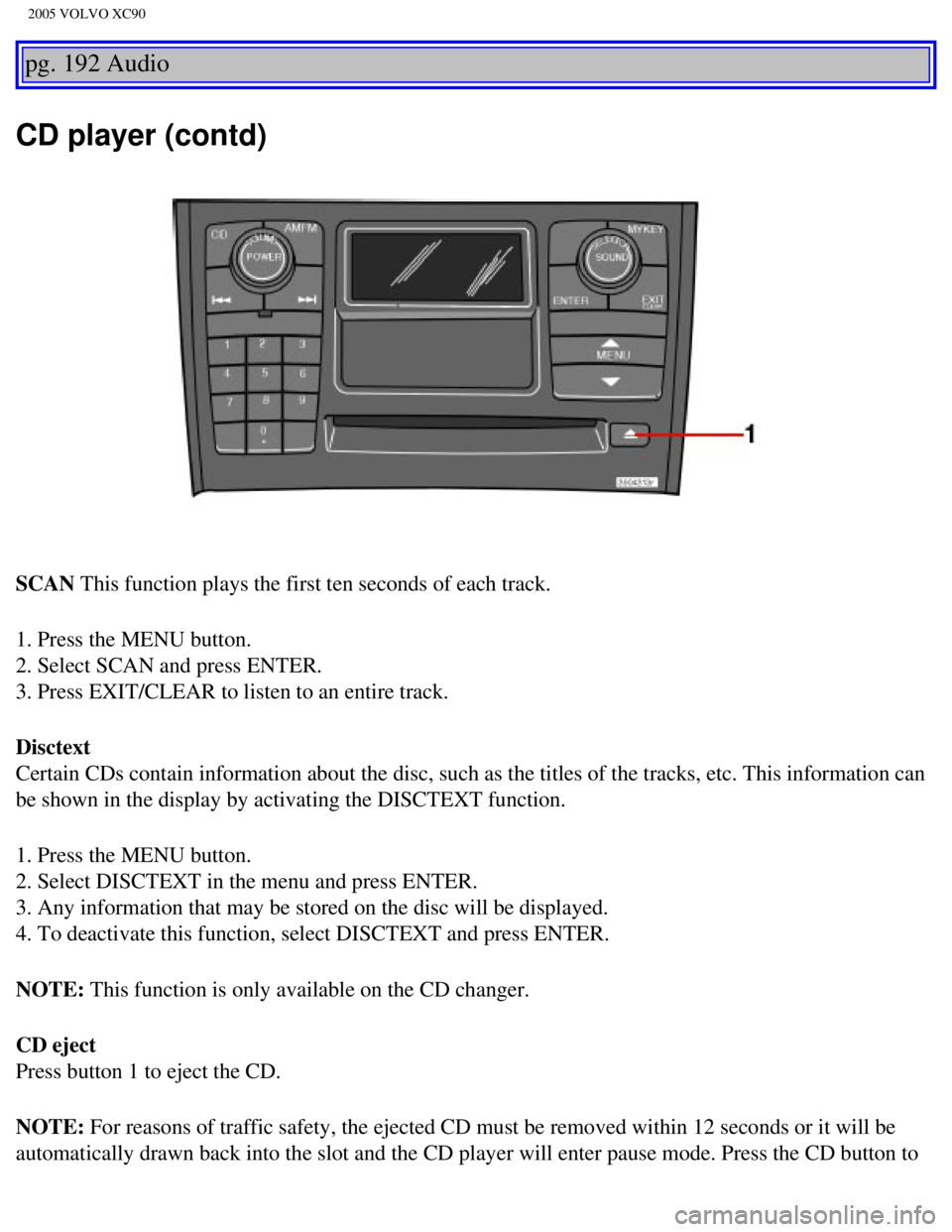
SCAN This function plays the first ten seconds of each track.
1. Press the MENU button.
2. Select SCAN and press ENTER.
3. Press EXIT/CLEAR to listen to an entire track.
Disctext
Certain CDs contain information about the disc, such as the titles of th\
e tracks, etc. This information can
be shown in the display by activating the DISCTEXT function.
1. Press the MENU button.
2. Select DISCTEXT in the menu and press ENTER.
3. Any information that may be stored on the disc will be displayed.
4. To deactivate this function, select DISCTEXT and press ENTER.
NOTE: This function is only available on the CD changer.
CD eject
Press button 1 to eject the CD.
NOTE: For reasons of traffic safety, the ejected CD must be removed within 12 \
seconds or it will be
automatically drawn back into the slot and the CD player will enter paus\
e mode. Press the CD button to
file:///K|/ownersdocs/2005/2005_XC90/05xc90_11b.htm (4 of 11)12/30/200\
6 4:42:44 PM
Page 243 of 263
2005 VOLVO XC90
restart the disc.
pg. 193 Audio
CD changer (option)
CD changer (option)
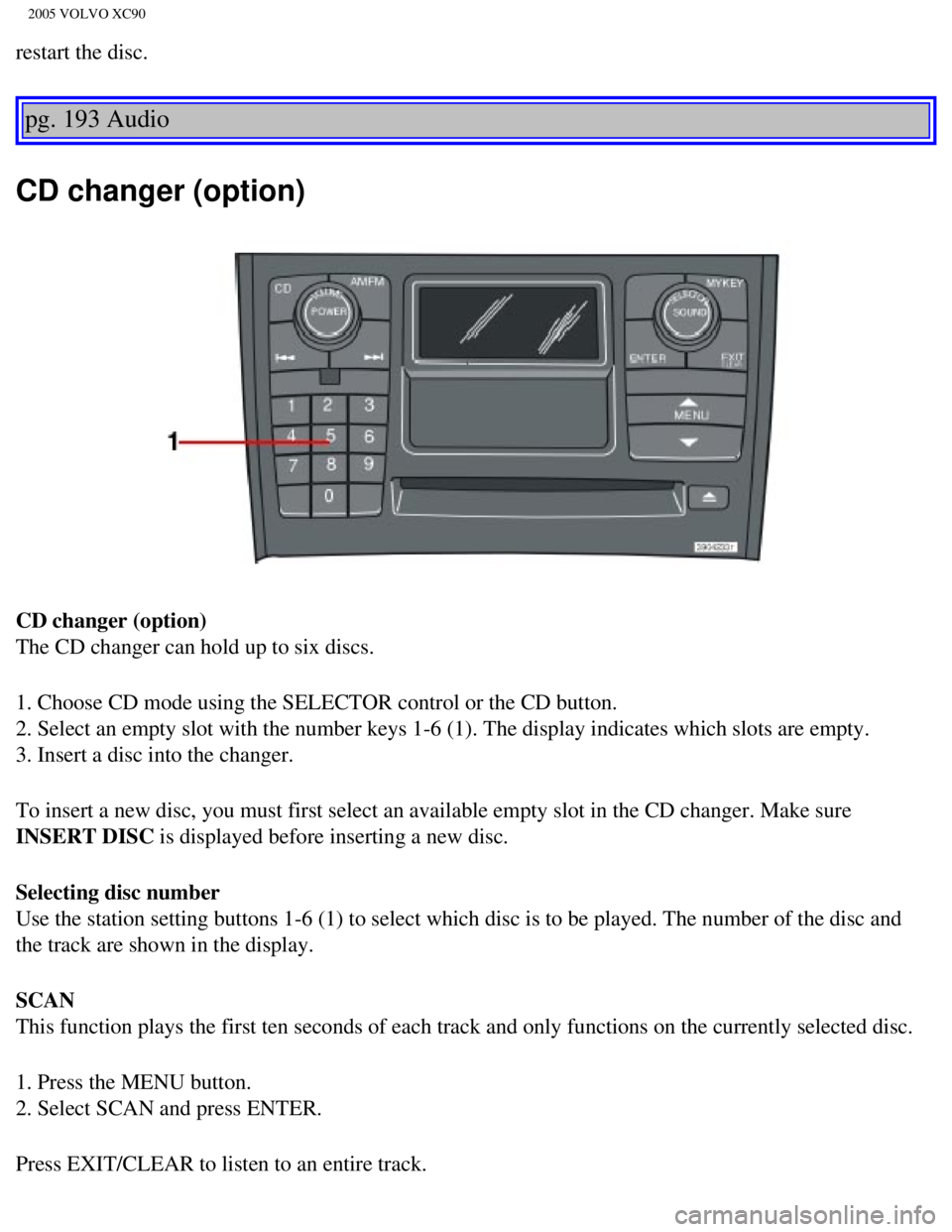
The CD changer can hold up to six discs.
1. Choose CD mode using the SELECTOR control or the CD button.
2. Select an empty slot with the number keys 1-6 (1). The display indi\
cates which slots are empty.
3. Insert a disc into the changer.
To insert a new disc, you must first select an available empty slot in t\
he CD changer. Make sure
INSERT DISC is displayed before inserting a new disc.
Selecting disc number
Use the station setting buttons 1-6 (1) to select which disc is to be \
played. The number of the disc and
the track are shown in the display.
SCAN
This function plays the first ten seconds of each track and only functio\
ns on the currently selected disc.
1. Press the MENU button.
2. Select SCAN and press ENTER.
Press EXIT/CLEAR to listen to an entire track.
file:///K|/ownersdocs/2005/2005_XC90/05xc90_11b.htm (5 of 11)12/30/200\
6 4:42:44 PM
Page 247 of 263
 2\
to 5 in. (5 to 12 cm) away from
the HomeLink® surface, keeping the indicator light in view. For place\
ment")
2005 VOLVO XC90
3. Hold your hand-held transmitter (garage door opener, for example) 2\
to 5 in. (5 to 12 cm) away from
the HomeLink® surface, keeping the indicator light in view. For place\
ment questions, contact
HomeLink® toll-free 1-800-355-3515 (Internet:
www.HomeLink.com).
4. Using two hands, push and hold both your hand-held transmitter's butt\
on and the transceiver button
you wish to program. The indicator light will flash first slowly, then r\
apidly. Rapid flashing tells you the
HomeLink® button has been successfully programmed. Release both butto\
ns.
5. If you are programming a rolling code-equipped device (e.g., garage \
door opener or entry door lock),
refer to "Programming rolling codes" on the next page to complete the pr\
ogramming process.
Repeat steps 3 and 4 to program the other two transceiver buttons.
If, after several attempts, you are unable to successfully train the Hom\
eLink® Universal Transceiver to
learn your hand-held transmitter's signal, contact HomeLink® toll-fre\
e 1-800-355-3515 (Internet:
www.
HomeLink.com).
pg. 197 Audio
WARNING!
- If you use HomeLink® to open a garage door or gate, be sure no one \
is near the gate or door while it
is in motion.
- Do not use the HomeLink® Universal Transceiver with any garage door\
opener that lacks safety
"stop" and "reverse" features as required by federal safety standards. (\
This includes any garage door
opener model manufactured before April 1, 1982). A garage door opener t\
hat cannot "detect" an
object, signalling the door to "stop" and "reverse" does not meet curren\
t federal safety standards.
Using a garage door opener without these features increases the risk of \
serious injury or death. For
more information on this matter, call toll-free 1-800-355-3515 (Interne\
t:
www.HomeLink.com).
NOTE: Canadian residents: During programming, your hand-held transmitter may automatically stop
transmitting. To successfully train HomeLink®, continue to hold the H\
omeLink® button. At the same
time, repeatedly press and hold your hand-held transmitter's button at t\
wo-second intervals until
HomeLink® has learned your transmitter's code. The HomeLink® indic\
ator light will flash first slowly,
and then rapidly to indicate that the button has been successfully progr\
ammed.
Determining if your garage door uses a rolling code
Determine, in one of the following ways, if your garage door uses a roll\
ing code system and is
manufactured after 1996:
file:///K|/ownersdocs/2005/2005_XC90/05xc90_11b.htm (9 of 11)12/30/200\
6 4:42:44 PM
Page 260 of 263

2005 VOLVO XC90
Volvo and the environment iii
W
W - Winter
95
Warning light, safety systems
6
Warning symbol in center of dashboard
27
Warranties
136
Washer fluid reservoir
140, 143
Washing the car
130
Water repellent glass
37
Waxing
131
Weights
165
WHIPS
17
Windows, power
44
Windshield washer fluid reservoir
143
Windshield wiper blades, replacing
145
Windshield wipers
36
Windshield wipers (rain sensor function)
36
Winter/Wet driving mode
109
Wiper, tailgate
37
Back cover
Accessory Installation - Important Warning
l We strongly recommend that Volvo owners install only genuine, Volvo-appr\
oved accessories, and
that accessory installations be performed only by the factory-trained te\
chnicians at your authorized
Volvo retailer.
l Genuine Volvo accessories are tested to ensure compatibility with the pe\
rformance, safety, and
emission systems in your vehicle. Additionally, your authorized Volvo re\
tailer knows where accessories
may and may not be safely installed in your Volvo. In all cases, please \
consult your authorized Volvo
retailer before installing any accessory in or on your vehicle.
l Accessories that have not been approved by Volvo may or may not be speci\
fically tested for
compatibility with your vehicle. Additionally, an inexperienced installe\
r may not be familiar with some
of your vehicle's systems.
l Any of your vehicle's performance and safety systems could be adversely \
affected if you install
file:///K|/ownersdocs/2005/2005_XC90/05xc90_12.htm (11 of 14)12/30/200\
6 4:42:46 PM