2005 VOLVO XC90 Ignition key
[x] Cancel search: Ignition keyPage 146 of 263
\
, including the weight of the
load carriers and any other load carrying equipment (ski boxes, bicycl")
2005 VOLVO XC90
WARNING!
Loads carried on the vehicle's roof should not exceed 220 lbs (100 kg)\
, including the weight of the
load carriers and any other load carrying equipment (ski boxes, bicycle\
racks, etc.). Excessive loads
on the roof can adversely affect the handling and roadholding characteri\
stics of the vehicle.
Load carrier cover
The vehicle's ignition key or the stud on the edge of the supplied torqu\
e wrench can be used to undo or
tighten the cover. Turn a quarter turn (90 degrees). See illustration.\
pg. 109 Starting and driving
Cold weather precautions
If you wish to check your vehicle before the approach of cold weather, t\
he following advice is worth
noting:
l Make sure that the engine coolant contains 50 percent antifreeze. Any ot\
her mixture will reduce
freeze protection. This gives protection against freezing down to -31°\
F (-35°C). See section "Coolant".
The use of "recycled" antifreeze is not approved by Volvo. Different typ\
es of antifreeze must not
be mixed.
l Volvo recommends using only genuine Volvo antifreeze in your vehicle's r\
adiator. Your Volvo
retailer stocks plenty of Volvo engine coolant to help protect your vehi\
cle during cold weather.
l Try to keep the fuel tank well filled - this prevents the formation of condensation in the tank. \
In
addition, in extremely cold weather conditions it is worthwhile to add f\
uel line de-icer before refueling.
l The viscosity of the engine oil is important. Oil with low viscosity (thinner oil) improves cold-
weather starting as well as decreasing fuel consumption while the engine\
is warming up. For winter use,
5W-30 oil, particularly the synthetic type*, is recommended. Be sure to \
use good quality oil but do not
use cold-weather oil for hard driving or in warm weather. See section "E\
ngine oil" for more information.
l The load placed on the battery is greater during the winter since the windshield wipers, lighting, etc\
.
file:///K|/ownersdocs/2005/2005_XC90/05xc90_06b.htm (16 of 18)12/30/20\
06 4:42:35 PM
Page 197 of 263
2005 VOLVO XC90
C - Back-up light
D - Parking light
Replacing bulbs in the tail light cluster
1. Switch off all lights and turn ignition key to position 0.
2. Fold down the lower section of the tailgate, and fold up the rear sec\
tion of the cargo area floor.
3. If the vehicle is equipped with the optional grocery bag holder, deta\
ch the holder's bands.
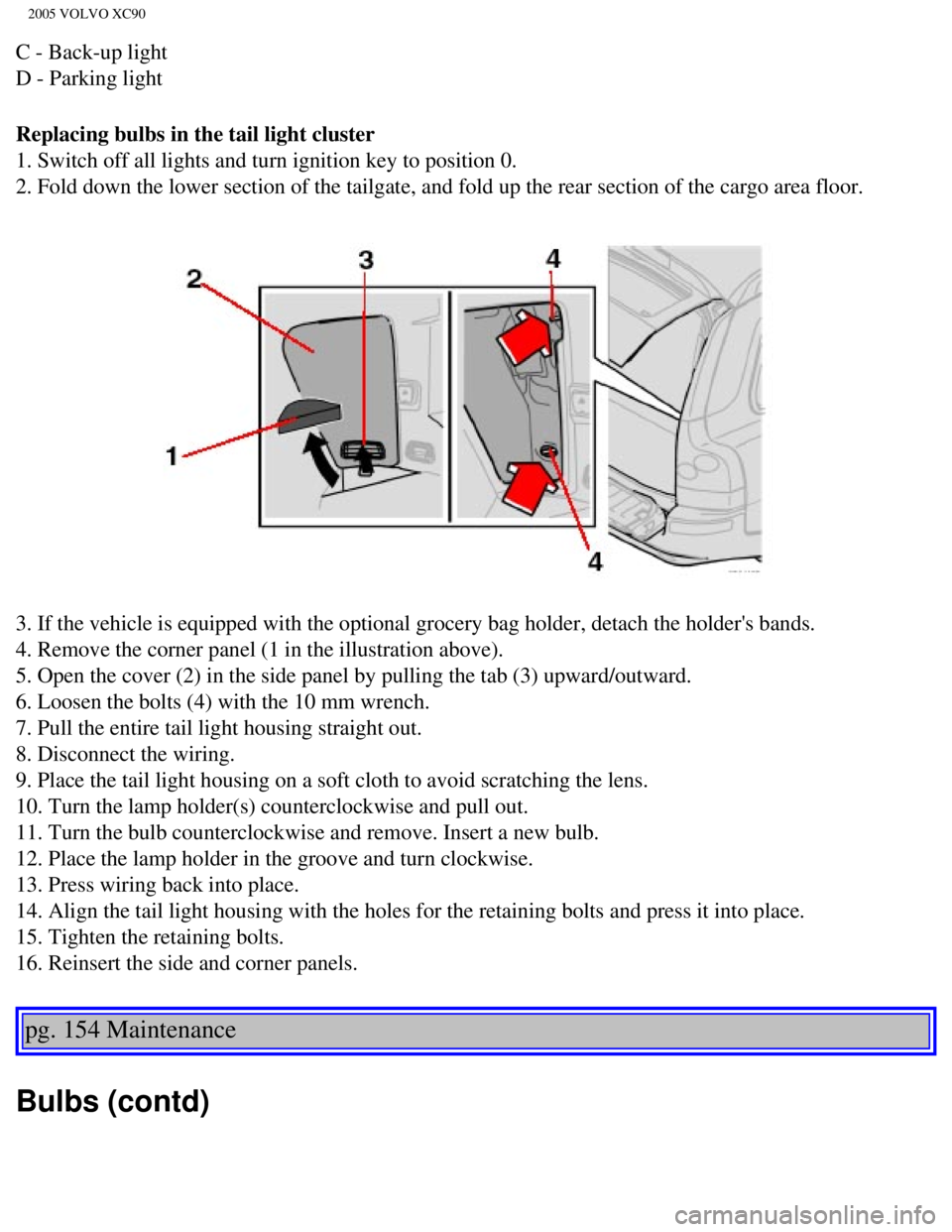
4. Remove the corner panel (1 in the illustration above).
5. Open the cover (2) in the side panel by pulling the tab (3) upwar\
d/outward.
6. Loosen the bolts (4) with the 10 mm wrench.
7. Pull the entire tail light housing straight out.
8. Disconnect the wiring.
9. Place the tail light housing on a soft cloth to avoid scratching the \
lens.
10. Turn the lamp holder(s) counterclockwise and pull out.
11. Turn the bulb counterclockwise and remove. Insert a new bulb.
12. Place the lamp holder in the groove and turn clockwise.
13. Press wiring back into place.
14. Align the tail light housing with the holes for the retaining bolts \
and press it into place.
15. Tighten the retaining bolts.
16. Reinsert the side and corner panels.
pg. 154 Maintenance
Bulbs (contd)
file:///K|/ownersdocs/2005/2005_XC90/05xc90_09b.htm (12 of 25)12/30/20\
06 4:42:40 PM
Page 225 of 263

2005 VOLVO XC90
sensitivity of these should be equal to or greater than 102 dB. The head\
phone connections are intended
for 3.5 mm contacts and are located under the lower edge of the socket.
All headphones are automatically turned off when the ignition is switche\
d off. They must be manually
restarted when the ignition is switched on again.
Headphones - limitations
l The headphones will only work when the ignition key is in position I or \
higher.
l If a set of headphones is connected to the same source that is being sen\
t through the speakers, the
headphone controls cannot be used to change track or station. This is to\
prevent the driver from being
distracted by an unexpected change in music.
l If the driver selects the same sound source as someone listening to this\
source through headphones,
the driver takes control of the sound source.
l Only one disc in the optional CD changer, and one track on the CD can be\
played at a time.
l Headphone users can choose from among the preset radio stations (AM, FM\
1, FM2) previously set by
the driver.
l If FM is played in the speakers, AM is not available and vice versa.
pg. 179 Audio
Remote control (option)
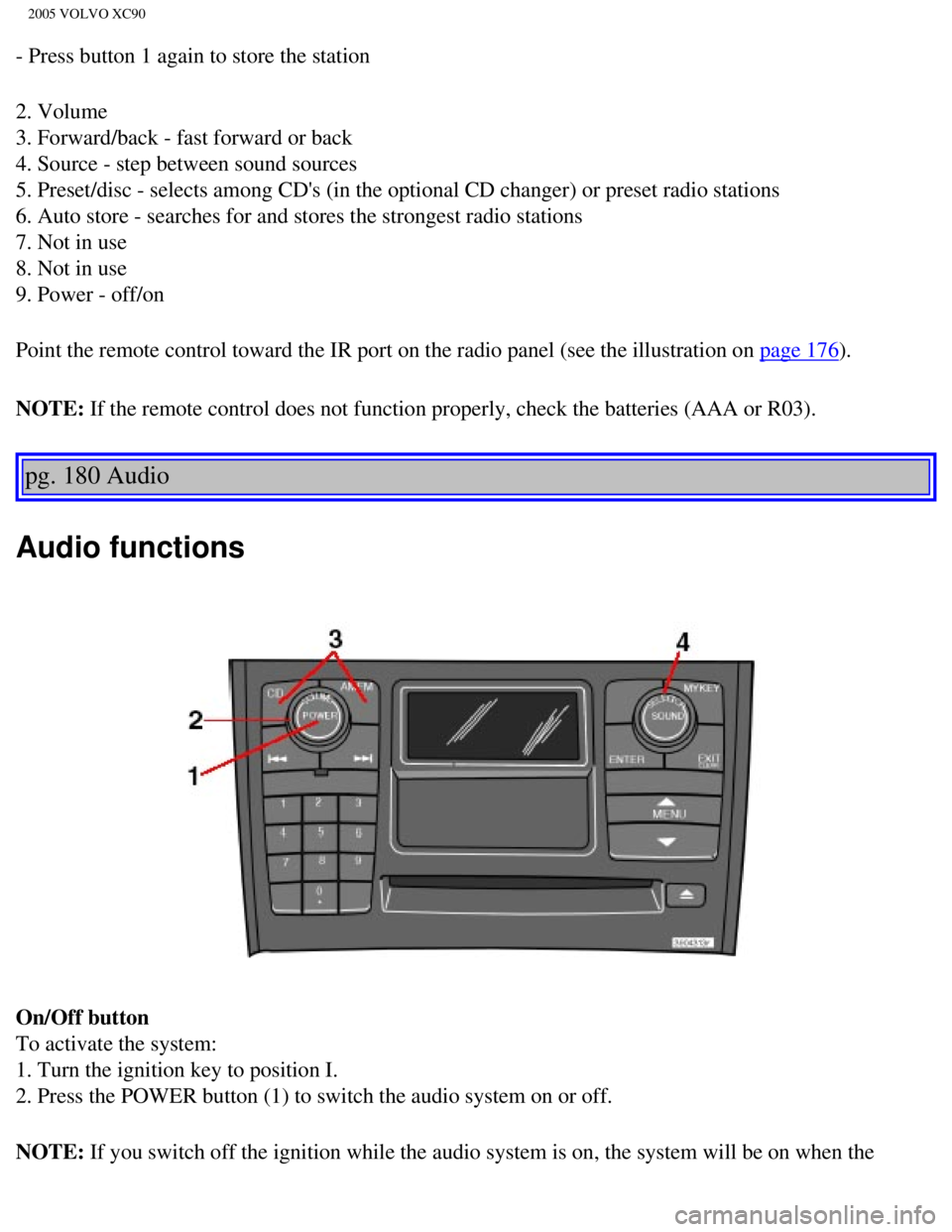
1. Memory - stores radio stations that have been found by a search
To store a station:
- Press the memory button (1). The preset station number will flash 4 \
times in the display
- While the preset number is flashing, use the + or - buttons (5) to s\
elect a position at which to store the
station
file:///K|/ownersdocs/2005/2005_XC90/05xc90_11a.htm (5 of 18)12/30/200\
6 4:42:43 PM
Page 226 of 263
2005 VOLVO XC90
- Press button 1 again to store the station
2. Volume
3. Forward/back - fast forward or back
4. Source - step between sound sources
5. Preset/disc - selects among CD's (in the optional CD changer) or pr\
eset radio stations
6. Auto store - searches for and stores the strongest radio stations
7. Not in use
8. Not in use
9. Power - off/on
Point the remote control toward the IR port on the radio panel (see the\
illustration on
page 176).
NOTE: If the remote control does not function properly, check the batteries (\
AAA or R03).
pg. 180 Audio
Audio functions
On/Off button
To activate the system:
1. Turn the ignition key to position I.
2. Press the POWER button (1) to switch the audio system on or off.
NOTE: If you switch off the ignition while the audio system is on, the system \
will be on when the
file:///K|/ownersdocs/2005/2005_XC90/05xc90_11a.htm (6 of 18)12/30/200\
6 4:42:43 PM
Page 227 of 263
 clockwise or counterclockwise to raise or lower the \
volume. The volume control is
electronic and has no end positio")
2005 VOLVO XC90
ignition is switched on again.
Volume control
Turn the knob (2) clockwise or counterclockwise to raise or lower the \
volume. The volume control is
electronic and has no end position. Volume can also be raised (+) or l\
owered (-) using the optional
steering wheel keypad.
Pause mode
If the volume is turned off, the CD player will go into pause mode. Re-a\
ctivate the player by turning up
the volume.
Selecting a sound source
A sound source can be selected either with the function buttons (3) - \
CD, AM/FM, or with the
SELECTOR control (4).
To select a sound source:
l Turn the SELECTOR control to choose FM1, FM2, AM, CD, CD changer (optio\
n)
l Press the AM/FM button repeatedly to choose between FM1, FM2, AM
l Press the CD button to change to the CD player or optional CD changer
The selected sound source will be shown in the display.
pg. 181 Audio
Sound settings
1. Press the SOUND button (1) repeatedly until you come to the setting\
that you wish to change. Choose
BASS, TREBLE, FADER, BALANCE, SUBWOOFER (option), CENTER (option) or\
SURROUND
file:///K|/ownersdocs/2005/2005_XC90/05xc90_11a.htm (7 of 18)12/30/200\
6 4:42:43 PM
Page 248 of 263

2005 VOLVO XC90
l Refer to the garage door opener owner's manual for verification.
l If your hand-held transmitter appears to program the HomeLink® Univer\
sal Transceiver but the
programmed button does not activate the garage door, your garage door op\
ener may have a rolling code.
l Press the programmed HomeLink® button. If the garage door opener has \
the rolling code feature, the
HomeLink® indicator light flashes rapidly and then glows steadily aft\
er approximately 2 seconds.
To train a rolling code garage door opener,
follow these instructions after programming the desired transceiver butt\
on according to "Programming
the transceiver." The help of a second person may make training easier.
1. Locate the training button on the garage door opener motor head unit.\
The location and color of the
training button may vary. If you encounter difficulty, refer to the gara\
ge door opener owner's manual or
call toll-free 1-800-355-3515 (Internet:
www.HomeLink.com).
2. Press the "training" button on the garage door opener motor head unit\
until the "training" light comes
on.
3. Press and release the programmed HomeLink® button. Press and relea\
se the programmed
HomeLink® button a second time to complete the training process.
4. Some garage door openers may require you to do this procedure a third\
time to complete the training.
5. The programmed button on your HomeLink® Universal Transceiver shou\
ld now operate your garage
door opener. The original hand-held transmitter can also be used, as des\
ired, to operate the garage door.
The remaining two HomeLink® buttons can be programmed in the same way\
. In the event of any
problems in programming the HomeLink® Universal Transceiver, call tol\
l-free 1-800-355-3515
(Internet:
www.HomeLink.com).
Operating the HomeLink® Universal Transceiver
Once programmed, the HomeLink® Universal Transceiver can be used in p\
lace of your handheld
transmitters.
To operate, the key must be turned to the "accessory" position (II) or\
the engine must be running. Press
the programmed HomeLink® button to activate the garage door, driveway\
gate, security lighting, home
security system, etc.
pg. 198 Audio
Your original hand-held transmitters may, of course, be used at any time\
.
Erasing programmed buttons
Individual buttons cannot be erased. To erase all three programmed butto\
ns:
1. Turn the ignition key to the "accessory" position (II).
2. Hold down the two outside buttons on the HomeLink® Universal Trans\
ceiver for about 20 seconds,
until HomeLink®'s indicator light begins to flash.
file:///K|/ownersdocs/2005/2005_XC90/05xc90_11b.htm (10 of 11)12/30/20\
06 4:42:44 PM