2005 SKODA OCTAVIA battery
[x] Cancel search: batteryPage 44 of 315

Unlocking and locking43
Using the systemSafetyDriving TipsGeneral MaintenanceBreakdown assistanceTechnical Data
•Keep the groove of the keys absolutely clean as impurities (textile
fibres, dust etc.) have a negative effect on proper operation of the keys
and the ignition lock.
Note
Please approach a Škoda dealer if you lose a key since he can obtain a
new one for you.
Key with light*
Switching on the light
– Press the button in the middle in the direction of arrow . Replacing battery or bulb
– Insert a coin into the slot (arrow ) and press off the upper
part through a rotary movement of the coin.
– Replace the battery or bulb.
– Place the upper and lower part above each other and press the parts together.
You can obtain replacement batteries and replacement bulbs at a
specialist garage.
For the sake of the environment
Dispose of an old battery in accordance with environmental regulations.
Note
The replacement battery must have the same specification as the original
battery.
Fig. 23 Key with light
A1
A2
s24s.book Page 43 Thursday, November 24, 2005 12:27 PM
Page 45 of 315
Unlocking and locking
44
Changing the battery of the radio remote
control
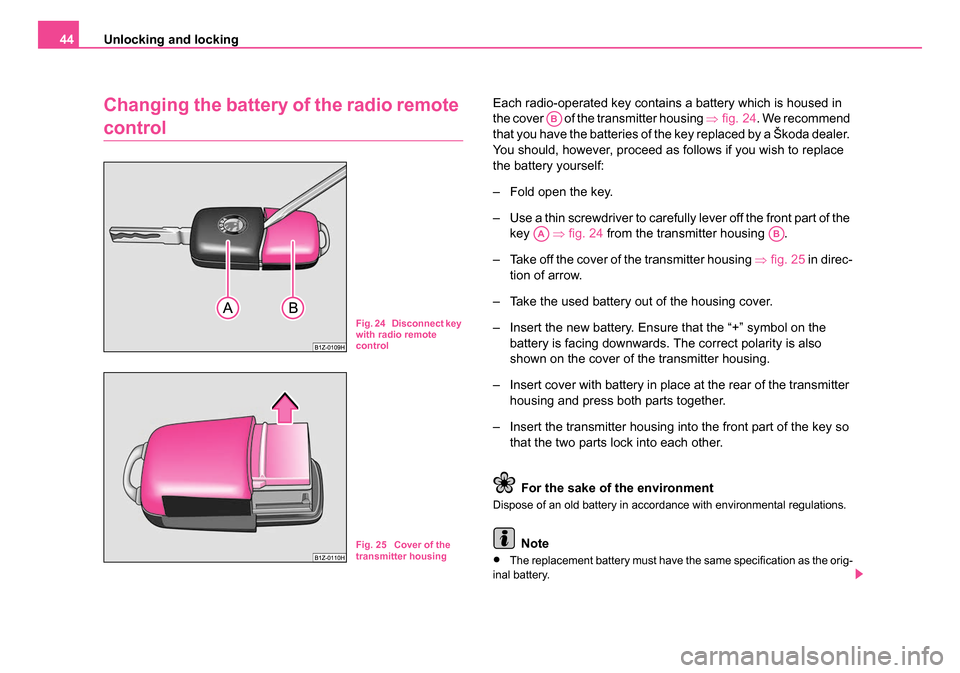
Each radio-operated key contains a battery which is housed in
the cover of the transmitter housing ⇒fig. 24 . We recommend
that you have the batteries of the key replaced by a Škoda dealer.
You should, however, proceed as follows if you wish to replace
the battery yourself:
– Fold open the key.
– Use a thin screwdriver to carefully lever off the front part of the key ⇒fig. 24 from the transmitter housing .
– Take off the cover of the transmitter housing ⇒fig. 25 in direc-
tion of arrow.
– Take the used battery out of the housing cover.
– Insert the new battery. Ensure that the “+” symbol on the battery is facing downwards. The correct polarity is also
shown on the cover of the transmitter housing.
– Insert cover with battery in place at the rear of the transmitter housing and press both parts together.
– Insert the transmitter housing into the front part of the key so that the two parts lock into each other.
For the sake of the environment
Dispose of an old battery in accordance with environmental regulations.
Note
•The replacement battery must have the same specification as the orig-
inal battery.
Fig. 24 Disconnect key
with radio remote
control
Fig. 25 Cover of the
transmitter housing
AB
AAAB
s24s.book Page 44 Thursday, November 24, 2005 12:27 PM
Page 46 of 315

Unlocking and locking45
Using the systemSafetyDriving TipsGeneral MaintenanceBreakdown assistanceTechnical Data
•If it is still not be possible to unlock or lock the vehicle with the remote
control even after replacing the battery this means that the system has to
be synchronised ⇒page 53.
Electronic immobiliser
The electronic immobiliser prevents the vehicle being
operated by an unauthorised person.
An electronic chip is integrated in the head of the key. The immobiliser is
deactivated with the aid of this chip when the key is inserted in the ignition
lock. The electronic immobiliser is automatically activated when you with-
draw the ignition key from the lock.
Note
It is only possible to start the engine of your car with a Genuine Škoda key
with the matching code ⇒page 32.
Child safety locks
The child safety lock prevents the rear door from being
opened from the inside.
The rear doors are equipped with a child safety lock. You can
switch the child safety lock on and off using the vehicle key.
Switching child safety lock on
– Use the vehicle key to turn the slit in the rear door to the left in
the direction of the arrow ⇒fig. 26.
Switching child safety lock off
– Use the vehicle key to turn the slit to the right against the direc- tion of the arrow.
Fig. 26 Child safety
locks on the rear doors
s24s.book Page 45 Thursday, November 24, 2005 12:27 PM
Page 53 of 315
Unlocking and locking
52
Remote control*
Description
You can use the remote control:
•to unlock and lock the car,
•unlocking boot lid,
•Opening and closing window.
The transmitter with the battery is housed in the handle of the master key.
The receiver is located in the interior of the car. The operating range of the
remote control is 10 metres but this range can be reduced if the batteries
are waek.
The master key has a fold-open key bit which can be used for unlocking
and locking the car manually and also for starting the engine.
If a lost key is replaced or if the receiver unit has been repaired or a new
unit installed, it is then necessary for a Škoda Dealer to initialise the
system. Only after this is it possible to again use the remote control.
Note
•The remote control is automatically deactivated when the ignition is
switched on.
•The operation of the remote control may temporarily be affected by
interference from transmitters close to the car and which operate in the
same frequency range (e.g. mobile phone, TV transmitter).
•The battery must be replaced, ideally by the Škoda dealer, if the
central locking or anti-theft alarm system does react to the remote control
at less than 3 metres away.
Unlocking and locking car
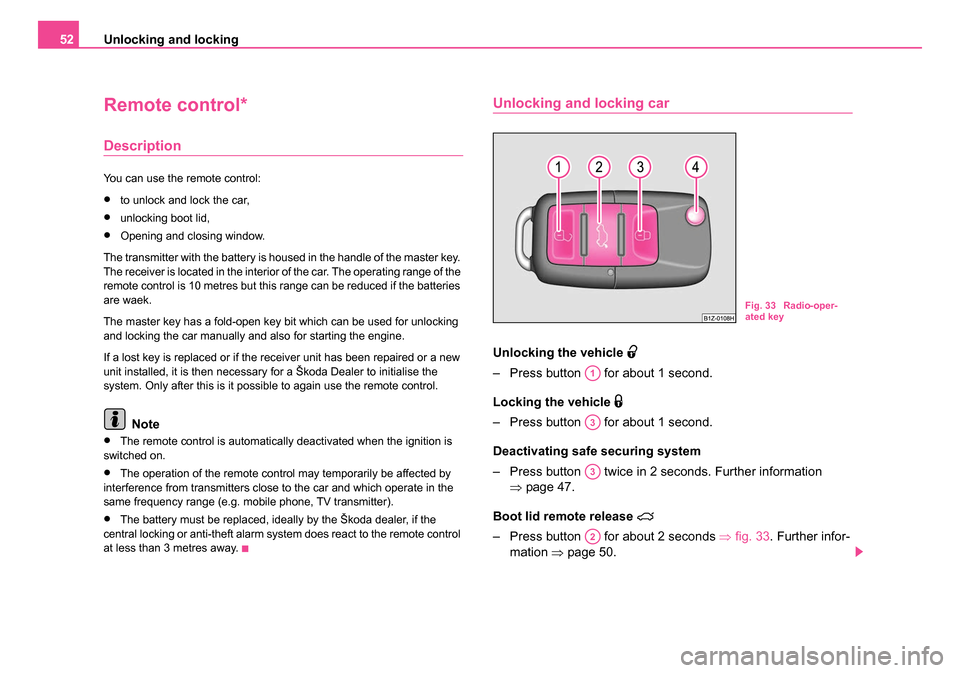
Unlocking th e vehicle
– Press button for about 1 second.
Locking the vehicle
– Press button for about 1 second.
Deactivating safe securing system
– Press button twice in 2 seconds. Further information
⇒page 47.
Boot lid remote release
– Press button for about 2 seconds ⇒fig. 33 . Further infor-
mation ⇒page 50.
Fig. 33 Radio-oper-
ated key
A1
A3
A3
A2
s24s.book Page 52 Thursday, November 24, 2005 12:27 PM
Page 54 of 315

Unlocking and locking53
Using the systemSafetyDriving TipsGeneral MaintenanceBreakdown assistanceTechnical Data
Folding out of the key
– Press button .
Folding up of the key
– Press button and collapse the key bit in the housing.
The turn signal lights flash twice as confirmation that the vehicle has been
unlocked. The vehicle will lock again automatically if you unlock the
vehicle using button but do not open a door or the boot lid within the
next 30 seconds. This function is intended to prevent the car being
unlocked unintentionally.
In addition, when the car is unlocked, the power seats and exterior
mirrors* move into the position assigned to this key. The stored setting of
driver seat and exterior mirrors is retrieved.
The turn signal lights flash once to confirm that the vehicle has been
correctly locked. If the turn signal lights do not flash, check the doors,
bonnet and boot lid again to ensure that they are closed. If the doors, the
bonnet or the boot lid remain open when the anti-theft alarm system is
activated, the turn signal lights do not flash until after they have been
closed.
When the vehicle is unlocked or locked, the interior lights in the door
contact are automatically switched on or off.
WARNING
If the vehicle is locked from the outside and the safe securing
system is activated, there must not be any person in the vehicle as
it is then not possible to open either a door or a window from the
inside. The locked doors make it more difficult for rescuers to get
into the vehicle in an emergency - hazard!
Note
•Operate the radio remote control only when the doors and boot lid are
closed and you have visual contact with the vehicle.
•Once in the car, you must not press the lock button of the radio
remote control before inserting the key into the ignition lock in order to
avoid the car being inadvertently locked and, in addition, the anti-theft
alarm system* being switched on. Should this happen, press the unlock
button
of the radio remote control.
Synchonisation of the remote control
If the vehicle cannot be unlocked by actuating the remote control system
then it is possible that the code in the key and the control unit in the vehicle
are no longer synchronised. This can occur when the buttons on the radio-
operated key are actuated a number of times outside of the operative
range of the equipment or the battery on the remote control was replaced.
This means it is necessary to synchronise the code as follows:
•Press any button on the remote control.
•Pressing of the button means that the door will unlock with the key
within 1 minute.
A4
A4
A1
s24s.book Page 53 Thursday, November 24, 2005 12:27 PM
Page 55 of 315

Unlocking and locking
54
Anti-theft alarm system*
Description
The anti-theft alarm system increases the level of protection against
people seeking to break into the vehicle. The system triggers audible and
visual warning signals if an attempt is made to break into the vehicle.
How is the alarm system activated?
The anti-theft alarm system is activated automatically when the vehicle is
locked with the key on the closed driver's door or by using the radio
remote control. It is activated 30 seconds after closing the door.
How is the alarm system deactivated?
The anti-theft alarm system is deactivated if the vehicle is unlocked by
only using the radio remote control. The vehicle is automatically locked
again if the vehicle is not opened within 30 seconds after reactivating the
anti-theft alarm system.
Once you unlock the vehicle by inserting the key into the driver door you
then have to insert the key into the ignition lock and switch the ignition on
within 15 seconds after opening the door in order to deactivate the anti-
theft alarm system. The alarm will be triggered if you do not switch on
the ignition within 15 seconds.
When is the alarm triggered?
The following security areas of the locked vehicle are monitored:
•Bonnet,
•Boot lid,
•Doors,
•Ignition lock,
•Angle of the vehicle* ⇒page 55,
•Vehicle interior* ⇒page 55,
•A drop in voltage of the on-board power supply.
An alarm is immediately triggered if either of the two battery terminals is
disconnected while the anti-theft alarm system is activated.
How is the alarm switched off?
You switch the alarm off if you unlock the car with the radio remote control
in the key or if you switch the ignition on.
Note
•The working life of the alarm siren is 6 years. More detailed information
is available from your Škoda dealer.
•Before leaving the car, check that all the doors, windows and the elec-
tric sliding/tilting roof* are properly closed in order to ensure that the anti-
theft alarm system is fully operational.
•Coding of the radio remote control and the receptor part precludes the
use of the radio remote control from other vehicles.
s24s.book Page 54 Thursday, November 24, 2005 12:27 PM
Page 60 of 315

Unlocking and locking59
Using the systemSafetyDriving TipsGeneral MaintenanceBreakdown assistanceTechnical Data
WARNING
The system is fitted with a force limiter ⇒page 58. The closing
process will be stop if an obstruction is detected and the window
will open again. You should then take particular care when closing
the windows! A person may otherwise suffer severe injuries as a
result of getting an arm, for example, jammed in the window!
Note
•On vehicles fitted with anti-theft alarm system the convenience
window opening is possible by means of the key in the lock only 45
seconds after deactivating the warning system or after activating the anti-
theft alarm system.
Operational problems
Automatic closing or opening does not operate
If the battery of the car has been disconnected and then reconnected, the
automatic closing and opening function does not operate. The system
must be activated. Proceed as follows in order to re-establish the function:
•Turn the key in the lock of the driver door into the closing position and
hold it there until all of the windows are closed.
•Release the key.
•Insert the key again and turn it to the closing position for about 3
seconds.
Operation in winter
Ice accumulating on the surface of the windows during the winter may
result in a greater resistance when closing the windows and the window
may stop and move back several centimetres Proceed as follows to close the window fully:
•Turn the key in the lock of the driver door into the closing position and
hold it there until all of the windows are closed.
•Repeat this operatiive cycle when the window stops.
WARNING
The system is fitted with a force limiter ⇒page 58. The closing
process will be stop if an obstruction is detected and the window
will open again. You should then take particular care when closing
the windows! A person may otherwise suffer severe injuries as a
result of getting an arm, fo r example, jammed in the window!
Electric sliding/tilting roof*
Description
Fig. 38 Control dial for
the power sliding/tilting
roof
s24s.book Page 59 Thursday, November 24, 2005 12:27 PM
Page 61 of 315

Unlocking and locking
60
The sliding/tilting roof is operated by means of the control dial ⇒page 59,
fig. 38 and only functions when the ignition is switched on. The control dial
has a number of fixed positions.
After switching the ignition off, it is still possible to open or close the
sliding/tilting roof for a further 10 minutes. It is no longer possible to
operate the sliding/tilting roof after opening or closing one of the front
doors, however.
Note
•If the battery has been disconnected and reconnected, it is possible
that the sliding/tilting roof does not close fully. Here you have to set the
control dial to the switch position and press it forward for about 10
seconds.
•It is necessary after each emergency operation (using crank handle)
to move the sliding/tilting roof into the basic position. Here you have to set
the control dial to the switch position and press it forward for about 10
seconds.
Opening and tilting
Comfort position
– Turn the switch to position ⇒page 59, fig. 38 .
Opening roof fully
– Turn the switch to position and hold it in this position (spring-tensioned position).
Tilting roof
– Turn the switch to position .
The wind noise in the comfort position is less than when the roof is fully
opened.
The sun screen is also opened automatically when the roof slides open.
You can slide the sun screen into the opened or closed position by hand
when the sliding/tilting roof is closed.
Caution
It may be necessary during winter to remove any ice and snow in the area
of the sliding/tilting roof before opening it in order to prevent damaging the
opening mechanism.
Closing
Sliding closed/closing the sliding/tilting roof
– Turn the switch to position ⇒page 59, fig. 38 .
Safety closing
The sliding/tilting roof is equipped with an overload protection system. If
an obstacle (e.g. ice) prevents closing, the sliding/tilting roof stops and
opens completely. You can close the sliding/tilting roof completely without
overload protection by pressing the switch to the position ⇒page 59,
fig. 38 at the front for as long as it takes for the sliding/tilting roof to shut
completely ⇒.
WARNING
Close the sliding/tilting roof carefully - risk of injury!
AA
AA
AC
AB
AD
AA
AA
s24s.book Page 60 Thursday, November 24, 2005 12:27 PM