Page 44 of 215
43 Audio
Radio operation
�
Use �, �, � or � to choose a
preset and press�;
or
�
Press one of the number keys
3 - ".
The system tunes to the station stored
under this number.Tuning via Autostore presets
The Autostore function allows placing of
stations into the presets sorted by recep-
tion quality (
�page 48).
The system will store the station with the
strongest signal in preset 1.
Ten presets each are available for FM and
AM.
�
Switch to the desired waveband
(�page 40).
�
Press the
Autost.
soft key.
The Autostore preset list appears. It
can take several seconds until all fre-
quencies are displayed.
�
Use �, �, � or � to choose a
preset and press�;
or
�
Press one of the number keys
3 - ".
The system tunes to the station stored
under this number.
Page 45 of 215
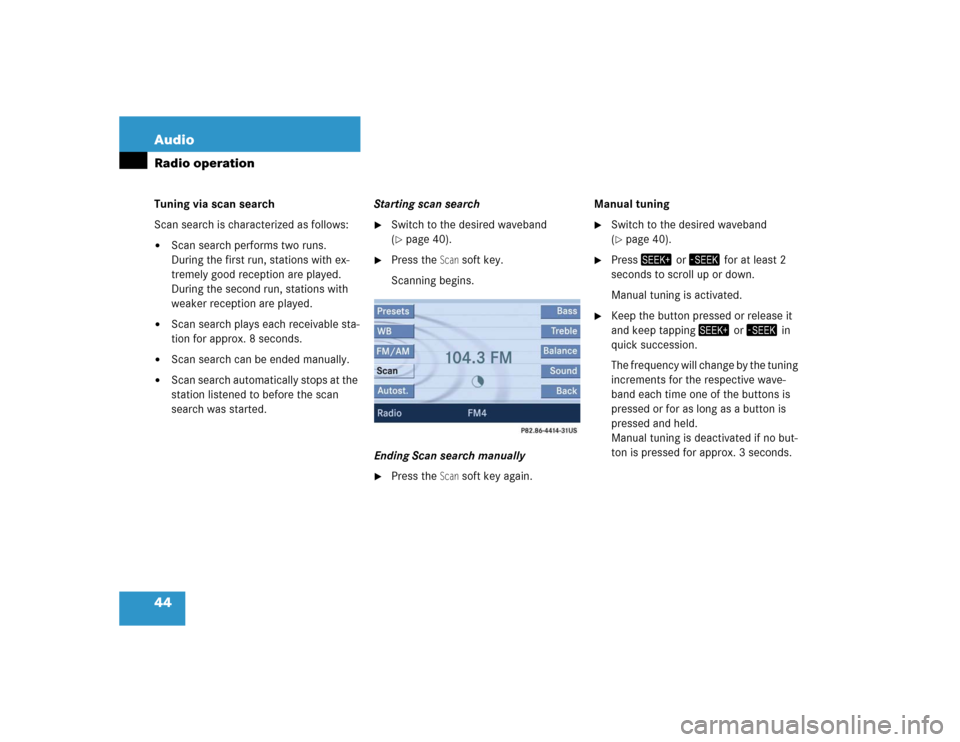
44 AudioRadio operationTuning via scan search
Scan search is characterized as follows:�
Scan search performs two runs.
During the first run, stations with ex-
tremely good reception are played.
During the second run, stations with
weaker reception are played.
�
Scan search plays each receivable sta-
tion for approx. 8 seconds.
�
Scan search can be ended manually.
�
Scan search automatically stops at the
station listened to before the scan
search was started.Starting scan search
�
Switch to the desired waveband
(�page 40).
�
Press the
Scan
soft key.
Scanning begins.
Ending Scan search manually
�
Press the
Scan
soft key again.Manual tuning
�
Switch to the desired waveband
(�page 40).
�
Press- or, for at least 2
seconds to scroll up or down.
Manual tuning is activated.
�
Keep the button pressed or release it
and keep tapping- or, in
quick succession.
The frequency will change by the tuning
increments for the respective wave-
band each time one of the buttons is
pressed or for as long as a button is
pressed and held.
Manual tuning is deactivated if no but-
ton is pressed for approx. 3 seconds.
Page 46 of 215
45 Audio
Radio operation
Tuning via direct frequency input
Entry example:
98.5 MHz in FM waveband
�
Switch to the FM waveband
(�page 40).
�
Press2.
The frequency input display appears.
The frequency range of the FM wave-
band is shown.
�
Press the number buttons in
succession:!, , and �.
Each number entered appears in the
display.
The system tunes to the frequency en-
tered (in this example: 98.5 Mhz)
and
switches back to the FM menu
.
iManual tuning is also possible in all
wavebands by pressing�or�.
The frequency will change by the tuning
increments for the respective wave-
band each time one of the buttons is
pressed.
Frequency increments for manual
tuning:�
FM 0.2 MHz
�
AM 10 kHz
iEntries outside the frequency range are
not possible.
Within the AM waveband, the input is
restricted to frequencies within the re-
spective frequency increment, which
is10 kHz.
The system will select the nearest valid
frequency if a frequency outside the
frequency increment is entered.
Page 47 of 215
46 AudioRadio operationSeven channels are available on the
Weather Band. �
Switch to the WB waveband by press-
ing the
WB soft key in the Radio main
menu (
�page 40).
Each time you press the
WB soft key the
system will tune to the strongest re-
ceivable station.Tuning via station search
On the COMAND control unit
�
Switch to the WB waveband by press-
ing the
WB soft key in the Radio main
menu (
�page 40).
The system will tune to the strongest
receivable station.
�
Press- or,.
The search begins descending or as-
cending.
The search stops at the next receivable
station.On the multifunction steering wheel
�
Switch the multifunction display in the
instrument cluster to Audio display
(�page 25).
�
Pressj ork.
The search stops at the next receivable
station.
Tuning via station presets
The seven strongest channels are sort-
ed in preset 1 to 7 each time you press
the WB soft key. They are accessed us-
ing the number keypad.
Tuning to a station on Weather Band
Page 48 of 215
47 Audio
Radio operation
�
Press one of the number keys
3 - �.
The system tunes to the station stored
under this number.
Ten presets each are available for the
FM and AM waveband.
The following options are available:
�
Storing manually using number keys
�
Storing manually using the Presets
menu
�
Storing using Autostore (
�page 48)Storing manually using the number
keys 3 - "
�
Tune to the station to be stored
(�page 41).
�
Press a number key between3 and
" and hold it for more than 2 sec-
onds.
The station is now stored in the respec-
tive memory location.
Storing manually using the Presets
menu
�
Tune to the station to be stored
(�page 41).
�
Press the
Presets
soft key.
The Presets menu appears.
�
Use�, �, � or � to select a
preset.
�
Press� for more than 2 seconds.
The station will be stored in the respec-
tive memory location.
Storing FM/AM stations
Page 49 of 215
48 AudioRadio operationStoring using Autostore
The Autostore function places stations into
the Autostore memory sorted by reception
quality.
The system stores the station with the
strongest signal in preset 1.
�
Switch to the desired waveband
(�page 40).
�
Press the
Autost.
soft key.
The Autostore preset list appears.
�
Use� to select the Reprogram Autostore
header entry.
�
Press�.
The Autostore search starts. After a de-
lay the new preset assignment ap-
pears. The system tunes to the station
stored on preset 1.�
To tune-in another station from the
Autostore preset list (
�page 43).
iThe Autostore feature stores presets in
a separate memory, not in the regular
presets seen under the
Presets
soft
key. As such, the Autostore memory is
only temporary.
Page 50 of 215

49 Audio
Single CD operation
� Single CD operation
�
Only touch the CD on the edges.
�
Clean the CD with a dry, lint-free cloth.
Wipe the CD a straight line from the
center. Never wipe the CD in a circular
motion.
�
Do not use rubbing alcohol or solvents
to clean CDs.
�
D o n o t e x p o s e t h e C D s t o h e a t o r d i r e c t
sunlight.
�
Do not write or put labels on CDs
Safety instructionsWarning
G
In order to avoid distraction which could
lead to an accident, the driver should insert
CDs with the vehicle at a standstill and
operate the audio system only when road,
weather and traffic conditions permit.
Bear in mind that at a speed of just 30 mph
(approximately 50 km/h), your vehicle is
covering a distance of 44 feet (approximate-
ly 14 m) every second.
Warning
G
The CD drive is a Class 1 laser product.
There is a danger of invisible laser radiation
when you open or damage the cover.
Do not remove the cover. The CD drive does
not contain any parts serviceable by the us-
er. For safety reasons, have any necessary
service work performed by qualified person-
nel.
Tips on caring for your CDs
Page 51 of 215

50 AudioSingle CD operation�
Open the Single CD main menu
(�page 51);
or
�
Load an audio CD into the COMAND
CD drive.
aa
Switching to Single CD modeLoading a CDWarning
G
In order to avoid distraction which could
lead to an accident, the driver should insert
CDs with the vehicle at a standstill and oper-
ate the audio system only when road, weath-
er and traffic conditions permit.
Bear in mind that at a speed of just 30 mph
(approximately 50 km/h), your vehicle is
covering a distance of 44 feet (approximate-
ly 14 m) every second.
!Do not attach labels of any type to the
CD. They may become detached and
damage the drive.
Your CD drive has been designed to
play CDs which correspond to the IEC
60908 standard. Therefore only CDs
not exceeding a thickness of 1.3 mm
can be used.
!If you insert thicker data carriers, e.g.
ones that have data on both sides (one
side with DVD data, the other side with
audio data), they cannot be ejected
and will damage the drive.
Do not play single-CDs (80 mm) with an
adapter. Only use 12 cm diameter CDs.iThe COMAND CD drive may not be able
to play audio CDs with copy protection.


