Page 60 of 215

59 Audio
MP3 operation
If MP3 files are stored in the root directory
itself, the root directory also counts as a
folder. COMAND will then display the root
directory name as a folder name.
Permissible MP3 formats
COMAND supports the MPEG1
Audio Layer 3 format.Permissible bit and scan rates
�
Fixed and variable bit rates up to 320
kbps
�
Scan rates from 24 kHz - 48 kHz
.
The music tracks that you can create for
play back in MP3 mode are generally
copyright-protected under applicable in-
ternational and national laws.
In many countries, the reproduction of
copyrighted material is not permitted,
even if only for personal use, without the
express prior consent of the copyright
holder.
Please check the current copyright laws
for your country and comply with them.
These restrictions do not apply for exam-
ple to your own compositions and record-
ings, or for recordings for which
authorization has been obtained from the
copyright holder.
iCOMAND does not support ID3 tags.Tips on creating MP3 tracks iIn everyday speech, this format has
been replaced by the designation
“MP3”.
iIt is recommended to use MP3 tracks
with a bit rate of128 kbps or higher and
with a scan rate of 44.1 kHz or higher.
Lower rates may impair quality. This is
particularly true if the sound function LOGIC7 Surround
has been activated.
Tips on copyright
Page 61 of 215

60 AudioMP3 operation�
Open the MP3 main menu (
�page 61);
or
�
Load an MP3 CD into the COMAND CD
drive.
The COMAND CD drive holds one CD. Lo-
cated above the display is the CD slot 3
for loading the drive (
�page 16).
�
Insert a MP3 CD face up into the CD
slot while COMAND is switched ON.
COMAND pulls in the CD and loads the
data. It may take a while to load the da-
ta, depending on the number of folders
and tracks.
After loading, COMAND plays the CD.
Switching to MP3 mode iMP3 CDs can only be played back in
the COMAND CD drive.
Loading a MP3 CDWarning
G
In order to avoid distraction which could
lead to an accident, the driver should insert
CDs with the vehicle at a standstill and oper-
ate the audio system only when road, weath-
er and traffic conditions permit.
Bear in mind that at a speed of just 30 mph
(approximately 50 km/h), your vehicle is
covering a distance of 44 feet (approximate-
ly 14 m) every second.
!If a CD is already loaded, it must be
ejected before inserting the new CD.
Inserting a second CD in the slot with
another CD still loaded will cause dam-
age to the CD drive not covered by the
Mercedes-Benz Limited Warranty.
Page 62 of 215
61 Audio
MP3 operation
�
Press7.
COMAND ejects the CD.
�
Remove the CD from the slot.
If you do not remove the CD from the
slot, COMAND will automatically pull it
back after approx. 7 seconds.
�
Open the Audio main menu
(�page 38).
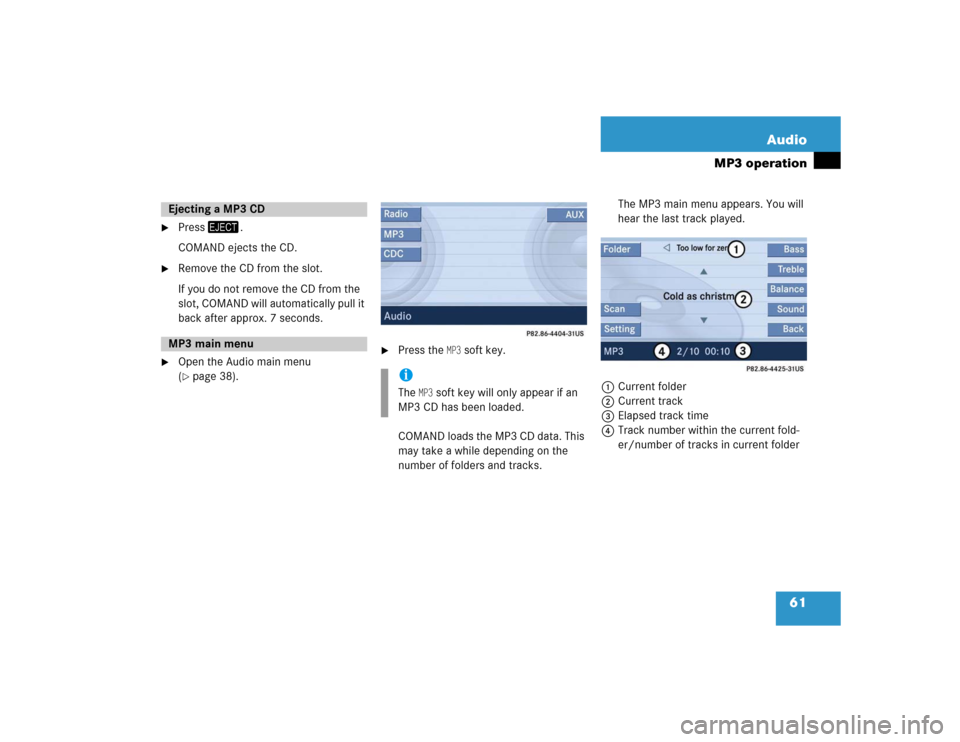
�
Press the
MP3
soft key.
COMAND loads the MP3 CD data. This
may take a while depending on the
number of folders and tracks.The MP3 main menu appears. You will
hear the last track played.
1Current folder
2Current track
3Elapsed track time
4Track number within the current fold-
er/number of tracks in current folder
Ejecting a MP3 CD MP3 main menu
iThe
MP3
soft key will only appear if an
MP3 CD has been loaded.
Page 63 of 215
62 AudioMP3 operationIf the MP3 tracks are organized into folders
on the CD, you can select a folder from the
COMAND control unit.
The following options are available:�
Selecting via folder list
�
Selecting via extended folder listSelecting via folder list
Only one folder can be viewed at a time.
1Current folder
�
Open the MP3 main menu (
�page 61);
�
Press� or � to select a folder.
�
Wait approx. 3 seconds without chang-
ing the selection.
The COMAND changes the folder and
loads the data from the new folder.
It may take a while to load the data, de-
pending on the number of folders and
tracks.
Selecting via extended folder list
iOn MP3 tracks with variable bit rates,
the elapsed track time displayed may
deviate from the actual time elapsed.Selecting folders
iThe folder list only contains folders in
which MP3 tracks are stored.
iThe extended folder list only contains
folders in which MP3 tracks are stored.
Page 64 of 215
63 Audio
MP3 operation
�
In the MP3 main menu (
�page 61),
press the
Folder
soft key.
The extended folder list appears.
�
Press� or � to select a folder.
�
Press�.
COMAND changes the folder and loads
the data from the new folder.
It may take a while to load the data, de-
pending on the number of folders and
tracks.The following options are available:
�
Selecting via track skip
�
Selecting via track list (
�page 64)
�
Selecting via direct entry of the track
number (
�page 64)
�
Selecting via scan search (
�page 65)
Selecting via track skip On the COMAND control unit
�
Open the MP3 main menu (
�page 61).
Selecting a track iForward skipping:
The next track is played.
iBackward skipping:
If the track has been playing longer
than approx. 10 seconds, the system
skips back to the beginning of the
track.
If less than 10 seconds have played,
the system skips back to the beginning
of the previous track.
��
Page 65 of 215
64 AudioMP3 operation�
For forward skipping press-;
or
�
For backward skipping press,.
The tracks skip immediately after
pressing one of the buttons.
On the multifunction steering wheel
�
Switch the multifunction display in the
instrument cluster to the MP3 display
(�page 25).
�
For forward skipping pressj;
or
�
For backward skipping pressk.
The tracks skip immediately after
pressing one of the buttons. Selecting via track list
The track list contains all tracks in the cur-
rent folder. Only one track can be viewed
at a time.
1Current track
�
Open the MP3 main menu (
�page 61);
�
Press� or � to select a different
track.
The current track remains playing while
selecting.
�
Press�, or wait approx. 3 seconds
without changing the selection.
The selected track is played.
Selecting via direct entry of the track
number
�
Open the MP3 main menu (
�page 61).
�
Press2.
The Manual track input display ap-
pears.
Page 66 of 215
65 Audio
MP3 operation
1Number of tracks in the current folder
(10 tracks)
Example entry: Track 1�
Press3.
Example entry: Track 10
�
Press3 and " in quick succession.
�
Wait approx. 3 seconds after entering
the number.
The selected track is played.
Selecting via scan search
Scan search is characterized as follows:
�
Scan search plays each track in the
current folder for approx. 8 seconds.
�
Scan search can be ended manually.
�
Scan search automatically stops at the
track listened to before the scan
search was started.Starting scan search
�
In the MP3 main menu (
�page 61)
press the
Scan
soft key.
The scan search starts.
iIt is not possible to enter a number
greater than the number of tracks in
the current folder.
iThe scan search will not function if the
current folder only contains one track.
When you start scan search, playback
option
Normal sequence
(�page 66) is
activated automatically.
Therein scan search is restricted to the
current folder.
Page 67 of 215
66 AudioMP3 operationEnding scan search manually �
Press the
Scan
soft key.
The track playing when scan search is
ended remains selected.
�
Open the MP3 main menu (
�page 61).
�
Press and hold- or,.
�
To stop release- or,.The following options are available:
�
Normal sequence
�
Repeat track
(�page 67)
�
Repeat folder
(�page 67)
�
Track Random
(�page 67)
�
Folder Random
(�page 67)Explanation of the playback options
�
Normal sequence
The COMAND plays tracks in a folder in
succession.
Once all the tracks in a folder have
been played, COMAND begins playing
the track(s) in the next folder on the
CD.
Fast forward/reverse
Playback options