Page 183 of 474
181 Controls in detail
Automatic transmission
Steering wheel gearshift control (Speedshift) S 55 AMG
When driving in the automatic program
modesC orS, or in the manual program
modeM, you can change the gears
manually on the steering wheel or by using
the gear selector lever (
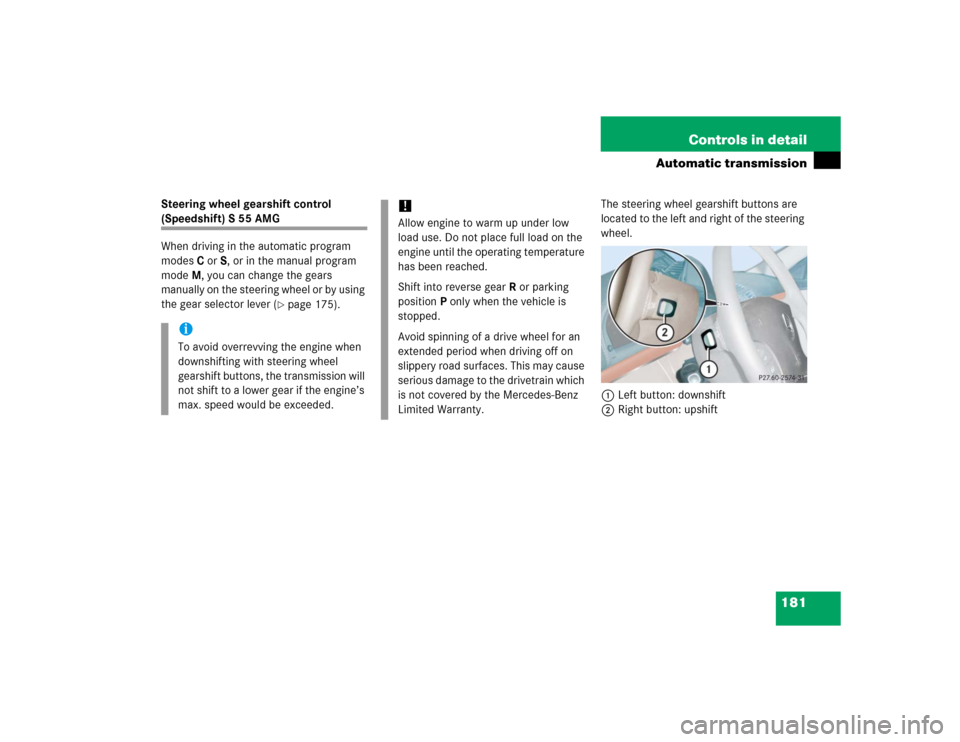
�page 175).The steering wheel gearshift buttons are
located to the left and right of the steering
wheel.
1Left button: downshift
2Right button: upshift
iTo avoid overrevving the engine when
downshifting with steering wheel
gearshift buttons, the transmission will
not shift to a lower gear if the engine’s
max. speed would be exceeded.
!Allow engine to warm up under low
load use. Do not place full load on the
engine until the operating temperature
has been reached.
Shift into reverse gearR or parking
positionP only when the vehicle is
stopped.
Avoid spinning of a drive wheel for an
extended period when driving off on
slippery road surfaces. This may cause
serious damage to the drivetrain which
is not covered by the Mercedes-Benz
Limited Warranty.
Page 185 of 474

183 Controls in detail
Automatic transmission
Manual shift program S 55 AMG
In the manual program modeM you can
change the gears manually on the steering
wheel (
�page 181) or by using the gear
selector lever (
�page 175).The program mode selector switch is
located on the lower part of the center
console.
1Program mode selector switch
M Manual For manual gear shifting
C Comfort For comfort driving
S Sport For standard driving
The current gear selector lever position
and the selected program mode (
M/C/S)
are indicated in the tachometer display
(
�page 174).Activating manual shift program
�
Press program mode selector
switch1 repeatedly until the
M for the
manual program modeM appears in
the tachometer display.
The transmission switches to the
manual program modeM. Automatic
shifting is switched off. The gear range
is not limited.
You can change the gears manually when
the gear selector lever is in positionD. You
can upshift or downshift through the gears
in succession.
!Allow engine to warm up under low
load use. Do not place full load on the
engine until the operating temperature
has been reached.
Shift into reverse gearR or parking
positionP only when the vehicle is
stopped.
Avoid spinning of a drive wheel for an
extended period when driving off on
slippery road surfaces. This may cause
serious damage to the drivetrain which
is not covered by the Mercedes-Benz
Limited Warranty.
Page 187 of 474
185 Controls in detail
Automatic transmission
Deactivating manual shift program�
Press the program mode selector
switch (
�page 183) repeatedly
until
Cor
S appears in the tachometer
display.
or
�
Restart the engine.
The transmission will go to the
automatic program mode (C orS).
The manual program modeM is not
stored.Emergency operation (Limp Home
Mode)
If vehicle acceleration worsens or the
transmission no longer shifts, the trans-
mission is most likely operating in limp
home (emergency operation) mode. In this
mode only second gear and reverse gear
can be activated.�
Stop the vehicle.
�
Move gear selector lever toP.
�
Turn off the engine.
�
Wait at least ten seconds before
restarting.
�
Restart the engine.
�
Move gear selector lever to positionD
(for second gear) orR.
�
Have the transmission checked at an
authorized Mercedes-Benz Center as
soon as possible.
Page 193 of 474

191 Controls in detail
Good visibility
Rear window sunshade*
The switch is located on the upper part of
the front center console.
1Rear window sunshade switch�
Switch on ignition (
�page 34).
�
Press switch 1 briefly to raise the sun-
shade.
�
Press switch 1 briefly to lower the
sunshade.
Always raise the sunshade fully for its sup-
port against the window frame.
Rear door window sunshade*�
To raise sunshade pull on the tab and
engage in holder.
�
To lower sunshade disengage tab and
guide retraction.
Warning!
G
When operating the rear window sunshade,
be sure that there is no danger of anyone be-
ing harmed by the raising or lowering proce-
dure.
The raising or lowering procedure can be im-
mediately reversed by pressing switch1.Warning!
G
When leaving the vehicle, always remove the
SmartKey or SmartKey with KEYLESS-GO*
from the starter switch, take it with you, and
lock the vehicle. Do not leave children unat-
tended in the vehicle, or with access to an
unlocked vehicle. Unsupervised use of vehi-
cle equipment can cause an accident
and/or serious personal injury.
!Always guide the sunshade. Do not let
it snap back abruptly, as the retractor
could be damaged.
Page 195 of 474
193 Controls in detail
Automatic climate control
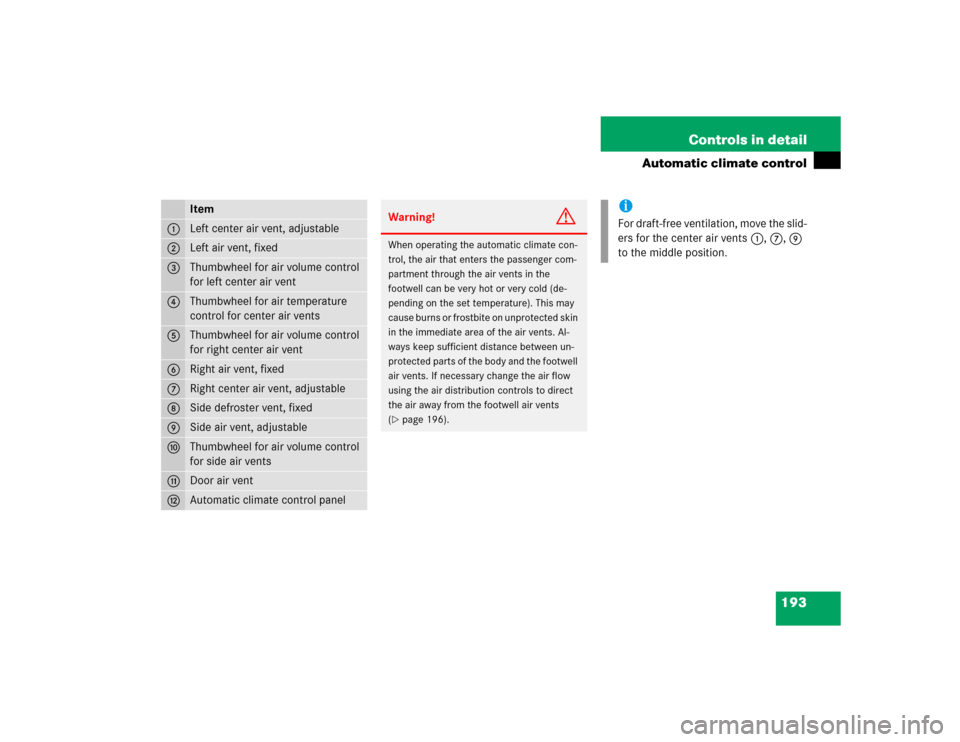
Item
1
Left center air vent, adjustable
2
Left air vent, fixed
3
Thumbwheel for air volume control
for left center air vent
4
Thumbwheel for air temperature
control for center air vents
5
Thumbwheel for air volume control
for right center air vent
6
Right air vent, fixed
7
Right center air vent, adjustable
8
Side defroster vent, fixed
9
Side air vent, adjustable
a
Thumbwheel for air volume control
for side air vents
b
Door air vent
c
Automatic climate control panel
Warning!
G
When operating the automatic climate con-
trol, the air that enters the passenger com-
partment through the air vents in the
footwell can be very hot or very cold (de-
pending on the set temperature). This may
cause burns or frostbite on unprotected skin
in the immediate area of the air vents. Al-
ways keep sufficient distance between un-
protected parts of the body and the footwell
air vents. If necessary change the air flow
using the air distribution controls to direct
the air away from the footwell air vents
(�page 196).
iFor draft-free ventilation, move the slid-
ers for the center air vents 1, 7, 9
to the middle position.
Page 196 of 474
194 Controls in detailAutomatic climate controlAutomatic climate control panel
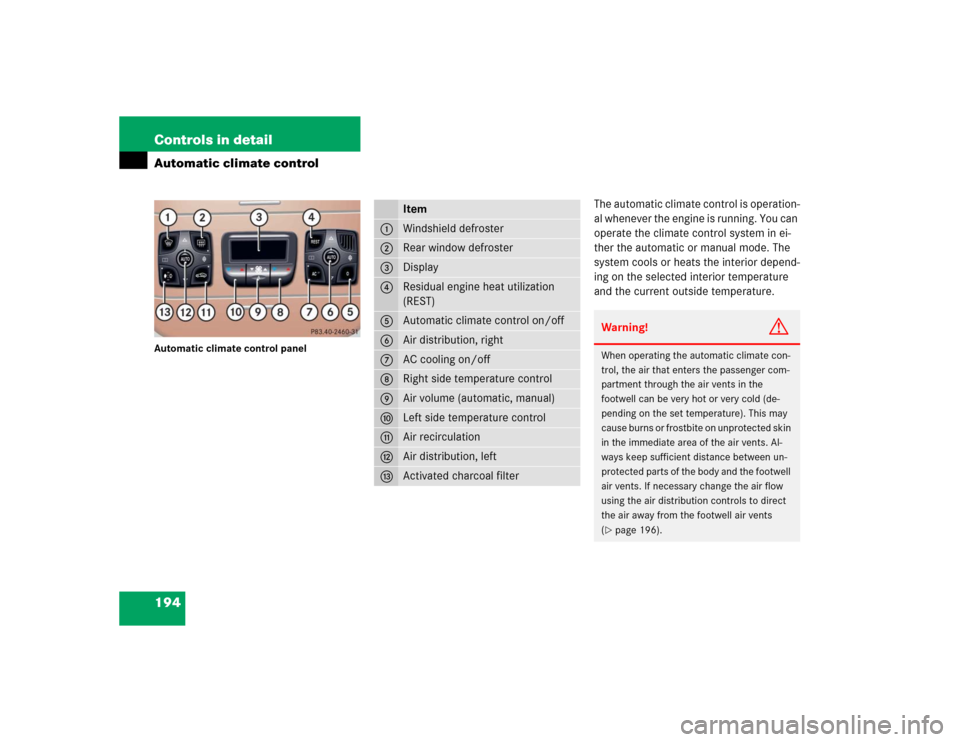
The automatic climate control is operation-
al whenever the engine is running. You can
operate the climate control system in ei-
ther the automatic or manual mode. The
system cools or heats the interior depend-
ing on the selected interior temperature
and the current outside temperature.
Item
1
Windshield defroster
2
Rear window defroster
3
Display
4
Residual engine heat utilization
(REST)
5
Automatic climate control on/off
6
Air distribution, right
7
AC cooling on/off
8
Right side temperature control
9
Air volume (automatic, manual)
a
Left side temperature control
b
Air recirculation
c
Air distribution, left
d
Activated charcoal filter
Warning!
G
When operating the automatic climate con-
trol, the air that enters the passenger com-
partment through the air vents in the
footwell can be very hot or very cold (de-
pending on the set temperature). This may
cause burns or frostbite on unprotected skin
in the immediate area of the air vents. Al-
ways keep sufficient distance between un-
protected parts of the body and the footwell
air vents. If necessary change the air flow
using the air distribution controls to direct
the air away from the footwell air vents
(�page 196).
Page 197 of 474
195 Controls in detail
Automatic climate control
Nearly all dust particles, pollutants and
odors are filtered out before outside air en-
ters the passenger compartment through
the air distribution system.
The air conditioning will not engage (no
cooling) if the ± mode is selected
(�page 202).
Setting the temperature
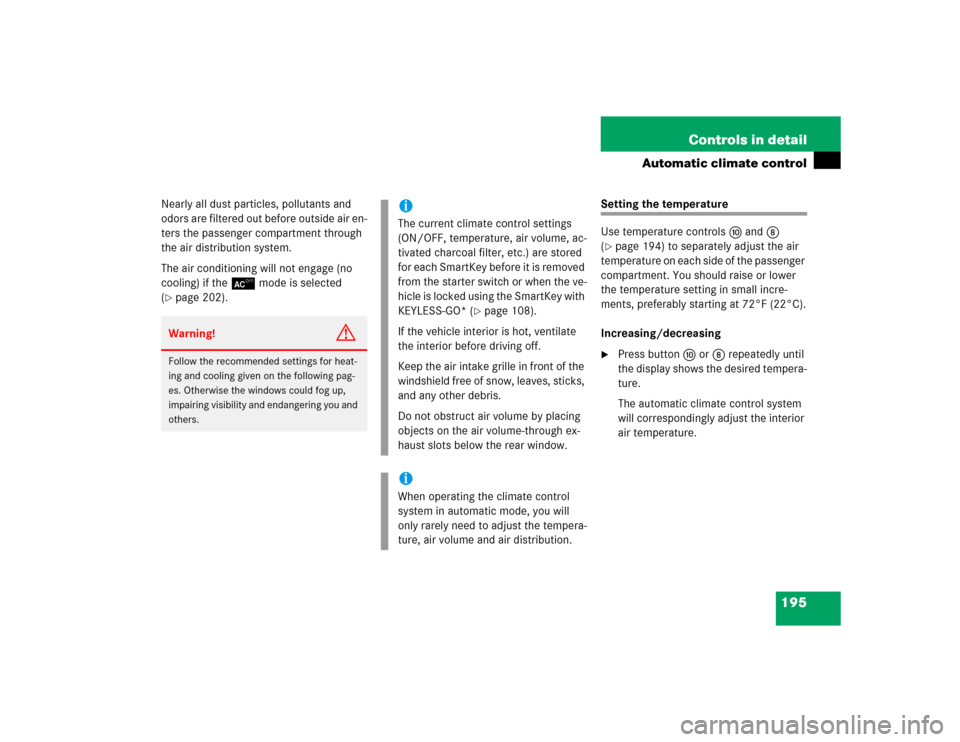
Use temperature controls aand8
(�page 194) to separately adjust the air
temperature on each side of the passenger
compartment. You should raise or lower
the temperature setting in small incre-
ments, preferably starting at 72°F (22°C).
Increasing/decreasing
�
Press button a or 8 repeatedly until
the display shows the desired tempera-
ture.
The automatic climate control system
will correspondingly adjust the interior
air temperature.
Warning!
G
Follow the recommended settings for heat-
ing and cooling given on the following pag-
es. Otherwise the windows could fog up,
impairing visibility and endangering you and
others.
iThe current climate control settings
(ON/OFF, temperature, air volume, ac-
tivated charcoal filter, etc.) are stored
for each SmartKey before it is removed
from the starter switch or when the ve-
hicle is locked using the SmartKey with
KEYLESS-GO* (
�page 108).
If the vehicle interior is hot, ventilate
the interior before driving off.
Keep the air intake grille in front of the
windshield free of snow, leaves, sticks,
and any other debris.
Do not obstruct air volume by placing
objects on the air volume-through ex-
haust slots below the rear window.
iWhen operating the climate control
system in automatic mode, you will
only rarely need to adjust the tempera-
ture, air volume and air distribution.
Page 210 of 474
208 Controls in detailPower windows�
Switch on ignition (
�page 34).
Opening the windows
�
Press switch1 to 4 at the
symbolk to the resistance point.
The corresponding window will move
downwards until you release the
switch.Closing the windows
�
Press switch1 to 4 at the
symbolj to the resistance point.
The corresponding window will move
upwards until you release the switch.
Fully opening the windows
(Express-open)
�
Press switch1 to 4 at the
symbolk past the resistance point
and release.
The corresponding window opens com-
pletely.Fully closing the windows
(Express-close)
�
Press switch1 to 4 at the
symbolj past the resistance point
and release.
The corresponding window closes com-
pletely.
iOperating the windows from the rear is
not possible if you activate the override
switch (
�page 78).
iWith the SmartKey in starter switch po-
sition 0 or removed from the starter
switch, the power windows can be op-
erated:�
until you open the driver’s or front
passenger door
�
for at least five minutes.
Warning
G
If you press and hold the switch up when
closing the window, and upward movement
of the window is blocked by some obstruc-
tion including but not limited to arms, hands,
fingers, etc., the automatic reversal will not
operate.
Warning!
G
Driver's door only:
If within five seconds you again press the
switch past the resistance point and re-
lease, the automatic reversal will not func-
tion.