Page 30 of 368

AUDIOPHILE SATELLITE COMPATIBLE AM/FM STEREO IN-DASH
SIX CD/MP3 RADIO—LATE AVAILABILITY (IF EQUIPPED)
1.SEEK:Press and release
SEEK
/for previous/next
strong station or track.
2.TEXT:The filename (Fi), song
title (So), artist text (Ar) or album
text (AL) may be viewed while
playing an MP3 selection. When MP3 selection text is shown on the
message display its corresponding text indicator (Fi, So, Ar, or AL) is
shown in the elapsed time display. Press TEXT to scroll through the text
fields. The display will scroll all of the text in the current field before
changing to the next field. (TEXT must be pressed within 3 seconds of
the previous button press to proceed to the next/last text display.)
TEXT is also available when equipped with Satellite radio. Your
Audiophile radio comes equipped with Satellite ready capability. The kit
to enable Satellite reception is available through your dealer. Detailed
Satellite instructions are included with the dealer installed kit.Dealer
installed satellite kit only available in the continental United States.
3.AUX:This function is not
operational.
REVIEW COPY
2005 Aviator f/k/a Navigator LS(231), Owners Guide (post-2002-fmt)(own2002),
Market:USA_English(fus)
Entertainment Systems
30
Page 34 of 368
20.Load:Press to load a CD. Press
LOAD and a memory preset to load
to a specific disc slot. Press and
hold to load up to six discs.
21.CD:Press to enter CD mode.
CD units are designed to play commercially pressed 4.75 in (12
cm) audio compact discs only. Due to technical incompatibility,
certain recordable and re-recordable compact discs may not
function correctly when used in Ford CD players. Irregular
shaped CDs, CDs with a scratch protection film attached, and CDs
with homemade paper (adhesive) labels should not be inserted
into the CD player. The label may peel and cause the CD to
become jammed. It is recommended that homemade CDs be
identified with permanent felt tip marker rather than adhesive
labels. Ballpoint pens may damage CDs. Please contact your
dealer for further information.
22.Scan:Press SCAN to hear a
brief sampling of radio stations or
CD/MP3 tracks. Press again to stop.
23.Disc/Tune:Press
orto
manually tune down/up the radio frequency band, or to listen to the
previous/next CD.
CAT:CAT is only available when equipped with Satellite Radio. Your
Audiophile radio comes equipped with Satellite ready capability. The kit
to enable Satellite reception is available through your dealer. Detailed
Satellite instructions are included with the dealer installed kit.Dealer
installed satellite kit only available in the continental United States.
For information regarding SIRIUS Satellite Radio, please call toll-free
888-539-SIRIUS (888-539-7474) or visit the SIRIUS website at
www.siriusradio.com
24.CD slot:Insert a CD, label side up.
FAMILY ENTERTAINMENT SYSTEM (IF EQUIPPED)
Your vehicle may be equipped with a Family Entertainment System
(FES). Refer to theDVD Supplement Guidefor further information on
your system.
REVIEW COPY
2005 Aviator f/k/a Navigator LS(231), Owners Guide (post-2002-fmt)(own2002),
Market:USA_English(fus)
Entertainment Systems
34
Page 36 of 368

Don’t:
•Expose discs to direct sunlight or heat sources for extended periods
of time.
•Insert more than one disc into each slot of the CD changer magazine.
•Clean using a circular motion.
CD units are designed to play commercially pressed 4.75 in (12
cm) audio compact discs only. Due to technical incompatibility,
certain recordable and re-recordable compact discs may not
function correctly when used in Ford CD players. Irregular
shaped CDs, CDs with a scratch protection film attached, and CDs
with homemade paper (adhesive) labels should not be inserted
into the CD player. The label may peel and cause the CD to
become jammed. It is recommended that homemade CDs be
identified with permanent felt tip marker rather than adhesive
labels. Ball point pens may damage CDs. Please contact your
dealer for further information.
AUDIO SYSTEM WARRANTY AND SERVICE
Refer to theWarranty Guidefor audio system warranty information. If
service is necessary, see your dealer or qualified technician.
LINCOLN NAVIGATION SYSTEM (IF EQUIPPED)
Your vehicle may be equipped with a Lincoln Navigation System which
allows you to listen to the radio, play CDs and also navigate the vehicle
using a navigation DVD.
THX audio system (if equipped)
Your vehicle may be equipped with
the THX�certified premium audio
system. This system creates optimal
acoustic quality for all seating
positions and road conditions.
The system offers an advanced
speaker system, amplifier, subwoofer
and equalizer.
Your Lincoln Navigation System has a large range of features, yet is easy
to use. Guidance is shown on the display screen and is supplemented
with voice prompts. The display screen provides full information for
operating the system through use of menus, text screens and map
displays. Screen selections are made by touching the desired selection on
the screen.
REVIEW COPY
2005 Aviator f/k/a Navigator LS(231), Owners Guide (post-2002-fmt)(own2002),
Market:USA_English(fus)
Entertainment Systems
36
Page 37 of 368
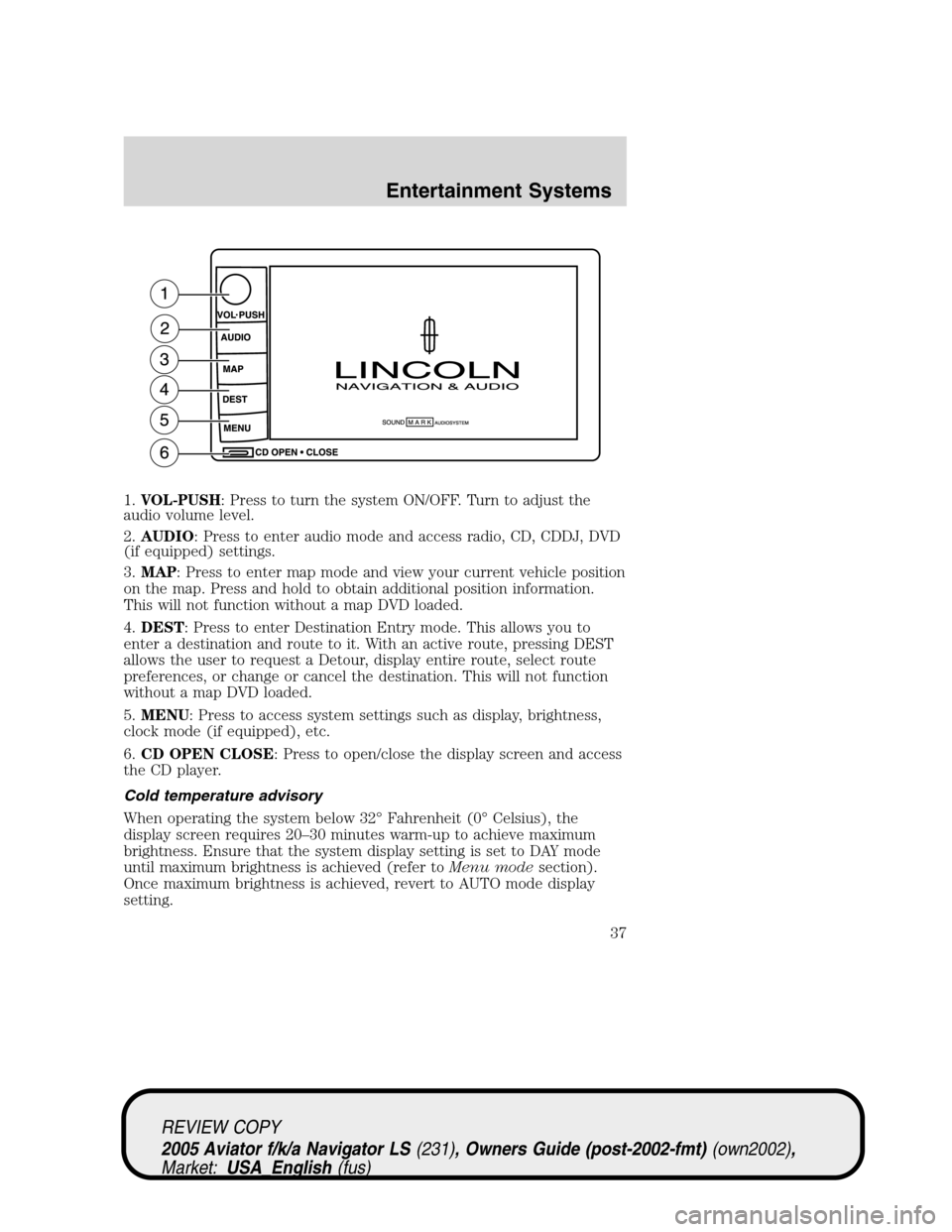
1.VOL-PUSH: Press to turn the system ON/OFF. Turn to adjust the
audio volume level.
2.AUDIO: Press to enter audio mode and access radio, CD, CDDJ, DVD
(if equipped) settings.
3.MAP: Press to enter map mode and view your current vehicle position
on the map. Press and hold to obtain additional position information.
This will not function without a map DVD loaded.
4.DEST: Press to enter Destination Entry mode. This allows you to
enter a destination and route to it. With an active route, pressing DEST
allows the user to request a Detour, display entire route, select route
preferences, or change or cancel the destination. This will not function
without a map DVD loaded.
5.MENU: Press to access system settings such as display, brightness,
clock mode (if equipped), etc.
6.CD OPEN CLOSE: Press to open/close the display screen and access
the CD player.
Cold temperature advisory
When operating the system below 32°Fahrenheit (0°Celsius), the
display screen requires 20–30 minutes warm-up to achieve maximum
brightness. Ensure that the system display setting is set to DAY mode
until maximum brightness is achieved (refer toMenu modesection).
Once maximum brightness is achieved, revert to AUTO mode display
setting.
REVIEW COPY
2005 Aviator f/k/a Navigator LS(231), Owners Guide (post-2002-fmt)(own2002),
Market:USA_English(fus)
Entertainment Systems
37
Page 38 of 368
Initial map display
After pressing AGREE to the initial
WARNING screen, you will move
into the initial map screen which
shows the current vehicle location.
Pressing the globe icon will take you
to the user settings—audible
feedback, navigation units, language
and clock (if equipped).
Quick Start—How to get going
To play a radio station:
1. Ensure that the vehicle ignition is on.
2. Press AUDIO.
3. Select AM, FM1 or FM2.
4. Press TUNE to adjust manually up (
) or down () the frequency
band.
5. Press SEEK to find the next strong station up (
) or down ().
Note:If PTY (program type) is selected, the station selection will be
limited. Refer toProgram Type (PTY)for further information.
REVIEW COPY
2005 Aviator f/k/a Navigator LS(231), Owners Guide (post-2002-fmt)(own2002),
Market:USA_English(fus)
Entertainment Systems
38
Page 39 of 368

To play a previously loaded CD:
1. Ensure that the vehicle ignition is on.
2. Press AUDIO.
3. Press CD to select a CD which is already loaded. (NO CD will appear
in the display if there are no CDs loaded into the system). Use the
controls (1–6) to select the desired CD.
4. CD will begin to play.
To load CDs:
1. Press CD OPEN CLOSE at the bottom of the screen to load a CD.
(The screen will open).
2. Press LOAD and select the desired slot. Or, press and hold LOAD to
auto load all available slots. The slot indicator lights blink rate will
increase when the system is ready to accept a disc. Push CD OPEN
CLOSE to close the screen. Once closed, the CD will begin to play.
3. Use the touch controls to advance tracks, scan, pause, etc.
To use the Navigation system:
1. Ensure that the vehicle ignition is on, and the navigation DVD is
loaded into the navigation DVD player.
Refer toLoading the map DVDorNavigation system—DVD location
in the Index for your vehicle’s navigation DVD location.
REVIEW COPY
2005 Aviator f/k/a Navigator LS(231), Owners Guide (post-2002-fmt)(own2002),
Market:USA_English(fus)
Entertainment Systems
39
Page 42 of 368

Press and hold VOICE briefly (on your steering wheel controls) until the
voice icon
appears on the Navigation display to use the Navigation
voice command. You will hear a beep, signaling that the system is ready
to take your command. Any command spoken prior to the beep will not
register with the system. Press RPT (repeat) to hear the previous
command repeated from the navigation system.
The voice activated command feature will not operate if a map DVD is
not inserted into the navigation DVD unit.
At any time, you may say these commands to change modes:
•Radio•Audio on
•AM•Audio off
•FM1•Power off
•FM2•CD Changer (if equipped)
•CD•DVD (if equipped)
•Power on
During normal radio operation, you may say:
•Seek up•Seek down
During CDDJ or in-dash CD play, you may say:
•Track up•Track down
•Previous track•Disc up
•Next disc•Disc down
•Previous disc
To change the screen display, you may say the following commands:
•Screen off•Screen day mode
•Day mode on•Screen night mode
•Night mode on•Screen auto mode
•Auto mode on
Note:If you say“Screen off”, you must touch the screen in order to
activate the screen again. The screen will not turn on again with a voice
command.
Commands that jump over screens:
•Current position•Current location
•Map
REVIEW COPY
2005 Aviator f/k/a Navigator LS(231), Owners Guide (post-2002-fmt)(own2002),
Market:USA_English(fus)
Entertainment Systems
42
Page 45 of 368
•Entire route map•Entire route
•Route overview•Reroute
•Detour•Detour entire route
Navigation help commands you may speak at any time:
•Help•Map
•Destination•Guidance
•Radio•Disc
•Map help•Destination help
•Guidance help•Radio help
•Disc help
Audio mode
Your Lincoln Navigation Audio System has many features including a full
range of audio functions. To access these functions, press AUDIO on the
main bezel. This will take you into audio mode.
Volume/power control
Press knob to turn the audio system
on/off. Turn to raise or lower
volume. The levels will be displayed
on the screen.
To activate the navigation mode,
press MAP or DEST.
REVIEW COPY
2005 Aviator f/k/a Navigator LS(231), Owners Guide (post-2002-fmt)(own2002),
Market:USA_English(fus)
Entertainment Systems
45

