Page 32 of 539

KEYS AND DOORS
13
11L221
�When starting the engine, do not use the key in
proximity with other transponder keys (including the
flat key and keys of other vehicles), and do not press
other key plates against the key grip. Doing so may
prevent the engine from starting, or may cause the
engine to stop soon after it starts. If this happens,
remove the key once and then insert it again after
removing other transponder keys (including the flat
key and keys of other vehicles) from the ring or while
gripping or covering them with your hand to start the
engine.
11L241a
� Do not bend the key grip or flat keys.
� Do not cover the key grip or engine start flat key with
any material that cuts off electromagnetic waves.
� Do not knock the key or flat keys hard against other
objects.
� Do not leave the key or flat keys exposed to high
temperatures for a long period, such as on the
dashboard or hood under direct sunlight.
� Do not put the key or flat keys in water or wash it in
an ultrasonic washer.
� Do not use the key or engine start flat key with
electromagnetic materials.
Page 34 of 539

KEYS AND DOORS
15
Flat key
11g039c
As a transponder chip is built in its key case, you can start
the engine with this key.
The flat key works in every lock.
A transponder chip for the engine immobilizer system has
been placed in the key case of the flat key. This chip is required
for the system to function correctly, so be careful not to lose this
key. If you make your own duplicate key, you will not be able
to cancel the system or start the engine.
Insert your flat key plate in its key case as shown. We
recommend that you always carry this with you for emergency
use. Do not leave it in your vehicle.
Starting the engine using a flat key
11L050a
1. Remove the key plate from the key case.
2. Insert the key plate into the ignition switch. The security
indicator light keeps flashing.
3. Bring the key case closer to the ignition switch within 10
seconds as indicated by the arrow head. The indicator light
goes out. This means the engine immobilizer system is
automatically canceled. (For details, see “Engine immobilizer
system” on page 17.) You can put the key case away then. You
cannot cancel the engine immobilizer system if 10 seconds
have passed after you inserted the key plate. You need to
remove the key plate from the ignition switch and try it again
from the step 2.
4. Start the engine within 20 seconds after the security
indicator light goes out. You cannot start the engine if 20
seconds have passed after the security indicator went off. You
need to remove the key plate from the ignition switch and try
it again from the step 2.
Page 36 of 539
KEYS AND DOORS
17
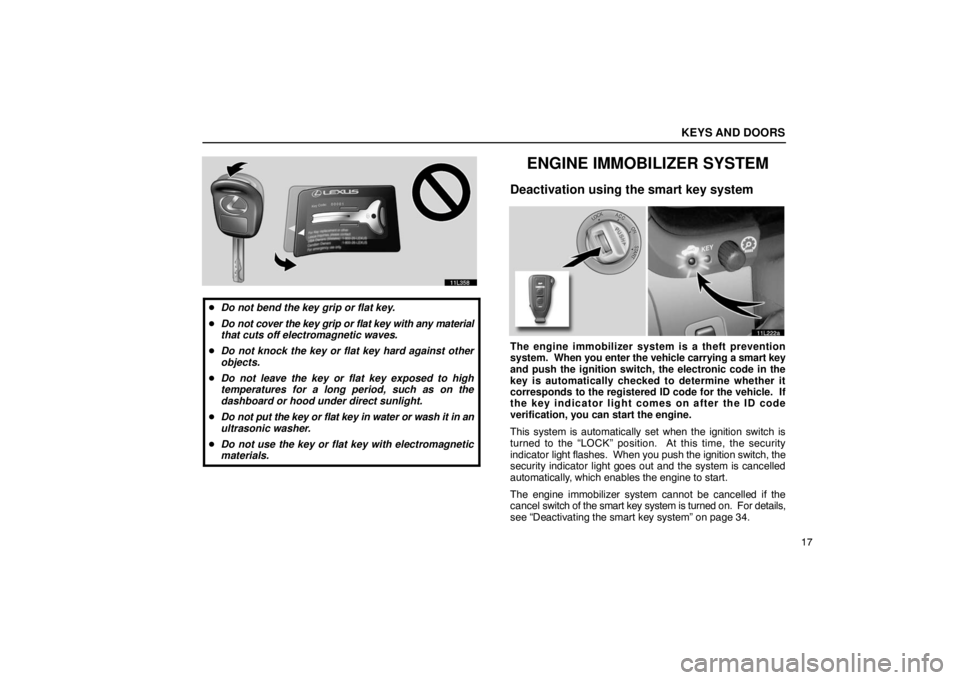
11L358
�Do not bend the key grip or flat key.
� Do not cover the key grip or flat key with any material
that cuts off electromagnetic waves.
� Do not knock the key or flat key hard against other
objects.
� Do not leave the key or flat key exposed to high
temperatures for a long period, such as on the
dashboard or hood under direct sunlight.
� Do not put the key or flat key in water or wash it in an
ultrasonic washer.
� Do not use the key or flat key with electromagnetic
materials.
ENGINE IMMOBILIZER SYSTEM
Deactivation using the smart key system
11L222a
The engine immobilizer system is a theft prevention
system. When you enter the vehicle carrying a smart key
and push the ignition switch, the electronic code in the
key is automatically checked to determine whether it
corresponds to the registered ID code for the vehicle. If
the key indicator light comes on after the ID code
verification, you can start the engine.
This system is automatically set when the ignition switch is
turned to the “LOCK” position. At this time, the security
indicator light flashes. When you push the ignition switch, the
security indicator light goes out and the system is cancelled
automatically, which enables the engine to start.
The engine immobilizer system cannot be cancelled if the
cancel switch of the smart key system is turned on. For details,
see “Deactivating the smart key system” on page 34.
Page 37 of 539

KEYS AND DOORS
18For your Lexus dealer to make you a new key with built
−in
transponder chip, your dealer will need your key number and
master key. However, there is a limit to the number of
additional keys your Lexus dealer can make for you.
If you make your own duplicate key, you will not be able
to cancel the system or start the engine.
NOTICE
Do not modify, remove or disassemble the engine
immobilizer system. If any unauthorized changes or
modifications are made, proper operation of the system
cannot be guaranteed.
Deactivation using the key
11L223a
� 1 Type A 2Type B
The engine immobilizer system is a theft prevention
system. When you insert the key in the ignition switch, the
transponder chip in the key’s head transmits an electronic
code to the vehicle. The engine will start only when the
electronic code in the chip corresponds to the registered
ID code for the vehicle.
The system is automatically set when the key is removed from
the ignition switch. At this time, the security indicator light
flashes. When you insert the key in the ignition switch, the
security indicator light goes out and the system is canceled
automatically, which enables the engine to start.
The transponder chip of the flat key is in its key case. You can
cancel the engine immobilizer system using the flat key. (For
details, see pages 12 and 15.)
Page 44 of 539

KEYS AND DOORS
25
Locking the doors with smart key system
11L224
The smart key system will lock the doors without being
inserted into the door keyhole.
When you exit the vehicle carrying the smart key and push the
lock button on the outside door handle with all the doors
closed, all the doors will be locked provided that the electronic
code in the key corresponds to the registered ID code for the
vehicle.
At this time, you will hear one beep and the turn signal lights
flash once. However, when you push the lock button on the
outside door handle with any door not closed securely, a beep
sounds for 10 seconds. (For details, see page 27.)
If outer foot lights are illuminated, you can turn off the lights by
pushing the “LOCK” button on the smart key. (For details, see
“Outer foot lights” on page 233.)
INFORMATION
� When locking the doors, be sure to push the lock
button on the outside door handle slowly and surely.
If you push the button quickly, the doors may not
lock.
� When opening or closing a door, do not touch the
lock button on the outside door handle.
� When a wireless key is used to lock the doors and a
smart key is left in the ef fective range of the smart key
system in the vehicle, the doors cannot be unlocked
using the smart key system. In this case, use the
wireless remote function to unlock the doors.
� You cannot activate smart unlocking functions
within 3 seconds after the smart locking function is
activated.
Page 47 of 539

KEYS AND DOORS
28
Unlocking the door(s) with smart key system
11L225
The smart key system can be used to unlock the door(s)
without being inserted into the door keyhole.
When you get close to your vehicle (about 1 m (3 ft.) from each
outside door handle), and are carrying the smart key, the
electronic code emitted from the key is automatically checked
to determine if it corresponds to the registered ID code for the
vehicle. After this, the outer foot lights come on. (For outer foot
lights, see “Outer foot lights” on page 233.) When you take
hold of the back side of the outside door handle on the door
firmly, it will unlock and the key indicator light blinks. (You can
select the doors to be unlocked. For details, see “Changing the
doors to be unlocked” on page 30.) At this time, two beeps sound and the turn signal lights flash
twice. As the door(s) is(are) unlocked, the interior light comes
on for 15 seconds if the interior light switch is in the “DOOR”
position. However, the interior lights go out when you push the
power door lock switch in the lock position or turn the ignition
switch to the “ACC” or “ON” position. For further information,
see “Interior lights” on page 112.
You have 30 seconds to open a door after operating the smart
unlocking
function. If a door is not opened by then, all the doors
will be automatically locked again.
Page 52 of 539

KEYS AND DOORS
33
Battery power saving
When doors are locked, the smart key system transmits
electromagnetic waves to the outside of the vehicle at regular
intervals. For this reason, the vehicle battery will be
discharged if the vehicle is left for a long time. If the key is left
within the effective range of the smart key system outside of
the vehicle, the key and the vehicle transmit electromagnetic
waves periodically.
If these conditions continue for a long time, the battery in the
key and vehicle will be discharged and from the sixth day,
smart unlocking operations will become slow.
To prevent the batteries from being discharged, the smart key
system is automatically deactivated in the following conditions:
� If there is no smart door locking operation for more than 14
days
� If the key is left within the effective range of the smart key
system outside of the vehicle for more than 10 minutes
To reactivate the smart key system properly, perform any of the
following:
(a) Press the lock button on the outside door handle while
carrying the smart key.
(b) Perform a wireless remote control operation.
(c) Insert and turn the key in the keyhole of the door.INFORMATION
� To maintain communication with the vehicle, smart
keys (including master keys) use builtin battery
power. The battery service life is about 1 to 3 years
on average. If battery power becomes insufficient,
replace the battery with a new one.
� The smart key continually receives electromagnetic
waves, and if it receives strong electromagnetic
waves over a period of time, the battery can be
drastically run down. Therefore, avoid storing smart
keys near any electrical appliances.
Here is a list of electrical appliances which may have
adverse effects on the smart key performance: TVs,
personal computers, cellular phone or cordless
phone recharger units, electric light stands and
fluorescent desk lights
Note that you should always keep such electrical
appliances at least 1 m (3 ft.) away from the smart key.
Page 55 of 539
KEYS AND DOORS
36For vehicles sold in Canada
This device complies with RSS− 210 of Industry
Canada.
Operation is subject to the following two conditions:
(1) This device may not cause interference, and (2)
this device must accept any interference, including
interference that may cause undesired operation of the
device.
WIRELESS REMOTE CONTROL*
11L215
� 1 Type A 2Type B
3Indicator light
4Locking the doors and sounding an alarm
5Unlocking the doors, and opening the windows and
moon roof
6 Unlocking the trunk lid
NOTE:
* This feature can be deactivated as vehicle theft deterrent
measure in case of the loss of the wireless remote control
function key.
Ask your Lexus dealer for details.
When you operate any button on the key, push it slowly and
surely. At this time, the indicator light on the key grip flashes
once.
