Page 884 of 4731
REMOTE KEYLESS ENTRY SYSTEM BL-69
C
D E
F
G H
J
K L
M A
B
BL
Revision: 2005 July 2005 FX
MULTI ANSWER BACK SET
AUTO LOCK SET
PANIC ALARM SET
PW DOWN SET
Work FlowAIS004MI
1. Check the symptom and customer's requests.
2. Understand outline of system. Refer to BL-57, "
System Description" .
3. Confirm that power door lock system operates normally. Refer to BL-21, "
POWER DOOR LOCK SYSTEM" .
4. Repair or replace any malfunctioning parts. Refer to BL-70, "
Trouble Diagnosis Chart by Symptom" .
5. INSPECTION END
MODE 1
(C mode) MODE 2
(S mode)
Key fob operation Lock Unlock Lock Unlock
Hazard warning lamp flash Twice Once Twice —
Horn sound Once — — —
MODE 1 MODE 2 MODE 3
Auto locking function 1 minutes Nothing 5 minutes
MODE 1 MODE 2 MODE 3
Key fob operation 0.5 seconds Nothing 1.5 seconds
MODE 1 MODE 2 MODE 3
Key fob operation 3 seconds Nothing 5 seconds
Page 890 of 4731
REMOTE KEYLESS ENTRY SYSTEM BL-75
C
D E
F
G H
J
K L
M A
B
BL
Revision: 2005 July 2005 FX
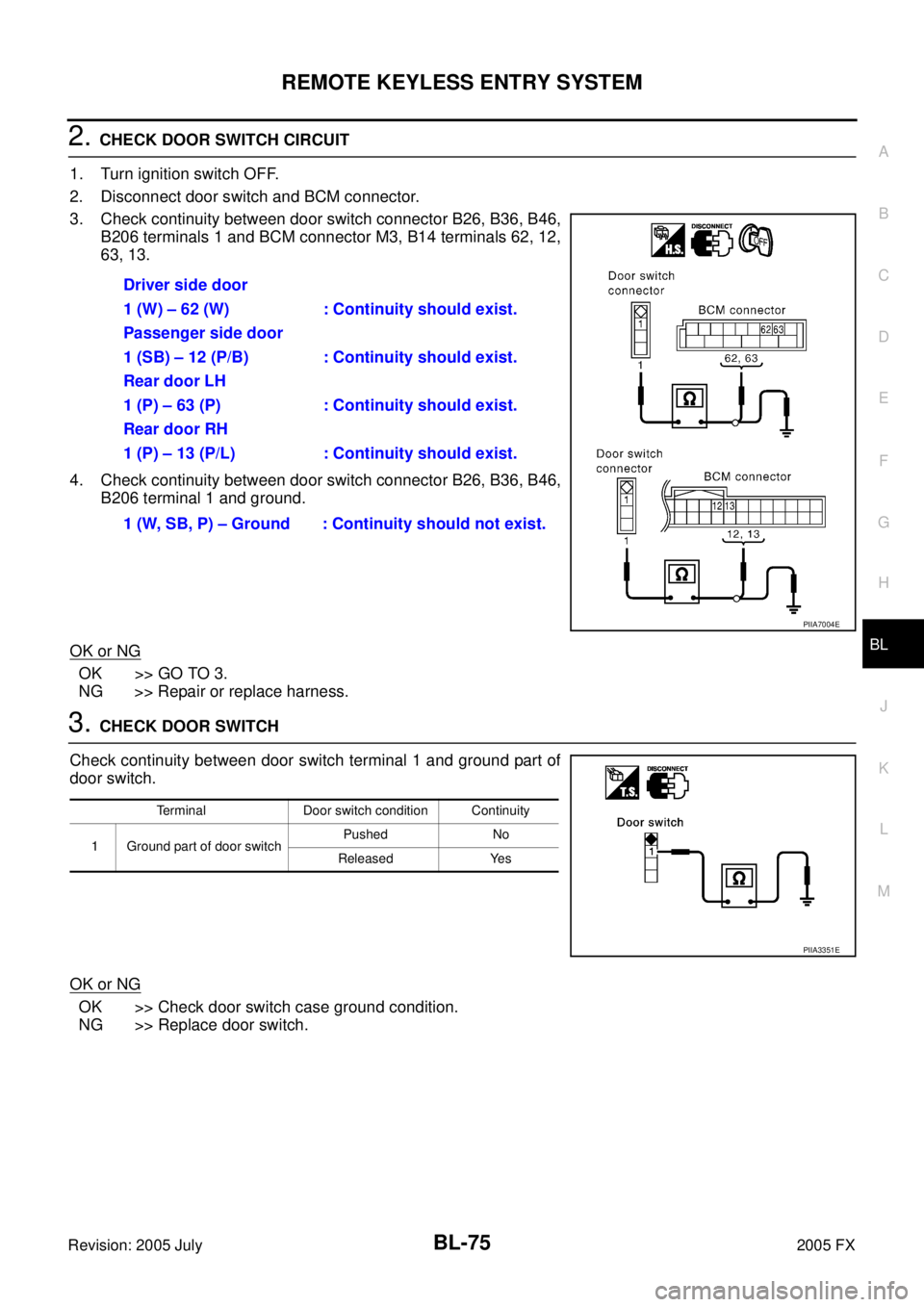
2. CHECK DOOR SWITCH CIRCUIT
1. Turn ignition switch OFF.
2. Disconnect door switch and BCM connector.
3. Check continuity between door switch connector B26, B36, B46, B206 terminals 1 and BCM connector M3, B14 terminals 62, 12,
63, 13.
4. Check continuity between door switch connector B26, B36, B46, B206 terminal 1 and ground.
OK or NG
OK >> GO TO 3.
NG >> Repair or replace harness.
3. CHECK DOOR SWITCH
Check continuity between door switch terminal 1 and ground part of
door switch.
OK or NG
OK >> Check door switch case ground condition.
NG >> Replace door switch. Driver side door
1 (W) – 62 (W) : Continuity should exist.
Passenger side door
1 (SB) – 12 (P/B) : Continuity should exist.
Rear door LH
1 (P) – 63 (P) : Continuity should exist.
Rear door RH
1 (P) – 13 (P/L) : Continuity should exist.
1 (W, SB, P) – Ground : Continuity should not exist.
PIIA7004E
Terminal Door switch condition Continuity
1 Ground part of door switch Pushed No
Released Yes
PIIA3351E
Page 891 of 4731
BL-76
REMOTE KEYLESS ENTRY SYSTEM
Revision: 2005 July 2005 FX
CHECK BACK DOOR SWITCH
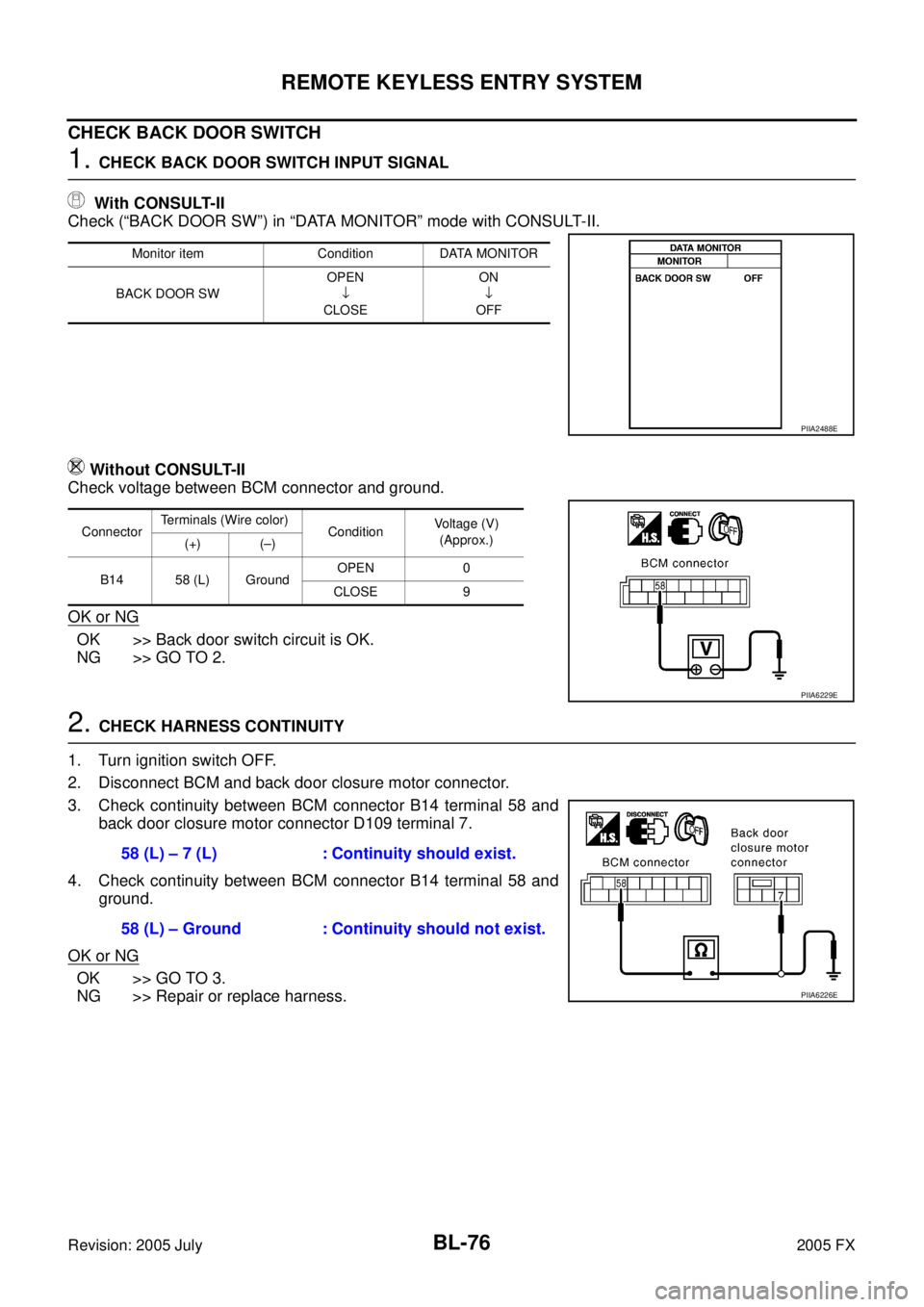
1. CHECK BACK DOOR SWITCH INPUT SIGNAL
With CONSULT-II
Check (“BACK DOOR SW”) in “DATA MONITOR” mode with CONSULT-II.
Without CONSULT-II
Check voltage between BCM connector and ground.
OK or NG
OK >> Back door switch circuit is OK.
NG >> GO TO 2.
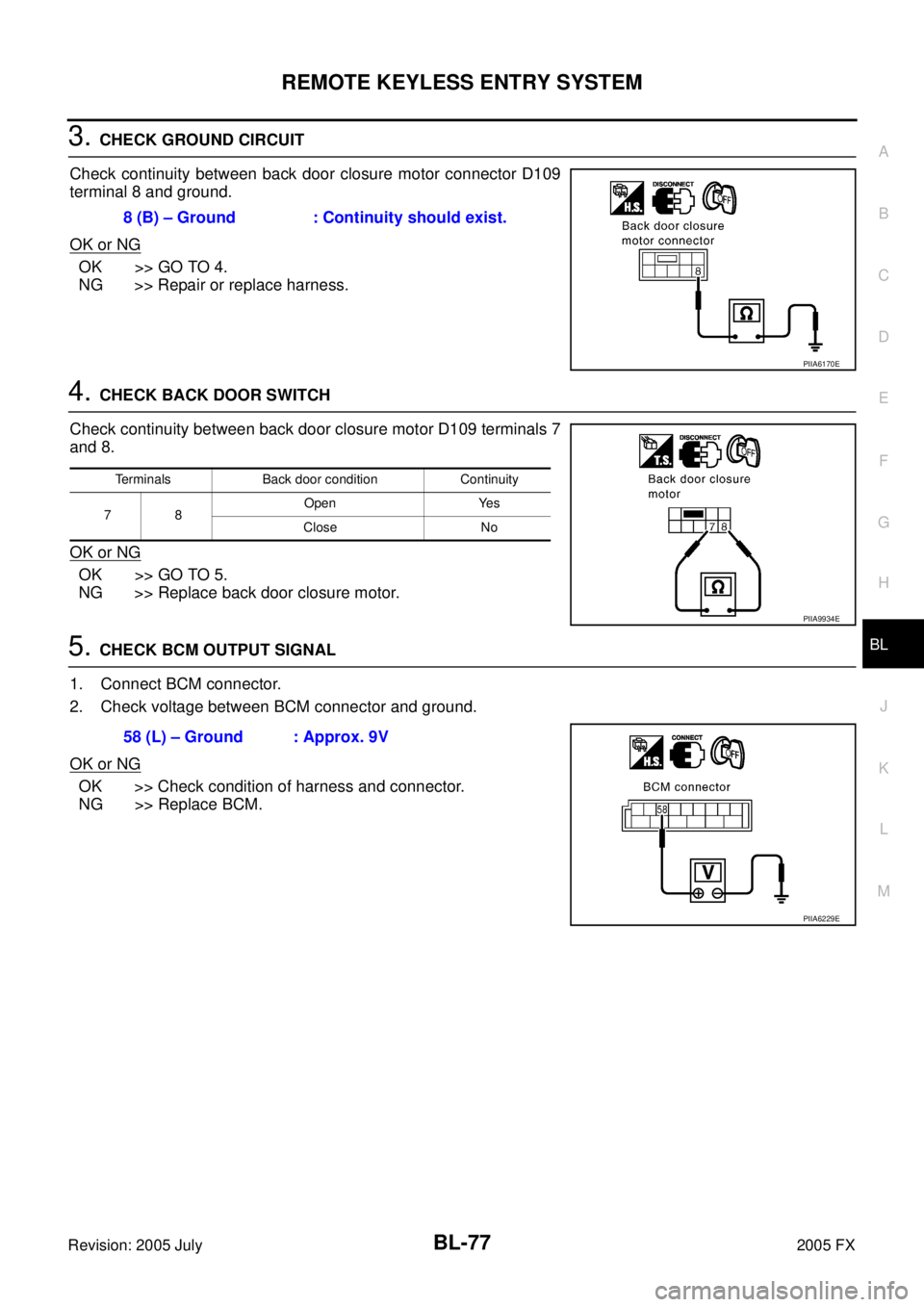
2. CHECK HARNESS CONTINUITY
1. Turn ignition switch OFF.
2. Disconnect BCM and back door closure motor connector.
3. Check continuity between BCM connector B14 terminal 58 and back door closure motor connector D109 terminal 7.
4. Check continuity between BCM connector B14 terminal 58 and ground.
OK or NG
OK >> GO TO 3.
NG >> Repair or replace harness.
Monitor item Condition DATA MONITOR
BACK DOOR SW OPEN
↓
CLOSE ON
↓
OFF
PIIA2488E
Connector Terminals (Wire color)
Condition Voltage (V)
(Approx.)
(+) (–)
B14 58 (L) Ground OPEN 0
CLOSE 9
PIIA6229E
58 (L) – 7 (L) : Continuity should exist.
58 (L) – Ground : Continuity should not exist.
PIIA6226E
Page 892 of 4731
REMOTE KEYLESS ENTRY SYSTEM BL-77
C
D E
F
G H
J
K L
M A
B
BL
Revision: 2005 July 2005 FX
3. CHECK GROUND CIRCUIT
Check continuity between back door closure motor connector D109
terminal 8 and ground.
OK or NG
OK >> GO TO 4.
NG >> Repair or replace harness.
4. CHECK BACK DOOR SWITCH
Check continuity between back door closure motor D109 terminals 7
and 8.
OK or NG
OK >> GO TO 5.
NG >> Replace back door closure motor.
5. CHECK BCM OUTPUT SIGNAL
1. Connect BCM connector.
2. Check voltage between BCM connector and ground.
OK or NG
OK >> Check condition of harness and connector.
NG >> Replace BCM. 8 (B) – Ground : Continuity should exist.
PIIA6170E
Terminals Back door condition Continuity
78 Open Yes
Close No
PIIA9934E
58 (L) – Ground : Approx. 9V
PIIA6229E
Page 895 of 4731
BL-80
REMOTE KEYLESS ENTRY SYSTEM
Revision: 2005 July 2005 FX
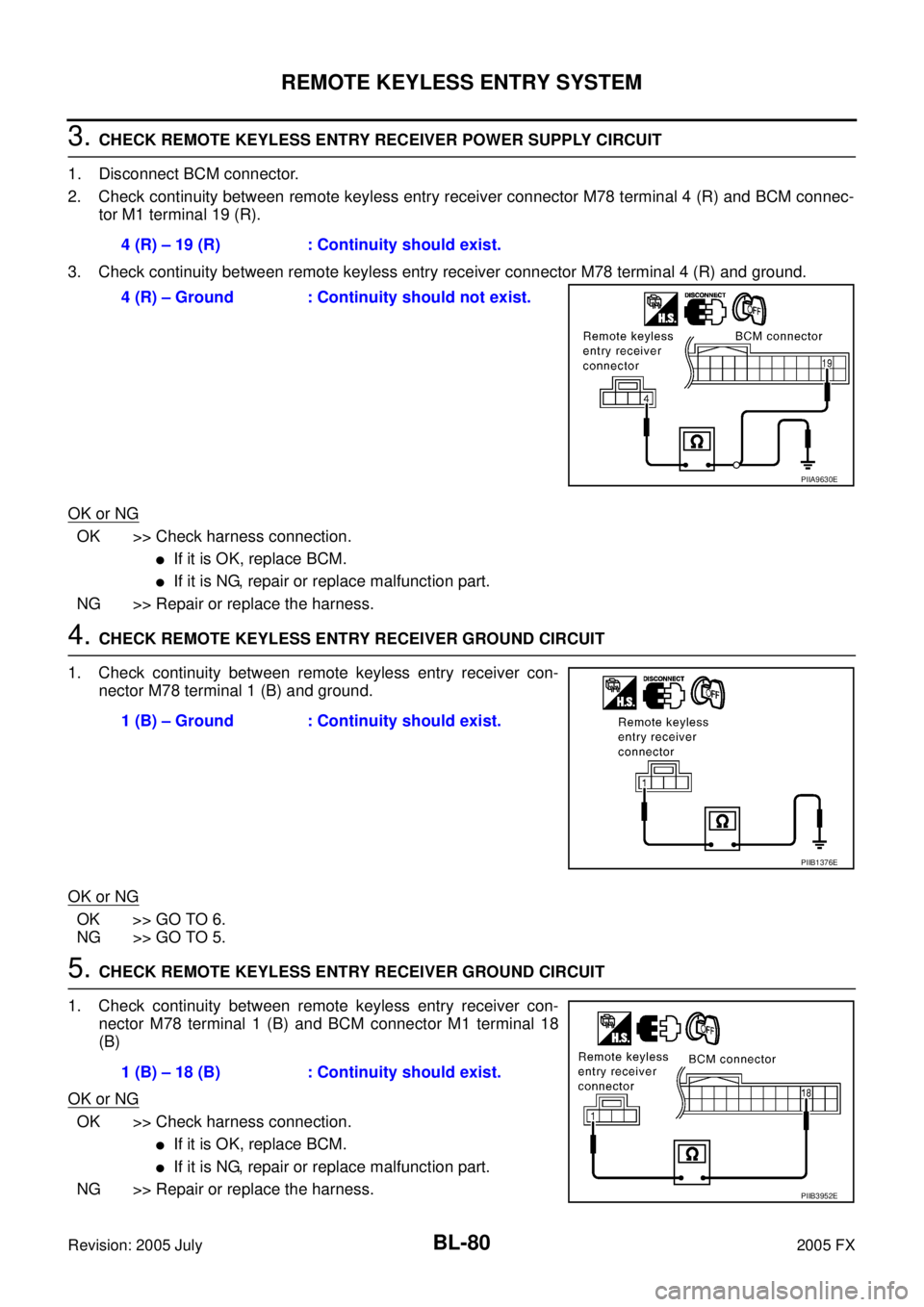
3. CHECK REMOTE KEYLESS ENTRY RECEIVER POWER SUPPLY CIRCUIT
1. Disconnect BCM connector.
2. Check continuity between remote keyless entry receiver connector M78 terminal 4 (R) and BCM connec- tor M1 terminal 19 (R).
3. Check continuity between remote keyless entry receiver connector M78 terminal 4 (R) and ground.
OK or NG
OK >> Check harness connection.
�If it is OK, replace BCM.
�If it is NG, repair or replace malfunction part.
NG >> Repair or replace the harness.
4. CHECK REMOTE KEYLESS ENTRY RECEIVER GROUND CIRCUIT
1. Check continuity between remote keyless entry receiver con- nector M78 terminal 1 (B) and ground.
OK or NG
OK >> GO TO 6.
NG >> GO TO 5.
5. CHECK REMOTE KEYLESS ENTRY RECEIVER GROUND CIRCUIT
1. Check continuity between remote keyless entry receiver con- nector M78 terminal 1 (B) and BCM connector M1 terminal 18
(B)
OK or NG
OK >> Check harness connection.
�If it is OK, replace BCM.
�If it is NG, repair or replace malfunction part.
NG >> Repair or replace the harness. 4 (R) – 19 (R) : Continuity should exist.
4 (R) – Ground : Continuity should not exist.
PIIA9630E
1 (B) – Ground : Continuity should exist.
PIIB1376E
1 (B) – 18 (B) : Continuity should exist.
PIIB3952E
Page 896 of 4731
REMOTE KEYLESS ENTRY SYSTEM BL-81
C
D E
F
G H
J
K L
M A
B
BL
Revision: 2005 July 2005 FX
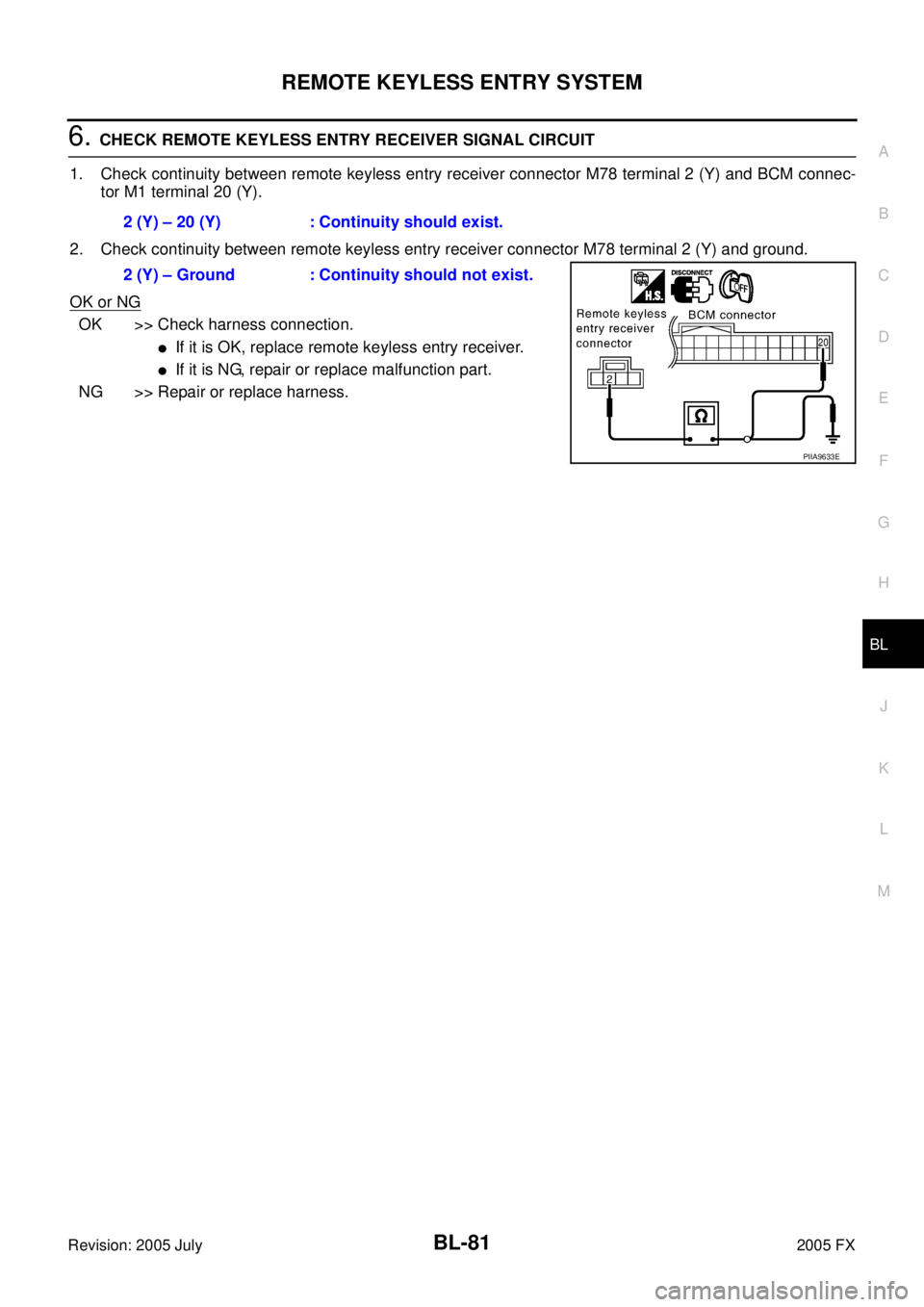
6. CHECK REMOTE KEYLESS ENTRY RECEIVER SIGNAL CIRCUIT
1. Check continuity between remote keyless entry receiver connector M78 terminal 2 (Y) and BCM connec- tor M1 terminal 20 (Y).
2. Check continuity between remote keyless entry receiver connector M78 terminal 2 (Y) and ground.
OK or NG
OK >> Check harness connection.
�If it is OK, replace remote keyless entry receiver.
�If it is NG, repair or replace malfunction part.
NG >> Repair or replace harness. 2 (Y) – 20 (Y) : Continuity should exist.
2 (Y) – Ground : Continuity should not exist.
PIIA9633E
Page 897 of 4731
BL-82
REMOTE KEYLESS ENTRY SYSTEM
Revision: 2005 July 2005 FX
Check IPDM E/R OperationAIS004MO
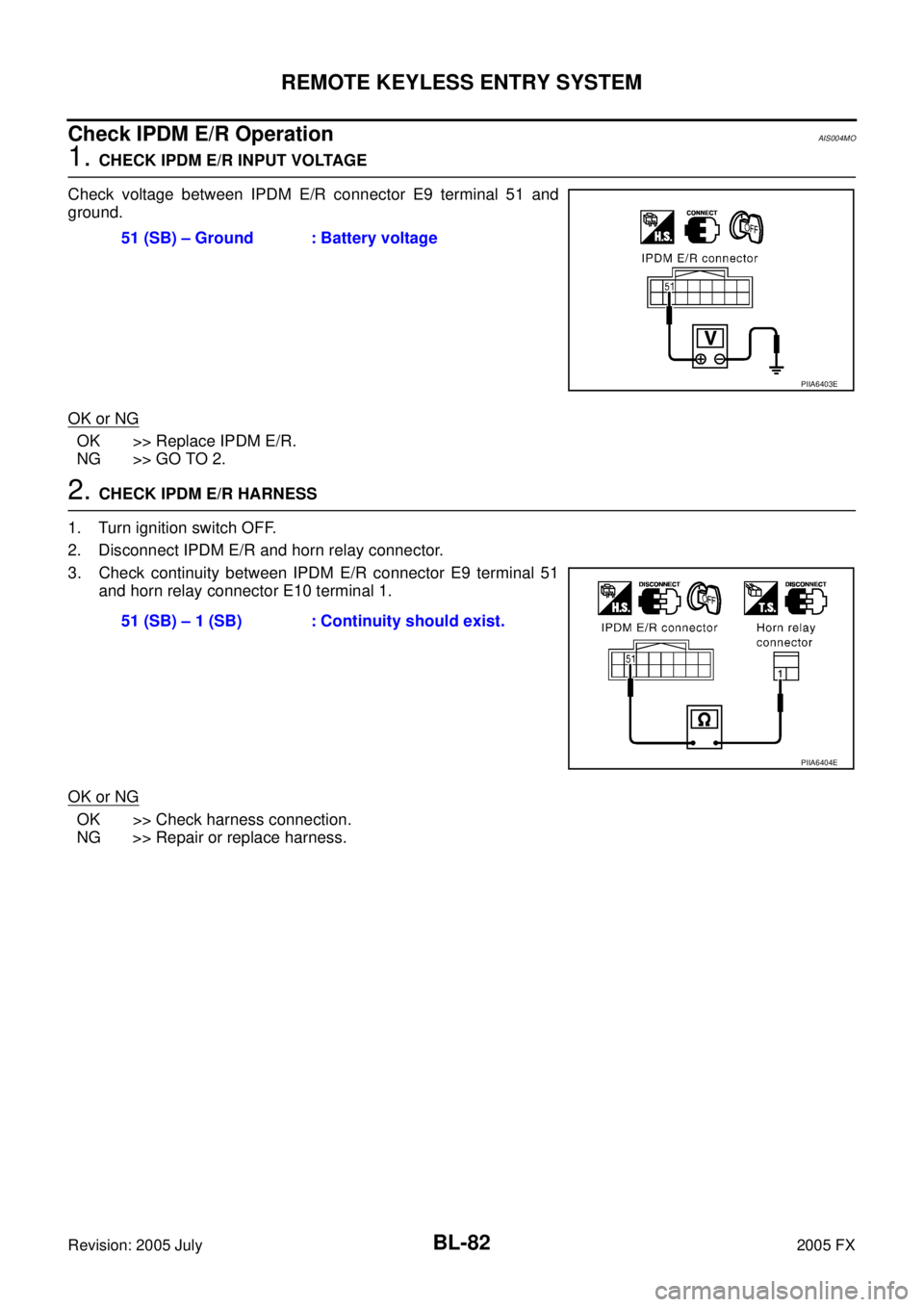
1. CHECK IPDM E/R INPUT VOLTAGE
Check voltage between IPDM E/R connector E9 terminal 51 and
ground.
OK or NG
OK >> Replace IPDM E/R.
NG >> GO TO 2.
2. CHECK IPDM E/R HARNESS
1. Turn ignition switch OFF.
2. Disconnect IPDM E/R and horn relay connector.
3. Check continuity between IPDM E/R connector E9 terminal 51 and horn relay connector E10 terminal 1.
OK or NG
OK >> Check harness connection.
NG >> Repair or replace harness. 51 (SB) – Ground : Battery voltage
PIIA6403E
51 (SB) – 1 (SB) : Continuity should exist.
PIIA6404E
Page 944 of 4731

INTELLIGENT KEY SYSTEM BL-129
C
D E
F
G H
J
K L
M A
B
BL
Revision: 2005 July 2005 FX
Check Intelligent Key Unit Power Supply and Ground CircuitAIS004NB
1. CHECK POWER SUPPLY CIRCUIT
1. Turn ignition knob OFF position.
2. Disconnect Intelligent Key unit connector.
3. Check voltage between Intelligent Key unit connector and ground.
OK or NG
OK >> GO TO 2.
NG >> Repair or replace Intelligent Key power supply circuit.
2. CHECK GROUND CIRCUIT
Check continuity between Intelligent Key unit connector M34 termi-
nal 12 (B) and ground.
OK or NG
OK >> Power supply and ground circuits are normal.
NG >> Repair or replace the Intelligent Key unit ground circuit.
Check Key Switch (Intelligent Key Unit Input)AIS004NC
1. CHECK KEY SWITCH
With CONSULT-II
Display “KEY SW” on DATA MONITOR screen, and check if ON-
OFF display is linked to insertion of mechanical key in ignition knob.
OK or NG
OK >> Key switch is OK.
NG >> GO TO 2.
Connector Terminal
(Wire color) Ignition knob position
M34 (+) (–) OFF ACC ON
6
(G/R)
Ground 0V 0V Battery voltage
10
(LG/R) 0V Battery voltage Battery voltage
11
(L/R) Battery voltage Battery voltage Battery voltage
MIIB0360E
12 (B) - Ground : Continuity should exist.
MIIB0361E
When key is inserted in ignition knob : ON
When key is removed in ignition knob : OFF
PIIB1359E