Page 998 of 4731
BACK DOOR AUTO CLOSURE SYSTEM BL-183
C
D E
F
G H
J
K L
M A
B
BL
Revision: 2005 July 2005 FX
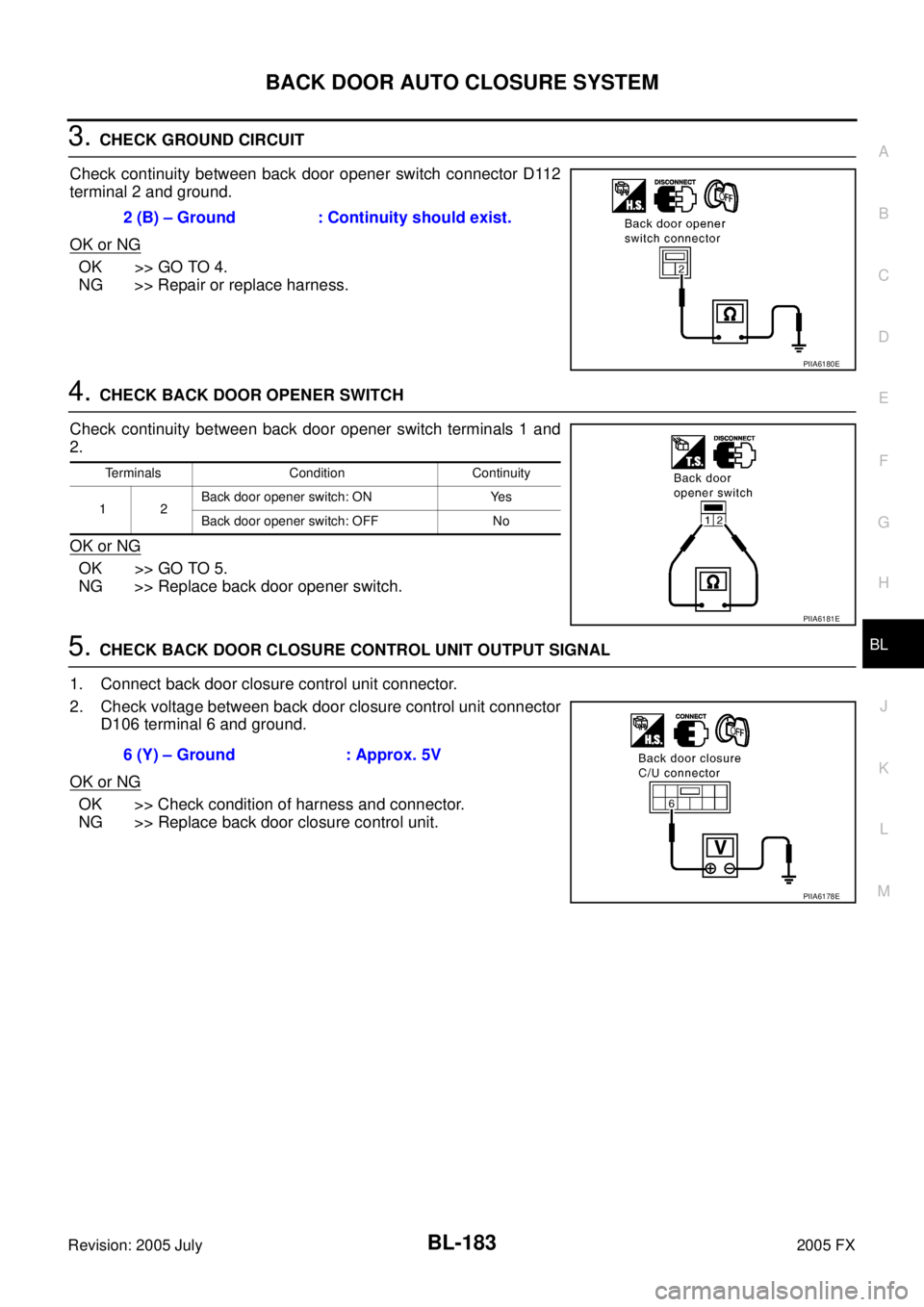
3. CHECK GROUND CIRCUIT
Check continuity between back door opener switch connector D112
terminal 2 and ground.
OK or NG
OK >> GO TO 4.
NG >> Repair or replace harness.
4. CHECK BACK DOOR OPENER SWITCH
Check continuity between back door opener switch terminals 1 and
2.
OK or NG
OK >> GO TO 5.
NG >> Replace back door opener switch.
5. CHECK BACK DOOR CLOSURE CONTROL UNIT OUTPUT SIGNAL
1. Connect back door closure control unit connector.
2. Check voltage between back door closure control unit connector D106 terminal 6 and ground.
OK or NG
OK >> Check condition of harness and connector.
NG >> Replace back door closure control unit. 2 (B) – Ground : Continuity should exist.
PIIA6180E
Terminals Condition Continuity
12 Back door opener switch: ON Yes
Back door opener switch: OFF No
PIIA6181E
6 (Y) – Ground : Approx. 5V
PIIA6178E
Page 999 of 4731

BL-184
BACK DOOR AUTO CLOSURE SYSTEM
Revision: 2005 July 2005 FX
Unlock Sensor Check (Without Intelligent Key)AIS004UA
1. CHECK UNLOCK SENSOR SIGNAL
1. Turn ignition switch OFF.
2. Check voltage between back door closure control unit connector and ground.
OK or NG
OK >> Unlock sensor is OK.
NG >> GO TO 2.
2. CHECK HARNESS CONTINUITY
1. Disconnect back door closure control unit and front door lock assembly (passenger side) connector.
2. Check continuity between back door closure control unit con- nector D106 terminal 5 and front door lock assembly (passenger
side) connector D40 terminal 5.
OK or NG
OK >> GO TO 3.
NG >> Repair or replace harness between back door closure
control unit and front door lock assembly (passenger
side).
3. CHECK GROUND CIRCUIT
Check continuity between front door lock assembly (passenger side)
connector D40 terminal 4 and ground.
OK or NG
OK >> GO TO 4.
NG >> Repair or replace harness.
Connector Terminals (Wire color)
Condition Voltage (V)
(Approx.)
(+) (-)
D106 5 (W) Ground Passenger side door lock is
locked 5
Passenger side door lock is
unlocked 0
PIIA6182E
5 (W) – 5 (W) : Continuity should exist.
PIIA6183E
4 (B) – Ground : Continuity should exist.
PIIA6184E
Page 1000 of 4731
BACK DOOR AUTO CLOSURE SYSTEM BL-185
C
D E
F
G H
J
K L
M A
B
BL
Revision: 2005 July 2005 FX
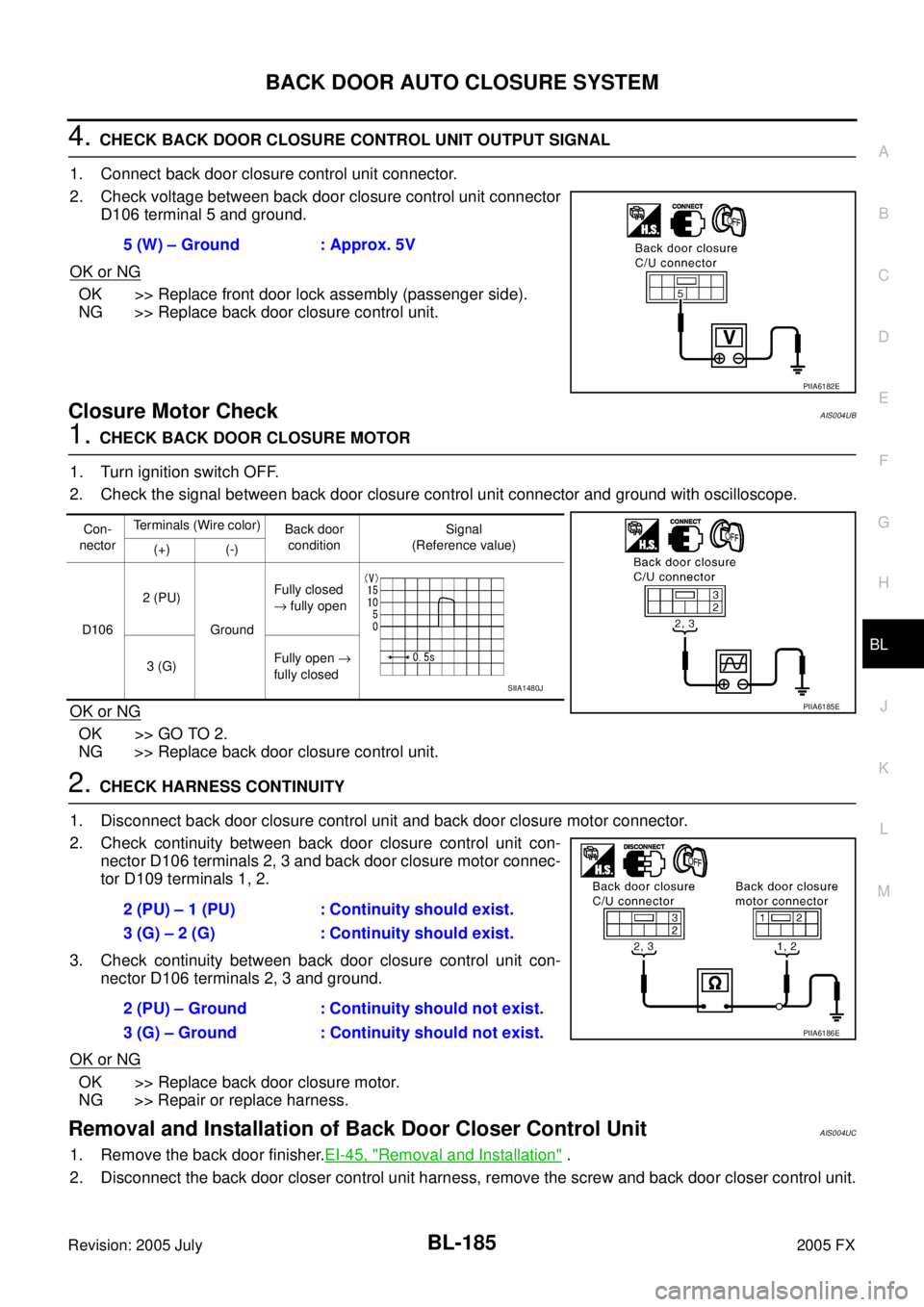
4. CHECK BACK DOOR CLOSURE CONTROL UNIT OUTPUT SIGNAL
1. Connect back door closure control unit connector.
2. Check voltage between back door closure control unit connector D106 terminal 5 and ground.
OK or NG
OK >> Replace front door lock assembly (passenger side).
NG >> Replace back door closure control unit.
Closure Motor CheckAIS004UB
1. CHECK BACK DOOR CLOSURE MOTOR
1. Turn ignition switch OFF.
2. Check the signal between back door closure control unit connector and ground with oscilloscope.
OK or NG
OK >> GO TO 2.
NG >> Replace back door closure control unit.
2. CHECK HARNESS CONTINUITY
1. Disconnect back door closure control unit and back door closure motor connector.
2. Check continuity between back door closure control unit con- nector D106 terminals 2, 3 and back door closure motor connec-
tor D109 terminals 1, 2.
3. Check continuity between back door closure control unit con- nector D106 terminals 2, 3 and ground.
OK or NG
OK >> Replace back door closure motor.
NG >> Repair or replace harness.
Removal and Installation of Back Door Closer Control UnitAIS004UC
1. Remove the back door finisher. EI-45, "Removal and Installation" .
2. Disconnect the back door closer control unit harness, remove the screw and back door closer control unit. 5 (W) – Ground : Approx. 5V
PIIA6182E
Con-
nector Terminals (Wire color)
Back door
condition Signal
(Reference value)
(+) (-)
D106 2 (PU)
Ground Fully closed
→ fully open
3 (G) Fully open
→
fully closed
PIIA6185E
SIIA1480J
2 (PU) – 1 (PU) : Continuity should exist.
3 (G) – 2 (G) : Continuity should exist.
2 (PU) – Ground : Continuity should not exist.
3 (G) – Ground : Continuity should not exist.
PIIA6186E
Page 1021 of 4731
BL-206
VEHICLE SECURITY (THEFT WARNING) SYSTEM
Revision: 2005 July 2005 FX
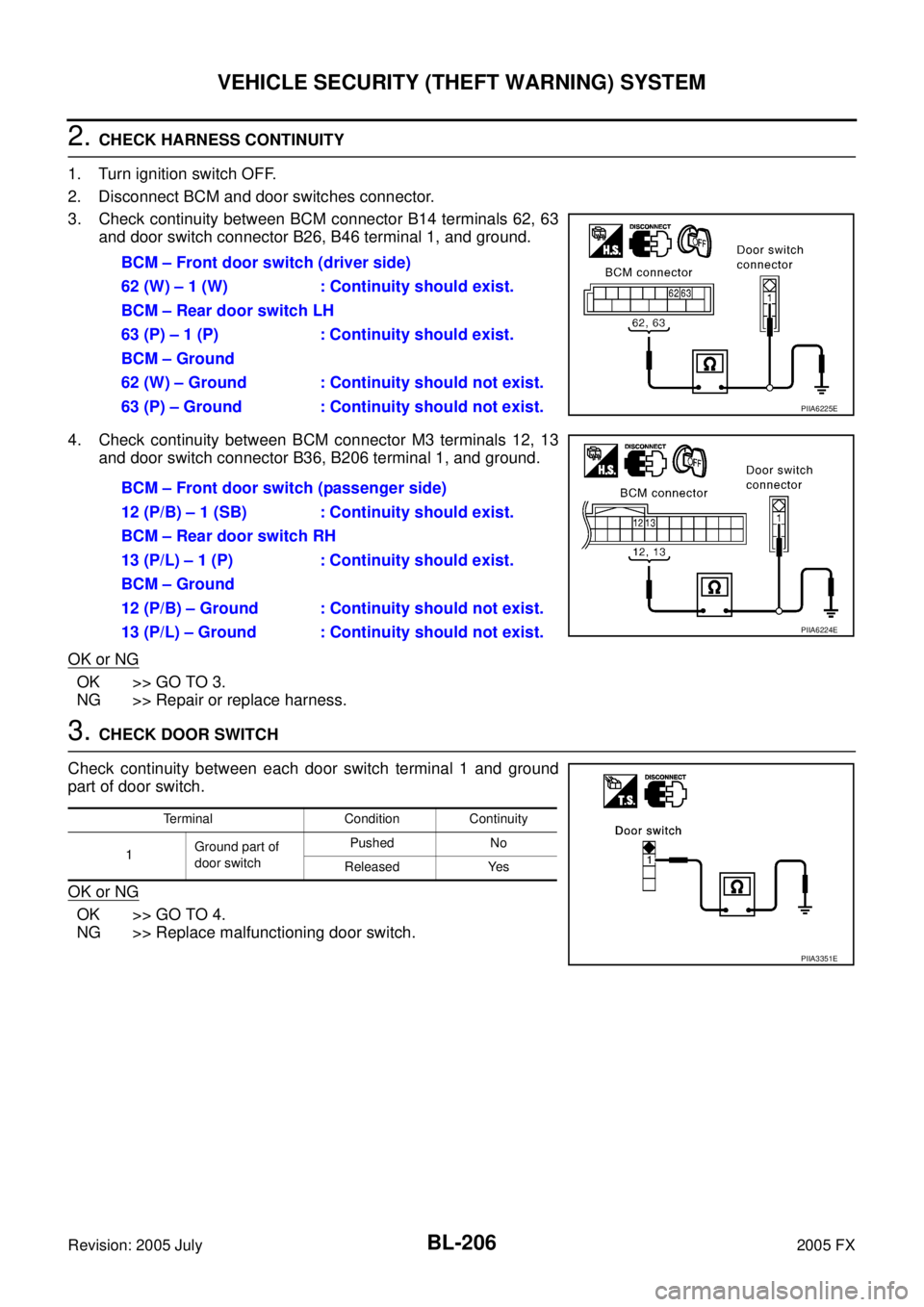
2. CHECK HARNESS CONTINUITY
1. Turn ignition switch OFF.
2. Disconnect BCM and door switches connector.
3. Check continuity between BCM connector B14 terminals 62, 63 and door switch connector B26, B46 terminal 1, and ground.
4. Check continuity between BCM connector M3 terminals 12, 13 and door switch connector B36, B206 terminal 1, and ground.
OK or NG
OK >> GO TO 3.
NG >> Repair or replace harness.
3. CHECK DOOR SWITCH
Check continuity between each door switch terminal 1 and ground
part of door switch.
OK or NG
OK >> GO TO 4.
NG >> Replace malfunctioning door switch. BCM – Front door switch (driver side)
62 (W) – 1 (W) : Continuity should exist.
BCM – Rear door switch LH
63 (P) – 1 (P) : Continuity should exist.
BCM – Ground
62 (W) – Ground : Continuity should not exist.
63 (P) – Ground : Continuity should not exist.
PIIA6225E
BCM – Front door switch (passenger side)
12 (P/B) – 1 (SB) : Continuity should exist.
BCM – Rear door switch RH
13 (P/L) – 1 (P) : Continuity should exist.
BCM – Ground
12 (P/B) – Ground : Continuity should not exist.
13 (P/L) – Ground : Continuity should not exist.
PIIA6224E
Terminal Condition Continuity
1 Ground part of
door switch Pushed No
Released Yes
PIIA3351E
Page 1024 of 4731
VEHICLE SECURITY (THEFT WARNING) SYSTEM BL-209
C
D E
F
G H
J
K L
M A
B
BL
Revision: 2005 July 2005 FX
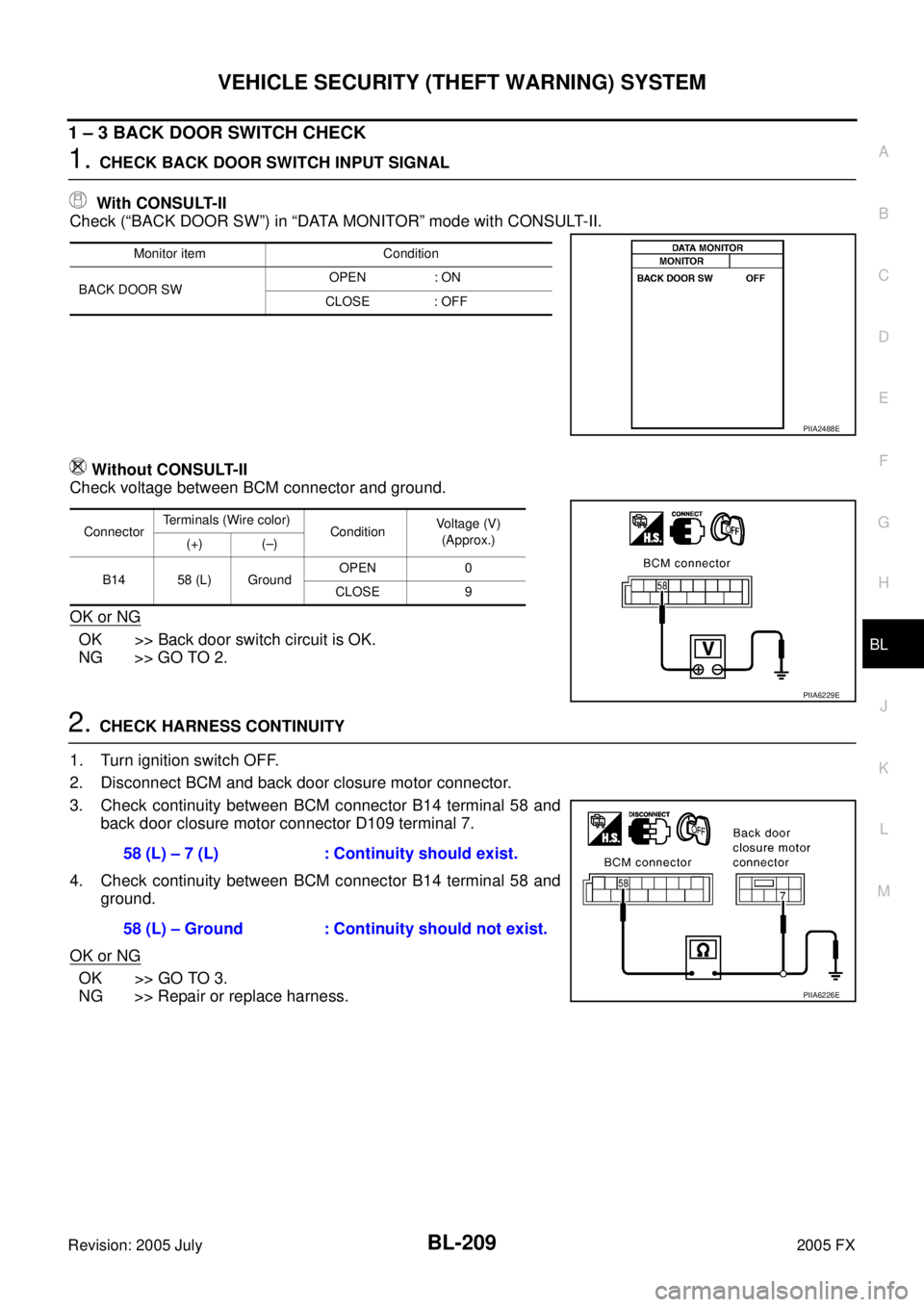
1 – 3 BACK DOOR SWITCH CHECK
1. CHECK BACK DOOR SWITCH INPUT SIGNAL
With CONSULT-II
Check (“BACK DOOR SW”) in “DATA MONITOR” mode with CONSULT-II.
Without CONSULT-II
Check voltage between BCM connector and ground.
OK or NG
OK >> Back door switch circuit is OK.
NG >> GO TO 2.
2. CHECK HARNESS CONTINUITY
1. Turn ignition switch OFF.
2. Disconnect BCM and back door closure motor connector.
3. Check continuity between BCM connector B14 terminal 58 and back door closure motor connector D109 terminal 7.
4. Check continuity between BCM connector B14 terminal 58 and ground.
OK or NG
OK >> GO TO 3.
NG >> Repair or replace harness.
Monitor item Condition
BACK DOOR SW OPEN : ON
CLOSE : OFF
PIIA2488E
Connector Terminals (Wire color)
Condition Voltage (V)
(Approx.)
(+) (–)
B14 58 (L) Ground OPEN 0
CLOSE 9
PIIA6229E
58 (L) – 7 (L) : Continuity should exist.
58 (L) – Ground : Continuity should not exist.
PIIA6226E
Page 1025 of 4731
BL-210
VEHICLE SECURITY (THEFT WARNING) SYSTEM
Revision: 2005 July 2005 FX
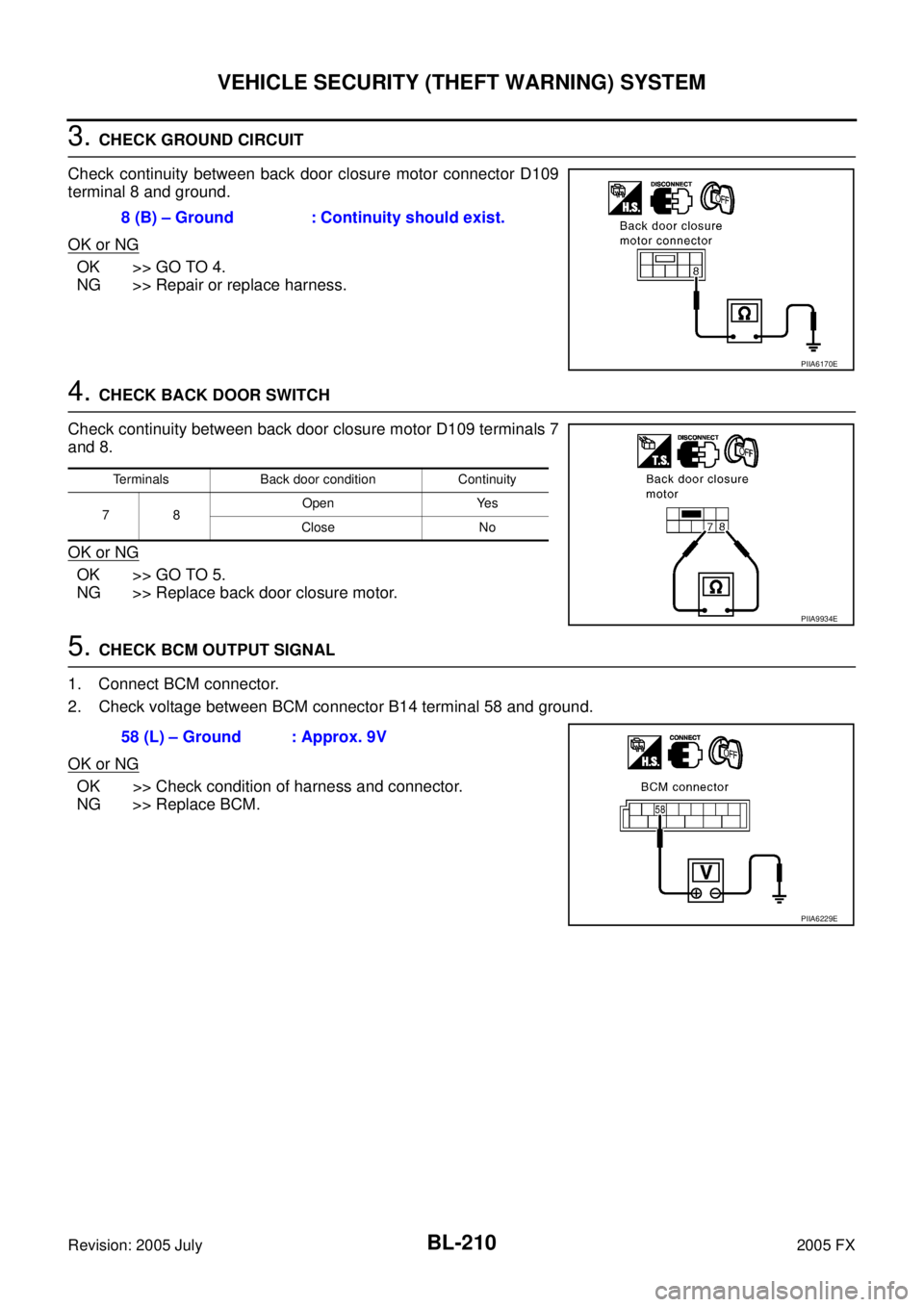
3. CHECK GROUND CIRCUIT
Check continuity between back door closure motor connector D109
terminal 8 and ground.
OK or NG
OK >> GO TO 4.
NG >> Repair or replace harness.
4. CHECK BACK DOOR SWITCH
Check continuity between back door closure motor D109 terminals 7
and 8.
OK or NG
OK >> GO TO 5.
NG >> Replace back door closure motor.
5. CHECK BCM OUTPUT SIGNAL
1. Connect BCM connector.
2. Check voltage between BCM connector B14 terminal 58 and ground.
OK or NG
OK >> Check condition of harness and connector.
NG >> Replace BCM. 8 (B) – Ground : Continuity should exist.
PIIA6170E
Terminals Back door condition Continuity
78 Open Yes
Close No
PIIA9934E
58 (L) – Ground : Approx. 9V
PIIA6229E
Page 1026 of 4731
VEHICLE SECURITY (THEFT WARNING) SYSTEM BL-211
C
D E
F
G H
J
K L
M A
B
BL
Revision: 2005 July 2005 FX
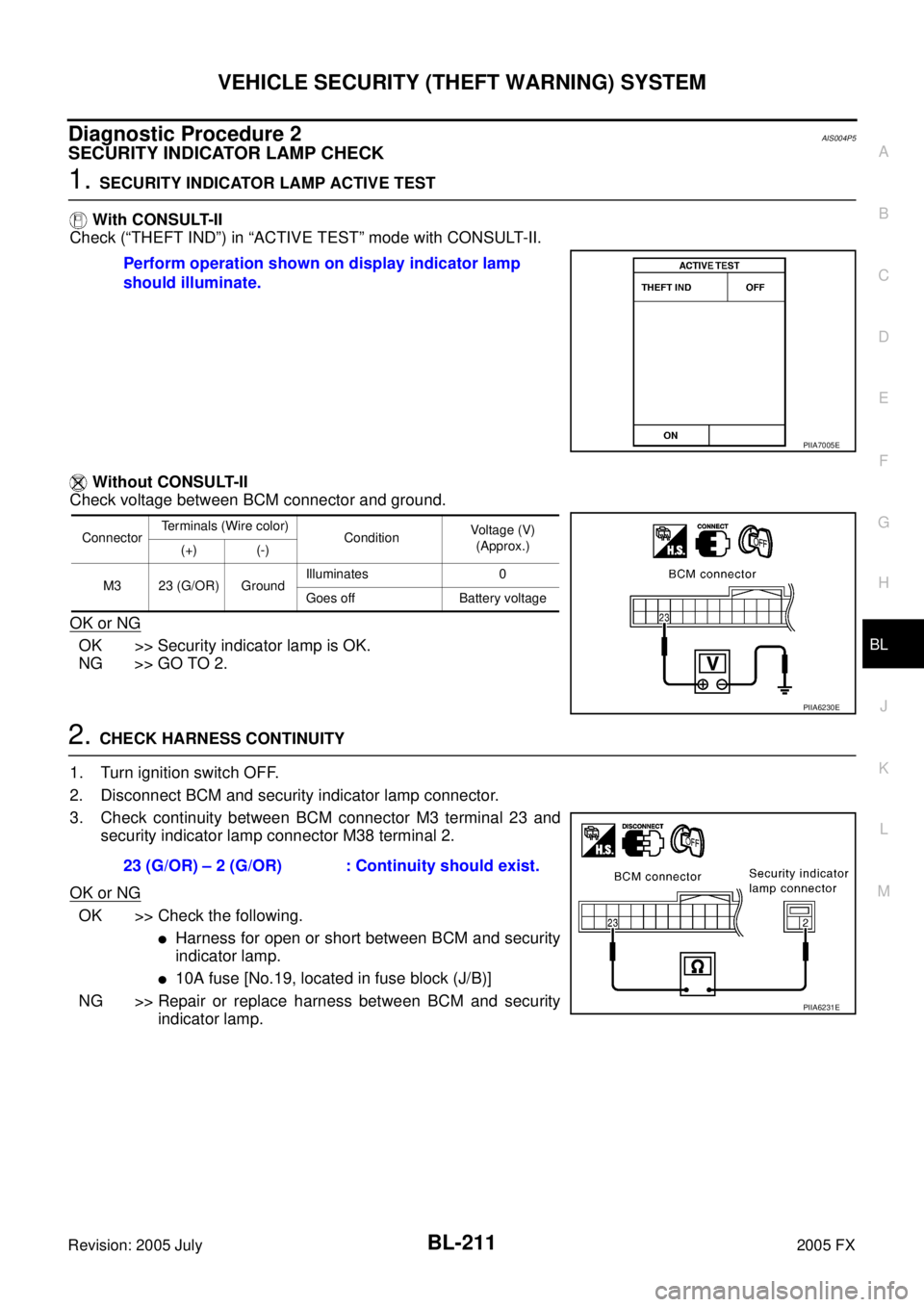
Diagnostic Procedure 2AIS004P5
SECURITY INDICATOR LAMP CHECK
1. SECURITY INDICATOR LAMP ACTIVE TEST
With CONSULT-II
Check (“THEFT IND”) in “ACTIVE TEST” mode with CONSULT-II.
Without CONSULT-II
Check voltage between BCM connector and ground.
OK or NG
OK >> Security indicator lamp is OK.
NG >> GO TO 2.
2. CHECK HARNESS CONTINUITY
1. Turn ignition switch OFF.
2. Disconnect BCM and security indicator lamp connector.
3. Check continuity between BCM connector M3 terminal 23 and security indicator lamp connector M38 terminal 2.
OK or NG
OK >> Check the following.
�Harness for open or short between BCM and security
indicator lamp.
�10A fuse [No.19, located in fuse block (J/B)]
NG >> Repair or replace harness between BCM and security indicator lamp.
Perform operation shown on display indicator lamp
should illuminate.
PIIA7005E
Connector Terminals (Wire color)
Condition Voltage (V)
(Approx.)
(+) (-)
M3 23 (G/OR) Ground Illuminates 0
Goes off Battery voltage
PIIA6230E
23 (G/OR) – 2 (G/OR) : Continuity should exist.
PIIA6231E
Page 1043 of 4731
BL-228
IVIS (INFINITI VEHICLE IMMOBILIZER SYSTEM-NATS)
Revision: 2005 July 2005 FX
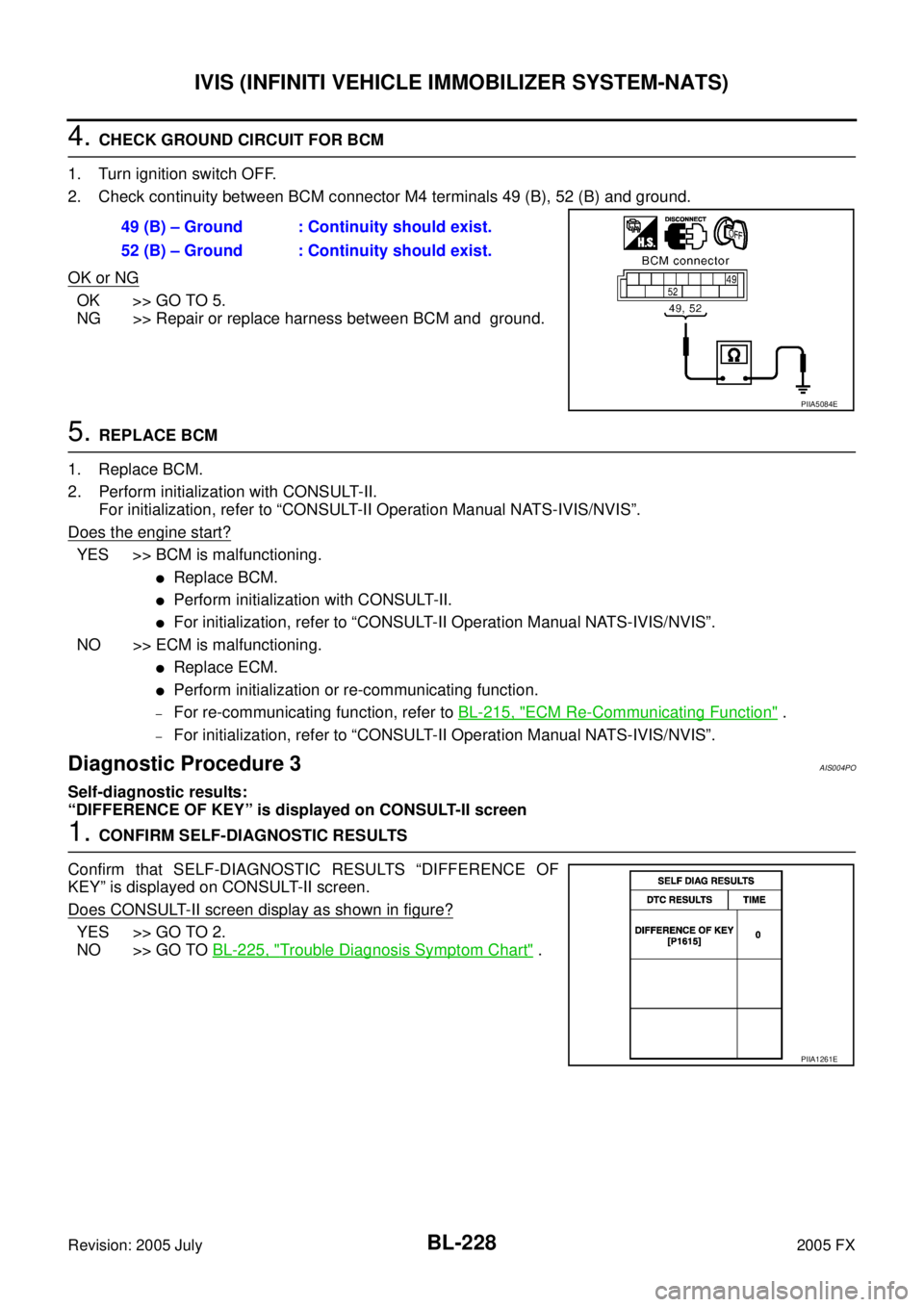
4. CHECK GROUND CIRCUIT FOR BCM
1. Turn ignition switch OFF.
2. Check continuity between BCM connector M4 terminals 49 (B), 52 (B) and ground.
OK or NG
OK >> GO TO 5.
NG >> Repair or replace harness between BCM and ground.
5. REPLACE BCM
1. Replace BCM.
2. Perform initialization with CONSULT-II. For initialization, refer to “CONSULT-II Operation Manual NATS-IVIS/NVIS”.
Does the engine start?
YES >> BCM is malfunctioning.
�Replace BCM.
�Perform initialization with CONSULT-II.
�For initialization, refer to “CONSULT-II Operation Manual NATS-IVIS/NVIS”.
NO >> ECM is malfunctioning.
�Replace ECM.
�Perform initialization or re-communicating function.
–For re-communicating function, refer to BL-215, "ECM Re-Communicating Function" .
–For initialization, refer to “CONSULT-II Operation Manual NATS-IVIS/NVIS”.
Diagnostic Procedure 3AIS004PO
Self-diagnostic results:
“DIFFERENCE OF KEY” is displayed on CONSULT-II screen
1. CONFIRM SELF-DIAGNOSTIC RESULTS
Confirm that SELF-DIAGNOSTIC RESULTS “DIFFERENCE OF
KEY” is displayed on CONSULT-II screen.
Does CONSULT-II screen display as shown in figure?
YES >> GO TO 2.
NO >> GO TO BL-225, "
Trouble Diagnosis Symptom Chart" .
49 (B) – Ground : Continuity should exist.
52 (B) – Ground : Continuity should exist.
PIIA5084E
PIIA1261E