Page 100 of 273
Turn on the f ront and second row
individual map lights by pushing the
lens. Push the lens again to turn it
off. You can also operate these lights
with the light control switch (see
page ).
The light in the tailgate has an on-of f
switch to control if the light comes
on when the tailgate is opened.
The courtesy lights in the f ront
doors and around the ignition switch
come on when you open any door.
Af ter you close the door, the ignition
switch light stays on f or several
seconds.97
Lights
Individual Map L ights
Tailgate Light
Individual Interior L ights
98
Page 107 of 273
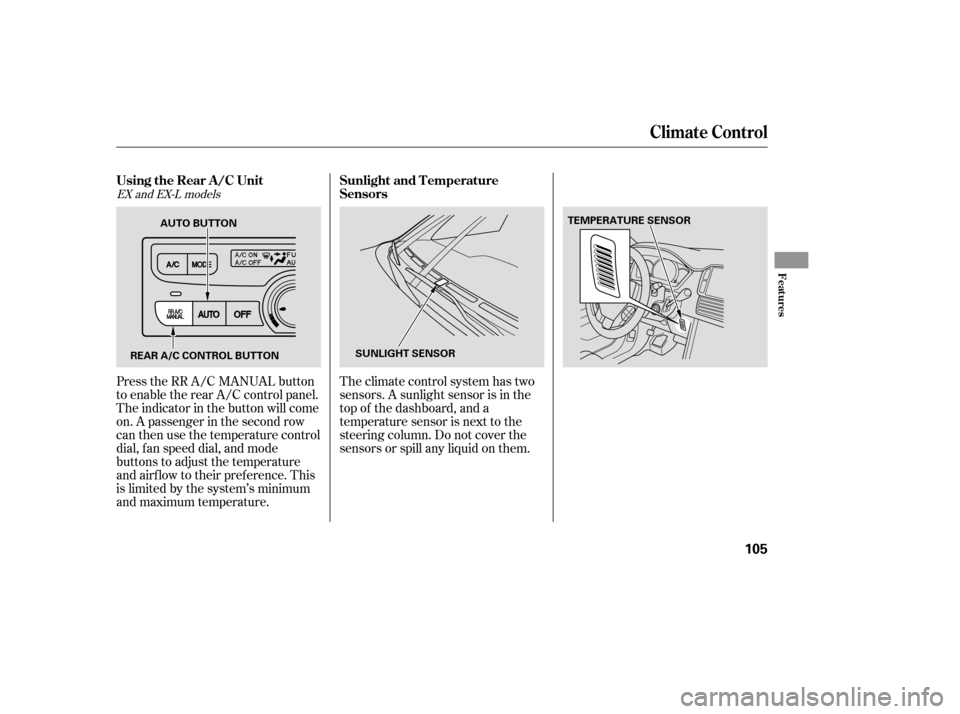
Theclimatecontrolsystemhastwo
sensors. A sunlight sensor is in the
top of the dashboard, and a
temperature sensor is next to the
steering column. Do not cover the
sensors or spill any liquid on them.
Press the RR A/C MANUAL button
to enable the rear A/C control panel.
The indicator in the button will come
on. A passenger in the second row
can then use the temperature control
dial, f an speed dial, and mode
buttons to adjust the temperature
and airflow to their preference. This
is limited by the system’s minimum
and maximum temperature.
EX and EX-L models
Climat e Cont rol
Using the Rear A /C Unit
Sunlight and T emperature
Sensors
Features
105
REAR A/C CONTROL BUTTON SUNLIGHT SENSORTEMPERATURE SENSOR
AUTO BUTTON
Page 110 of 273

�µ�µ
�µ
If you are
traveling far from home and can no
longer receive your preset stations,
you can use the auto select feature to
find stations in the local area. Use the TRE/BAS
modes to adjust the tone to your
liking.
You can use the instrument panel
brightness control knob to adjust the
illumination of the audio system (see
page ). The audio system
illuminates when the parking lights
are on, even if the radio is of f .
These two
modes adjust the strength of the
sound coming f rom each speaker.
BAL adjusts the side-to-side strength,
while FAD adjusts the f ront-to-back
strength. Eachmodeisshowninthedisplayas
it changes. Turn the MODE knob to
adjust the setting to your liking.
When the level reaches the center,
you will see ‘‘C’’ in the display. The
system will automatically return the
display to the selected audio mode
about f ive seconds af ter you stop
adjusting a mode. Press the MODE knob repeatedly to
display the Bass (BAS), Treble
(TRE), Balance (BAL), and Fader
(FAD) settings. press the
A. SEL button. This restores the
presets you originally set.
Press the A. SEL button. ‘‘A.SEL’’
f lashes in the display, and the system
goes into scan mode f or several
seconds. It stores the f requencies of
six AM, and twelve FM stations in
the preset buttons.
You will see a ‘‘0’’ displayed af ter
pressing a preset button if Auto
Select cannot f ind a strong station
f or every preset button.
If you do not like the stations Auto
Select has stored, you can store
other f requencies on the preset
buttons. Use the TUNE, SEEK, or
SCAN f unction to f ind stations, then
store them in the preset buttons as
described previously. 72To turn of f Auto Select,
Playing the Radio
AUTO SELECT
A udio System L ighting Treble/Bass
Balance/Fader Adjusting the Sound
108
Page 118 of 273
When using CD-R discs, use only
high quality CDs labeled f or audio
use.
When recording a CD-R, the
recording must be closed f or it to
be used by the system.
CD-RW discs will not work in this
unit.
Play only standard round CDs.
Odd-shaped CDs may jam in the
driveorcauseotherproblems.
Handle your CDs properly to
prevent damage and skipping. See
this page.When a CD is not being played, store
it in its case to protect it f rom dust
and other contamination. To prevent
warpage, keep CDs out of direct
sunlight and extreme heat.
To clean a CD, use a clean sof t cloth.
Wipe across the CD f rom the center
to the outside edge.
AnewCDmayberoughonthe
inner and outer edges. The small
plastic pieces causing this roughness
can f lake of f and f all on the re-
cording surf ace of the CD, causing
skipping or other problems. Remove
these pieces by rubbing the inner
and outer edges with the side of a
pencil or pen.
Never try to insert f oreign objects in
the CD player or the magazine.
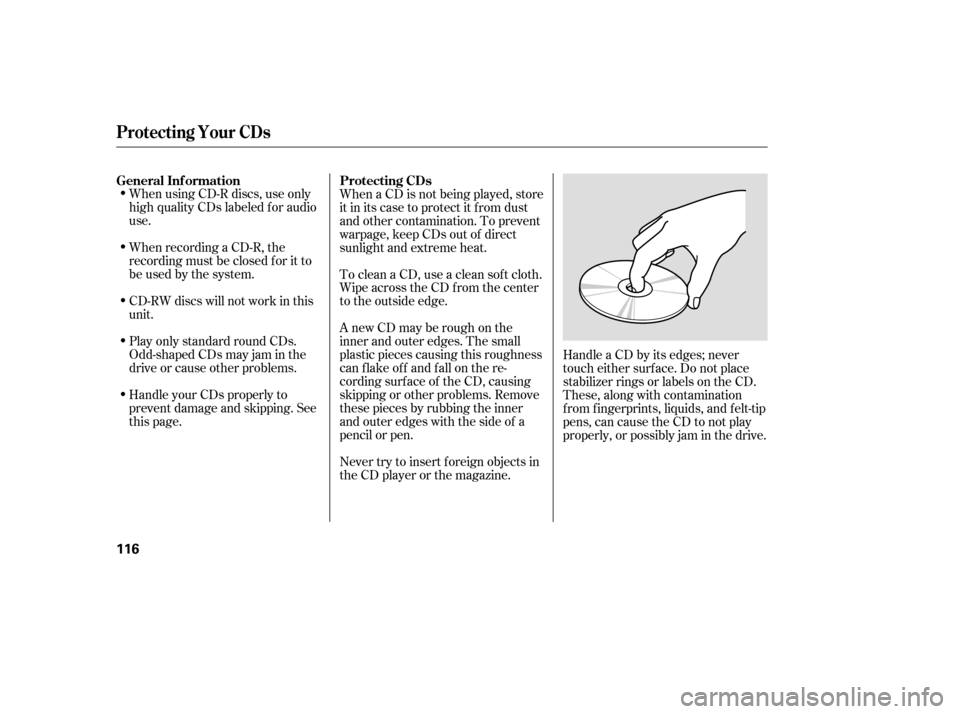
Handle a CD by its edges; never
touch either surf ace. Do not place
stabilizer rings or labels on the CD.
These, along with contamination
f rom f ingerprints, liquids, and f elt-tip
pens, can cause the CD to not play
properly, or possibly jam in the drive.
General Inf ormation
Protecting CDs
Protecting Your CDs
116
Page 123 of 273

�µPress the RPT button
to continuously play a song or
passage. You will see RPT displayed.
The track will repeat until you press
the RPT button again.
The SKIP and REPEAT
f unctions use silent periods on the
tape to find the end of a song or
passage. These f eatures may not
work if there is almost no gap
between selections, a high noise
level, or a silent period in the middle
of a selection. Thetapeplayerpicksupdirtand
oxides f rom the tape. This
contamination builds up over time
and causes the sound quality to
degrade. To prevent this, you should
clean the player af ter every 30 hours
of use.
If you do not clean the tape player
regularly, it may eventually become
impossible to remove the
contamination with a normal
cleaning kit. Your dealer has a
cleaning kit available.
Use 100-minute or shorter tapes.
Tapes longer than that may break or
jam the drive.If the tape is loose, tighten it by
turning the hub with a pencil or your
f inger. If the label is peeling of f ,
remove it or it could cause the tape
to jam in the player. Never try to
insert a warped or damaged tape in
the player.
Store tapes in their cases to protect
them f rom dust and moisture. Never
place tapes where they will be
exposed to direct sunlight, high heat,
or high humidity. If a tape is exposed
to extreme heat or cold, let it reach a
moderate temperature bef ore
inserting it into the player.
Never try to insert f oreign objects
into the tape player.
REPEAT
Caring f or the Tape and Player
Playing a T ape
Features
121
NOTE:
Page 137 of 273
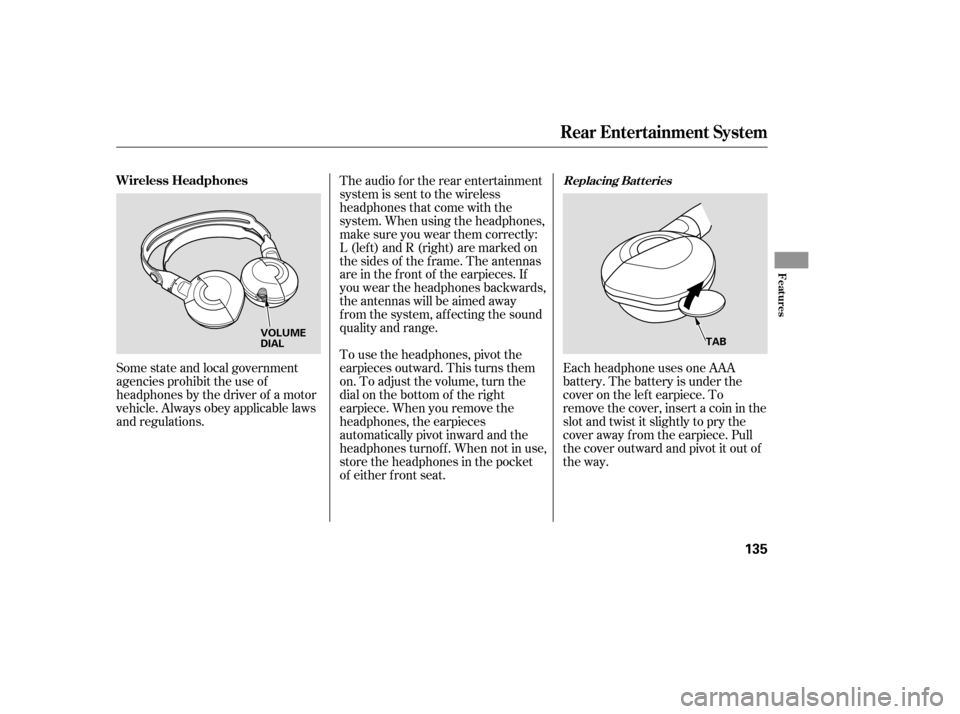
Each headphone uses one AAA
battery. The battery is under the
cover on the lef t earpiece. To
remove the cover, insert a coin in the
slot and twist it slightly to pry the
cover away f rom the earpiece. Pull
the cover outward and pivot it out of
the way.
Some state and local government
agencies prohibit the use of
headphones by the driver of a motor
vehicle. Always obey applicable laws
and regulations. The audio f or the rear entertainment
system is sent to the wireless
headphones that come with the
system. When using the headphones,
make sure you wear them correctly:
L (lef t) and R (right) are marked on
the sides of the frame. The antennas
are in the f ront of the earpieces. If
you wear the headphones backwards,
the antennas will be aimed away
from the system, affecting the sound
quality and range.
To use the headphones, pivot the
earpieces outward. This turns them
on. To adjust the volume, turn the
dial on the bottom of the right
earpiece. When you remove the
headphones, the earpieces
automatically pivot inward and the
headphones turnof f . When not in use,
store the headphones in the pocket
of either f ront seat.
Replacing Bat t eriesWireless Headphones
Rear Entertainment System
Features
135
VOLUME
DIAL
TAB
Page 139 of 273

The security system helps to protect
your vehicle and valuables f rom thef t.
The horn sounds and a combination
of headlights, parking lights, side
marker lights, and taillights f lash if
someone attempts to break into your
vehicle. This alarm continues for two
minutes, then the system resets. To
reset an alarm system bef ore the two
minutes have elapsed, unlock the
driver’s f ront door with the key or
the remote transmitter.Once the security system is set,
opening any door without using the
key or the remote transmitter, or the
hood, will cause it to alarm. It also
alarms if the radio is removed from
the dashboard or the wiring is cut.The security system will not set if
the hood, the tailgate, or any door is
not f ully closed. If the system will not
set, check the Door and Tailgate
Open Monitor on the instrument
panel (see page ) to see if the
doors and the tailgate are f ully
closed. Since it is not part of the
monitor display, manually check the
hood.
Do not attempt to alter this system
or add other devices to it.
The security system automatically
sets 15 seconds after you lock the
doors, hood, and the tailgate. For the
system to activate, you must lock the
doors f rom the outside with the key,
lock tab, door lock switch, or remote
transmitter. The security system
indicator next to the driver’s door
lock starts blinking immediately to
show you the system is setting itself . 62
On EX and EX-L models
Security System
Features
137
SECURITY SYSTEM INDICATOR
Page 141 of 273

You can increase the set cruising
speed in any of these ways:Press and hold the RESUME/
ACCEL button. When you reach
the desired cruising speed, release
the button.
Push on the accelerator pedal.
Accelerate to the desired cruising
speed and press the SET/DECEL
button.
You can decrease the set cruising
speed in any of these ways: Press and hold the SET/DECEL
button. Release the button when
you reach the desired speed. To slow down in very small
amounts, tap the SET/DECEL
button. Each time you do this,
your vehicle will slow down about
1 mph (1.6 km/h).
Tap the brake pedal lightly with
your f oot. The CRUISE
CONTROL indicator on the
instrument panel will go out.
When the vehicle slows to the
desired speed, press the SET/
DECEL button.
Even with the cruise control turned
on, you can still use the accelerator
pedal to speed up f or passing. Af ter
completing the pass, take your foot
of f the accelerator pedal. The vehicle
will return to the set cruising speed.
Resting your f oot on the brake pedal
will cause cruise control to cancel. Youcancancelthecruisecontrolin
any of these ways:
Tap the brake pedal.
Push the CANCEL button on the
steering wheel.
Pushthecruisecontrolmaster
button.
To increase the speed in very
small amounts, tap the RES/
ACCEL button. Each time you do
this, your vehicle will speed up
about 1 mph (1.6 km/h). When you push the CANCEL button
or tap on the brake pedal, the system
will remember the previously set
cruising speed. To return to that
speed, accelerate to above 25 mph
(40 km/h) and then press and
release the RES/ACCEL button. The
CRUISE CONTROL indicator comes
on. The vehicle will accelerate to the
same cruising speed as bef ore.
Pressingthecruisecontrolmaster
button turns the system off and
erases the previous cruising speed.
Cruise Control
Changing the Set Speed
Cancelling the Cruise Control
Resuming the Set Speed
Features
139