2005 HONDA PILOT instrument panel
[x] Cancel search: instrument panelPage 139 of 273

The security system helps to protect
your vehicle and valuables f rom thef t.
The horn sounds and a combination
of headlights, parking lights, side
marker lights, and taillights f lash if
someone attempts to break into your
vehicle. This alarm continues for two
minutes, then the system resets. To
reset an alarm system bef ore the two
minutes have elapsed, unlock the
driver’s f ront door with the key or
the remote transmitter.Once the security system is set,
opening any door without using the
key or the remote transmitter, or the
hood, will cause it to alarm. It also
alarms if the radio is removed from
the dashboard or the wiring is cut.The security system will not set if
the hood, the tailgate, or any door is
not f ully closed. If the system will not
set, check the Door and Tailgate
Open Monitor on the instrument
panel (see page ) to see if the
doors and the tailgate are f ully
closed. Since it is not part of the
monitor display, manually check the
hood.
Do not attempt to alter this system
or add other devices to it.
The security system automatically
sets 15 seconds after you lock the
doors, hood, and the tailgate. For the
system to activate, you must lock the
doors f rom the outside with the key,
lock tab, door lock switch, or remote
transmitter. The security system
indicator next to the driver’s door
lock starts blinking immediately to
show you the system is setting itself . 62
On EX and EX-L models
Security System
Features
137
SECURITY SYSTEM INDICATOR
Page 140 of 273
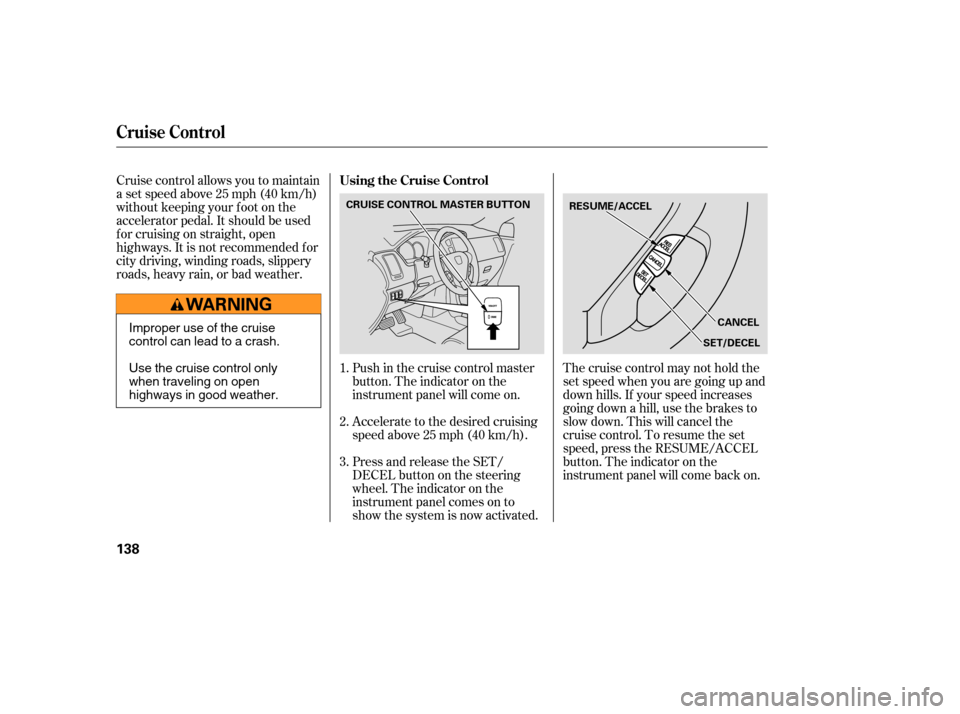
Cruise control allows you to maintain
asetspeedabove25mph(40km/h)
without keeping your f oot on the
accelerator pedal. It should be used
f or cruising on straight, open
highways. It is not recommended f or
city driving, winding roads, slippery
roads, heavy rain, or bad weather.Accelerate to the desired cruising
speedabove25mph(40km/h).
Press and release the SET/
DECELbuttononthesteering
wheel. The indicator on the
instrument panel comes on to
show the system is now activated.The cruise control may not hold the
set speed when you are going up and
down hills. If your speed increases
going down a hill, use the brakes to
slow down. This will cancel the
cruise control. To resume the set
speed, press the RESUME/ACCEL
button. The indicator on the
instrument panel will come back on.
Push in the cruise control master
button. The indicator on the
instrument panel will come on.
1.
2.
3.
Cruise Control
Using the Cruise Control
138
RESUME/ACCEL
CANCEL
SET/DECEL
CRUISE CONTROL MASTER BUTTON
Improper use of the cruise
control can lead to a crash.
Use the cruise control only
when traveling on open
highways in good weather.
Page 141 of 273

You can increase the set cruising
speed in any of these ways:Press and hold the RESUME/
ACCEL button. When you reach
the desired cruising speed, release
the button.
Push on the accelerator pedal.
Accelerate to the desired cruising
speed and press the SET/DECEL
button.
You can decrease the set cruising
speed in any of these ways: Press and hold the SET/DECEL
button. Release the button when
you reach the desired speed. To slow down in very small
amounts, tap the SET/DECEL
button. Each time you do this,
your vehicle will slow down about
1 mph (1.6 km/h).
Tap the brake pedal lightly with
your f oot. The CRUISE
CONTROL indicator on the
instrument panel will go out.
When the vehicle slows to the
desired speed, press the SET/
DECEL button.
Even with the cruise control turned
on, you can still use the accelerator
pedal to speed up f or passing. Af ter
completing the pass, take your foot
of f the accelerator pedal. The vehicle
will return to the set cruising speed.
Resting your f oot on the brake pedal
will cause cruise control to cancel. Youcancancelthecruisecontrolin
any of these ways:
Tap the brake pedal.
Push the CANCEL button on the
steering wheel.
Pushthecruisecontrolmaster
button.
To increase the speed in very
small amounts, tap the RES/
ACCEL button. Each time you do
this, your vehicle will speed up
about 1 mph (1.6 km/h). When you push the CANCEL button
or tap on the brake pedal, the system
will remember the previously set
cruising speed. To return to that
speed, accelerate to above 25 mph
(40 km/h) and then press and
release the RES/ACCEL button. The
CRUISE CONTROL indicator comes
on. The vehicle will accelerate to the
same cruising speed as bef ore.
Pressingthecruisecontrolmaster
button turns the system off and
erases the previous cruising speed.
Cruise Control
Changing the Set Speed
Cancelling the Cruise Control
Resuming the Set Speed
Features
139
Page 148 of 273

Help assure your vehicle’s f uture
reliability and perf ormance by paying
extra attention to how you drive
during the f irst 600 miles (1,000 km).
During this period:Avoid full-throttle starts and rapid
acceleration.
Do not change the oil until the
scheduled maintenance time.
Avoidhardbrakingforthefirst
200 miles (300 km).
Do not tow a trailer.
You should also f ollow these
recommendations with an
overhauled or exchanged engine, or
when the brakes are replaced. We recommend using gasoline
containing detergent additives that
help prevent f uel system and engine
deposits.
In addition, in order to maintain good
perf ormance, f uel economy, and
emissions control, we strongly
recommend, in areas where it is
available, the use of gasoline that
does NOT contain manganese-based
f uel additives such as MMT.Use of gasoline with these additives
may adversely af f ect perf ormance,
and cause the Malfunction Indicator
Lamp on your instrument panel to
come on. If this happens, contact
your dealer f or service.
Some gasoline today is blended with
oxygenates such as ethanol or
MTBE. Your vehicle is designed to
operate on oxygenated gasoline
containing up to 10 percent ethanol
by volume and up to 15 percent
MTBE by volume. Do not use
gasoline containing methanol.
If you notice any undesirable
operating symptoms, try another
service station or switch to another
brand of gasoline.
For f urther important f uel-related
inf ormation, please ref er to your
.
Your vehicle is designed to operate
on unleaded gasoline with a pump
octane number of 86 or higher. Use
of a lower octane gasoline can cause
a persistent, heavy metallic rapping
noise that can lead to engine damage.
Premium f uel is recommended when
towing in certain conditions (see
page ).
180
Break-in Period, Fuel Recommendation
Break-in Period Fuel Recommendation
Quick Start Guide
146
Page 160 of 273

Your vehicle has a higher ground
clearance that allows you to travel
over bumps, obstacles, and rough
terrain. It also provides good
visibility so you can anticipate
problems earlier.
Because your vehicle rides higher
of f the ground, it has a high center
of gravity that can cause it to roll
over if you make abrupt turns. Utility
vehicles have a signif icantly higher
roll over rate than other types of
vehicles.
To prevent rollovers or loss of
control:Take corners at slower speeds
than you would with a passenger
vehicle.
Avoid sharp turns and abrupt
maneuvers whenever possible. Make sure the doors and the
tailgate are securely closed and
locked. Check the steering wheel
adjustment (see page ). Check the adjustment of the
inside and outside mirrors (see
page ). Check the seat adjustment (see
page ). Check that any items you may be
carrying are stored properly or
f astened down securely.
Visually check the tires. If a tire
looks low, use a gauge to check its
pressure. Make sure all windows, mirrors,
and outside lights are clean and
unobstructed. Remove f rost, snow,
or ice.
Youshoulddothefollowingchecks
and adjustments bef ore you drive
your vehicle. Do not carry heavy cargo on the
roof . Do not modif y your vehicle in any
way that would raise the center of
gravity.
Fasten your seat belt. Check that
your passengers have f astened
their seat belts (see page ).
When you start the engine, check
the gauges and indicators in the
instrument panel (see page ).
3.
2. 1. 4.
5.
6.
7.
8.
9.83
88 74
1557
See page f or additional driving of f -highway guidelines. 183
Driving Guidelines
Preparing to Drive
158
Page 162 of 273
If the malf unction indicator lamp
comes on along with the ‘‘D’’
indicator, there is a problem in the
automatic transmission control
system. Avoid rapid acceleration, and
have the transmission checked by
your dealer as soon as possible.
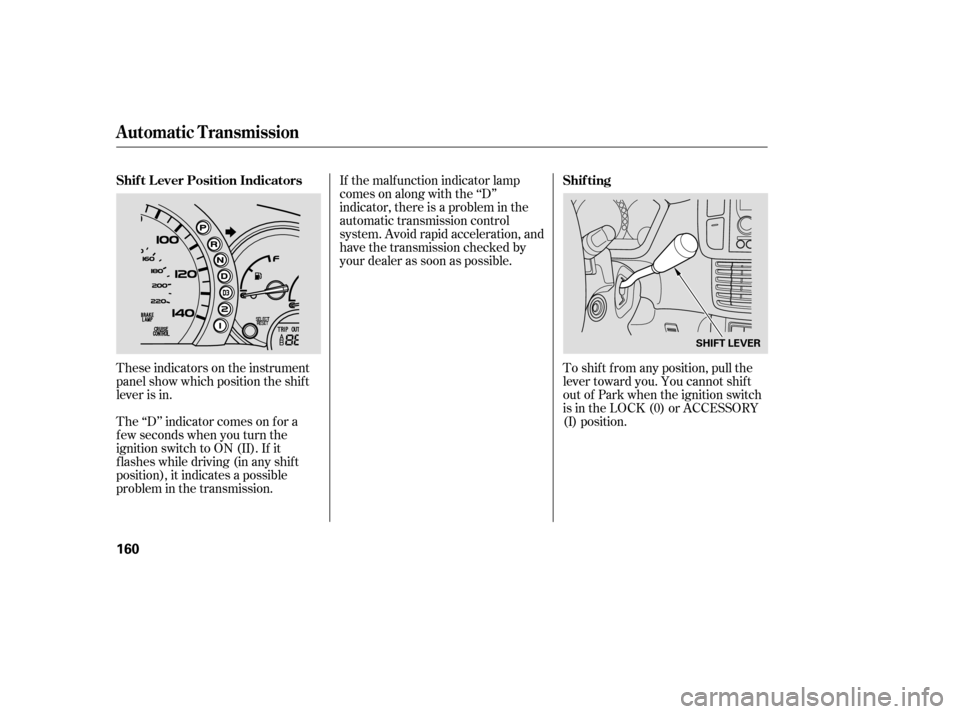
These indicators on the instrument
panel show which position the shif t
lever is in.
The ‘‘D’’ indicator comes on f or a
f ew seconds when you turn the
ignition switch to ON (II). If it
f lashes while driving (in any shif t
position), it indicates a possible
problem in the transmission. To shif t f rom any position, pull the
lever toward you. You cannot shif t
out of Park when the ignition switch
is in the LOCK (0) or ACCESSORY
(I) position.
Automatic Transmission
Shif t L ever Position Indicators
Shif ting
160
SHIFT LEVER
Page 268 of 273

.....................................
Heater, Seat .82
.....................
Heating and Cooling .100
.............
High Altitude, Starting at . 159
.................
High-Low Beam Switch . 71
..............
High-mount Brake Light . 211
HomeLink Universal ................................
Transceiver .140
.......................
Hood, Opening the .148
...
Identif ication Number, Vehicle . 244
Ignition ..............................................
Keys .75
...........................................
Switch .77
............
Timing Control System . 252
........................
Immobilizer System .75
...
Important Handling Inf ormation . iii
.........
Important Safety Precautions . 8
.........
Indicators, Instrument Panel . 57
...............................
Inf ant Restraint .39
......................................
Inf ant Seats .39
...................
Inf lation, Proper Tire . 216
...................................
Inside Mirror .88
.............................
Inspection, Tire .217 Installing a Child Seat
...........................................
LACH .43
..........
Tether Anchorage Points . 47
........................
Instrument Panel .5 ,57
........
Instrument Panel Brightness . 72
........................................
Introduction .i
..................................................
Keys .75
.................
Jacking up the Vehicle . 226
.......................................
Jack, Tire .225
................................
Jump Starting .230
.......................
Label, Certif ication .244
.................
Lane Change, Signaling . 71
........................
Lap/Shoulder Belts .20
...........
LATCH Anchorage System . 43
.........................................
Lights .71, 97
....................
Bulb Replacement .208
.......................................
Indicator .57 .........................................
Parking .71
..................................
Turn Signal .71
....................................
Load Limits .154
......
LOCK (Ignition Key Position) . 77
Locks .......
Anti-thef t Steering Column . 77
............................
Fuel Fill Door .147
....................................
Glove Box .96
....................
Lockout Prevention . 78
.................................
Power Door .78
........................
Low Coolant Level .149
.........................
Low Fuel Indicator .63
...
Low Oil Pressure Indicator . 58,234
.................................
Lower Anchor .43
...
Lubricant Specif ications Chart . 246
.........................................
Luggage .153
..................................
Maintenance .187
Owner’s Maintenance ...................................
Checks .191
.................................
Record .195-197
......................
Required Indicator .65
..........................................
Saf ety .188
.............................
Schedule .192-194
Index
I J
K
LM
IV