Page 67 of 273

For the f irst 6,000 miles (9,600 km)
af ter the Maintenance Required
Indicator is reset, it will come on f or
two seconds when you turn the
ignition switch to ON (II).
Ref er to the Maintenance Schedules
f or Normal and Severe Driving
Conditions on pages and . This indicator reminds you that it is
time to take your vehicle in for
scheduled maintenance. If you exceed 7,500 miles (12,000
km) without having the scheduled
maintenance perf ormed, this
indicator will remain on as a constant
reminder.Your dealer will reset this indicator
af ter completing the scheduled
maintenance. If this maintenance is
done by someone other than your
dealer, reset the indicator as f ollows.
Between 6,000 miles (9,600 km) and
7,500 miles (12,000 km) this
indicator will light f or 2 seconds
when you first turn the ignition
switch to ON (II), and then flash for
10 seconds. Turn of f the engine.
Press and hold the Select/Reset
button on the instrument panel,
then turn the ignition switch ON
(II).
Hold the button for about 10
seconds until the indicator goes
of f .
1.
2.
3.
192 193
Instrument Panel
Maintenance Required Indicator
Inst rument s and Cont rols
65
MAINTENANCE REQUIRED INDICATOR SELECT/RESET BUTTON
Page 73 of 273
�µ
�µ
�µ To turn on the high
beams, push the lever f orward until
you hear a click. The blue high beam
indicator will come on (see page ).
To turn of f the high beams, pull the
lever back. To flash the high beams,
pull the lever f arther back, and then
release it. The high beams remain on
until the lever is released.
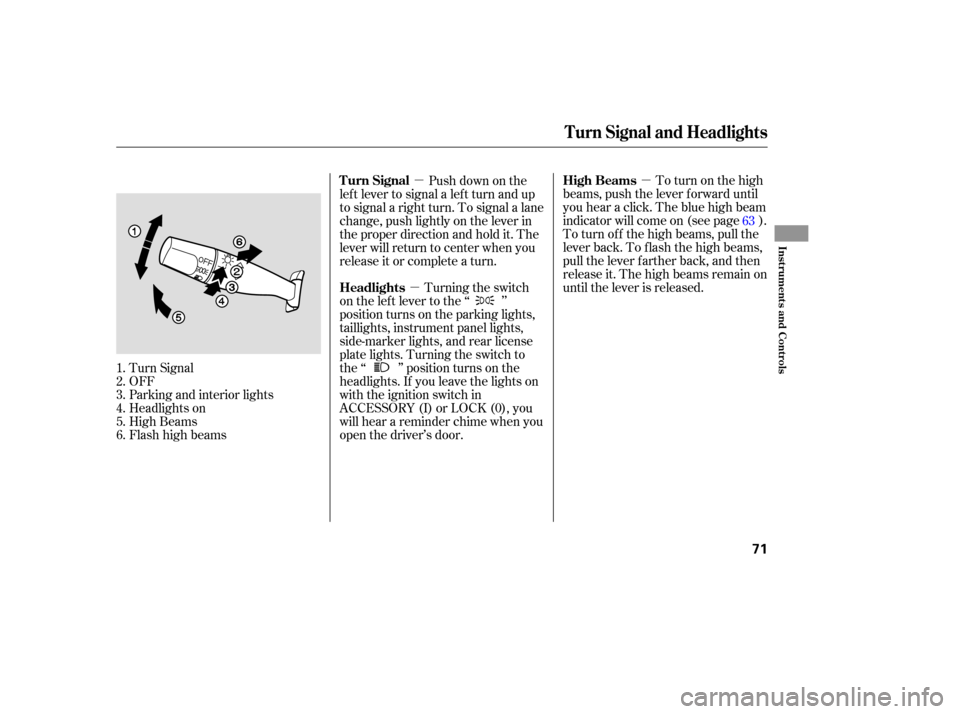
Turn Signal
OFF
Parking and interior lights
Headlights on
High Beams
Flashhighbeams Push down on the
lef t lever to signal a lef t turn and up
to signal a right turn. To signal a lane
change, push lightly on the lever in
the proper direction and hold it. The
lever will return to center when you
release it or complete a turn.
Turning the switch
on the lef t lever to the ‘‘ ’’
position turns on the parking lights,
taillights, instrument panel lights,
side-marker lights, and rear license
plate lights. Turning the switch to
the ‘‘ ’’ position turns on the
headlights. If you leave the lights on
with the ignition switch in
ACCESSORY (I) or LOCK (0), you
will hear a reminder chime when you
open the driver’s door.
1.
2.
3.
4.
5.
6. 63
Turn Signal and Headlights
High Beams
Turn Signal
Headlights
Inst rument s and Cont rols
71
Page 74 of 273

The knob on the instrument panel
controls the brightness of the instru-
ment panel lights. Turn the knob to
adjust the brightness.
The lights will turn on again when
you unlock or open the driver’s door.
With the headlight switch off, the
high beam headlights come on with
reduced brightness when you turn
the ignition switch to ON (II) and
release the parking brake. They
remain on until you turn the ignition
switch of f , even if you set the
parking brake.
The headlights revert to normal
operation when you turn the switch
to the ‘‘ ’’ position. If you unlock the door, but do not
open it within 15 seconds, the lights
will go off. With the driver’s door
open, you will hear a lights-on
reminder chime.
This f eature turns of f the headlights,
parking lights, taillights, side marker
lights, license plate lights, and
instrument panel lights within 15
seconds of removing the key f rom
the ignition switch and closing the
driver’s door.
This feature activates if you leave
the headlight switch in the ‘‘ ’’
or ‘‘ ’’ position, remove the key,
then open and close the driver’s door.
If you remove the key f rom the
ignition switch with the headlight
switch on, but do not open the door
and get out, the lights will turn of f
af ter 10 minutes.
On EX and EX-L model
Instrument Panel Brightness
Daytime Running L ights
(Canadian Models)
Automatic Lighting Of f Feature
Headlights, Instrument Panel Brightness
72
INSTRUMENT PANEL BRIGHTNESS
CONTROL KNOB
Page 75 of 273
Make sure the rear window is clear
and you have good visibility bef ore
starting to drive.
The def ogger wires on the inside of
the rear window can be accidentally
damaged. When cleaning the glass,
always wipe side-to-side.
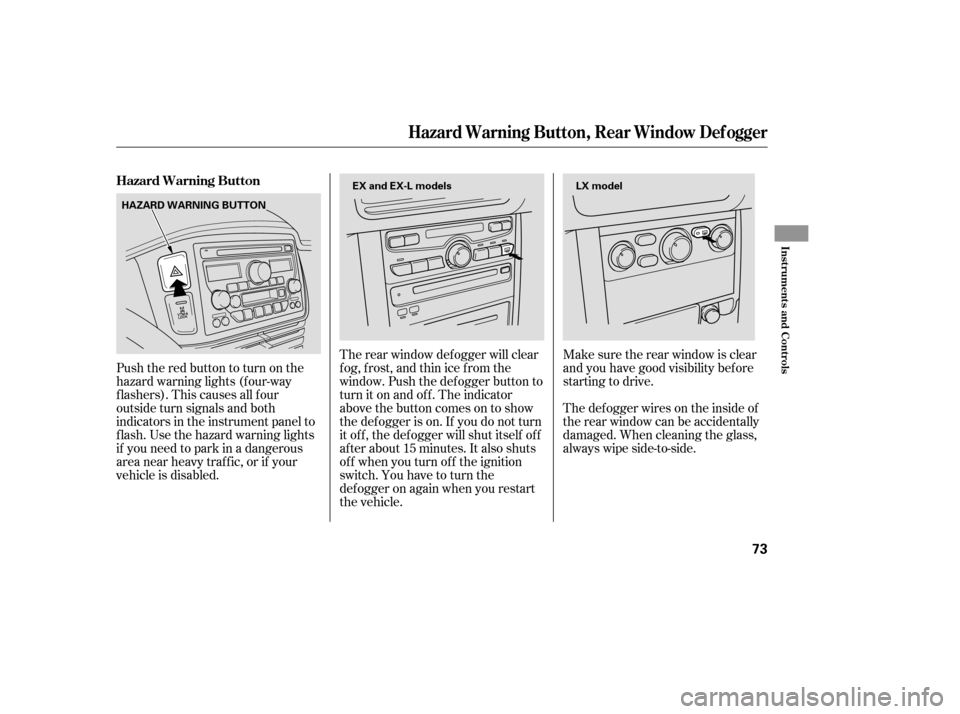
The rear window def ogger will clear
fog, frost, and thin ice from the
window. Push the def ogger button to
turn it on and off. The indicator
above the button comes on to show
the def ogger is on. If you do not turn
it of f , the def ogger will shut itself of f
af ter about 15 minutes. It also shuts
of f when you turn of f the ignition
switch. You have to turn the
def ogger on again when you restart
the vehicle.
Pushtheredbuttontoturnonthe
hazard warning lights (f our-way
flashers). This causes all four
outside turn signals and both
indicators in the instrument panel to
f lash. Use the hazard warning lights
if you need to park in a dangerous
area near heavy traffic, or if your
vehicle is disabled. Hazard Warning Button
Hazard Warning Button, Rear Window Def ogger
Inst rument s and Cont rols
73
LX model
HAZARD WARNING BUTTON EX and EX-L models
Page 76 of 273
Push the lever under the steering
column all the way down.
Move the steering wheel so it
points to your chest, not toward
your f ace. Make sure you can see
the instrument panel gauges and
indicators.Push the lever up to lock the
steering wheel in that position.
Make sure you have securely
locked the steering wheel in place
by trying to move it up and down.
Make any steering wheel adjustment
bef ore you start driving.
1.
2.3.
4.
Steering Wheel A djustment
74
Adjusting the steering wheel
position while driving may
cause you to lose control of the
vehicle and be seriously injured
inacrash.
Adjust the steering wheel only
when the vehicle is stopped.
Page 79 of 273

�µ�µ
�µ
�µ
The ignition switch has f our
positions: LOCK (0), ACCESSORY
(I), ON (II), and START (III). You can insert or
remove the key only in this position.
To turn the key, the shift lever must
be in Park, and you must push the
key in slightly. You will hear a reminder beeper if
you leave the key in the ignition
switch in the LOCK (0) or
ACCESSORY (I) position and open
the driver’s door. Remove the key to
turn of f the beeper.
TheshiftlevermustbeinPark
bef ore you can remove the key f rom
the ignition switch.
Use this position
only to start the engine. The switch
returns to ON (II) when you let go of
the key. This is the normal key
position when driving. Several of the
lights on the instrument panel come
on as a test when you turn the
ignition switch f rom ACCESSORY
(I) to ON (II). You can
operate the audio system and the
accessory power sockets in this
position. If the f ront wheels are turned, the
anti-theft lock may make it difficult
to turn the key. Firmly turn the
steering wheel to the lef t or right as
you turn the key.
LOCK (0) ST A RT (III) ON (II) A CCESSORY (I)
Ignition Switch
Inst rument s and Cont rols
77
Removing the key from the
ignition switch while driving
locks the steering. This can
cause you to lose control of the
vehicle.
Remove the key from the
ignition switch only when
parked.
Page 95 of 273
To apply the parking brake, push the
pedal down with your f oot. To
release it, push on the pedal again.
The parking brake indicator on the
instrument panel should go out when
the parking brake is fully released
with the engine running (see page).
59
Parking Brake
Inst rument s and Cont rols
93
PARKING BRAKE PEDAL
Driving the vehicle with the parking
brake applied can damage the rear
brakes and hubs.
Page 110 of 273

�µ�µ
�µ
If you are
traveling far from home and can no
longer receive your preset stations,
you can use the auto select feature to
find stations in the local area. Use the TRE/BAS
modes to adjust the tone to your
liking.
You can use the instrument panel
brightness control knob to adjust the
illumination of the audio system (see
page ). The audio system
illuminates when the parking lights
are on, even if the radio is of f .
These two
modes adjust the strength of the
sound coming f rom each speaker.
BAL adjusts the side-to-side strength,
while FAD adjusts the f ront-to-back
strength. Eachmodeisshowninthedisplayas
it changes. Turn the MODE knob to
adjust the setting to your liking.
When the level reaches the center,
you will see ‘‘C’’ in the display. The
system will automatically return the
display to the selected audio mode
about f ive seconds af ter you stop
adjusting a mode. Press the MODE knob repeatedly to
display the Bass (BAS), Treble
(TRE), Balance (BAL), and Fader
(FAD) settings. press the
A. SEL button. This restores the
presets you originally set.
Press the A. SEL button. ‘‘A.SEL’’
f lashes in the display, and the system
goes into scan mode f or several
seconds. It stores the f requencies of
six AM, and twelve FM stations in
the preset buttons.
You will see a ‘‘0’’ displayed af ter
pressing a preset button if Auto
Select cannot f ind a strong station
f or every preset button.
If you do not like the stations Auto
Select has stored, you can store
other f requencies on the preset
buttons. Use the TUNE, SEEK, or
SCAN f unction to f ind stations, then
store them in the preset buttons as
described previously. 72To turn of f Auto Select,
Playing the Radio
AUTO SELECT
A udio System L ighting Treble/Bass
Balance/Fader Adjusting the Sound
108

