Page 71 of 273
�ÎTo use the horn, press the pad around the ‘‘H’’ logo.
Controls Near the Steering Wheel
Inst rument s and Cont rols
69
VTM-4LOCK
LIGHT CONTROL
SWITCH
CRUISE CONTROLHAZARD WARNING BUTTON
HEADLIGHTS/TURN SIGNALS
REAR WINDOW
DEFOGGER
CRUISE CONTROL
MASTER SWITCH
REMOTE AUDIO
CONTROLS WINDSHIELD WIPERS/
WASHERS
VSA OFF SWITCH
MOON ROOF
STEERING WHEEL
ADJUSTMENT HORN
PASSENGER AIRBAG
OFF INDICATOR
(P.92)
(P.97) (P.172)
(P.138)
(P.122) (P.74) (P.138) (P.70)(P.
73)
(P.
31)
(P.164)
(P.73)
(P.71)
Page 76 of 273
Push the lever under the steering
column all the way down.
Move the steering wheel so it
points to your chest, not toward
your f ace. Make sure you can see
the instrument panel gauges and
indicators.Push the lever up to lock the
steering wheel in that position.
Make sure you have securely
locked the steering wheel in place
by trying to move it up and down.
Make any steering wheel adjustment
bef ore you start driving.
1.
2.3.
4.
Steering Wheel A djustment
74
Adjusting the steering wheel
position while driving may
cause you to lose control of the
vehicle and be seriously injured
inacrash.
Adjust the steering wheel only
when the vehicle is stopped.
Page 79 of 273

�µ�µ
�µ
�µ
The ignition switch has f our
positions: LOCK (0), ACCESSORY
(I), ON (II), and START (III). You can insert or
remove the key only in this position.
To turn the key, the shift lever must
be in Park, and you must push the
key in slightly. You will hear a reminder beeper if
you leave the key in the ignition
switch in the LOCK (0) or
ACCESSORY (I) position and open
the driver’s door. Remove the key to
turn of f the beeper.
TheshiftlevermustbeinPark
bef ore you can remove the key f rom
the ignition switch.
Use this position
only to start the engine. The switch
returns to ON (II) when you let go of
the key. This is the normal key
position when driving. Several of the
lights on the instrument panel come
on as a test when you turn the
ignition switch f rom ACCESSORY
(I) to ON (II). You can
operate the audio system and the
accessory power sockets in this
position. If the f ront wheels are turned, the
anti-theft lock may make it difficult
to turn the key. Firmly turn the
steering wheel to the lef t or right as
you turn the key.
LOCK (0) ST A RT (III) ON (II) A CCESSORY (I)
Ignition Switch
Inst rument s and Cont rols
77
Removing the key from the
ignition switch while driving
locks the steering. This can
cause you to lose control of the
vehicle.
Remove the key from the
ignition switch only when
parked.
Page 107 of 273
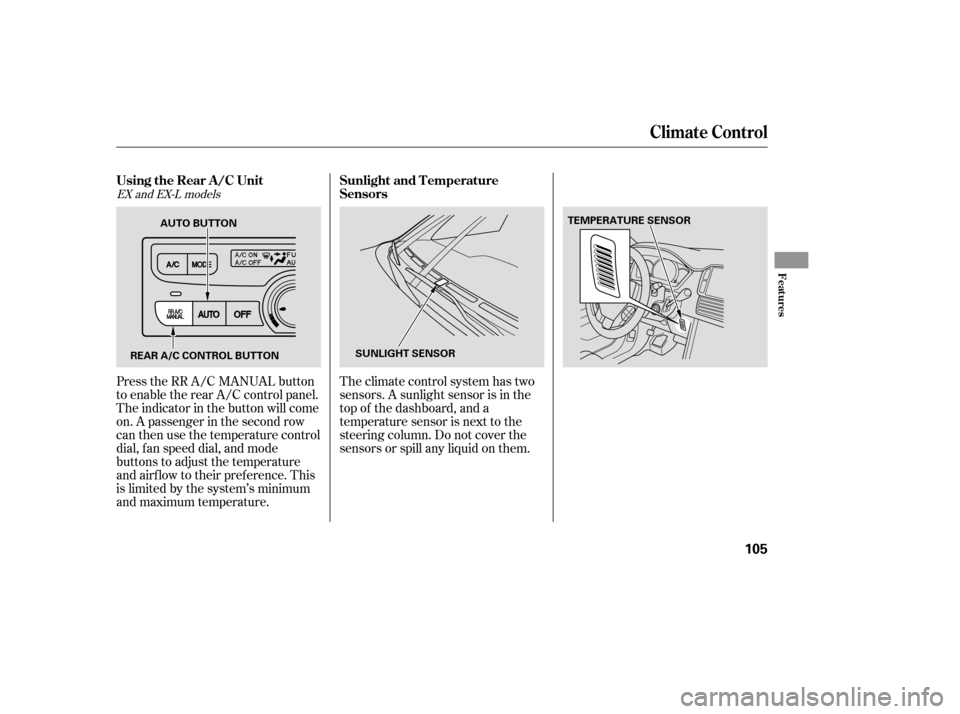
Theclimatecontrolsystemhastwo
sensors. A sunlight sensor is in the
top of the dashboard, and a
temperature sensor is next to the
steering column. Do not cover the
sensors or spill any liquid on them.
Press the RR A/C MANUAL button
to enable the rear A/C control panel.
The indicator in the button will come
on. A passenger in the second row
can then use the temperature control
dial, f an speed dial, and mode
buttons to adjust the temperature
and airflow to their preference. This
is limited by the system’s minimum
and maximum temperature.
EX and EX-L models
Climat e Cont rol
Using the Rear A /C Unit
Sunlight and T emperature
Sensors
Features
105
REAR A/C CONTROL BUTTON SUNLIGHT SENSORTEMPERATURE SENSOR
AUTO BUTTON
Page 124 of 273

If you are playing a CD
If you are playing a tape
If you are listening to the radio,usetheCH
buttontoskiptothebeginningof the
next track. You will see the CD and
track number in the display.
,usetheCH
button to advance to the next
selection. You will see ‘‘FF’’ blinking
in the display. The system f ast
f orwards until it senses a silent
period, then resumes playing. ,usethe
CHbuttontogotothenextpreset
station. You will see the number of
the preset button in the display. To
change bands, press the AM/FM
button.
Three controls f or the audio system
are mounted in the steering wheel
hub. These let you control basic
f unctions without removing your
hand f rom the wheel.
The middle button adjusts the
volume. Press the top or bottom of
the button and hold it until the
desired volume is reached, then
release it.
The CH button has three functions,
depending on whether you are
listening to the radio, playing a tape,
or CD.
The MODE button changes the
audio mode between FM1, FM2, AM,
CD, and DVD/AUX (if a disc is
inserted).
Remote Audio Controls
122
CH BUTTON
VOLUME
BUTTON MODE
BUTTON
Page 140 of 273
Cruise control allows you to maintain
asetspeedabove25mph(40km/h)
without keeping your f oot on the
accelerator pedal. It should be used
f or cruising on straight, open
highways. It is not recommended f or
city driving, winding roads, slippery
roads, heavy rain, or bad weather.Accelerate to the desired cruising
speedabove25mph(40km/h).
Press and release the SET/
DECELbuttononthesteering
wheel. The indicator on the
instrument panel comes on to
show the system is now activated.The cruise control may not hold the
set speed when you are going up and
down hills. If your speed increases
going down a hill, use the brakes to
slow down. This will cancel the
cruise control. To resume the set
speed, press the RESUME/ACCEL
button. The indicator on the
instrument panel will come back on.
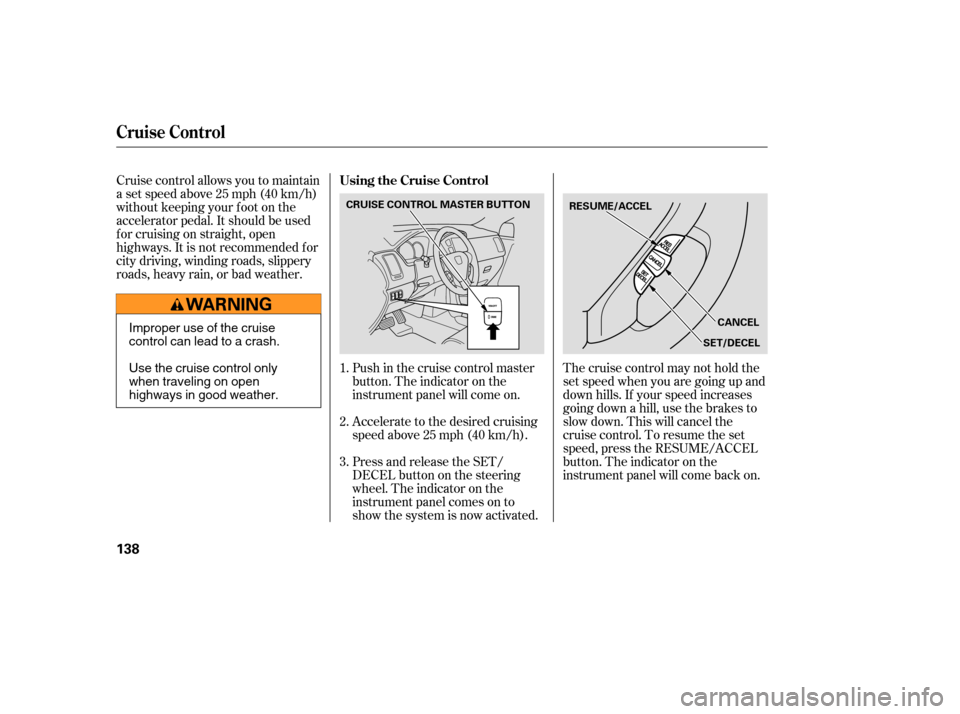
Push in the cruise control master
button. The indicator on the
instrument panel will come on.
1.
2.
3.
Cruise Control
Using the Cruise Control
138
RESUME/ACCEL
CANCEL
SET/DECEL
CRUISE CONTROL MASTER BUTTON
Improper use of the cruise
control can lead to a crash.
Use the cruise control only
when traveling on open
highways in good weather.
Page 141 of 273

You can increase the set cruising
speed in any of these ways:Press and hold the RESUME/
ACCEL button. When you reach
the desired cruising speed, release
the button.
Push on the accelerator pedal.
Accelerate to the desired cruising
speed and press the SET/DECEL
button.
You can decrease the set cruising
speed in any of these ways: Press and hold the SET/DECEL
button. Release the button when
you reach the desired speed. To slow down in very small
amounts, tap the SET/DECEL
button. Each time you do this,
your vehicle will slow down about
1 mph (1.6 km/h).
Tap the brake pedal lightly with
your f oot. The CRUISE
CONTROL indicator on the
instrument panel will go out.
When the vehicle slows to the
desired speed, press the SET/
DECEL button.
Even with the cruise control turned
on, you can still use the accelerator
pedal to speed up f or passing. Af ter
completing the pass, take your foot
of f the accelerator pedal. The vehicle
will return to the set cruising speed.
Resting your f oot on the brake pedal
will cause cruise control to cancel. Youcancancelthecruisecontrolin
any of these ways:
Tap the brake pedal.
Push the CANCEL button on the
steering wheel.
Pushthecruisecontrolmaster
button.
To increase the speed in very
small amounts, tap the RES/
ACCEL button. Each time you do
this, your vehicle will speed up
about 1 mph (1.6 km/h). When you push the CANCEL button
or tap on the brake pedal, the system
will remember the previously set
cruising speed. To return to that
speed, accelerate to above 25 mph
(40 km/h) and then press and
release the RES/ACCEL button. The
CRUISE CONTROL indicator comes
on. The vehicle will accelerate to the
same cruising speed as bef ore.
Pressingthecruisecontrolmaster
button turns the system off and
erases the previous cruising speed.
Cruise Control
Changing the Set Speed
Cancelling the Cruise Control
Resuming the Set Speed
Features
139
Page 154 of 273

Some examples are:Larger or smaller wheels and tires
can interf ere with the operation of
your vehicle’s anti-lock brakes and
other systems.
Any object
attached to or placed on the covers
marked ‘‘SRS AIRBAG’’ in the
center of the steering wheel and
on top the dashboard, and f ront
seat back could interf ere with the
proper operation of the airbags. Or,
if the airbags inf late, the objects
could be propelled inside the
vehicle and hurt someone.
If a side airbag
inflates,acupholderorotherhard
object attached on or near the
door could be propelled inside the
vehicle and hurt someone.
This could prevent the
airbag from inflating properly.
Modif ying your steering wheel or
any other part of your vehicle’s
safety features can make the
systems inef f ective.
If you plan to modif y your vehicle,
consult your dealer.
Removing parts f rom your vehicle,
or replacing components with
non-Honda components could
seriously af f ect your vehicle’s
handling, stability, and reliability.
Lowering the vehicle with a non-
Honda suspension kit that
signif icantly reduces ground
clearance can allow the
undercarriage to hit speed bumps
or other raised objects, which
could cause the airbags to deploy.
Raising your vehicle with a
non-Honda suspension kit can
af f ect the handling and stability.
Non-Honda wheels, because they
are a universal design, can cause
excessive stress on suspension
components.
Modif ying Your Vehicle
Additional Saf ety Precautions
Do not at t ach or place object s on
the airbag covers.
Do not at t ach hard object s on ornear a f ront door.
Do not place any object s over orreplacetheoutsideedgeof afrontseat -back.
A ccessories and Modif ications
152