Page 60 of 414

This section gives inf ormation about
the controls and displays that
contribute to the daily operation of
your vehicle. All the essential
controls are within easy reach............................
Control Locations .60 ............................
Instrument Panel .61
..........
Instrument Panel Indicators . 63
.............................................
Gauges .71
.............
Multi-Inf ormation Display . 74
Controls Near the Steering .........................................
Wheel .120
Windshield Wipers and .....................................
Washers .121
Rear Window Wiper and .......................................
Washer .122
.........
Turn Signal and Headlights . 122
......
Instrument Panel Brightness . 125
...............
Hazard Warning Button . 126
...............
Rear Window Def ogger . 126
........
Steering Wheel Adjustment . 127
.............................
Keys and Locks .128
......................
Immobilizer System .129
..............................
Ignition Switch .130
.....................
Remote Transmitter .131
....................................
Door Locks .137
....................
Power Door Locks . 137
............
Childproof Door Locks . 138
......................................
Tailgate .138
..........................
Power Tailgate .139
.................................
Sliding Doors .142
...............................................
Seats .148 ..................................
Seat Heaters .160
Driver’s Seat Position Memory ........................................
System .161
............................
Power Windows .163
.......................................
Moonroof .166
...........................................
Mirrors .167
...............................
Parking Brake .169
.
Adjustable Driver’s Foot Pedals . 169
.........
Interior Convenience Items . 170
..........
Retractable Center Tray . 171
.....................
Beverage Holders .171
................
Integrated Sunshade . 173
....................
Sunglasses Holder .174
................
Conversation Mirror . 174
...................................
Sun Visor .175
............................
Vanity Mirror .175
...................
Rear Compartment . 175
Removable Second Row ..................................
Console .176
...............
In-Floor Storage Area . 177
......................
Lower Glove Box .180
......................
Upper Glove Box .180
...........................
Center Pocket .181
........
Accessory Power Sockets . 182
.......................
AC Power Outlet .182
...............................
Interior Lights .183
Instruments and Controls
Inst rument s and Cont rols
59
Page 61 of 414
Control L ocations
60
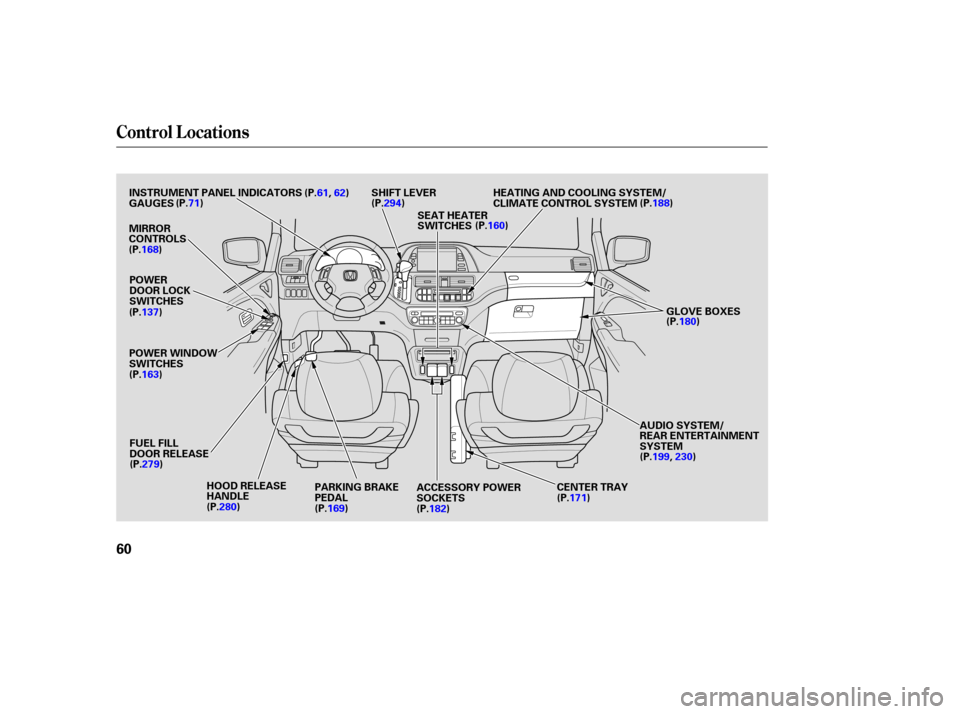
AUDIO SYSTEM/
REAR ENTERTAINMENT
SYSTEM
PARKING BRAKE
PEDAL
FUEL FILL
DOOR RELEASE
HOOD RELEASE
HANDLE
POWER WINDOW
SWITCHES
POWER
DOOR LOCK
SWITCHES
INSTRUMENT PANEL INDICATORS
SHIFT LEVER
MIRROR
CONTROLS
ACCESSORY POWER
SOCKETS
(P.61,
62)
GAUGES (P.71)
(P.137)
(P.279) (P.280) (P.182)(P.171)(P.199,
230)
(P.180)
(P.188)
HEATING AND COOLING SYSTEM/
CLIMATE CONTROL SYSTEM
(P.294)
CENTER TRAY
(P.168)
(P.163)
(P.169)SEAT HEATER
SWITCHES
(P.160)
GLOVE BOXES
Page 111 of 414
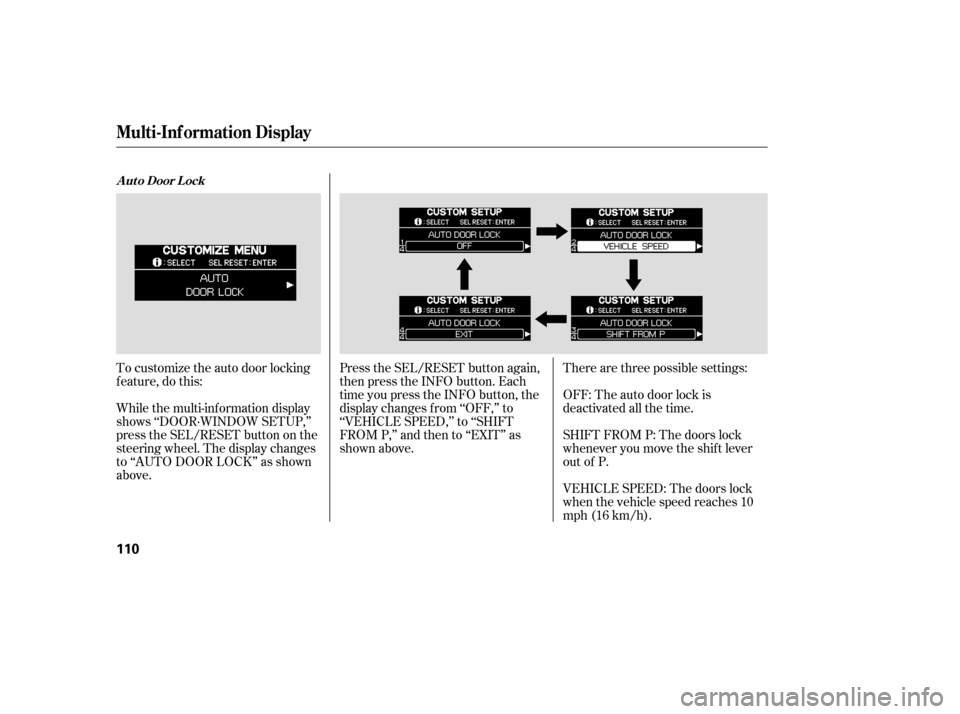
To customize the auto door locking
f eature, do this:
While the multi-information display
shows ‘‘DOOR·WINDOW SETUP,’’
press the SEL/RESET button on the
steering wheel. The display changes
to ‘‘AUTO DOOR LOCK’’ as shown
above.Press the SEL/RESET button again,
then press the INFO button. Each
time you press the INFO button, the
display changes f rom ‘‘OFF,’’ to
‘‘VEHICLE SPEED,’’ to ‘‘SHIFT
FROM P,’’ and then to ‘‘EXIT’’ as
shown above.
Therearethreepossiblesettings:
OFF: The auto door lock is
deactivated all the time.
SHIFT FROM P: The doors lock
whenever you move the shif t lever
out of P.
VEHICLE SPEED: The doors lock
when the vehicle speed reaches 10
mph (16 km/h).
A ut o Door L ock
Multi-Inf ormation Display
110
Page 121 of 414
�Î
�Î
To use the horn, press the pad around the ‘‘H’’ logo.
:
Controls Near the Steering Wheel
120
POWER SLIDING
DOOR SWITCHES
REAR WINDOW
DEFOGGER
STEERING WHEEL
ADJUSTMENT CRUISE
CONTROL
CLOCK
LIGHT CONTROL
SWITCH
AUDIO SYSTEM/
REAR
ENTERTAINMENT
SYSTEM
STEERING WHEEL
AUDIO CONTROLS PASSENGER
AIRBAG OFF
INDICATOR
POWER TAILGATE
SWITCH HEADLIGHTS/
TURN SIGNALS
HAZARD WARNING
BUTTON
WINDSHIELD
WIPERS/WASHERS
VSA OFF
SWITCH
HORN
(P.142)
(P.139)
(P.271) (P.302)
(P.228) (P.127) (P.121)
(P.122)
(P.264)
(P.126) (P.227)
(P.33)
(P.126)
(P.199, 230)
(P. 183 )
PARKING SENSOR
SYSTEM SWITCH
DRIVER’S PEDAL
ADJUSTMENT SWITCH
(P.169)
(P.166)
(P.75)MULTI-INFORMATION
DISPLAY SWITCHES
VSA OFF SWITCH
/
(P.302)
MOONROOF
Page 123 of 414
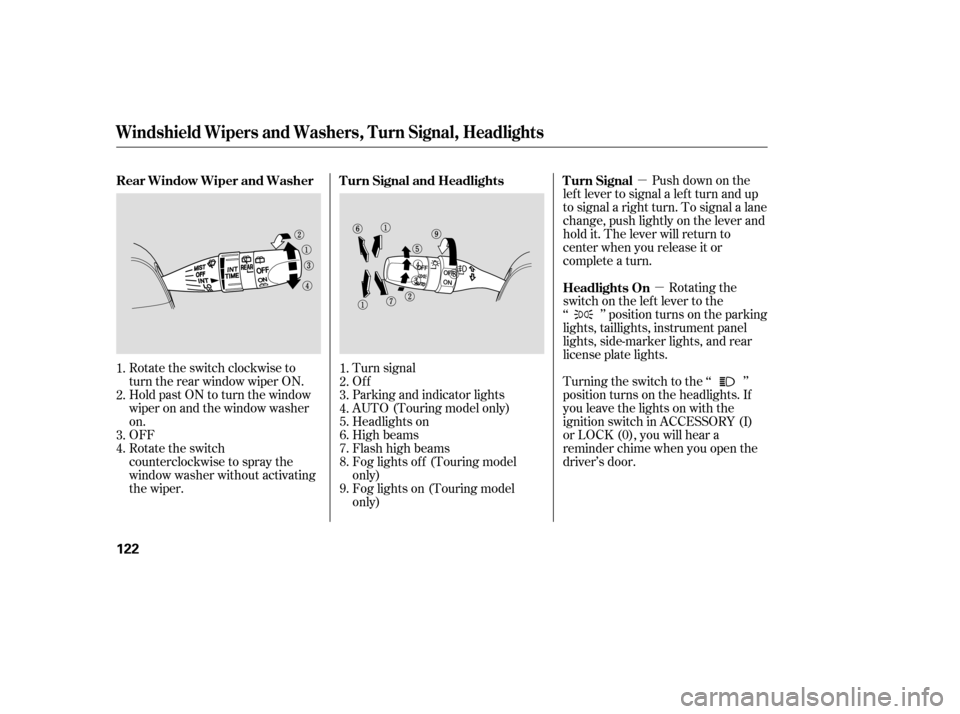
�µ�µPush down on the
lef t lever to signal a lef t turn and up
to signal a right turn. To signal a lane
change, push lightly on the lever and
hold it. The lever will return to
center when you release it or
complete a turn.
Turning the switch to the ‘‘ ’’
position turns on the headlights. If
you leave the lights on with the
ignition switch in ACCESSORY (I)
or LOCK (0), you will hear a
reminder chime when you open the
driver’s door. Rotating the
switch on the lef t lever to the
‘‘ ’’ position turns on the parking
lights, taillights, instrument panel
lights, side-marker lights, and rear
license plate lights.
Turn signal
Of f
Parking and indicator lights
AUTO (Touring model only)
Headlights on
High beams
Flashhighbeams
Fog lights of f (Touring model
only)
Fog lights on (Touring model
only)
Rotate the switch clockwise to
turn the rear window wiper ON.
Hold past ON to turn the window
wiper on and the window washer
on.
OFF
Rotate the switch
counterclockwise to spray the
window washer without activating
the wiper.
1.
2.
3.
4.
5.
6.
7.
8.
9.
1.
2.
3.
4. Turn Signal
Headlights On
Turn Signal and Headlights
Rear Window Wiper and Washer
Windshield Wipers and Washers, Turn Signal, Headlights
122
Page 127 of 414

Push the red button between the
center air vents to turn on the hazard
warning lights (f our-way f lashers).
This causes all f our outside turn
signals and both indicators in the
instrument panel to f lash. Use the
hazard warning lights if you need to
park in a dangerous area near heavy
traf f ic, or if your vehicle is disabled.The def ogger wires on the inside of
the rear window can be accidentally
damaged. When cleaning the glass,
always wipe side-to-side. Make sure the rear window is clear
and you have good visibility bef ore
starting to drive.
The rear window def ogger will clear
fog, frost, and thin ice from the
window. Push the def ogger button to
turn it on and off. The indicator in
the button comes on to show the
def ogger is on. It shuts of f when you
turn of f the ignition. You have to
turn the def ogger on again when you
restart the vehicle.
Hazard Warning Button
Rear Window Def ogger
Hazard Warning Button, Rear Window Def ogger
126
LX model EX and Touring models
Page 132 of 414
�µ�µ�µ
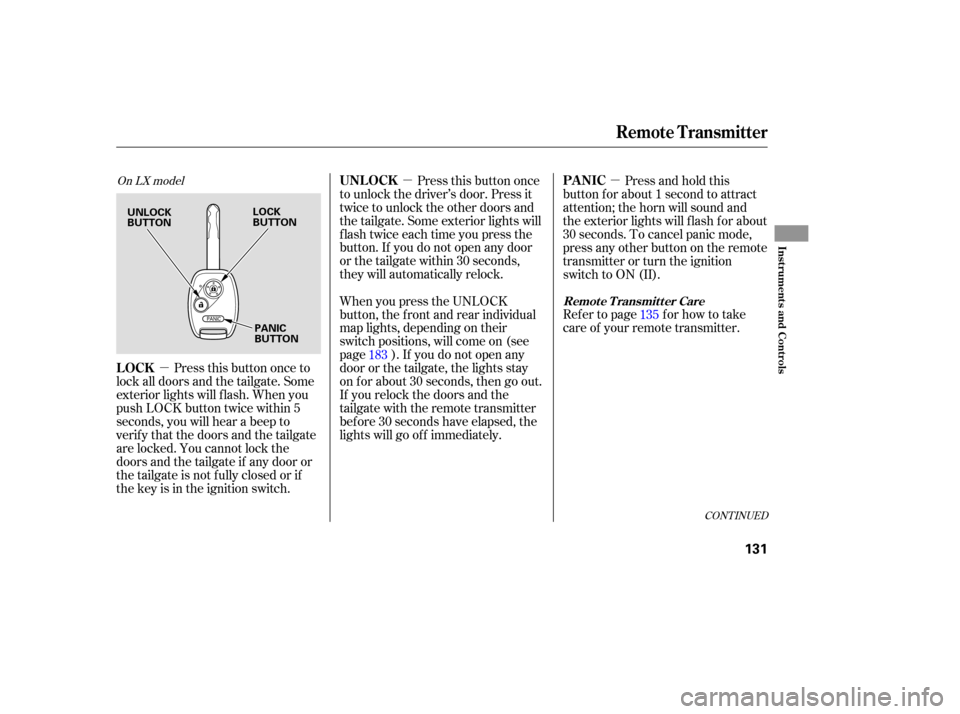
Press this button once to
lock all doors and the tailgate. Some
exterior lights will f lash. When you
push LOCK button twice within 5
seconds, you will hear a beep to
verify that the doors and the tailgate
are locked. You cannot lock the
doors and the tailgate if any door or
the tailgate is not f ully closed or if
the key is in the ignition switch. Press this button once
to unlock the driver’s door. Press it
twice to unlock the other doors and
the tailgate. Some exterior lights will
f lash twice each time you press the
button. If you do not open any door
orthetailgatewithin30seconds,
they will automatically relock. Press and hold this
button for about 1 second to attract
attention; the horn will sound and
the exterior lights will f lash f or about
30 seconds. To cancel panic mode,
press any other button on the remote
transmitter or turn the ignition
switch to ON (II).
Refertopage forhowtotake
care of your remote transmitter.
When you press the UNLOCK
button, the f ront and rear individual
map lights, depending on their
switch positions, will come on (see
page ). If you do not open any
door or the tailgate, the lights stay
on f or about 30 seconds, then go out.
If you relock the doors and the
tailgate with the remote transmitter
bef ore 30 seconds have elapsed, the
lights will go of f immediately. 135
183
CONT INUED
On LX model
LOCK UNL OCK
PA NIC
Remote Transmitter Care
Remote Transmitter
Inst rument s and Cont rols
131
UNLOCK
BUTTONLOCK
BUTTON
PANIC
BUTTON
Page 134 of 414
�µ�µ
�µ
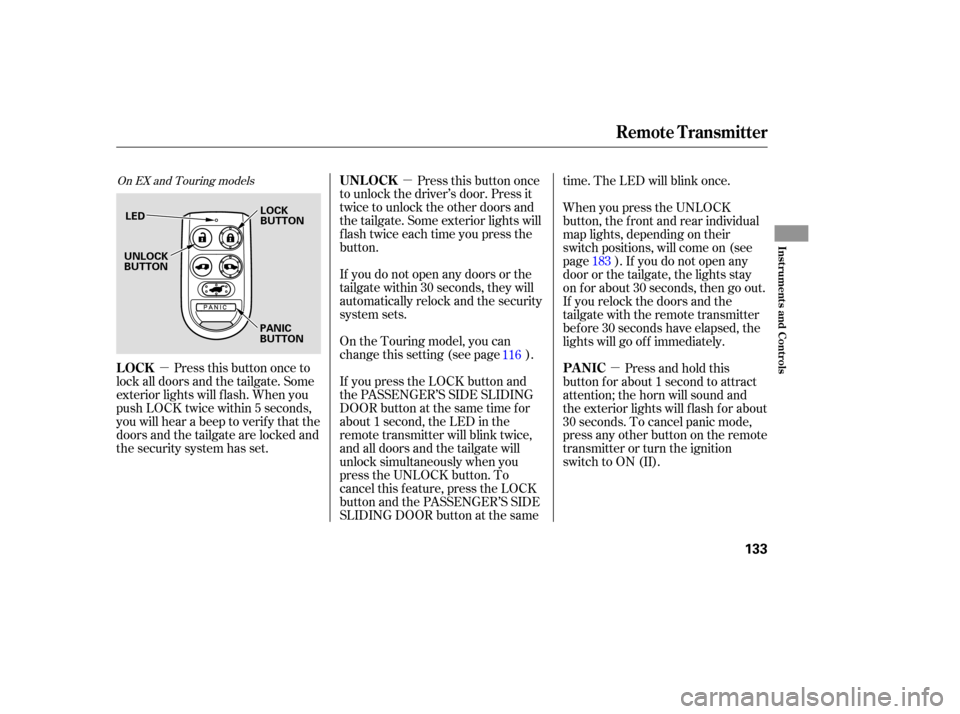
Press this button once to
lock all doors and the tailgate. Some
exterior lights will f lash. When you
push LOCK twice within 5 seconds,
you will hear a beep to verify that the
doors and the tailgate are locked and
the security system has set. Press this button once
to unlock the driver’s door. Press it
twice to unlock the other doors and
the tailgate. Some exterior lights will
f lash twice each time you press the
button.
If you do not open any doors or the
tailgate within 30 seconds, they will
automatically relock and the security
system sets.
If you press the LOCK button and
the PASSENGER’S SIDE SLIDING
DOOR button at the same time f or
about 1 second, the LED in the
remote transmitter will blink twice,
and all doors and the tailgate will
unlock simultaneously when you
press the UNLOCK button. To
cancel this f eature, press the LOCK
button and the PASSENGER’S SIDE
SLIDING DOOR button at the same time. The LED will blink once.
On the Touring model, you can
change this setting (see page ). When you press the UNLOCK
button, the f ront and rear individual
map lights, depending on their
switch positions, will come on (see
page ). If you do not open any
door or the tailgate, the lights stay
on f or about 30 seconds, then go out.
If you relock the doors and the
tailgate with the remote transmitter
bef ore 30 seconds have elapsed, the
lights will go of f immediately.
Press and hold this
button for about 1 second to attract
attention; the horn will sound and
the exterior lights will f lash f or about
30 seconds. To cancel panic mode,
press any other button on the remote
transmitter or turn the ignition
switch to ON (II).
116
183
On EX and Touring models
LOCK UNL OCK
PA NIC
Remote Transmitter
Inst rument s and Cont rols
133
LEDLOCK
BUTTON
PANIC
BUTTON
UNLOCK
BUTTON