Page 73 of 226
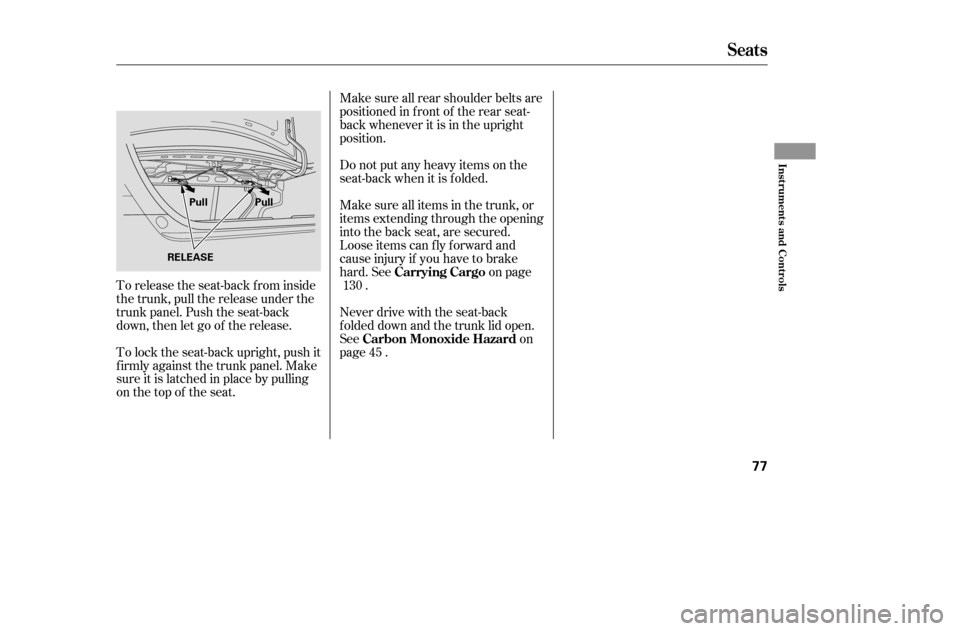
To release the seat-back from inside
the trunk, pull the release under the
trunk panel. Push the seat-back
down, then let go of the release.
To lock the seat-back upright, push it
f irmly against the trunk panel. Make
sure it is latched in place by pulling
on the top of the seat.Make sure all rear shoulder belts are
positioned in f ront of the rear seat-
back whenever it is in the upright
position.
Do not put any heavy items on the
seat-back when it is folded.
Make sure all items in the trunk, or
items extending through the opening
into the back seat, are secured.
Looseitemscanflyforwardand
cause injury if you have to brake
hard. See on page
.
Never drive with the seat-back
f olded down and the trunk lid open.
See on
page . 130
45Carrying Cargo
Carbon Monoxide Hazard
Seats
Inst rument s and Cont rols
77
RELEASE Pull Pull
�����—�����—�����y�
�������������y���
�(���%�������y���������y
Page 82 of 226
Push on the spotlight lenses to turn
the light on and of f .
The ignition switch light comes on
when you open the driver’s door. It
goes out several seconds af ter the
door is closed.
If you leave either door open with
the key not in the ignition switch, the
ceiling light will go of f af ter 3
minutes.
The f ront ceiling light also contains
two spotlights. Push the button next
to each light to turn the spotlight on
andoff.Youcanusethespotlightsat
all times.
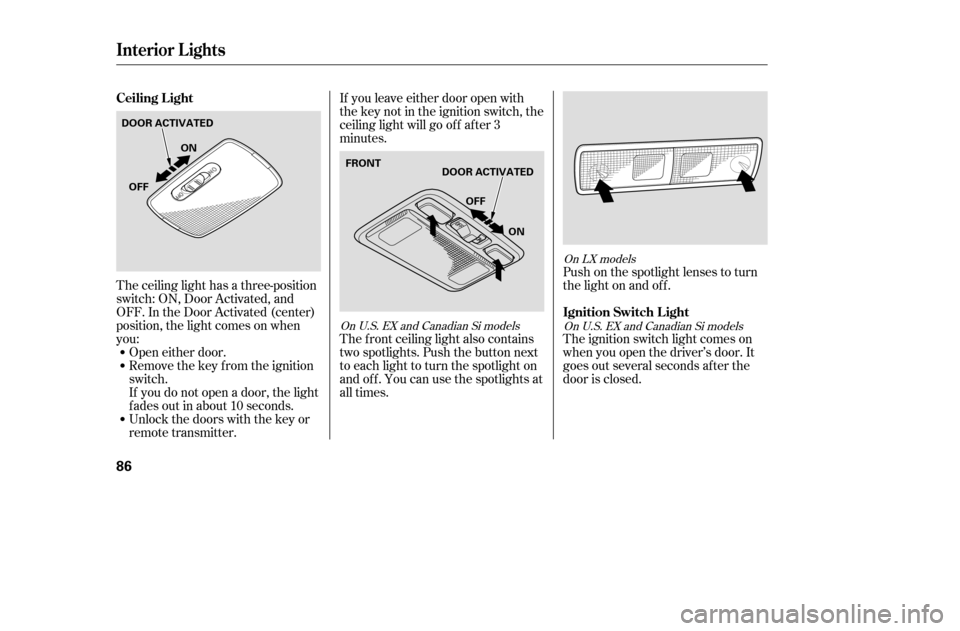
The ceiling light has a three-position
switch: ON, Door Activated, and
OFF. In the Door Activated (center)
position, the light comes on when
you:
Open either door.
Remove the key from the ignition
switch.
If you do not open a door, the light
f ades out in about 10 seconds.
Unlock the doors with the key or
remote transmitter.
On LX models
OnU.S.EXandCanadianSimodels
OnU.S.EXandCanadianSimodels
Ceiling L ight
Ignition Switch L ight
Interior Lights
86
DOOR ACTIVATEDON
OFF
OFF
ON
FRONTDOOR ACTIVATED
�����—�����—�����y�
�������������y���
�(���%�������y���������y
Page 84 of 226

Air f lows f rom the def roster
vents at the base of the windshield. Air flows from the center
and corner vents in the dashboard.
The outside air intakes f or the
heating and cooling system are at
the base of the windshield. Keep this
area clear of leaves and other debris.
Switch to recirculation mode when
driving through dusty or smoky
conditions, then return to fresh air
mode.
This button turns the rear window
def ogger of f and on (see page ).
Turning this dial clockwise increases
the temperature of the airflow.
This button turns the air
conditioning on and of f . The
indicatorinthebuttonisonwhen
the A/C is on.
Use the mode control dial to select
the vents the air flows from. Some
air will f low f rom the dashboard
corner vents in all modes. Airf low is divided between
the vents in the dashboard and the
f loor vents.
Airf low is divided between
the f loor vents and the def roster
vents at the base of the windshield.
When you select or ,
the system automatically switches to
f resh air mode and turns on the A/C.
You cannot turn the A/C of f in this
mode.
Turn this dial to increase or decrease
the fan speed and airflow.
When the recirculation indicator is
on, air f rom the vehicle’s interior is
sent throughout the system again.
When the indicator is off, air is
brought in f rom the outside of the
vehicle (fresh air mode).
Thesystemshouldbeleftinfresh
air mode under almost all conditions.
Keeping the system in recirculation
mode, particularly with the A/C of f ,
can cause the windows to fog up.
Air f lows f rom the f loor
vents. When you select , the
system automatically switches to
f resh air mode.
64
Optional on DX and HX models
Rear Window Def ogger Button
Mode Control Dial
Fan Control Dial
A irf low Controls
T emperature Control Dial
Air Conditioning (A/C) Button
Recirculation Button
Vents, Heating, and A/C
Features
89
�����—�����—�����y�
���������
���y���
�(���%�������y���������y
Page 95 of 226

�µ �µ �µ �µ
On models with in-dash CD changerOn models with CD player
Optional on DX model
The in-dash CD changer can also
play CD-Rs and CD-RWs
compressed in MP3 standard. When
playing a disc in MP3, you will see
‘‘MP3’’ in the display. You can select
afolderortrackupto .
Video CDs and DVD discs will not
work in this unit.
The specif ications of the compatible
MP3 f ile are:
You operate the CD player/CD
changer with the same controls used
for the radio. To select the CD
player/CD changer, press the CD
button. You will see ‘‘CD’’ in the
display. The number of the track
playing is shown in the display. With
the in-dash CD changer, the disc and
track numbers are displayed. The
system will continuously play a disc
until you change modes.
To load or play discs, the ignition
switch must be in the ACCESSORY
(I) or ON (II) position.
Sampling f requency: 32/44.1/48kHz
Bit rate: 32/40/48/56/64/80/96/
112/128/160/192/224/256/
320 kbps
Compatible with variable bit rate
and multi-session
Maximum layers
(including ROOT): 8 layersWhile playing a disc, you can see the
playing time in the display by
cancelling the clock display (see
page ).
Insert a CD into the CD slot. The
drive will pull the CD in the rest of
the way to play it. When the system
reaches the end of the disc, it will
return to the beginning and play the
disc again.
You can also play 3-inch (8-cm) discs
without using an adapter ring.
To play the radio when a disc is
playing, press the AM/FM button.
Press the CD button again to switch
back to the CD player.
255
116
To Play a Disc
Playing a Disc
100
Do not use discs with adhesive labels.
The label can curl up and cause the
disc to jam in the unit.
�����—�����—�����y�
�����������
�y���
�(���%�������y���
�����y
Page 110 of 226
CONT INUED
Setting the Clock
Features
115
DX modelCLOCK BUTTON
RESET BUTTON
MINUTE BUTTON
HOUR BUTTON
CLOCK BUTTON
HOUR BUTTON MINUTE BUTTONRESET BUTTON CLOCK
BUTTONCLOCK DISPLAY
HOUR
BUTTON
MINUTE
BUTTON
RESET
BUTTON
U.S.: Special Edition models
Canada: REVERB, Si-GA models
U.S.: Value Package, HX, LX, EX models
Canada: DX Special Edition, LX, Si-G models
�����—�����—�����y�
������
������y���
�(���%�������y���
�
���y
Page 111 of 226

If your vehicle’s battery is
disconnected or goes dead, you will
need to set the clock.
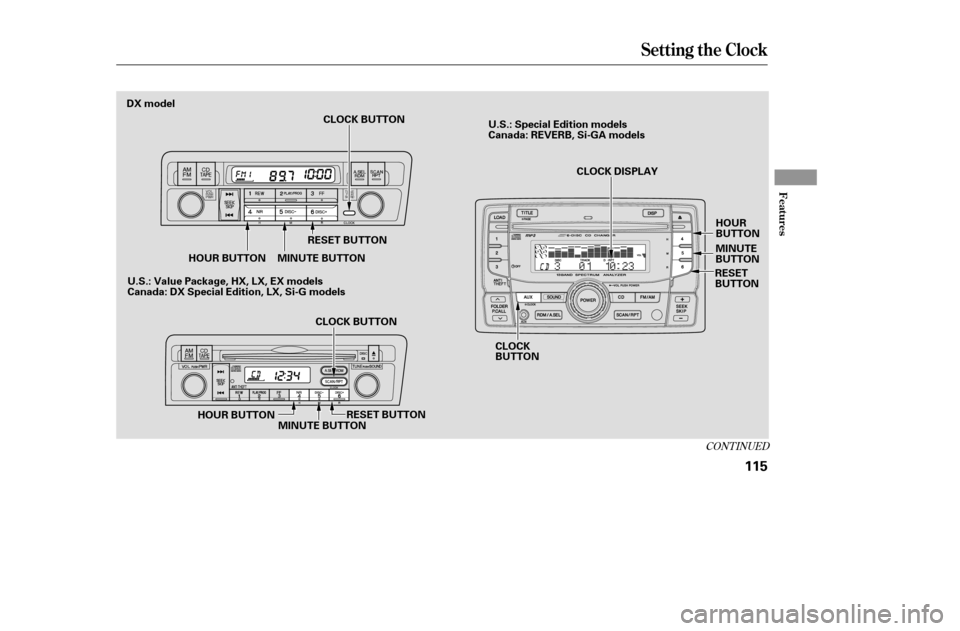
To set the time, press the CLOCK
(SCAN/RPT, AUX) button until you
hear a beep, then release the button.
The displayed time begins to blink.
Change the hours by pressing the H
(preset 4) button until the numbers
advance to the desired time. Change
the minutes by pressing the M
(preset 5) button until the numbers
advance to the desired time.
Press the CLOCK (SCAN/RPT,
AUX) button again to enter the set
time. On models with in-dash CD
changer, press the CLOCK button
until you hear a beep.You can quickly set the time to the
nearest hour. If the displayed time is
bef ore the half hour, pressing the
CLOCK (SCAN/RPT, AUX) button
until you hear a beep, then pressing
the R (preset 6) button sets the clock
back to the previous hour. If the
displayed time is af ter the half hour,
the clock sets forward to the
beginning of the next hour.
For example: 1:06 will reset to 1:00
1:52 will reset to 2:00
You can set the time only when the
clock is displayed.
To set the hours, press and hold the
CLOCK button, then press the H
(preset 4) button until the numbers
advance to the desired time. To set
theminutes,pressandholdthe
CLOCK button, then press the M
(preset 5) button until the numbers advance to the desired time.
To quickly set the time to the
nearest hour, press and hold the
CLOCK button, then press the R
(preset 6) button.
To turn of f the clock display, press
the CLOCK (AUX) button until you
hear a beep, then press the Preset 3
(Clock Of f ) button. The displayed
time will be turned off.
Toshowthetimeagain,pressthe
CLOCK (AUX) button again until
you hear a beep.
On models with in-dash CD player/
changer
On models without in-dash CD player/changer On models with in-dash CD changer
Setting the Clock
Cancelling Clock Display
116
�����—�����—�����y�
������
��
���y���
�(���%�������y���
�
���y
Page 122 of 226

When properly installed, cellular
phones, alarms, two-way radios, and
low-powered audio systems should
not interf ere with your vehicle’s
computer controlled systems, such
as your airbags and anti-lock brakes.Bef ore installing any accessory:
Make sure the accessory does not
obscure any lights, or interf ere
with proper vehicle operation or
perf ormance.
Be sure electronic accessories do
not overload electrical circuits
(see page ) or interf ere with
proper operation.
Modif ying your vehicle, or installing
some non-Honda accessories, can
make it unsaf e. Bef ore you make any
modif ications or add any accessories,
be sure to read the f ollowing
inf ormation.
Your dealer has Honda accessories
that allow you to personalize your
vehicle, or improve its perf ormance.
These accessories have been
designed and approved f or your
vehicle, and are covered by warranty.
Although non-Honda accessories
may f it on your vehicle, they may not
meet f actory specif ications, and
could adversely af f ect your vehicle’s
handling and stability.
Bef ore installing any electronic
accessory, have the installer
contact your dealer for assistance.
If possible, have your dealer
inspect the f inal installation.204
A ccessories
A ccessories and Modif ications
128
Improper accessories or
modifications can affect your
vehicle’s handling, stability, and
performance, and cause a
crash in which you can be hurt
or killed.
Follow all instructions in this
owner’s manual regarding
accessories and modifications.
�����—�����—�����y�
�������������y���
�(���%�������y���
���
�y
Page 123 of 226

Some examples are:Larger or smaller wheels and tires
can interf ere with the operation of
your vehicle’s anti-lock brakes and
other systems.
Removing parts f rom your vehicle,
or replacing components with
non-Honda components could
seriously af f ect your vehicle’s
handling, stability, and reliability.
Non-Honda wheels, because they
are a universal design, can cause
excessive stress on suspension
components.
Raising your vehicle with a
non-Honda suspension kit can
af f ect the handling and stability.
Lowering your vehicle with a
non-Honda suspension kit that
signif icantly reduces ground
clearance can allow the
undercarriage to hit speed bumps
or other raised objects, which
could cause the airbags to deploy.
If you plan to modif y your vehicle,
consult your dealer.Modif ying your steering wheel or
any other part of your vehicle’s
safety features can make the
systems inef f ective.
Modif ying Your Vehicle
A ccessories and Modif ications
Bef ore Driving
129
�����—�����—�����y�
���������
�
�y���
�(���%�������y���
�����y