Page 1 of 289
Your Vehicle at a Glance
Your Vehicle at a Glance
3
POWER WINDOW
SWITCHES
MIRROR CONTROLS
AUDIO SYSTEM
POWER DOOR LOCK
MASTER SWITCH
HOOD RELEASE
HANDLE AUTOMATIC TRANSMISSION
MANUAL TRANSMISSION HEATING/COOLING
CONTROLS
CLIMATE CONTROL
SYSTEM
FUEL FILL DOOR/
TRUNK RELEASE HANDLE INSTRUMENT PANEL INDICATORS
GAUGES
ACCESSORY POWER SOCKETS FRONT PASSENGER
AIRBAG
DRIVER’S FRONT
AIRBAG
HAZARD WARNING BUTTON
(P.55)
(P.63)
(P.9, 22)
(P.93)
(P.76)
(P.89)
(P.161, 80) (P.162)
(P.99)(P.176)
(P.179)
(P.111)
(P.104) (P.9, 22)
(P.116)
(P.70)
CLOCK (P.150)
�����—�����—�����y�
�������������y���
�(���%�������y���������y
Page 2 of 289
�Î
�Î
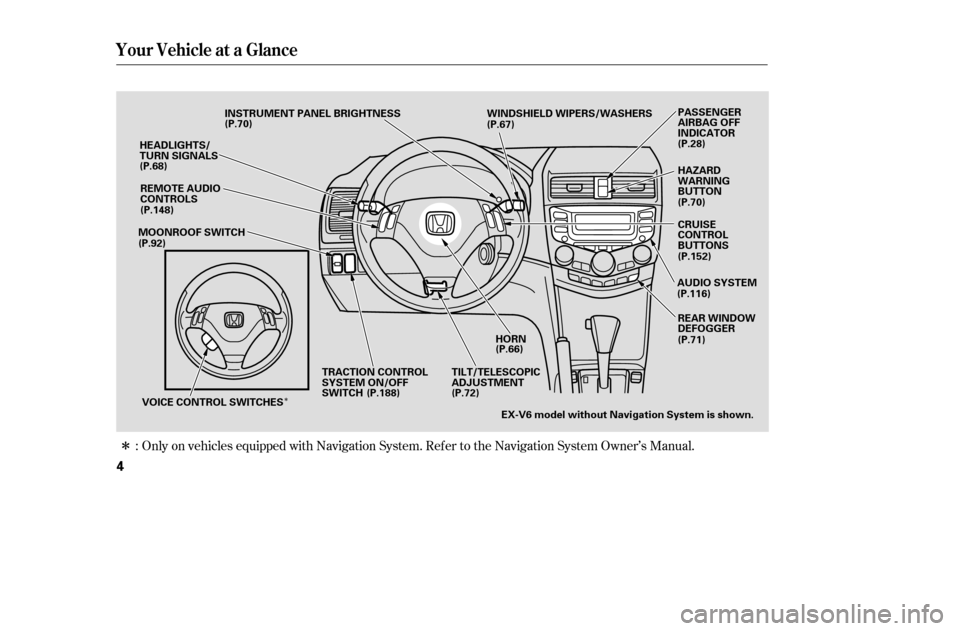
Only on vehicles equipped with Navigation System. Ref er to the Navigation System Owner’s Manual.
:
Your Vehicle at a Glance
4
HORN
HEADLIGHTS/
TURN SIGNALS
TILT/TELESCOPIC
ADJUSTMENTEX-V6 model without Navigation System is shown. REAR WINDOW
DEFOGGER
INSTRUMENT PANEL BRIGHTNESS WINDSHIELD WIPERS/WASHERS
MOONROOF SWITCH
VOICE CONTROL SWITCHES TRACTION CONTROL
SYSTEM ON/OFF
SWITCH HAZARD
WARNING
BUTTON
AUDIO SYSTEM PASSENGER
AIRBAG OFF
INDICATOR
(P.70)
(P.68)
(P.148)
(P.92) (P.67)
(P.28)
(P.70) CRUISE
CONTROL
BUTTONS
(P.152)
(P.116)
(P.66)
(P.72)
(P.188)
REMOTE AUDIO
CONTROLS
(P.71)
�����—�����—�����y�
�������������y���
�(���%�������y���������y
Page 3 of 289

�µ
You’ll f ind many saf ety
recommendations throughout this
section, and throughout this manual.
Therecommendationsonthispage
are the ones we consider to be the
most important.
A seat belt is your best protection in
all types of collisions. Airbags are
designed to supplement seat belts,
not replace them. So even though
your vehicle is equipped with airbags,
make sure you and your passengers
always wear your seat belts, and
wear them properly (see page ).
Alcohol and driving don’t mix. Even
one drink can reduce your ability to
respond to changing conditions, and
your reaction time gets worse withevery additional drink. So don’t drink
and drive, and don’t let your f riends
drink and drive, either.
While airbags can save lives, they
can cause serious or fatal injuries to
occupants who sit too close to them,
or are not properly restrained.
Inf ants, young children, and short
adults are at the greatest risk. Be
sure to f ollow all instructions and
warnings in this manual.
Children age 12 and under should
ride properly restrained in a back
seat, not the front seat. Infants and
smallchildrenshouldberestrained
in a child seat. Larger children
should use a booster seat and a lap/
shoulder belt until they can use the
belt properly without a booster seat
(see pages ).
Excessive speed is a major f actor in
crash injuries and deaths. Generally,
the higher the speed, the greater the
risk, but serious injuries can also
occur at lower speeds. Never drive
f aster than is saf e f or current
conditions, regardless of the
maximum speed posted.
Having a tire blowout or a
mechanical f ailure can be extremely
hazardous. To reduce the possibility
of such problems, check your tire
pressures and condition f requently,
and perform all regularly scheduled
maintenance (see page ).
14
31
48
199
Important Saf ety Precautions
Always Wear Your Seat Belt Control Your Speed
Don’t Drink and Drive
Be Aware of Airbag Hazards
Restrain All Children
K eep Your Vehicle in Saf e
Condition
6
�����—�����—�����y�
�������������y���
�(���%�������y���������y
Page 30 of 289
�µ
To remind you of the passenger’s
f ront airbag hazards, and that
children must be properly restrained
in a back seat, your vehicle has
warninglabelsonthedashboard
(U.S. models) and on the f ront visors.
Please read and follow the
instructions on these labels.
Protecting Children General Guidelines
Canadian Models
U.S. Models
Driver and Passenger Saf ety
33
SUN VISOR
SUN VISOR DASHBOARD
�����—�����—�����y�
�������������y���
�(���%�������y���������y
Page 50 of 289
Control L ocations
54
MIRROR CONTROLS
POWER WINDOW
SWITCHESHOOD RELEASE
HANDLE AUDIO SYSTEM
POWER DOOR LOCK
MASTER SWITCH
CLIMATE CONTROL
SYSTEM
HEATING/COOLING
CONTROLS
HAZARD WARNING
BUTTON
INSTRUMENT PANEL INDICATORS
GAUGES
ACCESSORY
POWER SOCKETS
FUEL FILL
DOOR/
TRUNK
RELEASE
HANDLE
SEAT HEATER
SWITCH
(P.63)
(P.55)
(P.93)
(P.76)
(P.89)
(P.161, 80) (P.162) (P.88)
(P.99)(P.111)
(P.104)
(P.150)
(P.70)
(P.116)
CLOCK
�����—�����—�����y�
���������
���y���
�(���%�������y���������y
Page 55 of 289

This indicator also blinks several
times when you turn the ignition
switch f rom ON (II) to ACCESSORY
(I) or LOCK (0).The appropriate indicator comes on
in this monitor if the trunk or either
door is not closed tightly.
All the indicators in the monitor
come on f or a f ew seconds when you
turn the ignition switch to ON (II).
This indicator comes on f or a f ew
seconds when you turn the ignition
switch to ON (II). It will then go of f
if you have inserted a properly-coded
ignition key. If it is not a properly-
coded key, the indicator will blink,
and the engine will not start (see
page ).
The lef t or right turn signal indicator
blinks when you signal a lane change
or turn. If the indicator does not
blink or blinks rapidly, it usually
means one of the turn signal bulbs is
burned out (see page ). Replace
the bulb as soon as possible, since
other drivers cannot see that you are
signaling.
When you press the hazard warning
button, both turn signal indicators
blink. All turn signals on the outside
of the vehicle should f lash.
74
231
Instrument Panel Indicators
Immobilizer System
IndicatorDoor and T runk Open Monitor T urn Signal and
Hazard Warning
Indicators
Inst rument s and Cont rols
59
�����—�����—�����y�
���������
�
�y���
�(���%�������y���������y
Page 62 of 289
�Î
�Î
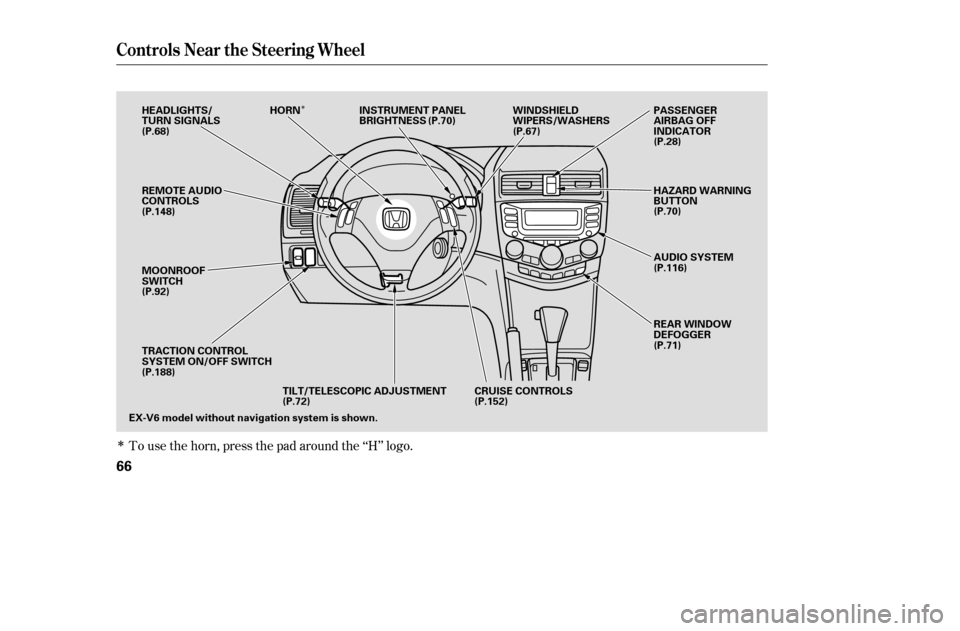
To use the horn, press the pad around the ‘‘H’’ logo.
Controls Near the Steering Wheel
66
EX-V6 model without navigation system is shown.CRUISE CONTROLS
TILT/TELESCOPIC ADJUSTMENT
REMOTE AUDIO
CONTROLS
MOONROOF
SWITCH
TRACTION CONTROL
SYSTEM ON/OFF SWITCH
HEADLIGHTS/
TURN SIGNALS
HORN INSTRUMENT PANEL
BRIGHTNESS WINDSHIELD
WIPERS/WASHERS
REAR WINDOW
DEFOGGER
AUDIO SYSTEM
HAZARD WARNING
BUTTON
PASSENGER
AIRBAG OFF
INDICATOR
(P.68) (P.70)
(P.67)
(P.28)
(P.70)
(P.116)
(P.71)
(P.152)
(P.72)
(P.188)
(P.92)
(P.148)
�����—�����—�����y�
�������������y���
�(���%�������y���������y
Page 66 of 289
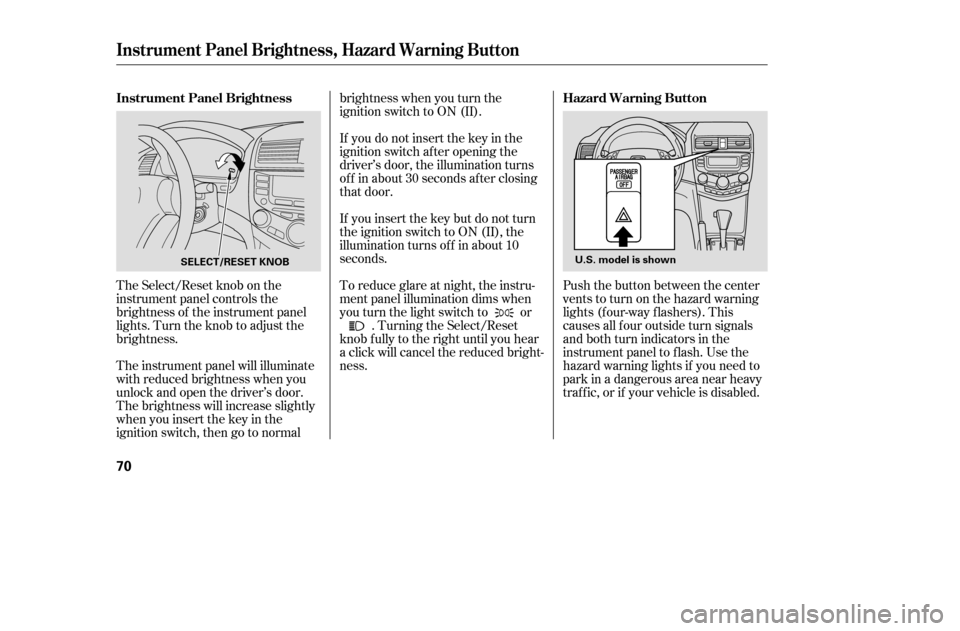
The Select/Reset knob on the
instrument panel controls the
brightness of the instrument panel
lights. Turn the knob to adjust the
brightness.
The instrument panel will illuminate
with reduced brightness when you
unlock and open the driver’s door.
The brightness will increase slightly
when you insert the key in the
ignitionswitch,thengotonormalbrightness when you turn the
ignition switch to ON (II).
If you do not insert the key in the
ignition switch af ter opening the
driver’s door, the illumination turns
of f in about 30 seconds af ter closing
that door.
If you insert the key but do not turn
the ignition switch to ON (II), the
illumination turns of f in about 10
seconds.
To reduce glare at night, the instru-
ment panel illumination dims when
you turn the light switch to or
. Turning the Select/Reset
knob f ully to the right until you hear
a click will cancel the reduced bright-ness. Push the button between the center
vents to turn on the hazard warning
lights (f our-way f lashers). This
causes all f our outside turn signals
and both turn indicators in the
instrument panel to f lash. Use the
hazard warning lights if you need to
park in a dangerous area near heavy
traf f ic, or if your vehicle is disabled.
Instrument Panel Brightness
Hazard Warning Button
Instrument Panel Brightness, Hazard Warning Button
70
SELECT/RESET KNOBU.S. model is shown
�����—�����—�����y�
���������
���y���
�(���%�������y���������y