Page 64 of 258

63GETTING TO KNOW YOUR VEHICLE
IMPORTANTTo recall other pre-
set times, press button 6within 10
seconds.
– press button 5or 7to select the
starting time required within 10 sec-
onds.
IMPORTANTStarting time disap-
pears and the number 3(correspond-
ing to the selected preset time) ap-
pears on the display to confirm the
starting time has been entered.
Deleting a programmed
starting time fig. 89
To delete the programmed starting
time, press button 6briefly: the dis-
play light will go off and number 3cor-
responding to the selected preset
time will disappear.Recalling a pre-set time fig. 90
Press the button 6repeatedly until
the required preset starting time ap-
pears on the display (number 3). After
10 seconds, the time will disappear,
number 3and the display will light up
thus confirming starting time has been
entered.
IMPORTANTTo change or delete
pre-set times, follow the instructions
in the paragraphs above.Turning the heater off
According to the operation mode
(automatic or manual), the heater can
be turned off:
–automatically,after the preset
period of time (60 minutes when the
display light is red);
– manuallyby pressing the “heat
now” button on the timer.
In each case, the heater warning light,
the display and the passenger com-
partment fan will be turned off and the
heater flame will be blown out.
The coolant circulation pump will
run for approximately two minutes af-
ter the heater has been turned off to
dispose of as much heat as possible.
During this phase the heater can, how-
ever, be turned on.
fig. 90
F0D0135m
Page 66 of 258

65GETTING TO KNOW YOUR VEHICLE
STEERING COLUMN
STALKS
LEFT-HAND STALK
The left-hand stalk operates most of
the external lights.
The external lights can only be
switched on when the ignition key is
at MAR. The instrument panel and
the heating/ventilation (or climate con-
trol system) controls and the cigar
lighter ring will come on with the ex-
ternal lights.Side/taillights fig. 91
Turn the ring from åto 6to switch
the lights on. Instrument panel warn-
ing light 3will come on.
Dipped beam headlights fig. 92
Turn the ring from 6to 2.
IMPORTANTThe dipped beam
headlights will automatically be
switched off when the main beam
headlights are switched on if the front
fog lights are on.Main beam headlights fig. 93
Push the stalk from position 2to-
wards the dashboard to switch the
headlights on.
Instrument panel warning light 1
will come on.
Pull the stalk towards the steering
wheel to switch the lights off.
IMPORTANTThe dipped beam
headlights will be automatically
switched off when the main beam
headlights are on and the front fog
lights are switched on.
fig. 91
F0D0013m
fig. 92
F0D0014m
fig. 93
F0D0015m
Page 68 of 258

67GETTING TO KNOW YOUR VEHICLE
REARVIEW
CAMERA
Vehicles equipped with CONNECT
NAV+ can be fitted with an optional
rearview camera. This camerafig. 98,
set on roof rear cross member dis-
plays on the CONNECT NAV+ mon-
itor the images of the rear part of the
vehicle, thus supporting the driver
during parking or reverse manoeuvres.
When the reverse gear is engaged, the
camera is automatically activated. In
the same way, the camera is deacti-
vated when disengaging the reverse
gear.
PARKING SENSORS
The parking system fig. 99detects
and informs the driver about the pres-
ence of obstacles in the rear part of
the vehicle.
It is a valid support to identify fences,
walls, posts, vases with plants and the
like or children playing behind the ve-
hicle.
fig. 98
F0D0173m
SMART WASH fig. 97
Pull the stalk towards the steering
wheel to send a jet of fluid to the
windscreen and operate the wiper
with a simple gesture. The windscreen
wiper will be operated automatically
by holding the washer stalk for longer
than half a second.
The windscreen wiper will flick three
times after the lever is released.
Operate the control repeatedly and
rapidly (for less than half a second) to
spray the windscreen several times
without operating the windscreen
wiper.
fig. 97
F0D0020m
fig. 99
F0D0223m
Page 69 of 258

68GETTING TO KNOW YOUR VEHICLE
IMPORTANTThe cruise control
can be engaged only with speeds high-
er than 40 km/h.
The device is automatically discon-
nected in one of the following cases:
– pressing the brake pedal;
– pressing the clutch pedal;
– inadvertently moving the automat-
ic gearbox selector to N. A special horn warns any people near
the vehicle that the driver is manoeu-
vring it.
Through four sensors located in the
bumper, the system detects the dis-
tance between the vehicle and possi-
ble obstacles; the driver is warned by
an intermittent acoustic signal with in-
creasing frequency, which is automat-
ically activated when the reverse gear
is engaged.CRUISE CONTROL
GENERAL FEATURES
The cruise control, with electronic
control, allows driving the vehicle at
a desired speed, without pressing the
accelerator pedal. This allows reduc-
ing the driving fatigue on motorways,
especially during long journeys, be-
cause the memorised speed is auto-
matically maintained.
Never set gear selector to
N (vehicles fitted with au-
tomatic gearbox) when the vehicle
is moving.
WARNING
The Cruise Control must be
activated only when the
traffic and the path allow keeping,
for a distance long enough, a con-
stant speed in complete safety.
WARNING
Page 71 of 258

70GETTING TO KNOW YOUR VEHICLE
To increase the memorised
speed
The speed memorised can be in-
creased in two ways:
1 -pressing the accelerator and then
memorising the new speed reached
(pressing button + for more than
three seconds);
2 -pressing briefly button +: each
pressing will correspond to a slight in-
crease in speed (about 2.5 km/h) while
pressing continuously will correspond
to a continuous speed increase. Re-
leasing the button the new speed will
be memorised automatically.
To reduce the memorised
speed
The speed memorised can be re-
duced in two ways:
1 -disengaging the device (for in-
stance pressing the brake pedal) and
then memorising the new speed
(pressing button +for more than
three seconds);
2 -pressing button –until reaching
the new speed which will be memo-
rised automatically.To set to zero the memorised
speed
The memorised speed is automati-
cally reset:
– turning the engine off;
– pressing buttonOFF.Do not engage the device in town or
in busy flowing traffic conditions.
When travelling with the
cruise control on, do not
move the gearshift lever to neutral
and to not move the automatic
gearbox selector to N. We suggest
to engage the cruise control only
when the traffic and road condi-
tions allow doing it in complete
safety and so: straight and dry
roads, freeways or motorways,
smooth flowing traffic and even as-
phalt.
WARNING
The cruise control can be en-
gaged only with speeds high-
er than 40 km/h. The device may on-
ly be engaged in 4
thor 5thgear, de-
pending on the speed of the vehicle.
On vehicles with electronic automat-
ic gearbox it can only be engaged
with selector to D, in automatic mode
without then moving the selector
manually, or with 3
rdor 4thgear in se-
quential operation. Travelling down-
hill with the device engaged, the ve-
hicle speed may increase more than
the memorised one, due to the
change in the engine load.
WARNING
Page 72 of 258

71GETTING TO KNOW YOUR VEHICLE
CONTROLS
CENTRAL BUTTON PANEL
fig. 103
A- Heated rear window on/off
(where provided)
When the heated rear window is
switched on, also the door mirror de-
frosting function is activated. It is how-
ever possible to activate the defrost-
ing function without switching on the
heated rear window: the control but-
ton is the same.
B - Front fog lights on/off
C- Hazard lights on/off
CEILING LIGHT
The lights come on automatically
when a front door is opened.
Press button A-fig. 101to switch
both lights on with the doors closed
or open.
Press button Cto light the right lamp
only. Press button Bto light the left
lamp only.
A second ceiling light can be found
over the rear door in the load com-
partment. Press the short side of the
plastic lens as shown in fig. 102to
switch this light on.
fig. 101
F0D0037m
fig. 102
F0D0038m
In the event of defective
device operation or unsuc-
cessful operation, press button
OFF and contact the Fiat Dealer-
ship after checking the protection
fuse well-being. Deactivate the de-
vice when you are not using it to
prevent accidental speed memori-
sation.
WARNING
fig. 103
F0D0032m
Page 78 of 258
77GETTING TO KNOW YOUR VEHICLE
ASHTRAY AND CIGAR
LIGHTER
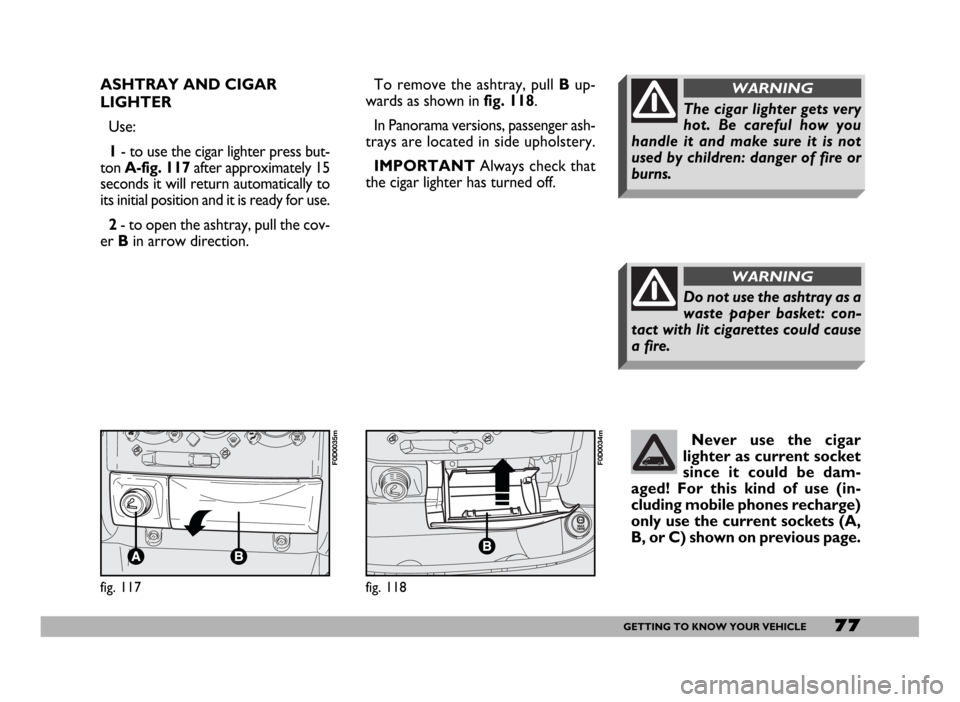
Use:
1- to use the cigar lighter press but-
ton A-fig. 117after approximately 15
seconds it will return automatically to
its initial position and it is ready for use.
2- to open the ashtray, pull the cov-
er Bin arrow direction.To remove the ashtray, pull Bup-
wards as shown in fig. 118.
In Panorama versions, passenger ash-
trays are located in side upholstery.
IMPORTANTAlways check that
the cigar lighter has turned off.
Do not use the ashtray as a
waste paper basket: con-
tact with lit cigarettes could cause
a fire.
WARNING
The cigar lighter gets very
hot. Be careful how you
handle it and make sure it is not
used by children: danger of fire or
burns.
WARNING
fig. 117
F0D0035m
fig. 118
F0D0034m
Never use the cigar
lighter as current socket
since it could be dam-
aged! For this kind of use (in-
cluding mobile phones recharge)
only use the current sockets (A,
B, or C) shown on previous page.
Page 96 of 258
95GETTING TO KNOW YOUR VEHICLE
The correct operation of
front and side airbags and
pretensioners is only ensured if the
vehicle is not overloaded.
WARNINGEOBD SYSTEM
(petrol versions only)
The EOBD (European On Board Di-
agnosis) system fitted on the vehicle
complies with Directive 98/69/CE
(EURO 3).
This system continuously monitors
the engine emission system compo-
nents. Furthermore, the system warns
the driver of deterioration concerning
the emission system components by
means of the Uwarning light on the
instrument panel.
The objective is to:
– monitor system efficiency;
– warn when failures can increase
emissions over the threshold estab-
lished by the European regulations;
– warn of the need to replace dete-
riorated components.
Remember that with the
key engaged and in the
MAR position, even with the en-
gine not running, the airbags may
be triggered on a stationary vehi-
cle if it is bumped by another mov-
ing vehicle. Therefore, never seat
children on the front seat even
when the vehicle is stationary. On
the other hand, remember that
with the vehicle stationary, with-
out the key engaged and turned,
the airbags are not triggered in the
event of an impact; in these cases,
failure to come into action of the
airbags cannot be considered as a
sign that the system is not working
properly.
WARNING
On vehicles equipped with
side bags, do not cover the
backrest of the front seats with
trims or covers.
WARNING
The airbag does not substi-
tute the seat belts, but on-
ly increases their effectiveness.
Moreover, since the front airbags
do not come into operation in the
event of front impact at low speed,
side collisions, bumps from behind
or overturning, in these circum-
stances the occupants would only
be protected by the seat belts which
must therefore always be fastened.
WARNING
Do not wash the seat back
in vehicles with side bags
with pressurised steam or water in
automatic seat washing station.
WARNING