Page 67 of 264
MIRRORS
Inside Day/Night Mirror
Adjust the mirror to center on the view through the rear
window. A pivot system allows for horizontal and verti-
cal mirror adjustment.Annoying headlight glare can be reduced by moving the
small control under the mirror to the night position
(toward rear of vehicle). The mirror should be adjusted
while set in the day position (toward windshield).
Adjusting Rearview Mirror
UNDERSTANDING THE FEATURES OF YOUR VEHICLE 67
3
Page 68 of 264
Electric Remote Control Mirrors
Both of the outside mirrors can be adjusted by using the
remote controls mounted inside the driver’s door, below
the door handle and power door switch.NOTE:Place the mirror selector switch in the center
(neutral) position to prevent accidental movement of the
mirrors.
Mirror Adjustment
Outside Mirror—Driver’s Side
Adjust the outside mirror to center on the adjacent lane of
traffic, with a slight overlap of the view obtained on the
inside mirror.
Right Side Mirror
Adjust the convex outside mirror so you can just see the
side of your vehicle. This type of mirror will give a much
wider view to the rear, and especially of the lane next to
your vehicle.
Power Mirror Controls
68 UNDERSTANDING THE FEATURES OF YOUR VEHICLE
Page 71 of 264
Reclining Seat
The recliner control is on the side of the seat on the
door-side. To recline, lean forward slightly before pulling
the lever, then lean back to the desired position, and
release the lever. Lean forward and pull the lever to
return the seatback to its original position.
To Open And Close The Hood
Two latches must be released to open the hood. First,
reach into the lower right grille opening and pull the
primary hood latch forward. Raise the front of the hood
slightly for access to the safety catch.
Hood Release Lever
UNDERSTANDING THE FEATURES OF YOUR VEHICLE 71
3
Page 73 of 264
WARNING!
If the hood is not fully latched, it could open when
the vehicle is moving and block your forward vision.
Be sure the hood latches are fully latched before
driving.
LIGHTS
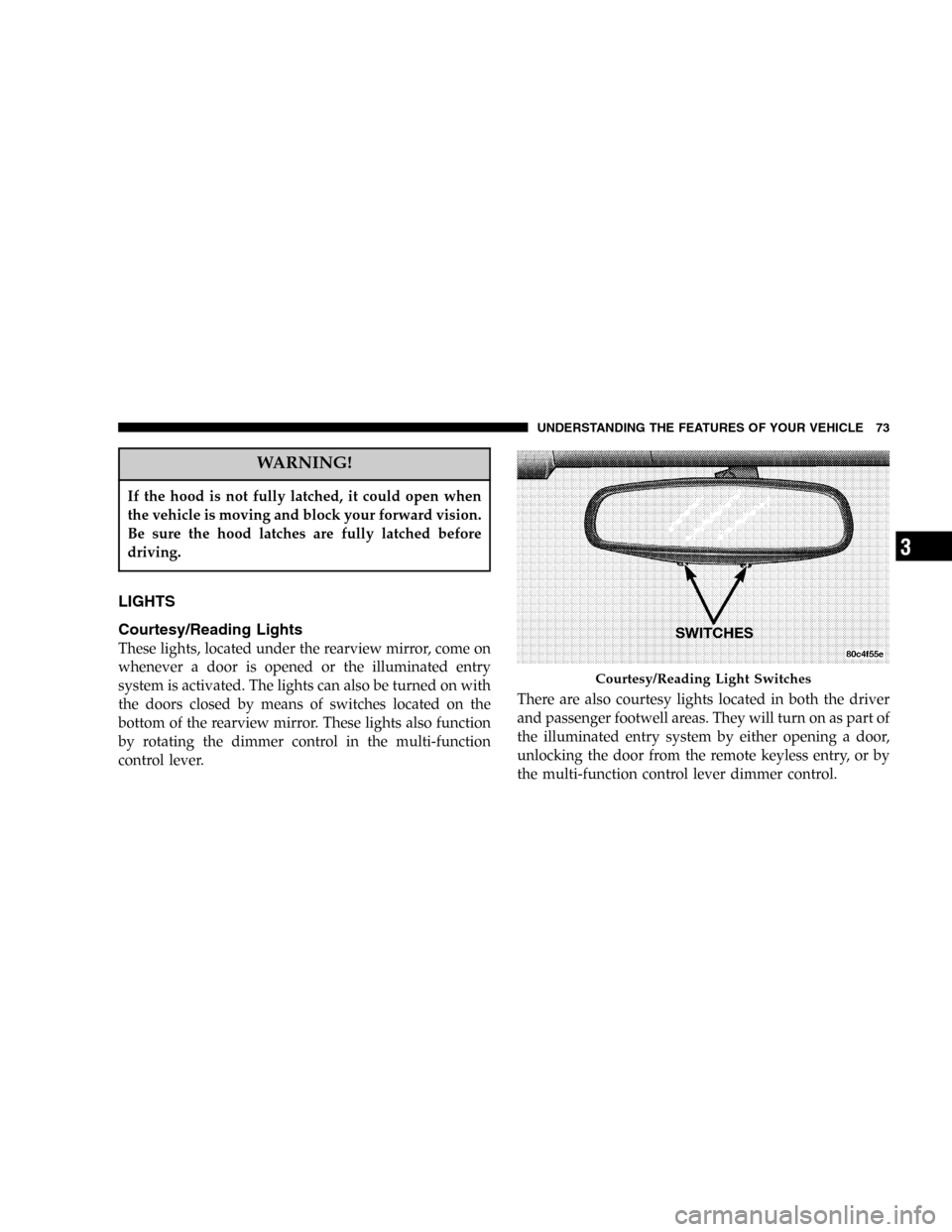
Courtesy/Reading Lights
These lights, located under the rearview mirror, come on
whenever a door is opened or the illuminated entry
system is activated. The lights can also be turned on with
the doors closed by means of switches located on the
bottom of the rearview mirror. These lights also function
by rotating the dimmer control in the multi-function
control lever.There are also courtesy lights located in both the driver
and passenger footwell areas. They will turn on as part of
the illuminated entry system by either opening a door,
unlocking the door from the remote keyless entry, or by
the multi-function control lever dimmer control.
Courtesy/Reading Light Switches
UNDERSTANDING THE FEATURES OF YOUR VEHICLE 73
3
Page 74 of 264

Interior Lights
The interior lights come on when a door is opened and
the dome switch is not in the defeat position.
Battery Saver Feature—Interior Lights
The interior courtesy lights come on when a door is open
or left ajar. To prevent battery drain, if you leave a door
open or ajar, these lights will turn off after 15 minutes.
After you close the door, the interior courtesy lights will
again function in the normal manner.
Multi-Function Control Lever
The Multi-Function Control Lever controls the operation
of the headlights, parking lights, turn signals, headlight
beam selection, instrument panel light dimming, interior
lights, the passing lights, and fog lights. The lever is
located on the left side of the steering column.
Dimmer Control
With the parking lights or headlights
on, rotating the dimmer control for the
interior lights on the Multi-Function
Control Lever upward will increase
the brightness of the instrument panel
lights.
Dome Light Position
Rotate the dimmer control completely
upward to the second detent to turn
on the interior lights. The interior
lights will remain on when the dim-
mer control is in this position.
74 UNDERSTANDING THE FEATURES OF YOUR VEHICLE
Page 75 of 264
Interior Light Defeat (OFF)
Rotate the dimmer control to the ex-
treme bottom“OFF”position. The in-
terior lights will remain off when the
doors are open.
Parade Mode (Daytime Brightness Feature)
Rotate the dimmer control to the first
detent (white semi-circle). This feature
brightens the odometer and radio dis-
play when the parking lights or head-
lights are on during daylight condi-
tions.
Headlights, Parking Lights, Instrument Panel
Lights, and Front Fog Lights
Turn the end of the Multi-Function Control Lever to the
first detent for parking light operation. Turn to the
second detent for headlight operation. Pull out the end of
the Multi-Function Control Lever to turn on the front fog
lights.
Multi-Function Lever
UNDERSTANDING THE FEATURES OF YOUR VEHICLE 75
3
Page 76 of 264

To change the brightness of the instrument panel lights,
rotate the center portion of the Multi-Function Control
Lever up or down.
Daytime Running Lights
The fog lights will come on as Daytime Running Lights
whenever the ignition switch is on, the headlights are off,
and the parking brake is off. The headlight switch must
be used for normal night time driving.
NOTE:This feature is standard on all Canadian vehicles
and cannot be disabled. For US vehicles, this feature is
shipped disabled and can be enabled (or disabled) at a
dealership if so desired.
Lights-On Reminder
If the headlights or parking lights are on after the ignition
is turned OFF, a chime will sound to alert the driver
when the driver’s door is opened.
Headlight Time Delay
This feature provides the safety of headlight illumination
for about 90 seconds.
To activate the delay, turn off the ignition while the
headlights are still on. Then turn off the headlights within
45 seconds. The delay interval begins when the headlamp
switch is turned off.
If the headlights are turned off before the ignition, they
will go off in the normal manner.
This feature can be disabled at the dealership if so
desired.
Battery Saver Feature—Exterior Lights
If an exterior light is left on when the ignition switch is
moved to the Off position (with the key in or out), it will
automatically turn off after 3 minutes. Normal operation
will resume when the ignition is turned On or when the
headlight switch is turned to another position.
76 UNDERSTANDING THE FEATURES OF YOUR VEHICLE
Page 77 of 264
If the ignition switch is turned to any position other than
the Off position at any time during the 3 minute delay
period the battery saver feature will be disabled.
Fog Lights
The front fog light switch is on the Multi-Function
Control Lever. To activate the front fog lights, turn
on the parking lights or the low beam headlights
and pull out the end of the control lever.
NOTE:The fog lights will only operate with the head-
lights on low beam. Selecting high beam headlights will
turn off the fog lights.
Turn Signals
Move the Multi-Function Control Lever up or down and
the arrows on each side of the instrument cluster flash to
show proper operation of the front and rear turn signal
lights. You can signal a lane change by moving the lever
partially up or down without moving beyond the detent.
Turn Signal Lever
UNDERSTANDING THE FEATURES OF YOUR VEHICLE 77
3