Page 198 of 480
The light will remain on until the cause is corrected.
NOTE: The light may flash momentarily during sharp
cornering maneuvers which change fluid level condi-
tions. The vehicle should have service performed.
If brake failure is indicated, immediate repair is neces-
sary.
WARNING!Driving a vehicle with the brake light on is danger-
ous. Part of the brake system may have failed. It will
take longer to stop the vehicle. You could have an
accident. Have the vehicle checked immediately.
Vehicles equipped with Anti-Lock brakes (ABS), are also
equipped with Electronic Brake Force Distribution (EBD). In the event of an EBD failure, the Brake Warning Light
will turn on along with the ABS Light. Immediate repair
to the ABS system is required.
The operation of the Brake Warning Light can be checked
by turning the ignition switch from the OFF position to
the ON position. The light should illuminate for approxi-
mately four seconds. The light should then turn off
unless the parking brake is applied or a brake fault is
detected. If the light does not illuminate, have the light
inspected by an authorized dealer.
The light also will turn on when the parking brake is
applied with the ignition switch in the ON position.
NOTE: This light shows only that the parking brake is
applied. It does not show the degree of brake application.198 UNDERSTANDING YOUR INSTRUMENT PANEL
Page 199 of 480

9. Airbag Light
This light turns on and remains on for 6 to 8
seconds as a bulb check when the ignition
switch is first turned ON. If the light is not on
during starting, stays on, or turns on while
driving, have the system inspected by an authorized
dealer as soon as possible.
10. Anti-Lock Light
This light monitors the Anti-Lock Brake Sys-
tem. The light will turn on when the ignition
switch is turned to the ON position and may
stay on for as long as four seconds.
If the ABS light remains on or turns on while driving, it
indicates that the Anti-Lock portion of the brake system
is not functioning and that service is required. However,
the conventional brake system will continue to operate
normally if the BRAKE warning light is not on. If the ABS light is on, the brake system should be serviced
as soon as possible to restore the benefits of Anti-Lock
brakes. If the ABS light does not turn on when the
Ignition switch is turned to the ON position, have the
light inspected by an authorized dealer.
11. Tachometer — If Equipped
The red segments indicate the maximum permissible
engine revolutions-per-minute (r.p.m. x 1000) for each
gear range. Before reaching the red area, ease up on the
accelerator.
12. Voltage Light
This light monitors the electrical system voltage.
The light should turn on momentarily as the
engine is started. If the light stays on or turns on while
driving, it indicates a problem with the charging system.
Immediate service should be obtained. UNDERSTANDING YOUR INSTRUMENT PANEL 199
4
Page 200 of 480

13. Seat Belt Reminder Light
When the ignition switch is first turned ON, this
light will turn on for 5 to 8 seconds as a bulb check.
During the bulb check, if the driver ’ s seat belt is
unbuckled, a chime will sound. After the bulb check or
when driving, if the driver seat belt remains unbuckled,
the Seat Belt Warning Light will flash or remain on
continuously. Refer to � Enhanced Driver Seat Belt Re-
minder System (BeltAlert ™ ) � in the Occupant Restraints
section for more information.
14. Engine Temperature Warning Light
This light warns of an overheated engine condi-
tion. If the engine is critically hot, a continuous
chime will sound for 4 minutes. After the chime
turns off, the engine will still be critically hot until the
light turns off. 15. Vehicle Theft Alarm Light — If Equipped
This light will flash for approximately 15 sec-
onds when the vehicle theft alarm is arming.
16. Temperature Gauge
The temperature gauge shows engine coolant tempera-
ture. Any reading within the normal range indicates that
the engine cooling system is operating satisfactorily.
The gauge pointer will likely indicate a higher tempera-
ture when driving in hot weather, up mountain grades,
or when towing a trailer. It should not be allowed to
exceed the upper limits of the normal operating range.200 UNDERSTANDING YOUR INSTRUMENT PANEL
Page 203 of 480

22. Trac Off Indicator — If Equipped
This display indicator should illuminate for approxi-
mately four seconds as a bulb check when the ignition
switch is first turned ON.
The “ TRAC OFF ” Indicator will flash if the traction
control is in use.
The “ TRAC OFF ” Indicator will illuminate if:
• The Traction Control switch has been used to turn
the system OFF.
• There is a Traction Control System malfunction
• The system has been deactivated to prevent damage
to the brake system due to overheated brake tem-
peratures.
NOTE: Extended heavy use of Traction Control may
cause the system to deactivate and turn on the TRAC and
the OFF indicators located in the instrument cluster. This is to prevent overheating of the brake system and is
a normal condition. The system will remain disabled for
about 4 minutes until the brakes have cooled. The system
will automatically reactivate and turn off the TRAC and
the OFF indicators.
If your vehicle becomes stuck in mud, ice, or snow, turn
the Traction Control System OFF before attempting to
“ rock ” the vehicle free.
23. Odometer/Trip Odometer
The odometer shows the total distance the vehicle has
been driven.
U.S. federal regulations require that upon transfer of
vehicle ownership, the seller certify to the purchaser the
correct mileage that the vehicle has been driven. There-
fore, if the odometer reading is changed during repair or
replacement, be sure to keep a record of the reading
before and after the service so that the correct mileage can
be determined. UNDERSTANDING YOUR INSTRUMENT PANEL 203
4
Page 204 of 480

The trip odometer shows individual trip mileage. To
switch from odometer to trip odometer, press the Trip
Odometer button.
24. Cruise Indicator
This display indicator shows that the Speed Control
System is ON.
25. Trip Odometer Button
Press this button to change the display from odometer to
trip odometer. The word TRIP will appear when in the
trip odometer mode.
Push in and hold the button for two seconds to reset the
trip odometer to 0 miles or kilometers. The odometer
must be in trip mode to reset. ELECTRONIC DIGITAL CLOCK
The clock and radio each use the display panel built into
the radio. A digital readout shows the time in hours and
minutes whenever the ignition switch is in the ON or
ACC position and the time button is pressed.
When the ignition switch is in the OFF position, or when
the radio frequency is being displayed, time keeping is
accurately maintained.
Clock Setting Procedure
1. Turn the ignition switch to the ON or ACC position
and press the time button. Using the tip of a ballpoint pen
or similar object, press either the hour (H) or minute (M)
buttons on the radio.
2. Press the H button to set hours or the M button to set
minutes. The time setting will increase each time you
press a button.204 UNDERSTANDING YOUR INSTRUMENT PANEL
Page 206 of 480
remain active for up to 45 seconds after the ignition
switch has been turned off. Opening a vehicle front door
will cancel this feature.
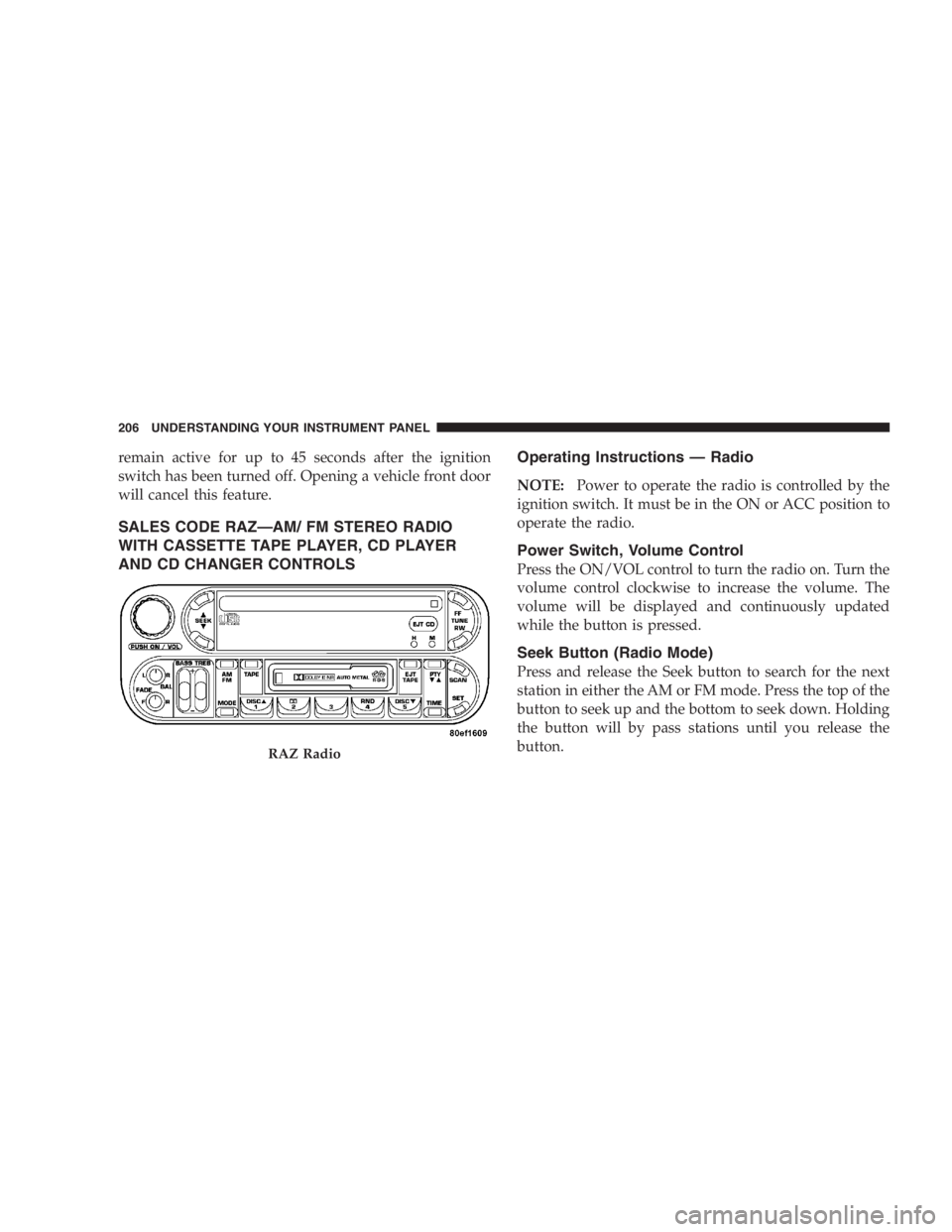
SALES CODE RAZ — AM/ FM STEREO RADIO
WITH CASSETTE TAPE PLAYER, CD PLAYER
AND CD CHANGER CONTROLS Operating Instructions — Radio
NOTE: Power to operate the radio is controlled by the
ignition switch. It must be in the ON or ACC position to
operate the radio.
Power Switch, Volume Control
Press the ON/VOL control to turn the radio on. Turn the
volume control clockwise to increase the volume. The
volume will be displayed and continuously updated
while the button is pressed.
Seek Button (Radio Mode)
Press and release the Seek button to search for the next
station in either the AM or FM mode. Press the top of the
button to seek up and the bottom to seek down. Holding
the button will by pass stations until you release the
button.RAZ Radio206 UNDERSTANDING YOUR INSTRUMENT PANEL
Page 212 of 480

Pinch Roller Release
If ignition power or the radio ON/OFF switch are turned
off, the pinch roller will automatically retract to protect
the tape from any damage. When power is restored to the
tape player, the pinch roller will automatically reengage
and the tape will resume play.
Noise Reduction
The Dolby Noise Reduction System* is on whenever the
tape player is on, but may be switched off.
To turn off the Dolby Noise reduction System: Press the
Dolby button (button 2) after you insert the tape. The NR
light in the display will go off when the Dolby System is
off. The Dolby System is automatically reactivated each
time a tape is inserted.
* ” Dolby ” noise reduction manufactured under license
from Dolby Laboratories Licensing Corporation. Dolby
and the double-D symbol are trademarks of Dolby Labo-
ratories Licensing Corporation. Operating Instructions — CD Player
NOTE: The ignition switch must be in the ON or ACC
position and the volume control ON before the CD player
will operate.
CAUTION!This CD player will accept 4 3
⁄ 4
inch (12 cm) discs
only. The use of other sized discs may damage the
CD player mechanism.
Inserting The Compact Disc
The CD player contained within the radio is not a
multi-disc changer, and will only accept one CD. Gently
insert one CD into the CD player with the CD label facing
up. The CD will automatically be pulled into the CD
Player.212 UNDERSTANDING YOUR INSTRUMENT PANEL
Page 213 of 480
If the volume control is ON, the unit will switch from
radio to CD mode and begin to play. The display will
show the track number and index time in minutes and
seconds. Play will begin at the start of track one.
NOTE:
• You may eject a disc with the radio OFF. The ignition
switch must be in the ON or ACC position to insert a
disc with the radio OFF.
• If you insert a disc with the ignition ON and the radio
OFF, the CD will automatically be pulled into the CD
Player and the display will show the time of day. If
you insert a disc with the ignition OFF, the display will
show the time of day for about 5 seconds, then go out. Seek Button
Press the top of the SEEK button for the next selection on
the CD. Press the bottom of the button to return to the
beginning of the current selection, or return to the
beginning of the previous selection if the CD is within the
first 10 seconds of the current selection.
EJT CD (Eject) Button
Press this button and the disc will unload and move to
the entrance for easy removal. The unit will switch to the
radio mode.
If you do not remove the disc within 15 seconds, it will be
reloaded. The radio mode will continue to appear.
The disc can be ejected with the radio OFF. UNDERSTANDING YOUR INSTRUMENT PANEL 213
4