Page 84 of 360
3. Continue pushing the entire seat forward until it slides
toward the dashboard.4. To return seat to a sitting position, rotate seat back
upright until it locks.
5. Push seat rearward until the track locks.
NOTE:The passenger front seat has a full recliner
memory, which will allow the seat back to returned to its
original position.
NOTE:The passenger front seat has a mid-track
memory, which returns the seat to the middle off the
track regardless of original position.
Passenger Seat Back Tilt Handle
84 UNDERSTANDING THE FEATURES OF YOUR VEHICLE
Page 94 of 360

WARNING!
If the hood is not fully latched it could fly up when
the vehicle is moving and block your forward vision.
You could have a collision. Be sure all hood latches
are fully latched before driving.
LIGHTS
Interior Lights
The interior lights come on when a door or the deck lid
is opened.
With the ignition key in the OFF position, the interior
lights will automatically turn off in about 8 minutes if a
door is left open or the dimmer control is left in the Dome
light position. Turn the ignition switch ON to restore the
interior light operation.
Dimmer Control
With the parking lights or headlights
on, rotating the dimmer control for the
interior lights on the Multi-Function
Control Lever upward will increase
the brightness of the instrument panel
lights.
Dome Light Position
Rotate the dimmer control completely
upward to the second detent to turn
on the interior lights. The interior
lights will remain on when the dim-
mer control is in this position. With the
ignition key in the OFF position, the
interior lights will automatically turn
off in about 8 minutes if the dimmer
control is left in the Dome light posi-
tion.
94 UNDERSTANDING THE FEATURES OF YOUR VEHICLE
Page 99 of 360
CAUTION!
In cold weather, always turn off the wiper switch
and allow the wipers to return to the park position
before turning off the engine. If the wiper switch is
left on and the wipers freeze to the windshield,
damage to the wiper motor may occur when the
vehicle is restarted.
Windshield Wiper Operation
Move the lever upward to the second detent for Low
speed wiper operation, or to the third detent for High
speed operation.
Intermittent Wiper System
Use the intermittent wiper when weather conditions
make a single wiping cycle, with a variable pause be-
tween cycles, desirable. Move the lever to the DEL
position, then select the delay interval by turning the end
of the lever. Rotate the knob upward (clockwise) to
decrease the delay time and downward (counterclock-
wise) to increase the delay time. The delay can be
regulated from a maximum of approximately 18 seconds
between cycles, to a cycle every second.
UNDERSTANDING THE FEATURES OF YOUR VEHICLE 99
3
Page 101 of 360
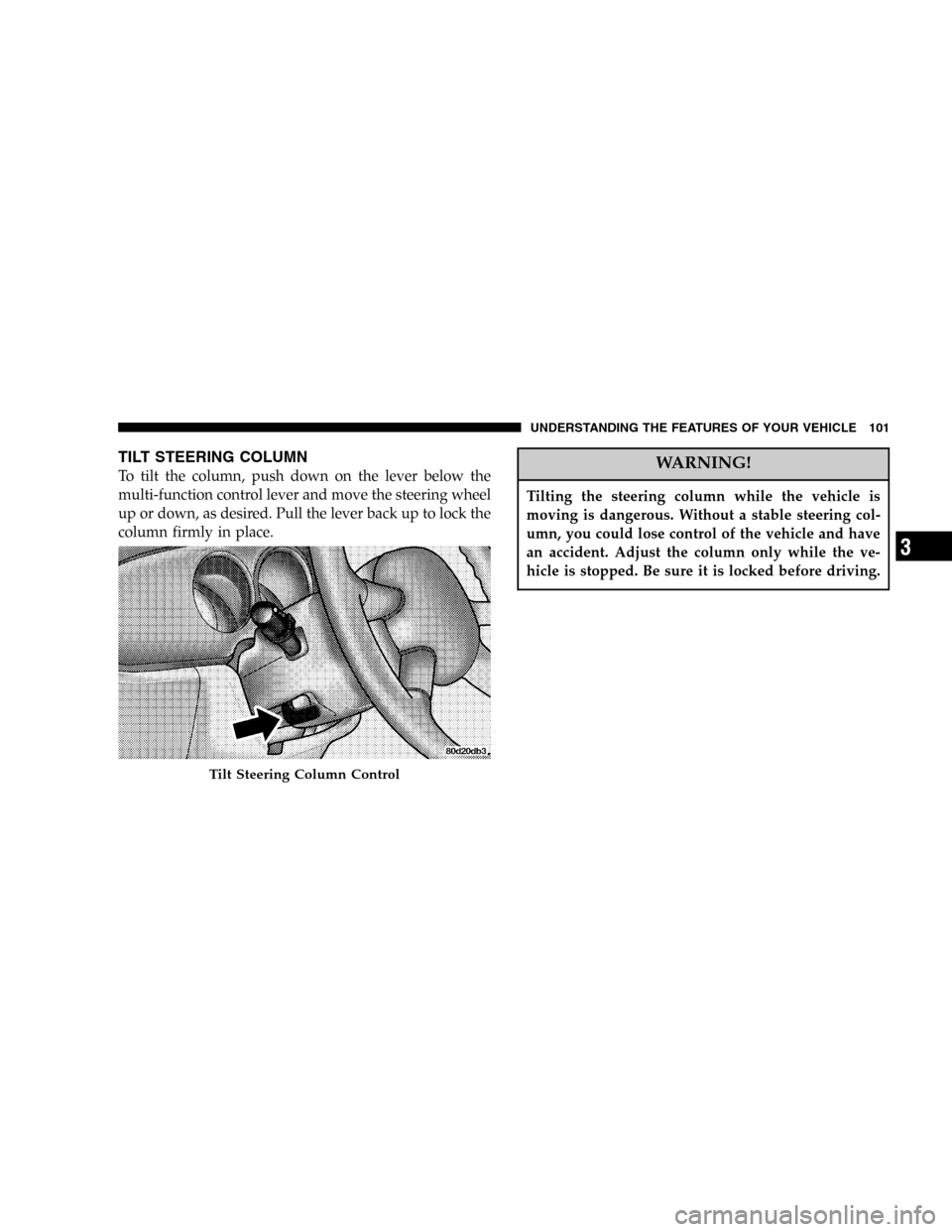
TILT STEERING COLUMN
To tilt the column, push down on the lever below the
multi-function control lever and move the steering wheel
up or down, as desired. Pull the lever back up to lock the
column firmly in place.WARNING!
Tilting the steering column while the vehicle is
moving is dangerous. Without a stable steering col-
umn, you could lose control of the vehicle and have
an accident. Adjust the column only while the ve-
hicle is stopped. Be sure it is locked before driving.
Tilt Steering Column Control
UNDERSTANDING THE FEATURES OF YOUR VEHICLE 101
3
Page 119 of 360
UNDERSTANDING YOUR INSTRUMENT PANEL
CONTENTS
�Instrument Panel Features.................123
�Instrument Cluster......................124
�Instrument Cluster—Turbo, With AutoStick....125
�Instrument Cluster—Turbo, Without AutoStick . . 126
�Instrument Cluster Descriptions............127
�Electronic Digital Clock..................134
▫Clock Setting Procedure.................134
�Radio General Information................135
▫Radio Broadcast Signals.................135▫Two Types Of Signals..................135
▫Electrical Disturbances..................135
▫AM Reception.......................135
▫FM Reception........................135
�Sales Code RAZ—AM/ FM Stereo Radio With
Cassette Tape Player, CD Player And CD Changer
Controls.............................136
▫Operating Instructions—Radio...........136
▫Power Switch, Volume Control............136
▫Seek Button (Radio Mode)...............1364
Page 120 of 360

▫Tuning.............................137
▫Radio Data System (RDS)...............137
▫PTY (Program Type) Button..............137
▫Balance............................139
▫Fade..............................139
▫Tone Control........................139
▫AM/FM Selection.....................139
▫Scan Button.........................139
▫To Set The Radio Push-Button Memory......140
▫To Change From Clock To Radio Mode......140
▫Operating Instructions—Tape Player.......140
▫Seek Button.........................140
▫Fast Forward (FF).....................141▫Rewind (RW)........................141
▫Tape Eject...........................141
▫Scan Button.........................141
▫Changing Tape Direction................141
▫Metal Tape Selection...................141
▫Pinch Roller Release...................142
▫Noise Reduction......................142
▫Operating Instructions—CD Player........142
▫Inserting The Compact Disc..............142
▫Seek Button.........................143
▫EJT CD (Eject) Button..................143
▫FF/Tune/RW........................144
▫Program Button 4 (Random Play)..........144
120 UNDERSTANDING YOUR INSTRUMENT PANEL
Page 129 of 360

9. Speedometer
Indicates vehicle speed.
10. High Beam Indicator
This light shows that the headlights are on high
beam. Pull the turn signal lever toward the steer-
ing wheel to switch the headlights from high or low
beam.
11. Tachometer
The white area of the scale shows the permissible engine
revolutions-per-minute (rpm x 1000) for each gear range.
Before reaching the red area, ease up on the accelerator to
prevent engine damage.
12. Anti-Lock Warning Light (ABS)—If Equipped
This light monitors the Anti-Lock Brake System
(ABS) described elsewhere in this manual. This
light will come on when the ignition key is
turned to the ON position and may stay on for
as long as four seconds.If the ABS light remains on or comes on during driving,
it indicates that the Anti-Lock portion of the brake system
is not functioning and that service is required, however,
the conventional brake system will continue to operate
normally provided that the BRAKE warning light is not
on.
If the ABS light is on, the brake system should be serviced
as soon as possible to restore the benefit of Anti-Lock
Brakes.
The warning light should be checked frequently to assure
that it is operating properly. Turn the ignition key to the
on position, but do not start the vehicle. The light should
come on. If the light does not come on, have the system
checked by an authorized dealer.
13. Seat Belt Reminder Light
When the ignition switch is first turned ON, this
light will come on for about six seconds. A chime
will sound if you have not pulled the shoulder belt
UNDERSTANDING YOUR INSTRUMENT PANEL 129
4
Page 130 of 360

out of the retractor. This is a reminder to“buckle up”.If
you do not buckle up, the light will remain on.
14. Brake System Warning Light
This light monitors various brake functions,
including brake fluid level and parking brake
application. If the brake light comes on, it may
indicate that the parking brake is applied, or
there is a low brake fluid level. On vehicles equipped
with Anti-lock brakes (ABS), it may also indicate an ABS
malfunction that could lead to reduced braking perfor-
mance.WARNING!
Driving a vehicle with the brake light on is danger-
ous. A significant decrease in braking performance
or vehicle stability during braking may occur. It will
take you longer to stop the vehicle or will make your
vehicle harder to control. You could have an acci-
dent. Have the vehicle checked immediately.
The operation of the Brake Warning light can be checked
by turning the ignition key from the OFF to the ON
position. The light should illuminate for three seconds, or
until the engine is started, whichever comes first. The
light should then go out unless the parking brake is
applied or a brake fault is detected. If the light does not
illuminate, have the light inspected and serviced as soon
as possible.
130 UNDERSTANDING YOUR INSTRUMENT PANEL