2005 CHRYSLER 300 steering
[x] Cancel search: steeringPage 115 of 374
CAUTION!
If the vehicle is towed with the front axle raised, the
engine must be shut off (key in the ignition switch to
the OFF/LOCK or ACC position). Otherwise the ESP
will immediately be engaged and will apply the rear
wheel brakes.
Synchronizing ESP
The malfunction indicator lamp for the ESP is
combined with the BAS on some models. If the
power supply was interrupted (battery discon-
nected or discharged), the ESP/BAS malfunc-
tion indicator light may be illuminated with the engine
running. Turn the steering wheel completely to the left
and then to the right. The ESP/BAS malfunction indica-
tor light should go out.
If the power supply was interrupted (battery
disconnected or discharged), the BAS malfunc-
tion indicator light may be illuminated with
the engine running. Turn the steering wheelcompletely to the left and then to the right. The BAS
malfunction indicator light should go out.
ELECTRONIC SPEED CONTROL
When engaged, this device takes over the accelerator
operation at speeds greater than 25 mph (40 km/h). The
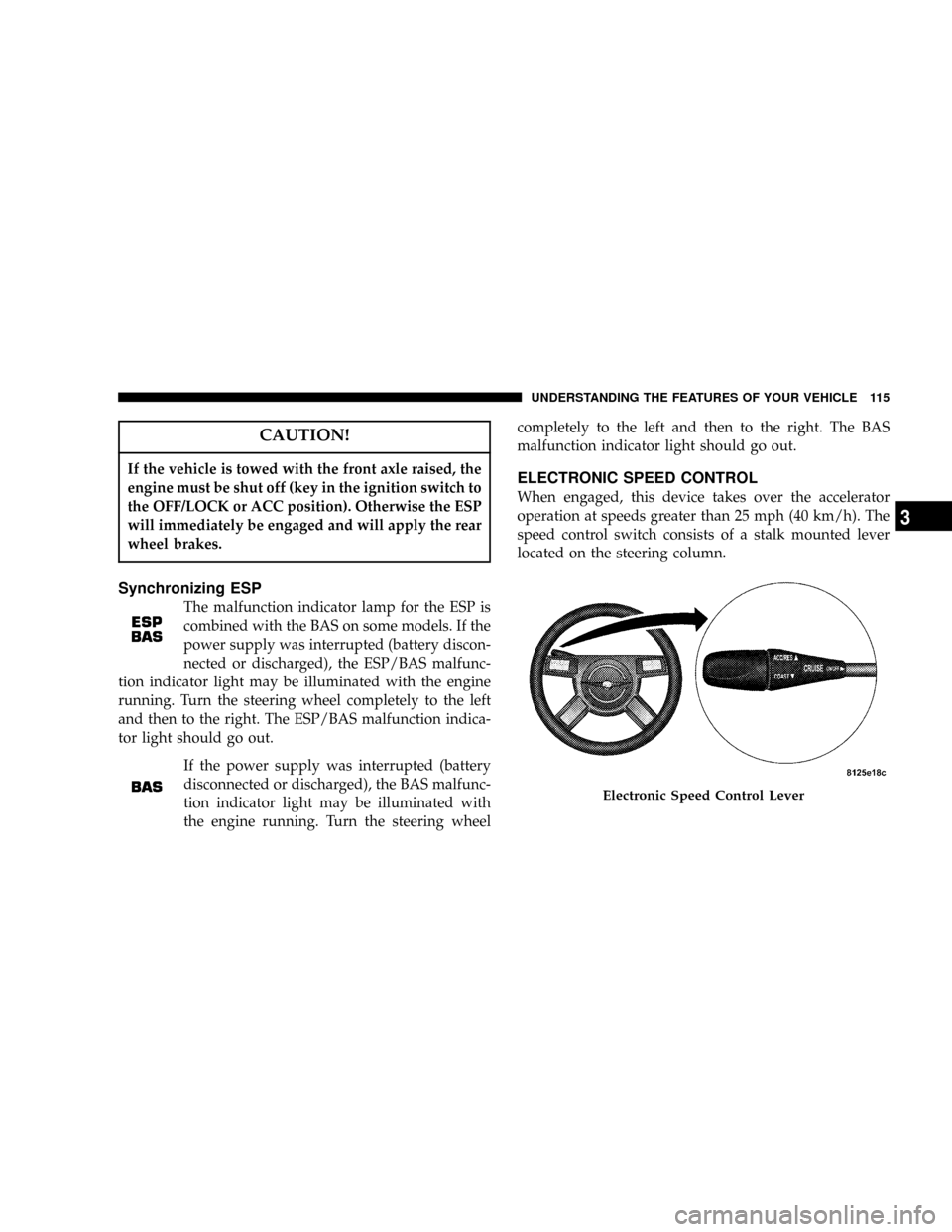
speed control switch consists of a stalk mounted lever
located on the steering column.
Electronic Speed Control Lever
UNDERSTANDING THE FEATURES OF YOUR VEHICLE 115
3
Page 140 of 374

INSTRUMENT CLUSTER DESCRIPTIONS
1. Oil Pressure Warning Light
This light shows low engine oil pressure. The
light should turn on momentarily when the
engine is started. If the light turns on while driving,
stop the vehicle and shut off the engine as soon as
possible. A continuous chime will sound when this
light turns on.
Do not operate the vehicle until the cause is corrected.
This light does not show how much oil is in the engine.
The engine oil level must be checked under the hood.
2. Low Fuel Indicator Light
The Low Fuel Light will turn on when there is
approximately 2 gallons (9 liters) of fuel remain-
ing in the tank. This light will remain on until
fuel is added.
3. Front Fog Light Indicator Ð If Equipped
This light shows the front fog lights are ON.4. Turn Signal Indicators
The arrow will flash with the exterior turn signal
when the turn signal lever is operated.
If the vehicle electronics sense that the vehicle has
traveled about one mile with the turn signals on, a chime
will sound to alert you to turn the signals off. If either
indicator flashes at a rapid rate, check for a defective
outside light bulb.
5. Speedometer
Indicates vehicle speed.
6. Electronic Vehicle Information Center Display
When the appropriate conditions exist, this display
shows the Electronic Vehicle Information Center (EVIC)
messages. Refer to Electronic Vehicle Information Center
for specific messages (only on vehicles equipped with
steering wheel mounted switches).
NOTE:On non-EVIC equipped vehicles the odometer
is located here.
140 UNDERSTANDING YOUR INSTRUMENT PANEL
Page 144 of 374
CAUTION!
Driving with a hot engine cooling system could
damage your vehicle. If temperature gauge reads (H),
pull over and stop the vehicle. Idle the vehicle with
the air conditioner turned off until the pointer drops
back into the normal range. If the pointer remains on
the ªHº, and you hear continuous chimes, turn the
engine off immediately, and call for service.
WARNING!
A hot engine cooling system is dangerous. You or
others could be badly burned by steam or boiling
coolant. You may want to call a service center if your
vehicle overheats. If you decide to look under the
hood yourself, see Section 7 of this manual. Follow
the warnings under the Cooling System Pressure
Cap paragraph.
15. Trip Odometer Button
Trip Odometer Button Ð Standard Cluster
The word9TRIP9will appear when this button is pressed.
Push in and hold the button for two seconds when the
trip odometer is displayed to reset it to 0 miles or
kilometers. A second press of the button will display the
outside temperature in the odometer.
Trip Odometer Button Ð Premium Cluster
Press this button to change the display from odometer to
either of the two trip odometer settings. The letter ªAº or
ªBº will appear when in the trip odometer mode. Push in
and hold the button for two seconds to reset the trip
odometer to 0 miles or kilometers. The odometer must be
in trip mode to reset.
16. High Beam Light
This light shows that the headlights are on high
beam. Push the Multi-Function lever away from
the steering wheel to switch the headlights to high
beam.
144 UNDERSTANDING YOUR INSTRUMENT PANEL
Page 147 of 374

ELECTRONIC VEHICLE INFORMATION CENTER
(EVIC)±If Equipped
The Electronic Vehicle Information Center (EVIC) fea-
tures a driver-interactive display. It is located in the
upper part of the cluster between the speedometer and
tachometer. Vehicles equipped with steering wheel
mounted switches (described in this section) will also be
equipped with the EVIC. This system conveniently al-
lows the driver to select a variety of useful information
by pressing the switches mounted on the steering wheel.
The EVIC consists of the following:
²System Status
²Vehicle information warning message displays
²Tire Pressure Monitor System Ð If Equipped
²Personal Settings (customer programmable features)
²Compass display
²Outside temperature display
²Trip computer functions
²UConnectŸ hands-free communication system dis-
plays Ð If Equipped
²Navigation system screens Ð If Equipped
²Audio mode display
Press and release the MENU button and the
mode displayed will change between Trip
Functions, Navigation (If Equipped), System
Status, Personal Settings, and Telephone (If
Equipped).
UNDERSTANDING YOUR INSTRUMENT PANEL 147
4
Page 154 of 374

The EVIC displays this symbol to indicate that
the U-Connect phone is currently not available.
Navigation Ð If Equipped
Navigation Display Control
Press and release the MENU button until Navigation is
displayed in the EVIC. When the Navigation System is
On, the steering wheel buttons can be used to select the
Map or Menu display on the Navigation Unit. When the
Menu display is active, the SCROLL buttons can be used
to scroll through the list, the FUNCTION SELECT button
can be used to select an item, and the AUDIO MODE
SELECT button can be used to return to the previous
menu. When the Map display is active, pressing the
FUNCTION SELECT button will change the Navigation
Unit Display to the Menu.
Turn By Turn Directions
If Turn by Turn Navigation is enabled through Personal
Settings, the Navigation System will provide turn by turn
directions to the programmed destination in the EVIC
display. The name of the approaching road is displayed
at the top of the screen, followed by an arrow to show the
direction of the turn and the remaining distance to the
turn counted down.
Personal Settings (Customer Programmable
Features)
This allows the driver to set and recall features when the
transmission is in PARK.
Press and release the MENU button until Personal Set-
tings is displayed in the EVIC.
Use the SCROLL buttons to display one of the following
choices:
Language
When in this display you may select one of five lan-
guages for all display nomenclature, including the trip
Phone
Not
Avail-
able
154 UNDERSTANDING YOUR INSTRUMENT PANEL
Page 190 of 374

REMOTE SOUND SYSTEM CONTROLS
The remote sound system controls are located on the
surface of the steering wheel at the 3 and 9 o'clock
positions.
Some models feature an Electronic Vehicle Information
Center (EVIC) with driver-interactive display. This is
located in the upper part of the instrument cluster
between the speedometer and tachometer. The audio
mode of the EVIC can display any one of twelve radio
station preset frequencies, CD disc number, CD tracknumber, tape, or one of 200 Satellite radio channels
depending on which radio is in the vehicle.
The VOLUME switch controls the volume of
the sound system. Pressing the top of the
rocker switch will increase the volume and
pressing the bottom of the rocker switch will
decrease the volume.
The AUDIO MODE SELECT button changes
the mode of the radio from AM to FM to Tape
to CD, or to Satellite (SAT) depending on
which radio is in the vehicle.
The FUNCTION SELECT button advances the
radio to the next preset, changes the tape side
being played, or changes the current disc when
used in audio mode.
The SCROLL buttons change selections such as
radio station, CD track, or satellite radio chan-
nel depending on the current mode.
190 UNDERSTANDING YOUR INSTRUMENT PANEL
Page 192 of 374

Two Types of Signals
There are two basic types of radio signals... AM or
Amplitude Modulation, in which the transmitted sound
causes the amplitude, or height, of the radio waves to
vary... and FM or Frequency Modulation, in which the
frequency of the wave is varied to carry the sound.
Electrical Disturbances
Radio waves may pick up electrical disturbances during
transmission. They mainly affect the wave amplitude,
and thus remain a part of the AM reception. They
interfere very little with the frequency variations that
carry the FM signal.
AM Reception
AM sound is based on wave amplitude, so AM reception
can be disrupted by such things as lightning, power lines
and neon signs.
FM Reception
Because FM transmission is based on frequency varia-
tions, interference that consists of amplitude variations
can be filtered out, leaving the reception relatively clear,
which is the major feature of FM radio.
NOTE:On vehicles so equipped the radio, steering
wheel radio controls and 6 disc CD/DVD changer if
equipped, will remain active for 10 minutes after the
ignition has been turned off, and the driver door has not
been opened. This feature is programmable through the
electronic vehicle information center (EVIC) Ð if
equipped. Refer to ªDelay Power Off to Accessories Until
Exitº under ªPersonal Settingsº in the Electronic Vehicle
Information Center section for details.
CASSETTE TAPE AND PLAYER MAINTENANCE
To keep the cassette tapes and player in good condition,
take the following precautions:
1. Do not use cassette tapes longer than C-90; otherwise,
sound quality and tape durability will be greatly dimin-
ished.
2. Keep the cassette tape in its case to protect from
slackness and dust when it is not in use.
3. Keep the cassette tape away from direct sunlight, heat
and magnetic fields such as the radio speakers.
192 UNDERSTANDING YOUR INSTRUMENT PANEL
Page 205 of 374

STARTING AND OPERATING
CONTENTS
mStarting Procedures....................207
NNormal Starting......................207
mEngine Block Heater Ð If Equipped........209
mTransmission Shifting...................209
N4 Speed Automatic Transmission..........209
N5 Speed Automatic Transmission..........214
NAutomatic Transmission Ð General
Information.........................219
mAutoStick Ð If Equipped................222
NAutoStick Operation...................222
mParking Brake.........................222
mBrake System.........................224NAnti-Lock Brake System................225
mPower Steering........................227
mTire Safety Information..................228
NTire Markings........................228
NTire Identification Number (TIN)..........231
NTire Loading And Tire Pressure...........232
mTiresÐGeneral Information...............236
NTire Pressure.........................236
NTire Inflation Pressures.................237
NRadial-Ply Tires......................239
NCompact Spare Tire Ð If Equipped.........239
NTire Spinning........................240
5