2005 CHEVROLET MALIBU oil change
[x] Cancel search: oil changePage 182 of 434
Information Mode (INFO Button)
Use the INFO button to scroll through the vehicle
information mode displays in the following order:
TRIP Odometer A
TRIP Odometer B
FUEL RANGE (Fuel Range Until Empty)
ECON (Average Fuel Economy)
AV SPEED (Average Vehicle Speed)
OIL LIFE (Engine Oil Life System)
TRIP A or TRIP B:Press the INFO button until
TRIP A or TRIP B is displayed. This shows the
current distance traveled since the last reset for
each trip odometer in either miles or kilometers.
Both odometers can be used at the same time.
Each trip odometer can be reset to zero separately
by pressing and holding the ENTER button for a
few seconds while the desired trip odometer is
displayed.
FUEL RANGE:Press the INFO button until FUEL
RANGE displays. This shows the remaining distance
you can drive without refueling. It is based on fuel
economy and the fuel remaining in the tank.The fuel economy data used to determine fuel range is
an average of recent driving conditions. As your driving
conditions change, this data is gradually updated. Fuel
range cannot be reset.
ECON (Economy):Press the INFO button until ECON
appears in the display. Average fuel economy is how
many miles per gallon or liters per 100 kilometers
your vehicle is getting based on current and past driving
conditions.
Press and hold the ENTER button while ECON is
displayed to reset the average fuel economy. Average
fuel economy will then be calculated starting from
that point. If the average fuel economy is not reset,
it will be continually updated each time you drive.
AV (Average) SPEED:Press the INFO button until AV
SPEED appears in the display. This is the vehicle’s
average speed in miles per hour or kilometers per hour.
Press and hold the ENTER button while AV SPEED
is displayed to reset the average vehicle speed.
OIL LIFE:Press the INFO button until OIL LIFE appears
in the display. The engine oil life system shows an
estimate of the oil’s remaining useful life. It will show
100% when the system is reset after an oil change. It will
alert you to change your oil on a schedule consistent with
your driving conditions.
3-52
Page 183 of 434
In addition to the engine oil life system monitoring the
oil life, additional maintenance is recommended in the
Maintenance Schedule in this manual. SeeEngine Oil
on page 5-15andScheduled Maintenance on page 6-4.
Always reset the engine oil life system after an oil
change. See “How to Reset the Engine Oil Life System”
underEngine Oil Life System on page 5-18.
Personalization
The following options can be accessed in order by
pressing the MENU button anytime while the vehicle
is in on. Press this button to scroll through each option.
All of the personalization options may not be available
on your vehicle. Only the options available will be
displayed on your DIC.
Oil Life Reset
Units Selection (English/Metric)
Remote Start Capability
Horn Chirp During Remote Keyless Entry Locking
Horn Chirp During Remote Keyless Entry Unlocking
Exterior Light Flash During Remote Keyless
Entry Locking or Unlocking
Delayed Locking
Automatic Vehicle Unlocking: Specic Doors
Automatic Vehicle Unlocking: When Key is Off or
When Shift To Park
Exterior Perimeter Lighting During Remote Keyless
Entry Unlock
Security System Passive or Remote Keyless Entry
Arming
Select Language: (English, French, Spanish or
German)
When the desired option is reached, use the ENTER
button to toggle between the modes of that option.
To make a selection, press the MENU button again.
If no selection is made within ten seconds, the display
will revert back to the previous information displayed.
The MENU mode is exited when the INFO button is
pressed, a ten second time period has elapsed, the
ignition is turned to off or the end of the MENU list is
reached.
The following display messages may appear on your
vehicle’s audio display by pressing the MENU button:
OIL LIFE RESET:When this option is displayed, you
can reset the engine oil life system. To reset the system
to 100%, press and hold the ENTER button for at least
one second. An ACKNOWLEDGED display message
will appear for three seconds or until the next button is
pressed. This will tell you the system has been reset.
SeeEngine Oil Life System on page 5-18for more
information.
3-53
Page 186 of 434
DIC Warnings and Messages
These messages will appear if there is a problem
detected in one of your vehicle’s systems.
Any message will clear when the vehicle’s condition is
no longer present. The warning message will come back
on the next time the vehicle is turned off and back on
if the condition is still present. With most messages,
a warning chime will sound when the message is
displayed. Your vehicle may have other warning
messages.
AUTO LIGHTS OFF:This message is displayed if the
automatic headlamp system is disabled with the
headlamp switch.
AUTO LIGHTS ON:This message is displayed if the
automatic headlamp system is enabled with the
headlamp switch.
BRAKE FLUID:This message will display if the ignition
is in ON to inform the driver that the brake uid level
is low. Have the brake system serviced by your
GM dealer as soon as possible.CHANGE OIL SOON:This message is displayed when
the life of the engine oil has expired and it should be
changed.
When you acknowledge the Change Engine Oil
message by clearing it from the display, you still must
reset the engine oil life system separately. See
Engine Oil Life System on page 5-18,Engine Oil on
page 5-15, andScheduled Maintenance on page 6-4for
more information.
CHECK GAS CAP:This message will appear if the gas
cap has not been fully tightened. You should recheck
your gas cap to make sure that it is on properly. A few
driving trips with the cap properly installed should
turn the display off.
DOOR AJAR:This message is displayed if one or
more of the vehicle’s doors are not closed properly.
When this message appears, you should make sure that
the door is closed completely.
ENGINE DISABLED:This message is displayed if the
starting of the engine is disabled. Have your vehicle
serviced by your GM dealer immediately.
3-56
Page 318 of 434
Notice:Use only engine oil identied as meeting
GM Standard GM6094M and showing the American
Petroleum Institute Certied For Gasoline Engines
starburst symbol. Failure to use the recommended
oil can result in engine damage not covered by
your warranty.
GM Goodwrench
®oil meets all the requirements for
your vehicle.
If you are in an area of extreme cold, where the
temperature falls below−20°F (−29°C), it is
recommended that you use either an SAE 5W-30
synthetic oil or an SAE 0W-30 oil. Both will provide
easier cold starting and better protection for your engine
at extremely low temperatures.
Engine Oil Additives
Do not add anything to your oil. The recommended oils
with the starburst symbol that meet GM Standard
GM6094M are all you will need for good performance
and engine protection.
Engine Oil Life System
When to Change Engine Oil
Your vehicle has a computer system that lets you know
when to change the engine oil and lter. This is
based on engine revolutions and engine temperature,
and not on mileage. Based on driving conditions,
the mileage at which an oil change will be indicated can
vary considerably. For the oil life system to work
properly, you must reset the system every time the oil is
changed.
When the system has calculated that oil life has been
diminished, it will indicate that an oil change is
necessary. A Change Oil Soon message will come on.
Change your oil as soon as possible within the next
600 miles (1 000 km). It is possible that, if you are
driving under the best conditions, the oil life system may
not indicate that an oil change is necessary for over a
year. However, your engine oil and lter must be
changed at least once a year and at this time the system
must be reset. Your dealer has GM-trained service
people who will perform this work using genuine GM
parts and reset the system. It is also important to check
your oil regularly and keep it at the proper level.
If the system is ever reset accidentally, you must change
your oil at 3,000 miles (5 000 km) since your last oil
change. Remember to reset the oil life system whenever
the oil is changed.
5-18
Page 319 of 434
How to Reset the Engine Oil Life
System
The Engine Oil Life System calculates when to change
your engine oil and lter based on vehicle use.
Anytime your oil is changed, reset the system so it can
calculate when the next oil change is required. If a
situation occurs where you change your oil prior to a
Change Oil Soon message being turned on, reset
the system.
After changing the engine oil, reset the system by
performing the following steps:
1. Display OIL LIFE RESET on the DIC.
2. Press and hold the ENTER button for at least
one second. An ACKNOWLEDGED display
message will appear for three seconds or until the
next button is pressed. This will tell you the
system has been reset.
3. Turn the key to OFF.
If the Change Oil Soon message comes back on when
you start your vehicle, the engine oil life system has
not reset. Repeat the procedure.
What to Do with Used Oil
Used engine oil contains certain elements that may be
unhealthy for your skin and could even cause cancer.
Do not let used oil stay on your skin for very long. Clean
your skin and nails with soap and water, or a good
hand cleaner. Wash or properly dispose of clothing or
rags containing used engine oil. See the manufacturer’s
warnings about the use and disposal of oil products.
Used oil can be a threat to the environment. If you
change your own oil, be sure to drain all the oil from the
lter before disposal. Never dispose of oil by putting it
in the trash, pouring it on the ground, into sewers, or into
streams or bodies of water. Instead, recycle it by
taking it to a place that collects used oil. If you have a
problem properly disposing of your used oil, ask
your dealer, a service station or a local recycling center
for help.
5-19
Page 320 of 434
Engine Air Cleaner/Filter
SeeEngine Compartment Overview on page 5-12for
the location of the engine air cleaner/lter.
When to Inspect the Engine Air
Cleaner/Filter
Inspect the air cleaner/lter at the MaintenanceII
intervals and replace it at the rst oil change after each
50,000 mile (83 000 km) interval. SeeScheduled
Maintenance on page 6-4for more information. If you
are driving in dusty/dirty conditions, inspect the lter
at each engine oil change.
How to Inspect the Engine Air
Cleaner/Filter
To inspect the air cleaner/lter, remove the lter from
the vehicle and lightly shake the lter to release
loose dust and dirt. If the lter remains caked with dirt, a
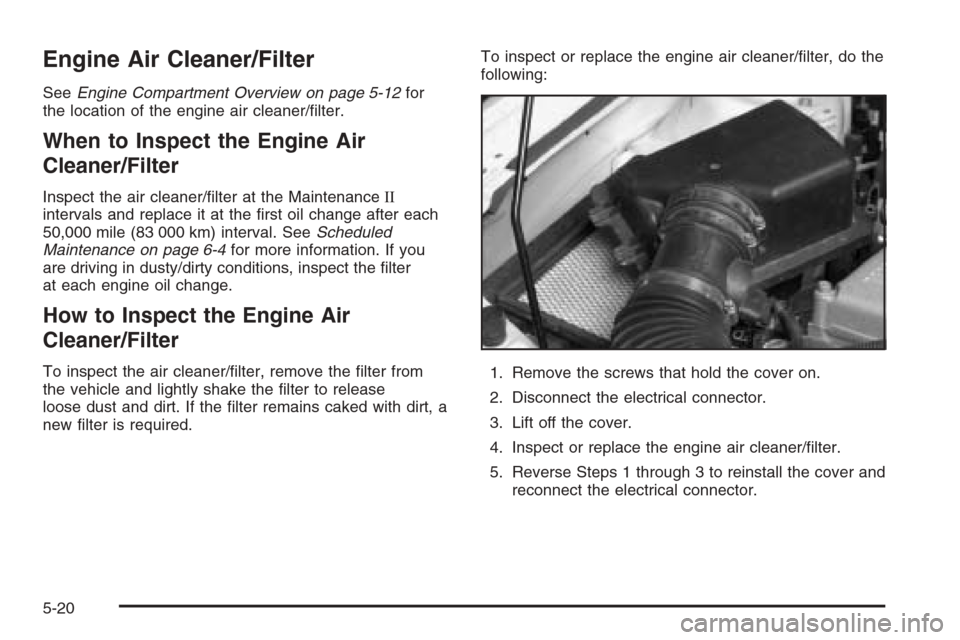
new lter is required.To inspect or replace the engine air cleaner/lter, do the
following:
1. Remove the screws that hold the cover on.
2. Disconnect the electrical connector.
3. Lift off the cover.
4. Inspect or replace the engine air cleaner/lter.
5. Reverse Steps 1 through 3 to reinstall the cover and
reconnect the electrical connector.
5-20
Page 374 of 434
They can all be hazardous — some more than
others — and they can all damage the vehicle, too.
Do not use any of these products unless this manual
says you can. In many uses, these will damage the
vehicle:
Alcohol
Laundry Soap
Bleach
Reducing Agents
Fabric/Carpet
Cleaning Fabric/Carpet
Use a vacuum cleaner often to get rid of dust and loose
dirt. Wipe vinyl, leather, plastic, and painted surfaces
with a clean, damp cloth.
Your GM dealer has cleaners for the cleaning of fabric
and carpet. They will clean normal spots and stains
very well.
If the vehicle has the Ultra Lux
®suede fabric, follow the
listed procedures except do not use any solvents or
dry cleaning products.Here are some cleaning tips:
Always read the instructions on the cleaner label.
Clean up stains as soon as you can — before
they set.
Carefully scrape off any excess stain.
Use a clean cloth or sponge, and change to a clean
area often. A soft brush may be used if stains are
stubborn.
To avoid forming a ring on fabric after spot cleaning,
clean the entire area immediately or it will set.
Most stains can be removed with club soda water. To
clean, use the following instructions:
1. For liquids: blot with a clean, soft white cloth.
For solids: remove as much as possible and
then vacuum or brush.
2. Apply club soda water to a clean, soft white cloth. Do
not over-saturate; the cloth should not drip water.
3. Clean the entire area. Avoid getting the fabric
too wet.
4. Start cleaning from the seams into the stain to
avoid a ring effect.
5. Continue cleaning, using a clean area of the cloth
each time it becomes soiled.
6. When the stain is removed, blot the cleaned area
with another dry clean, soft white cloth.
5-74
Page 394 of 434
Maintenance Schedule
Introduction
Important: Keep engine oil at the proper level and
change as recommended.
Have you purchased the GM Protection Plan? The Plan
supplements your new vehicle warranties. See your
Warranty and Owner Assistance booklet or your dealer
for details.
Maintenance Requirements
Notice:Maintenance intervals, checks, inspections,
replacement parts, and recommended uids and
lubricants as prescribed in this manual are
necessary to keep your vehicle in good working
condition. Any damage caused by failure to follow
scheduled maintenance may not be covered by
warranty.
Your Vehicle and the Environment
Proper vehicle maintenance not only helps to keep your
vehicle in good working condition, but also helps the
environment. All recommended maintenance is
important. Improper vehicle maintenance can even
affect the quality of the air we breathe. Improper uid
levels or the wrong tire ination can increase the level of
emissions from your vehicle. To help protect our
environment, and to keep your vehicle in good condition,
be sure to maintain your vehicle properly.
Using the Maintenance Schedule
We at General Motors want to help you keep your
vehicle in good working condition. But we do not know
exactly how you will drive it. You may drive very
short distances only a few times a week. Or you may
drive long distances all the time in very hot, dusty
weather. You may use your vehicle in making deliveries.
Or you may drive it to work, to do errands or in many
other ways.
Because of all the different ways people use their
vehicles, maintenance needs vary. You may need more
frequent checks and replacements. So please read
the following and note how you drive. If you have any
questions on how to keep your vehicle in good condition,
see your GM Goodwrench
®dealer.
6-2