2005 CHEVROLET MALIBU fuel
[x] Cancel search: fuelPage 1 of 434

Seats and Restraint Systems........................... 1-1
Front Seats
............................................... 1-2
Rear Seats
............................................... 1-8
Safety Belts
.............................................1-10
Child Restraints
.......................................1-33
Airbag System
.........................................1-60
Restraint System Check
............................1-75
Features and Controls..................................... 2-1
Keys
........................................................ 2-3
Doors and Locks
......................................2-11
Windows
.................................................2-16
Theft-Deterrent Systems
............................2-17
Starting and Operating Your Vehicle
...........2-21
Mirrors
....................................................2-33
OnStar
®System
......................................2-38
HomeLink®Wireless Control System
...........2-40
Storage Areas
.........................................2-44
Sunroof
..................................................2-47
Instrument Panel............................................. 3-1
Instrument Panel Overview
.......................... 3-4
Climate Controls
......................................3-21
Warning Lights, Gages, and Indicators
........3-30
Driver Information Center (DIC)
..................3-47
Audio System(s)
.......................................3-54Driving Your Vehicle....................................... 4-1
Your Driving, the Road, and Your Vehicle
..... 4-2
Towing
...................................................4-34
Service and Appearance Care.......................... 5-1
Service
..................................................... 5-3
Fuel
......................................................... 5-5
Checking Things Under the Hood
...............5-10
Bulb Replacement
....................................5-41
Windshield Wiper Blade Replacement
.........5-45
Tires
......................................................5-47
Appearance Care
.....................................5-73
Vehicle Identication
.................................5-82
Electrical System
......................................5-83
Capacities and Specications
.....................5-91
Maintenance Schedule..................................... 6-1
Maintenance Schedule
................................ 6-2
Customer Assistance and Information.............. 7-1
Customer Assistance and Information
........... 7-2
Reporting Safety Defects
...........................7-10
Index................................................................ 1
2005 Chevrolet Malibu Owner ManualM
Page 91 of 434
Remote Vehicle Start
Your vehicle may have a remote start feature. This
feature allows you to start the engine from outside the
vehicle. It may also start the vehicle’s heating or air
conditioning systems and rear window defogger. When
the remote start system is active and the vehicle has an
automatic climate control system, it may automatically
regulate the inside temperature. Normal operation of the
system will return after the key is turned to ON.
Laws in some communities may restrict the use of
remote starters. For example, some laws may require a
person using remote start to have the vehicle in view
when doing so. Check local regulations for any
requirements on remote starting of vehicles.
Do not use the remote start feature if your vehicle is low
on fuel. Your vehicle may run out of fuel.
The remote start feature provides two separate starts,
each with 10 minutes of engine running time.
The remote vehicle start feature needs to be reset after
your vehicle’s engine is started two times using the
transmitter’s remote start button. The remote start
system is reset by inserting the vehicle’s key into the
ignition switch and turning it to ON. SeeIgnition
Positions on page 2-22for information regarding the
ignition positions on your vehicle.
You can start your vehicle’s engine from approximately
197 feet (60 m) away. However, the range may beless while the vehicle is running, and as a result you
may need to be closer to your vehicle to turn it off than
you were to turn it on.
There are other conditions which may affect the
performance of the transmitter, seeRemote Keyless
Entry System on page 2-4.
/(Remote Start):If your vehicle has the remote start
feature, the keyless entry transmitter will have a
button with this symbol on it.
To start the vehicle using the remote start feature, do
the following:
1. Aim the transmitter at the vehicle.
2. Press and release the transmitter’s lock button,
then immediately press and hold the transmitter’s
remote start button until the vehicle’s turn signal
lights ash.
3. When the vehicle starts, the parking lamps will turn
on and remain on while the engine is running.
The engine will shut off automatically after
10 minutes, unless a time extension has been
done, or the vehicle’s key is inserted into the ignition
switch and turned to ON.
If you enter the vehicle after a remote start, and the
engine is still running, insert the key into the
ignition switch and turn it to ON to drive the vehicle.
2-9
Page 102 of 434
PASS-Key®III+ Operation
Your vehicle is equipped with PASS-Key®III+
(Personalized Automotive Security System)
theft-deterrent system. PASS-Key
®III+ is a passive
theft-deterrent system. This means you don’t have to do
anything special to arm or disarm the system. It works
when you insert or remove the key from the ignition.
When the PASS-Key
®III+ system senses that someone
is using the wrong key, it shuts down the vehicle’s
starter and fuel systems. The starter will not work and
fuel will stop owing to the engine. Anyone using a
trial-and-error method to start the vehicle will be
discouraged because of the high number of electrical
key codes.
When trying to start the vehicle if the engine does not
start and the security light comes on, the key may have a
damaged transponder. Turn the ignition off and try again.
If the engine still does not start, and the key appears to
be undamaged, try another ignition key. At this time,
you may also want to check the fuse, seeFuses
on page 5-83. If the engine still does not start with the
other key, your vehicle needs service. If your vehicle
does start, the rst key may be faulty.See your dealer who can service the PASS-Key
®III+ to
have a new key made. In an emergency, contact
Chevrolet Roadside Assistance. SeeRoadside
Assistance Program on page 7-6for more information.
It is possible for the PASS-Key
®III+ decoder to
“learn” the transponder value of a new or replacement
key. Up to 10 additional keys may be programmed
for the vehicle. The following procedure is for
programming additional keys only. If all the currently
programmed keys are lost or do not operate, you must
see your dealer or a locksmith who can service
PASS-Key
®III+ to have keys made and programmed to
the system.
See your GM dealer or a locksmith who can service
PASS-Key
®III+ to get a new key blank that is cut
exactly as the ignition key that operates the system.
To program the new key do the following:
1. Verify that the new key has “+” stamped on it.
2. Insert the already programmed key in the ignition
and start the engine. If the engine will not start,
see your dealer for service.
3. After the engine has started, turn the key to off, and
remove the key.
2-20
Page 106 of 434
Adjustable Throttle and Brake Pedal
If your vehicle has this feature, you can change the
position of the throttle and brake pedals. This feature is
designed for shorter drivers, since the pedals cannot
move farther away from the standard position, but can
move rearward for better pedal reach.
The vehicle must be in PARK (P) or have the ignition off
for this feature to operate. If the system senses unusually
high resistance while the pedals are being adjusted, such
as a driver’s foot pushing the brake pedal, it is designed
to disable the switch. Simply remove the obstruction and
try to adjust the pedals again.
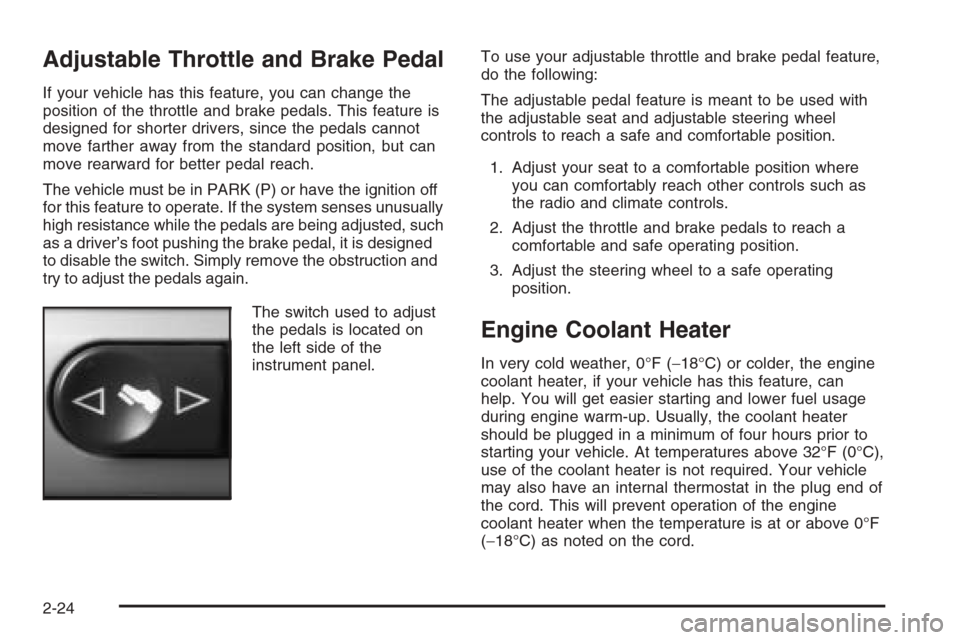
The switch used to adjust
the pedals is located on
the left side of the
instrument panel.To use your adjustable throttle and brake pedal feature,
do the following:
The adjustable pedal feature is meant to be used with
the adjustable seat and adjustable steering wheel
controls to reach a safe and comfortable position.
1. Adjust your seat to a comfortable position where
you can comfortably reach other controls such as
the radio and climate controls.
2. Adjust the throttle and brake pedals to reach a
comfortable and safe operating position.
3. Adjust the steering wheel to a safe operating
position.
Engine Coolant Heater
In very cold weather, 0°F (−18°C) or colder, the engine
coolant heater, if your vehicle has this feature, can
help. You will get easier starting and lower fuel usage
during engine warm-up. Usually, the coolant heater
should be plugged in a minimum of four hours prior to
starting your vehicle. At temperatures above 32°F (0°C),
use of the coolant heater is not required. Your vehicle
may also have an internal thermostat in the plug end of
the cord. This will prevent operation of the engine
coolant heater when the temperature is at or above 0°F
(−18°C) as noted on the cord.
2-24
Page 110 of 434
DRIVE (D):This position is for normal driving. If you
need more power for passing, and you are:
Going less than 35 mph (56 km/h), push your
accelerator pedal about halfway down.
Going about 35 mph (56 km/h) or more, push the
accelerator all the way down.
Shifting down to the next gear provides more engine
braking but lower fuel economy.
Notice:If your vehicle seems to start up rather
slowly or not shift gears when you go faster, and
you continue to drive your vehicle that way, you
could damage the transaxle. Have your vehicle
serviced right away. You can drive in LOW (L2) when
you are driving less than 35 mph (56 km/h) and
DRIVE (D) for higher speeds until then.
LOW (L):This position gives you access to FOURTH,
THIRD, SECOND and FIRST gears. This provides
more engine braking but lower fuel economy than
DRIVE (D). You can use it on very steep hills, or in deep
snow or mud. If the electronic range select is put in
LOW (L), the transaxle will not shift into lower gears until
the vehicle is going slow enough.
Electronic Range Select Mode
This feature allows you to select lower driving gears
when the shift lever is in LOW (L). The button for
this mode is located on the left side of the shift
lever knob.
When the shift lever is rst moved into the LOW (L)
position, the display in the instrument panel shows L3.
Press the (−) end of the button on the shift lever
once for L2 and once more for L1. Press the (+) end of
the button once each to return to L2, L3 and L4. The
shift lever must be moved back to DRIVE (D) to turn off
the electronic range select mode.
2-28
Page 132 of 434
Oil Pressure Light.........................................3-44
Security Light...............................................3-44
Cruise Control Light......................................3-45
Highbeam On Light.......................................3-45
Service Vehicle Soon Light............................3-45
Fuel Gage...................................................3-46
Driver Information Center (DIC).......................3-47
DIC Operation and Displays...........................3-47
DIC Warnings and Messages.........................3-52
Audio System(s).............................................3-54
Setting the Time for Radios without Radio
Data Systems (RDS)..................................3-54
Setting the Time for Radios with Radio Data
Systems (RDS).........................................3-55
Radio with CD (Base Level)...........................3-55
Radio with CD (Up Level)..............................3-60Radio with Cassette and CD..........................3-71
Radio with Six-Disc CD.................................3-84
Rear Seat Entertainment System....................3-99
Rear Seat Audio (RSA) (Without Rear
Seat Entertainment).................................3-115
Rear Seat Audio (RSA) (With Entertainment
System)..................................................3-117
Theft-Deterrent Feature................................3-118
Audio Steering Wheel Controls......................3-119
Radio Reception.........................................3-120
Care of the Cassette Tape Player.................3-120
Care of Your CDs and DVDs........................3-121
Care of the CD and DVD Player...................3-121
Fixed Mast Antenna (MAXX Only).................3-122
Backglass Antenna (Sedan Only)..................3-122
XM™ Satellite Radio Antenna System............3-122
Section 3 Instrument Panel
3-2
Page 163 of 434
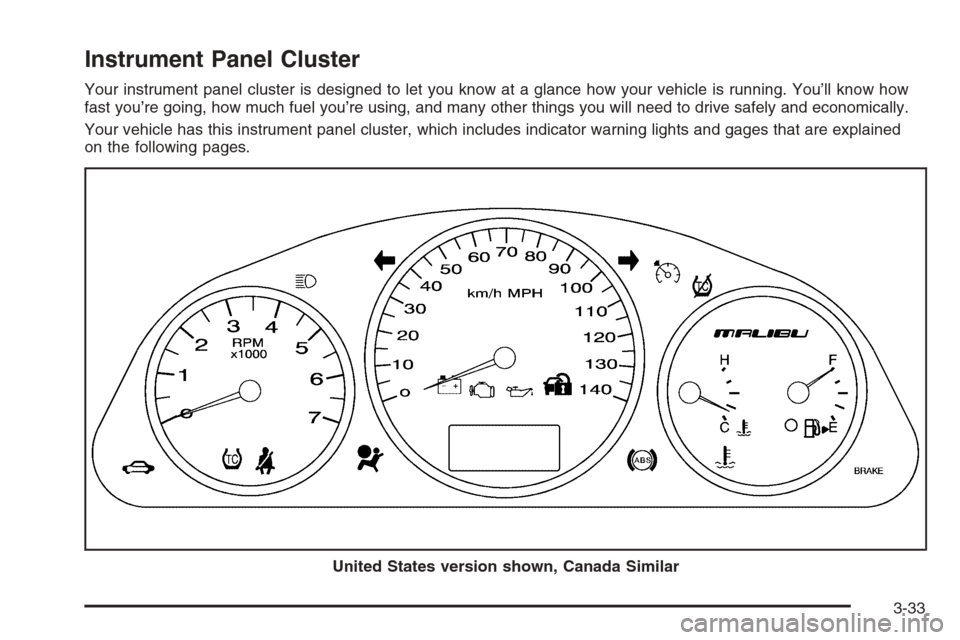
Instrument Panel Cluster
Your instrument panel cluster is designed to let you know at a glance how your vehicle is running. You’ll know how
fast you’re going, how much fuel you’re using, and many other things you will need to drive safely and economically.
Your vehicle has this instrument panel cluster, which includes indicator warning lights and gages that are explained
on the following pages.
United States version shown, Canada Similar
3-33
Page 175 of 434

Malfunction Indicator Lamp
Check Engine Light
Your vehicle is equipped
with a computer which
monitors operation of the
fuel, ignition, and emission
control systems.
This system is called OBD II (On-Board
Diagnostics-Second Generation) and is intended to
assure that emissions are at acceptable levels for the
life of the vehicle, helping to produce a cleaner
environment. The check engine light comes on to
indicate that there is a problem and service is required.
Malfunctions often will be indicated by the system
before any problem is apparent. This may prevent more
serious damage to your vehicle. This system is also
designed to assist your service technician in correctly
diagnosing any malfunction.
Notice:If you keep driving your vehicle with this
light on, after awhile, your emission controls may not
work as well, your fuel economy may not be as good,
and your engine may not run as smoothly. This could
lead to costly repairs that may not be covered by
your warranty.Notice:Modications made to the engine,
transaxle, exhaust, intake, or fuel system of your
vehicle or the replacement of the original tires with
other than those of the same Tire Performance
Criteria (TPC) can affect your vehicle’s emission
controls and may cause this light to come on.
Modications to these systems could lead to costly
repairs not covered by your warranty. This may
also result in a failure to pass a required Emission
Inspection/Maintenance test.
This light should come on, as a check to show you
it is working, when the ignition is on and the engine
is not running. If the light does not come on, have
it repaired. This light will also come on during a
malfunction in one of two ways:
Light Flashing— A misre condition has been
detected. A misre increases vehicle emissions
and may damage the emission control system
on your vehicle. Diagnosis and service may
be required.
Light On Steady— An emission control system
malfunction has been detected on your vehicle.
Diagnosis and service may be required.
3-45