2005 CHEVROLET MALIBU stop start
[x] Cancel search: stop startPage 193 of 434
If an error appears on the display, see “CD Messages”
later in this section.
1
s(Reverse):Press and hold this pushbutton to
reverse quickly within a track. You will hear sound at a
reduced volume. Release this pushbutton to play the
passage. The elapsed time of the track will appear
on the display.
2
\(Fast Forward):Press and hold this pushbutton
to advance quickly within a track. You will hear sound
at a reduced volume. Release this pushbutton to
play the passage. The elapsed time of the track will
appear on the display.
3 RPT (Repeat):Press this pushbutton once to hear a
track over again. REPEAT ON and RPT will appear
on the display. The current track will continue to repeat.
Press RPT again to turn off repeat play. REPEAT
OFF will appear on the display and RPT will disappear
from the display.
4 RDM (Random):Press this pushbutton to hear the
tracks in random, rather than sequential, order. T#,
RANDOM, and RDM will appear on the display. Press
RDM again to turn off random play. RANDOM OFF
will appear on the display and RDM will disappear from
the display.
SEEK
w:Press this button to go to the next track.
The track number will appear on the display.If this button is pressed more than once, the player will
continue moving forward through the CD.
If this button is held for more than two seconds, the CD
will enter CD scan mode and the CD will play the
rst 10 seconds of each track. Press this button again to
stop scanning.
SEEK
x:Press this button to go to the start of the
current track if more than eight seconds have played.
The track number will appear on the display. If this
button is pressed more than once, the player will
continue moving backward through the CD.
If this button is held for more than two seconds, the CD
will enter CD scan mode and the CD will play the
rst 10 seconds of each track. Press this button again to
stop scanning.
DISP (Display):Press this knob to see the current
track number, time, and temperature or the track
number, the elapsed time of the track, and the
temperature.
To change the default on the display, press this knob
until you see the display you want, then hold the
knob for two seconds. You will hear a beep and the
selected display will now be the default.
AM/FM/CD:Press this button when listening to the
radio to play a CD.
3-63
Page 203 of 434
Playing a CD
Insert a CD partway into the slot, label side up. The
player will pull it in and the CD should begin playing. If
you want to insert a CD with the ignition off, rst
press the eject button or the DISP knob.
As each new track starts to play, the track number will
appear on the display.
If the ignition or radio is turned off with a CD in the
player, it will stay in the player. When the ignition
or radio is turned on, the CD will start playing, where it
stopped, if it was the last selected audio source.
The CD player can play the smaller 3 inch (8 cm) single
CDs with an adapter ring. Full-size CDs and the
smaller CDs are loaded in the same manner.
If playing a CD-R the sound quality may be reduced
due to CD-R quality, the method of recording, the quality
of the music that has been recorded, and the way the
CD-R has been handled. There may be an increase
in skipping, difficulty in nding tracks, and/or difficulty in
loading and ejecting. If these problems occur try a
known good CD.
Do not add paper labels to CDs, they could get caught
in the CD player.Notice:If you add any label to a CD, insert more
than one CD into the slot at a time, or attempt
to play scratched or damaged CDs, you could
damage the CD player. When using the CD player,
use only CDs in good condition without any
label, load one CD at a time, and keep the CD player
and the loading slot free of foreign materials,
liquids, and debris.
If an error appears on the display, see “CD Messages”
later in this section.
s(Reverse):Press and hold this pushbutton to
reverse quickly within a track. You will hear sound at a
reduced volume. Release the button to play the
passage. The elapsed time of the track will appear on
the display.
\(Fast Forward):Press and hold this pushbutton to
advance quickly within a track. You will hear sound at
a reduced volume. Release the button to play the
passage. The elapsed time of the track will appear on
the display.
RPT (Repeat):Press this button once to hear a track
over again. REPEAT ON and RPT will appear on
the display. The current track will continue to repeat.
Press RPT again to turn off repeat play. REPEAT OFF
will appear on the display and RPT will disappear
from the display.
3-73
Page 204 of 434
RDM (Random):Press this button to hear the tracks in
random, rather than sequential, order. T#, RANDOM,
and RDM will appear on the display. T and the
track number will appear on the display when each
track starts to play. Press RDM again to turn off random
play. RANDOM OFF will appear on the display and
RDM will disappear from the display.
xSEEKw:Press the down arrow to go to the start of
the current track if more than eight seconds have played.
If this arrow is pressed more than once, the player will
continue moving backward through the CD.
Press the up arrow to go to the start of the next track. If
this arrow is pressed more than once, the player will
continue moving forward through the CD.
If either arrow is held or pressed for more than
two seconds, the CD will enter CD scan mode and the
CD will play the rst 10 seconds of each track. Press
either arrow again to stop scanning.DISP (Display):Press this knob to see how long the
current track has been playing. T, the track number, and
the elapsed time of the track will appear on the
display. To change the default on the display, time or
elapsed time, press the knob until you see the display
you want, then hold the knob for two seconds. The radio
will produce one beep and the selected display will
now be the default. Pressing this button will also display
text on commercially recorded CDs (if available).
AUTO TONE/AUTO EQ (Automatic Equalization):
Press this button to select the desired equalization
setting while playing a CD. The equalization will
be automatically recalled whenever a CD is played.
For more information, see AUTO TONE/AUTO EQ listed
previously in this section.
BAND:Press this button to listen to the radio when a
CD is playing. The inactive CD will remain safely
inside the radio for future listening.
SRCE (Source):Press this button to play a CD or to
access a remote device (if installed) when listening
to the radio.
EJECT /
Z(Eject):Press this button to eject a CD.
Eject may be activated with either the ignition or
radio off. CDs may be loaded with the ignition and radio
off if this button is pressed rst.
3-74
Page 216 of 434
CD Adapter Kits
It is possible to use a portable CD player with your
cassette tape player after disabling the tight/loose tape
sensing feature on the tape player.
To disable the feature, use the following steps:
1. Turn the ignition on.
2. Turn the radio off.
3. Press and hold the SRCE button. READY will
appear on the display and ash the cassette
symbol.
4. Insert the adapter into the cassette slot. It will
power up the radio and begin playing.
The override feature will remain active until the eject
button is pressed.
Playing a CD
Insert a CD partway into the slot, label side up. The
player will pull it in and the CD should begin playing.
If you want to insert a CD with the ignition off, rst press
the eject button or the DISP knob.
If the ignition or radio is turned off with the CD in the
player, it will stay in the player. When the ignition
or radio is turned on, the CD will start playing where it
stopped, if it was the last selected audio source.When a CD is inserted, the CD symbol will appear on
the display. As each new track starts to play, the
track number will appear on the display.
The CD player can play the smaller 3 inch (8 cm) single
CDs with an adapter ring. Full-size CDs and the
smaller CDs are loaded in the same manner.
If playing a CD-R the sound quality may be reduced
due to CD-R quality, the method of recording, the quality
of the music that has been recorded, and the way the
CD-R has been handled. There may be an increase
in skipping, difficulty in nding tracks, and/or difficulty in
loading and ejecting. If these problems occur try a
known good CD.
Do not add paper labels to CDs, they could get caught
in the CD player.
If an error appears on the display, see “CD Messages”
later in this section.s(Reverse):Press and hold this pushbutton to
reverse quickly within a track. You will hear sound at a
reduced volume. Release this button to play the passage.
The elapsed time of the track will appear on the display.
\(Fast Forward):Press and hold this pushbutton to
advance quickly within a track. You will hear sound
at a reduced volume. Release this button to play
the passage. The elapsed time of the track will appear
on the display.
3-86
Page 217 of 434
RPT (Repeat):Press this button once to hear a track
over again. REPEAT ON and RPT will appear on
the display. The current track will continue to repeat.
Press RPT again to turn off repeat play. REPEAT OFF
will appear on the display and RPT will disappear
from the display.
RDM (Random):Press this button to hear the tracks in
random, rather than sequential, order. T#, RANDOM,
and RDM will appear on the display. T and the
track number will appear on the display when each
track starts to play. Press RDM again to turn off random
play. RANDOM OFF will appear on the display and
RDM will disappear from the display.
xSEEKw:Press the down arrow to go to the start
of the current track if it has been playing for more
than eight seconds. If this arrow is pressed more than
once, the player will continue moving backward
through the CD.
Press the up arrow to go to the start of the next track.
If this arrow is pressed more than once, the player
will continue moving forward through the CD.
If either arrow is held for more than two seconds, the
CD will enter CD scan mode and the CD will play
the rst 10 seconds of each track. Press either arrow
again to stop scanning.DISP (Display):Press this knob to see how long the
current track has been playing. T, the track number, and
the elapsed time of the track will appear on the
display. To change the default on the display, time or
elapsed time, press the knob until you see the display
you want, then hold the knob for two seconds. The radio
will produce one beep and the selected display will
now be the default. Pressing this button will also display
text on commercially recorded CDs (if available).
AUTO TONE/AUTO EQ (Automatic Equalization):
Press this button to select the desired equalization
setting while playing a CD. The equalization will
be recalled whenever a CD is played. For more
information, see AUTO TONE/AUTO EQ listed
previously in this section.
BAND:Press this button to listen to the radio when a
cassette tape or CD is playing. The inactive tape or CD
will remain safely inside the radio for future listening.
SRCE (Source):Press this button to play a tape, CD,
or a remote device (if installed) when listening to the
radio. The inactive tape or CD will remain safely inside
the radio for future listening.
EJECT /
Z(Eject):Press this button, located to the
left of the CD slot, to eject a CD. Eject may be
activated with either the ignition or radio off. CDs may
be loaded with the ignition and radio off if this button
is pressed rst.
3-87
Page 227 of 434
Playing a CD
If the ignition or radio is turned off, with a CD in the
player, it will stay in the player. When the ignition
or radio is turned on, the CD will start playing where it
stopped, if it was the last selected audio source.
When a CD is inserted, the CD symbol will appear on
the CD. As each new track starts to play, the track
number will appear on the display.
The CD player can play the smaller 3 inch (8 cm) single
CDs with an adapter ring. Full-size CDs and the
smaller CDs are loaded in the same manner.
If playing a CD-R the sound quality may be reduced
due to CD-R quality, the method of recording, the quality
of the music that has been recorded, and the way the
CD-R has been handled. There may be an increase
in skipping, difficulty in nding tracks, and/or difficulty in
loading and ejecting. If these problems occur try a
known good CD.
Do not add paper labels to CDs, they could get caught
in the CD player.Notice:If you add any label to a CD, insert more
than one CD into the slot at a time, or attempt
to play scratched or damaged CDs, you could
damage the CD player. When using the CD player,
use only CDs in good condition without any
label, load one CD at a time, and keep the CD player
and the loading slot free of foreign materials,
liquids, and debris.
If an error appears on the display, see “CD Messages”
later in this section.
LOAD:Press the LOAD button to load CDs into the CD
player. This CD player will hold up to six CDs.
To insert one CD, do the following:
1. Turn the ignition on.
2. Press and release the LOAD button.
3. Wait for INSERT CD to ash on the display.
4. Load a CD. Insert the CD partway into the slot,
label side up. The player will pull the CD in.
3-97
Page 230 of 434
RDM (Random):With random, you can listen to the
tracks in random, rather than sequential, order, on
one CD or on all of the CDs.
To use random, do one of the following:
To play the tracks on the CD you are listening to in
random order, press the RDM button. RANDOM
TRACKS and RDM will appear on the display. Press
RDM again to turn off random play. RANDOM
OFF will appear on the display and RDM will
disappear from the display.
To play the tracks on all of the CDs that are loaded,
in random order, press and hold the RDM button for
more than two seconds. You will hear a beep,
RANDOM ALL CDS, and RDM will appear on the
display. Press RDM again to turn off random
play. RANDOM OFF will appear on the display and
RDM will disappear from the display.
xSEEKw:Press the down arrow to go to the start
of the current track, if more than eight seconds have
played. Press the up arrow to go to the beginning of the
next track. If either arrow is held or pressed more
than once, the player will continue moving backward or
forward through the CD.
To scan the current CD, press and hold either SEEK
arrow for more than two seconds. The CD will go to the
next track, play the rst 10 seconds, then go on to
the next track. Press either SEEK arrow again to stop
scanning.To scan all of the CDs loaded, press and hold either
SEEK arrow for more than four seconds. The CD will go
to the next CD, play the rst 10 seconds of the rst
track, then go on to the next CD. Press either SEEK
arrow again to stop scanning.
DISP (Display):Press this knob to switch between
time, temperature, and the elapsed time of the track. To
change the default on the display (CD#/Track#/Time,
CD#/Track#/Temperature, or Track#/Elapsed
Time/Temperature), press the knob until you see the
display you want, then hold the knob for two seconds.
The radio will produce one beep and the selected
display will now be the default.
AUTO TONE/AUTO EQ (Automatic Equalization):
Press this button to select the desired equalization
setting while playing a CD. The equalization will be set
whenever a CD is played. For more information, see
“AUTO TONE” or “AUTO EQ” listed previously in
this section.
BAND:Press this button to listen to the radio when a
CD is playing. The inactive CD(s) will remain safely
inside the radio for future listening.
SRCE (Source):Press this button to play a CD or to
access the remote device, when listening to the radio.
3-100
Page 237 of 434
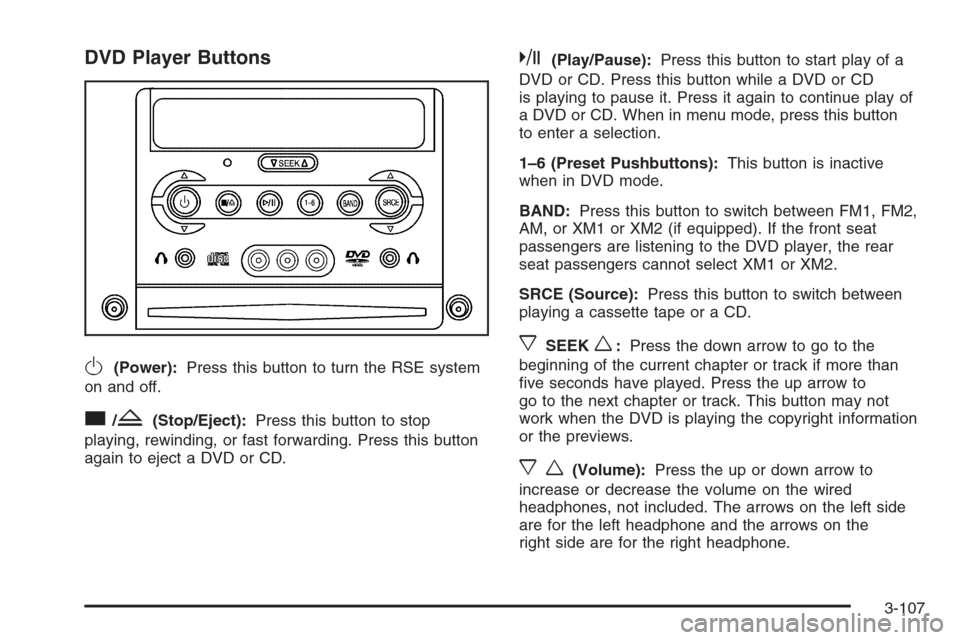
DVD Player Buttons
O(Power):Press this button to turn the RSE system
on and off.
c/Z(Stop/Eject):Press this button to stop
playing, rewinding, or fast forwarding. Press this button
again to eject a DVD or CD.
k(Play/Pause):Press this button to start play of a
DVD or CD. Press this button while a DVD or CD
is playing to pause it. Press it again to continue play of
a DVD or CD. When in menu mode, press this button
to enter a selection.
1–6 (Preset Pushbuttons):This button is inactive
when in DVD mode.
BAND:Press this button to switch between FM1, FM2,
AM, or XM1 or XM2 (if equipped). If the front seat
passengers are listening to the DVD player, the rear
seat passengers cannot select XM1 or XM2.
SRCE (Source):Press this button to switch between
playing a cassette tape or a CD.
xSEEKw:Press the down arrow to go to the
beginning of the current chapter or track if more than
ve seconds have played. Press the up arrow to
go to the next chapter or track. This button may not
work when the DVD is playing the copyright information
or the previews.
xw(Volume):Press the up or down arrow to
increase or decrease the volume on the wired
headphones, not included. The arrows on the left side
are for the left headphone and the arrows on the
right side are for the right headphone.
3-107